
SysKey - Create USB Key to Lock or Unlock Windows

How to Create a USB Startup Key to Lock or Unlock Windows

   Information
SysKey (SAM Lock Tool) is an in-built Windows utility that can help you secure the Security Accounts Management or SAM database. The SAM Database stores hashed copies of your user passwords, which is encrypted with a locally stored system startup key by default.

You can use SysKey to store the startup key locally in Windows or on a USB flash drive. Having the startup key stored on a USB flash drive instead will give you better security since the USB flash drive must be connected at startup to be able to login and gain access to Windows.

This tutorial will show you how to use SysKey to be able to create a USB flash key "Startup Key Disk" to lock or unlock Vista, Windows 7, or Windows 8 with.

You must be logged in as an administrator to be able to do the steps in this tutorial.


   Note
If you Lock Windows with OPTION ONE:
  • The startup key placed on the USB flash drive is only good to gain access to logon to the specific Windows that it was created in.
  • This will only lock the Windows computer at boot from a cold startup after a restart or shut down. It will not lock Windows after a log off, lock, or switch user.
  • Once Windows has started after logging in, you will no longer need to have the USB flash drive connected. It is only required to be connected at system startup at boot.
  • You will still be able to continue to use the USB flash drive as normal. Just do not ever delete the StartKey.Key file on it, or you will not be able to unlock Windows with it anymore.
  • It is recommended to create a USB flash drive per user that you wish to be able to log in from startup.
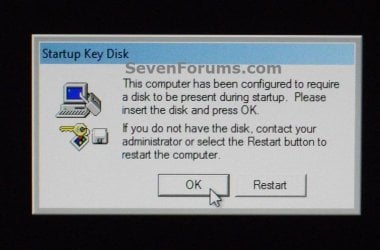
EXAMPLE: Windows Startup
NOTE: This is an example of what you will see at Windows startup after using OPTION ONE. Windows will not startup until you connect the USB startup key.
startup.jpg


OPTION ONE

To Lock Windows to Require a USB Key at Startup to Unlock


NOTE: This option will store the startup key on your USB flash key instead of locally. It will require the USB flash drive to be connected at system startup to be able to unlock Windows.
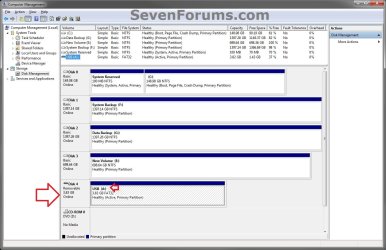
1. If you have not already, you will need to change the drive letter of the USB flash drive to have the letter A. (see screenshot below)
diskmgmt.jpg
2. Press the Windows+R keys to open the Run dialog, type syskey, and click/tap on OK.

3. If prompted by UAC, then click/tap on Yes (Windows 7/8) or Continue (Vista).

4. Click/tap on Update. (see screenshot below)
syskey-1.jpg
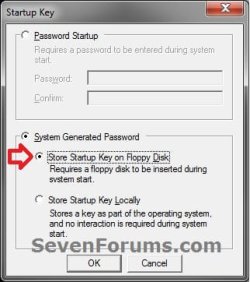
5. Select (dot) System Generated Password, select (dot) the Store Startup Key on Floppy Disk option, and click/tap on OK. (see screenshot below)
syskey-2.jpg
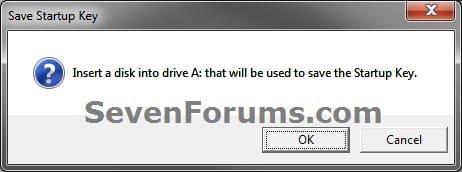
6. If you have not already, connect the USB flash drive with the drive letter of A from step 1, and click/tap on OK. (see screenshot below)
syskey-3.jpg
7. Click/tap on OK. (see screenshot below)


   Note

  • This places the StartKey.Key file on the USB flash drive. If you already have an existing StartKey.Key file on the USB, then the older existing one would be renamed to StartKey.Bak for the new one to be saved to it.
  • It is recommended that you keep a backup of this StartKey.Key file at another location in case the USB gets corrupted or lost. This way you will be able to copy it to another USB with a drive letter of A to be able to gain access to Windows again.
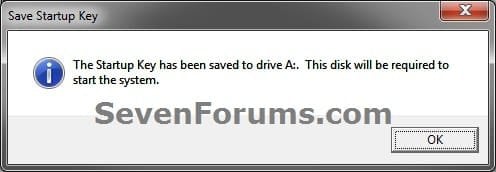
syskey-4.jpg
8. Click/tap on OK. (see screenshot below)
syskey-5.jpg
9. Windows will now require this USB flash drive to be connected at startup when you boot your computer to be able to login to Windows.


OPTION TWO

To Unlock Windows to Not Require a USB Key at Startup


NOTE: This option is the default setting in Windows to store the startup key locally. It will undo OPTION ONE to have Windows no longer require the USB flash drive at startup.
1. Press the Windows+R keys to open the Run dialog, type syskey, and click/tap on OK.

2. If prompted by UAC, then click/tap on Yes (Windows 7/8) or Continue (Vista).

3. Click/tap on Update. (see screenshot below)
syskey-1.jpg
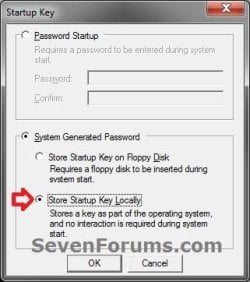
4. Select (dot) System Generated Password, select (dot) the Store Startup Key Locally option, and click/tap on OK. (see screenshot below)
undo-2.jpg
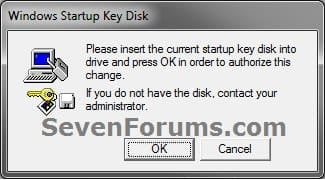
5. If you have not already, connect the USB flash drive with the drive letter of A from OPTION ONE, and click/tap on OK. (see screenshot below)
undo-3.jpg
6. Click/tap on OK. (see screenshot below)
syskey-5.jpg
7. Windows will now no longer require the USB flash drive to be connected at startup for access.
That's it,
Shawn


Last edited:
Very good and very useful tutorial.

A question: System generates password. Can I backup it to another USB stick? I mean, I would like to use this method on a laptop that normally always follows me and is often left unattended (though locked to Welcome screen) but I would not like to have only one USB to boot the computer. What if the USB gets corrupted? I would like to have "a set of spare keys".

Kari
 

My Computer My Computer

Computer type
Laptop
Computer Manufacturer/Model Number
HP ENVY 17-1150eg
OS
Windows 10 Pro x64 EN-GB
CPU
1.6 GHz Intel Core i7-720QM Processor
Memory
6 GB
Graphics Card(s)
ATI Mobility Radeon HD 5850 Graphics
Sound Card
Beats sound system with integrated subwoofer
Monitor(s) Displays
17" laptop display, 22" LED and 32" Full HD TV through HDMI
Screen Resolution
1600*900 (1), 1920*1080 (2&3)
Hard Drives
Internal: 2 x 500 GB SATA Hard Disk Drive 7200 rpm
External: 2TB for backups, 3TB USB3 network drive for media
Cooling
As Envy runs a bit warm, I have it on a Cooler Master pad
Keyboard
Logitech diNovo Media Desktop Laser (bluetooth)
Mouse
Logitech Performance Mouse MX
Internet Speed
50/10 Mbps VDSL
Antivirus
Windows Defender 4.3.9431.0
Browser
Maxthon 3.5.2., IE11
Hello Kari,

Thank you. :)

Yes, you can backup the StartKey.Key file that is placed on the USB key. The only requirement to restore it is to have a USB key drive with the drive letter as A for it, and copy the StartKey.Key file to the USB's root directory.

It would be a very smart idea to backup the StartKey.Key file.
 

My Computer My Computer

Computer type
PC/Desktop
Computer Manufacturer/Model Number
Self built custom
OS
64-bit Windows 11 Pro for Workstations
CPU
Intel i7-8700K OC'd to 5 GHz
Motherboard
ASUS ROG Maximus XI Formula Z390
Memory
64 GB (4x16GB) G.SKILL TridentZ RGB DDR4 3600 MHz
Graphics Card(s)
ASUS ROG-STRIX-GTX1080TI-O11G-GAMING
Sound Card
Integrated
Monitor(s) Displays
2 x Samsung Odyssey G7 27"
Screen Resolution
2560x1440
Hard Drives
1TB Samsung 990 PRO M.2,
4TB Samsung 990 PRO PRO M.2,
TerraMaster F8 SSD Plus NAS
PSU
Seasonic Prime Titanium 850W
Case
Thermaltake Core P3
Cooling
Corsair Hydro H115i
Keyboard
Logitech wireless K800
Mouse
Logitech MX Master 4
Internet Speed
2 Gb/s Download and 100 Mb/s Upload
Antivirus
Malwarebyte Anti-Malware Premium
Browser
Google Chrome
Other Info
Logitech Z625 speaker system,
Logitech BRIO 4K Pro webcam,
HP Color LaserJet Pro MFP M477fdn,
APC SMART-UPS RT 1000 XL - SURT1000XLI,
Galaxy S23 Plus phone
OK. Thanks.
 

My Computer My Computer

Computer type
Laptop
Computer Manufacturer/Model Number
HP ENVY 17-1150eg
OS
Windows 10 Pro x64 EN-GB
CPU
1.6 GHz Intel Core i7-720QM Processor
Memory
6 GB
Graphics Card(s)
ATI Mobility Radeon HD 5850 Graphics
Sound Card
Beats sound system with integrated subwoofer
Monitor(s) Displays
17" laptop display, 22" LED and 32" Full HD TV through HDMI
Screen Resolution
1600*900 (1), 1920*1080 (2&3)
Hard Drives
Internal: 2 x 500 GB SATA Hard Disk Drive 7200 rpm
External: 2TB for backups, 3TB USB3 network drive for media
Cooling
As Envy runs a bit warm, I have it on a Cooler Master pad
Keyboard
Logitech diNovo Media Desktop Laser (bluetooth)
Mouse
Logitech Performance Mouse MX
Internet Speed
50/10 Mbps VDSL
Antivirus
Windows Defender 4.3.9431.0
Browser
Maxthon 3.5.2., IE11
You're welcome. :)
 

My Computer My Computer

Computer type
PC/Desktop
Computer Manufacturer/Model Number
Self built custom
OS
64-bit Windows 11 Pro for Workstations
CPU
Intel i7-8700K OC'd to 5 GHz
Motherboard
ASUS ROG Maximus XI Formula Z390
Memory
64 GB (4x16GB) G.SKILL TridentZ RGB DDR4 3600 MHz
Graphics Card(s)
ASUS ROG-STRIX-GTX1080TI-O11G-GAMING
Sound Card
Integrated
Monitor(s) Displays
2 x Samsung Odyssey G7 27"
Screen Resolution
2560x1440
Hard Drives
1TB Samsung 990 PRO M.2,
4TB Samsung 990 PRO PRO M.2,
TerraMaster F8 SSD Plus NAS
PSU
Seasonic Prime Titanium 850W
Case
Thermaltake Core P3
Cooling
Corsair Hydro H115i
Keyboard
Logitech wireless K800
Mouse
Logitech MX Master 4
Internet Speed
2 Gb/s Download and 100 Mb/s Upload
Antivirus
Malwarebyte Anti-Malware Premium
Browser
Google Chrome
Other Info
Logitech Z625 speaker system,
Logitech BRIO 4K Pro webcam,
HP Color LaserJet Pro MFP M477fdn,
APC SMART-UPS RT 1000 XL - SURT1000XLI,
Galaxy S23 Plus phone
One (silly ?) question. Since I don't have a floppy drive (it's turned off in BIOS), do I need to turn it on for the USB logon to work ?
 

My Computer My Computer

Computer type
PC/Desktop
Computer Manufacturer/Model Number
Home Built
OS
Windows 7 Home Pro SP1 64bit
CPU
Intel Xeon E-3 1240v2
Motherboard
HP
Memory
8GB
Graphics Card(s)
NVIDIA 300
Sound Card
Onboard
Monitor(s) Displays
Hanns G 25"
Screen Resolution
1920x1080
Hard Drives
Hitachi 2GB
PSU
Seasonic 430W
Case
Antec
Cooling
Stock
Keyboard
Logitech
Mouse
Logitech
Internet Speed
5MB
Hello Bej,

No, you sure don't since this is at Windows startup and not at boot. Having the USB flash drive set with the drive letter A is all Windows needs for the USB flash drive to work at startup for this. :)
 

My Computer My Computer

Computer type
PC/Desktop
Computer Manufacturer/Model Number
Self built custom
OS
64-bit Windows 11 Pro for Workstations
CPU
Intel i7-8700K OC'd to 5 GHz
Motherboard
ASUS ROG Maximus XI Formula Z390
Memory
64 GB (4x16GB) G.SKILL TridentZ RGB DDR4 3600 MHz
Graphics Card(s)
ASUS ROG-STRIX-GTX1080TI-O11G-GAMING
Sound Card
Integrated
Monitor(s) Displays
2 x Samsung Odyssey G7 27"
Screen Resolution
2560x1440
Hard Drives
1TB Samsung 990 PRO M.2,
4TB Samsung 990 PRO PRO M.2,
TerraMaster F8 SSD Plus NAS
PSU
Seasonic Prime Titanium 850W
Case
Thermaltake Core P3
Cooling
Corsair Hydro H115i
Keyboard
Logitech wireless K800
Mouse
Logitech MX Master 4
Internet Speed
2 Gb/s Download and 100 Mb/s Upload
Antivirus
Malwarebyte Anti-Malware Premium
Browser
Google Chrome
Other Info
Logitech Z625 speaker system,
Logitech BRIO 4K Pro webcam,
HP Color LaserJet Pro MFP M477fdn,
APC SMART-UPS RT 1000 XL - SURT1000XLI,
Galaxy S23 Plus phone
Thank you for responding.
 

My Computer My Computer

Computer type
PC/Desktop
Computer Manufacturer/Model Number
Home Built
OS
Windows 7 Home Pro SP1 64bit
CPU
Intel Xeon E-3 1240v2
Motherboard
HP
Memory
8GB
Graphics Card(s)
NVIDIA 300
Sound Card
Onboard
Monitor(s) Displays
Hanns G 25"
Screen Resolution
1920x1080
Hard Drives
Hitachi 2GB
PSU
Seasonic 430W
Case
Antec
Cooling
Stock
Keyboard
Logitech
Mouse
Logitech
Internet Speed
5MB
You're most welcome. Please let us know how it went for you. :)
 

My Computer My Computer

Computer type
PC/Desktop
Computer Manufacturer/Model Number
Self built custom
OS
64-bit Windows 11 Pro for Workstations
CPU
Intel i7-8700K OC'd to 5 GHz
Motherboard
ASUS ROG Maximus XI Formula Z390
Memory
64 GB (4x16GB) G.SKILL TridentZ RGB DDR4 3600 MHz
Graphics Card(s)
ASUS ROG-STRIX-GTX1080TI-O11G-GAMING
Sound Card
Integrated
Monitor(s) Displays
2 x Samsung Odyssey G7 27"
Screen Resolution
2560x1440
Hard Drives
1TB Samsung 990 PRO M.2,
4TB Samsung 990 PRO PRO M.2,
TerraMaster F8 SSD Plus NAS
PSU
Seasonic Prime Titanium 850W
Case
Thermaltake Core P3
Cooling
Corsair Hydro H115i
Keyboard
Logitech wireless K800
Mouse
Logitech MX Master 4
Internet Speed
2 Gb/s Download and 100 Mb/s Upload
Antivirus
Malwarebyte Anti-Malware Premium
Browser
Google Chrome
Other Info
Logitech Z625 speaker system,
Logitech BRIO 4K Pro webcam,
HP Color LaserJet Pro MFP M477fdn,
APC SMART-UPS RT 1000 XL - SURT1000XLI,
Galaxy S23 Plus phone
The tutorial worked perfectly. Appreciate all your work on this website.
 

My Computer My Computer

Computer type
PC/Desktop
Computer Manufacturer/Model Number
Home Built
OS
Windows 7 Home Pro SP1 64bit
CPU
Intel Xeon E-3 1240v2
Motherboard
HP
Memory
8GB
Graphics Card(s)
NVIDIA 300
Sound Card
Onboard
Monitor(s) Displays
Hanns G 25"
Screen Resolution
1920x1080
Hard Drives
Hitachi 2GB
PSU
Seasonic 430W
Case
Antec
Cooling
Stock
Keyboard
Logitech
Mouse
Logitech
Internet Speed
5MB
Last edited:

My Computer My Computer

Computer type
PC/Desktop
Computer Manufacturer/Model Number
Self built custom
OS
64-bit Windows 11 Pro for Workstations
CPU
Intel i7-8700K OC'd to 5 GHz
Motherboard
ASUS ROG Maximus XI Formula Z390
Memory
64 GB (4x16GB) G.SKILL TridentZ RGB DDR4 3600 MHz
Graphics Card(s)
ASUS ROG-STRIX-GTX1080TI-O11G-GAMING
Sound Card
Integrated
Monitor(s) Displays
2 x Samsung Odyssey G7 27"
Screen Resolution
2560x1440
Hard Drives
1TB Samsung 990 PRO M.2,
4TB Samsung 990 PRO PRO M.2,
TerraMaster F8 SSD Plus NAS
PSU
Seasonic Prime Titanium 850W
Case
Thermaltake Core P3
Cooling
Corsair Hydro H115i
Keyboard
Logitech wireless K800
Mouse
Logitech MX Master 4
Internet Speed
2 Gb/s Download and 100 Mb/s Upload
Antivirus
Malwarebyte Anti-Malware Premium
Browser
Google Chrome
Other Info
Logitech Z625 speaker system,
Logitech BRIO 4K Pro webcam,
HP Color LaserJet Pro MFP M477fdn,
APC SMART-UPS RT 1000 XL - SURT1000XLI,
Galaxy S23 Plus phone
Drive letter

Thanks for this great tip I really appreciate all the knowledge here. I saw the post about creating a backup which I did. My problem is my system isn't allowing me to have two usb drives with the same letter (I don't have them both plugged in at the same time, I unplug one and reinsert the other, assign it drive a then plug the first one in and it's back to drive e). Any thoughts?
 

My Computer My Computer

OS
windows 7 ultimate 64
Hello Woodward, and welcome to Seven Forums.

This would be normal. Each drive has a unique hardware ID (HID) number that it is referenced by when it is connected and assigned a drive letter. This is how Windows knows what drive letters are used and what to give it the next time it's connected.

It's really best to let each drive to have it's own drive letter so Windows will know what files are on each drive. If you really must use the same drive letter, then you could use OPTION TWO in the tutorial below to change the drive letter, but you'll have to do it each time you connect either drive.

http://www.sevenforums.com/tutorials/82994-drive-letter-add-change-remove-windows-7-a.html

Hope this helps some, :)
Shawn
 

My Computer My Computer

Computer type
PC/Desktop
Computer Manufacturer/Model Number
Self built custom
OS
64-bit Windows 11 Pro for Workstations
CPU
Intel i7-8700K OC'd to 5 GHz
Motherboard
ASUS ROG Maximus XI Formula Z390
Memory
64 GB (4x16GB) G.SKILL TridentZ RGB DDR4 3600 MHz
Graphics Card(s)
ASUS ROG-STRIX-GTX1080TI-O11G-GAMING
Sound Card
Integrated
Monitor(s) Displays
2 x Samsung Odyssey G7 27"
Screen Resolution
2560x1440
Hard Drives
1TB Samsung 990 PRO M.2,
4TB Samsung 990 PRO PRO M.2,
TerraMaster F8 SSD Plus NAS
PSU
Seasonic Prime Titanium 850W
Case
Thermaltake Core P3
Cooling
Corsair Hydro H115i
Keyboard
Logitech wireless K800
Mouse
Logitech MX Master 4
Internet Speed
2 Gb/s Download and 100 Mb/s Upload
Antivirus
Malwarebyte Anti-Malware Premium
Browser
Google Chrome
Other Info
Logitech Z625 speaker system,
Logitech BRIO 4K Pro webcam,
HP Color LaserJet Pro MFP M477fdn,
APC SMART-UPS RT 1000 XL - SURT1000XLI,
Galaxy S23 Plus phone
Assigning a drive to usb's.

Thanks Shawn;

That does help but it leaves me with the question of how do I get the start key to work on my computer if my original usb drive becomes corrupt? My second usb is not recognized as drive a anymore.

Could I assign it as drive a on another machine?

Thanks again, Phil
 

My Computer My Computer

OS
windows 7 ultimate 64
You're welcome Phil,

It doesn't matter what USB key the StartKey.Key file is on for it to work to unlock Windows so long as the StartKey.Key file is on it and connected.

The blue NOTE box under step 7 Option One can give you more details, but you should keep a copy of the StartKey.Key file backed up somewhere safe in case your USB key does get corrupted, lost, broken, etc.... This way you could just copy the backup of the StartKey.Key file to a new USB, and be good to go. :)
 

My Computer My Computer

Computer type
PC/Desktop
Computer Manufacturer/Model Number
Self built custom
OS
64-bit Windows 11 Pro for Workstations
CPU
Intel i7-8700K OC'd to 5 GHz
Motherboard
ASUS ROG Maximus XI Formula Z390
Memory
64 GB (4x16GB) G.SKILL TridentZ RGB DDR4 3600 MHz
Graphics Card(s)
ASUS ROG-STRIX-GTX1080TI-O11G-GAMING
Sound Card
Integrated
Monitor(s) Displays
2 x Samsung Odyssey G7 27"
Screen Resolution
2560x1440
Hard Drives
1TB Samsung 990 PRO M.2,
4TB Samsung 990 PRO PRO M.2,
TerraMaster F8 SSD Plus NAS
PSU
Seasonic Prime Titanium 850W
Case
Thermaltake Core P3
Cooling
Corsair Hydro H115i
Keyboard
Logitech wireless K800
Mouse
Logitech MX Master 4
Internet Speed
2 Gb/s Download and 100 Mb/s Upload
Antivirus
Malwarebyte Anti-Malware Premium
Browser
Google Chrome
Other Info
Logitech Z625 speaker system,
Logitech BRIO 4K Pro webcam,
HP Color LaserJet Pro MFP M477fdn,
APC SMART-UPS RT 1000 XL - SURT1000XLI,
Galaxy S23 Plus phone
My mistake

Thanks again, i was confusing the drive a requirement with predator, which i use also. Sorry about that and thanks again.
 

My Computer My Computer

OS
windows 7 ultimate 64
You're most welcome Phil. It's no problem. :)
 

My Computer My Computer

Computer type
PC/Desktop
Computer Manufacturer/Model Number
Self built custom
OS
64-bit Windows 11 Pro for Workstations
CPU
Intel i7-8700K OC'd to 5 GHz
Motherboard
ASUS ROG Maximus XI Formula Z390
Memory
64 GB (4x16GB) G.SKILL TridentZ RGB DDR4 3600 MHz
Graphics Card(s)
ASUS ROG-STRIX-GTX1080TI-O11G-GAMING
Sound Card
Integrated
Monitor(s) Displays
2 x Samsung Odyssey G7 27"
Screen Resolution
2560x1440
Hard Drives
1TB Samsung 990 PRO M.2,
4TB Samsung 990 PRO PRO M.2,
TerraMaster F8 SSD Plus NAS
PSU
Seasonic Prime Titanium 850W
Case
Thermaltake Core P3
Cooling
Corsair Hydro H115i
Keyboard
Logitech wireless K800
Mouse
Logitech MX Master 4
Internet Speed
2 Gb/s Download and 100 Mb/s Upload
Antivirus
Malwarebyte Anti-Malware Premium
Browser
Google Chrome
Other Info
Logitech Z625 speaker system,
Logitech BRIO 4K Pro webcam,
HP Color LaserJet Pro MFP M477fdn,
APC SMART-UPS RT 1000 XL - SURT1000XLI,
Galaxy S23 Plus phone
Hi, I have a question on this.

Should I lose the USB key, and the spare USB key... would it work if I stored that file on something like "Google Drive" so I can access it from any computer, then drag/drop the file onto the USB stick, then I can just put it into the laptop and it will work again. Is that correct?

I'm worried about never being able to access the laptop ever again if something went wrong!
 

My Computer My Computer

Computer Manufacturer/Model Number
Sony Vaio E11
OS
Microsoft Windows 7 Home Premium 64-bit 7601 Multiprocessor Free Service Pack 1
CPU
AMD E2-1800 APU with Radeon(tm) HD Graphics
Motherboard
Sony Corporation VAIO
Memory
4.00 GB
Graphics Card(s)
AMD Radeon HD 7300 Series Graphics
Sound Card
(1) AMD High Definition Audio Device (2) Realtek High Defi
Screen Resolution
1366 x 768 x 32 bits (4294967296 colors) @ 60 Hz
Hard Drives
WDC WD50 00BPVT-55A1YT0 SATA Disk Device
Hello Amnesia,

Yes, that would work as well. As long as that StartKey.Key file is on the root directory of a connected USB key, you would be good to go. :)
 
Last edited:

My Computer My Computer

Computer type
PC/Desktop
Computer Manufacturer/Model Number
Self built custom
OS
64-bit Windows 11 Pro for Workstations
CPU
Intel i7-8700K OC'd to 5 GHz
Motherboard
ASUS ROG Maximus XI Formula Z390
Memory
64 GB (4x16GB) G.SKILL TridentZ RGB DDR4 3600 MHz
Graphics Card(s)
ASUS ROG-STRIX-GTX1080TI-O11G-GAMING
Sound Card
Integrated
Monitor(s) Displays
2 x Samsung Odyssey G7 27"
Screen Resolution
2560x1440
Hard Drives
1TB Samsung 990 PRO M.2,
4TB Samsung 990 PRO PRO M.2,
TerraMaster F8 SSD Plus NAS
PSU
Seasonic Prime Titanium 850W
Case
Thermaltake Core P3
Cooling
Corsair Hydro H115i
Keyboard
Logitech wireless K800
Mouse
Logitech MX Master 4
Internet Speed
2 Gb/s Download and 100 Mb/s Upload
Antivirus
Malwarebyte Anti-Malware Premium
Browser
Google Chrome
Other Info
Logitech Z625 speaker system,
Logitech BRIO 4K Pro webcam,
HP Color LaserJet Pro MFP M477fdn,
APC SMART-UPS RT 1000 XL - SURT1000XLI,
Galaxy S23 Plus phone
Brilliant, thank you. Does the USB key always have to read as the same drive number? How would I ensure this?
 

My Computer My Computer

Computer Manufacturer/Model Number
Sony Vaio E11
OS
Microsoft Windows 7 Home Premium 64-bit 7601 Multiprocessor Free Service Pack 1
CPU
AMD E2-1800 APU with Radeon(tm) HD Graphics
Motherboard
Sony Corporation VAIO
Memory
4.00 GB
Graphics Card(s)
AMD Radeon HD 7300 Series Graphics
Sound Card
(1) AMD High Definition Audio Device (2) Realtek High Defi
Screen Resolution
1366 x 768 x 32 bits (4294967296 colors) @ 60 Hz
Hard Drives
WDC WD50 00BPVT-55A1YT0 SATA Disk Device
Back
Top