Need carification on removing dual boot from windows 7

Raner777

New member
Member
Local time
2:09 PM
Messages
33
Clarification on removing dual boot from windows 7

Hi All...
The time has come to remove windows xp from my duel boot configeration.
I bought a 240gb ssd and replaced my 60gb ssd. The 60gb ssd that I removed is where my windows 7 Pro is installed. So I cloned windows 7 from the 60gb ssd to the 240 ssd and removed the 60gb ssd and saved it, If I ever need to reinstall windows 7 I'll hook it back up and just copy it to my disc ounce more. I am running Windows 7 of the cloned copy and everything seems to be just fine.
Now the reason for the post.
I installed windows 7 first and installed windows xp after.
I am running three hard drives Which are C-ssd), F-ssd, G-Convention HD ...E: is parition of G drive..
All the posts I am seeing are with windows xp first and windows 7 after on duel boot configerations. Here are some links I looked at...
http://www.sevenforums.com/installation-setup/101587-remove-windows-xp-dual-boot.html
http://www.sevenforums.com/installation-setup/36434-remove-xp-dual-boot.html
http://www.sevenforums.com/installa...ving-xp-windows-xp-7-dual-boot-revisited.html
My windows 7 is on C drive or 0 drive and xp is on E drive which is a 200gb partition of my 1TB drive. So in my case all I have to do is delete the partition that should remove xp but do I have to do anything else to remove all traces of xp...Thanks...
 
Last edited:

My Computer My Computer

At a glance

Windows 7 Pro x64AMD Phenom II X6 1090T ProcessorPhysical Memory (RAM) 8.00 GBAMD Radeon HD 6870 2GB's Memory
Computer Manufacturer/Model Number
Raner
OS
Windows 7 Pro x64
CPU
AMD Phenom II X6 1090T Processor
Motherboard
AsRock 890FX Deluxe 4 (AM3)
Memory
Physical Memory (RAM) 8.00 GB
Graphics Card(s)
AMD Radeon HD 6870 2GB's Memory
Sound Card
Onboard Sound (Realtek) (8 channel)
Monitor(s) Displays
Samsong 24 inch
Hard Drives
60 gb SSD
120 gb SSD
1T Conventional HD
PSU
1000 Watts
Case
Azza Solano 1000
Cooling
Water Cooled
Hi All...
The time has come to remove windows xp from my duel boot configeration.
I bought a 240gb ssd and replaced my 60gb ssd. The 60gb ssd that I removed is where my windows 7 Pro is installed. So I cloned windows 7 from the 60gb ssd to the 240 ssd and removed the 60gb ssd and saved it, If I ever need to reinstall windows 7 I'll hook it back up and just copy it to my disc ounce more. I am running Windows 7 of the cloned copy and everything seems to be just fine.
Now the reason for the post.
I installed windows 7 first and installed windows xp after.
I am running three hard drives Which are C-ssd), F-ssd, G-Convention HD ...E: is parition of G drive..
All the posts I am seeing are with windows xp first and windows 7 after on duel boot configerations. Here are some links I looked at...
http://www.sevenforums.com/installation-setup/101587-remove-windows-xp-dual-boot.html
http://www.sevenforums.com/installation-setup/36434-remove-xp-dual-boot.html
http://www.sevenforums.com/installa...ving-xp-windows-xp-7-dual-boot-revisited.html
My windows 7 is on C drive or 0 drive and xp is on E drive which is a 200gb partition of my 1TB drive. So in my case all I have to do is delete the partition that should remove xp but do I have to do anything else to remove all traces of xp...Thanks...

Since you state you use a dual boot with the options of XP or Windows 7, you will want to remove the XP option. The easiest way is with a free utility EasyBCD which can be downloaded from;

http://neosmart.net/blog/2010/welcome-to-easybcd-2/

I can't think of any other issues you will encounter.
 

My Computer My Computer

At a glance

Windows 7 Professional x64Intel i5 quad processor16 GBRadeon HD 5770
Computer type
PC/Desktop
Computer Manufacturer/Model Number
Custom Built
OS
Windows 7 Professional x64
CPU
Intel i5 quad processor
Motherboard
DP67BG
Memory
16 GB
Graphics Card(s)
Radeon HD 5770
Sound Card
Realtek High Definition Audio
Monitor(s) Displays
Samsung SyncMaster
Screen Resolution
1920X1080
Hard Drives
WD 2TB (SATA Internal)
WD 1TB (USB External)
PSU
Corsair GS800
Case
Tower (Generic)
Cooling
3 Internal Fans
Keyboard
MS Wireless
Mouse
MS Optical Wired
Internet Speed
54 mbps
Antivirus
Emsisoft
Browser
IE-Version 9, Palemoon-Version 24.2.0

My Computer My Computer

At a glance

Microsoft Windows 10 Pro Insider Preview 64-bitIntel(R) Core(TM) i3-4130 CPU @ 3.40GHzCorsair Vengence 4GB x2 (8.00GB Dual-Channel ...2047MB GeForce GTS 450 (ZOTAC International)
Computer type
PC/Desktop
Computer Manufacturer/Model Number
Self Assembled
OS
Microsoft Windows 10 Pro Insider Preview 64-bit
CPU
Intel(R) Core(TM) i3-4130 CPU @ 3.40GHz
Motherboard
Gigabyte Technology Co., Ltd. B85M-D3H
Memory
Corsair Vengence 4GB x2 (8.00GB Dual-Channel DDR3 @ 798MHz)
Graphics Card(s)
2047MB GeForce GTS 450 (ZOTAC International)
Sound Card
Onboard (Realtek High Definition Audio)
Monitor(s) Displays
LG Flatron E2040T
Screen Resolution
1600x900
Hard Drives
Western Digital 1 TB
Seagate 500 GB
PSU
Corsair VS550
Case
Cooler Master K380
Cooling
Cooler Master Seidon 120V Plus
Keyboard
Logitech MK260r
Mouse
Logitech MK260r
Internet Speed
PMPL Broadband
Antivirus
Windows Defender + MBAM
Browser
Firefox
Other Info
Dell Studio 15" Laptop
Thanks Sir George...Messed up Clarification but you got it anyway...LOL
Looks like I'm good to go now...did not want to messup windows 7 it's working great...
After I get done with deleting xp...I'll move on to getting the most out of my new SSD drive...Thanks Again...
 

My Computer My Computer

At a glance

Windows 7 Pro x64AMD Phenom II X6 1090T ProcessorPhysical Memory (RAM) 8.00 GBAMD Radeon HD 6870 2GB's Memory
Computer Manufacturer/Model Number
Raner
OS
Windows 7 Pro x64
CPU
AMD Phenom II X6 1090T Processor
Motherboard
AsRock 890FX Deluxe 4 (AM3)
Memory
Physical Memory (RAM) 8.00 GB
Graphics Card(s)
AMD Radeon HD 6870 2GB's Memory
Sound Card
Onboard Sound (Realtek) (8 channel)
Monitor(s) Displays
Samsong 24 inch
Hard Drives
60 gb SSD
120 gb SSD
1T Conventional HD
PSU
1000 Watts
Case
Azza Solano 1000
Cooling
Water Cooled
Hey Arc Thanks for the comeback...let me try Sir George suggestion and if I run into trouble I will post the screen shot...
 

My Computer My Computer

At a glance

Windows 7 Pro x64AMD Phenom II X6 1090T ProcessorPhysical Memory (RAM) 8.00 GBAMD Radeon HD 6870 2GB's Memory
Computer Manufacturer/Model Number
Raner
OS
Windows 7 Pro x64
CPU
AMD Phenom II X6 1090T Processor
Motherboard
AsRock 890FX Deluxe 4 (AM3)
Memory
Physical Memory (RAM) 8.00 GB
Graphics Card(s)
AMD Radeon HD 6870 2GB's Memory
Sound Card
Onboard Sound (Realtek) (8 channel)
Monitor(s) Displays
Samsong 24 inch
Hard Drives
60 gb SSD
120 gb SSD
1T Conventional HD
PSU
1000 Watts
Case
Azza Solano 1000
Cooling
Water Cooled
Waiting to see the Disk Mgmt screenshot.

Removing an OS is more than just removing it's listing if it even has a Windows Boot Manager - you might choose the OS via the BIOS which is the cleanest method of Dual Booting.

First you must assure Win7 has it's own System Active boot files onboard its partition or it's 100mb System Reserved partition.

Then you can delete the XP partition, wipe or unplug its HD .
 
Raner I might have said you the same that sir George suggested, but the screenshot is very important. We are to know that in which partition MBR is stored, otherwise it might create some further trouble there.
 

My Computer My Computer

At a glance

Microsoft Windows 10 Pro Insider Preview 64-bitIntel(R) Core(TM) i3-4130 CPU @ 3.40GHzCorsair Vengence 4GB x2 (8.00GB Dual-Channel ...2047MB GeForce GTS 450 (ZOTAC International)
Computer type
PC/Desktop
Computer Manufacturer/Model Number
Self Assembled
OS
Microsoft Windows 10 Pro Insider Preview 64-bit
CPU
Intel(R) Core(TM) i3-4130 CPU @ 3.40GHz
Motherboard
Gigabyte Technology Co., Ltd. B85M-D3H
Memory
Corsair Vengence 4GB x2 (8.00GB Dual-Channel DDR3 @ 798MHz)
Graphics Card(s)
2047MB GeForce GTS 450 (ZOTAC International)
Sound Card
Onboard (Realtek High Definition Audio)
Monitor(s) Displays
LG Flatron E2040T
Screen Resolution
1600x900
Hard Drives
Western Digital 1 TB
Seagate 500 GB
PSU
Corsair VS550
Case
Cooler Master K380
Cooling
Cooler Master Seidon 120V Plus
Keyboard
Logitech MK260r
Mouse
Logitech MK260r
Internet Speed
PMPL Broadband
Antivirus
Windows Defender + MBAM
Browser
Firefox
Other Info
Dell Studio 15" Laptop
ok I will post the screen shot as soon as I get home...I am at work at he moment...Thanks for the help guys...
 

My Computer My Computer

At a glance

Windows 7 Pro x64AMD Phenom II X6 1090T ProcessorPhysical Memory (RAM) 8.00 GBAMD Radeon HD 6870 2GB's Memory
Computer Manufacturer/Model Number
Raner
OS
Windows 7 Pro x64
CPU
AMD Phenom II X6 1090T Processor
Motherboard
AsRock 890FX Deluxe 4 (AM3)
Memory
Physical Memory (RAM) 8.00 GB
Graphics Card(s)
AMD Radeon HD 6870 2GB's Memory
Sound Card
Onboard Sound (Realtek) (8 channel)
Monitor(s) Displays
Samsong 24 inch
Hard Drives
60 gb SSD
120 gb SSD
1T Conventional HD
PSU
1000 Watts
Case
Azza Solano 1000
Cooling
Water Cooled

My Computer My Computer

At a glance

Windows 7 Professional x64Intel i5 quad processor16 GBRadeon HD 5770
Computer type
PC/Desktop
Computer Manufacturer/Model Number
Custom Built
OS
Windows 7 Professional x64
CPU
Intel i5 quad processor
Motherboard
DP67BG
Memory
16 GB
Graphics Card(s)
Radeon HD 5770
Sound Card
Realtek High Definition Audio
Monitor(s) Displays
Samsung SyncMaster
Screen Resolution
1920X1080
Hard Drives
WD 2TB (SATA Internal)
WD 1TB (USB External)
PSU
Corsair GS800
Case
Tower (Generic)
Cooling
3 Internal Fans
Keyboard
MS Wireless
Mouse
MS Optical Wired
Internet Speed
54 mbps
Antivirus
Emsisoft
Browser
IE-Version 9, Palemoon-Version 24.2.0
ok I will post the screen shot as soon as I get home...I am at work at he moment...Thanks for the help guys...

When I replied to your post this morning, I thought you had visited the following site;

http://www.sevenforums.com/tutorials/210983-dual-boot-delete-os.html

I was just trying to be sure you were aware of the need to remove XP from the dual boot menu.

My aplogies for not being more careful in reviewing your post.

gregrocker provided better details.

Sir George, you posted the right thing. Dont worry at all. But in these cases it is better to ask for a disk management screenshot, for those reasons those Gerg described.

A very nice and helpful post s yours one. :)
 

My Computer My Computer

At a glance

Microsoft Windows 10 Pro Insider Preview 64-bitIntel(R) Core(TM) i3-4130 CPU @ 3.40GHzCorsair Vengence 4GB x2 (8.00GB Dual-Channel ...2047MB GeForce GTS 450 (ZOTAC International)
Computer type
PC/Desktop
Computer Manufacturer/Model Number
Self Assembled
OS
Microsoft Windows 10 Pro Insider Preview 64-bit
CPU
Intel(R) Core(TM) i3-4130 CPU @ 3.40GHz
Motherboard
Gigabyte Technology Co., Ltd. B85M-D3H
Memory
Corsair Vengence 4GB x2 (8.00GB Dual-Channel DDR3 @ 798MHz)
Graphics Card(s)
2047MB GeForce GTS 450 (ZOTAC International)
Sound Card
Onboard (Realtek High Definition Audio)
Monitor(s) Displays
LG Flatron E2040T
Screen Resolution
1600x900
Hard Drives
Western Digital 1 TB
Seagate 500 GB
PSU
Corsair VS550
Case
Cooler Master K380
Cooling
Cooler Master Seidon 120V Plus
Keyboard
Logitech MK260r
Mouse
Logitech MK260r
Internet Speed
PMPL Broadband
Antivirus
Windows Defender + MBAM
Browser
Firefox
Other Info
Dell Studio 15" Laptop
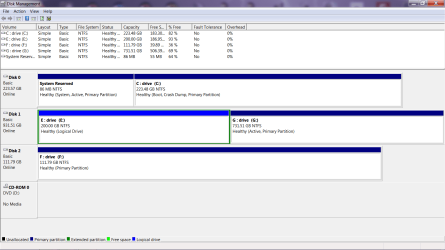
Well I made it home and here is the disc manager snap shot...Thanks to everyone for the help....
 

Attachments

  • Disk manager.png
    Disk manager.png
    36.3 KB · Views: 8

My Computer My Computer

At a glance

Windows 7 Pro x64AMD Phenom II X6 1090T ProcessorPhysical Memory (RAM) 8.00 GBAMD Radeon HD 6870 2GB's Memory
Computer Manufacturer/Model Number
Raner
OS
Windows 7 Pro x64
CPU
AMD Phenom II X6 1090T Processor
Motherboard
AsRock 890FX Deluxe 4 (AM3)
Memory
Physical Memory (RAM) 8.00 GB
Graphics Card(s)
AMD Radeon HD 6870 2GB's Memory
Sound Card
Onboard Sound (Realtek) (8 channel)
Monitor(s) Displays
Samsong 24 inch
Hard Drives
60 gb SSD
120 gb SSD
1T Conventional HD
PSU
1000 Watts
Case
Azza Solano 1000
Cooling
Water Cooled
There should be no problem with deleting E to remove XP, once you have any files you want to save moved off of it. Then you can create a new storage partition there.

If you were booting via the BIOS then there is no Dual Boot menu entry to remove.

If you had added XP from Win7 using EasyBCD then the listing should go away when XP partition is deleted, and if not can be deleted from the Edit Boot Menu tab in EasyBCD from Win7.
 
Thanks for all the help all...Now I can delete the partition and proceed forward till I hit another snag and as
Arnold said as the terminator "I'LL BE BACK"..... Bye for now and have a great day...
 

My Computer My Computer

At a glance

Windows 7 Pro x64AMD Phenom II X6 1090T ProcessorPhysical Memory (RAM) 8.00 GBAMD Radeon HD 6870 2GB's Memory
Computer Manufacturer/Model Number
Raner
OS
Windows 7 Pro x64
CPU
AMD Phenom II X6 1090T Processor
Motherboard
AsRock 890FX Deluxe 4 (AM3)
Memory
Physical Memory (RAM) 8.00 GB
Graphics Card(s)
AMD Radeon HD 6870 2GB's Memory
Sound Card
Onboard Sound (Realtek) (8 channel)
Monitor(s) Displays
Samsong 24 inch
Hard Drives
60 gb SSD
120 gb SSD
1T Conventional HD
PSU
1000 Watts
Case
Azza Solano 1000
Cooling
Water Cooled
Back
Top