Solved Activation issue after clean install on new hard drive

See if you can Explore the partition in Disk Mgmt.

Was just about to ask how I do that until I realised by selecting other partitions and exploring them, that it's not an option on the Recovery.

Might be mistaken but those files I'm looking for... when I was using Disk Utility in Ubuntu I am fairly sure I saw very similar sounding files and *think* i was able to explore when using that. I will pop in the CD and find out, grabbing some screenshots of anything that looks useful.
 

My Computer My Computer

At a glance

Windows 7 Home Premium 32bitPentium Dual-Core CPU T4300 2.10GHz3.00GB
Computer Manufacturer/Model Number
Samsung R530
OS
Windows 7 Home Premium 32bit
CPU
Pentium Dual-Core CPU T4300 2.10GHz
Memory
3.00GB
Hard Drives
Hitachi Travelstar SATA 2.5" 750GB
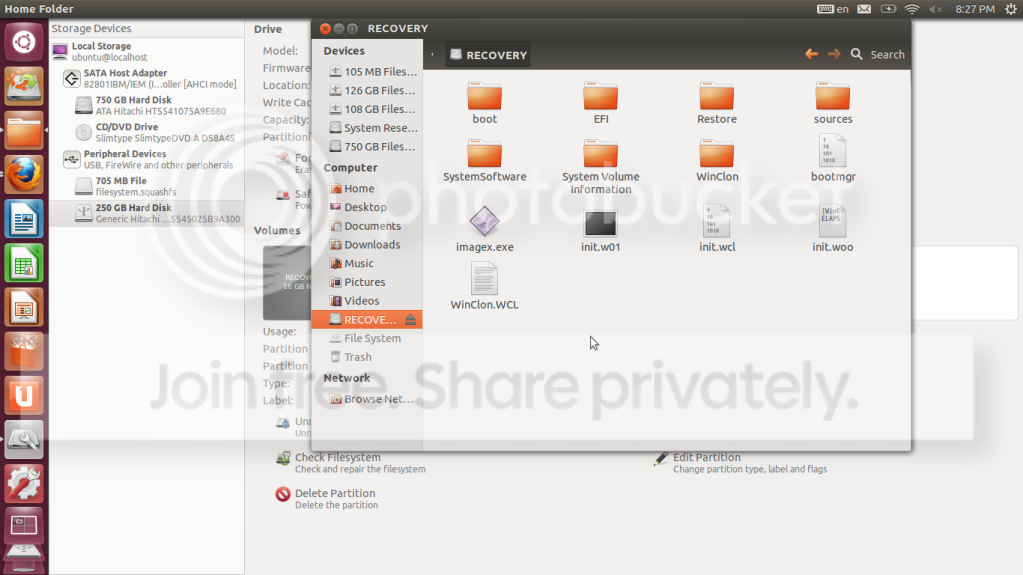
I can't get image to upload. But I am able to explore recovery partition. There are some similar sounding files

Folders:

Boot
EFI
Restore
Sources
SystemSoftware
System Volume Information
Winclon

Files without folders:

bootmgr
imagex.exe
init.w01
init.wcl
init.woo
WinClon.WCL

diskutility.png
 
Last edited:

My Computer My Computer

At a glance

Windows 7 Home Premium 32bitPentium Dual-Core CPU T4300 2.10GHz3.00GB
Computer Manufacturer/Model Number
Samsung R530
OS
Windows 7 Home Premium 32bit
CPU
Pentium Dual-Core CPU T4300 2.10GHz
Memory
3.00GB
Hard Drives
Hitachi Travelstar SATA 2.5" 750GB
I don't need to assign a Letter to the drive name before I can use Easy BCD?
 

My Computer My Computer

At a glance

Windows 7 Home Premium 32bitPentium Dual-Core CPU T4300 2.10GHz3.00GB
Computer Manufacturer/Model Number
Samsung R530
OS
Windows 7 Home Premium 32bit
CPU
Pentium Dual-Core CPU T4300 2.10GHz
Memory
3.00GB
Hard Drives
Hitachi Travelstar SATA 2.5" 750GB
No, read the steps. Assigning a letter was only suggested to see files in Explorer, but you have found a way to view them otherwise.

See if the EasyBCD mini-explorer can find the specified files to add.
 
Ahhh I see. Okay I need to boot back into Windows, I don't know if and how to install Easy BCD on Ubuntu. Things do seem more transparent on this side of the fence tho.

The two files I need, I take it it has to be a complete match? I browsed through the folders in Recovery and go deep enough to find Windows, System32 etc so Ill boot up and see what I find. Great tutorials, Thanks again.
 

My Computer My Computer

At a glance

Windows 7 Home Premium 32bitPentium Dual-Core CPU T4300 2.10GHz3.00GB
Computer Manufacturer/Model Number
Samsung R530
OS
Windows 7 Home Premium 32bit
CPU
Pentium Dual-Core CPU T4300 2.10GHz
Memory
3.00GB
Hard Drives
Hitachi Travelstar SATA 2.5" 750GB
You should install EasyBCD to attempt booting Recovery from Win7.

You'll likely have to reimage Recovery onto the same HD to get it to restore the new HD, however beforehand you can test whether it will add to Dual Boot menu from where it is, then even boot it to see what options it gives you.
 
Will attempt in the morning, muchly appreciate your assistance.
 

My Computer My Computer

At a glance

Windows 7 Home Premium 32bitPentium Dual-Core CPU T4300 2.10GHz3.00GB
Computer Manufacturer/Model Number
Samsung R530
OS
Windows 7 Home Premium 32bit
CPU
Pentium Dual-Core CPU T4300 2.10GHz
Memory
3.00GB
Hard Drives
Hitachi Travelstar SATA 2.5" 750GB
If using EasyBCD gets you to the point where you can dual boot, but then you find the old recovery partition doesn't let you restore to the new drive, I think your best bet would be attempting to clone your old disk to the new.

I think if the cloning process can successfully transfer at least the first 15 GB or so of bit-by-bit data you might be in good enough shape even if it fails later on (that'll grab the old MBR, the data after it, and your recovery partition).

I don't have much experience with Macrium and am not sure if it can also do disk-to-disk cloning. I use other software for this type of task (Clonezilla).
 

My Computer My Computer

At a glance

Windows 7 Ultimate x64
OS
Windows 7 Ultimate x64
You'll need to apply the old Recovery partition to a part of the HD where it doesn't interfere with Win7, which is necessary for it to be added to the Boot Manager so it can boot.

For this reason it may be best to use Macrium as planned since it offers more flexibility in what you can image (Recovery) and where you can restore it (space you create at right end of new HD).
 
Had a problem trying to brose EasyBCD to the boot.wim file on Recovery. Well, actually it wouldn't browse to Recovery at all since it wouldn't show up in EasyBCD at all.

I think I've managed to clone the Recovery Drive and put it in a folder in my C: which makes it searchable and I can browse to the boot.wim file but... something tells me that booting from a folder in my C: drive isn't a safe distance from Windows 7.

When you say I can use Macrium to place the Recovery at 'the right end' of the new HD, where would that be?
 

My Computer My Computer

At a glance

Windows 7 Home Premium 32bitPentium Dual-Core CPU T4300 2.10GHz3.00GB
Computer Manufacturer/Model Number
Samsung R530
OS
Windows 7 Home Premium 32bit
CPU
Pentium Dual-Core CPU T4300 2.10GHz
Memory
3.00GB
Hard Drives
Hitachi Travelstar SATA 2.5" 750GB
In a 20gb space you shrink from C.

You should consult SIW2 by PM on this thread as he is the expert on doing this.
 
I was thinking more along the lines of blowing away your recent install (and contents) on your new disk by applying a clone to it from your old disk. Then disconnect your old drive and attempt the recovery (which should auto-activate).

Your new disk will likely appear to have the same capacity as your old disk after the clone/recovery (because of cloning) but you would then just go into Disk Management or Partition Wizard to adjust your partitions and sizes the way you want to utilize the "lost" space.
 

My Computer My Computer

At a glance

Windows 7 Ultimate x64
OS
Windows 7 Ultimate x64
I have done it with a Dell and a Sony.

The principle is the same - the details vary depending on what the oem has done with it's recovery media.

Not too hard - took me about 1/2 hr in both cases.

Of course, I had the machines in front of me.

Finding out long distance what the oem setup is on your machine - and trying to explain it, would be quite a task.

What part of the country are you in?
I need to have a look at the recov partition contents to figure it out.

If I knew someone with the same machine - I could look at theirs - but no one springs to mind who has one - most folk I know have macs.

This kind of thing is interesting.
 

My Computers My Computers

  • At a glance

    7 X64i5 84002x8gb 3200mhz
    Computer type
    PC/Desktop
    OS
    7 X64
    CPU
    i5 8400
    Motherboard
    gigabyte b365m ds3h
    Memory
    2x8gb 3200mhz
    Hard Drives
    various
    PSU
    pure power 11 400w cm
    Case
    Coolermaster
    Cooling
    cryorig m9i
  • At a glance

    7x64g54008gb ddr4 2400
    Computer type
    PC/Desktop
    OS
    7x64
    CPU
    g5400
    Motherboard
    ga b365m ds3h
    Memory
    8gb ddr4 2400
    PSU
    xfx pro 450w
I have done it with a Dell and a Sony.

The principle is the same - the details vary depending on what the oem has done with it's recovery media.

Not too hard - took me about 1/2 hr in both cases.

Of course, I had the machines in front of me.

Finding out long distance what the oem setup is on your machine - and trying to explain it, would be quite a task.

What part of the country are you in?

I can provide screenshots etc if it helps.

I'm in Edinburgh.

Just got off the phone from Microsoft... well got cut off and I don't think I'm gonna get any help there. Told the guy what the problem is and he referred me to Samsung for disks that they say they don't give out. He said he can't give me a product key if it was already installed.
 

My Computer My Computer

At a glance

Windows 7 Home Premium 32bitPentium Dual-Core CPU T4300 2.10GHz3.00GB
Computer Manufacturer/Model Number
Samsung R530
OS
Windows 7 Home Premium 32bit
CPU
Pentium Dual-Core CPU T4300 2.10GHz
Memory
3.00GB
Hard Drives
Hitachi Travelstar SATA 2.5" 750GB
Oh and I've done a bit of homework. Since I have the files etc saved into a folder on my new drive, I understand I may be able to 'shrink' my C drive in disk management, place the files in there and then it will dual boot?

Or does the dual boot thing come first?
 

My Computer My Computer

At a glance

Windows 7 Home Premium 32bitPentium Dual-Core CPU T4300 2.10GHz3.00GB
Computer Manufacturer/Model Number
Samsung R530
OS
Windows 7 Home Premium 32bit
CPU
Pentium Dual-Core CPU T4300 2.10GHz
Memory
3.00GB
Hard Drives
Hitachi Travelstar SATA 2.5" 750GB
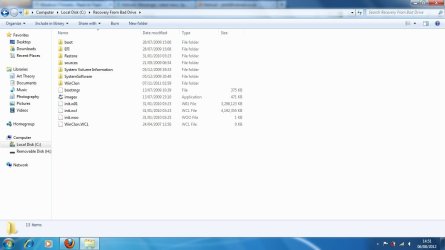
Contents of the Recovery folder
 

Attachments

  • Recovery.jpg
    Recovery.jpg
    61.9 KB · Views: 22

My Computer My Computer

At a glance

Windows 7 Home Premium 32bitPentium Dual-Core CPU T4300 2.10GHz3.00GB
Computer Manufacturer/Model Number
Samsung R530
OS
Windows 7 Home Premium 32bit
CPU
Pentium Dual-Core CPU T4300 2.10GHz
Memory
3.00GB
Hard Drives
Hitachi Travelstar SATA 2.5" 750GB
If you are in Eburgh - we will have to try it long distance.

That screenie looks promising.

Need to see the entire contents of the "sources" folder.

Ther should be at least two .wim files in there.

They may have split install.wim into several split wim files.

Hopefully, they will have either the .wim or the .swm extension - if they have used a different extension, they may have changed the headers.
 

My Computers My Computers

  • At a glance

    7 X64i5 84002x8gb 3200mhz
    Computer type
    PC/Desktop
    OS
    7 X64
    CPU
    i5 8400
    Motherboard
    gigabyte b365m ds3h
    Memory
    2x8gb 3200mhz
    Hard Drives
    various
    PSU
    pure power 11 400w cm
    Case
    Coolermaster
    Cooling
    cryorig m9i
  • At a glance

    7x64g54008gb ddr4 2400
    Computer type
    PC/Desktop
    OS
    7x64
    CPU
    g5400
    Motherboard
    ga b365m ds3h
    Memory
    8gb ddr4 2400
    PSU
    xfx pro 450w
The sources folder contains boot.wim file.
 

My Computer My Computer

At a glance

Windows 7 Home Premium 32bitPentium Dual-Core CPU T4300 2.10GHz3.00GB
Computer Manufacturer/Model Number
Samsung R530
OS
Windows 7 Home Premium 32bit
CPU
Pentium Dual-Core CPU T4300 2.10GHz
Memory
3.00GB
Hard Drives
Hitachi Travelstar SATA 2.5" 750GB
Back
Top