Solved Repair F8 Repair Your Computer Option

It may not even need three Repairs. The boot files on there may be perfectly fine and ready to boot Win7 now. If it boots on its own after one or two repairs, check F8 to see if Recovery options are present. Or did you say they already are?

Now if you're really lucky, this will also restore Recovery link so it boots.
 
Well I was able to convert C: to primary & set it as active. The issue now is that when it boots I get BOOTMGR IS MISSING PRESS CTRL+ALT+DELETE TO CONTINUE. The only way I can get it to boot is by hitting Alt+F10...Do I need to restore MBR again. This other forum says to try to rebuild BCD. What do I do from here??
 

My Computer My Computer

At a glance

Windows 7 Home Premium 64 Bit2.53 GHz4 GBNvidia Geforce GT 555M Cuda 2GB
Computer Manufacturer/Model Number
Acer Aspire 5742G-7200
OS
Windows 7 Home Premium 64 Bit
CPU
2.53 GHz
Memory
4 GB
Graphics Card(s)
Nvidia Geforce GT 555M Cuda 2GB
So I'm in my Windows 7 OS but, I could only get it to boot by hitting Alt+F10. Odd much.
 

My Computer My Computer

At a glance

Windows 7 Home Premium 64 Bit2.53 GHz4 GBNvidia Geforce GT 555M Cuda 2GB
Computer Manufacturer/Model Number
Acer Aspire 5742G-7200
OS
Windows 7 Home Premium 64 Bit
CPU
2.53 GHz
Memory
4 GB
Graphics Card(s)
Nvidia Geforce GT 555M Cuda 2GB
Okay update. I ran another Startup Repair & it is now booting properly.
 

My Computer My Computer

At a glance

Windows 7 Home Premium 64 Bit2.53 GHz4 GBNvidia Geforce GT 555M Cuda 2GB
Computer Manufacturer/Model Number
Acer Aspire 5742G-7200
OS
Windows 7 Home Premium 64 Bit
CPU
2.53 GHz
Memory
4 GB
Graphics Card(s)
Nvidia Geforce GT 555M Cuda 2GB
Update. I was able to access F8 tools, choose Repair Your Computer & am now running a factory restore as we speak.
 

My Computer My Computer

At a glance

Windows 7 Home Premium 64 Bit2.53 GHz4 GBNvidia Geforce GT 555M Cuda 2GB
Computer Manufacturer/Model Number
Acer Aspire 5742G-7200
OS
Windows 7 Home Premium 64 Bit
CPU
2.53 GHz
Memory
4 GB
Graphics Card(s)
Nvidia Geforce GT 555M Cuda 2GB
Hello Harvey -

Wow, you and gregrocker need some sleep!

Regards,
GEWB
 

My Computer My Computer

At a glance

Linux Mint / XP / Win7 Home, Pro, Ultimate / ...
Computer type
PC/Desktop
Computer Manufacturer/Model Number
(7 different computers booting up to 10 systems)
OS
Linux Mint / XP / Win7 Home, Pro, Ultimate / Win8.1 / Win10
Other Info
Four desktops, two laptops, one notebook and one tablet
Haha. Hello GEWB. It's working now. Alt+F10 still isn't working. Trying a restore from eRecovery once logged into Windows 7 just reboots the computer & doesn't continue a restore process so, there is still a hotlinking issue but, the F8 function worked just fine. Any weigh-ins?
 

My Computer My Computer

At a glance

Windows 7 Home Premium 64 Bit2.53 GHz4 GBNvidia Geforce GT 555M Cuda 2GB
Computer Manufacturer/Model Number
Acer Aspire 5742G-7200
OS
Windows 7 Home Premium 64 Bit
CPU
2.53 GHz
Memory
4 GB
Graphics Card(s)
Nvidia Geforce GT 555M Cuda 2GB
I left you this morning at the point where you had marked System Reserved partition Active and were running the three Repairs, reporting some success.

Then you jumped to marking C Active instead and inquired why it got the Bootmgr Is Missing error, This is because C had never had the System boot files written to it so needed the three Repairs, whereas System Reserved apparently already had them.

So I am wondering why you moved the Active flag from System Reserved to C when you were having some success with it on the System Reserved partition which is where it belongs on a System with the SysReserved partition which is only used to boot Win7.

It makes it very strange that you then got not only F8 Tools menu, but those tools apparently had Factory Recovery link on them. You did report you ran Factory Recovery, correct? And this is how you ran it, from F8?

If you run Factory Recovery from the HD and not from Disks then it cannot reimage or repair its own partition so this may be why it's hotlink is not running now.

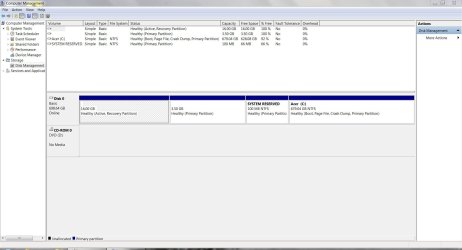
It would be very interesting to see a Disk Mgmt screenshot now. Recovery likely marked itself Active to run so I wonder if it returned the Active flag to System Reserved when it reimaged that and C partition.

Time will tell on performance, but you always have the other options to order Recovery Disks to reimage the entire HD, or do the superior Clean Reinstall.

 
I marked C: as active because I thought you said that's what to do. I guess I should've doubled checked first but, after a Startup Repair, it remarked System Reserved as active & C: with active.

Yes factory restore from F8 works now but, Alt+F10 hotlink & in OS eRecovery still doesn't work. Hitting Alt+F10 does nothing & in OS eRecovery just restarts the computer. It doesn't initiate the factory restore process. Very odd indeed. But, are you saying I can still potentially properly have the HD re-imaged if I made a set of backup discs?
 

Attachments

  • DM Capture.JPG
    DM Capture.JPG
    120.8 KB · Views: 14

My Computer My Computer

At a glance

Windows 7 Home Premium 64 Bit2.53 GHz4 GBNvidia Geforce GT 555M Cuda 2GB
Computer Manufacturer/Model Number
Acer Aspire 5742G-7200
OS
Windows 7 Home Premium 64 Bit
CPU
2.53 GHz
Memory
4 GB
Graphics Card(s)
Nvidia Geforce GT 555M Cuda 2GB
Oh damn I guess System Reserved wasn't marked active but, Recovery Partition is...
 

My Computer My Computer

At a glance

Windows 7 Home Premium 64 Bit2.53 GHz4 GBNvidia Geforce GT 555M Cuda 2GB
Computer Manufacturer/Model Number
Acer Aspire 5742G-7200
OS
Windows 7 Home Premium 64 Bit
CPU
2.53 GHz
Memory
4 GB
Graphics Card(s)
Nvidia Geforce GT 555M Cuda 2GB
No it has the Alt+F10 hotlink. I know because I used it before
 

My Computer My Computer

At a glance

Windows 7 Home Premium 64 Bit2.53 GHz4 GBNvidia Geforce GT 555M Cuda 2GB
Computer Manufacturer/Model Number
Acer Aspire 5742G-7200
OS
Windows 7 Home Premium 64 Bit
CPU
2.53 GHz
Memory
4 GB
Graphics Card(s)
Nvidia Geforce GT 555M Cuda 2GB
Well the System flag is still not set on any partition so watch performance carefully as on a System with a System Reserved partition it should always be marked System Active. It wouldn't have been installed if that was not the case. Your boot files may be on Recovery since it is marked Active, and the Recovery only reimaged C.

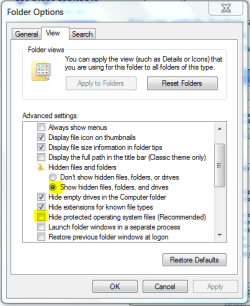
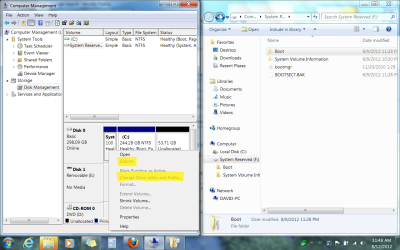
You can unhide System and Hidden files in Control Panel>Folder Options>View, temporarily give each partition a letter in Disk Mgmt to then Explore it to see where the boot files are: http://www.sevenforums.com/tutorials/82994-drive-letter-add-change-remove-windows-7-a.html

Capture.PNGUntitled.png
click to enlarge
 
I'll try that now...
 

My Computer My Computer

At a glance

Windows 7 Home Premium 64 Bit2.53 GHz4 GBNvidia Geforce GT 555M Cuda 2GB
Computer Manufacturer/Model Number
Acer Aspire 5742G-7200
OS
Windows 7 Home Premium 64 Bit
CPU
2.53 GHz
Memory
4 GB
Graphics Card(s)
Nvidia Geforce GT 555M Cuda 2GB
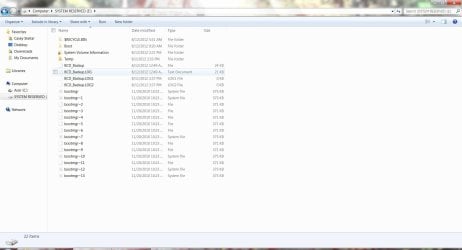
This is what's in the System Reserved Partition...
 

Attachments

  • SR Capture.JPG
    SR Capture.JPG
    107.2 KB · Views: 13

My Computer My Computer

At a glance

Windows 7 Home Premium 64 Bit2.53 GHz4 GBNvidia Geforce GT 555M Cuda 2GB
Computer Manufacturer/Model Number
Acer Aspire 5742G-7200
OS
Windows 7 Home Premium 64 Bit
CPU
2.53 GHz
Memory
4 GB
Graphics Card(s)
Nvidia Geforce GT 555M Cuda 2GB
The boot files are there as expected. It's likely it is still the boot partition and the System flag is just hidden, probably because the OEM wants Recovery marked Active to be able to run from boot.

Use the same method to see if they've also been written to Recovery.

Watch performance and consider the Clean Reinstall since you're obviously a tech enthusiast. :geek:
 
Last edited:
Well in that case, I have to ask your personal & professional opinion. The only reason I choose to keep things the way they are now is because having the built in Recovery is one hell of a fail safe especially when it comes to needing to do a re-install of Windows & needing a license key. How many times can this COA be used?
 

My Computer My Computer

At a glance

Windows 7 Home Premium 64 Bit2.53 GHz4 GBNvidia Geforce GT 555M Cuda 2GB
Computer Manufacturer/Model Number
Acer Aspire 5742G-7200
OS
Windows 7 Home Premium 64 Bit
CPU
2.53 GHz
Memory
4 GB
Graphics Card(s)
Nvidia Geforce GT 555M Cuda 2GB
Wow, if that was your concern I'm really glad you asked because you are entitled to reinstall ANY license of Win7 as often as you want, in any way you want, for the life of the OS, or in your case with Factory OEM for the life of the machine.

MS assures this by changing your factory activation to their servers when you http://www.sevenforums.com/tutorials/219487-clean-reinstall-factory-oem-windows-7-a.html#post1839164 which is why they put the Product Key on each COA sticker required for preinstalled Win7.

Built in Factory Recovery is also deceptive because one of the most frequent failures is of the HD which takes the Recovery partition with it. We see it here several times per week. You need the Recovery disks in this case.

However with built-in Win7 backup imaging you can have a much better Recovery of your customized Win7 installation imaged just after it is setup and running best, updated whenever you please. This image is stored externally so it doesnt' fail with the HD. http://www.sevenforums.com/tutorials/663-backup-complete-computer-create-image-backup.html

Most tech enthusiasts won't run the Factory Preinstall because it is larded with advertiser's crapware all set to spy on you, plus useless factory utilities which duplicate and interfere with much better features built into the OS.

Finally http://www.sevenforums.com/tutorials/219487-clean-reinstall-factory-oem-windows-7-a.html#post1839164 is a specialty of these forums where you get much better support than from the OEM anyway. If you follow the steps closely for install and maintaining your OS we can help assure it runs perfectly.

Until you decide you can also http://www.sevenforums.com/tutorials/219576-clean-up-factory-bloatware.html
 
Last edited:
Ah. I didn't know the COA key was immortal lol. I already have all the drivers backed up on my external anyway & SlimDrivers is my friend lol. The beauty of this machine however is the only pre-installed stuffs are Zune, Skype 5.3, Bing Bar & Microsoft Security Essentials so, it never bothered me much to have to remove them. Of which Skype i use anyway...But, you're still saying, third party vendors can still spy on us? Ouch. I actually already have a Windows 7 Home Premium 64-bit disc. The ISO admittedly was taken from a torrent. It seems to work great only I'm afraid Microsoft may now be able to tell the copy is fraud if it in fact is not a copy of an official Microsoft Windows 7 disc. Do you think you'll be able to tell me if the copy is legit or not?
 

My Computer My Computer

At a glance

Windows 7 Home Premium 64 Bit2.53 GHz4 GBNvidia Geforce GT 555M Cuda 2GB
Computer Manufacturer/Model Number
Acer Aspire 5742G-7200
OS
Windows 7 Home Premium 64 Bit
CPU
2.53 GHz
Memory
4 GB
Graphics Card(s)
Nvidia Geforce GT 555M Cuda 2GB
Okay I got recovery discs from another Acer I have but, I'm letting a friend borrow it & well I like this one better so, I'm willing to erase these discs & make recovery discs for this one. The problem is I can't to them to load up. It's as if they aren't even in the drive. Any suggestions?
 

My Computer My Computer

At a glance

Windows 7 Home Premium 64 Bit2.53 GHz4 GBNvidia Geforce GT 555M Cuda 2GB
Computer Manufacturer/Model Number
Acer Aspire 5742G-7200
OS
Windows 7 Home Premium 64 Bit
CPU
2.53 GHz
Memory
4 GB
Graphics Card(s)
Nvidia Geforce GT 555M Cuda 2GB
Back
Top