- Local time
- 8:20 AM
- Messages
- 115
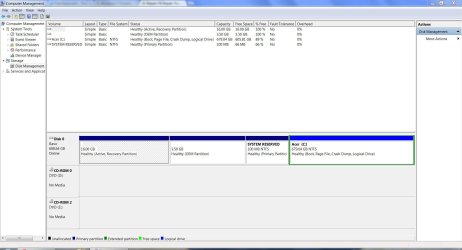
I need help repairing my F8 Repair Your Computer function. It's not working. It just boots directly into Windows 7. Running Acer eRecovery once booted also doesn't work. It just simply reboots. Alt+F10 also doesn't work. So, I can't run a factory restore. I'v gathered that the information I need is:
& the name of the folder in the Recovery folder is:
0e18341f-e344-11e1-8661-ce906dfc6f91
I didn't delete or merge/move any partitions. I had a dual boot with Ubuntu recently but, I've since deleted that & restored MBR. I also restored the Boot & BCD as other posts & forums suggested. I'm not sure if those were necessary because my Windows 7 is booting just fine. The issue is that I can't seem to get to the Recovery partition.
I don't want to try referencing others fixes & trying my own. I want to know exactly how to do it correctly. As always any help will be greatly appreciated.
Code:
Microsoft Windows [Version 6.1.7601]
Copyright (c) 2009 Microsoft Corporation. All rights reserved.

C:\windows\system32>bcdedit /enum all

Windows Boot Manager
--------------------
identifier {bootmgr}
device partition=\Device\HarddiskVolume1
description Windows Boot Manager
locale en-us
inherit {globalsettings}
default {current}
resumeobject {8803457e-dcd0-11e1-bb52-dd1735160394}
displayorder {current}
toolsdisplayorder {memdiag}
timeout 30

Windows Boot Loader
-------------------
identifier {88034578-dcd0-11e1-bb52-dd1735160394}
device ramdisk=[C:]\Recovery\853ec2c3-d0d3-11e1-9392-e53aceb99e
c0\Winre.wim,{88034579-dcd0-11e1-bb52-dd1735160394}
path \windows\system32\winload.exe
description Windows Recovery Environment (recovered)
locale
osdevice ramdisk=[C:]\Recovery\853ec2c3-d0d3-11e1-9392-e53aceb99e
c0\Winre.wim,{88034579-dcd0-11e1-bb52-dd1735160394}
systemroot \windows
winpe Yes

Windows Boot Loader
-------------------
identifier {8803457a-dcd0-11e1-bb52-dd1735160394}
device ramdisk=[C:]\Recovery\8803457a-dcd0-11e1-bb52-dd17351603
94\Winre.wim,{8803457b-dcd0-11e1-bb52-dd1735160394}
path \windows\system32\winload.exe
description Windows Recovery Environment
inherit {bootloadersettings}
osdevice ramdisk=[C:]\Recovery\8803457a-dcd0-11e1-bb52-dd17351603
94\Winre.wim,{8803457b-dcd0-11e1-bb52-dd1735160394}
systemroot \windows
nx OptIn
winpe Yes

Windows Boot Loader
-------------------
identifier {8803457c-dcd0-11e1-bb52-dd1735160394}
device ramdisk=[C:]\Recovery\0e18341f-e344-11e1-8661-ce906dfc6f
91\Winre.wim,{8803457d-dcd0-11e1-bb52-dd1735160394}
path \windows\system32\winload.exe
description Windows Recovery Environment (recovered)
locale
osdevice ramdisk=[C:]\Recovery\0e18341f-e344-11e1-8661-ce906dfc6f
91\Winre.wim,{8803457d-dcd0-11e1-bb52-dd1735160394}
systemroot \windows
winpe Yes

Windows Boot Loader
-------------------
identifier {current}
device partition=C:
path \windows\system32\winload.exe
description Windows 7
locale en-us
inherit {bootloadersettings}
recoverysequence {0e18341f-e344-11e1-8661-ce906dfc6f91}
recoveryenabled Yes
osdevice partition=C:
systemroot \windows
resumeobject {8803457e-dcd0-11e1-bb52-dd1735160394}
nx OptIn
detecthal Yes

Resume from Hibernate
---------------------
identifier {8803457e-dcd0-11e1-bb52-dd1735160394}
device partition=C:
path \windows\system32\winresume.exe
description Windows Resume Application
locale en-us
inherit {resumeloadersettings}
filedevice partition=C:
filepath \hiberfil.sys
debugoptionenabled No

Windows Memory Tester
---------------------
identifier {memdiag}
device partition=\Device\HarddiskVolume1
path \boot\memtest.exe
description Windows Memory Diagnostic
locale en-us
inherit {globalsettings}
badmemoryaccess Yes

EMS Settings
------------
identifier {emssettings}
bootems Yes

Debugger Settings
-----------------
identifier {dbgsettings}
debugtype Serial
debugport 1
baudrate 115200

RAM Defects
-----------
identifier {badmemory}

Global Settings
---------------
identifier {globalsettings}
inherit {dbgsettings}
{emssettings}
{badmemory}

Boot Loader Settings
--------------------
identifier {bootloadersettings}
inherit {globalsettings}
{hypervisorsettings}

Hypervisor Settings
-------------------
identifier {hypervisorsettings}
hypervisordebugtype Serial
hypervisordebugport 1
hypervisorbaudrate 115200

Resume Loader Settings
----------------------
identifier {resumeloadersettings}
inherit {globalsettings}

Device options
--------------
identifier {88034579-dcd0-11e1-bb52-dd1735160394}
ramdisksdidevice partition=C:
ramdisksdipath \Recovery\853ec2c3-d0d3-11e1-9392-e53aceb99ec0\boot.sdi

Device options
--------------
identifier {8803457b-dcd0-11e1-bb52-dd1735160394}
description Ramdisk Options
ramdisksdidevice partition=C:
ramdisksdipath \Recovery\8803457a-dcd0-11e1-bb52-dd1735160394\boot.sdi

Device options
--------------
identifier {8803457d-dcd0-11e1-bb52-dd1735160394}
ramdisksdidevice partition=C:
ramdisksdipath \Recovery\0e18341f-e344-11e1-8661-ce906dfc6f91\boot.sdi

C:\windows\system32>
& the name of the folder in the Recovery folder is:
0e18341f-e344-11e1-8661-ce906dfc6f91
I didn't delete or merge/move any partitions. I had a dual boot with Ubuntu recently but, I've since deleted that & restored MBR. I also restored the Boot & BCD as other posts & forums suggested. I'm not sure if those were necessary because my Windows 7 is booting just fine. The issue is that I can't seem to get to the Recovery partition.
I don't want to try referencing others fixes & trying my own. I want to know exactly how to do it correctly. As always any help will be greatly appreciated.
Last edited by a moderator:
My Computer
At a glance
Windows 7 Home Premium 64 Bit2.53 GHz4 GBNvidia Geforce GT 555M Cuda 2GB
- Computer Manufacturer/Model Number
- Acer Aspire 5742G-7200
- OS
- Windows 7 Home Premium 64 Bit
- CPU
- 2.53 GHz
- Memory
- 4 GB
- Graphics Card(s)
- Nvidia Geforce GT 555M Cuda 2GB