
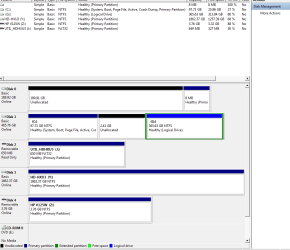
My drive0 is "Unallocated Space" How do I format it to NTFS ?

thenoo

New member
Member
VIP
Local time
11:40 PM
Messages
140
My drive0 is "Unallocated Space" How do I format it to NTFS ?

Drive 0 is "Unallocated Space" as shown in Disk Mgt attachment.

How do I format this into NTFS . There is no "FORMAT" command when right clicked ?
 

Attachments

  • DM1.PNG
    DM1.PNG
    21.5 KB · Views: 118

My Computer My Computer

At a glance

Windows 7 Home Premium x64AMD 3000+ 2.00gHZ2048 MbsRAEDON 9800 PRO
Computer Manufacturer/Model Number
Home Built
OS
Windows 7 Home Premium x64
CPU
AMD 3000+ 2.00gHZ
Motherboard
ASUSTeK k8vsedx
Memory
2048 Mbs
Graphics Card(s)
RAEDON 9800 PRO
Monitor(s) Displays
Sony SDM-HS95P 19.1"vis
Hard Drives
2x500 Gbts
Right click on the space and define a partition. The wizard will guide you. One of the steps during this process is formatting.

You can only format partitions - not any unallocated spaces. This is not a USB stick.
 

My Computer My Computer

At a glance

Vista, Windows7, Mint Mate, Zorin, Windows 8from 1.6GHz Duo to i7
Computer Manufacturer/Model Number
HP, Dell, Gateway, Toshiba - 4 laptops and 2 desktops
OS
Vista, Windows7, Mint Mate, Zorin, Windows 8
CPU
from 1.6GHz Duo to i7
Monitor(s) Displays
2x HP w2207
Hard Drives
5x HDD, 7x SSD, 12x Externals
Keyboard
with trackball - no mices
Mouse
Trackball mice
Internet Speed
DSL 6000
Showing the 8 MB partition might mean you have been messing with Win XP. But for some reason they seem to show up. You might think about getting rid of it before your format the drive.
 

My Computer My Computer

At a glance

Windows 7 x64i7-2600K8 GGTX 480
Computer Manufacturer/Model Number
Homebuilt
OS
Windows 7 x64
CPU
i7-2600K
Motherboard
Asus P8Z77-v Pro
Memory
8 G
Graphics Card(s)
GTX 480
Sound Card
Onboard
Monitor(s) Displays
LG W2753V
Screen Resolution
1920x1080
Hard Drives
Crucial M4 128 G SSD
Right click on the space and define a partition. The wizard will guide you. One of the steps during this process is formatting.

You can only format partitions - not any unallocated spaces. This is not a USB stick.

Ah , as Michael Cane the English actor was won't to say :- "Not many people know that " - myself being one of them !

Thanks for the gen .
 

My Computer My Computer

At a glance

Windows 7 Home Premium x64AMD 3000+ 2.00gHZ2048 MbsRAEDON 9800 PRO
Computer Manufacturer/Model Number
Home Built
OS
Windows 7 Home Premium x64
CPU
AMD 3000+ 2.00gHZ
Motherboard
ASUSTeK k8vsedx
Memory
2048 Mbs
Graphics Card(s)
RAEDON 9800 PRO
Monitor(s) Displays
Sony SDM-HS95P 19.1"vis
Hard Drives
2x500 Gbts

My Computer My Computer

At a glance

W 7 64-bit UltimateIntel Q9550 Yorkfield8GB Dominator 8500C5DATI : XFX 5870
Computer Manufacturer/Model Number
* BFK Customs *
OS
W 7 64-bit Ultimate
CPU
Intel Q9550 Yorkfield
Motherboard
ASUS P5Q Pro
Memory
8GB Dominator 8500C5D
Graphics Card(s)
ATI : XFX 5870
Sound Card
Realtek HD Audio 7-1
Monitor(s) Displays
1x 47" LCD HDMI & 3x 26" LCD HDMI
Screen Resolution
1920x1080P & 1920x1200
Hard Drives
1x 80GB Intel X25-M G2 SSD : 1x 500GB & 1x 640GB WD Caviar Black(s)
PSU
Corsair 620HX
Case
Cooler Master RC-690
Cooling
Tuniq Tower 120, 2x 140mm and 3x 120mm case fans
Keyboard
Microsoft 500
Mouse
Razer Diamondback 3G
Internet Speed
14 Mb/s
Other Info
1x Koutech 3Gb/s SATA HDD Hot Swap Rack
Go to first new post My drive0 is "Unallocated Space" How do I format

Showing the 8 MB partition might mean you have been messing with Win XP. But for some reason they seem to show up. You might think about getting rid of it before your format the drive.[/QUOTE

Thanks for the reply but I have some software installed there .
 

My Computer My Computer

At a glance

Windows 7 Home Premium x64AMD 3000+ 2.00gHZ2048 MbsRAEDON 9800 PRO
Computer Manufacturer/Model Number
Home Built
OS
Windows 7 Home Premium x64
CPU
AMD 3000+ 2.00gHZ
Motherboard
ASUSTeK k8vsedx
Memory
2048 Mbs
Graphics Card(s)
RAEDON 9800 PRO
Monitor(s) Displays
Sony SDM-HS95P 19.1"vis
Hard Drives
2x500 Gbts

My Computer My Computer

At a glance

Windows 7 Home Premium x64AMD 3000+ 2.00gHZ2048 MbsRAEDON 9800 PRO
Computer Manufacturer/Model Number
Home Built
OS
Windows 7 Home Premium x64
CPU
AMD 3000+ 2.00gHZ
Motherboard
ASUSTeK k8vsedx
Memory
2048 Mbs
Graphics Card(s)
RAEDON 9800 PRO
Monitor(s) Displays
Sony SDM-HS95P 19.1"vis
Hard Drives
2x500 Gbts
This is a general reply to all who have kindly replied.

I refer to my Drive 0 which is almost completely Unallocated except for an 8 Mb Primary Partition which I am reluctant to delete as it contains software by TerabyteUnlimited which I use frequently.( See Attachment in OP)

What is happening here is each time I right click this unallocated Space and then follow the Wizard to format this - this seems to procede OK and the space is formatted in NTFS as required as a Primary Partition.
However , after each subsequent boot , this space reverts again to UNALLOCATED. except , that is , for the small 8MB Partition as shown in Disk Management attached here.

Do you think I should follow the link given by Bare Foot Kid and make this an Extendeed Partition instead as I only require it for storage ?

Would that work and remain permanent.

Does the reason it reverts to Unallocated here have something to do with the number of Primary Partitions thus created ? If you count the External drives , I have more than 4 in that case ?
 

My Computer My Computer

At a glance

Windows 7 Home Premium x64AMD 3000+ 2.00gHZ2048 MbsRAEDON 9800 PRO
Computer Manufacturer/Model Number
Home Built
OS
Windows 7 Home Premium x64
CPU
AMD 3000+ 2.00gHZ
Motherboard
ASUSTeK k8vsedx
Memory
2048 Mbs
Graphics Card(s)
RAEDON 9800 PRO
Monitor(s) Displays
Sony SDM-HS95P 19.1"vis
Hard Drives
2x500 Gbts
There can be 4 partitions per HDD, either 3 Primary and an Extended or 4 Primary.


Why can't you move that SW from the drive 0 or will that break it's connections.
 

My Computer My Computer

At a glance

W 7 64-bit UltimateIntel Q9550 Yorkfield8GB Dominator 8500C5DATI : XFX 5870
Computer Manufacturer/Model Number
* BFK Customs *
OS
W 7 64-bit Ultimate
CPU
Intel Q9550 Yorkfield
Motherboard
ASUS P5Q Pro
Memory
8GB Dominator 8500C5D
Graphics Card(s)
ATI : XFX 5870
Sound Card
Realtek HD Audio 7-1
Monitor(s) Displays
1x 47" LCD HDMI & 3x 26" LCD HDMI
Screen Resolution
1920x1080P & 1920x1200
Hard Drives
1x 80GB Intel X25-M G2 SSD : 1x 500GB & 1x 640GB WD Caviar Black(s)
PSU
Corsair 620HX
Case
Cooler Master RC-690
Cooling
Tuniq Tower 120, 2x 140mm and 3x 120mm case fans
Keyboard
Microsoft 500
Mouse
Razer Diamondback 3G
Internet Speed
14 Mb/s
Other Info
1x Koutech 3Gb/s SATA HDD Hot Swap Rack
There can be 4 partitions per HDD, either 3 Primary and an Extended or 4 Primary.


Why can't you move that SW from the drive 0 or will that break it's connections.

Sorry I don't understand "SW" . If you're referring to the 8 mb Partition , I explained why in my last post.
 

My Computer My Computer

At a glance

Windows 7 Home Premium x64AMD 3000+ 2.00gHZ2048 MbsRAEDON 9800 PRO
Computer Manufacturer/Model Number
Home Built
OS
Windows 7 Home Premium x64
CPU
AMD 3000+ 2.00gHZ
Motherboard
ASUSTeK k8vsedx
Memory
2048 Mbs
Graphics Card(s)
RAEDON 9800 PRO
Monitor(s) Displays
Sony SDM-HS95P 19.1"vis
Hard Drives
2x500 Gbts
SW means software--the Terabyte Unlimited application in this case.
 

My Computer My Computer

At a glance

Windows 7 Home Premium SP1, 64-bitIntel Skylake i5-6600K, not overclocked8 GB HyperX DDR4-2666 (2 x 4 GB)none; graphics are integrated on CPU
Computer type
PC/Desktop
Computer Manufacturer/Model Number
Ignatz Special; 4 speed manual gearbox; factory air conditioning; one of one
OS
Windows 7 Home Premium SP1, 64-bit
CPU
Intel Skylake i5-6600K, not overclocked
Motherboard
AsRock Z170M Extreme 4, micro ATX
Memory
8 GB HyperX DDR4-2666 (2 x 4 GB)
Graphics Card(s)
none; graphics are integrated on CPU
Sound Card
onboard: Realtek ALC1150; external: USB Behringer UF0-202
Monitor(s) Displays
Dell S2340M 23 inch IPS
Screen Resolution
1600 x 900
Hard Drives
System: Crucial MX100 series SSD, 128 GB;
Data: Samsung Spinpoint 103SJ, 1 TB;
Backup: WD Caviar Green WD30EZRX-00D8PB0, 3 TB
PSU
Rosewill SilentNight 500 watt fanless, semi-modular
Case
Antec Solo II
Cooling
Noctua NH-U12S; Noctua F12 intake, Noctua S12A exhaust
Keyboard
Microsoft 200 6JH-00001 USB
Mouse
Dell or Microsoft optical wired; USB
Antivirus
Microsoft Security Essentials and Malwarebytes Premium
Browser
Pale Moon
Other Info
All fans PWM; speeds at idle: CPU circa 500 rpm; intake circa 600 rpm; exhaust circa 600 rpm; CPU temps 27 idle and 47 C load in a warm room (27 C/81 F) when running Intel Extreme Tuning Utility stress test.
I was not suggesting you remove it just move it to another location.
 

My Computer My Computer

At a glance

W 7 64-bit UltimateIntel Q9550 Yorkfield8GB Dominator 8500C5DATI : XFX 5870
Computer Manufacturer/Model Number
* BFK Customs *
OS
W 7 64-bit Ultimate
CPU
Intel Q9550 Yorkfield
Motherboard
ASUS P5Q Pro
Memory
8GB Dominator 8500C5D
Graphics Card(s)
ATI : XFX 5870
Sound Card
Realtek HD Audio 7-1
Monitor(s) Displays
1x 47" LCD HDMI & 3x 26" LCD HDMI
Screen Resolution
1920x1080P & 1920x1200
Hard Drives
1x 80GB Intel X25-M G2 SSD : 1x 500GB & 1x 640GB WD Caviar Black(s)
PSU
Corsair 620HX
Case
Cooler Master RC-690
Cooling
Tuniq Tower 120, 2x 140mm and 3x 120mm case fans
Keyboard
Microsoft 500
Mouse
Razer Diamondback 3G
Internet Speed
14 Mb/s
Other Info
1x Koutech 3Gb/s SATA HDD Hot Swap Rack
SW means software--the Terabyte Unlimited application in this case.

Sorry - should have worked that out for myself !

Yes it would break the connection - its not a big problem its just that its handy having it on the hard drive .
 

My Computer My Computer

At a glance

Windows 7 Home Premium x64AMD 3000+ 2.00gHZ2048 MbsRAEDON 9800 PRO
Computer Manufacturer/Model Number
Home Built
OS
Windows 7 Home Premium x64
CPU
AMD 3000+ 2.00gHZ
Motherboard
ASUSTeK k8vsedx
Memory
2048 Mbs
Graphics Card(s)
RAEDON 9800 PRO
Monitor(s) Displays
Sony SDM-HS95P 19.1"vis
Hard Drives
2x500 Gbts
I was not suggesting you remove it just move it to another location.

Yes that woulnd't be a big deal .

Do you think the existence of this small Primary Partition on this drive is the reason or cause of the instability of the formatting of Drive 0 ?
 

My Computer My Computer

At a glance

Windows 7 Home Premium x64AMD 3000+ 2.00gHZ2048 MbsRAEDON 9800 PRO
Computer Manufacturer/Model Number
Home Built
OS
Windows 7 Home Premium x64
CPU
AMD 3000+ 2.00gHZ
Motherboard
ASUSTeK k8vsedx
Memory
2048 Mbs
Graphics Card(s)
RAEDON 9800 PRO
Monitor(s) Displays
Sony SDM-HS95P 19.1"vis
Hard Drives
2x500 Gbts
A partition containing software which erases my partitioning repeatedly is one I would not want on the HD no matter it's other benefits. I've never heard of such interference on an internal HD, although proprietary crapware on an external HD is best avoided when shopping or wiped from the start.

So I would wipe the HD first with Diskpart Clean Command to clear any boot code and then partition it as suggested.
 
I was not suggesting you remove it just move it to another location.

Yes that woulnd't be a big deal .

Do you think the existence of this small Primary Partition on this drive is the reason or cause of the instability of the formatting of Drive 0 ?

I don't know, but I don't see why you should keep an application on an isolated partition like that.

Do you have any particular reason for keeping it there??

If not, I'd put it on C and then you can better attack disk 0 without any concern for that little partition.

If you move the app to C, you could then use diskpart to wipe disk 0 and then make another format attempt.
 

My Computer My Computer

At a glance

Windows 7 Home Premium SP1, 64-bitIntel Skylake i5-6600K, not overclocked8 GB HyperX DDR4-2666 (2 x 4 GB)none; graphics are integrated on CPU
Computer type
PC/Desktop
Computer Manufacturer/Model Number
Ignatz Special; 4 speed manual gearbox; factory air conditioning; one of one
OS
Windows 7 Home Premium SP1, 64-bit
CPU
Intel Skylake i5-6600K, not overclocked
Motherboard
AsRock Z170M Extreme 4, micro ATX
Memory
8 GB HyperX DDR4-2666 (2 x 4 GB)
Graphics Card(s)
none; graphics are integrated on CPU
Sound Card
onboard: Realtek ALC1150; external: USB Behringer UF0-202
Monitor(s) Displays
Dell S2340M 23 inch IPS
Screen Resolution
1600 x 900
Hard Drives
System: Crucial MX100 series SSD, 128 GB;
Data: Samsung Spinpoint 103SJ, 1 TB;
Backup: WD Caviar Green WD30EZRX-00D8PB0, 3 TB
PSU
Rosewill SilentNight 500 watt fanless, semi-modular
Case
Antec Solo II
Cooling
Noctua NH-U12S; Noctua F12 intake, Noctua S12A exhaust
Keyboard
Microsoft 200 6JH-00001 USB
Mouse
Dell or Microsoft optical wired; USB
Antivirus
Microsoft Security Essentials and Malwarebytes Premium
Browser
Pale Moon
Other Info
All fans PWM; speeds at idle: CPU circa 500 rpm; intake circa 600 rpm; exhaust circa 600 rpm; CPU temps 27 idle and 47 C load in a warm room (27 C/81 F) when running Intel Extreme Tuning Utility stress test.
A partition containing software which erases my partitioning repeatedly is one I would not want on the HD no matter it's other benefits. I've never heard of such interference on an internal HD, although proprietary crapware on an external HD is best avoided when shopping or wiped from the start.

So I would wipe the HD first with Diskpart Clean Command to clear any boot code and then partition it as suggested.

I agree with your sentiments in your intial paragraph above except that the SW on that drive is definitely not " crapware " although I now realise , for reasons not connected with this thread , that it was its presence on that drive which was probably causing the symptoms described in my O.P.

I have now removed it from the drive and this seems to have solved the problem .

This problem was caused , not by the use of the SW which I have used for some years without complaint , but by my failing to understand the effect changes I made to my PC , not detailed in this thread , would cause a problem
 

My Computer My Computer

At a glance

Windows 7 Home Premium x64AMD 3000+ 2.00gHZ2048 MbsRAEDON 9800 PRO
Computer Manufacturer/Model Number
Home Built
OS
Windows 7 Home Premium x64
CPU
AMD 3000+ 2.00gHZ
Motherboard
ASUSTeK k8vsedx
Memory
2048 Mbs
Graphics Card(s)
RAEDON 9800 PRO
Monitor(s) Displays
Sony SDM-HS95P 19.1"vis
Hard Drives
2x500 Gbts

My Computers My Computers

  • At a glance

    7 X64i5 84002x8gb 3200mhz
    Computer type
    PC/Desktop
    OS
    7 X64
    CPU
    i5 8400
    Motherboard
    gigabyte b365m ds3h
    Memory
    2x8gb 3200mhz
    Hard Drives
    various
    PSU
    pure power 11 400w cm
    Case
    Coolermaster
    Cooling
    cryorig m9i
  • At a glance

    7x64g54008gb ddr4 2400
    Computer type
    PC/Desktop
    OS
    7x64
    CPU
    g5400
    Motherboard
    ga b365m ds3h
    Memory
    8gb ddr4 2400
    PSU
    xfx pro 450w

Yes it is and I can attest to those views . It is OS independent .

My only criticism is that it is a bit on the "techie" side but that really is no fault of the SW - only that it is not really meant for the likes of myself ?

My problem is that all things re: computers and their associated software , no matter how complicated , fascinate me and my curiosity sometimes gets me into trouble !

Anyway , I'm retired and these interests keep me from taking up golf ! - which I've managed to resist so far ! - just as well as that could be even more frustrating !
 

My Computer My Computer

At a glance

Windows 7 Home Premium x64AMD 3000+ 2.00gHZ2048 MbsRAEDON 9800 PRO
Computer Manufacturer/Model Number
Home Built
OS
Windows 7 Home Premium x64
CPU
AMD 3000+ 2.00gHZ
Motherboard
ASUSTeK k8vsedx
Memory
2048 Mbs
Graphics Card(s)
RAEDON 9800 PRO
Monitor(s) Displays
Sony SDM-HS95P 19.1"vis
Hard Drives
2x500 Gbts

Yes it is and I can attest to those views . It is OS independent .

My only criticism is that it is a bit on the "techie" side but that really is no fault of the SW - only that it is not really meant for the likes of myself ?

My problem is that all things re: computers and their associated software , no matter how complicated , fascinate me and my curiosity sometimes gets me into trouble !

Anyway , I'm retired and these interests keep me from taking up golf ! - which I've managed to resist so far ! - just as well as that could be even more frustrating !


I know how you feel mate, a couple short years ago I got my first-ever PC and have become addicted.


:shock:
 

My Computer My Computer

At a glance

W 7 64-bit UltimateIntel Q9550 Yorkfield8GB Dominator 8500C5DATI : XFX 5870
Computer Manufacturer/Model Number
* BFK Customs *
OS
W 7 64-bit Ultimate
CPU
Intel Q9550 Yorkfield
Motherboard
ASUS P5Q Pro
Memory
8GB Dominator 8500C5D
Graphics Card(s)
ATI : XFX 5870
Sound Card
Realtek HD Audio 7-1
Monitor(s) Displays
1x 47" LCD HDMI & 3x 26" LCD HDMI
Screen Resolution
1920x1080P & 1920x1200
Hard Drives
1x 80GB Intel X25-M G2 SSD : 1x 500GB & 1x 640GB WD Caviar Black(s)
PSU
Corsair 620HX
Case
Cooler Master RC-690
Cooling
Tuniq Tower 120, 2x 140mm and 3x 120mm case fans
Keyboard
Microsoft 500
Mouse
Razer Diamondback 3G
Internet Speed
14 Mb/s
Other Info
1x Koutech 3Gb/s SATA HDD Hot Swap Rack
Back
Top