HELP! My External Hard Disk is unallocated!

Wepepe

New member
Local time
10:56 AM
Messages
6
I'm new here, and pardon my english.
I'm totally panic, I was backup my files to my TOSHIBA Ext.HD (500GB) a while ago, and suddenly my HD said it need to be format so the HD is function again, kinda...
Well I don't want to loose all my data, at first I try to command prompt and use "chkdsk :H/F" (I found it in the internet it said this can help) and the scaning is stop at 72%, I tried it over and over again it's just the same. I try to unplug (safe remove) the HD and plug it again, now my HD is unallocated until now.

I tried EaseUS Partition Recovery 8.5 & EaseUS Partition Master 10.2 but when the list to choose partition to recover show up, the list just blank.

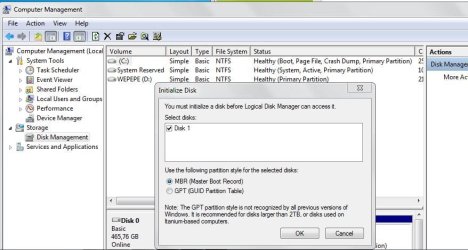
And everytime I go to disk management it's told me to intialize the disk. (the Ext.HD)
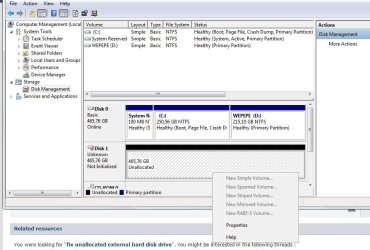
Well some say the other way to fix it is to format it, through the disk management with the "New Simple Volume" but I can't click it. PLEASE HELP ME!! :cry::cry::cry::cry::cry::cry::cry::cry:
 

Attachments

  • jjj.JPG
    jjj.JPG
    54.5 KB · Views: 2
  • wat.JPG
    wat.JPG
    64.7 KB · Views: 2
  • jk;.JPG
    jk;.JPG
    68.5 KB · Views: 2
  • help.JPG
    help.JPG
    85.5 KB · Views: 2

My Computer

Computer type
Laptop
Computer Manufacturer/Model Number
Asus
OS
Microsoft Windows 7 Professional 64-bit 7601 Multiprocessor Free Service Pack 1
CPU
Intel(R) Core(TM) i5-3317U CPU @ 1.70GHz
Motherboard
ASUSTeK COMPUTER INC. K46CB
Memory
4,00 GB
Graphics Card(s)
(1) Intel(R) HD Graphics 4000 (2) NVIDIA GeForce GT 740M
Sound Card
(1) NVIDIA Virtual Audio Device (Wave Extensible) (WDM) (2
Screen Resolution
1366 x 768
Hard Drives
Hitachi HTS545050A7E380 SCSI Disk Device
Antivirus
Baidu
Hello and welcome Wepepe mate if ti is just the data you want then try using this ditty of mine

BOOTABLE UBUNTU
Make a bootable Ubuntu disk http://www.ubuntu.com/download
Set the BIOS to boot from the optical when the machine boots it will show you a screen with TRY or INSTALL > select TRY not INSTALL
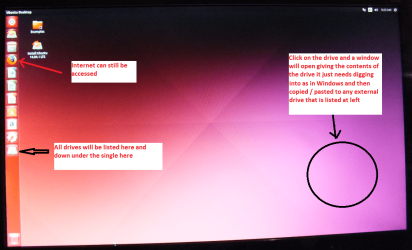
When it is finished - it takes very little time you will get a screen like in the pic .
Open the drive you want > User and dig down until you get to the data / settings you may be able to copy / paste the material you want to an external source or other installed drive doing this.
I am not sure if it will but I have recovered tons of data etc using this method both on "dead" or just plain drives that you cannot get data from using Windows.

Now there is another one you can use it is Linux Mint MATE but basically they run the same way. I use a disk as I don't like using sticks because it is a waste of one with just one bootable item on it. They both boot to the other OS if you set the BIOS boot order to where the Ubuntu or Linux is and it runs independent of Windows
 

Attachments

  • UBUNTU SCREEN X2.png
    UBUNTU SCREEN X2.png
    272.7 KB · Views: 3

My Computer

Computer type
PC/Desktop
Computer Manufacturer/Model Number
Own build (new) Desk1 / Asus ROG Win 7 / Desk2 1st build
OS
Desk1 7 Home Prem / Desk2 10 Pro / Main lap Asus ROG 10 Pro 2 laptop Toshiba 7 Pro Asus P2520 7 & 10
CPU
Desk1 i5 3750K / Laptop i7 GTX 860M / Desk2 i5 2500
Motherboard
Desk1 Asus P877-V / Desk2 Gigabyte H67 UD3H / Laptop ?
Memory
Desk1 8GB (1866) / Desk2 16GB (1333) / Laptop 8Gb DDR3
Graphics Card(s)
Desk 1& 2NVidia GTX 650 & Laptops on board Intel
Sound Card
Desk 1 & 2 -XONAR DG Realtek High Def audio Laptop
Monitor(s) Displays
Desk 1 Benq HD 2450 / Desk2 Philips 24" / Laptop 17.5"
Screen Resolution
1920x1080 D1 & D2 & Laptop 1
Hard Drives
Desk1 Samsung 120GB 830 SSD
Asus ROG 256GB 850 Pro SSD
Desk2 Samsung 840 256 SSD
Toshiba 120GB EVO
PSU
Desk 1 Corsair HX 1050/ Laptop ? / Desk 2 Corsair HX 650
Case
Desk 1 Cooler HAF XM ? Toshiba laptop / Desk2 Coolermaster
Cooling
Fans on all Desk1 -2 Desk2 - all Coolermasters 5 Laptop ?
Keyboard
Desk 1 MS Sidewinder X6 Desk 2 MS Sidewinder X 4
Mouse
Desk 1&2 - Gigabyte MS 900 gamer - laptop - Logitec wireless
Internet Speed
ADSL2+
Other Info
One other Desktop (tester) and spare Toshba laptop both with SSD's
Running Kaspersky 2016 ISS on all machines config'd identically
Logitec audio stereo systems on each machine (x3)
Canon MG5250MFC
Router/modem TP-Link running WPA2SK
thank you for the reply @ICIT2LOL :)

umm wait does that mean I have to run a different OS? does that mean My Windows 7 will be replace or something? So it's like I'm try to open my files in my External Hard Disk through a different OS?
 

My Computer

Computer type
Laptop
Computer Manufacturer/Model Number
Asus
OS
Microsoft Windows 7 Professional 64-bit 7601 Multiprocessor Free Service Pack 1
CPU
Intel(R) Core(TM) i5-3317U CPU @ 1.70GHz
Motherboard
ASUSTeK COMPUTER INC. K46CB
Memory
4,00 GB
Graphics Card(s)
(1) Intel(R) HD Graphics 4000 (2) NVIDIA GeForce GT 740M
Sound Card
(1) NVIDIA Virtual Audio Device (Wave Extensible) (WDM) (2
Screen Resolution
1366 x 768
Hard Drives
Hitachi HTS545050A7E380 SCSI Disk Device
Antivirus
Baidu
No Wepepe the Ubuntu will not replace the Windows it stays on the drive or whatever data is on the drive that has been put on it by Windows operating. The Ubuntu only operates while you have tha particular boot running but remember only use the TRY option the INSTALL will do just that!!

When you are finished shut the machine down remove the Ubuntu boot source ie disk or stick and when you restart it will open in Windows (after you have changed the boot order in the BIOS - having said that if there is nothing in the optical drive or USB ports then Windows will go looking for another boot source)

So in effect what you said at he end of your post is correct:) The data you see and want on that drive you will be able to just copy / paste to another drive, or stick that is listed when Ubuntu is open. The data is in effect just being duplicated. The best part about this system is even drives that cannot be opened in Windows can be seen into with Ubuntu or if you were using it that Linux Mint MATE (both are kind of related to each other amongst many other non Windows systems)
 

My Computer

Computer type
PC/Desktop
Computer Manufacturer/Model Number
Own build (new) Desk1 / Asus ROG Win 7 / Desk2 1st build
OS
Desk1 7 Home Prem / Desk2 10 Pro / Main lap Asus ROG 10 Pro 2 laptop Toshiba 7 Pro Asus P2520 7 & 10
CPU
Desk1 i5 3750K / Laptop i7 GTX 860M / Desk2 i5 2500
Motherboard
Desk1 Asus P877-V / Desk2 Gigabyte H67 UD3H / Laptop ?
Memory
Desk1 8GB (1866) / Desk2 16GB (1333) / Laptop 8Gb DDR3
Graphics Card(s)
Desk 1& 2NVidia GTX 650 & Laptops on board Intel
Sound Card
Desk 1 & 2 -XONAR DG Realtek High Def audio Laptop
Monitor(s) Displays
Desk 1 Benq HD 2450 / Desk2 Philips 24" / Laptop 17.5"
Screen Resolution
1920x1080 D1 & D2 & Laptop 1
Hard Drives
Desk1 Samsung 120GB 830 SSD
Asus ROG 256GB 850 Pro SSD
Desk2 Samsung 840 256 SSD
Toshiba 120GB EVO
PSU
Desk 1 Corsair HX 1050/ Laptop ? / Desk 2 Corsair HX 650
Case
Desk 1 Cooler HAF XM ? Toshiba laptop / Desk2 Coolermaster
Cooling
Fans on all Desk1 -2 Desk2 - all Coolermasters 5 Laptop ?
Keyboard
Desk 1 MS Sidewinder X6 Desk 2 MS Sidewinder X 4
Mouse
Desk 1&2 - Gigabyte MS 900 gamer - laptop - Logitec wireless
Internet Speed
ADSL2+
Other Info
One other Desktop (tester) and spare Toshba laptop both with SSD's
Running Kaspersky 2016 ISS on all machines config'd identically
Logitec audio stereo systems on each machine (x3)
Canon MG5250MFC
Router/modem TP-Link running WPA2SK
@ICIT2LOL umm I'm trying to try the Ubuntu through flashdisk cause I don't have the disk, I change the boot priorities in the BIOS but after that it said I have to remove my flashdisk or other media. And it didn't work, what should I do?
 

My Computer

Computer type
Laptop
Computer Manufacturer/Model Number
Asus
OS
Microsoft Windows 7 Professional 64-bit 7601 Multiprocessor Free Service Pack 1
CPU
Intel(R) Core(TM) i5-3317U CPU @ 1.70GHz
Motherboard
ASUSTeK COMPUTER INC. K46CB
Memory
4,00 GB
Graphics Card(s)
(1) Intel(R) HD Graphics 4000 (2) NVIDIA GeForce GT 740M
Sound Card
(1) NVIDIA Virtual Audio Device (Wave Extensible) (WDM) (2
Screen Resolution
1366 x 768
Hard Drives
Hitachi HTS545050A7E380 SCSI Disk Device
Antivirus
Baidu
never mind! I made it to the Ubuntu desktop, but my external harddisk was not detected :( it's just the same..
is there any other way? I even can't format my HD so then I able to recovery. What should I do now??? :confused:
 

My Computer

Computer type
Laptop
Computer Manufacturer/Model Number
Asus
OS
Microsoft Windows 7 Professional 64-bit 7601 Multiprocessor Free Service Pack 1
CPU
Intel(R) Core(TM) i5-3317U CPU @ 1.70GHz
Motherboard
ASUSTeK COMPUTER INC. K46CB
Memory
4,00 GB
Graphics Card(s)
(1) Intel(R) HD Graphics 4000 (2) NVIDIA GeForce GT 740M
Sound Card
(1) NVIDIA Virtual Audio Device (Wave Extensible) (WDM) (2
Screen Resolution
1366 x 768
Hard Drives
Hitachi HTS545050A7E380 SCSI Disk Device
Antivirus
Baidu
The we do have a problem can you hook the external to another machine?? if not then it s probably really bricked.
 

My Computer

Computer type
PC/Desktop
Computer Manufacturer/Model Number
Own build (new) Desk1 / Asus ROG Win 7 / Desk2 1st build
OS
Desk1 7 Home Prem / Desk2 10 Pro / Main lap Asus ROG 10 Pro 2 laptop Toshiba 7 Pro Asus P2520 7 & 10
CPU
Desk1 i5 3750K / Laptop i7 GTX 860M / Desk2 i5 2500
Motherboard
Desk1 Asus P877-V / Desk2 Gigabyte H67 UD3H / Laptop ?
Memory
Desk1 8GB (1866) / Desk2 16GB (1333) / Laptop 8Gb DDR3
Graphics Card(s)
Desk 1& 2NVidia GTX 650 & Laptops on board Intel
Sound Card
Desk 1 & 2 -XONAR DG Realtek High Def audio Laptop
Monitor(s) Displays
Desk 1 Benq HD 2450 / Desk2 Philips 24" / Laptop 17.5"
Screen Resolution
1920x1080 D1 & D2 & Laptop 1
Hard Drives
Desk1 Samsung 120GB 830 SSD
Asus ROG 256GB 850 Pro SSD
Desk2 Samsung 840 256 SSD
Toshiba 120GB EVO
PSU
Desk 1 Corsair HX 1050/ Laptop ? / Desk 2 Corsair HX 650
Case
Desk 1 Cooler HAF XM ? Toshiba laptop / Desk2 Coolermaster
Cooling
Fans on all Desk1 -2 Desk2 - all Coolermasters 5 Laptop ?
Keyboard
Desk 1 MS Sidewinder X6 Desk 2 MS Sidewinder X 4
Mouse
Desk 1&2 - Gigabyte MS 900 gamer - laptop - Logitec wireless
Internet Speed
ADSL2+
Other Info
One other Desktop (tester) and spare Toshba laptop both with SSD's
Running Kaspersky 2016 ISS on all machines config'd identically
Logitec audio stereo systems on each machine (x3)
Canon MG5250MFC
Router/modem TP-Link running WPA2SK
I tried to plug my HD to my other laptop but it's just the same.. :(
 

My Computer

Computer type
Laptop
Computer Manufacturer/Model Number
Asus
OS
Microsoft Windows 7 Professional 64-bit 7601 Multiprocessor Free Service Pack 1
CPU
Intel(R) Core(TM) i5-3317U CPU @ 1.70GHz
Motherboard
ASUSTeK COMPUTER INC. K46CB
Memory
4,00 GB
Graphics Card(s)
(1) Intel(R) HD Graphics 4000 (2) NVIDIA GeForce GT 740M
Sound Card
(1) NVIDIA Virtual Audio Device (Wave Extensible) (WDM) (2
Screen Resolution
1366 x 768
Hard Drives
Hitachi HTS545050A7E380 SCSI Disk Device
Antivirus
Baidu
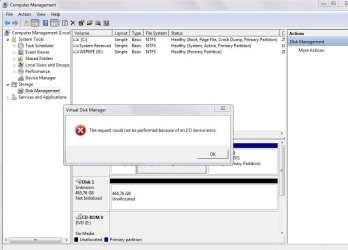
it says that an I/O device error. Have you tried replacing the USB Cord?
 

My Computer

Computer type
PC/Desktop
Computer Manufacturer/Model Number
HP
OS
Windows 7 Pro 32bit
CPU
Dual Core
Antivirus
Trend Micro
it says that an I/O device error. Have you tried replacing the USB Cord?
Good point Shottas but I am wondering if the external has a fixed lead or a plug in replaceable type?

The other thing that I finds rather odd is that the machine is telling Wepepe to remove devices perhaps that might be indicating a driver problem or even a dodgy USB port/s on the board? It is not out of the realms of possibilities that port/s have become "dry jointed" in which case they will need re soldering to the board but that is a long shot.

Wepepe mate as we have very few specs on this machine could you post ta least the machine's model number please - a full system specs would be better.
http://www.sevenforums.com/tutorials/180324-system-info-see-your-system-specs.html if we need more detailed stuff then HW Info can be used but leats see what the basics are first.
 

My Computer

Computer type
PC/Desktop
Computer Manufacturer/Model Number
Own build (new) Desk1 / Asus ROG Win 7 / Desk2 1st build
OS
Desk1 7 Home Prem / Desk2 10 Pro / Main lap Asus ROG 10 Pro 2 laptop Toshiba 7 Pro Asus P2520 7 & 10
CPU
Desk1 i5 3750K / Laptop i7 GTX 860M / Desk2 i5 2500
Motherboard
Desk1 Asus P877-V / Desk2 Gigabyte H67 UD3H / Laptop ?
Memory
Desk1 8GB (1866) / Desk2 16GB (1333) / Laptop 8Gb DDR3
Graphics Card(s)
Desk 1& 2NVidia GTX 650 & Laptops on board Intel
Sound Card
Desk 1 & 2 -XONAR DG Realtek High Def audio Laptop
Monitor(s) Displays
Desk 1 Benq HD 2450 / Desk2 Philips 24" / Laptop 17.5"
Screen Resolution
1920x1080 D1 & D2 & Laptop 1
Hard Drives
Desk1 Samsung 120GB 830 SSD
Asus ROG 256GB 850 Pro SSD
Desk2 Samsung 840 256 SSD
Toshiba 120GB EVO
PSU
Desk 1 Corsair HX 1050/ Laptop ? / Desk 2 Corsair HX 650
Case
Desk 1 Cooler HAF XM ? Toshiba laptop / Desk2 Coolermaster
Cooling
Fans on all Desk1 -2 Desk2 - all Coolermasters 5 Laptop ?
Keyboard
Desk 1 MS Sidewinder X6 Desk 2 MS Sidewinder X 4
Mouse
Desk 1&2 - Gigabyte MS 900 gamer - laptop - Logitec wireless
Internet Speed
ADSL2+
Other Info
One other Desktop (tester) and spare Toshba laptop both with SSD's
Running Kaspersky 2016 ISS on all machines config'd identically
Logitec audio stereo systems on each machine (x3)
Canon MG5250MFC
Router/modem TP-Link running WPA2SK
here..
 

Attachments

  • a'ldfnalk.JPG
    a'ldfnalk.JPG
    30.8 KB · Views: 4

My Computer

Computer type
Laptop
Computer Manufacturer/Model Number
Asus
OS
Microsoft Windows 7 Professional 64-bit 7601 Multiprocessor Free Service Pack 1
CPU
Intel(R) Core(TM) i5-3317U CPU @ 1.70GHz
Motherboard
ASUSTeK COMPUTER INC. K46CB
Memory
4,00 GB
Graphics Card(s)
(1) Intel(R) HD Graphics 4000 (2) NVIDIA GeForce GT 740M
Sound Card
(1) NVIDIA Virtual Audio Device (Wave Extensible) (WDM) (2
Screen Resolution
1366 x 768
Hard Drives
Hitachi HTS545050A7E380 SCSI Disk Device
Antivirus
Baidu
Back
Top