Solved Windows 7 x86 video driver for dell d800

phoenix416

New member
Local time
8:46 AM
Messages
4
Hey guys,

I've spent 3 days on finding the drivers for windows 7 x86 for a dell d800 laptop. I am not quiet sure which video car I have geforce 5200 or 5600

I've been trying to download old drivers that as the people said were compatible, but they are not unfortunately. I've tried to open them through a compatibility mode, still no luck.

Can you please help ?

Additionally, I have the default drivers that were install with the windows update, however, it gives me the maximum resolution of 1280x1024. When I select it, I loose like 1/3 of the screen in the bottom.
 

My Computer My Computer

At a glance

Windows 7 x86
OS
Windows 7 x86
Hey guys,

I've spent 3 days on finding the drivers for windows 7 x86 for a dell d800 laptop. I am not quiet sure which video car I have geforce 5200 or 5600

I've been trying to download old drivers that as the people said were compatible, but they are not unfortunately. I've tried to open them through a compatibility mode, still no luck.

Can you please help ?

Additionally, I have the default drivers that were install with the windows update, however, it gives me the maximum resolution of 1280x1024. When I select it, I loose like 1/3 of the screen in the bottom.
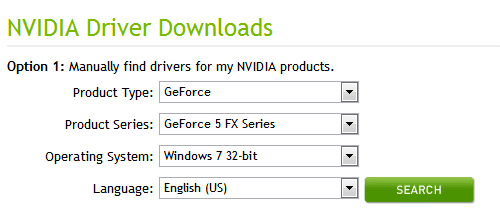
For the graphics drivers, use this link : NVIDIA Driver Downloads - Automatically Detect NVIDIA Products it will auto detect and update, it will need java to run.
Also to see what card you have you can go to start orb and type in "system information" once that opens under components, and then display you should find which card you have.
On top of all this please update your system specs on 7 forums using this http://www.sevenforums.com/tutorials/180324-system-info-see-your-system-specs.html
Also i believe your graphics card is : NVIDIA GeForce FX Go5600
 

My Computer My Computer

At a glance

Microsoft Windows 7 Ultimate 64-bit 7601 Mult...Intel(R) Core(TM) i7 CPU Q [email protected] (Turbo...4.00 GBATI Mobility Radeon HD 5730
Computer type
Laptop
Computer Manufacturer/Model Number
Lenovo Y560 Laptop
OS
Microsoft Windows 7 Ultimate 64-bit 7601 Multiprocessor Free Service Pack 1
CPU
Intel(R) Core(TM) i7 CPU Q [email protected] (Turbo boost 2.93ghz)
Motherboard
Lenovo KL3
Memory
4.00 GB
Graphics Card(s)
ATI Mobility Radeon HD 5730
Sound Card
(1) ATI HDMI Audio (2) Realtek High Definition Audio
Monitor(s) Displays
1024 x 768 x 32 bits (4294967296 colors) @ 60 Hz
Screen Resolution
1366 x 768 x 32 bits (4294967296 colors) @ 60 Hz
Hard Drives
WDC WD5000BEVT-24A0RT0
Mouse
Logitech M305
Internet Speed
10 Mbps
Antivirus
My brain
Browser
Google Chrome
Other Info
Trying my best to learn.
Hey guys,

I've spent 3 days on finding the drivers for windows 7 x86 for a dell d800 laptop. I am not quiet sure which video car I have geforce 5200 or 5600

I've been trying to download old drivers that as the people said were compatible, but they are not unfortunately. I've tried to open them through a compatibility mode, still no luck.

Can you please help ?

Additionally, I have the default drivers that were install with the windows update, however, it gives me the maximum resolution of 1280x1024. When I select it, I loose like 1/3 of the screen in the bottom.
For the graphics drivers, use this link : NVIDIA Driver Downloads - Automatically Detect NVIDIA Products it will auto detect and update, it will need java to run.
Also to see what card you have you can go to start orb and type in "system information" once that opens under components, and then display you should find which card you have.
On top of all this please update your system specs on 7 forums using this http://www.sevenforums.com/tutorials/180324-system-info-see-your-system-specs.html
Also i believe your graphics card is : NVIDIA GeForce FX Go5600

Thanks a lot for your response. The auto-detect on nvidia site cannot find my card configuration.
By looking a the sys info, it says

Adapter type : Geforce 4200 GO
Adapter Descr : Standard VGA Graphichs Adapter
 

My Computer My Computer

At a glance

Windows 7 x86
OS
Windows 7 x86

Attachments

  • Capture.PNG
    Capture.PNG
    4.9 KB · Views: 22

My Computer My Computer

At a glance

Microsoft Windows 7 Ultimate 64-bit 7601 Mult...Intel(R) Core(TM) i7 CPU Q [email protected] (Turbo...4.00 GBATI Mobility Radeon HD 5730
Computer type
Laptop
Computer Manufacturer/Model Number
Lenovo Y560 Laptop
OS
Microsoft Windows 7 Ultimate 64-bit 7601 Multiprocessor Free Service Pack 1
CPU
Intel(R) Core(TM) i7 CPU Q [email protected] (Turbo boost 2.93ghz)
Motherboard
Lenovo KL3
Memory
4.00 GB
Graphics Card(s)
ATI Mobility Radeon HD 5730
Sound Card
(1) ATI HDMI Audio (2) Realtek High Definition Audio
Monitor(s) Displays
1024 x 768 x 32 bits (4294967296 colors) @ 60 Hz
Screen Resolution
1366 x 768 x 32 bits (4294967296 colors) @ 60 Hz
Hard Drives
WDC WD5000BEVT-24A0RT0
Mouse
Logitech M305
Internet Speed
10 Mbps
Antivirus
My brain
Browser
Google Chrome
Other Info
Trying my best to learn.
Name Standard VGA Graphics Adapter
PNP Device ID PCI\VEN_10DE&DEV_0286&SUBSYS_01791028&REV_A1\4&2B74EC9&0&0008
Adapter Type GeForce4 4200 Go, (Standard display types) compatible
Adapter Description Standard VGA Graphics Adapter
Adapter RAM 32.00 MB (33,554,432 bytes)
Installed Drivers nvd3dum.dll
Driver Version 6.1.7600.16385
 

My Computer My Computer

At a glance

Windows 7 x86
OS
Windows 7 x86
Thanks! that helped, do not use the nvidia link and setup i told you.
Here are the correct graphics driver. Drivers and Downloads | Dell [United States]
Your version : 6.1.7600.16385
New version : 6.14.10.6742
I also found this for compatibility with that driver: Systems
inspiron 8500
inspiron 8600
Latitude D800
Operating Systems:
Windows 2000
Windows XP

I do not see windows 7 on there. How was windows 7, installed on this pc?
For this driver: Fixes & Enhancements
Add 1680X1050 resolution support and minor fixes.

Directions for download and install : Hard Drive Installation (via WinZip) with Setup.exe File for R88792.EXE

Download

1.Click Download Now, to download the file.
2.When the File Download window appears, click Save (Windows XP
users will click Save) this program to disk and click OK. The Save In:
window appears.
3.From the Save In: field, click the down arrow then click to
select Desktop and click Save. The file will download to your desktop.
4.If the Download Complete window appears, click Close. The file
icon appears on your desktop.


Install

1.Double-click the new icon on the desktop labeled R88792.EXE.
2.The Self-Extracting window appears and prompts you to extract or
unzip to C:\DELL\DRIVERS\r88792. Write down this path so the executable (I.e.
Setup.exe) file can be found later.
3.The Self-Extractor window appears.
4.Click OK.
5.After completing the file extraction, if the Self-Extractor
window is still open, close it.
6.Click the Start button and then click Run.
7.Type C:\DELL\DRIVERS\r88792 in the Open textbox and then click OK.
8.Follow the on-screen installation instructions.
 

My Computer My Computer

At a glance

Microsoft Windows 7 Ultimate 64-bit 7601 Mult...Intel(R) Core(TM) i7 CPU Q [email protected] (Turbo...4.00 GBATI Mobility Radeon HD 5730
Computer type
Laptop
Computer Manufacturer/Model Number
Lenovo Y560 Laptop
OS
Microsoft Windows 7 Ultimate 64-bit 7601 Multiprocessor Free Service Pack 1
CPU
Intel(R) Core(TM) i7 CPU Q [email protected] (Turbo boost 2.93ghz)
Motherboard
Lenovo KL3
Memory
4.00 GB
Graphics Card(s)
ATI Mobility Radeon HD 5730
Sound Card
(1) ATI HDMI Audio (2) Realtek High Definition Audio
Monitor(s) Displays
1024 x 768 x 32 bits (4294967296 colors) @ 60 Hz
Screen Resolution
1366 x 768 x 32 bits (4294967296 colors) @ 60 Hz
Hard Drives
WDC WD5000BEVT-24A0RT0
Mouse
Logitech M305
Internet Speed
10 Mbps
Antivirus
My brain
Browser
Google Chrome
Other Info
Trying my best to learn.
Thanks! that helped, do not use the nvidia link and setup i told you.
Here are the correct graphics driver. Drivers and Downloads | Dell [United States]
Your version : 6.1.7600.16385
New version : 6.14.10.6742
I also found this for compatibility with that driver: Systems
inspiron 8500
inspiron 8600
Latitude D800
Operating Systems:
Windows 2000
Windows XP

I do not see windows 7 on there. How was windows 7, installed on this pc?
For this driver: Fixes & Enhancements
Add 1680X1050 resolution support and minor fixes.

Directions for download and install : Hard Drive Installation (via WinZip) with Setup.exe File for R88792.EXE

Download

1.Click Download Now, to download the file.
2.When the File Download window appears, click Save (Windows XP
users will click Save) this program to disk and click OK. The Save In:
window appears.
3.From the Save In: field, click the down arrow then click to
select Desktop and click Save. The file will download to your desktop.
4.If the Download Complete window appears, click Close. The file
icon appears on your desktop.


Install

1.Double-click the new icon on the desktop labeled R88792.EXE.
2.The Self-Extracting window appears and prompts you to extract or
unzip to C:\DELL\DRIVERS\r88792. Write down this path so the executable (I.e.
Setup.exe) file can be found later.
3.The Self-Extractor window appears.
4.Click OK.
5.After completing the file extraction, if the Self-Extractor
window is still open, close it.
6.Click the Start button and then click Run.
7.Type C:\DELL\DRIVERS\r88792 in the Open textbox and then click OK.
8.Follow the on-screen installation instructions.

Thanks, you are awesome ! It did properly installed the drivers just as needed. You can't even imagine how I appreciate your help!
 

My Computer My Computer

At a glance

Windows 7 x86
OS
Windows 7 x86
That is what we are here for, and thank you:) Also thanks for marking solved, on top of this if you ever need any more assistance please make another thread:) If you are satisfied with me or any other here you can give us reputation, by click the scale looking icon in the right corner of this post or any other.
I appreciate your cooperation during the thread as well as your patience.
 

My Computer My Computer

At a glance

Microsoft Windows 7 Ultimate 64-bit 7601 Mult...Intel(R) Core(TM) i7 CPU Q [email protected] (Turbo...4.00 GBATI Mobility Radeon HD 5730
Computer type
Laptop
Computer Manufacturer/Model Number
Lenovo Y560 Laptop
OS
Microsoft Windows 7 Ultimate 64-bit 7601 Multiprocessor Free Service Pack 1
CPU
Intel(R) Core(TM) i7 CPU Q [email protected] (Turbo boost 2.93ghz)
Motherboard
Lenovo KL3
Memory
4.00 GB
Graphics Card(s)
ATI Mobility Radeon HD 5730
Sound Card
(1) ATI HDMI Audio (2) Realtek High Definition Audio
Monitor(s) Displays
1024 x 768 x 32 bits (4294967296 colors) @ 60 Hz
Screen Resolution
1366 x 768 x 32 bits (4294967296 colors) @ 60 Hz
Hard Drives
WDC WD5000BEVT-24A0RT0
Mouse
Logitech M305
Internet Speed
10 Mbps
Antivirus
My brain
Browser
Google Chrome
Other Info
Trying my best to learn.
Back
Top