Help! I inadvertantly might have messed up my external hard drive

Birddude007

New member
Member
Local time
2:04 AM
Messages
70
Hey folks I have one of those WD My Book external hard drives that I have been basically using as a storage device for all my images and other essential items I need.
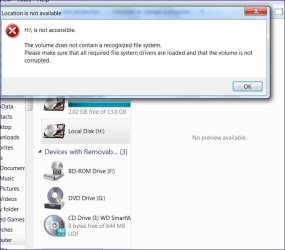
Somewhere along the way I must have done something wrong. Now when I have it connected to my laptop it only shows that it is showing as "CD Drive (I; ) WD Smartware" and at only one gigabyte, this is a 1 TB hard drive. I cannot get the computer to access the rest of the HD, it just shows it as an unrecognisable partition.
is there any thing out there I can use so that I can force the computer to access the rest of this hardrive?
Hopefully I have explained this right. The hard drive used to just be the I drive where I have stored tons of photos and other crucial information that I need to recover. I am thinking of just taking it into some computer guru locally to get all that info back, but I first want to know If I can take care of it myself.
 

My Computer My Computer

At a glance

Windows 7 64 bitAMD Dual Core 2,2 GHZ4GB, upgrading to 8GBintegrated
OS
Windows 7 64 bit
CPU
AMD Dual Core 2,2 GHZ
Motherboard
dunno...its a laptop
Memory
4GB, upgrading to 8GB
Graphics Card(s)
integrated
Sound Card
does it need one?
Monitor(s) Displays
built in
Screen Resolution
lots
Hard Drives
2 x 250 GB
PSU
wall outlet
Case
plastic
Cooling
swamp cooler
Keyboard
finger operated
Mouse
cat got it
Internet Speed
1 meg
I have two 2tb My Books and I find that one of them has to be unplugged and reconnected to be seen. Have you pulled the usb and reconnected and see what the lappy does. You can also power it totally down and power back up then report what your laptop does and see's.
Also what is it's exact model and model number?
 

My Computer My Computer

At a glance

Windows 7 Ultimate 64i7 3770k OC'd 4.6 @ 1.17v, also FX 8120 & i5 ...32 gb G.Skill Sniper DDR3 10-12-12-31 @ 2133XFX Radeon 7870 2GB DDR5
Computer type
PC/Desktop
Computer Manufacturer/Model Number
A blend of brains, brawn and dumb luck.
OS
Windows 7 Ultimate 64
CPU
i7 3770k OC'd 4.6 @ 1.17v, also FX 8120 & i5 miniITX
Motherboard
MSI P67A-GD80 b3
Memory
32 gb G.Skill Sniper DDR3 10-12-12-31 @ 2133
Graphics Card(s)
XFX Radeon 7870 2GB DDR5
Sound Card
Sound Blaster Z Series Card
Monitor(s) Displays
(2) LG LED 23" 1920 x 1080 2ms Monitors via mini d-port
Screen Resolution
1680 X 1050 p
Hard Drives
Samsung 256 gb 830 SSD sata III
(1) 1 tb WD Black
(2) 1 tb Hitachi deskmates/sata II
(2) 1 tb WD green/sata II
(2) 3 tb Seagate Barracuda
(1) 120 gb OCZ Vertex SS
(1) Drobo 5N w/5 Seagate 3tb
PSU
EVGA modular 1000G2 80% gold rating & APC 1200 RS
Case
CoolerMaster Storm Styker
Cooling
7 case fans 140mm & 120mm, NZXT Kraken X60
Keyboard
(2) Logitech Illuminated Keyboards (1) usb (1) wireless
Mouse
Logitech G700 & T-BC21 - nano nx for the laptop
Internet Speed
Basic 120mbps down
Antivirus
Trend Micro Titanium Max Security & Malwarebytes Premium
Browser
Chrome and IE 10
Other Info
5 Noctua case fans + 3 Noctua in p/p on NZXT cooler
Integrated hot swap drive bays for 2.5" Drives
(2) Lite-on dvd/cd/Blu Ray optical 22X
Integrated fan controller and led on/off
HP Officejet Pro 8630 all-n-one
Hot-swappable 3.5" hard drive bay
Netgear Nighthawk router
Asus USB 3 & sata 6 PCIe card
Vantec IDE to sata adptr./Ultra sata adptr
Lenovo L420 i5 lappy with m sata
Drobo 5N advanced NAS
Open disk management (Start-Right Click Computer-Manage-Disk Management), right click the drive you are having trouble with, click change drive letter and paths, remove it, then right click it again, Drive Letter and Paths, and add it. Just click OK in the box.
 

My Computer My Computer

At a glance

Windows 7 Home Premium 64-BitIntel Core i5-4670K8GB HyperX BLUIntel HD 4600 Graphics
Computer type
PC/Desktop
Computer Manufacturer/Model Number
Custom Build
OS
Windows 7 Home Premium 64-Bit
CPU
Intel Core i5-4670K
Motherboard
Gigabyte GA-Z87MX-D3H
Memory
8GB HyperX BLU
Graphics Card(s)
Intel HD 4600 Graphics
Monitor(s) Displays
Vizta V24Lmh
Screen Resolution
1920x1080x32 @60Hz
Hard Drives
Toshiba 1TB
PSU
Dynex 650W
Case
Antec GX700
Keyboard
Logitech mk270
Mouse
Logitech mk270
Internet Speed
50 mbps down/5 mbps up
Antivirus
MSE
Browser
Chrome
Other Info
First custom build, saving up for a GTX770!
Sounds to me like you have the WD software DVD in your DVD drive...
 

My Computer My Computer

At a glance

Vista Ultimate X64/ Windows 7 Dual-bootQ66004G OCZ PC2 8500 PlatinumEVGA 8800GTS Vid Card
Computer Manufacturer/Model Number
Self-Built
OS
Vista Ultimate X64/ Windows 7 Dual-boot
CPU
Q6600
Motherboard
ASUS P5K
Memory
4G OCZ PC2 8500 Platinum
Graphics Card(s)
EVGA 8800GTS Vid Card
Hard Drives
500G Seagate SATA
200G Seagate SATA
100G WD Caviar SATA
80G WD Caviar IDE
PSU
OCZ Elite 800W PSU
Case
RaidMax Smilodon Case
Open disk management (Start-Right Click Computer-Manage-Disk Management), right click the drive you are having trouble with, click change drive letter and paths, remove it, then right click it again, Drive Letter and Paths, and add it. Just click OK in the box.

I did that and and when I try to open the drive, it wants to reformat in order for me to use it
 

My Computer My Computer

At a glance

Windows 7 64 bitAMD Dual Core 2,2 GHZ4GB, upgrading to 8GBintegrated
OS
Windows 7 64 bit
CPU
AMD Dual Core 2,2 GHZ
Motherboard
dunno...its a laptop
Memory
4GB, upgrading to 8GB
Graphics Card(s)
integrated
Sound Card
does it need one?
Monitor(s) Displays
built in
Screen Resolution
lots
Hard Drives
2 x 250 GB
PSU
wall outlet
Case
plastic
Cooling
swamp cooler
Keyboard
finger operated
Mouse
cat got it
Internet Speed
1 meg
Sounds to me like you have the WD software DVD in your DVD drive...

No, it is not in the drive, I somehow or another managed to make it so that it always comes up like that....I know absolutely nothing about computers,
 

My Computer My Computer

At a glance

Windows 7 64 bitAMD Dual Core 2,2 GHZ4GB, upgrading to 8GBintegrated
OS
Windows 7 64 bit
CPU
AMD Dual Core 2,2 GHZ
Motherboard
dunno...its a laptop
Memory
4GB, upgrading to 8GB
Graphics Card(s)
integrated
Sound Card
does it need one?
Monitor(s) Displays
built in
Screen Resolution
lots
Hard Drives
2 x 250 GB
PSU
wall outlet
Case
plastic
Cooling
swamp cooler
Keyboard
finger operated
Mouse
cat got it
Internet Speed
1 meg
Open disk management (Start-Right Click Computer-Manage-Disk Management), right click the drive you are having trouble with, click change drive letter and paths, remove it, then right click it again, Drive Letter and Paths, and add it. Just click OK in the box.

I did that and and when I try to open the drive, it wants to reformat in order for me to use it

Oooh. I think something is wrong with the HD and you might have to format it in order to use it. I had the same thing happen to me with an SD card. Can you post a screenshot of the error your getting?

File and data recovery software to unformat, undelete files. Recover deleted files and recover formatted disk or corrupt drives - EaseUS Data Recovery Wizard.
http://www.sevenforums.com/tutorials/9733-screenshots-files-upload-post-seven-forums.html
 

My Computer My Computer

At a glance

Windows 7 Home Premium 64-BitIntel Core i5-4670K8GB HyperX BLUIntel HD 4600 Graphics
Computer type
PC/Desktop
Computer Manufacturer/Model Number
Custom Build
OS
Windows 7 Home Premium 64-Bit
CPU
Intel Core i5-4670K
Motherboard
Gigabyte GA-Z87MX-D3H
Memory
8GB HyperX BLU
Graphics Card(s)
Intel HD 4600 Graphics
Monitor(s) Displays
Vizta V24Lmh
Screen Resolution
1920x1080x32 @60Hz
Hard Drives
Toshiba 1TB
PSU
Dynex 650W
Case
Antec GX700
Keyboard
Logitech mk270
Mouse
Logitech mk270
Internet Speed
50 mbps down/5 mbps up
Antivirus
MSE
Browser
Chrome
Other Info
First custom build, saving up for a GTX770!
Here ya go-
Capture.JPG
 

My Computer My Computer

At a glance

Windows 7 64 bitAMD Dual Core 2,2 GHZ4GB, upgrading to 8GBintegrated
OS
Windows 7 64 bit
CPU
AMD Dual Core 2,2 GHZ
Motherboard
dunno...its a laptop
Memory
4GB, upgrading to 8GB
Graphics Card(s)
integrated
Sound Card
does it need one?
Monitor(s) Displays
built in
Screen Resolution
lots
Hard Drives
2 x 250 GB
PSU
wall outlet
Case
plastic
Cooling
swamp cooler
Keyboard
finger operated
Mouse
cat got it
Internet Speed
1 meg
Are there any drivers or software disks for it? You're gonna have to try some data recovery like the Easeus link in my post above yours, or take it to a local computer shop if not.
 

My Computer My Computer

At a glance

Windows 7 Home Premium 64-BitIntel Core i5-4670K8GB HyperX BLUIntel HD 4600 Graphics
Computer type
PC/Desktop
Computer Manufacturer/Model Number
Custom Build
OS
Windows 7 Home Premium 64-Bit
CPU
Intel Core i5-4670K
Motherboard
Gigabyte GA-Z87MX-D3H
Memory
8GB HyperX BLU
Graphics Card(s)
Intel HD 4600 Graphics
Monitor(s) Displays
Vizta V24Lmh
Screen Resolution
1920x1080x32 @60Hz
Hard Drives
Toshiba 1TB
PSU
Dynex 650W
Case
Antec GX700
Keyboard
Logitech mk270
Mouse
Logitech mk270
Internet Speed
50 mbps down/5 mbps up
Antivirus
MSE
Browser
Chrome
Other Info
First custom build, saving up for a GTX770!
Are there any drivers or software disks for it? You're gonna have to try some data recovery like the Easeus link in my post above yours, or take it to a local computer shop if not.

I am doing that right now and it is actually the first software that I tried that is actually scanning the drive, I will let you know the outcome.

PS: By the way- GO Jr! he really needs to get up on that wheel to get that championship, I have seen some serious improvement with him this year, hope he gets the Cup
 

My Computer My Computer

At a glance

Windows 7 64 bitAMD Dual Core 2,2 GHZ4GB, upgrading to 8GBintegrated
OS
Windows 7 64 bit
CPU
AMD Dual Core 2,2 GHZ
Motherboard
dunno...its a laptop
Memory
4GB, upgrading to 8GB
Graphics Card(s)
integrated
Sound Card
does it need one?
Monitor(s) Displays
built in
Screen Resolution
lots
Hard Drives
2 x 250 GB
PSU
wall outlet
Case
plastic
Cooling
swamp cooler
Keyboard
finger operated
Mouse
cat got it
Internet Speed
1 meg
So far it is finding all the folders.....kinda happy about that
 

My Computer My Computer

At a glance

Windows 7 64 bitAMD Dual Core 2,2 GHZ4GB, upgrading to 8GBintegrated
OS
Windows 7 64 bit
CPU
AMD Dual Core 2,2 GHZ
Motherboard
dunno...its a laptop
Memory
4GB, upgrading to 8GB
Graphics Card(s)
integrated
Sound Card
does it need one?
Monitor(s) Displays
built in
Screen Resolution
lots
Hard Drives
2 x 250 GB
PSU
wall outlet
Case
plastic
Cooling
swamp cooler
Keyboard
finger operated
Mouse
cat got it
Internet Speed
1 meg
What's showing up in Explorer is likely only the crapware which comes preinstalled on the HD which in most cases can be wiped off the HD with Diskpart Clean Command so it doesn't interfere. However for MyBook WD recommends: How to remove (disable / hide) the Virtual CD (VCD) for Windows or Mac OSX on a WD My Book or WD My Passport

When an external doesn't show up correctly in Explorer, I try to run a Disk Check on it and if that doesn't see it often times Partition Wizard's Check File System function will bring it back to life. How to Check File System? Partition Wizard Video Help. This may work since data Recovery sees your data.

There is also Partition Wizard Partition Recovery Wizard - Video Help which may be able to recover the entire missing data partition on the HD.

 
Last edited:
IMO, neither Windows nor any other conventional partition/formatting utility is going to touch the 700MB VCD partition which is in the UDF format as per your screenshot.( These may deal with the rest of the WD HDD.)

Do put in a screenshot of how your Western Digital HDD presents itself in the Disk Management.

Then we can try to decipher ways and means of getting it annihilated.
 

My Computer My Computer

At a glance

Windows 7 Home Premium 32 bit
OS
Windows 7 Home Premium 32 bit
What's showing up in Explorer is likely only the crapware which comes preinstalled on the HD which is best deleted or wiped off the HD with Diskpart Clean Command so it doesn't interfere.

When an external doesn't show up correctly in Explorer, I try to run a Disk Check on it and if that doesn't see it often times Partition Wizard's Check File System function will bring it back to life. How to Check File System? Partition Wizard Video Help.

This is especially likely to work since data Recovery sees your data.

Thanks for that info, for now I am gonna let Ease US Data Recovery tool do its job, I have never been able to take that other crapware off of that hard drive and because of that, it has been a constant pain in my arse. After I get all my nfo recovered I will try that software to remove that crapware.
 

My Computer My Computer

At a glance

Windows 7 64 bitAMD Dual Core 2,2 GHZ4GB, upgrading to 8GBintegrated
OS
Windows 7 64 bit
CPU
AMD Dual Core 2,2 GHZ
Motherboard
dunno...its a laptop
Memory
4GB, upgrading to 8GB
Graphics Card(s)
integrated
Sound Card
does it need one?
Monitor(s) Displays
built in
Screen Resolution
lots
Hard Drives
2 x 250 GB
PSU
wall outlet
Case
plastic
Cooling
swamp cooler
Keyboard
finger operated
Mouse
cat got it
Internet Speed
1 meg

My Computer My Computer

At a glance

Windows 7 64 bitAMD Dual Core 2,2 GHZ4GB, upgrading to 8GBintegrated
OS
Windows 7 64 bit
CPU
AMD Dual Core 2,2 GHZ
Motherboard
dunno...its a laptop
Memory
4GB, upgrading to 8GB
Graphics Card(s)
integrated
Sound Card
does it need one?
Monitor(s) Displays
built in
Screen Resolution
lots
Hard Drives
2 x 250 GB
PSU
wall outlet
Case
plastic
Cooling
swamp cooler
Keyboard
finger operated
Mouse
cat got it
Internet Speed
1 meg
The relevant questions here are:

1. Have you installed the Smartware and using it to backup your system?

2. Do you need the VCD feature that does the Hardware encryption or locking and unlocking the drive?

WD SmartWare FAQ - Western Digital Community

If you are not using the Smartware and the VCD enabled lock-unlock, just to hide the VCD, you will be installing another bit of garbageware " WD Smartware Virtual CD Manager" :)

As far as Smartware is concerned it has been rightly termed 'garbageware" by thousands of users expressing anger and agony in many threads in the WD community forum - including their latest version 1.6.2.

To thousands of users asking WD on how to remove the VCD, this is the reply:

"You buy a lockable drive and it comes with the necessities for locking and unlocking it; you buy a plain drive and you get a plain drive. Seems straight-forward.

As WD has repeatedly said, the VCDs will not be being removed from the lockables any time in the forseeable future -- that's why they sell the other lines of drives. And even if they did happen to remove them from future drives, that still won't change the one you've bought. It was built as being lockable. And so it shall remain, whether you hide the VCD"

An exasperated user commented:

"I started this thread. I was hoping for a solution, and you have it.

Just stop buying WD, and sell the one you have. I did and have no more problems with the VCD.I removed the VCD from my computer by unplugging the drive and selling it. I now steer clear of any WD product."

Now it is your drive - your concern - Try killing VCD once for all and use it as a plain drive to be used as any other external HDD or hide the pest and close your eyes to it. :)

( Not that I am a WD-basher. One of my Media Centers runs on WD drives in RAID 0. But now I go with Seagate only for externals.)
 

My Computer My Computer

At a glance

Windows 7 Home Premium 32 bit
OS
Windows 7 Home Premium 32 bit
Well folks....I used EaseUS data recovery and it has located all my files and is now asking where to recover the files to, the only place I have with enough room IS the hard drive that I am recovering from!, but when I point it to the hard drive it has a window pop up asking to reformat it. Do I throw the dice and risk erasing the information that I am trying to recover by reformatting the hard drive that it is sitting on or do I just leave the program open and go buy a new external HD?
Or should I try to find an online storage site? if so then which one is a good one? is there any that do a trial period?
 

My Computer My Computer

At a glance

Windows 7 64 bitAMD Dual Core 2,2 GHZ4GB, upgrading to 8GBintegrated
OS
Windows 7 64 bit
CPU
AMD Dual Core 2,2 GHZ
Motherboard
dunno...its a laptop
Memory
4GB, upgrading to 8GB
Graphics Card(s)
integrated
Sound Card
does it need one?
Monitor(s) Displays
built in
Screen Resolution
lots
Hard Drives
2 x 250 GB
PSU
wall outlet
Case
plastic
Cooling
swamp cooler
Keyboard
finger operated
Mouse
cat got it
Internet Speed
1 meg
Well folks....I used EaseUS data recovery and it has located all my files and is now asking where to recover the files to, the only place I have with enough room IS the hard drive that I am recovering from!, but when I point it to the hard drive it has a window pop up asking to reformat it. Do I throw the dice and risk erasing the information that I am trying to recover by reformatting the hard drive that it is sitting on or do I just leave the program open and go buy a new external HD?
Or should I try to find an online storage site? if so then which one is a good one? is there any that do a trial period?

Dropbox gives you 5 GB of storage free I believe, and SkyDrive gives you 7 GB per account I think.
 

My Computer My Computer

At a glance

Windows 7 Home Premium 64-BitIntel Core i5-4670K8GB HyperX BLUIntel HD 4600 Graphics
Computer type
PC/Desktop
Computer Manufacturer/Model Number
Custom Build
OS
Windows 7 Home Premium 64-Bit
CPU
Intel Core i5-4670K
Motherboard
Gigabyte GA-Z87MX-D3H
Memory
8GB HyperX BLU
Graphics Card(s)
Intel HD 4600 Graphics
Monitor(s) Displays
Vizta V24Lmh
Screen Resolution
1920x1080x32 @60Hz
Hard Drives
Toshiba 1TB
PSU
Dynex 650W
Case
Antec GX700
Keyboard
Logitech mk270
Mouse
Logitech mk270
Internet Speed
50 mbps down/5 mbps up
Antivirus
MSE
Browser
Chrome
Other Info
First custom build, saving up for a GTX770!
Did you ever try my suggestion to run Partition Wizard Partition Recovery Wizard - Video Help which very reliably will recover an entire deleted or missing partition to the same HD if it hasn't been partitioned over?

If you instead now feel stuck having started out with the last-resort data recovery with an app that is not recommended here, I would borrow another external HD unless you have a stable network which will reliably transfer files to another PC. I would not attempt to save the files to the same HD.
 
Back
Top