Solved Updating IE9

Anak

New member
Guru
Gold Member
VIP
Local time
2:43 PM
Messages
5,599
Well, I just updated our IE from 8 to 9, and so far I like it, but I do have some questions.

Some history:
The update to IE9 has been sitting hidden in our updates page for quite a while, I'm not sure how long, several months at least.

I did have a successful update for the out-of-band security bulletin for Internet Explorer back on Sept. 21st while running IE8:
Microsoft Security Bulletin MS12-063 - Critical : Cumulative Security Update for Internet Explorer (2744842)

After the IE update I checked for any new updates, and there were none.


First question:
Will the MS12-063 update intergrate with, and protect IE9, even though it was installed while I had IE8 on the machine?
Will all of the updates meant for IE8 act the same way?


Next:
How the heck do I add a search bar on the same row as that obscenely long address bar?

IE9 search bar.JPG


And:
When I would go forward or back some web pages, I would see this at the bottom:

Script warning IE9.JPG

It just did it again while I proofread this post, and viewed the script warning pic.


Is this a security setting, does anyone have some sound advice or links on these settings so IE9 won't be as intrusive?
  • My settings for the internet are at medium-high right now.
  • Local intranet are medium-low.
  • Trusted sites medium.
  • Restricted high.
 

My Computer

Computer type
PC/Desktop
Computer Manufacturer/Model Number
Gateway DX4831-01e (Mid-Tower Desktop)
OS
Originally Win 7 Hm Prem x64 Ver 6.1.7600 Build 7601-SP1 | Upgraded to Windows 10 December 14, 2019
CPU
Intel i3 530 2.93GHz, 2933MHz 2 Cores 4 Logical Processors
Motherboard
Gateway H57M01 133 megahertz
Memory
6GB of 1,333MHz DDR3 SDRAM
Graphics Card(s)
32MB Intel Graphics Media Accelerator HD IGChip
Sound Card
Realtek High Definition Audio
Monitor(s) Displays
Gateway HX2000 20inch TFT active matrix TN
Screen Resolution
1600 x 900 x 59 hertz
Hard Drives
WDC WD10EADS-00M2B0 [HDD] (1000.20 GB) -- drive 0,
HL-DT-ST DVDRAM GH41N [CD-ROM dr]
Four card readers, and Four USB 2.0
PSU
300watts.
Case
Mid-Tower Desktop
Cooling
Stock from Gateway
Keyboard
Natural Ergonomic Keyboard 4000, see Other Info
Mouse
Orig. Gateway wore out now using Insignia USB wired optical
Internet Speed
Vz FIOS 10ms png 57.64Mbps down 65.53Mbps up Speedtest.org
Antivirus
Zamana Anti-logger with Anti-malware, MSE, Windows Firewall,
Browser
IE11.0.9600.19399-Upd ver11.0.135, Firefox 68.0.1 x64
Other Info
System Specs by Belarc.

BIOS: American Megatrends Inc. P01-A0 11/17/2009

Replaced the MS 'Natural' Standard PS/2 Enhanced 101-102 Keyboard with a new Natural Ergonomic Keyboard 4000 on August 1st 2014.

Canon Pixma MG3222 Printer.

Updated to IE11 on 12102015 | Fios Quantum Router g1100

Additional AV: SpywareBlaster, manual Mbam, SAS
Hello Steve, many, if not most of the updates for IE apply to IE6 right up to IE9. And since you have them installed, should apply to IE9 after it's install. If there were missing updates specifically for IE9, Windows update would offer them, assuming you have looked through any hidden updates.

I personally have my tabs on the same level as the url bar

URL.jpg

http://www.sevenforums.com/tutorials/143757-internet-explorer-9-show-tabs-separate-row-turn-off.html

The address bar is now also the search bar. Just type your search string there and press enter. You can set up default search providers.

http://www.sevenforums.com/tutorials/119534-internet-explorer-9-search.html

And this new guy Brink also has a tute on the cross site scripting filter ;)

http://www.sevenforums.com/tutorial...cross-site-scripting-xss-filter-turn-off.html

A Guy
 

My Computer

Computer type
PC/Desktop
OS
Windows 10 Home x64
CPU
INTEL Core i5-750 Quad-Core 3.37GHz
Motherboard
ASUS P7P55D
Memory
HyperX Fury Black Series 8GB (2 x 4GB) 1866Mhz
Graphics Card(s)
EVGA GeForce GTX 750 Superclocked 1GB 128-Bit GDDR5
Monitor(s) Displays
LG 32MA68HY 32" IPS
Screen Resolution
1920 x 1080
Hard Drives
Samsung 840 Evo 120GB, SEAGATE 500GB Barracuda® 7200.12, SATA 3 Gb/s, 7200 RPM, 16MB cache
PSU
ANTEC TruePower New TP-550, 80 PLUS, 550W
Case
ANTEC Three Hundred Illusion
Cooling
COOLER MASTER Hyper 212 Plus, 4 x 120mm 1 x 140mm Noctua's
Internet Speed
85 + Mbps
Antivirus
Avast
Browser
Vivaldi
Hello Bill,

I believe you are correct that past security, and some program? updates for IE8 do apply to IE9. I am finding that any previous instances of IE8 on our machine have been superseded by IE9.

As I said earlier, but failed to mention they were specific to IE9; I checked for any new updates, and there were none. I did re-check hidden updates, and did not find any pertaining to IE9, but I do have five that are for Silverlight.

At one time I did have Silverlight installed on this machine, but after using it for a while I uninstalled it from Programs and Features.
But, there are Folders that remain, and I have learned that IE uses it to "enhance the IE browsing experience". So I am debating whether or not to install them because I do not have it as a plug-in for IE, but could get it here: Get Silverlight | Microsoft Silverlight

I probably should since I have those Folders, and then get the plug-in for IE.
What do you think?


I do like the Tabs in the same row as the Address/Search bar, never knew the Address/Search bar were combined. I am going to have to get used that.


It's too late now to check if I had XSS enabled in IE8, but it probably was, and I never had that warning with IE8.
Now that I am getting it does it mean there is a potential problem here at 7F, do you think that "new guy" would know anything about it?


I have noticed our ieSpell checker is not working. I have checked in add-ons, and it is listed, and enabled, but it doesn't work here at 7F. Should I try re-installing it?

More:
Name: ieSpell
Publisher: Not Available
Type: Browser Extension
Version: Not available
File date:
Date last accessed: ‎Yesterday, ‎September ‎29, ‎2012, ‏‎10:31 PM
Class ID: {0E17D5B7-9F5D-4FEE-9DF6-CA6EE38B68A8}
Use count: 942
Block count: 480
File: Not available
Folder: Not available


Thank you for bearing with me about my questions of uncertainty, and the links I would rather ask for a possible solution first before I go applying anything that was not needed.

I will probably have more since I am playing the "guinea pig" for the DW, and I will be able to answer her questions when she uses it.


Anak
 

My Computer

Computer type
PC/Desktop
Computer Manufacturer/Model Number
Gateway DX4831-01e (Mid-Tower Desktop)
OS
Originally Win 7 Hm Prem x64 Ver 6.1.7600 Build 7601-SP1 | Upgraded to Windows 10 December 14, 2019
CPU
Intel i3 530 2.93GHz, 2933MHz 2 Cores 4 Logical Processors
Motherboard
Gateway H57M01 133 megahertz
Memory
6GB of 1,333MHz DDR3 SDRAM
Graphics Card(s)
32MB Intel Graphics Media Accelerator HD IGChip
Sound Card
Realtek High Definition Audio
Monitor(s) Displays
Gateway HX2000 20inch TFT active matrix TN
Screen Resolution
1600 x 900 x 59 hertz
Hard Drives
WDC WD10EADS-00M2B0 [HDD] (1000.20 GB) -- drive 0,
HL-DT-ST DVDRAM GH41N [CD-ROM dr]
Four card readers, and Four USB 2.0
PSU
300watts.
Case
Mid-Tower Desktop
Cooling
Stock from Gateway
Keyboard
Natural Ergonomic Keyboard 4000, see Other Info
Mouse
Orig. Gateway wore out now using Insignia USB wired optical
Internet Speed
Vz FIOS 10ms png 57.64Mbps down 65.53Mbps up Speedtest.org
Antivirus
Zamana Anti-logger with Anti-malware, MSE, Windows Firewall,
Browser
IE11.0.9600.19399-Upd ver11.0.135, Firefox 68.0.1 x64
Other Info
System Specs by Belarc.

BIOS: American Megatrends Inc. P01-A0 11/17/2009

Replaced the MS 'Natural' Standard PS/2 Enhanced 101-102 Keyboard with a new Natural Ergonomic Keyboard 4000 on August 1st 2014.

Canon Pixma MG3222 Printer.

Updated to IE11 on 12102015 | Fios Quantum Router g1100

Additional AV: SpywareBlaster, manual Mbam, SAS

You installed SP1, so I'm suspect it included whatever IE9 updates that had accumulated up to that point as well.

I personally never installed Silverlight. I believe the "enhanced IE browsing experience" would only be being able to view Silverlight content, which doesn't appear for me too often. But I get the "install Silverlight to view this content" instead of the vid, for instance. This has been, from memory, 100% on Microsoft pages.

I so rarely use IE, and have never here at 7F, I can't speak to the XSS, or the spellcheck even, sorry. Opera has a great, built in spellcheck that saves me ;)

Let's see what the VIP's think :D

A Guy
 

My Computer

Computer type
PC/Desktop
OS
Windows 10 Home x64
CPU
INTEL Core i5-750 Quad-Core 3.37GHz
Motherboard
ASUS P7P55D
Memory
HyperX Fury Black Series 8GB (2 x 4GB) 1866Mhz
Graphics Card(s)
EVGA GeForce GTX 750 Superclocked 1GB 128-Bit GDDR5
Monitor(s) Displays
LG 32MA68HY 32" IPS
Screen Resolution
1920 x 1080
Hard Drives
Samsung 840 Evo 120GB, SEAGATE 500GB Barracuda® 7200.12, SATA 3 Gb/s, 7200 RPM, 16MB cache
PSU
ANTEC TruePower New TP-550, 80 PLUS, 550W
Case
ANTEC Three Hundred Illusion
Cooling
COOLER MASTER Hyper 212 Plus, 4 x 120mm 1 x 140mm Noctua's
Internet Speed
85 + Mbps
Antivirus
Avast
Browser
Vivaldi
FWIW, the Search bar no longer exists in IE9. you can search direct from the address bar, and pick your search engine from the dropdown that appears as soon as you start typing.

...as far as the x-site scripting warning, I can only recall ever seeing it once - and the site was a dodgy one.
I'd reset all Security Zone settings to Default, and see what happens
 

My Computer

Computer type
Laptop
Computer Manufacturer/Model Number
Asus K52F or Lenovo B51-80
OS
Win 7 x64 Home Premium (and x86 VirtualBox VM)/Win10
CPU
i3 370M/i7 6500U
Motherboard
Asus/Lenovo
Memory
8GB - finally :)/8GB
Graphics Card(s)
it's an i3, dude!/dual Intel&nVidia
Sound Card
onboard
Monitor(s) Displays
15.6" built-in
Screen Resolution
1366x768/1920x1080
Hard Drives
750GB Seagate internal
Sundry external drives attached to other computers on the local network
1TB SSD on the Lenovo
PSU
n/a
Internet Speed
as much as I can get - usually on a dongle/phone, so <1MB/s
Antivirus
MSE/Defender
Browser
IE11/12/Edge/Chrome/FF(if I must)
iespell works fine for me on SF. If you installed it in ie8, you may have to install it again for ie9. (just a guess) I have installed Silverlight and uninstalled it. I really see not much difference, but will probably install it again if Bill is right. Once you get used to the search bar/address bar I think you will like it. It took me a while, but I like it better this way. Either that or I'm just used to it now.
 

My Computers

System One System Two

  • Computer type
    PC/Desktop
    Computer Manufacturer/Model Number
    ALWAYS UNDER CONSTRUCTION
    OS
    Windows 11 Pro
    CPU
    Ryzen 9 5900X
    Motherboard
    Asus X570 Crosshair Viii Hero
    Memory
    32GB G Skill DDR4-3600
    Graphics Card(s)
    EVGA RTX 3080 FTW 3 Ultra
    Sound Card
    On Board/Sennheiser PC37X Headset
    Monitor(s) Displays
    3 X Asus 27"
    Screen Resolution
    2560x1440
    Hard Drives
    2 X 1 TB NVME drives
    PSU
    EVGA 850
    Case
    Phanteks Eclipse P400A
    Cooling
    EVGA 280 AIO
    Keyboard
    Logitech G510s/ Logitech G13
    Mouse
    Logitech G502
    Internet Speed
    24/1
    Antivirus
    ESET/MBAM Pro/SAS Pro
    Browser
    Chrome/ Firefox/ Edge
  • Computer type
    Laptop
    System Manufacturer/Model Number
    Dell 16 Plus
    OS
    Windows 11 Pro
    CPU
    Intel Ultra 9 288V
    Memory
    32 GB LPDDR5X 8533
    Monitor(s) Displays
    16" Mini-LED HDR600 Touch 90 Hz
    Screen Resolution
    2560X1600
    Hard Drives
    1 TB NVME
Silverlight is dying technology - MS have pretty much abandoned it, is my understanding?

HTML5 is supposed to take over from Flash/SWF/SL and Win8 is supposed to hasten their demise (can't be soon enough with the number of vulnerabilities that Flash is exhibiting!)
 

My Computer

Computer type
Laptop
Computer Manufacturer/Model Number
Asus K52F or Lenovo B51-80
OS
Win 7 x64 Home Premium (and x86 VirtualBox VM)/Win10
CPU
i3 370M/i7 6500U
Motherboard
Asus/Lenovo
Memory
8GB - finally :)/8GB
Graphics Card(s)
it's an i3, dude!/dual Intel&nVidia
Sound Card
onboard
Monitor(s) Displays
15.6" built-in
Screen Resolution
1366x768/1920x1080
Hard Drives
750GB Seagate internal
Sundry external drives attached to other computers on the local network
1TB SSD on the Lenovo
PSU
n/a
Internet Speed
as much as I can get - usually on a dongle/phone, so <1MB/s
Antivirus
MSE/Defender
Browser
IE11/12/Edge/Chrome/FF(if I must)
~~~
First question:
Will the MS12-063 update intergrate with, and protect IE9, even though it was installed while I had IE8 on the machine?
Will all of the updates meant for IE8 act the same way?
~~~
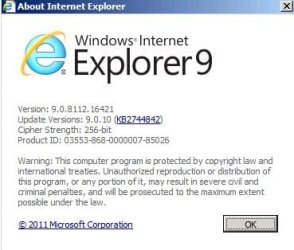
I'm not sure if all of the updates meant for IE8 will act the same way, but the "Help > About" screen should show you if the latest patch is applied.

IE9-about.JPG
 

My Computer

Computer type
Laptop
Computer Manufacturer/Model Number
Employer provided Dell Latitude
OS
W7 Pro SP1 64bit
CPU
i7
Memory
8GB
Graphics Card(s)
Intel HD Graphics
Hard Drives
crappy SSD
Antivirus
Employer mandated Symantec Endpoint Protection
Browser
Pale Moon 64bit, IE11 64bit & Chrome 64bit
I have noticed our ieSpell checker is not working. I have checked in add-ons, and it is listed, and enabled, but it doesn't work here at 7F. Should I try re-installing it?

More:
Name: ieSpell
Publisher: Not Available
Type: Browser Extension
Version: Not available
File date:
Date last accessed: ‎Yesterday, ‎September ‎29, ‎2012, ‏‎10:31 PM
Class ID: {0E17D5B7-9F5D-4FEE-9DF6-CA6EE38B68A8}
Use count: 942
Block count: 480
File: Not available
Folder: Not available

Anak

Do you happen to have CCleaner installed? If yes, look at Tools > Startup button > Internet Explorer tab. Make sure that ieSpell and ieSpell Options are both listed and enabled. If they're not listed and enabled ieSpell won't work even though they're listed and enabled in add-ons. At least that's how it is for my Sony Vaio and Dell Vostro.
 

My Computer

Computer type
Laptop
Computer Manufacturer/Model Number
Sony Vaio VPCEB47GM Laptop
OS
Win 7 Pro 64-bit
CPU
Intel i5 2.4 Ghz
Memory
8GB DDR3
Graphics Card(s)
Intel HD 3000
Sound Card
IDT High Definition
Monitor(s) Displays
15.6 WGXA Anti-Glare LED
Screen Resolution
1280x800
Hard Drives
640Gb 7200rpm
Antivirus
MSE
Browser
Opera (primary) with IE9 backup
You installed SP1, so I'm suspect it included whatever IE9 updates that had accumulated up to that point as well.

I personally never installed Silverlight. I believe the "enhanced IE browsing experience" would only be being able to view Silverlight content, which doesn't appear for me too often. But I get the "install Silverlight to view this content" instead of the vid, for instance. This has been, from memory, 100% on Microsoft pages.

I so rarely use IE, and have never here at 7F, I can't speak to the XSS, or the spellcheck even, sorry. Opera has a great, built in spellcheck that saves me ;)

Let's see what the VIP's think :D

A Guy
The Calvary has arrived!

FWIW, the Search bar no longer exists in IE9. you can search direct from the address bar, and pick your search engine from the dropdown that appears as soon as you start typing.

...as far as the x-site scripting warning, I can only recall ever seeing it once - and the site was a dodgy one.
I'd reset all Security Zone settings to Default, and see what happens
Thank you for the FYI Noel, and I'm on the reset.

iespell works fine for me on SF. If you installed it in ie8, you may have to install it again for ie9. (just a guess) I have installed Silverlight and uninstalled it. I really see not much difference, but will probably install it again if Bill is right. Once you get used to the search bar/address bar I think you will like it. It took me a while, but I like it better this way. Either that or I'm just used to it now.
I'm going to try a reinstall on the ieSpell essenbe, yes all good things take time.

Silverlight is dying technology - MS have pretty much abandoned it, is my understanding?
After reading A Guy's, essenbe's, and now yours Noel I'm going to forget about Silverlight, but I still wonder if I should install those updates since I still have left over files onboard.

I'm not sure if all of the updates meant for IE8 will act the same way, but the "Help > About" screen should show you if the latest patch is applied.View attachment 234467
I have what you have. Does that highlighted KB2744842 mean we're fully updated to that point or we have to apply it again?

Do you happen to have CCleaner installed? If yes, look at Tools > Startup button > Internet Explorer tab. Make sure that ieSpell and ieSpell Options are both listed and enabled. If they're not listed and enabled ieSpell won't work even though they're listed and enabled in add-ons. At least that's how it is for my Sony Vaio and Dell Vostro.
They are both there, and enabled in CCleaner, I am going to try essenbe's tip for a reinstall, and see if that wakes it up.


There was something else odd that occurred while using IE9, but I can't seem to remember it now, oh well maybe later.
I have to start writing this stuff down, as I have Sometimer's, sometimes I remember, sometimes I don't.


Thank You's to all for pitchin' in!


EDIT:

Just remembered, I'm having the same problem with Adobe PDF Reader.
I went back to CC, and it was listed, but not enabled so I clicked on it, and set it to enabled, it's working now, but I still get the sites warning that I need to download, and install the plug-in. :confused:
 
Last edited:

My Computer

Computer type
PC/Desktop
Computer Manufacturer/Model Number
Gateway DX4831-01e (Mid-Tower Desktop)
OS
Originally Win 7 Hm Prem x64 Ver 6.1.7600 Build 7601-SP1 | Upgraded to Windows 10 December 14, 2019
CPU
Intel i3 530 2.93GHz, 2933MHz 2 Cores 4 Logical Processors
Motherboard
Gateway H57M01 133 megahertz
Memory
6GB of 1,333MHz DDR3 SDRAM
Graphics Card(s)
32MB Intel Graphics Media Accelerator HD IGChip
Sound Card
Realtek High Definition Audio
Monitor(s) Displays
Gateway HX2000 20inch TFT active matrix TN
Screen Resolution
1600 x 900 x 59 hertz
Hard Drives
WDC WD10EADS-00M2B0 [HDD] (1000.20 GB) -- drive 0,
HL-DT-ST DVDRAM GH41N [CD-ROM dr]
Four card readers, and Four USB 2.0
PSU
300watts.
Case
Mid-Tower Desktop
Cooling
Stock from Gateway
Keyboard
Natural Ergonomic Keyboard 4000, see Other Info
Mouse
Orig. Gateway wore out now using Insignia USB wired optical
Internet Speed
Vz FIOS 10ms png 57.64Mbps down 65.53Mbps up Speedtest.org
Antivirus
Zamana Anti-logger with Anti-malware, MSE, Windows Firewall,
Browser
IE11.0.9600.19399-Upd ver11.0.135, Firefox 68.0.1 x64
Other Info
System Specs by Belarc.

BIOS: American Megatrends Inc. P01-A0 11/17/2009

Replaced the MS 'Natural' Standard PS/2 Enhanced 101-102 Keyboard with a new Natural Ergonomic Keyboard 4000 on August 1st 2014.

Canon Pixma MG3222 Printer.

Updated to IE11 on 12102015 | Fios Quantum Router g1100

Additional AV: SpywareBlaster, manual Mbam, SAS
I hope it helped a little. I'm just glad to be listed amongst the Calvary.
 

My Computers

System One System Two

  • Computer type
    PC/Desktop
    Computer Manufacturer/Model Number
    ALWAYS UNDER CONSTRUCTION
    OS
    Windows 11 Pro
    CPU
    Ryzen 9 5900X
    Motherboard
    Asus X570 Crosshair Viii Hero
    Memory
    32GB G Skill DDR4-3600
    Graphics Card(s)
    EVGA RTX 3080 FTW 3 Ultra
    Sound Card
    On Board/Sennheiser PC37X Headset
    Monitor(s) Displays
    3 X Asus 27"
    Screen Resolution
    2560x1440
    Hard Drives
    2 X 1 TB NVME drives
    PSU
    EVGA 850
    Case
    Phanteks Eclipse P400A
    Cooling
    EVGA 280 AIO
    Keyboard
    Logitech G510s/ Logitech G13
    Mouse
    Logitech G502
    Internet Speed
    24/1
    Antivirus
    ESET/MBAM Pro/SAS Pro
    Browser
    Chrome/ Firefox/ Edge
  • Computer type
    Laptop
    System Manufacturer/Model Number
    Dell 16 Plus
    OS
    Windows 11 Pro
    CPU
    Intel Ultra 9 288V
    Memory
    32 GB LPDDR5X 8533
    Monitor(s) Displays
    16" Mini-LED HDR600 Touch 90 Hz
    Screen Resolution
    2560X1600
    Hard Drives
    1 TB NVME
If Silverlight is installed, then it must be updated - older versions have security holes.
Either update, or uninstall.
 

My Computer

Computer type
Laptop
Computer Manufacturer/Model Number
Asus K52F or Lenovo B51-80
OS
Win 7 x64 Home Premium (and x86 VirtualBox VM)/Win10
CPU
i3 370M/i7 6500U
Motherboard
Asus/Lenovo
Memory
8GB - finally :)/8GB
Graphics Card(s)
it's an i3, dude!/dual Intel&nVidia
Sound Card
onboard
Monitor(s) Displays
15.6" built-in
Screen Resolution
1366x768/1920x1080
Hard Drives
750GB Seagate internal
Sundry external drives attached to other computers on the local network
1TB SSD on the Lenovo
PSU
n/a
Internet Speed
as much as I can get - usually on a dongle/phone, so <1MB/s
Antivirus
MSE/Defender
Browser
IE11/12/Edge/Chrome/FF(if I must)
~~~
I'm not sure if all of the updates meant for IE8 will act the same way, but the "Help > About" screen should show you if the latest patch is applied.View attachment 234467
I have what you have. Does that highlighted KB2744842 mean we're fully updated to that point or we have to apply it again?
~~~
I would not think that you would need to apply it again. Part of the installation process for IE9 has it go get updates. A few times, I've disabled all connections to the internet and installed IE9 from a stand alone file... then let it update once the computer was back on a broadband connection. So, my thinking is: if IE9 needed to re-apply that patch, it would do so during the installation process for IE9.

I looked at systems that had IE9 before that patch came out and ones that got IE9 today - the "Help > About" screen looked the same. For systems that had IE9 and got patched, KB2744842 shows in the list of installed updates. For systems that had IE9 installed after that patch came out, KB2744842 is not listed. Maybe the IE9 installer has changed to include a fix for what is being patched.

I'm not sure why MS make things so confusing by referencing a KB on the "Help > About" screen that is not the KB# that will appear in the list of installed updates.
:-(
 

My Computer

Computer type
Laptop
Computer Manufacturer/Model Number
Employer provided Dell Latitude
OS
W7 Pro SP1 64bit
CPU
i7
Memory
8GB
Graphics Card(s)
Intel HD Graphics
Hard Drives
crappy SSD
Antivirus
Employer mandated Symantec Endpoint Protection
Browser
Pale Moon 64bit, IE11 64bit & Chrome 64bit
Windows Update should give you needed updates, you can check manually.
I have Silver Light and only have seen it on MS sites as someone said.
I use iespell and had startup DISabled in CCleaner and it still works, it shows up in the right click context menu or by clicking the ABC check mark in replying to posts here on SF.

I had the XSS warning here on SF a few times, but Admin couldn't explain it. :confused:
 

My Computer

Computer type
PC/Desktop
Computer Manufacturer/Model Number
Home Built Desktop By DataTech
OS
Windows 7 Ultimate X64 SP1
CPU
Intel i5-2550K, Differing ~4.4-4.8GHz No built in GPU
Motherboard
ASUS P8Z68-V PRO/GEN3
Memory
16GB G.Skill Sniper 1866MHz @ 2133MHz 2x8GB
Graphics Card(s)
ASUS GTX650TIB-DC2OC-2GD5, (650TI Boost)
Sound Card
Onboard Realtek 5-1
Monitor(s) Displays
Samsung P2570HD
Screen Resolution
1920x1080
Hard Drives
Samsung 840 Pro 256GB SSD for OS, 500GB Seagate Constellation (Enterprise drive) for Data
PSU
Corsair HX650W
Case
Inwin Dragon Rider
Cooling
Hyper 212 EVO w/two Noctua fans, push-pull, @1300 RPM
Keyboard
E-Z Eyes, bright yellow keys with large characters
Mouse
steelseries SENSEI Laser Pro Gaming
Internet Speed
48-51Mbs Mbs down, 11 Mbs up Xfinity Cable
Antivirus
Norton Internet Security 2013
Browser
IE 10, Opera, Pale Moon if needed
Other Info
4 case fans, LG BluRay-RE, ASUS DVD-RW, Mr. Fusion power supply, 1.21 gigawatts.
If you decide to uninstall - I suggest hiding all Silverlight updates (Right click on the update in WU and select hide - you can if you wish, restore updates anytime)

If Silverlight is installed, then it must be updated - older versions have security holes.
Either update, or uninstall.
 

My Computer

Computer type
Laptop
Computer Manufacturer/Model Number
HP Pavilion dv6-6c10us
OS
x64 (6.3.9600) Win8.1 Pro & soon dual boot x64 (6.1.7601) Win7_SP1 HomePrem
CPU
AMD A6-3420M APU with Radeon(tm) HD Graphics
Motherboard
Hewlett-Packard 1805
Memory
6.00 GB
Graphics Card(s)
AMD Radeon(TM) HD 6520G
Sound Card
(1) AMD High Definition Audio Device (2) IDT High Definiti
Monitor(s) Displays
HP W2072a 20" LCD (1600 x 900) @ 60 Hz
Screen Resolution
1366 x 768 x 32 bits (4294967296 colors) @ 60 Hz
Hard Drives
ST640LM0 00 HM641JI SATA Disk Device
Keyboard
Logitech k520 wireless KB
Mouse
Logitech m320 wireless mouse (bundled with KB)
Internet Speed
15/5 | 54 MB Wireless 'n'
Antivirus
Realtime: Defender or Avast | On-demand: Malwarebytes, ESET
Browser
IE 11 on Win8, IE 10 on win 7
Other Info
Media: [Gimp, Audacity, VLC] || Comm: [WEmail 2012, Skype] || Productivity: [OpenOffice,| Textpad] || Utils: [Sysinternals, cCleaner, Speccy, Defraggler]
Just remembered, I'm having the same problem with Adobe PDF Reader.
I went back to CC, and it was listed, but not enabled so I clicked on it, and set it to enabled, it's working now, but I still get the sites warning that I need to download, and install the plug-in. :confused:
Hey mate, figured I'd drop a note here too.

Any add-on you encounter with problems, just reinstall them (uninstall, reinstall). That usually takes care of it, and it is simple enough.

Also, I thought the tabs came next to the address bar in IE automatically? Mine are that way and I don't remember changing it, so I assumed IE9 put tabs up there on a single 'line'. Could be wrong on that point though.

Hope you enjoy it, I wasn't a fan of IE until IE9, now I use it exclusively. But different browsers offer different things based on preference, so everyone will like something different. No need to conform! :D
 

My Computer

Computer type
PC/Desktop
Computer Manufacturer/Model Number
Custom Asus Build
OS
Microsoft Windows 8.1 Pro 64-bit
CPU
Intel(R) Core(TM) i3-4130 CPU @ 3.40GHz
Motherboard
B85M-E
Memory
8.00 GB
Graphics Card(s)
None
Sound Card
Realtek High Definition Audio
Monitor(s) Displays
Asus 23.6" Monitor
Screen Resolution
1920 x 1080 x 32 bits (4294967296 colors) @ 60 Hz
Hard Drives
INTEL SSDSC2BW180A4
Samsung SSD 840 PRO Series
PSU
Seasonic S12II-380Bronze
Case
Lian Li
Cooling
Fan, Passive
Keyboard
Logitech K120
Mouse
Microsoft Touch Mouse
Internet Speed
4ms Ping, 19.0 Mbps Download, 19.0 Mbps Upload
Antivirus
Eset Endpoint
Browser
Internet Explorer, Chrome
I hope it helped a little. I'm just glad to be listed amongst the Calvary.
Mate, 3 Bronzes and you question your status? Your humility is respected :)
 

My Computer

Computer type
PC/Desktop
Computer Manufacturer/Model Number
Custom Asus Build
OS
Microsoft Windows 8.1 Pro 64-bit
CPU
Intel(R) Core(TM) i3-4130 CPU @ 3.40GHz
Motherboard
B85M-E
Memory
8.00 GB
Graphics Card(s)
None
Sound Card
Realtek High Definition Audio
Monitor(s) Displays
Asus 23.6" Monitor
Screen Resolution
1920 x 1080 x 32 bits (4294967296 colors) @ 60 Hz
Hard Drives
INTEL SSDSC2BW180A4
Samsung SSD 840 PRO Series
PSU
Seasonic S12II-380Bronze
Case
Lian Li
Cooling
Fan, Passive
Keyboard
Logitech K120
Mouse
Microsoft Touch Mouse
Internet Speed
4ms Ping, 19.0 Mbps Download, 19.0 Mbps Upload
Antivirus
Eset Endpoint
Browser
Internet Explorer, Chrome
I hope it helped a little. I'm just glad to be listed amongst the Calvary.
Yup you are one of the masters Steve. However it should be cavalry, Calvary is where Jesus' cross was. ;)
 

My Computer

Computer type
PC/Desktop
Computer Manufacturer/Model Number
Home Built Desktop By DataTech
OS
Windows 7 Ultimate X64 SP1
CPU
Intel i5-2550K, Differing ~4.4-4.8GHz No built in GPU
Motherboard
ASUS P8Z68-V PRO/GEN3
Memory
16GB G.Skill Sniper 1866MHz @ 2133MHz 2x8GB
Graphics Card(s)
ASUS GTX650TIB-DC2OC-2GD5, (650TI Boost)
Sound Card
Onboard Realtek 5-1
Monitor(s) Displays
Samsung P2570HD
Screen Resolution
1920x1080
Hard Drives
Samsung 840 Pro 256GB SSD for OS, 500GB Seagate Constellation (Enterprise drive) for Data
PSU
Corsair HX650W
Case
Inwin Dragon Rider
Cooling
Hyper 212 EVO w/two Noctua fans, push-pull, @1300 RPM
Keyboard
E-Z Eyes, bright yellow keys with large characters
Mouse
steelseries SENSEI Laser Pro Gaming
Internet Speed
48-51Mbs Mbs down, 11 Mbs up Xfinity Cable
Antivirus
Norton Internet Security 2013
Browser
IE 10, Opera, Pale Moon if needed
Other Info
4 case fans, LG BluRay-RE, ASUS DVD-RW, Mr. Fusion power supply, 1.21 gigawatts.
Perhaps Calvary was intended - sometimes computers make me get on my kness and ask the universe for guidance :devil:
.....The Calvary has arrived!

.....
hmmmmm, I just installed speckie but it's not working either. ican Miss Speeel wurds as mulch as I'm waunted.
Perhaps a reload of IE - perhaps pinning Sevenforums is causing it?????
 

My Computer

Computer type
Laptop
Computer Manufacturer/Model Number
HP Pavilion dv6-6c10us
OS
x64 (6.3.9600) Win8.1 Pro & soon dual boot x64 (6.1.7601) Win7_SP1 HomePrem
CPU
AMD A6-3420M APU with Radeon(tm) HD Graphics
Motherboard
Hewlett-Packard 1805
Memory
6.00 GB
Graphics Card(s)
AMD Radeon(TM) HD 6520G
Sound Card
(1) AMD High Definition Audio Device (2) IDT High Definiti
Monitor(s) Displays
HP W2072a 20" LCD (1600 x 900) @ 60 Hz
Screen Resolution
1366 x 768 x 32 bits (4294967296 colors) @ 60 Hz
Hard Drives
ST640LM0 00 HM641JI SATA Disk Device
Keyboard
Logitech k520 wireless KB
Mouse
Logitech m320 wireless mouse (bundled with KB)
Internet Speed
15/5 | 54 MB Wireless 'n'
Antivirus
Realtime: Defender or Avast | On-demand: Malwarebytes, ESET
Browser
IE 11 on Win8, IE 10 on win 7
Other Info
Media: [Gimp, Audacity, VLC] || Comm: [WEmail 2012, Skype] || Productivity: [OpenOffice,| Textpad] || Utils: [Sysinternals, cCleaner, Speccy, Defraggler]
iszat so - Yep, reloading IE got it working

but it doesn't work when I use the pinned site on the taskbar.
Probably by design - security and all that.
 

My Computer

Computer type
Laptop
Computer Manufacturer/Model Number
HP Pavilion dv6-6c10us
OS
x64 (6.3.9600) Win8.1 Pro & soon dual boot x64 (6.1.7601) Win7_SP1 HomePrem
CPU
AMD A6-3420M APU with Radeon(tm) HD Graphics
Motherboard
Hewlett-Packard 1805
Memory
6.00 GB
Graphics Card(s)
AMD Radeon(TM) HD 6520G
Sound Card
(1) AMD High Definition Audio Device (2) IDT High Definiti
Monitor(s) Displays
HP W2072a 20" LCD (1600 x 900) @ 60 Hz
Screen Resolution
1366 x 768 x 32 bits (4294967296 colors) @ 60 Hz
Hard Drives
ST640LM0 00 HM641JI SATA Disk Device
Keyboard
Logitech k520 wireless KB
Mouse
Logitech m320 wireless mouse (bundled with KB)
Internet Speed
15/5 | 54 MB Wireless 'n'
Antivirus
Realtime: Defender or Avast | On-demand: Malwarebytes, ESET
Browser
IE 11 on Win8, IE 10 on win 7
Other Info
Media: [Gimp, Audacity, VLC] || Comm: [WEmail 2012, Skype] || Productivity: [OpenOffice,| Textpad] || Utils: [Sysinternals, cCleaner, Speccy, Defraggler]
Back
Top