Solved Dual boot with Windows 7, and XP no longer appears in Boot Manager

deggen

New member
Local time
11:01 PM
Messages
3
Hello,

I have been using windows xp for a long time. I have two actual HD, one partitioned into 4, and another without any partition, giving me a total of 5. I was using two instance of windows xp installed in drive C and another in drive E (both are actually located in just one HD, but the other HD somehow got in between the two)

I finally decided to change the windows xp in drive C into windows 7. After installation, my previous option of choosing between which windows xp to use no longer appears and it goes straight to my new windows 7. I tried these four command :

bcdedit /create {ntldr} /d "Windows XP"
bcdedit /set {ntldr} device partition=E:
bcdedit /set {ntldr} path \ntldr
bcdedit /displayorder {ntldr} /addlast

So now an option appears before loading any windows but whenever i try to go to windows xp, it cant. It seems like i need to do more bcdedit.

Please help. Thanks!

Regards,
Deggen
 

My Computer My Computer

At a glance

Windows 7 64bit
OS
Windows 7 64bit
Another physical hard drive can not possibly get between 2 partitions on a totally seperate physical hard drive.

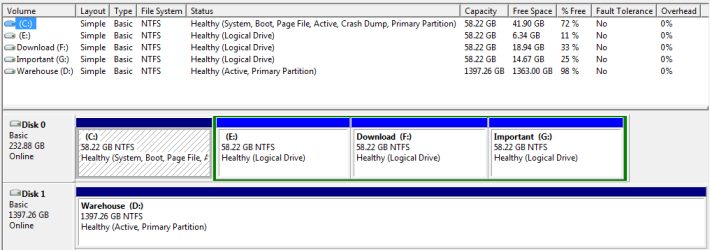
If you can get in to your machine, post us a shot of disk management.
 

My Computer My Computer

At a glance

Windows 10 Pro x64Intel Core i7 6700KGSkill TridentZ RGB 16GB 3600 16-16-16-36EVGA GTX 980 Ti SC x2
Computer type
PC/Desktop
Computer Manufacturer/Model Number
Skylake Special #666
OS
Windows 10 Pro x64
CPU
Intel Core i7 6700K
Motherboard
Asus Sabertooth Z170 Mark 1
Memory
GSkill TridentZ RGB 16GB 3600 16-16-16-36
Graphics Card(s)
EVGA GTX 980 Ti SC x2
Sound Card
Realtek High Definition
Monitor(s) Displays
AOC G2460PG
Screen Resolution
1920 x 1080 144Hz
Hard Drives
Samsung 860 Pro 256GB, Seagate Barracuda 4TB x2
PSU
EVGA 1000 P2, EVGA White Custom Braided Cables
Case
Corsair Vengeance C70 Gunmetal Black
Cooling
Corsair H100i v2, Corsair ML120 x2, Thermal Grizzly Kryonaut
Keyboard
Logitech G910 Orion Spectrum
Mouse
Logitech G700s
Internet Speed
Verizon Fios Quantum Gateway 75/75
Antivirus
Windows Defender, Malwarebytes Free 3.8.3
Browser
Chrome
Other Info
Corsair SP120 x4, LG Blu-ray Drive, Durabrand HT-395 100 Watt Dolby Digital Amp, Corsair H2100 Wireless 7.1 Headset
> Another physical hard drive can not possibly get between 2 partitions on a totally seperate physical hard drive.

You are absolutely correct. I mentioned these details because in windows XP, the boot.ini uses lines like these "multi(0)disk(0)rdisk(0)partition(1)\WINDOWS="Windows XP" /fastdetect " which clearly describes where the windows xp are located. I thought it could help in understanding what might be the problem with my system.

Right now, I think the reason why I cannot access my windows XP is that I cannot fully describe using bcdedit where it is located.
 

Attachments

  • disk_management.png
    disk_management.png
    11.8 KB · Views: 128

My Computer My Computer

At a glance

Windows 7 64bit
OS
Windows 7 64bit
Another physical hard drive can not possibly get between 2 partitions on a totally seperate physical hard drive.

If you can get in to your machine, post us a shot of disk management.

AddRAM that is not totally correct. With XP, IIRC, and especially with older Windows OSs the system looks for the first Primary partition on each individual physical HDD and assigns letter to those first then goes back to DISK0 and looks for other partitions. Even it all the partitions on DISK0 are Primary you will get DISK0 Partition 1 as C drive then the first primary partition on DISK1 as D drive then back to DISK0 for all other partition then back to DISK1.

That is why I use Logical drive in an Extended Partition on all other drive except DISK0 in my systems.

Yes you can Re-Assign the driver letters with NTFS but you have to do that right from the start before you start installing things on the D drive.
 

My Computer My Computer

At a glance

7 x64
OS
7 x64
The problem you are having is ALL version of Windows ALWAYS install things on the First Partition of the First Physical HDD found in the system. Even if you were to installed Windows to Drive Z on the 10th Physical HDD in your system it would still place files on the First partition of DISK0.

When you Installed Win 7 on the C drive of DISK0 it removed all the Windows XP Boot Files that WERE ON that partition and replaced them with the Windows 7 Boot Files.
Not sure how to proceed. But if it was my system I would just use a Virtual Machine software program and install XP in a VM.
 

My Computer My Computer

At a glance

7 x64
OS
7 x64
problem solved!

Thank you very much gregrocker!
Not in a million years will i think that i should set these :

Name: Microsoft Windows XP
BCD ID: {11725c7e-0c7e-11e2-a242-c6d67b574b38}
Drive: C:\
Bootloader Path: \NST\ntldr

My XP is in C?? anyway. I can now boot to my windows XP. This saved me a lot of man hours because all my work (software, database, environment for coding, etc) is in there.

EasyBCD autocomplete solved it!
Thank you EasyBCD!

Amazing.

Regards,
Deggen
 

My Computer My Computer

At a glance

Windows 7 64bit
OS
Windows 7 64bit
Back
Top