
Solved How to format Windows XP on a dual boot with windows 7.

NielsDD

New member
Local time
11:25 AM
Messages
2
Hi,

I installed windows XP on my computer first and then later on I installed windows 7 ultimate 64bit.
Now I no longer have any use for my windows XP partition.
So I'd like to know how to format it and still be able to use my windows 7.
Both OS's have been installed on the same drive under a different partition.
I must also mention that I lost my original windows 7 install disk.
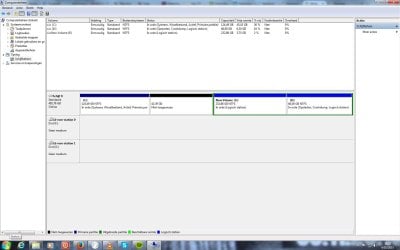
I've attached a print screen of my disk management.
I hope this is al the information you need.
 

Attachments
  • disk management.jpg
    disk management.jpg
    105.7 KB · Views: 5

My Computer My Computer

At a glance

Windows 7 ultimate 64bitIntel(R) Core(TM)2 Duo CPU E84008GBNVIDIA GeForce 8800 GT
Computer type
PC/Desktop
OS
Windows 7 ultimate 64bit
CPU
Intel(R) Core(TM)2 Duo CPU E8400
Motherboard
Asus P5k pro
Memory
8GB
Graphics Card(s)
NVIDIA GeForce 8800 GT
Hard Drives
SAMSUNG HD501LJ ATA Device
Antivirus
Avast internet security
Browser
Firefox
If you wipe out XP, Windows 7 will not boot anymore.

If windows 7 is installed on either of those logical partitions it will have to be made Primary and marked active.

If you own a windows activation key, then download the proper iso and burn to dvd.

Official Windows 7 SP1 ISO from Digital River « My Digital Life

Free ISO Burner

Easier just to properly prepare the drive and re install windows 7.

Or just re install Windows 7 on that C partition and wipe out the older install.
 

My Computer My Computer

At a glance

Windows 10 Pro x64Intel Core i7 6700KGSkill TridentZ RGB 16GB 3600 16-16-16-36EVGA GTX 980 Ti SC x2
Computer type
PC/Desktop
Computer Manufacturer/Model Number
Skylake Special #666
OS
Windows 10 Pro x64
CPU
Intel Core i7 6700K
Motherboard
Asus Sabertooth Z170 Mark 1
Memory
GSkill TridentZ RGB 16GB 3600 16-16-16-36
Graphics Card(s)
EVGA GTX 980 Ti SC x2
Sound Card
Realtek High Definition
Monitor(s) Displays
AOC G2460PG
Screen Resolution
1920 x 1080 144Hz
Hard Drives
Samsung 860 Pro 256GB, Seagate Barracuda 4TB x2
PSU
EVGA 1000 P2, EVGA White Custom Braided Cables
Case
Corsair Vengeance C70 Gunmetal Black
Cooling
Corsair H100i v2, Corsair ML120 x2, Thermal Grizzly Kryonaut
Keyboard
Logitech G910 Orion Spectrum
Mouse
Logitech G700s
Internet Speed
Verizon Fios Quantum Gateway 75/75
Antivirus
Windows Defender, Malwarebytes Free 3.8.3
Browser
Chrome
Other Info
Corsair SP120 x4, LG Blu-ray Drive, Durabrand HT-395 100 Watt Dolby Digital Amp, Corsair H2100 Wireless 7.1 Headset
We see that D is Opstarten which seems to translate closest to Boot partition and means it is the Win7 partition presently booted, so Brian has it right that you'll need to first set partition D as Primary with Partition Wizard, before you can Mark Partition Active to run Startup Repair - Run 3 Separate Times until D becomes the System Active Boot partition proving it can boot itself. Then you can delete XP partition to recover its space into any other partition or create a new Partition there. How to extend partition easily with Partition Wizard - video help.
Partition or Volume - Delete
Partition or Volume - Create New

Be sure to back up your files first.

There are problems with having Win7 on D which happens when you install it from C and not from the booted disk as is correct. Most users don't want the OS on D due to limitations, so now might be a good time to Clean Reinstall Windows 7 as Brian suggests.

If you're OK with Win7 on D then you also have it on the slow end of the hard drive, which is another compelling reason to reinstall while deleting all partitions from the booted installer provided in the tutorial. However once you Delete XP you can also use Partition Wizard to Resize Partition - Video Help to grab E and then D to slide them over to the left, resize D or E's right border if you want either or both larger, or create a New partition to the right.

Feel free to ask back any questions or for more specific steps to do exactly what you decide. This is the only site on the web that helps with thousands of these complicated partitioning operations, and we've never had a failure yet using PW boot disk.
 
Do you recommend a regular full back or a ghost from my windows 7?
 

My Computer My Computer

At a glance

Windows 7 ultimate 64bitIntel(R) Core(TM)2 Duo CPU E84008GBNVIDIA GeForce 8800 GT
Computer type
PC/Desktop
OS
Windows 7 ultimate 64bit
CPU
Intel(R) Core(TM)2 Duo CPU E8400
Motherboard
Asus P5k pro
Memory
8GB
Graphics Card(s)
NVIDIA GeForce 8800 GT
Hard Drives
SAMSUNG HD501LJ ATA Device
Antivirus
Avast internet security
Browser
Firefox
Back up files separately, System image to external or other HD. I'd use Macrium.
 
Back
Top