New to the forum Problem with Desktop

molczak714

New member
Local time
4:30 PM
Messages
18
Hey guys im not new to computers but im having a problem with installing windows 7 ultimate x64 on my tower. I actually got this tower from a guy on a trade. I put in a 500 gig hd in and also kept the 80 gig that was in there. After installation of windows 7 it says its going to reboot to complete the process and then i get the message Verifying DMI Pool Data and its just stuck there. I tried to reinstall the windows multiple times i tried to reinstall it on the 500 gig and 80 gig getting same message. What can i do i want to run win 7 on there and upgrade to 4 gigs of ram.
 

My Computer My Computer

At a glance

Windows 7 Ultimate x64
OS
Windows 7 Ultimate x64
Not sure if this will be much of a help. But I would give it a try. The error you are receiving is normally for a BadHDD or Filesystem.

Link
 

My Computer My Computer

At a glance

Windows 7 Ultimate x64
OS
Windows 7 Ultimate x64
Unplug all but the target HD, and all peripherals.

Boot the Win7 installer, at first screen press Shift + F10, run Diskpart Clean Command.

Close Command Box, click Install Now, then Custom>Drive Options to create install partition or just click Next to begin Clean Install Windows 7.

If this fails, reset the CMOS. In BIOS setup set SATA controller to AHCI to try install. Clear CMOS - 3 Ways to Clear the CMOS - Reset BIOS

If that fails test your RAM - Test with Memtest86+ for 5-6 passes or overnight.

Next test your HD with maker's HD Diagnostic extended CD scan, followed by Disk Check on a full disk Active partition you create/format from Step 2.2 in SSD - HDD Optimize for Windows Reinstallation to try install.

Where did you get Win7? Did you burn the DVD yourself? Burn another using ImgBurn
at 4x speed.
 
Unplug all but the target HD, and all peripherals.

Boot the Win7 installer, at first screen press Shift + F10, run Diskpart Clean Command.

Close Command Box, click Install Now, then Custom>Drive Options to create install partition or just click Next to begin Clean Install Windows 7.

If this fails, reset the CMOS. In BIOS setup set SATA controller to AHCI to try install. Clear CMOS - 3 Ways to Clear the CMOS - Reset BIOS

If that fails test your RAM - Test with Memtest86+ for 5-6 passes or overnight.

Next test your HD with maker's HD Diagnostic extended CD scan, followed by Disk Check on a full disk Active partition you create/format from Step 2.2 in SSD - HDD Optimize for Windows Reinstallation to try install.

Where did you get Win7? Did you burn the DVD yourself? Burn another using ImgBurn
at 4x speed.

Hi thanks for your reply when i did the command and tried selecting disk it says there is nothing there. Which i dont understand i have two drives they both show in the setup for win 7 install i delete all partition and format both and do a clean install. Previously there was win xp pro installed only on one drive the 80 gig drive and it was a clean win xp install and the computer booted up and everything. The win 7 i have is mine which i used on all my computers which work. And i know the ram works because it just worked before i tried to install win 7
 
Last edited:

My Computer My Computer

At a glance

Windows 7 Ultimate x64
OS
Windows 7 Ultimate x64
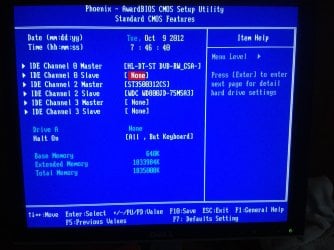
here is what it looks like. I tried doing install with either one by themselfs.
 

Attachments

  • 121009_0001.jpg
    121009_0001.jpg
    430.2 KB · Views: 10
Last edited:

My Computer My Computer

At a glance

Windows 7 Ultimate x64
OS
Windows 7 Ultimate x64
here is what it looks like. I tried doing install with either one by themselfs.

Tried reinstalling and now all im getting after your computer will run for first time is a white screen with a mouse and thats it.
 

My Computer My Computer

At a glance

Windows 7 Ultimate x64
OS
Windows 7 Ultimate x64
The screenshot shows a problem with your installed RAM. I would try reseating it now and test it as given earlier.

The screenshot seems to show both HD's plugged in. You need to unplug the other HD.

Make sure the HD is detected in BIOS setup and set SATA controller to AHCI if available.

Now try Diskpart Clean Command again. You must be typing a command wrong.

Type: DISKPART
LIST DISK
SEL DISK 0 (replace 0 with the Win7 target HD number)
CLEAN

If it continues to fail Diskpart then boot free bootable CD Partition Wizard to wipe the HD. Create an NTFS Primary partition and then modify>Set to Active.

I asked you where you got Win7 and if you burned the disk. Do not skip any steps or questions given.
 
Last edited:
The screenshot seems to show both HD's plugged in. You need to unplug the other HD.

Make sure the HD is detected in BIOS setup and set SATA controller to AHCI if available.

Now try Diskpart Clean Command again. You must be typing a command wrong.

Type: DISKPART
LIST DISK
SEL DISK 0 (replace 0 with the Win7 target HD number)
CLEAN

If it continues to fail Diskpart then boot free bootable CD Partition Wizard to wipe the HD. Create an NTFS Primary partition and then modify>Set to Active.

I asked you where you got Win7 and if you burned the disk. Do not skip any steps or questions given.

Would you mind telling me kinda step by step on where i go and do it? I usually deal with laptops.
 

My Computer My Computer

At a glance

Windows 7 Ultimate x64
OS
Windows 7 Ultimate x64
If you want any more in depth help you'll need to fill in your System Specs in bottom left corner of post.

You can first enter BIOS setup by tapping the key given on first screen. Look for the HD or storage section where you might be able to disable one HD without having to unplug it. Look also for the SATA controller setting to change it to AHCI.

If you can't disable a HD, then power down to open the case, pull the data cable off of one of the HD's to install to the other one.

Now boot the Win7 DvD, at first screen press Shift + F10 to open a Command prompt, Type:
DISKPART
LIST DISK
SEL DISK 0 (replace 0 with the Windows 7 target HD number)
CLEAN

Now close the Command Box, click Install Now and proceed with Clean Install Windows 7 using Drive Options to repartition, format and install, or just click Next at drive selection screen to have installer do it for you.
 
Did all that trying to install windows 7 now lets see what happens.
 

My Computer My Computer

At a glance

Windows 7 Ultimate x64
OS
Windows 7 Ultimate x64
Yeah im confused nothing is working out right. After the initial setup of win 7 when it gets to that screen where it asks you to accept. and set time and suck the screen just goes all white. i can see the mouse but cant click anything on the screen. The mouse acts like there is txt there because it gives me the cursor i think thats the part where im supposed to accept the terms & conditions.
 

My Computer My Computer

At a glance

Windows 7 Ultimate x64
OS
Windows 7 Ultimate x64
I just enlarged your screenshot because the installed RAM listing caught my eye and appears wrong. Can you access RAM sticks in tower to see if they are properly seated with no debris in slots? Then check what the installed RAM lists in BIOS. Next try swapping the sticks, or one at a time.


Then I would immediately skip to testing the RAM - Test with Memtest86+ for 5-6 passes.

If necessary spec your RAM carefully by googling the model and comparing specs, checking PC specifications , or going to a shop with the make/model to have them spec it for you which is easier to return if it's wrong.http://www.crucial.com/systemscanner/
 
Thats wiered i know the ram is good because previously the tower had win xp pro on it and it booted up no problem. Its only when i install windows 7 like i said it goes through the setup process everything works fine then when it wants me to accept the conditions from microsft that screen goes all white and all i got was a mouse on the monitor
 

My Computer My Computer

At a glance

Windows 7 Ultimate x64
OS
Windows 7 Ultimate x64
Look at the installed RAM shown in your BIOS screenshot. Unless it's wrong it is recognizing 64mb.
 
Look at the installed RAM shown in your BIOS screenshot. Unless it's wrong it is recognizing 64mb.

Thats odd because the whole computer boots up without any problem and it goes through the process of installing windows 7 just not leeting me continue on to set it up.
 

My Computer My Computer

At a glance

Windows 7 Ultimate x64
OS
Windows 7 Ultimate x64
back to the same problem now i reset the ram windows went through and setup normally where it would load into windows after setup it logged off or restart and now its stuck on a black screen saying verafiying DMI pool data boot from cd and its asking me to boot from my dvd drive
 

My Computer My Computer

At a glance

Windows 7 Ultimate x64
OS
Windows 7 Ultimate x64
Alright here is an update. I had another tower laying around witn win xp pro so i put that in and it booted up but it wont boot up normal win xp only in safe mode so what could be wrong. Why arent the other hard drives booting up. they install windows 7 but then it gets and hangs on the verifying dmi message.
 

My Computer My Computer

At a glance

Windows 7 Ultimate x64
OS
Windows 7 Ultimate x64
put the hd in tried installin windows 7 and same thing dmi message i dont know what is going on i know the hd's are good and ram is good.
 

My Computer My Computer

At a glance

Windows 7 Ultimate x64
OS
Windows 7 Ultimate x64
You'll sometimes need to run an XP Repair Install to adjust it to run on different hardware.

What do you mean you reset the RAM? Did you reseat the sticks? What was the result of the RAM test? You were to test it with memtest86 for 5-6 passes.

I've asked you three times now where you got Win7 and if you burned the disk yourself. You probably have a bad installer so confirm the ISO and burn another using ImgBurn at 4x speed or write to flash stick using Universal USB Installer

It irritates me that I'm having to repeat these steps over and over when I have a dozen others waiting for help. Complete all the steps NOW or ask back how to do them. I'm not interested in why you think I'm wrong any longer.
 
sorry didn't mean to get you all worked up. yes I downloaded win 7 and burned it myself w img burn its on a DVD rw. and the test of the steps I don't know how to do them to be honest I mean the basic ones I did with the list disk
 

My Computer My Computer

At a glance

Windows 7 Ultimate x64
OS
Windows 7 Ultimate x64
Back
Top