Solved Not responding - now can't open Outlook, check disk

Hairfallingout

New member
Local time
3:14 AM
Messages
56
Since my last problem with Windows 7 a few months ago, I learned that one of the easiest things to do to fix problems is do a system restore. That did not work for my current problem(s).

On Oct. 10, I installed a bunch of Windows updates without previewing them. I also knowingly installed Dropbox and IE 8.0. On the 11th, I started having problems with programs not responding. I usually keep several programs open at the same time, and Outlook and Firefox were giving me the biggest problems. It got to be so bad, I couldn't end task within any reasonable period of time, so I just pushed the off button. After two or maybe three times of on/off sessions and no improvement, I decided to do the system restore.

It took over half an hour, and upon restart a message stated that the restore did not complete because it didn't extract Windows\inf\setupapi.app.log. There was also something about disk failure and a suggestion to run chkdsk /R.

When I ran the chkdsk /R, I received a message that I couldn't do that because of recently installed software, and then it suggested I do a system restore. Since I don't care for Dropbox, I uninstalled that and tried the system restore again. It gave me the same error. Then I tried restoring to a prior restore point, and that didn't work. I also disabled my security software, Kaspersky, for 30 minutes, but that didn't work either.

I changed my sleep time out from 10 to 30 minutes, and then I tried to uninstall the Windows updates, figuring I would just uninstall them one at a time. I received a message "Windows Installer Service not accessed," and could not uninstall any updates or programs. After disabling it, rebooting and setting it to manual, I was finally able to uninstall many of the updates and IE 9.0. (I did not uninstall updates to Office Student, and perhaps I should do that.) At one point I also turned off a couple of programs at start up.


I had forced quit Outlook one too many times, I think, because now I cannot open it. It is giving me a message that I need to do a scanpst.exe. When I do that, however, I receive a message that an unexpected error occurred, and I should run a disk check program. I tried running chkdsk, but I get an error message that starts with 766 and ends with 3f1. (It goes by too fast for me to read the entire message.)


So now, I cannot open Outlook, I'm still having problems with programs not responding, startup takes almost 15 minutes (I had it down to 5 a little while ago, and it went back up to 15 after the failed chkdsk), and I need help.


I'm running Windows 7, 64-bit. I have Kaspersky Pure 2.0. Please help.

Solution: hard drive failure and replacement.
 
Last edited:

My Computer My Computer

Computer Manufacturer/Model Number
Toshiba
OS
Windows 7 x64
CPU
Intel Mobile Core 2 Duo T6600 @ 2.20GHz; Penryn 45nm Tech.
Motherboard
Toshiba Portable PC
Memory
4.00 GB Dual-Channel DDR2 @ 398MHz (6-6-6-18)
Graphics Card(s)
Generic PnP Monitor (1366x768@60Hz)
Sound Card
Realtek High Def; Intel High Def Audio HDMI
Hard Drives
466GB Toshiba MK5055GSX (SATA)
Keyboard
Microsoft Natural Ergonomic 4000
Mouse
Microsoft USB Trackball Optical (IntelliPoint)

My Computer My Computer

Computer Manufacturer/Model Number
Toshiba
OS
Windows 7 x64
CPU
Intel Mobile Core 2 Duo T6600 @ 2.20GHz; Penryn 45nm Tech.
Motherboard
Toshiba Portable PC
Memory
4.00 GB Dual-Channel DDR2 @ 398MHz (6-6-6-18)
Graphics Card(s)
Generic PnP Monitor (1366x768@60Hz)
Sound Card
Realtek High Def; Intel High Def Audio HDMI
Hard Drives
466GB Toshiba MK5055GSX (SATA)
Keyboard
Microsoft Natural Ergonomic 4000
Mouse
Microsoft USB Trackball Optical (IntelliPoint)
The warnings aren't really 'warnings' as such, they are more prompts, to which kind of installation discs will work and which won't work for a repair install.

For instance, the Windows 7 DVD must be the same as the operating system that you are using, you can't repair a Windows 7 Home Premium 32-bit with a DVD which contains Windows 7 Ultimate 64-bit. Also, your not able to perform a repair install with a system recovery disc or a factory restore DVD which came with your desktop/laptop, however are able to perform a able to perform a repair install with a Windows 7 Installation DVD supplied by the OEM.

OEM = Original Equipment Manufacturer

If you are unsure with any of the meanings of each type of disc, then are links to tutorials from this forum within the warnings section of the link I provided you with, which will explain which each disc is and what it does.

A repair install will not damage your system, unless you try to interrupt the repair or make changes to the operating system.
 

My Computer My Computer

Computer type
Laptop
Given your message about "disk failure", my guess is that startup is taking so long because it is encountering bad sectors on your hard drive and attempting to read them over and over and over ... until it times out and goes to the next sector. Failing sectors could also cause the inability to launch programs -- because some of their code is in the failing sectors area.

Windows restore and repair install will NOT fix a failing drive.
 

My Computer My Computer

Computer type
PC/Desktop
Computer Manufacturer/Model Number
Custom
OS
Win7 Pro 32-bit, Win8 Pro 32-bit
CPU
AMD Phenom II X6 1090T
Motherboard
Gigabyte
Memory
4GB ddr3 1300
Graphics Card(s)
AMD HD 4290 onboard
Sound Card
Builtin Realtek HD Audio
Monitor(s) Displays
Samsung 24" widescreen, LG 23" widescreen
Screen Resolution
1920x1200/1920x1080
Hard Drives
Kingston 256GB SSD
Keyboard
Logitech Illuminated Keyboard
Mouse
Logitech M705 wireless mouse
Antivirus
Norton Av 2013
Browser
IE v10
Given your message about "disk failure", my guess is that startup is taking so long because it is encountering bad sectors on your hard drive and attempting to read them over and over and over ... until it times out and goes to the next sector. Failing sectors could also cause the inability to launch programs -- because some of their code is in the failing sectors area.

Windows restore and repair install will NOT fix a failing drive.

Oh, I just noticed that, yes you may have a failing disk drive which could be the cause of why the repair install didn't really work and why you are having problems.

You can repair soft bad sectors, however, hard bad sectors are unrepairable and therefore you may need to purchase a new hard-drive.
 

My Computer My Computer

Computer type
Laptop
http://www.sevenforums.com/tutorials/433-disk-check.html

If physical bad sectors are found, then I would create a create a backup of any files, and then move these files onto a USB drive. You will also need to purchase a new hard-drive as physical bad sectors can't be repaired, and usually become more problematic over time.
 

My Computer My Computer

Computer type
Laptop
Okaaay. How do I tell if I have bad physical sectors? My computer isn't that old. I've been using it since June, and the person before me used it about a dozen times. It's just about two years old. (I should have stated that I already tried to do chkdsk, and I got an error message.)
 
Last edited:

My Computer My Computer

Computer Manufacturer/Model Number
Toshiba
OS
Windows 7 x64
CPU
Intel Mobile Core 2 Duo T6600 @ 2.20GHz; Penryn 45nm Tech.
Motherboard
Toshiba Portable PC
Memory
4.00 GB Dual-Channel DDR2 @ 398MHz (6-6-6-18)
Graphics Card(s)
Generic PnP Monitor (1366x768@60Hz)
Sound Card
Realtek High Def; Intel High Def Audio HDMI
Hard Drives
466GB Toshiba MK5055GSX (SATA)
Keyboard
Microsoft Natural Ergonomic 4000
Mouse
Microsoft USB Trackball Optical (IntelliPoint)
And how do bad physical sectors happen? Everything was okay until the Windows updates installed automatically.
 

My Computer My Computer

Computer Manufacturer/Model Number
Toshiba
OS
Windows 7 x64
CPU
Intel Mobile Core 2 Duo T6600 @ 2.20GHz; Penryn 45nm Tech.
Motherboard
Toshiba Portable PC
Memory
4.00 GB Dual-Channel DDR2 @ 398MHz (6-6-6-18)
Graphics Card(s)
Generic PnP Monitor (1366x768@60Hz)
Sound Card
Realtek High Def; Intel High Def Audio HDMI
Hard Drives
466GB Toshiba MK5055GSX (SATA)
Keyboard
Microsoft Natural Ergonomic 4000
Mouse
Microsoft USB Trackball Optical (IntelliPoint)
Physical bad sectors can occur because of damage to the actual hard-drive itself, for instance dropping the laptop/desktop, dropping or hitting the hard-drive or case of the computer and overheating can also be major problem for hardware in general.

The Chkdsk.exe program does not start correctly on a Windows 7-based computer

Try the above link, however please bear in mind, that the Disk Check program may not be working properly, as a result of the bad sectors on your hard-drive.
 

My Computer My Computer

Computer type
Laptop
I did the windows repair install last night, and I am still getting "not responding" messages in Firefox and other things like the control panel. I was able to schedule a chkdsk.exe, and I came up with the same error as before -- something about" cannot open volume" and a 766f . . . 3f1 error. After that, the screen was black for about 15 minutes. It took about 20 to start up.

The computer is very slow. I've never dropped or hit the computer, but I did take it on the bike with me a couple of months ago. It was well padded, however.

Would bad sectors cause this "not responding" problem? Is it just a coincidence that this issue came up when Windows automatically installed 20+ updates on the 10th? With the repair install, those updates are back on my computer. Do you think the problem is related to any of the updates?

I don't think overheating is an issue -- I have my laptop set up on two pieces of wood, and I can hear the fan running.
 

My Computer My Computer

Computer Manufacturer/Model Number
Toshiba
OS
Windows 7 x64
CPU
Intel Mobile Core 2 Duo T6600 @ 2.20GHz; Penryn 45nm Tech.
Motherboard
Toshiba Portable PC
Memory
4.00 GB Dual-Channel DDR2 @ 398MHz (6-6-6-18)
Graphics Card(s)
Generic PnP Monitor (1366x768@60Hz)
Sound Card
Realtek High Def; Intel High Def Audio HDMI
Hard Drives
466GB Toshiba MK5055GSX (SATA)
Keyboard
Microsoft Natural Ergonomic 4000
Mouse
Microsoft USB Trackball Optical (IntelliPoint)
Okaaay. How do I tell if I have bad physical sectors? My computer isn't that old. I've been using it since June, and the person before me used it about a dozen times. It's just about two years old. (I should have stated that I already tried to do chkdsk, and I got an error message.)

Your system is 2 years old, and the last person may not have treated it as well as you have, there is something wrong with your hard-drive due to the constant error message from Disk Check, and the notification of a Disk Failure in your first post.

You could attempt uninstalling the updates which you installed, and then see what happens then, but I would consider buying a new hard-drive or backing up your data as soon as possible.

The Repair Install usually repairs any issues with the operating system, but since nothing has changed, it seems to be pointing to a hardware problem.
 

My Computer My Computer

Computer type
Laptop
I backed up all of my data prior to doing the repair install. The person I bought the computer from said he only used it about 10 times -- he still had all of the original packaging and hadn't even registered the computer yet.

My Outlook pst file is now backed up on an external drive. Would it be possible to run Outlook on that drive until I get this problem solved? This is my work computer, and I need to check my schedule for this week. Of course, most of my contacts are in there as well.
 

My Computer My Computer

Computer Manufacturer/Model Number
Toshiba
OS
Windows 7 x64
CPU
Intel Mobile Core 2 Duo T6600 @ 2.20GHz; Penryn 45nm Tech.
Motherboard
Toshiba Portable PC
Memory
4.00 GB Dual-Channel DDR2 @ 398MHz (6-6-6-18)
Graphics Card(s)
Generic PnP Monitor (1366x768@60Hz)
Sound Card
Realtek High Def; Intel High Def Audio HDMI
Hard Drives
466GB Toshiba MK5055GSX (SATA)
Keyboard
Microsoft Natural Ergonomic 4000
Mouse
Microsoft USB Trackball Optical (IntelliPoint)
Yes, but you will need to tell Windows that your .pst file in on a external hard-drive.
 

My Computer My Computer

Computer type
Laptop
Will my event logs or other monitors (e.g., processing compared to memory usage) help solve this issue? I was just going through the critical events, and I remembered that I was surprised a couple of times that my computer had shut off after I had hibernated it. I hadn't realized until I checked that my computer was running on battery power overnight, because I had it plugged into an outlet strip that I turned off each night. I switched outlets for the computer on the 10th.

I note there are no hardware events in the log.
 

My Computer My Computer

Computer Manufacturer/Model Number
Toshiba
OS
Windows 7 x64
CPU
Intel Mobile Core 2 Duo T6600 @ 2.20GHz; Penryn 45nm Tech.
Motherboard
Toshiba Portable PC
Memory
4.00 GB Dual-Channel DDR2 @ 398MHz (6-6-6-18)
Graphics Card(s)
Generic PnP Monitor (1366x768@60Hz)
Sound Card
Realtek High Def; Intel High Def Audio HDMI
Hard Drives
466GB Toshiba MK5055GSX (SATA)
Keyboard
Microsoft Natural Ergonomic 4000
Mouse
Microsoft USB Trackball Optical (IntelliPoint)
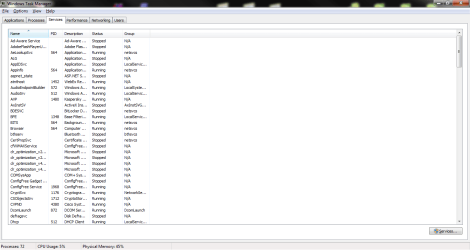
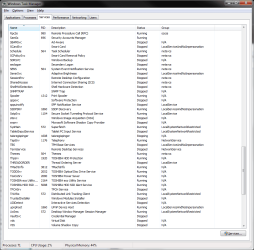
Post a screenshot of your Task Manager and could you please update your System Specifications fully by downloading Speccy (link in my signature), and then going to UserCP and clicking on Edit System Spec within the left pane.

http://www.sevenforums.com/tutorials/9733-screenshots-files-upload-post-seven-forums.html

Please download MSE (link in my signature) and uninstall or disable any other anti-virus programs you may have, and then perform a full scan of your system.

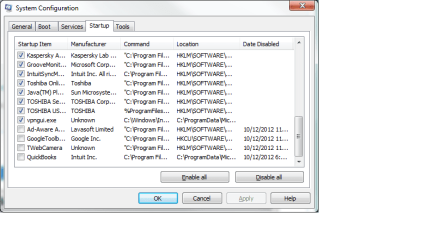
These two steps will help to see wherever you have a virus infection, and could you also post a screenshot of your msconfig by going to:

Start :orb: > Search Programs and Files (Type: msconfig) > Startup tab
Thanks,

Harry
 

My Computer My Computer

Computer type
Laptop
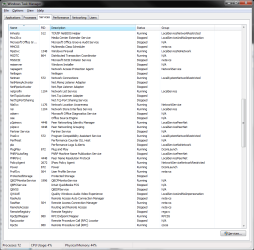
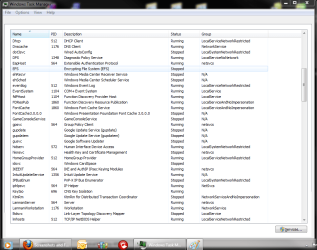
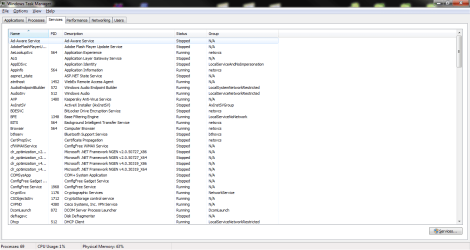
Thank you, Harry. Here are my task processes and services.

How do I get to Speccy and MSE? I clicked on "BlueRobot" and saw your profile, but I don't see "Speccy" or "MSE" any where.

I don't think I have a virus -- I haven't ever had one. (I had my other computer for nine years.) I ran SmartFan last night, and the laptop temperature was normal. I also did the short test, and that came out 95% and 95%. I was in the process of running the extended test, but it aborted some time during the night.
 

Attachments

  • Task processes.png
    Task processes.png
    28.9 KB · Views: 1
  • Task services 5.png
    Task services 5.png
    38.9 KB · Views: 1
  • Task services 4.png
    Task services 4.png
    45 KB · Views: 1
  • Task services 3.png
    Task services 3.png
    44.6 KB · Views: 1
  • Task services 2.png
    Task services 2.png
    43.5 KB · Views: 1
  • Task services 1.png
    Task services 1.png
    34.9 KB · Views: 1

My Computer My Computer

Computer Manufacturer/Model Number
Toshiba
OS
Windows 7 x64
CPU
Intel Mobile Core 2 Duo T6600 @ 2.20GHz; Penryn 45nm Tech.
Motherboard
Toshiba Portable PC
Memory
4.00 GB Dual-Channel DDR2 @ 398MHz (6-6-6-18)
Graphics Card(s)
Generic PnP Monitor (1366x768@60Hz)
Sound Card
Realtek High Def; Intel High Def Audio HDMI
Hard Drives
466GB Toshiba MK5055GSX (SATA)
Keyboard
Microsoft Natural Ergonomic 4000
Mouse
Microsoft USB Trackball Optical (IntelliPoint)
Could you also screenshot the Performance tab of Task Manager too please, and the links are at the bottom of my post.

Start :orb: > Search Programs and Files (Type: msconfig) > Startup tab
Screenshot the msconfig Startup tab too.
 

My Computer My Computer

Computer type
Laptop
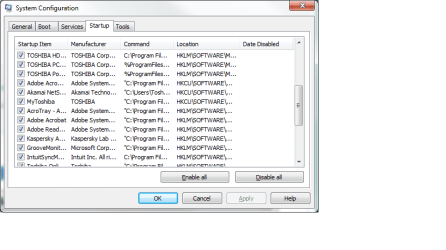
Here are the performance and startup shots. I'm working on the spec profile.
 

Attachments

  • Task performance.png
    Task performance.png
    23 KB · Views: 2
  • Startup 1.png
    Startup 1.png
    16 KB · Views: 1
  • Startup 2.png
    Startup 2.png
    16 KB · Views: 1
  • Startup 3.png
    Startup 3.png
    16.6 KB · Views: 1

My Computer My Computer

Computer Manufacturer/Model Number
Toshiba
OS
Windows 7 x64
CPU
Intel Mobile Core 2 Duo T6600 @ 2.20GHz; Penryn 45nm Tech.
Motherboard
Toshiba Portable PC
Memory
4.00 GB Dual-Channel DDR2 @ 398MHz (6-6-6-18)
Graphics Card(s)
Generic PnP Monitor (1366x768@60Hz)
Sound Card
Realtek High Def; Intel High Def Audio HDMI
Hard Drives
466GB Toshiba MK5055GSX (SATA)
Keyboard
Microsoft Natural Ergonomic 4000
Mouse
Microsoft USB Trackball Optical (IntelliPoint)
Thanks, and is the high memory usage when lots of applications are open or when the computer is idle? (no programs are running)

http://www.sevenforums.com/tutorials/219576-clean-up-factory-bloatware.html

This will clear up any programs which can corrupt your installation and hinder your performance.

http://www.sevenforums.com/tutorials/220165-troubleshooting-steps-windows-7-a.html

The above tutorial will give you many troubleshooting methods of Windows, you can ignore the steps we may have already done together.
 

My Computer My Computer

Computer type
Laptop
Back
Top