Hairfallingout
New member
- Local time
- 5:48 PM
- Messages
- 56
Since my last problem with Windows 7 a few months ago, I learned that one of the easiest things to do to fix problems is do a system restore. That did not work for my current problem(s).
On Oct. 10, I installed a bunch of Windows updates without previewing them. I also knowingly installed Dropbox and IE 8.0. On the 11th, I started having problems with programs not responding. I usually keep several programs open at the same time, and Outlook and Firefox were giving me the biggest problems. It got to be so bad, I couldn't end task within any reasonable period of time, so I just pushed the off button. After two or maybe three times of on/off sessions and no improvement, I decided to do the system restore.
It took over half an hour, and upon restart a message stated that the restore did not complete because it didn't extract Windows\inf\setupapi.app.log. There was also something about disk failure and a suggestion to run chkdsk /R.
When I ran the chkdsk /R, I received a message that I couldn't do that because of recently installed software, and then it suggested I do a system restore. Since I don't care for Dropbox, I uninstalled that and tried the system restore again. It gave me the same error. Then I tried restoring to a prior restore point, and that didn't work. I also disabled my security software, Kaspersky, for 30 minutes, but that didn't work either.
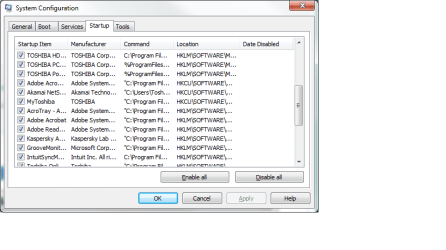
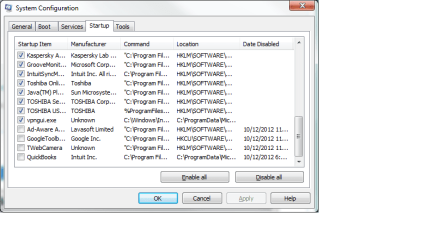
I changed my sleep time out from 10 to 30 minutes, and then I tried to uninstall the Windows updates, figuring I would just uninstall them one at a time. I received a message "Windows Installer Service not accessed," and could not uninstall any updates or programs. After disabling it, rebooting and setting it to manual, I was finally able to uninstall many of the updates and IE 9.0. (I did not uninstall updates to Office Student, and perhaps I should do that.) At one point I also turned off a couple of programs at start up.
I had forced quit Outlook one too many times, I think, because now I cannot open it. It is giving me a message that I need to do a scanpst.exe. When I do that, however, I receive a message that an unexpected error occurred, and I should run a disk check program. I tried running chkdsk, but I get an error message that starts with 766 and ends with 3f1. (It goes by too fast for me to read the entire message.)
So now, I cannot open Outlook, I'm still having problems with programs not responding, startup takes almost 15 minutes (I had it down to 5 a little while ago, and it went back up to 15 after the failed chkdsk), and I need help.
I'm running Windows 7, 64-bit. I have Kaspersky Pure 2.0. Please help.
Solution: hard drive failure and replacement.
On Oct. 10, I installed a bunch of Windows updates without previewing them. I also knowingly installed Dropbox and IE 8.0. On the 11th, I started having problems with programs not responding. I usually keep several programs open at the same time, and Outlook and Firefox were giving me the biggest problems. It got to be so bad, I couldn't end task within any reasonable period of time, so I just pushed the off button. After two or maybe three times of on/off sessions and no improvement, I decided to do the system restore.
It took over half an hour, and upon restart a message stated that the restore did not complete because it didn't extract Windows\inf\setupapi.app.log. There was also something about disk failure and a suggestion to run chkdsk /R.
When I ran the chkdsk /R, I received a message that I couldn't do that because of recently installed software, and then it suggested I do a system restore. Since I don't care for Dropbox, I uninstalled that and tried the system restore again. It gave me the same error. Then I tried restoring to a prior restore point, and that didn't work. I also disabled my security software, Kaspersky, for 30 minutes, but that didn't work either.
I changed my sleep time out from 10 to 30 minutes, and then I tried to uninstall the Windows updates, figuring I would just uninstall them one at a time. I received a message "Windows Installer Service not accessed," and could not uninstall any updates or programs. After disabling it, rebooting and setting it to manual, I was finally able to uninstall many of the updates and IE 9.0. (I did not uninstall updates to Office Student, and perhaps I should do that.) At one point I also turned off a couple of programs at start up.
I had forced quit Outlook one too many times, I think, because now I cannot open it. It is giving me a message that I need to do a scanpst.exe. When I do that, however, I receive a message that an unexpected error occurred, and I should run a disk check program. I tried running chkdsk, but I get an error message that starts with 766 and ends with 3f1. (It goes by too fast for me to read the entire message.)
So now, I cannot open Outlook, I'm still having problems with programs not responding, startup takes almost 15 minutes (I had it down to 5 a little while ago, and it went back up to 15 after the failed chkdsk), and I need help.
I'm running Windows 7, 64-bit. I have Kaspersky Pure 2.0. Please help.
Solution: hard drive failure and replacement.
Last edited:
My Computer
- Computer Manufacturer/Model Number
- Toshiba
- OS
- Windows 7 x64
- CPU
- Intel Mobile Core 2 Duo T6600 @ 2.20GHz; Penryn 45nm Tech.
- Motherboard
- Toshiba Portable PC
- Memory
- 4.00 GB Dual-Channel DDR2 @ 398MHz (6-6-6-18)
- Graphics Card(s)
- Generic PnP Monitor (1366x768@60Hz)
- Sound Card
- Realtek High Def; Intel High Def Audio HDMI
- Hard Drives
- 466GB Toshiba MK5055GSX (SATA)
- Keyboard
- Microsoft Natural Ergonomic 4000
- Mouse
- Microsoft USB Trackball Optical (IntelliPoint)

 rb: > Search Programs and Files (Type: msconfig) > Startup tab