Warcraft III on Windows 7 Ultimate x64

baecedar

New member
Local time
7:53 PM
Messages
5
I have some kind of a same problem here.
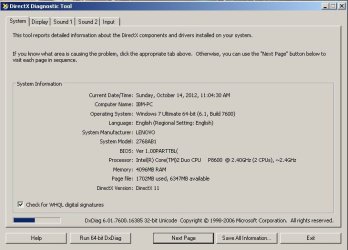
I am running on w7 ultimate x64 and my war3 won't start becouse I dont have the 8.1 or 9 version of direct x.But as you may know, w7 ultimate comes with 11 version of direct x preinstalled.
I checked a lot of forums and there are some topics with the same problem as mine, but there are also some guys which say that they have war3 running on w7 x64. So ..can some1 tell me how to solve this?Please.!

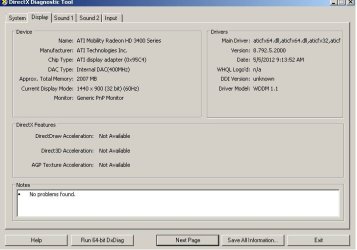
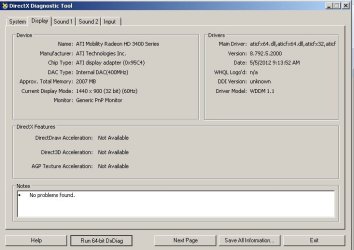
Here are some screens from dixdiag.
Untitled.jpg

Untitled1.jpg

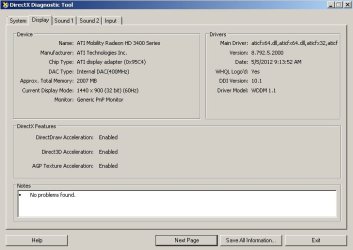
but there is something I dont understand here. When I hit "Run 64-bit DxDiag" button, DirectDraw, Direct3D and AGP Texture Acceleration will show as Enabled...Why?!
Untitled2.jpg

Untitled3.jpg
 

My Computer My Computer

At a glance

Windows 7 Ultimate x64
OS
Windows 7 Ultimate x64

My Computer My Computer

At a glance

Windows 10 64bitAMD Phenom II X4 925 (Deneb)(2.8GHz) OC 3.4GHzCorsair Vengeance DDR3 4GBX2 (8192MB)XFX HD 6870 1GB (OC)- 940MHz core, mem 1150MHz
Computer type
PC/Desktop
Computer Manufacturer/Model Number
custom build
OS
Windows 10 64bit
CPU
AMD Phenom II X4 925 (Deneb)(2.8GHz) OC 3.4GHz
Motherboard
M5A78L-MLX Plus
Memory
Corsair Vengeance DDR3 4GBX2 (8192MB)
Graphics Card(s)
XFX HD 6870 1GB (OC)- 940MHz core, mem 1150MHz
Monitor(s) Displays
Vizio 26' 1920x1080 / Acer 1336x768
Screen Resolution
1920x1080 60Hz /1336x768
Hard Drives
Kingston Digital 60GB SSDNow V300/500gb HDD Western Digital 7200rpm (/WD 160GB HDD 7200rpm
PSU
CORSAIR CX600 600w
Case
AZZA Orion 202 EVO
Cooling
cooler master hyper TX3 cpu cooler
Keyboard
Razer DeathStalker
Mouse
Logitech Optical Gaming Mouse G400
Antivirus
Defualt on win 10
Browser
Firefox
Other Info
cpu is overclocked in bios
lol, I already did this many times and it doesnt fix it!! I downgraded my directx version to 9 but in dixdiag it still shows 11..
 

My Computer My Computer

At a glance

Windows 7 Ultimate x64
OS
Windows 7 Ultimate x64
You don't downgrade DirectX and it will always show as 11 in Windows 7.
 

My Computer My Computer

At a glance

Windows 10 Pro (x64)Intel Core i7-3930K (3.2GHz - 4.5GHz)4x Samsung 4GB PC3-12800 DDR3 (16GB 1600MHz)Nvidia Geforce GTX 690
Computer type
PC/Desktop
Computer Manufacturer/Model Number
Alienware Aurora ALX R4
OS
Windows 10 Pro (x64)
CPU
Intel Core i7-3930K (3.2GHz - 4.5GHz)
Motherboard
Alienware Aurora-R4 x79
Memory
4x Samsung 4GB PC3-12800 DDR3 (16GB 1600MHz)
Graphics Card(s)
Nvidia Geforce GTX 690
Sound Card
SteelSeries Siberia Elite
Monitor(s) Displays
Dell UltraSharp U3011
Screen Resolution
2560x1600
Hard Drives
Samsung 850 Pro 256 GB, Seagate 1TB Desktop Hybrid HDD, 2x Western Digital 4TB Green HDD
PSU
875W Some Dell PSU <.<
Case
Alienware Aurora ALX
Cooling
Custom Liquid Cooling (EK CPU & GPU blocks) dual EK 480RAD
Keyboard
Logitech G710+ Mechanical
Mouse
Logitech G700s
Internet Speed
Verizon Fios (50 mbps average)
Other Info
Server: Intel NUC D54250WYK: i5-4250U, 16GB, 256 GB mSATA, Windows Server 2012 R2
There's nothing wrong with your direct x, Try to re-install your warcraft or just copy a working warcraft folder from another pc and just simply paste it to your pc.
 

My Computer My Computer

At a glance

Windows 10 Pro 64-BitIntel(R) Core(TM) i5-4460 CPU @ 3.20 GHz(4CPU...8192 RAMNVIDIA GeForce 710
Computer type
PC/Desktop
Computer Manufacturer/Model Number
Gigabyte Technology Co. Ltd.
OS
Windows 10 Pro 64-Bit
CPU
Intel(R) Core(TM) i5-4460 CPU @ 3.20 GHz(4CPU's), ~3.2GHz
Motherboard
Gigabyte B85M-HD3-A
Memory
8192 RAM
Graphics Card(s)
NVIDIA GeForce 710
Sound Card
Integrated High Definition audio with Realtek ALC888 codec
Monitor(s) Displays
Acer V183HV Ab 18.5" LCD Display
Screen Resolution
1366 x 768
Keyboard
HP
Mouse
HP
Internet Speed
100mbps
Antivirus
Microsoft Security Essentials
Browser
Chrome, Firefox
There's nothing wrong with your direct x, Try to re-install your warcraft or just copy a working warcraft folder from another pc and just simply paste it to your pc.

the same shit error poops up even if I copy warcraft already installled from a pc on which is working smooth.
Untitled4.jpg
 

My Computer My Computer

At a glance

Windows 7 Ultimate x64
OS
Windows 7 Ultimate x64
There's nothing wrong with your direct x, Try to re-install your warcraft or just copy a working warcraft folder from another pc and just simply paste it to your pc.

the same shit error poops up even if I copy warcraft already installled from a pc on which is working smooth.
View attachment 236520

Have you tried to run war3.exe as administrator? Everytime i have an error like that i usually just copy a working warcraft from another pc.
 

My Computer My Computer

At a glance

Windows 10 Pro 64-BitIntel(R) Core(TM) i5-4460 CPU @ 3.20 GHz(4CPU...8192 RAMNVIDIA GeForce 710
Computer type
PC/Desktop
Computer Manufacturer/Model Number
Gigabyte Technology Co. Ltd.
OS
Windows 10 Pro 64-Bit
CPU
Intel(R) Core(TM) i5-4460 CPU @ 3.20 GHz(4CPU's), ~3.2GHz
Motherboard
Gigabyte B85M-HD3-A
Memory
8192 RAM
Graphics Card(s)
NVIDIA GeForce 710
Sound Card
Integrated High Definition audio with Realtek ALC888 codec
Monitor(s) Displays
Acer V183HV Ab 18.5" LCD Display
Screen Resolution
1366 x 768
Keyboard
HP
Mouse
HP
Internet Speed
100mbps
Antivirus
Microsoft Security Essentials
Browser
Chrome, Firefox
No. It wasnt that the problem. There was a problem between my x64 driver and my graphic card.
I solved with Mobility Modder. It's an application which can modd an pc computer driver- making it optimal for notebook.
You simply download the appropiate graphic driver for the graphic card that u have, but for a pc, then go to Modder, choose the path folder u want to modd and after that you install it.
It worked it out for me.
 

My Computer My Computer

At a glance

Windows 7 Ultimate x64
OS
Windows 7 Ultimate x64
No. It wasnt that the problem. There was a problem between my x64 driver and my graphic card.
I solved with Mobility Modder. It's an application which can modd an pc computer driver- making it optimal for notebook.
You simply download the appropiate graphic driver for the graphic card that u have, but for a pc, then go to Modder, choose the path folder u want to modd and after that you install it.
It worked it out for me.

Good to know :thumbsup:
 

My Computer My Computer

At a glance

Windows 10 Pro 64-BitIntel(R) Core(TM) i5-4460 CPU @ 3.20 GHz(4CPU...8192 RAMNVIDIA GeForce 710
Computer type
PC/Desktop
Computer Manufacturer/Model Number
Gigabyte Technology Co. Ltd.
OS
Windows 10 Pro 64-Bit
CPU
Intel(R) Core(TM) i5-4460 CPU @ 3.20 GHz(4CPU's), ~3.2GHz
Motherboard
Gigabyte B85M-HD3-A
Memory
8192 RAM
Graphics Card(s)
NVIDIA GeForce 710
Sound Card
Integrated High Definition audio with Realtek ALC888 codec
Monitor(s) Displays
Acer V183HV Ab 18.5" LCD Display
Screen Resolution
1366 x 768
Keyboard
HP
Mouse
HP
Internet Speed
100mbps
Antivirus
Microsoft Security Essentials
Browser
Chrome, Firefox
Back
Top