Solved Blank icons/white thumbnails + slow My Computer

Guy1

New member
Local time
2:19 AM
Messages
8
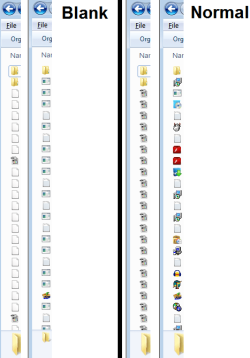
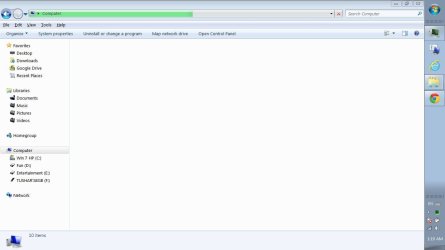
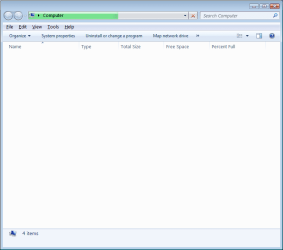
After some time on the computer the icons become blank and My Computer doesn't load.
It all returns to normal after I end the task "dllhost.exe", and after some time the problem comes back again.

I've tried these solutions:
- SFC /scannow
- Recreating IconCache.db

System:
Windows 7 Home Premium x64
Laptop - Toshiba Satellite P775
8GB RAM
Intel HD Graphics 3000
Mobile QuadCore Intel Core i7-2670QM, 2400 MHz

Thanks!
 

Attachments
  • computer.png
    computer.png
    10.6 KB · Views: 15
  • icons.png
    icons.png
    12.2 KB · Views: 48

My Computer My Computer

Computer Manufacturer/Model Number
Toshiba Satellite P775
OS
Windows 7 Home Premium x64
CPU
Mobile QuadCore Intel Core i7-2670QM, 2400 MHz
Memory
8GB
Graphics Card(s)
Intel HD Graphics 3000
Hi,

If this issue started occurring after doing some recent software changes on your computer, then I would suggest you to restore your system back to a date when it was working fine. System Restore will affect Windows system files, programs, and registry settings only.

For System Restore steps, you can refer to the URL mentioned: http://windows.microsoft.com/en-US/windows7/products/features/system-restore


If the issue still persists, try running Hardware Diagnostics on the computer.
 

My Computer My Computer

OS
Windows 7 Enterprise x64
Hi,

If this issue started occurring after doing some recent software changes on your computer, then I would suggest you to restore your system back to a date when it was working fine. System Restore will affect Windows system files, programs, and registry settings only.

For System Restore steps, you can refer to the URL mentioned: http://windows.microsoft.com/en-US/windows7/products/features/system-restore


If the issue still persists, try running Hardware Diagnostics on the computer.

It's been going on for over a month so system restore is no option.
What Hardware Diagnostics do you recommend? (I think I've run them all...)
Thanks!
 

My Computer My Computer

Computer Manufacturer/Model Number
Toshiba Satellite P775
OS
Windows 7 Home Premium x64
CPU
Mobile QuadCore Intel Core i7-2670QM, 2400 MHz
Memory
8GB
Graphics Card(s)
Intel HD Graphics 3000
Hi,

I would recommend you to run Hard drive diagnostics. If there are no errors, then I would suggest you to try creating a New User account and then try to log in this New User account in Normal Mode.
If the issue still persists, you can even try restoring system back to factory settings and then check the performance of the system. Ensure backing up your data before reinstalling Operating system or PC restore.

Keep us Posted
 

My Computer My Computer

OS
Windows 7 Enterprise x64
Hi,

I would recommend you to run Hard drive diagnostics. If there are no errors, then I would suggest you to try creating a New User account and then try to log in this New User account in Normal Mode.
If the issue still persists, you can even try restoring system back to factory settings and then check the performance of the system. Ensure backing up your data before reinstalling Operating system or PC restore.

Keep us Posted

The problem came up in the new user.

I'll consider restoring to factory settings.
 

My Computer My Computer

Computer Manufacturer/Model Number
Toshiba Satellite P775
OS
Windows 7 Home Premium x64
CPU
Mobile QuadCore Intel Core i7-2670QM, 2400 MHz
Memory
8GB
Graphics Card(s)
Intel HD Graphics 3000

My Computer My Computer

Computer type
PC/Desktop
Computer Manufacturer/Model Number
Home made Desktop
OS
Windows 10 Pro. 64/ version 1709 Windows 7 Pro/64
CPU
Intel i7-6800K @ 4.3
Motherboard
ASUS X-99 Deluxe II
Memory
Corsair Platinum 16 gig @2400
Graphics Card(s)
EVGA GTX 1070 OC
Monitor(s) Displays
Asus 27" LED LCD/VE278Q
Screen Resolution
1920-1080 or 1280-720 HDMI
Hard Drives
INTEL SSD 730-240 Gb Sata 3.0/
PSU
EVGA Platium 1200W
Case
Phanteks Luxe Tempered Glass 8 fans/ one radiator
Cooling
XSPC/ Water Cooled CPU
Keyboard
Das 4 Professional
Mouse
Logitech M705/MX Anywhere 2-S
Internet Speed
100 mbits
Antivirus
Microsoft Security Essentials/ Malwarebytes Premium 3.0/ SAS
Browser
I.E. 11 default/Firefox/ ISP Time Warner Cable/Spectrum
Other Info
LG BluRay Burner/
Sound system-KLipsch-THX/
Icy Dock ssd Hot Swap bays.
This could be a infection. Some infections do hide in dll host.
What security programs are you using?
This is a good program to use.

http://www.sevenforums.com/tutorials/166445-windows-defender-offline.html

Here is another one.

Free Online Virus Scanner | ESET

Throughout the years I've always been very careful and strict about that subject - and haven't had infections.
Currently I use ESET Smart Security + Immunizations by Spbot/SpywareBlaster/Advanced SystemCare.
 

My Computer My Computer

Computer Manufacturer/Model Number
Toshiba Satellite P775
OS
Windows 7 Home Premium x64
CPU
Mobile QuadCore Intel Core i7-2670QM, 2400 MHz
Memory
8GB
Graphics Card(s)
Intel HD Graphics 3000
Okay
Have a nice day.
 

My Computer My Computer

Computer type
PC/Desktop
Computer Manufacturer/Model Number
Home made Desktop
OS
Windows 10 Pro. 64/ version 1709 Windows 7 Pro/64
CPU
Intel i7-6800K @ 4.3
Motherboard
ASUS X-99 Deluxe II
Memory
Corsair Platinum 16 gig @2400
Graphics Card(s)
EVGA GTX 1070 OC
Monitor(s) Displays
Asus 27" LED LCD/VE278Q
Screen Resolution
1920-1080 or 1280-720 HDMI
Hard Drives
INTEL SSD 730-240 Gb Sata 3.0/
PSU
EVGA Platium 1200W
Case
Phanteks Luxe Tempered Glass 8 fans/ one radiator
Cooling
XSPC/ Water Cooled CPU
Keyboard
Das 4 Professional
Mouse
Logitech M705/MX Anywhere 2-S
Internet Speed
100 mbits
Antivirus
Microsoft Security Essentials/ Malwarebytes Premium 3.0/ SAS
Browser
I.E. 11 default/Firefox/ ISP Time Warner Cable/Spectrum
Other Info
LG BluRay Burner/
Sound system-KLipsch-THX/
Icy Dock ssd Hot Swap bays.
Hi,

I would recommend you to run Hard drive diagnostics. If there are no errors, then I would suggest you to try creating a New User account and then try to log in this New User account in Normal Mode.
If the issue still persists, you can even try restoring system back to factory settings and then check the performance of the system. Ensure backing up your data before reinstalling Operating system or PC restore.

Keep us Posted

The problem came up in the new user.

I'll consider restoring to factory settings.

As in most cases, formatting solved it (for now).
 

My Computer My Computer

Computer Manufacturer/Model Number
Toshiba Satellite P775
OS
Windows 7 Home Premium x64
CPU
Mobile QuadCore Intel Core i7-2670QM, 2400 MHz
Memory
8GB
Graphics Card(s)
Intel HD Graphics 3000
After some grace period following the format - the problem came back.
So I did a System Restore, the problem disappeared for a few hours, and then came back again.

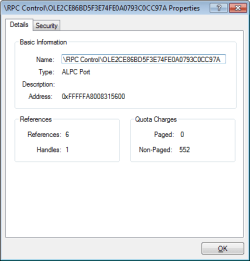
I've managed to pin point what exactly is causing the problem inside the dllhost.exe process with the help of Process Explorer (by Sysinternals) and its listing of Handles inside each process.
When the problem happened I went into the list of Handles inside dllhost.exe and started closing handles one by one to see after which one the problem disappears.
It turns out to be something called "ALPC Port/RPC Control" (Screenshot attached)

I really hope this info will help in figuring out this annoying problem.

Thanks!

---

Apparently it has something to do with codecs installed on the pc - in my case it is K-Lite.
I've uninstalled and things got back to normal - and when I installed the codecs again (I've tried different codec packs) it came back.
Furthermore, now there is another problem of "COM Surrogate has stopped working" with this error event:
"Faulting application name: DllHost.exe, version: 6.1.7600.16385, time stamp: 0x4a5bc6b7
Faulting module name: RPCRT4.dll, version: 6.1.7601.17514, time stamp: 0x4ce7ba59
Exception code: 0xc0020043
Fault offset: 0x0005cd99
Faulting process id: 0x778
Faulting application start time: 0x01cdbf761de92209
Faulting application path: C:\windows\SysWOW64\DllHost.exe
Faulting module path: C:\windows\syswow64\RPCRT4.dll
Report Id: 5cc678d8-2b69-11e2-a5c6-dc0ea12f8458"

And so I've followed these instructions:
http://helpdeskgeek.com/help-desk/fix-com-surrogate-has-stopped-working-in-windows-7/
And I'm trying to figure out if it helped.
 

Attachments

  • Untitled.png
    Untitled.png
    6.3 KB · Views: 88
Last edited:

My Computer My Computer

Computer Manufacturer/Model Number
Toshiba Satellite P775
OS
Windows 7 Home Premium x64
CPU
Mobile QuadCore Intel Core i7-2670QM, 2400 MHz
Memory
8GB
Graphics Card(s)
Intel HD Graphics 3000
Apparently it has something to do with Acronis True Image:

After some searching, this is what I've done:
1. Logged out of the Sync in Acronis ([DUPLICATE] Slow folder display issues possibly caused by Acronis True Image 2013? | Knowledge Base) [I already had "Acronis Nonstop Backup Service" and "Acronis Sync Agent Service" stopped and set to manual, and so I started "Acronis Sync Agent Service", logged out of Sync and stopped the service. Left "Acronis Scheduler2 Service" on and set to Automatic]
2. Renamed ti_manager_proxy_1.dll (Com Surrogate failure | Knowledge Base)

Now I have dllhost.exe running but the problem doesn't happen. Hopes it stays this way.
If not, apparently it only happens with Acronis 2013, so I'll install the 2012 or 2011 version.

Edit: this solved it.
 
Last edited:

My Computer My Computer

Computer Manufacturer/Model Number
Toshiba Satellite P775
OS
Windows 7 Home Premium x64
CPU
Mobile QuadCore Intel Core i7-2670QM, 2400 MHz
Memory
8GB
Graphics Card(s)
Intel HD Graphics 3000
Guy1, you are my absolute hero.

I've struggled with this problem for a month now. First it was just plain annoyance, lately it has become impossible to do my work, let alone the bad impression I gave my customers when I fixed their PC's but couldn't fix my own.

I've tried everything, and also followed your instructions, and failed. I was at the end of my wits...and only then I discovered that there was a second page. The second I saw the word Acronis, I knew what triggered the problems. Removed it, no problems ever since. You are awesome. So awesome I made an account on this forum only to mention your awesomeness :-P

Thanks a bunch and keep up the good work.
 

My Computer My Computer

OS
Windows 7 Home Premium x64
Guy1, you are my absolute hero.

I've struggled with this problem for a month now. First it was just plain annoyance, lately it has become impossible to do my work, let alone the bad impression I gave my customers when I fixed their PC's but couldn't fix my own.

I've tried everything, and also followed your instructions, and failed. I was at the end of my wits...and only then I discovered that there was a second page. The second I saw the word Acronis, I knew what triggered the problems. Removed it, no problems ever since. You are awesome. So awesome I made an account on this forum only to mention your awesomeness :-P

Thanks a bunch and keep up the good work.

Glad to hear! and thanks! :p
 

My Computer My Computer

Computer Manufacturer/Model Number
Toshiba Satellite P775
OS
Windows 7 Home Premium x64
CPU
Mobile QuadCore Intel Core i7-2670QM, 2400 MHz
Memory
8GB
Graphics Card(s)
Intel HD Graphics 3000
I have been having this problem for several months, and tried everything on this site and others to no avail. I even dealt with the Acronis 2013 dilemma, and it did not solve it.

What did finally work was going into My Computer > Advanced System Setting > Advanced > Performance Options > Visual Effects. I turned off Aero Peak, and several others, and it solved my issue. I also turned off all the "Fade" options and few others as well. Now my system is stable and windows explorer opens without incidence.

My suggestion is look at your graphic intensive processes and go from there. You may have to play around with some of the visual effects to get the problem resolved... Worked like a champ and has not reoccurred in over a month.
 
Last edited:

My Computer My Computer

Computer Manufacturer/Model Number
Generic
OS
Windows 7 64-bit
CPU
i5
Motherboard
Gygabyte
Memory
8 BG
Graphics Card(s)
Nvidia 9500 series
Sound Card
NA
Monitor(s) Displays
Dual - LG and Samsung
Hard Drives
SSD-256 GB
PSU
Thermaltake
Cooling
NA
WOW....Guy1 you saved the day...:D
I did all looked into possibilities for this blank My Computer until I zeroed on dllhost*.exe which is associated with Acronis True Image 2013. To identify this blank outs I ran sfc, malware, anti-virus scans, uninstalled couple more programs, but I didn't find this root cause. I even don't know how to key in tag word to google out this program. But google image searched help when I uploaded my screen shot which matched your...& whole problem solved. My one techie friend advises to format & re install but I was not at all ready for it as I found out its system application interfering this. In past when I use to encounter this problem I use to log off by keeping task manager on & then I use to click Cancle as Windows wait to background programs to end, so after clicking Cancle My Computer started to work fine but still I didn't founded the culprit dllhost....!!!:o
So big thanks to Guy1...you really saved the day...:cool:& Most important this platform from where I got DIY attitude...BIG THANKS-SevenForums....:):)
 

Attachments

  • Capture3.JPG
    Capture3.JPG
    52 KB · Views: 1
  • Capture5.JPG
    Capture5.JPG
    84.2 KB · Views: 1

My Computer My Computer

Computer type
Laptop
Computer Manufacturer/Model Number
Dell Inspiron N5010-Laptop
OS
Windows 7 Home Premium 64 bit
CPU
Intel(R) Core(TM) i5 CPU M 460 @ 2.53GHz
Motherboard
Dell Inc. 0YXXJJ
Memory
DDR3-SDRAM-4GB
Graphics Card(s)
ATI Mobility Radeon HD 5650- 1 GB
Sound Card
IDT High Definition Audio Controller
Monitor(s) Displays
Generic PnP Monitor-1
Screen Resolution
1366 x 768 (32-bit) (60 Hz)
Hard Drives
Western Digital-500 GB
Cooling
1 CPU Fan
Keyboard
Standard PS/2 Keyboard
Mouse
Synaptics PS/2 Port TouchPad
Internet Speed
1 mbps
Other Info
Dell Wireless 365 Bluetooth Module;Network Card - Realtek RTL8102E/RTL8103E Family PCI-E Fast Ethernet NIC (NDIS 6.20);Network Card - DW1501 Wireless-N WLAN Half-Mini Card
thanks a million bro you are truly my hero .you saved me
 

My Computer My Computer

Computer type
Laptop
Computer Manufacturer/Model Number
compaq cq 40
OS
windows 7 32 bit
Memory
4gb ram
Antivirus
avg
Browser
firefox
@guy1

hey bro..

m also having same problem..when i try to access DOWNLOAD FOLDER (specially) .... icons go blank n my computer folder does not show..

same as u attached the screenshot..

plz help me...
 

My Computer My Computer

Computer type
Laptop
Computer Manufacturer/Model Number
dell
OS
windows 7 home premium x64
Graphics Card(s)
raedon
Hard Drives
seagate
Antivirus
mcafee
Browser
firefox
Hey, people. I checked out this thread, and I have the same problem. However, dllhost.exe is not a problem for me (it seems), as it doesn't show in Task Management.

I also tried the visual settings which someone talked about, and it helped partially. Now I can see almost all the desktop icons, however not all of them, and my computer is still very slow.

I'm running a full virus scan in order to make sure I'm not infected.

Can anyone help this noob? :)
 

My Computer My Computer

Computer type
PC/Desktop
Computer Manufacturer/Model Number
Custom build
OS
Windows 7 Home Premium x64
CPU
Intel Core i7-2600K CPU @ 3.40GHz
Memory
8.00 GB
Graphics Card(s)
NVIDIA GeForce GTX 580
Antivirus
Norman
Browser
Google Chrome

My Computer My Computer

Computer type
Laptop
Computer Manufacturer/Model Number
HP Elitebook 8540p
OS
Windows 7 Pro 32
CPU
Intel(R) Core(TM) i5 CPU M 540 @ 2.53GHz
Motherboard
Hewlett-Packard 1521
Memory
4,00 GB (Usable 2,98)
Graphics Card(s)
NVIDIA NVS 5100M
Sound Card
NVIDIA High Definition Audio
Screen Resolution
1600x900
Hard Drives
INTEL SSDSA2CW120G3
Antivirus
F-Secure Internet Security
Browser
IE, Firefox, Opera
Other Info
Sandboxie,
SRP (Software Restriction Policy),
EMET (Enhanced Mitigation Experience Toolkit),
WFC (Windows Firewall Control by BiniSoft),
Malwarebytes Premium
I tried clicking the button Show processes form all users, but it only shows for a couple of secons and then it disappears again.

Also, I tried some of the answers you linked to. Downloading Media Preview did not solve the issue (it actually made all the icons turn white again). Neither did the Autoruns, however I'm not sure how to apply these changes. I tried saving them, but I only get a file which I don't know where to put. Also I tried resetting the thumbnail cache using the Run command "cleanmgr", but nothing happens when I press Enter.

I also have trouble opening some programs.
 

My Computer My Computer

Computer type
PC/Desktop
Computer Manufacturer/Model Number
Custom build
OS
Windows 7 Home Premium x64
CPU
Intel Core i7-2600K CPU @ 3.40GHz
Memory
8.00 GB
Graphics Card(s)
NVIDIA GeForce GTX 580
Antivirus
Norman
Browser
Google Chrome
Back
Top