
I very strange problem has begun to develop on my computer, and is something that I have never seen before. Googling the problem has led me pretty much nowhere, and even though I am usually capable of taking care of my own computer issues this is so bizzare that I have no idea what to do.
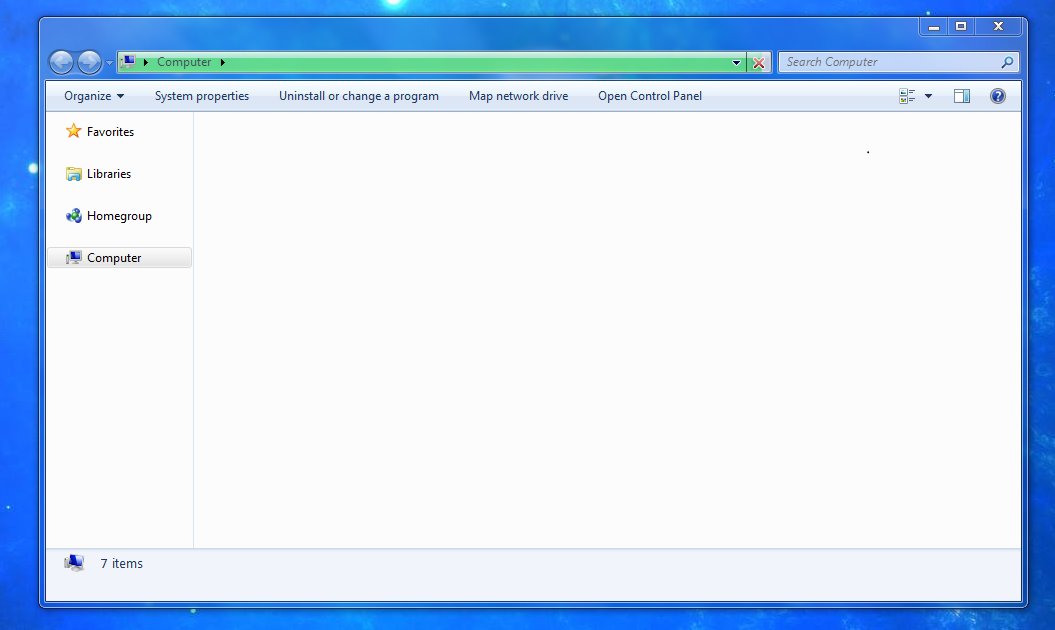
Basically, out of nowhere my computer started behaving strangely in this fashion: Opening windows explorer with "My Computer" takes FOREVER to load. The green bar goes up slowely but never finsishes (at least as far as I have watched it, and instead of the normal myriad of quick links on the left there is only "Favorites", "Libraries", "Homegroup", and "Computer", all unexpanded and lacking the expansion arrow as if there is nothing within them. Also, on the default "Computer" section there is just nothing. None of my drives show and it is just a blank white page. Additionally, I get the same loading issue with the Control Pannel as none of the icons ever load.
The other problem I am having which I believe is related is that random icons across all drives are either invisible (not loaded) or have the "No Icon" icon, that icon that is just a blank piece of paper with the corner folded. Paired with this, I am sure, is that sometimes when I empty the recycle bin, instead of the icon changing into the emptied bin it just disapears and eventually loads the correct icon sometime later while I am not watching. Also some icons for pictures and videos will actually load but then never show a thumbnail preview of the media like they are supposed to.

Notes:
this thing work perfect in explorer alternate like xyplorer .but windows default explorer gets corrupted
I have cleared all temp data/caches with CCleaner.i tried rebuilding iconcache.db.this temporary fix it but aftersome time or installing a new programme the problem recurrs
I have tried running the sfc scannow it didn't help
I do have Superfetch, Prefetch, and Drive Indexing disabled but only because I run Windows 7 off an SSD
I can still browse each drive my manually typing in the drive letter in explorer, and so far every file loads fine and every drive can be written to OK
Because of the above, and the fact that the icon issue is across all drives I don't think its a hardware issue but obviosuly I am not sure.
Thanks.
Basically, out of nowhere my computer started behaving strangely in this fashion: Opening windows explorer with "My Computer" takes FOREVER to load. The green bar goes up slowely but never finsishes (at least as far as I have watched it, and instead of the normal myriad of quick links on the left there is only "Favorites", "Libraries", "Homegroup", and "Computer", all unexpanded and lacking the expansion arrow as if there is nothing within them. Also, on the default "Computer" section there is just nothing. None of my drives show and it is just a blank white page. Additionally, I get the same loading issue with the Control Pannel as none of the icons ever load.
The other problem I am having which I believe is related is that random icons across all drives are either invisible (not loaded) or have the "No Icon" icon, that icon that is just a blank piece of paper with the corner folded. Paired with this, I am sure, is that sometimes when I empty the recycle bin, instead of the icon changing into the emptied bin it just disapears and eventually loads the correct icon sometime later while I am not watching. Also some icons for pictures and videos will actually load but then never show a thumbnail preview of the media like they are supposed to.
Notes:
this thing work perfect in explorer alternate like xyplorer .but windows default explorer gets corrupted
I have cleared all temp data/caches with CCleaner.i tried rebuilding iconcache.db.this temporary fix it but aftersome time or installing a new programme the problem recurrs
I have tried running the sfc scannow it didn't help
I do have Superfetch, Prefetch, and Drive Indexing disabled but only because I run Windows 7 off an SSD
I can still browse each drive my manually typing in the drive letter in explorer, and so far every file loads fine and every drive can be written to OK
Because of the above, and the fact that the icon issue is across all drives I don't think its a hardware issue but obviosuly I am not sure.
Thanks.
Last edited:
My Computer
At a glance
windows 7 32 bit4gb ram
- Computer type
- Laptop
- Computer Manufacturer/Model Number
- compaq cq 40
- OS
- windows 7 32 bit
- Memory
- 4gb ram
- Antivirus
- avg
- Browser
- firefox


