Tricky cloning question to SSD drive -

If you clone a physical disk...... you make an exact copy!
bootmenu entries (if located on cloned disk)->still point to old partition.
What's called C,D,E etc is in registry of win7.)->still point to old partition.

where it points to is is determined by:
  • disksignature of physical disk
  • start sector of partition
since you did I clone disk... did you?.... so not a simple partition clone?.... all should work.
At least if you detach the old disk!

Did you do a disk clone or partition clone?
 

My Computer My Computer

At a glance

Microsoft Windows 7 Home Premium 64-bits 7601...Intel(R) Core(TM) i3 CPU M 370 @ 2.40GHz4,00 GBATI Mobility Radeon HD 5400 Series
Computer type
Laptop
Computer Manufacturer/Model Number
ACER ASPIRE 5742G
OS
Microsoft Windows 7 Home Premium 64-bits 7601 Multiprocessor Free Service Pack 1
CPU
Intel(R) Core(TM) i3 CPU M 370 @ 2.40GHz
Motherboard
Acer Aspire 5742G
Memory
4,00 GB
Graphics Card(s)
ATI Mobility Radeon HD 5400 Series
Sound Card
(1) AMD High Definition Audio Device (2) Realtek High Defi
Screen Resolution
1366 x 768 x 32 bits (4294967296 colors) @ 60 Hz
Hard Drives
WDC WD5000BEVT-22ZAT0
all solved yet, thanks.
anyway, it was a partition clone.
now i have in dosk management the 128gb on ssd = 74 os + unallocate!
can i unify without problem?
 

My Computer My Computer

At a glance

win 7 x64 pro
OS
win 7 x64 pro
Motherboard
P5KC
Sound Card
integrated alc883
all solved yet, thanks.
anyway, it was a partition clone.
now i have in dosk management the 128gb on ssd = 74 os + unallocate!
can i unify without problem?
post screenshot of disk management!
 

My Computer My Computer

At a glance

Microsoft Windows 7 Home Premium 64-bits 7601...Intel(R) Core(TM) i3 CPU M 370 @ 2.40GHz4,00 GBATI Mobility Radeon HD 5400 Series
Computer type
Laptop
Computer Manufacturer/Model Number
ACER ASPIRE 5742G
OS
Microsoft Windows 7 Home Premium 64-bits 7601 Multiprocessor Free Service Pack 1
CPU
Intel(R) Core(TM) i3 CPU M 370 @ 2.40GHz
Motherboard
Acer Aspire 5742G
Memory
4,00 GB
Graphics Card(s)
ATI Mobility Radeon HD 5400 Series
Sound Card
(1) AMD High Definition Audio Device (2) Realtek High Defi
Screen Resolution
1366 x 768 x 32 bits (4294967296 colors) @ 60 Hz
Hard Drives
WDC WD5000BEVT-22ZAT0
You can add that unallocated space to the I partition if you want. You should be able to do that through Windows Disk Management by right-clicking I.
 

My Computer My Computer

At a glance

Windows 7 Home Premium SP1, 64-bitIntel Skylake i5-6600K, not overclocked8 GB HyperX DDR4-2666 (2 x 4 GB)none; graphics are integrated on CPU
Computer type
PC/Desktop
Computer Manufacturer/Model Number
Ignatz Special; 4 speed manual gearbox; factory air conditioning; one of one
OS
Windows 7 Home Premium SP1, 64-bit
CPU
Intel Skylake i5-6600K, not overclocked
Motherboard
AsRock Z170M Extreme 4, micro ATX
Memory
8 GB HyperX DDR4-2666 (2 x 4 GB)
Graphics Card(s)
none; graphics are integrated on CPU
Sound Card
onboard: Realtek ALC1150; external: USB Behringer UF0-202
Monitor(s) Displays
Dell S2340M 23 inch IPS
Screen Resolution
1600 x 900
Hard Drives
System: Crucial MX100 series SSD, 128 GB;
Data: Samsung Spinpoint 103SJ, 1 TB;
Backup: WD Caviar Green WD30EZRX-00D8PB0, 3 TB
PSU
Rosewill SilentNight 500 watt fanless, semi-modular
Case
Antec Solo II
Cooling
Noctua NH-U12S; Noctua F12 intake, Noctua S12A exhaust
Keyboard
Microsoft 200 6JH-00001 USB
Mouse
Dell or Microsoft optical wired; USB
Antivirus
Microsoft Security Essentials and Malwarebytes Premium
Browser
Pale Moon
Other Info
All fans PWM; speeds at idle: CPU circa 500 rpm; intake circa 600 rpm; exhaust circa 600 rpm; CPU temps 27 idle and 47 C load in a warm room (27 C/81 F) when running Intel Extreme Tuning Utility stress test.
https://dl.dropbox.com/u/7820506/Altro/overprov.jpg
https://dl.dropbox.com/u/7820506/Altro/ssd gestione disco.jpg

IN AS SSD the performance are half then expected! why?
bios is in ahci mode. crystaldissk info ok.
You boot from I on SSD. What happens if you open a "command prompt"?
I bet you see C:\USERS\<yourname> , is that correct?
put something on your desktop... is it in folder C:\users\<yourname>\desktop ?

If so.. you're having troubles! please report back asap
 

My Computer My Computer

At a glance

Microsoft Windows 7 Home Premium 64-bits 7601...Intel(R) Core(TM) i3 CPU M 370 @ 2.40GHz4,00 GBATI Mobility Radeon HD 5400 Series
Computer type
Laptop
Computer Manufacturer/Model Number
ACER ASPIRE 5742G
OS
Microsoft Windows 7 Home Premium 64-bits 7601 Multiprocessor Free Service Pack 1
CPU
Intel(R) Core(TM) i3 CPU M 370 @ 2.40GHz
Motherboard
Acer Aspire 5742G
Memory
4,00 GB
Graphics Card(s)
ATI Mobility Radeon HD 5400 Series
Sound Card
(1) AMD High Definition Audio Device (2) Realtek High Defi
Screen Resolution
1366 x 768 x 32 bits (4294967296 colors) @ 60 Hz
Hard Drives
WDC WD5000BEVT-22ZAT0
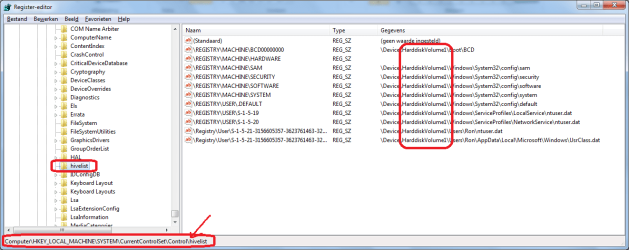
Start REGEDIT and browse to HKEY_LOCAL_MACHINE\SYSTEM\CurrentControlSet\Control\hivelist
Do you see the same as screenshot? All on same HarddiskVolume? Look carefully!
I think you're still using C drive!

Also do from http://www.sevenforums.com/tutorials/783-elevated-command-prompt.html
Code:
bcdedit/enum  all

All device and osdevice lines point to C or I?
 

Attachments

  • Naamloos.png
    Naamloos.png
    31 KB · Views: 8
Last edited:

My Computer My Computer

At a glance

Microsoft Windows 7 Home Premium 64-bits 7601...Intel(R) Core(TM) i3 CPU M 370 @ 2.40GHz4,00 GBATI Mobility Radeon HD 5400 Series
Computer type
Laptop
Computer Manufacturer/Model Number
ACER ASPIRE 5742G
OS
Microsoft Windows 7 Home Premium 64-bits 7601 Multiprocessor Free Service Pack 1
CPU
Intel(R) Core(TM) i3 CPU M 370 @ 2.40GHz
Motherboard
Acer Aspire 5742G
Memory
4,00 GB
Graphics Card(s)
ATI Mobility Radeon HD 5400 Series
Sound Card
(1) AMD High Definition Audio Device (2) Realtek High Defi
Screen Resolution
1366 x 768 x 32 bits (4294967296 colors) @ 60 Hz
Hard Drives
WDC WD5000BEVT-22ZAT0

My Computer My Computer

At a glance

Microsoft Windows 7 Home Premium 64-bits 7601...Intel(R) Core(TM) i3 CPU M 370 @ 2.40GHz4,00 GBATI Mobility Radeon HD 5400 Series
Computer type
Laptop
Computer Manufacturer/Model Number
ACER ASPIRE 5742G
OS
Microsoft Windows 7 Home Premium 64-bits 7601 Multiprocessor Free Service Pack 1
CPU
Intel(R) Core(TM) i3 CPU M 370 @ 2.40GHz
Motherboard
Acer Aspire 5742G
Memory
4,00 GB
Graphics Card(s)
ATI Mobility Radeon HD 5400 Series
Sound Card
(1) AMD High Definition Audio Device (2) Realtek High Defi
Screen Resolution
1366 x 768 x 32 bits (4294967296 colors) @ 60 Hz
Hard Drives
WDC WD5000BEVT-22ZAT0
It was I: because previously i installed seven in dual boot with xp. At installation time, other letter was busy from other hard drive. So I have i: as seven letter.
Anyway now I have no problem. Ssd with seven clone on i: and all software ok.
 

My Computer My Computer

At a glance

win 7 x64 pro
OS
win 7 x64 pro
Motherboard
P5KC
Sound Card
integrated alc883
It was I: because previously i installed seven in dual boot with xp. At installation time, other letter was busy from other hard drive. So I have i: as seven letter.
Anyway now I have no problem. Ssd with seven clone on i: and all software ok.
so you didn't clone at all!!
 

My Computer My Computer

At a glance

Microsoft Windows 7 Home Premium 64-bits 7601...Intel(R) Core(TM) i3 CPU M 370 @ 2.40GHz4,00 GBATI Mobility Radeon HD 5400 Series
Computer type
Laptop
Computer Manufacturer/Model Number
ACER ASPIRE 5742G
OS
Microsoft Windows 7 Home Premium 64-bits 7601 Multiprocessor Free Service Pack 1
CPU
Intel(R) Core(TM) i3 CPU M 370 @ 2.40GHz
Motherboard
Acer Aspire 5742G
Memory
4,00 GB
Graphics Card(s)
ATI Mobility Radeon HD 5400 Series
Sound Card
(1) AMD High Definition Audio Device (2) Realtek High Defi
Screen Resolution
1366 x 768 x 32 bits (4294967296 colors) @ 60 Hz
Hard Drives
WDC WD5000BEVT-22ZAT0
yess i've cloned partition I: with norton and migrate it on ssd.
so anyway now i've another question.
I have to move ssd win7 on hdd, because i must move ssd to another pc.
Which best software to write an image of ssd?
 

My Computer My Computer

At a glance

win 7 x64 pro
OS
win 7 x64 pro
Motherboard
P5KC
Sound Card
integrated alc883
Which best software to write an image of ssd?

As far as I know, any good imaging software will work---Acronis, Macrium, whatever you prefer.
 

My Computer My Computer

At a glance

Windows 7 Home Premium SP1, 64-bitIntel Skylake i5-6600K, not overclocked8 GB HyperX DDR4-2666 (2 x 4 GB)none; graphics are integrated on CPU
Computer type
PC/Desktop
Computer Manufacturer/Model Number
Ignatz Special; 4 speed manual gearbox; factory air conditioning; one of one
OS
Windows 7 Home Premium SP1, 64-bit
CPU
Intel Skylake i5-6600K, not overclocked
Motherboard
AsRock Z170M Extreme 4, micro ATX
Memory
8 GB HyperX DDR4-2666 (2 x 4 GB)
Graphics Card(s)
none; graphics are integrated on CPU
Sound Card
onboard: Realtek ALC1150; external: USB Behringer UF0-202
Monitor(s) Displays
Dell S2340M 23 inch IPS
Screen Resolution
1600 x 900
Hard Drives
System: Crucial MX100 series SSD, 128 GB;
Data: Samsung Spinpoint 103SJ, 1 TB;
Backup: WD Caviar Green WD30EZRX-00D8PB0, 3 TB
PSU
Rosewill SilentNight 500 watt fanless, semi-modular
Case
Antec Solo II
Cooling
Noctua NH-U12S; Noctua F12 intake, Noctua S12A exhaust
Keyboard
Microsoft 200 6JH-00001 USB
Mouse
Dell or Microsoft optical wired; USB
Antivirus
Microsoft Security Essentials and Malwarebytes Premium
Browser
Pale Moon
Other Info
All fans PWM; speeds at idle: CPU circa 500 rpm; intake circa 600 rpm; exhaust circa 600 rpm; CPU temps 27 idle and 47 C load in a warm room (27 C/81 F) when running Intel Extreme Tuning Utility stress test.
in easeus backup, yet installed but unused, can i do a DISK BKUP (image file) so i will restore it to future hdd? or is better to da a clone directly on hdd?
 

My Computer My Computer

At a glance

win 7 x64 pro
OS
win 7 x64 pro
Motherboard
P5KC
Sound Card
integrated alc883

My Computer My Computer

At a glance

Microsoft Windows 7 Home Premium 64-bits 7601...Intel(R) Core(TM) i3 CPU M 370 @ 2.40GHz4,00 GBATI Mobility Radeon HD 5400 Series
Computer type
Laptop
Computer Manufacturer/Model Number
ACER ASPIRE 5742G
OS
Microsoft Windows 7 Home Premium 64-bits 7601 Multiprocessor Free Service Pack 1
CPU
Intel(R) Core(TM) i3 CPU M 370 @ 2.40GHz
Motherboard
Acer Aspire 5742G
Memory
4,00 GB
Graphics Card(s)
ATI Mobility Radeon HD 5400 Series
Sound Card
(1) AMD High Definition Audio Device (2) Realtek High Defi
Screen Resolution
1366 x 768 x 32 bits (4294967296 colors) @ 60 Hz
Hard Drives
WDC WD5000BEVT-22ZAT0
disk management: https://dl.dropbox.com/u/7820506/Altro/disk manag.jpg
the disk that will replace ssd now is 500gb in a secondary pc and have win7.
On secondary pc now i have only the 500gb hdd and now i'm clone win7 of this pc, in which i'll mount ssd. In 2 words: i've switch 2 os(win7) of 2 pc, 1ssd with a hdd.
is not simple but i must do it!
 

My Computer My Computer

At a glance

win 7 x64 pro
OS
win 7 x64 pro
Motherboard
P5KC
Sound Card
integrated alc883
I read it three times, but still don't understand. Maybe because english isn't my native language;-)

If I understand well:
  1. contents of 500GB must be saved somewhere
  2. contents of SSD must replace everything on 500GB disk. Sort of copy from SDD to 500GB disk
  3. SSD will be overwritten with content you saved in step 1
Is that what you want?
Save disk mangement output of 500GB disk as well
 

My Computer My Computer

At a glance

Microsoft Windows 7 Home Premium 64-bits 7601...Intel(R) Core(TM) i3 CPU M 370 @ 2.40GHz4,00 GBATI Mobility Radeon HD 5400 Series
Computer type
Laptop
Computer Manufacturer/Model Number
ACER ASPIRE 5742G
OS
Microsoft Windows 7 Home Premium 64-bits 7601 Multiprocessor Free Service Pack 1
CPU
Intel(R) Core(TM) i3 CPU M 370 @ 2.40GHz
Motherboard
Acer Aspire 5742G
Memory
4,00 GB
Graphics Card(s)
ATI Mobility Radeon HD 5400 Series
Sound Card
(1) AMD High Definition Audio Device (2) Realtek High Defi
Screen Resolution
1366 x 768 x 32 bits (4294967296 colors) @ 60 Hz
Hard Drives
WDC WD5000BEVT-22ZAT0
yes just this!
disk mangement of 500GB is obvious: 1 partition mbr.
Now i'm moving all DATA (so remain only os on disk) to external hdd.
So i'll backup ssd image on external hdd, secure erase ssd, and then i'll install ssd on secondary pc to migrate os from 500 to ssd. OK??

and then i'll move 500 to first Pc to migrate ssd image. OK??
 

My Computer My Computer

At a glance

win 7 x64 pro
OS
win 7 x64 pro
Motherboard
P5KC
Sound Card
integrated alc883
yes just this!
disk mangement of 500GB is obvious: 1 partition mbr.
Is that partition SYSTEM and BOOT in disk management?

Now i'm moving all DATA (so remain only os on disk) to external hdd.
So i'll backup ssd image on external hdd, secure erase ssd, and then i'll install ssd on secondary pc to migrate os from 500 to ssd. OK??

Is your backup software capable to restore a large partition (500GB with lots of free space) to a small SSD?

500GB and SSD are both connected to SATA?

If all answers ae yes ... it should work.
-----------
Be sure partition on SSD and HDD are both marked ACTIVE and are PRIMARY partitions after restore.

Most likely you have to do a http://www.sevenforums.com/tutorials/681-startup-repair.html afterwards to make them bootable
 

My Computer My Computer

At a glance

Microsoft Windows 7 Home Premium 64-bits 7601...Intel(R) Core(TM) i3 CPU M 370 @ 2.40GHz4,00 GBATI Mobility Radeon HD 5400 Series
Computer type
Laptop
Computer Manufacturer/Model Number
ACER ASPIRE 5742G
OS
Microsoft Windows 7 Home Premium 64-bits 7601 Multiprocessor Free Service Pack 1
CPU
Intel(R) Core(TM) i3 CPU M 370 @ 2.40GHz
Motherboard
Acer Aspire 5742G
Memory
4,00 GB
Graphics Card(s)
ATI Mobility Radeon HD 5400 Series
Sound Card
(1) AMD High Definition Audio Device (2) Realtek High Defi
Screen Resolution
1366 x 768 x 32 bits (4294967296 colors) @ 60 Hz
Hard Drives
WDC WD5000BEVT-22ZAT0

My Computer My Computer

At a glance

win 7 x64 pro
OS
win 7 x64 pro
Motherboard
P5KC
Sound Card
integrated alc883
Back
Top