Product Key Number for Windows 7 - Find and See

How to Find and See the Windows 7 Product Key Number


   Information
The Windows 7 product key number is a sequence of 25 letters and numbers divided into 5 groups of 5 characters each (ex: XXXXX-XXXXX-XXXXX-XXXXX-XXXXX) that is used to activate either the 32-bit or 64-bit Windows 7 edition that you purchased and installed.

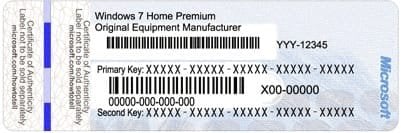
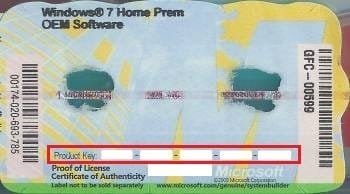
This will show you how to find and see your product key number in Windows 7 or on the retail or OEM product license key Certificate of Authenticity (COA) sticker.
   Note


  • A Windows 7 product key number can only be used to activate the same edition of Windows 7 that it was for, and cannot be used to activate a different edition of Windows 7.
  • A Family Pack Windows 7 product key number can be used to activate the Family Pack Windows 7 copy on up to 3 computers at any one time.
  • A OEM Windows 7 product key number can only be used to activate a OEM Windows 7 copy on the same computer that it was first activated on, and no other computer.
  • A retail Windows 7 product key number can be used to activate a retail Windows 7 copy on any computer, but only on up to one computer at any one time.
For more information on the license terms of Windows 7, see: License Terms

For more information about the product key number authenticity, see: How to Tell

   Tip
A Product Key and Product ID are two completely different things, despite the similarity of the terms.

The 20 character Product ID is created during the installation process and is prominently displayed under the Windows activation section at the bottom of the Control Panel (icons view) -> System window. It is used to obtain/qualify for technical support from Microsoft; it is of no use during the installation process.

The 25 character Product Key is used to "prove" ownership of a legitimate license and is required to perform the installation to activate Windows with.


OPTION ONE

Find Windows 7 Product Key Number on Product Key Sticker


1. For a OEM Product Key on COA Sticker
NOTE: These will be store bought computers that came with Windows 7 preinstalled on them. The product key sticker will usually be on the back of a desktop, and on the bottom or under the battery of a laptop and notebook. The sticker key number may be different than the key number reported in one of the programs below. If so, the key number on the sticker is the one that's unique to your computer, and that's the one you'll need to input should you ever clean install Windows. The different extracted key is just a master key used at the OEM factory.
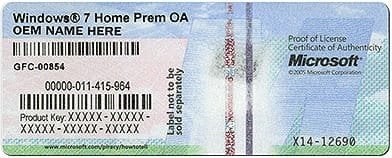
OEM-1.jpg

OEM-2.jpg

OEM-3.jpg

2. For a Retail Product Key on COA Sticker
NOTE: These will be computers that a retail copy of Windows 7 has been installed on. The product key sticker will be in the included paperwork in the retail Windows 7 box.
Retail.gif


OPTION TWO

To Use "ShowKeyPlus" to See Product Key Number in Windows 7


   Note
Installed Key = This is the product key that Windows is currently activated with.

OEM Key = This is the key stored in the UEFI firmware chip on the motherboard. This key will not always be the same as the installed key. For example, when the PC came with Windows 8.1 originally installed.


1. Download and run ShowKeyPlus. See: "ShowKeyPlus" Information and Download Page
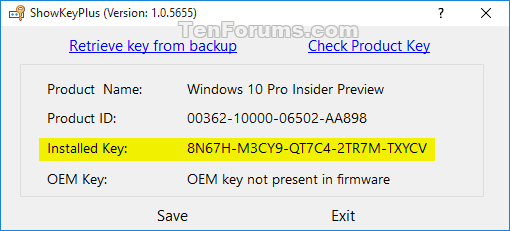
ShowKeyPlus.png
ShowKeyPlus_enterprise.png


OPTION THREE

To Use "Magical Jelly Bean Keyfinder" to See Product Key Number in Windows 7


   Note
This option shows you how to use the free program Magical Jelly Bean Keyfinder to see what the product key number is from within a Windows 7 that it has already been entered in (ex: activated). Magical Jelly Bean Keyfinder will not show the product key number for Windows 7 Enterprise though.

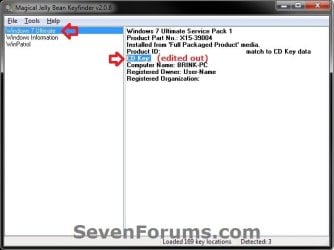
1. Download and run the free Magical Jelly Bean Keyfinderprogram towards the bottom of the link.

2. In the left pane, click on Windows 7 (your edition). You will see CD Key in the right pane displaying the Windows 7 product key number.
Magical_Jelly_Bean.jpg


OPTION FOUR

To Use "Speccy" to See Product Key Number in Windows 7


   Note
This option shows you how to use the free program Speccy to see what the product key number is from within a Windows 7 that it has already been entered in (ex: activated). Speccy will not show the product key number for Windows 7 Enterprise though.

1. Download, install, and run the free Speccy program.

2. In the left pane, click on Operating System. In the right pane, you will see the product key number to the right of Serial Number.
Speccy.JPG


OPTION FIVE

To Use "ProduKey" to See Product Key Number in Windows 7


   Note
This option shows you how to use the free program ProduKey to see what the product key number is from within a Windows 7 that it has already been entered in (ex: activated). ProduKey will not show the product key number for Windows 7 Enterprise though.

1. Download, extract, and run the free ProduKey program.

2. You will now see Windows product key listed.

ProduKey.jpg


OPTION SIX

To Use a VBS Download to See Product Key Number in Windows 7


   Note
This option was provided by our member Konst at this link.

There you can see that the encrypted key is stored in registry key:
HKLM\SOFTWARE\Microsoft\Windows NT\CurrentVersion\DigitalProductId
at Offset = 52

And that the key only includes this letters and numbers
BCDFGHJKMPQRTVWXY2346789
And no "AEILNOSUZ015 allowed.


1. Click on the Download button below to download the file below.
See_Windows_Product_Key.vbs


Download


2. Save the VBS file to your desktop, run it, and approve running it.
NOTE: The .vbs file does not install anything on your computer. You can also right click on the .vbs file and click on Edit to see what the script contains.

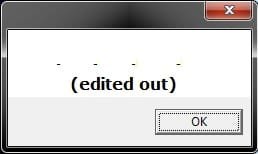
3. You will now get a pop-up dialog box displaying the product key number used to activate your current Windows installation. Click on OK to close the pop-up when ready. (see screenshot below)
VBS-example.jpg


OPTION SEVEN

Find Windows 7 Product Key with "Belarc Advisor"


   Note
You must be signed in as an administrator to run this program. This program will not find the product key of Windows 7 Enterprise since it's a volume license.


1. If you have not already, download and install the free Belarc Advisor program.

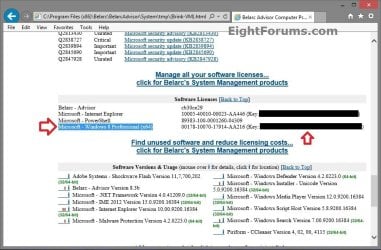
2. Run the program. When it displays the results in your default web browser, scroll down until you see your Windows 8 product key like below.
Belarc_Advisor.jpg


That's it,
Shawn


Attachments

Last edited:
Anyone tried any of these methods described in this post lately? I tried couple of them and none of them appears to be working now. Perhaps some Windows update is preventing you from retrieving the key via a program?

Not that it is extremely important. I do have all my Windows 7 keys printed except that I have 4 computers with Windows 7 and I don't know which key belongs to which machine anymore. :cry:
 

My Computer My Computer

Computer Manufacturer/Model Number
Custom Build - Beyonddc Edition
OS
Windows 7 Professional
CPU
Intel Core 2 Quad Q6600
Motherboard
MSI P6N SLI Platinum
Memory
G.SKILL 4GB DDR2 800
Graphics Card(s)
Gecube ATI Radeon HD 3850
Sound Card
Onboard
PSU
Cooler Master Real Power Pro 750 wattz
Case
Cooler Master Elite 330
Hello beyonddc,

Yes, they all still work just fine only if Windows 7 has been activated with the product key, and it's not a Windows 7 Enterprise with a volume license.

I like Magical Jelly Bean Keyfinder.
 

My Computer My Computer

Computer type
PC/Desktop
Computer Manufacturer/Model Number
Self built custom
OS
64-bit Windows 11 Pro for Workstations
CPU
Intel i7-8700K OC'd to 5 GHz
Motherboard
ASUS ROG Maximus XI Formula Z390
Memory
64 GB (4x16GB) G.SKILL TridentZ RGB DDR4 3600 MHz
Graphics Card(s)
ASUS ROG-STRIX-GTX1080TI-O11G-GAMING
Sound Card
Integrated
Monitor(s) Displays
2 x Samsung Odyssey G7 27"
Screen Resolution
2560x1440
Hard Drives
1TB Samsung 990 PRO M.2,
4TB Samsung 990 PRO PRO M.2,
TerraMaster F8 SSD Plus NAS
PSU
Seasonic Prime Titanium 850W
Case
Thermaltake Core P3
Cooling
Corsair Hydro H115i
Keyboard
Logitech wireless K800
Mouse
Logitech MX Master 4
Internet Speed
2 Gb/s Download and 100 Mb/s Upload
Antivirus
Malwarebyte Anti-Malware Premium
Browser
Google Chrome
Other Info
Logitech Z625 speaker system,
Logitech BRIO 4K Pro webcam,
HP Color LaserJet Pro MFP M477fdn,
APC SMART-UPS RT 1000 XL - SURT1000XLI,
Galaxy S23 Plus phone
Hello beyonddc,

Yes, they all still work just fine only if Windows 7 has been activated with the product key, and it's not a Windows 7 Enterprise with a volume license.

I like Magical Jelly Bean Keyfinder.

When I ran the "Magical Jelly Bean Keyfinder v2.0.9.5", the CD Key is...

CD Key: BBBBB-BBBBB-BBBBB-BBBBB-BBBBB

I tried to run the software as "Administrator" but no luck as well.

I didn't download the installer, I just downloaded the zip file that contains the software. I don't think that should matter though.

I also notice that the "Recover serials for Windows 7, 8 and Office 2010" feature is not part of the free version of "Magical Jelly Bean Keyfinder". KeyFinder | Magical Jelly Bean

Perhaps that's the reason why I can't get my key because I need to purchase "Recover Keys" software instead?
 

My Computer My Computer

Computer Manufacturer/Model Number
Custom Build - Beyonddc Edition
OS
Windows 7 Professional
CPU
Intel Core 2 Quad Q6600
Motherboard
MSI P6N SLI Platinum
Memory
G.SKILL 4GB DDR2 800
Graphics Card(s)
Gecube ATI Radeon HD 3850
Sound Card
Onboard
PSU
Cooler Master Real Power Pro 750 wattz
Case
Cooler Master Elite 330
It will show you the product key (license) number of Windows 7 with the free version (at least it did for me) as long as you are not running it in an Enterprise version that has a volume license. Volume licenses are not displayed.


Is your Windows 7 activated?
 

My Computer My Computer

Computer type
PC/Desktop
Computer Manufacturer/Model Number
Self built custom
OS
64-bit Windows 11 Pro for Workstations
CPU
Intel i7-8700K OC'd to 5 GHz
Motherboard
ASUS ROG Maximus XI Formula Z390
Memory
64 GB (4x16GB) G.SKILL TridentZ RGB DDR4 3600 MHz
Graphics Card(s)
ASUS ROG-STRIX-GTX1080TI-O11G-GAMING
Sound Card
Integrated
Monitor(s) Displays
2 x Samsung Odyssey G7 27"
Screen Resolution
2560x1440
Hard Drives
1TB Samsung 990 PRO M.2,
4TB Samsung 990 PRO PRO M.2,
TerraMaster F8 SSD Plus NAS
PSU
Seasonic Prime Titanium 850W
Case
Thermaltake Core P3
Cooling
Corsair Hydro H115i
Keyboard
Logitech wireless K800
Mouse
Logitech MX Master 4
Internet Speed
2 Gb/s Download and 100 Mb/s Upload
Antivirus
Malwarebyte Anti-Malware Premium
Browser
Google Chrome
Other Info
Logitech Z625 speaker system,
Logitech BRIO 4K Pro webcam,
HP Color LaserJet Pro MFP M477fdn,
APC SMART-UPS RT 1000 XL - SURT1000XLI,
Galaxy S23 Plus phone
It will show you the product key (license) number of Windows 7 with the free version (at least it did for me) as long as you are not running it in an Enterprise version that has a volume license. Volume licenses are not displayed.


Is your Windows 7 activated?

Yea, mine is activated.

I think I am running a Windows 7 pro enterprise version. The license key I got is from the school where I used to study.
 

My Computer My Computer

Computer Manufacturer/Model Number
Custom Build - Beyonddc Edition
OS
Windows 7 Professional
CPU
Intel Core 2 Quad Q6600
Motherboard
MSI P6N SLI Platinum
Memory
G.SKILL 4GB DDR2 800
Graphics Card(s)
Gecube ATI Radeon HD 3850
Sound Card
Onboard
PSU
Cooler Master Real Power Pro 750 wattz
Case
Cooler Master Elite 330
That is why then.
 

My Computers My Computers

System One System Two

  • Computer type
    PC/Desktop
    OS
    7 X64
    CPU
    i5 8400
    Motherboard
    gigabyte b365m ds3h
    Memory
    2x8gb 3200mhz
    Hard Drives
    various
    PSU
    pure power 11 400w cm
    Case
    Coolermaster
    Cooling
    cryorig m9i
  • Computer type
    PC/Desktop
    OS
    7x64
    CPU
    g5400
    Motherboard
    ga b365m ds3h
    Memory
    8gb ddr4 2400
    PSU
    xfx pro 450w
Yep, that would be why then. Enterprise uses a volume license, and none of these programs will reveal a volume license.
 

My Computer My Computer

Computer type
PC/Desktop
Computer Manufacturer/Model Number
Self built custom
OS
64-bit Windows 11 Pro for Workstations
CPU
Intel i7-8700K OC'd to 5 GHz
Motherboard
ASUS ROG Maximus XI Formula Z390
Memory
64 GB (4x16GB) G.SKILL TridentZ RGB DDR4 3600 MHz
Graphics Card(s)
ASUS ROG-STRIX-GTX1080TI-O11G-GAMING
Sound Card
Integrated
Monitor(s) Displays
2 x Samsung Odyssey G7 27"
Screen Resolution
2560x1440
Hard Drives
1TB Samsung 990 PRO M.2,
4TB Samsung 990 PRO PRO M.2,
TerraMaster F8 SSD Plus NAS
PSU
Seasonic Prime Titanium 850W
Case
Thermaltake Core P3
Cooling
Corsair Hydro H115i
Keyboard
Logitech wireless K800
Mouse
Logitech MX Master 4
Internet Speed
2 Gb/s Download and 100 Mb/s Upload
Antivirus
Malwarebyte Anti-Malware Premium
Browser
Google Chrome
Other Info
Logitech Z625 speaker system,
Logitech BRIO 4K Pro webcam,
HP Color LaserJet Pro MFP M477fdn,
APC SMART-UPS RT 1000 XL - SURT1000XLI,
Galaxy S23 Plus phone
"Magical Jelly Bean Keyfinder" seems to display Win 7 Enterprise Key

I just used "Magical Jelly Bean Keyfinder" to display the CD key of my Win 7 Enterprise SP1 install, so perhaps these instructions need to be checked in this regard.
 

My Computer My Computer

OS
Vista 32bit
Hello megabyte, and welcome to Seven Forums.

Are you using the free or paid for version of "Magical Jelly Bean Keyfinder"?
 

My Computer My Computer

Computer type
PC/Desktop
Computer Manufacturer/Model Number
Self built custom
OS
64-bit Windows 11 Pro for Workstations
CPU
Intel i7-8700K OC'd to 5 GHz
Motherboard
ASUS ROG Maximus XI Formula Z390
Memory
64 GB (4x16GB) G.SKILL TridentZ RGB DDR4 3600 MHz
Graphics Card(s)
ASUS ROG-STRIX-GTX1080TI-O11G-GAMING
Sound Card
Integrated
Monitor(s) Displays
2 x Samsung Odyssey G7 27"
Screen Resolution
2560x1440
Hard Drives
1TB Samsung 990 PRO M.2,
4TB Samsung 990 PRO PRO M.2,
TerraMaster F8 SSD Plus NAS
PSU
Seasonic Prime Titanium 850W
Case
Thermaltake Core P3
Cooling
Corsair Hydro H115i
Keyboard
Logitech wireless K800
Mouse
Logitech MX Master 4
Internet Speed
2 Gb/s Download and 100 Mb/s Upload
Antivirus
Malwarebyte Anti-Malware Premium
Browser
Google Chrome
Other Info
Logitech Z625 speaker system,
Logitech BRIO 4K Pro webcam,
HP Color LaserJet Pro MFP M477fdn,
APC SMART-UPS RT 1000 XL - SURT1000XLI,
Galaxy S23 Plus phone
HOW TO FIND AND SEE THE WINDOWS 7 PRODUCT KEY NUMBER

I just wanted to thank KONST, POSTED 27 Oct/2011. I just followed the easy instructions copied the below text, saved it, added a "2" before saving it with ext. vbs and voila! MY Windows 7 Pro KEY POPPED OUT IN SECONDS!!! THANK YOU KONST !!! You save me a lot of time !:)

Save this script to a text file.
Change the extension of the file to *.vbs
Run it.

Set WshShell = CreateObject("WScript.Shell")
MsgBox ConvertToKey(WshShell.RegRead("HKLM\SOFTWARE\Microsoft\Windows NT\CurrentVersion\DigitalProductId"))

Function ConvertToKey(Key)
Const KeyOffset = 52
i = 28
Chars = "BCDFGHJKMPQRTVWXY2346789"
Do
Cur = 0
x = 14
Do
Cur = Cur * 256
Cur = Key(x + KeyOffset) + Cur
Key(x + KeyOffset) = (Cur \ 24) And 255
Cur = Cur Mod 24
x = x -1
Loop While x >= 0
i = i -1
KeyOutput = Mid(Chars, Cur + 1, 1) & KeyOutput
If (((29 - i) Mod 6) = 0) And (i <> -1) Then
i = i -1
KeyOutput = "-" & KeyOutput
End If
Loop While i >= 0
ConvertToKey = KeyOutput
End Function
 

My Computer My Computer

OS
Win 7 Pro 64
Thank you KONST ! :) Your link helped me tremendously! It worked in seconds !!!
 

My Computer My Computer

OS
Win 7 Pro 64
A friend has dropped off his PC. He was fooled by the phone scam, where they connect to your PC (remote Ammyy). It has Win 7 Pro, and I believe it had a volume License, and that is why I cannot retrieve the Key. I intended to Format, and re-install W7 Pro. I had hoped to use the (NOT) retrieved key. During all my Googling in the last 10 hours, I came across programs that can Save/Restore the Activation details. (Mind you I noticed that his OS says not activated. Presumably that relates to it being a volume License). I will be re-installing into the exact same hardware, so perchance is there a program that can Save/Restore Key and 'activation' details ?
 

My Computer My Computer

OS
XP Pro
Hello Rob,

If his OS says it's not activated, then it's not activated with a product key whether it's a volume, retail, or OEM license. If it's not activated, then there's nothing available to retrieve or back up. :(
 

My Computer My Computer

Computer type
PC/Desktop
Computer Manufacturer/Model Number
Self built custom
OS
64-bit Windows 11 Pro for Workstations
CPU
Intel i7-8700K OC'd to 5 GHz
Motherboard
ASUS ROG Maximus XI Formula Z390
Memory
64 GB (4x16GB) G.SKILL TridentZ RGB DDR4 3600 MHz
Graphics Card(s)
ASUS ROG-STRIX-GTX1080TI-O11G-GAMING
Sound Card
Integrated
Monitor(s) Displays
2 x Samsung Odyssey G7 27"
Screen Resolution
2560x1440
Hard Drives
1TB Samsung 990 PRO M.2,
4TB Samsung 990 PRO PRO M.2,
TerraMaster F8 SSD Plus NAS
PSU
Seasonic Prime Titanium 850W
Case
Thermaltake Core P3
Cooling
Corsair Hydro H115i
Keyboard
Logitech wireless K800
Mouse
Logitech MX Master 4
Internet Speed
2 Gb/s Download and 100 Mb/s Upload
Antivirus
Malwarebyte Anti-Malware Premium
Browser
Google Chrome
Other Info
Logitech Z625 speaker system,
Logitech BRIO 4K Pro webcam,
HP Color LaserJet Pro MFP M477fdn,
APC SMART-UPS RT 1000 XL - SURT1000XLI,
Galaxy S23 Plus phone
Hello Rob,

If his OS says it's not activated, then it's not activated with a product key whether it's a volume, retail, or OEM license. If it's not activated, then there's nothing available to retrieve or back up. :(

Brink, Thanks for responding. AH! such is life, Rob
 

My Computer My Computer

OS
XP Pro
You're welcome. Sorry about that.
 

My Computer My Computer

Computer type
PC/Desktop
Computer Manufacturer/Model Number
Self built custom
OS
64-bit Windows 11 Pro for Workstations
CPU
Intel i7-8700K OC'd to 5 GHz
Motherboard
ASUS ROG Maximus XI Formula Z390
Memory
64 GB (4x16GB) G.SKILL TridentZ RGB DDR4 3600 MHz
Graphics Card(s)
ASUS ROG-STRIX-GTX1080TI-O11G-GAMING
Sound Card
Integrated
Monitor(s) Displays
2 x Samsung Odyssey G7 27"
Screen Resolution
2560x1440
Hard Drives
1TB Samsung 990 PRO M.2,
4TB Samsung 990 PRO PRO M.2,
TerraMaster F8 SSD Plus NAS
PSU
Seasonic Prime Titanium 850W
Case
Thermaltake Core P3
Cooling
Corsair Hydro H115i
Keyboard
Logitech wireless K800
Mouse
Logitech MX Master 4
Internet Speed
2 Gb/s Download and 100 Mb/s Upload
Antivirus
Malwarebyte Anti-Malware Premium
Browser
Google Chrome
Other Info
Logitech Z625 speaker system,
Logitech BRIO 4K Pro webcam,
HP Color LaserJet Pro MFP M477fdn,
APC SMART-UPS RT 1000 XL - SURT1000XLI,
Galaxy S23 Plus phone
We used Magical Jelly Bean. Worked great. Thanks!
 

My Computer My Computer

Computer Manufacturer/Model Number
"WartHog Wonder"
OS
Windows 7 Ultimate x64 SP1
CPU
AMD Phenom II X4, 945, Quad Core, 3.0 GHz
Motherboard
Gigabyte MA785GM-US2H
Memory
8GB G.Skill PI Black PC2 6400 * 4-4-4-12 @1.9v
Graphics Card(s)
NVIDIA 512MB 9600GT
Sound Card
Realtek ALC889A Chipset (onboard)
Monitor(s) Displays
2 x 22" Hans-G LCD
Screen Resolution
1680x1050
Hard Drives
650GB 7200RPM WD Caviar Black
PSU
OCZ 700w GameXstream
Case
Cooler Master CM 690 Midtower
Cooling
Xigmatek Gaia SD1283 CPU Cooler, Assorted 120mm case fans
Keyboard
Dell SK-8115
Mouse
Microsoft Comfort Optical Mouse 3000
Other Info
Liteon iHAS 424-98B 24x DVD/CD Writer
Hi, I'm a bit screwed -

I am running win7 64-bit and I recently noticed that the sticker on the bottom of my computer is faded so I can read the first 3 lines of my product Key, but not the last 2.

So I decided to use these product key finders, but none of them iv tried have worked, they all give me the same key, but it is different to the one on the sticker, which im guessing is one of these generic Volume ones that has been mentioned. It sounds like there isnt any method I can use to get the one on the sticker :(

It's my own fault, I should of noted it down at the beginning, and I guess I've learned the lesson the hard way - so I'm guessing I will have to buy a new product key if I ever need to reinstall, but figured I would ask here anyway on the off chance someones discovered something!

Thanks anyway,

Yog
 

My Computer My Computer

Computer type
Laptop
Computer Manufacturer/Model Number
Acer
OS
Win 7 64-bit
Hello Yog, and welcome to Seven Forums.

You should still be able to do a factory recovery from your recovery media or partition, and be activated with the same OEM SLP key afterwards. If this is for your Acer computer in your specs, then the two links below from Acer will help show you how to do a factory recovery.
In addition, you could create a system image to be able to do a system image recovery, and restore your system as it was when the image was created.

Hope this helps, :)
Shawn
 

My Computer My Computer

Computer type
PC/Desktop
Computer Manufacturer/Model Number
Self built custom
OS
64-bit Windows 11 Pro for Workstations
CPU
Intel i7-8700K OC'd to 5 GHz
Motherboard
ASUS ROG Maximus XI Formula Z390
Memory
64 GB (4x16GB) G.SKILL TridentZ RGB DDR4 3600 MHz
Graphics Card(s)
ASUS ROG-STRIX-GTX1080TI-O11G-GAMING
Sound Card
Integrated
Monitor(s) Displays
2 x Samsung Odyssey G7 27"
Screen Resolution
2560x1440
Hard Drives
1TB Samsung 990 PRO M.2,
4TB Samsung 990 PRO PRO M.2,
TerraMaster F8 SSD Plus NAS
PSU
Seasonic Prime Titanium 850W
Case
Thermaltake Core P3
Cooling
Corsair Hydro H115i
Keyboard
Logitech wireless K800
Mouse
Logitech MX Master 4
Internet Speed
2 Gb/s Download and 100 Mb/s Upload
Antivirus
Malwarebyte Anti-Malware Premium
Browser
Google Chrome
Other Info
Logitech Z625 speaker system,
Logitech BRIO 4K Pro webcam,
HP Color LaserJet Pro MFP M477fdn,
APC SMART-UPS RT 1000 XL - SURT1000XLI,
Galaxy S23 Plus phone
Good day again Brink.

I want to repair install my Windows 7 home premium sp1. I'm just confused. Should I use to activate my windows 7 (in step 15 of your tutorial at http://www.sevenforums.com/tutorials/3413-repair-install.html?ltr=R) with the product key found by the programs listed here or the sticker (though I can't locate the sticker here in my unit)? I wanted to make this unit better because its performance is getting bad. Honestly, this unit is a property of my office but I am the only one using this, therefore, I do not have the installation cd or the box where this unit is packaged.

Thank you again.
 

My Computer My Computer

Computer type
Laptop
Computer Manufacturer/Model Number
Neo
OS
Windows 7 Home Premium 32-bit
CPU
Intel(R) Atom(TM) CPU N2600 @ 1.60GHz
Motherboard
CLEVO CO. W210CUQ
Memory
2.00 GB
Graphics Card(s)
Intel(R) Graphics Media Accelerator 3600 Series
Sound Card
(1) VIA High Definition Audio (2) Intel(R) Display Audio
Hard Drives
Hitachi HTS543232A7A384 ATA Device
Antivirus
Avast!/Malwarebytes (Free)
Browser
Firefox/Pale Moon
Hello Ryan,

You would want to use the product key number on the COA sticker on the PC to activate Windows with. If it's a desktop computer, the COA sticker is usually on the back of the tower case.

If the computer came with Windows preinstalled, then it would have been activated with a SLP key at the factory. You would not be able to activate with a SLP key.
 

My Computer My Computer

Computer type
PC/Desktop
Computer Manufacturer/Model Number
Self built custom
OS
64-bit Windows 11 Pro for Workstations
CPU
Intel i7-8700K OC'd to 5 GHz
Motherboard
ASUS ROG Maximus XI Formula Z390
Memory
64 GB (4x16GB) G.SKILL TridentZ RGB DDR4 3600 MHz
Graphics Card(s)
ASUS ROG-STRIX-GTX1080TI-O11G-GAMING
Sound Card
Integrated
Monitor(s) Displays
2 x Samsung Odyssey G7 27"
Screen Resolution
2560x1440
Hard Drives
1TB Samsung 990 PRO M.2,
4TB Samsung 990 PRO PRO M.2,
TerraMaster F8 SSD Plus NAS
PSU
Seasonic Prime Titanium 850W
Case
Thermaltake Core P3
Cooling
Corsair Hydro H115i
Keyboard
Logitech wireless K800
Mouse
Logitech MX Master 4
Internet Speed
2 Gb/s Download and 100 Mb/s Upload
Antivirus
Malwarebyte Anti-Malware Premium
Browser
Google Chrome
Other Info
Logitech Z625 speaker system,
Logitech BRIO 4K Pro webcam,
HP Color LaserJet Pro MFP M477fdn,
APC SMART-UPS RT 1000 XL - SURT1000XLI,
Galaxy S23 Plus phone
Back
Top