partitions not showing up in windows 7

bossmayank619

New member
Local time
2:23 AM
Messages
48
Location
Delhi , India
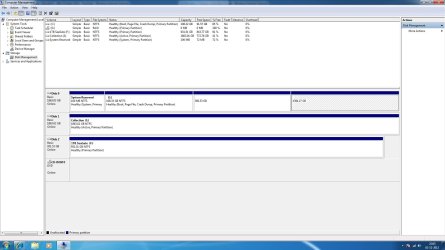
i was trying to fix a problem in one of my drives using partition magic 8 that problem is fixed but now that caused the other two drives to not show up in windows. i am attaching a screenshot for the same kindly check and suggest what to do? ? :cry: and yes format is not possible these 2 drives got valuable data.
 

Attachments

  • Untitled.jpg
    Untitled.jpg
    136.1 KB · Views: 24

My Computer My Computer

At a glance

Windows 8 Pro x64i5 Processor 2320 3.0GHz8 GB DDR2Internal Intel HD
Computer Manufacturer/Model Number
Customised
OS
Windows 8 Pro x64
CPU
i5 Processor 2320 3.0GHz
Motherboard
Intel DH67BL
Memory
8 GB DDR2
Graphics Card(s)
Internal Intel HD
Sound Card
Realtek
Monitor(s) Displays
Samsung 22inch LED Monitor
Screen Resolution
1920 * 1080
Hard Drives
1TB Seagate, 2TB Seagate, 2TB WD
PSU
Cooler Master Glite Power 350w
Case
Cooler Master
Cooling
Cooler Master Glite Power
Keyboard
Logitech Wireless K220
Mouse
Logitech Wireless K220
Internet Speed
2 MBPS
Other Info
Microsoft Office 2010 Pro Plus
360 and 1394GB partitions next to C you mean?
 

My Computer My Computer

At a glance

Microsoft Windows 7 Home Premium 64-bits 7601...Intel(R) Core(TM) i3 CPU M 370 @ 2.40GHz4,00 GBATI Mobility Radeon HD 5400 Series
Computer type
Laptop
Computer Manufacturer/Model Number
ACER ASPIRE 5742G
OS
Microsoft Windows 7 Home Premium 64-bits 7601 Multiprocessor Free Service Pack 1
CPU
Intel(R) Core(TM) i3 CPU M 370 @ 2.40GHz
Motherboard
Acer Aspire 5742G
Memory
4,00 GB
Graphics Card(s)
ATI Mobility Radeon HD 5400 Series
Sound Card
(1) AMD High Definition Audio Device (2) Realtek High Defi
Screen Resolution
1366 x 768 x 32 bits (4294967296 colors) @ 60 Hz
Hard Drives
WDC WD5000BEVT-22ZAT0

My Computer My Computer

At a glance

Windows 8 Pro x64i5 Processor 2320 3.0GHz8 GB DDR2Internal Intel HD
Computer Manufacturer/Model Number
Customised
OS
Windows 8 Pro x64
CPU
i5 Processor 2320 3.0GHz
Motherboard
Intel DH67BL
Memory
8 GB DDR2
Graphics Card(s)
Internal Intel HD
Sound Card
Realtek
Monitor(s) Displays
Samsung 22inch LED Monitor
Screen Resolution
1920 * 1080
Hard Drives
1TB Seagate, 2TB Seagate, 2TB WD
PSU
Cooler Master Glite Power 350w
Case
Cooler Master
Cooling
Cooler Master Glite Power
Keyboard
Logitech Wireless K220
Mouse
Logitech Wireless K220
Internet Speed
2 MBPS
Other Info
Microsoft Office 2010 Pro Plus

My Computer My Computer

At a glance

Microsoft Windows 7 Home Premium 64-bits 7601...Intel(R) Core(TM) i3 CPU M 370 @ 2.40GHz4,00 GBATI Mobility Radeon HD 5400 Series
Computer type
Laptop
Computer Manufacturer/Model Number
ACER ASPIRE 5742G
OS
Microsoft Windows 7 Home Premium 64-bits 7601 Multiprocessor Free Service Pack 1
CPU
Intel(R) Core(TM) i3 CPU M 370 @ 2.40GHz
Motherboard
Acer Aspire 5742G
Memory
4,00 GB
Graphics Card(s)
ATI Mobility Radeon HD 5400 Series
Sound Card
(1) AMD High Definition Audio Device (2) Realtek High Defi
Screen Resolution
1366 x 768 x 32 bits (4294967296 colors) @ 60 Hz
Hard Drives
WDC WD5000BEVT-22ZAT0
btw what is G? and why is not listed in the bottom part of screen? Why doesn't your CD-drive have a drive letter?
 

My Computer My Computer

At a glance

Microsoft Windows 7 Home Premium 64-bits 7601...Intel(R) Core(TM) i3 CPU M 370 @ 2.40GHz4,00 GBATI Mobility Radeon HD 5400 Series
Computer type
Laptop
Computer Manufacturer/Model Number
ACER ASPIRE 5742G
OS
Microsoft Windows 7 Home Premium 64-bits 7601 Multiprocessor Free Service Pack 1
CPU
Intel(R) Core(TM) i3 CPU M 370 @ 2.40GHz
Motherboard
Acer Aspire 5742G
Memory
4,00 GB
Graphics Card(s)
ATI Mobility Radeon HD 5400 Series
Sound Card
(1) AMD High Definition Audio Device (2) Realtek High Defi
Screen Resolution
1366 x 768 x 32 bits (4294967296 colors) @ 60 Hz
Hard Drives
WDC WD5000BEVT-22ZAT0

Attachments

  • Untitled1.jpg
    Untitled1.jpg
    157.5 KB · Views: 23

My Computer My Computer

At a glance

Windows 8 Pro x64i5 Processor 2320 3.0GHz8 GB DDR2Internal Intel HD
Computer Manufacturer/Model Number
Customised
OS
Windows 8 Pro x64
CPU
i5 Processor 2320 3.0GHz
Motherboard
Intel DH67BL
Memory
8 GB DDR2
Graphics Card(s)
Internal Intel HD
Sound Card
Realtek
Monitor(s) Displays
Samsung 22inch LED Monitor
Screen Resolution
1920 * 1080
Hard Drives
1TB Seagate, 2TB Seagate, 2TB WD
PSU
Cooler Master Glite Power 350w
Case
Cooler Master
Cooling
Cooler Master Glite Power
Keyboard
Logitech Wireless K220
Mouse
Logitech Wireless K220
Internet Speed
2 MBPS
Other Info
Microsoft Office 2010 Pro Plus
btw what is G? and why is not listed in the bottom part of screen? Why doesn't your CD-drive have a drive letter?

I guess because its a External DVD Writer
 

My Computer My Computer

At a glance

Windows 8 Pro x64i5 Processor 2320 3.0GHz8 GB DDR2Internal Intel HD
Computer Manufacturer/Model Number
Customised
OS
Windows 8 Pro x64
CPU
i5 Processor 2320 3.0GHz
Motherboard
Intel DH67BL
Memory
8 GB DDR2
Graphics Card(s)
Internal Intel HD
Sound Card
Realtek
Monitor(s) Displays
Samsung 22inch LED Monitor
Screen Resolution
1920 * 1080
Hard Drives
1TB Seagate, 2TB Seagate, 2TB WD
PSU
Cooler Master Glite Power 350w
Case
Cooler Master
Cooling
Cooler Master Glite Power
Keyboard
Logitech Wireless K220
Mouse
Logitech Wireless K220
Internet Speed
2 MBPS
Other Info
Microsoft Office 2010 Pro Plus
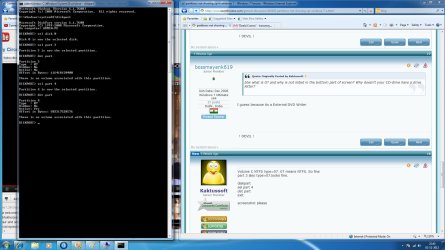
Volume C NTFS type=07. 07 means NTFS. So fine
part 3 also type=07.looks fine.

diskpart
sel part 4
det part
exit

screenshot please
 

My Computer My Computer

At a glance

Microsoft Windows 7 Home Premium 64-bits 7601...Intel(R) Core(TM) i3 CPU M 370 @ 2.40GHz4,00 GBATI Mobility Radeon HD 5400 Series
Computer type
Laptop
Computer Manufacturer/Model Number
ACER ASPIRE 5742G
OS
Microsoft Windows 7 Home Premium 64-bits 7601 Multiprocessor Free Service Pack 1
CPU
Intel(R) Core(TM) i3 CPU M 370 @ 2.40GHz
Motherboard
Acer Aspire 5742G
Memory
4,00 GB
Graphics Card(s)
ATI Mobility Radeon HD 5400 Series
Sound Card
(1) AMD High Definition Audio Device (2) Realtek High Defi
Screen Resolution
1366 x 768 x 32 bits (4294967296 colors) @ 60 Hz
Hard Drives
WDC WD5000BEVT-22ZAT0
Volume C NTFS type=07. 07 means NTFS. So fine
part 3 also type=07.looks fine.

diskpart
sel part 4
det part
exit

screenshot please
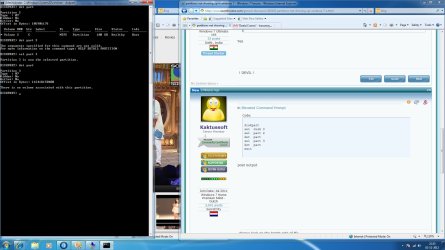
it didnt work:cry:

The whole problem started after partition magic 8 tried fixing some sector 63 or something of the drive. hope that helps
 

Attachments

  • Untitled2.jpg
    Untitled2.jpg
    183.1 KB · Views: 9

My Computer My Computer

At a glance

Windows 8 Pro x64i5 Processor 2320 3.0GHz8 GB DDR2Internal Intel HD
Computer Manufacturer/Model Number
Customised
OS
Windows 8 Pro x64
CPU
i5 Processor 2320 3.0GHz
Motherboard
Intel DH67BL
Memory
8 GB DDR2
Graphics Card(s)
Internal Intel HD
Sound Card
Realtek
Monitor(s) Displays
Samsung 22inch LED Monitor
Screen Resolution
1920 * 1080
Hard Drives
1TB Seagate, 2TB Seagate, 2TB WD
PSU
Cooler Master Glite Power 350w
Case
Cooler Master
Cooling
Cooler Master Glite Power
Keyboard
Logitech Wireless K220
Mouse
Logitech Wireless K220
Internet Speed
2 MBPS
Other Info
Microsoft Office 2010 Pro Plus
It did work! I kown it is a good ntfs partition. just assign a drive letter to it.

Code:
diskpart
sel disk 0
sel  part  3
assign letter=d
det part
sel  part 4
assign letter=e
det part
exit
can also be done in diskmanagement by rightclicking partition
 

My Computer My Computer

At a glance

Microsoft Windows 7 Home Premium 64-bits 7601...Intel(R) Core(TM) i3 CPU M 370 @ 2.40GHz4,00 GBATI Mobility Radeon HD 5400 Series
Computer type
Laptop
Computer Manufacturer/Model Number
ACER ASPIRE 5742G
OS
Microsoft Windows 7 Home Premium 64-bits 7601 Multiprocessor Free Service Pack 1
CPU
Intel(R) Core(TM) i3 CPU M 370 @ 2.40GHz
Motherboard
Acer Aspire 5742G
Memory
4,00 GB
Graphics Card(s)
ATI Mobility Radeon HD 5400 Series
Sound Card
(1) AMD High Definition Audio Device (2) Realtek High Defi
Screen Resolution
1366 x 768 x 32 bits (4294967296 colors) @ 60 Hz
Hard Drives
WDC WD5000BEVT-22ZAT0
I think partition 4 is "system reserved" because it's active. assign a drive letter to the other two partition in disk managent. But first remove the drive letter of "system reserved" also in disk management
 

My Computer My Computer

At a glance

Microsoft Windows 7 Home Premium 64-bits 7601...Intel(R) Core(TM) i3 CPU M 370 @ 2.40GHz4,00 GBATI Mobility Radeon HD 5400 Series
Computer type
Laptop
Computer Manufacturer/Model Number
ACER ASPIRE 5742G
OS
Microsoft Windows 7 Home Premium 64-bits 7601 Multiprocessor Free Service Pack 1
CPU
Intel(R) Core(TM) i3 CPU M 370 @ 2.40GHz
Motherboard
Acer Aspire 5742G
Memory
4,00 GB
Graphics Card(s)
ATI Mobility Radeon HD 5400 Series
Sound Card
(1) AMD High Definition Audio Device (2) Realtek High Defi
Screen Resolution
1366 x 768 x 32 bits (4294967296 colors) @ 60 Hz
Hard Drives
WDC WD5000BEVT-22ZAT0
It did work! I kown it is a good ntfs partition. just assign a drive letter to it.

Code:
diskpart
sel disk 0
sel  part  3
assign letter=d
det part
sel  part 4
assign letter=e
det part
exit
can also be done in diskmanagement by rightclicking partition


i tried both but didnt work
 

Attachments

  • Untitled3.jpg
    Untitled3.jpg
    224.9 KB · Views: 14
  • Untitled4.jpg
    Untitled4.jpg
    235 KB · Views: 6

My Computer My Computer

At a glance

Windows 8 Pro x64i5 Processor 2320 3.0GHz8 GB DDR2Internal Intel HD
Computer Manufacturer/Model Number
Customised
OS
Windows 8 Pro x64
CPU
i5 Processor 2320 3.0GHz
Motherboard
Intel DH67BL
Memory
8 GB DDR2
Graphics Card(s)
Internal Intel HD
Sound Card
Realtek
Monitor(s) Displays
Samsung 22inch LED Monitor
Screen Resolution
1920 * 1080
Hard Drives
1TB Seagate, 2TB Seagate, 2TB WD
PSU
Cooler Master Glite Power 350w
Case
Cooler Master
Cooling
Cooler Master Glite Power
Keyboard
Logitech Wireless K220
Mouse
Logitech Wireless K220
Internet Speed
2 MBPS
Other Info
Microsoft Office 2010 Pro Plus
It did work! I kown it is a good ntfs partition. just assign a drive letter to it.

Code:
diskpart
sel disk 0
sel  part  3
assign letter=d
det part
sel  part 4
assign letter=e
det part
exit
can also be done in diskmanagement by rightclicking partition


i tried both but didnt work
Right-click the partitons in Disk management and add drive letters that way.
 

My Computer My Computer

At a glance

Windows 8 Pro (32-bit)1.83GHz Intel Core Duo2GB 667MHz DDR2 SDRAM (PC2-5300) (upgrade)ATI Radeon X1600 with 128MB GDDR3 memory
Computer type
PC/Desktop
Computer Manufacturer/Model Number
Apple 17" iMac MA199LL (Early 2006)
OS
Windows 8 Pro (32-bit)
CPU
1.83GHz Intel Core Duo
Memory
2GB 667MHz DDR2 SDRAM (PC2-5300) (upgrade)
Graphics Card(s)
ATI Radeon X1600 with 128MB GDDR3 memory
Monitor(s) Displays
17-inch TFT active-matrix LCD, millions of colors
Screen Resolution
1440 x 900
Hard Drives
Hitachi 320GB HDT721032SLA360 7200RPM SATA II (upgrade)
Keyboard
Microsoft Wired Keyboard 600
Mouse
Microsoft Basic Optical Mouse v2.0
Internet Speed
4 Mbps
Antivirus
Microsoft Security Essentials
Browser
Google Chrome
Other Info
WEI:
Base Score: 3.9 Processor: 4.4 Memory 4.7
Graphics: 3.9 Gaming Graphics: 4.1 Primary HD: 5.9
Code:
diskpart
sel disk 0
sel part 1
det part
sel part 4
det part
exit

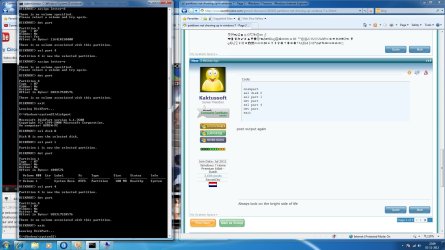
post output again
 

My Computer My Computer

At a glance

Microsoft Windows 7 Home Premium 64-bits 7601...Intel(R) Core(TM) i3 CPU M 370 @ 2.40GHz4,00 GBATI Mobility Radeon HD 5400 Series
Computer type
Laptop
Computer Manufacturer/Model Number
ACER ASPIRE 5742G
OS
Microsoft Windows 7 Home Premium 64-bits 7601 Multiprocessor Free Service Pack 1
CPU
Intel(R) Core(TM) i3 CPU M 370 @ 2.40GHz
Motherboard
Acer Aspire 5742G
Memory
4,00 GB
Graphics Card(s)
ATI Mobility Radeon HD 5400 Series
Sound Card
(1) AMD High Definition Audio Device (2) Realtek High Defi
Screen Resolution
1366 x 768 x 32 bits (4294967296 colors) @ 60 Hz
Hard Drives
WDC WD5000BEVT-22ZAT0
Code:
diskpart
sel dis 0
sel part 4
inactive
exit
now reboot and assign drive letters. Maybe it is fixed automatically(?) Boith part 1 and part 4 were active.. should be impossible... don't know why it happened
 

My Computer My Computer

At a glance

Microsoft Windows 7 Home Premium 64-bits 7601...Intel(R) Core(TM) i3 CPU M 370 @ 2.40GHz4,00 GBATI Mobility Radeon HD 5400 Series
Computer type
Laptop
Computer Manufacturer/Model Number
ACER ASPIRE 5742G
OS
Microsoft Windows 7 Home Premium 64-bits 7601 Multiprocessor Free Service Pack 1
CPU
Intel(R) Core(TM) i3 CPU M 370 @ 2.40GHz
Motherboard
Acer Aspire 5742G
Memory
4,00 GB
Graphics Card(s)
ATI Mobility Radeon HD 5400 Series
Sound Card
(1) AMD High Definition Audio Device (2) Realtek High Defi
Screen Resolution
1366 x 768 x 32 bits (4294967296 colors) @ 60 Hz
Hard Drives
WDC WD5000BEVT-22ZAT0

Attachments

  • Untitled5.jpg
    Untitled5.jpg
    204.9 KB · Views: 7

My Computer My Computer

At a glance

Windows 8 Pro x64i5 Processor 2320 3.0GHz8 GB DDR2Internal Intel HD
Computer Manufacturer/Model Number
Customised
OS
Windows 8 Pro x64
CPU
i5 Processor 2320 3.0GHz
Motherboard
Intel DH67BL
Memory
8 GB DDR2
Graphics Card(s)
Internal Intel HD
Sound Card
Realtek
Monitor(s) Displays
Samsung 22inch LED Monitor
Screen Resolution
1920 * 1080
Hard Drives
1TB Seagate, 2TB Seagate, 2TB WD
PSU
Cooler Master Glite Power 350w
Case
Cooler Master
Cooling
Cooler Master Glite Power
Keyboard
Logitech Wireless K220
Mouse
Logitech Wireless K220
Internet Speed
2 MBPS
Other Info
Microsoft Office 2010 Pro Plus
It did work! I kown it is a good ntfs partition. just assign a drive letter to it.

Code:
diskpart
sel disk 0
sel  part  3
assign letter=d
det part
sel  part 4
assign letter=e
det part
exit
can also be done in diskmanagement by rightclicking partition


i tried both but didnt work
Right-click the partitons in Disk management and add drive letters that way.


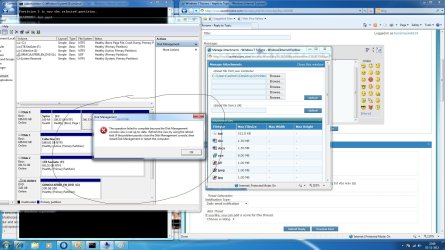
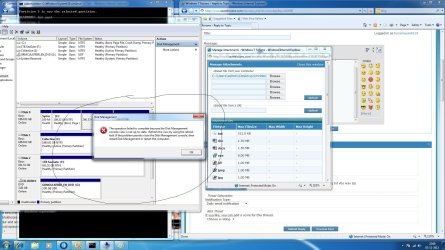
I tried this is the error it gives
 

Attachments

  • Untitled4.jpg
    Untitled4.jpg
    235 KB · Views: 8

My Computer My Computer

At a glance

Windows 8 Pro x64i5 Processor 2320 3.0GHz8 GB DDR2Internal Intel HD
Computer Manufacturer/Model Number
Customised
OS
Windows 8 Pro x64
CPU
i5 Processor 2320 3.0GHz
Motherboard
Intel DH67BL
Memory
8 GB DDR2
Graphics Card(s)
Internal Intel HD
Sound Card
Realtek
Monitor(s) Displays
Samsung 22inch LED Monitor
Screen Resolution
1920 * 1080
Hard Drives
1TB Seagate, 2TB Seagate, 2TB WD
PSU
Cooler Master Glite Power 350w
Case
Cooler Master
Cooling
Cooler Master Glite Power
Keyboard
Logitech Wireless K220
Mouse
Logitech Wireless K220
Internet Speed
2 MBPS
Other Info
Microsoft Office 2010 Pro Plus
Code:
diskpart
sel dis 0
sel part 4
inactive
exit
now reboot and assign drive letters. Maybe it is fixed automatically(?) Boith part 1 and part 4 were active.. should be impossible... don't know why it happened


this is what is shows i am reeboting now hope it works
 

Attachments

  • Untitled6.jpg
    Untitled6.jpg
    196.7 KB · Views: 3

My Computer My Computer

At a glance

Windows 8 Pro x64i5 Processor 2320 3.0GHz8 GB DDR2Internal Intel HD
Computer Manufacturer/Model Number
Customised
OS
Windows 8 Pro x64
CPU
i5 Processor 2320 3.0GHz
Motherboard
Intel DH67BL
Memory
8 GB DDR2
Graphics Card(s)
Internal Intel HD
Sound Card
Realtek
Monitor(s) Displays
Samsung 22inch LED Monitor
Screen Resolution
1920 * 1080
Hard Drives
1TB Seagate, 2TB Seagate, 2TB WD
PSU
Cooler Master Glite Power 350w
Case
Cooler Master
Cooling
Cooler Master Glite Power
Keyboard
Logitech Wireless K220
Mouse
Logitech Wireless K220
Internet Speed
2 MBPS
Other Info
Microsoft Office 2010 Pro Plus
in diskmangement you see system reserved marked as SYSTEM. That is you boot partition... so must be active.

try this
diskpart
sel dis 0
sel part 4
inactive
sel part 1
active
exit

post output
 

My Computer My Computer

At a glance

Microsoft Windows 7 Home Premium 64-bits 7601...Intel(R) Core(TM) i3 CPU M 370 @ 2.40GHz4,00 GBATI Mobility Radeon HD 5400 Series
Computer type
Laptop
Computer Manufacturer/Model Number
ACER ASPIRE 5742G
OS
Microsoft Windows 7 Home Premium 64-bits 7601 Multiprocessor Free Service Pack 1
CPU
Intel(R) Core(TM) i3 CPU M 370 @ 2.40GHz
Motherboard
Acer Aspire 5742G
Memory
4,00 GB
Graphics Card(s)
ATI Mobility Radeon HD 5400 Series
Sound Card
(1) AMD High Definition Audio Device (2) Realtek High Defi
Screen Resolution
1366 x 768 x 32 bits (4294967296 colors) @ 60 Hz
Hard Drives
WDC WD5000BEVT-22ZAT0
summary:
diskpart shows part4 as active, part1 as inactive
disk management showas part4 as inactive, part1 as active.

What is the truth? I think disk management, because system normally boots from "system reserved".
Just a hickup?

Or diskpart tells the truth and diskmanagement displays old info... see the screenhot you posted. ("console not up to date")
I didn't tell you to mark part4 as active in diskpart!
 

My Computer My Computer

At a glance

Microsoft Windows 7 Home Premium 64-bits 7601...Intel(R) Core(TM) i3 CPU M 370 @ 2.40GHz4,00 GBATI Mobility Radeon HD 5400 Series
Computer type
Laptop
Computer Manufacturer/Model Number
ACER ASPIRE 5742G
OS
Microsoft Windows 7 Home Premium 64-bits 7601 Multiprocessor Free Service Pack 1
CPU
Intel(R) Core(TM) i3 CPU M 370 @ 2.40GHz
Motherboard
Acer Aspire 5742G
Memory
4,00 GB
Graphics Card(s)
ATI Mobility Radeon HD 5400 Series
Sound Card
(1) AMD High Definition Audio Device (2) Realtek High Defi
Screen Resolution
1366 x 768 x 32 bits (4294967296 colors) @ 60 Hz
Hard Drives
WDC WD5000BEVT-22ZAT0
Back
Top