How do I downgrade back to windows 7 after upgrading to windows 8 Pro

weedavey

New member
Local time
8:38 AM
Messages
10
Hi Guys, as title suggests, I upgraded to windows 8 Pro from windows 7 home premium (just because it was free after redeeming from PB) and Just don't like it. My system is Packard Bell imedia s2870 with i5 2320 3 ghz. Windows 7 came installed on it already so I don't have disk. I do have my old dell vista laptop with all my needed personal files still alive though. Please can someone advise me on how I go about getting back to 7 as I much prefer it to 8.

Many thanks in advance. Dave.
 

My Computer My Computer

At a glance

windows 7 home prem 64
OS
windows 7 home prem 64
   Information
We always assume you have made your Recovery Disks using the OEM manufacturer's Recovery Media Creator app the first day you had your new PC.
& made the Startup Repair CD.
startup repair disc-create


Did you make the OEM manufacturer's Recovery Disks?


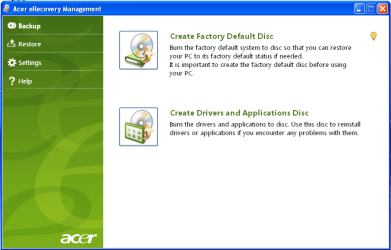
Manual how to use Acer eRecovery Management here:
ftp://ftp.support.acer-euro.com/notebook/empowering_technology/NB%20ET2%20user's%20guide/Acer%20eRecovery%20Management%20English.pdf

Have you tried pressing <Alt+F10> at boot up, to goto the Acer eRecovery Management.
Acer Support: Frequently Asked Questions list for How to use Acer eRecovery

Acer001.PNG
You can Order Acer recovery disks from here:
https://secure.tx.acer.com/RCDB/Main.aspx?brand=acer


Check & see if Acer eRecovery Management is still install.
 

My Computer My Computer

At a glance

ME/XP/Vista/Win7
OS
ME/XP/Vista/Win7
   Information
We always assume you have made your Recovery Disks using the OEM manufacturer's Recovery Media Creator app the first day you had your new PC.​

& made the Startup Repair CD.
startup repair disc-create


Did you make the OEM manufacturer's Recovery Disks?


Manual how to use Acer eRecovery Management here:
ftp://ftp.support.acer-euro.com/not...s guide/Acer eRecovery Management English.pdf

Have you tried pressing <Alt+F10> at boot up, to goto the Acer eRecovery Management.
Acer Support: Frequently Asked Questions list for How to use Acer eRecovery

View attachment 240262
You can Order Acer recovery disks from here:
https://secure.tx.acer.com/RCDB/Main.aspx?brand=acer


Check & see if Acer eRecovery Management is still install.


No I did not make discs....:o. I now realise just how bull at gate I have been with this all. My system is not acer though it is Packard Bell..... ahhh just looked at label on side of machine and saw the acer name.

Is this the only way to revert to 7?

Thanks Dave
 

My Computer My Computer

At a glance

windows 7 home prem 64
OS
windows 7 home prem 64
You can download a Windows 7 ISO from mydigitallife.info, burn it to a disc, install, and activate with your Windows 7 product key.

Do you have that 25 character product key??

You also may be able to restore via a recovery partition on your hard drive, but that was likely deleted or rendered unusable by the Win 8 install.

"Bull at gate" must be Brit slang for something. Never heard it. Meaning foolish? Stubborn? Careless?
 

My Computer My Computer

At a glance

Windows 7 Home Premium SP1, 64-bitIntel Skylake i5-6600K, not overclocked8 GB HyperX DDR4-2666 (2 x 4 GB)none; graphics are integrated on CPU
Computer type
PC/Desktop
Computer Manufacturer/Model Number
Ignatz Special; 4 speed manual gearbox; factory air conditioning; one of one
OS
Windows 7 Home Premium SP1, 64-bit
CPU
Intel Skylake i5-6600K, not overclocked
Motherboard
AsRock Z170M Extreme 4, micro ATX
Memory
8 GB HyperX DDR4-2666 (2 x 4 GB)
Graphics Card(s)
none; graphics are integrated on CPU
Sound Card
onboard: Realtek ALC1150; external: USB Behringer UF0-202
Monitor(s) Displays
Dell S2340M 23 inch IPS
Screen Resolution
1600 x 900
Hard Drives
System: Crucial MX100 series SSD, 128 GB;
Data: Samsung Spinpoint 103SJ, 1 TB;
Backup: WD Caviar Green WD30EZRX-00D8PB0, 3 TB
PSU
Rosewill SilentNight 500 watt fanless, semi-modular
Case
Antec Solo II
Cooling
Noctua NH-U12S; Noctua F12 intake, Noctua S12A exhaust
Keyboard
Microsoft 200 6JH-00001 USB
Mouse
Dell or Microsoft optical wired; USB
Antivirus
Microsoft Security Essentials and Malwarebytes Premium
Browser
Pale Moon
Other Info
All fans PWM; speeds at idle: CPU circa 500 rpm; intake circa 600 rpm; exhaust circa 600 rpm; CPU temps 27 idle and 47 C load in a warm room (27 C/81 F) when running Intel Extreme Tuning Utility stress test.
You can download a Windows 7 ISO from mydigitallife.info, burn it to a disc, install, and activate with your Windows 7 product key.

Do you have that 25 character product key??

You also may be able to restore via a recovery partition on your hard drive, but that was likely deleted or rendered unusable by the Win 8 install.

"Bull at gate" must be Brit slang for something. Never heard it. Meaning foolish? Stubborn? Careless?


Yes I have the key, its on the windows sticker on the side of machine right? How do I get into recovery partition?
 

My Computer My Computer

At a glance

windows 7 home prem 64
OS
windows 7 home prem 64

My Computer My Computer

At a glance

windows 7 home prem 64
OS
windows 7 home prem 64
Is your key in this format:

xxxxx-xxxxx-xxxxx-xxxxx-xxxxx

Total of 25 numbers and letters. The sticker should mention a version of Windows as well.

I'm not sure how to get into recovery partition on your particular PC, but the fact is you may no longer have such a partition.

Consult your manual for how to get at it.

Or post a picture of your Windows Disk Management so we can see if you still have such a partition.
 

My Computer My Computer

At a glance

Windows 7 Home Premium SP1, 64-bitIntel Skylake i5-6600K, not overclocked8 GB HyperX DDR4-2666 (2 x 4 GB)none; graphics are integrated on CPU
Computer type
PC/Desktop
Computer Manufacturer/Model Number
Ignatz Special; 4 speed manual gearbox; factory air conditioning; one of one
OS
Windows 7 Home Premium SP1, 64-bit
CPU
Intel Skylake i5-6600K, not overclocked
Motherboard
AsRock Z170M Extreme 4, micro ATX
Memory
8 GB HyperX DDR4-2666 (2 x 4 GB)
Graphics Card(s)
none; graphics are integrated on CPU
Sound Card
onboard: Realtek ALC1150; external: USB Behringer UF0-202
Monitor(s) Displays
Dell S2340M 23 inch IPS
Screen Resolution
1600 x 900
Hard Drives
System: Crucial MX100 series SSD, 128 GB;
Data: Samsung Spinpoint 103SJ, 1 TB;
Backup: WD Caviar Green WD30EZRX-00D8PB0, 3 TB
PSU
Rosewill SilentNight 500 watt fanless, semi-modular
Case
Antec Solo II
Cooling
Noctua NH-U12S; Noctua F12 intake, Noctua S12A exhaust
Keyboard
Microsoft 200 6JH-00001 USB
Mouse
Dell or Microsoft optical wired; USB
Antivirus
Microsoft Security Essentials and Malwarebytes Premium
Browser
Pale Moon
Other Info
All fans PWM; speeds at idle: CPU circa 500 rpm; intake circa 600 rpm; exhaust circa 600 rpm; CPU temps 27 idle and 47 C load in a warm room (27 C/81 F) when running Intel Extreme Tuning Utility stress test.

My Computer My Computer

At a glance

Vista, Windows7, Mint Mate, Zorin, Windows 8from 1.6GHz Duo to i7
Computer Manufacturer/Model Number
HP, Dell, Gateway, Toshiba - 4 laptops and 2 desktops
OS
Vista, Windows7, Mint Mate, Zorin, Windows 8
CPU
from 1.6GHz Duo to i7
Monitor(s) Displays
2x HP w2207
Hard Drives
5x HDD, 7x SSD, 12x Externals
Keyboard
with trackball - no mices
Mouse
Trackball mice
Internet Speed
DSL 6000
Is your key in this format:

xxxxx-xxxxx-xxxxx-xxxxx-xxxxx

Total of 25 numbers and letters. The sticker should mention a version of Windows as well.

I'm not sure how to get into recovery partition on your particular PC, but the fact is you may no longer have such a partition.

Consult your manual for how to get at it.

Or post a picture of your Windows Disk Management so we can see if you still have such a partition.

Yep, got that key.

Believe it or not....... no manual.
 

My Computer My Computer

At a glance

windows 7 home prem 64
OS
windows 7 home prem 64
OK on the key.

Try the method suggested by WHS for accessing recovery.

If it fails, you likely have to do a clean install by downloading the ISO from mydigitallife.info.

I assume that is Windows Home Premium 64 bit that you have?

If so, you need X17-58997.iso from this link; scroll down till you see it:

Official Windows 7 SP1 ISO from Digital River « My Digital Life

That will give you a new install WITHOUT whatever else Acer may have included with the machine.

You will need to back up all of your personal data or you will lose it.
 

My Computer My Computer

At a glance

Windows 7 Home Premium SP1, 64-bitIntel Skylake i5-6600K, not overclocked8 GB HyperX DDR4-2666 (2 x 4 GB)none; graphics are integrated on CPU
Computer type
PC/Desktop
Computer Manufacturer/Model Number
Ignatz Special; 4 speed manual gearbox; factory air conditioning; one of one
OS
Windows 7 Home Premium SP1, 64-bit
CPU
Intel Skylake i5-6600K, not overclocked
Motherboard
AsRock Z170M Extreme 4, micro ATX
Memory
8 GB HyperX DDR4-2666 (2 x 4 GB)
Graphics Card(s)
none; graphics are integrated on CPU
Sound Card
onboard: Realtek ALC1150; external: USB Behringer UF0-202
Monitor(s) Displays
Dell S2340M 23 inch IPS
Screen Resolution
1600 x 900
Hard Drives
System: Crucial MX100 series SSD, 128 GB;
Data: Samsung Spinpoint 103SJ, 1 TB;
Backup: WD Caviar Green WD30EZRX-00D8PB0, 3 TB
PSU
Rosewill SilentNight 500 watt fanless, semi-modular
Case
Antec Solo II
Cooling
Noctua NH-U12S; Noctua F12 intake, Noctua S12A exhaust
Keyboard
Microsoft 200 6JH-00001 USB
Mouse
Dell or Microsoft optical wired; USB
Antivirus
Microsoft Security Essentials and Malwarebytes Premium
Browser
Pale Moon
Other Info
All fans PWM; speeds at idle: CPU circa 500 rpm; intake circa 600 rpm; exhaust circa 600 rpm; CPU temps 27 idle and 47 C load in a warm room (27 C/81 F) when running Intel Extreme Tuning Utility stress test.
OK on the key.

Try the method suggested by WHS for accessing recovery.

If it fails, you likely have to do a clean install by downloading the ISO from mydigitallife.info.

I assume that is Windows Home Premium 64 bit that you have?

If so, you need X17-58997.iso from this link; scroll down till you see it:

Official Windows 7 SP1 ISO from Digital River « My Digital Life

That will give you a new install WITHOUT whatever else Acer may have included with the machine.

You will need to back up all of your personal data or you will lose it.

Ok well I alt-f10 on start up but my monitor has power saving feature on it which I cannot see how to turn off when I navigate the menu. It means the monitor doent light up straight away when pc is turned on, I tried hitting it repeatidly anyway (alt-f10, not my pc) but pc just started up as normal.

Im not to worried about a clean install as the machine came with very little on it anyway and as I said earlier my old machine with all my data is still good (but slow) so I can migrate all file settings etc again via easy transfer yes?

Can I back up to
 

My Computer My Computer

At a glance

windows 7 home prem 64
OS
windows 7 home prem 64

My Computer My Computer

At a glance

windows 7 home prem 64
OS
windows 7 home prem 64
I did a little looking through Google that implied that you might be able to access Packard Bell recovery by holding down F11 key when restarting. You might try that.

Recovery will of course wipe out everything, so you need to back up before doing it.

I have no idea about alt F10.

Not sure what you are referring to by "migrate all settings". If you do a clean install via the ISO download you will have to reinstall ALL programs.

Easy transfer is not particularly reliable and I would not count on it for anything.

Generally, for a clean install:

Go to Packard Bell web site and download the LAN or Ethernet driver for your PC so you can definitely establish a network connection after a clean install. You might already have this driver on a CD provided with your PC??

Back up all personal data to some other location.

Burn that ISO to a disc.

Disconnect all hard drives other than the one that will receive Windows 7.

Disconnect all external devices other than monitor, keyboard, mouse.

Boot from the burned ISO disc and follow the prompts to install Win 7.

When installation completes, re-establish network connection, and update Windows from Windows Update site.

Reinstall your programs. Copy your data back from the backup location.
 

My Computer My Computer

At a glance

Windows 7 Home Premium SP1, 64-bitIntel Skylake i5-6600K, not overclocked8 GB HyperX DDR4-2666 (2 x 4 GB)none; graphics are integrated on CPU
Computer type
PC/Desktop
Computer Manufacturer/Model Number
Ignatz Special; 4 speed manual gearbox; factory air conditioning; one of one
OS
Windows 7 Home Premium SP1, 64-bit
CPU
Intel Skylake i5-6600K, not overclocked
Motherboard
AsRock Z170M Extreme 4, micro ATX
Memory
8 GB HyperX DDR4-2666 (2 x 4 GB)
Graphics Card(s)
none; graphics are integrated on CPU
Sound Card
onboard: Realtek ALC1150; external: USB Behringer UF0-202
Monitor(s) Displays
Dell S2340M 23 inch IPS
Screen Resolution
1600 x 900
Hard Drives
System: Crucial MX100 series SSD, 128 GB;
Data: Samsung Spinpoint 103SJ, 1 TB;
Backup: WD Caviar Green WD30EZRX-00D8PB0, 3 TB
PSU
Rosewill SilentNight 500 watt fanless, semi-modular
Case
Antec Solo II
Cooling
Noctua NH-U12S; Noctua F12 intake, Noctua S12A exhaust
Keyboard
Microsoft 200 6JH-00001 USB
Mouse
Dell or Microsoft optical wired; USB
Antivirus
Microsoft Security Essentials and Malwarebytes Premium
Browser
Pale Moon
Other Info
All fans PWM; speeds at idle: CPU circa 500 rpm; intake circa 600 rpm; exhaust circa 600 rpm; CPU temps 27 idle and 47 C load in a warm room (27 C/81 F) when running Intel Extreme Tuning Utility stress test.
I did a little looking through Google that implied that you might be able to access Packard Bell recovery by holding down F11 key when restarting. You might try that.

Recovery will of course wipe out everything, so you need to back up before doing it.

I have no idea about alt F10.

Not sure what you are referring to by "migrate all settings". If you do a clean install via the ISO download you will have to reinstall ALL programs.

Easy transfer is not particularly reliable and I would not count on it for anything.

Generally, for a clean install:

Go to Packard Bell web site and download the LAN or Ethernet driver for your PC so you can definitely establish a network connection after a clean install. You might already have this driver on a CD provided with your PC??

Back up all personal data to some other location.

Burn that ISO to a disc.

Disconnect all hard drives other than the one that will receive Windows 7.

Disconnect all external devices other than monitor, keyboard, mouse.

Boot from the burned ISO disc and follow the prompts to install Win 7.

When installation completes, re-establish network connection, and update Windows from Windows Update site.

Reinstall your programs. Copy your data back from the backup location.

Thanks very much for your help (all of you) ive book marked this conversation so I can show it to a mate of mine who is rather more computer savvy than myself in order that I don't muck things up more drastically than I already have!

Once again thankyou all.
 

My Computer My Computer

At a glance

windows 7 home prem 64
OS
windows 7 home prem 64

My Computer My Computer

At a glance

Windows 7 Home Premium SP1, 64-bitIntel Skylake i5-6600K, not overclocked8 GB HyperX DDR4-2666 (2 x 4 GB)none; graphics are integrated on CPU
Computer type
PC/Desktop
Computer Manufacturer/Model Number
Ignatz Special; 4 speed manual gearbox; factory air conditioning; one of one
OS
Windows 7 Home Premium SP1, 64-bit
CPU
Intel Skylake i5-6600K, not overclocked
Motherboard
AsRock Z170M Extreme 4, micro ATX
Memory
8 GB HyperX DDR4-2666 (2 x 4 GB)
Graphics Card(s)
none; graphics are integrated on CPU
Sound Card
onboard: Realtek ALC1150; external: USB Behringer UF0-202
Monitor(s) Displays
Dell S2340M 23 inch IPS
Screen Resolution
1600 x 900
Hard Drives
System: Crucial MX100 series SSD, 128 GB;
Data: Samsung Spinpoint 103SJ, 1 TB;
Backup: WD Caviar Green WD30EZRX-00D8PB0, 3 TB
PSU
Rosewill SilentNight 500 watt fanless, semi-modular
Case
Antec Solo II
Cooling
Noctua NH-U12S; Noctua F12 intake, Noctua S12A exhaust
Keyboard
Microsoft 200 6JH-00001 USB
Mouse
Dell or Microsoft optical wired; USB
Antivirus
Microsoft Security Essentials and Malwarebytes Premium
Browser
Pale Moon
Other Info
All fans PWM; speeds at idle: CPU circa 500 rpm; intake circa 600 rpm; exhaust circa 600 rpm; CPU temps 27 idle and 47 C load in a warm room (27 C/81 F) when running Intel Extreme Tuning Utility stress test.
Everything you need is here to get a perfect Clean Reinstall - Factory OEM Windows 7

Just to know for sure if it' works you can look on the first boot screen for the key to press to run Factory Recovery. If it gives one try tapping the key to see if it will start. If not you can wipe all partitions during install as shown in the tutorial.
 
Back
Top