I would test RAM stick individually, and run the test overnight, and if an error is found with the RAM stick, place the same RAM stick in a different motherboard slot (repeat for all the slots), if an error is found in all the slots for the same RAM stick then you have a faulty RAM module.
However, if no errors are found for the RAM module in a different slot, then you have a bad motherboard DIMM slot. Remember, to make sure the contacts on the RAM modules are clean and the motherboard slots are not covered or full of dust.
Run the test for least 6-7 passes.
I started testing before I read your post. I pulled two, moved my SSD, and added another HD to my system for VMs. Ran the test, and almost INSTANTLY, I got an error. Shutdown, swapped out the first stick and running again. 49% thru the test without errors. I'm guessing it's safe to say it's the stick no the slot...
My Computer
- Computer type
- PC/Desktop
- Computer Manufacturer/Model Number
- Custom Build
- OS
- Windows 7 Ultimate x64/Windows 8.1 Pro x64
- CPU
- AMD FX 8350
- Motherboard
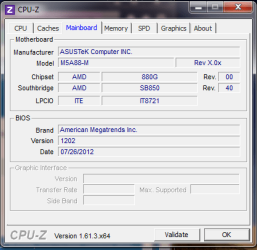
- Asus M5A88-M
- Memory
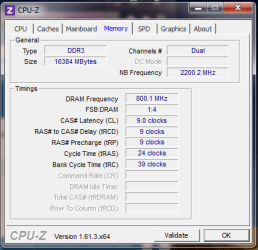
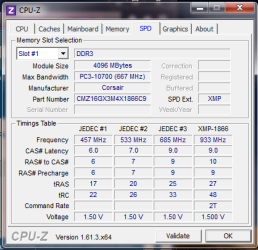
- 16 Gigs [1 Gig for Shared Vid mem]
- Graphics Card(s)
- Integrated ATI Radeon HD 4250 GPU
- Sound Card
- ALC892 8-Channel High Def Audio
- Monitor(s) Displays
- VGA main, HDMI to TV
- Screen Resolution
- VGA Screen: 1440 x 900 TV Screen: 1920 x 1080
- Hard Drives
- 120 Gig SSD
150 Gig HDD
~2TB on server. [My Docs, Photos, My Music, dedicated drives, Desktop is a folder. All on the server. Used by both Win7/Win8.1, and other machines in the house]
- PSU
- 850 Watt
- Case
- Smilodon Raidmax
- Cooling
- Cooler Master Hyper212EVO
- Keyboard
- [2,] Wireless
- Mouse
- [2,] Wireless
- Internet Speed
- Broadband
- Antivirus
- Microsoft Security Essentials
- Browser
- IE, Chrome, Opera
- Other Info
- Blue-Ray DL drive Z:\
Server: 2.4Ghz Dual core, with about 2TB on it. WinServ2003Enterprise x32 w 8Gigs usable RAM [YES]
MacBook: 2Ghz Core2Duo, 2Gigs, Snow 160Gigs
Acer AspireOne: 1.6Ghz, Dual-Core, 1 Gig, XP Home
6 Android Devices
iPod Touch