On mouse moven the mouse pointer gets stuck randomly

alphonse777

New member
Local time
5:47 PM
Messages
10
On mouse move, the mouse pointer gets stuck randomly

Hello,

I'm a computing science engineer, and there is something that is driving me nuts in one of my PCs.
This one runs Windows 7 ultimate 32, but the issue was the same with Vista (this is why I have upgraded this machine to 7)
This is a desktop PC with ASUS mother board.
I spend a lot of time googling this question, but I could not find any answer that could solve the issue.
The mouse of this PC get stuck in a random fashion..
I have test with 5 different mouse brand, wireless, not wireless ... no way to get rid of the issue ...
I put the mouse into another USB PCI card : same behavior
Checked device manager, all Ok
Checked IRQ, all OK
Windows logs : all fine, even not a warning.

The mouse uses the generic microsoft driver

ie :
mouclass.sys 06/21/2006
mouhid.sys 06/21/2006
version is 6.1.7600.16385


Any idea to get rid of it ? This is very annoying.

Thanks
 
Last edited:

My Computer My Computer

At a glance

Windows 7 Ultimate
OS
Windows 7 Ultimate
What kind of hard drive do you have, HDD or SSD? If the mouse is randomly freezing sometimes that can be the result of a hard drive problem.
 

My Computer My Computer

At a glance

Windows 7 Professional x64Intel Core 2 Quad Q8300Corsair XMS3 4GB (2 x 2GB) DDR3-1333 (PC3-107...NVIDIA GeForce 9600 GSO
Computer Manufacturer/Model Number
Custom
OS
Windows 7 Professional x64
CPU
Intel Core 2 Quad Q8300
Motherboard
Gigabyte EP43T-USB3
Memory
Corsair XMS3 4GB (2 x 2GB) DDR3-1333 (PC3-10700H)
Graphics Card(s)
NVIDIA GeForce 9600 GSO
Case
Logisys CS888CL
Keyboard
Razer Lycosa
Mouse
Cyborg R.A.T. 7
I will try to help. First off let stick with one mouse that is known to work on another Windows 7 computer. Let us know what mouse that is and how it hooks to the computer. Complete a Windows 7 Update and see if any drivers are indicating needed. Windows 7 comes with just about ever mouse driver that might be needed.
Please explain what you mean by a sticking mouse.
To help us help you please do this.
http://www.sevenforums.com/tutorials/180324-system-info-see-your-system-specs.html
You could also use this.
Speccy - System Information - Free Download
 

My Computer My Computer

At a glance

Windows 10 Pro. 64/ version 1709 Windows 7 Pr...Intel i7-6800K @ 4.3Corsair Platinum 16 gig @2400EVGA GTX 1070 OC
Computer type
PC/Desktop
Computer Manufacturer/Model Number
Home made Desktop
OS
Windows 10 Pro. 64/ version 1709 Windows 7 Pro/64
CPU
Intel i7-6800K @ 4.3
Motherboard
ASUS X-99 Deluxe II
Memory
Corsair Platinum 16 gig @2400
Graphics Card(s)
EVGA GTX 1070 OC
Monitor(s) Displays
Asus 27" LED LCD/VE278Q
Screen Resolution
1920-1080 or 1280-720 HDMI
Hard Drives
INTEL SSD 730-240 Gb Sata 3.0/
PSU
EVGA Platium 1200W
Case
Phanteks Luxe Tempered Glass 8 fans/ one radiator
Cooling
XSPC/ Water Cooled CPU
Keyboard
Das 4 Professional
Mouse
Logitech M705/MX Anywhere 2-S
Internet Speed
100 mbits
Antivirus
Microsoft Security Essentials/ Malwarebytes Premium 3.0/ SAS
Browser
I.E. 11 default/Firefox/ ISP Time Warner Cable/Spectrum
Other Info
LG BluRay Burner/
Sound system-KLipsch-THX/
Icy Dock ssd Hot Swap bays.
What kind of hard drive do you have, HDD or SSD? If the mouse is randomly freezing sometimes that can be the result of a hard drive problem.

This is HDD disk not SDD.
What kind of hard drive issue ?
I have the feelling that this is bound to disk access , but I dannot say for sure (i cannot see the HDD LED ).
 

My Computer My Computer

At a glance

Windows 7 Ultimate
OS
Windows 7 Ultimate
First off let stick with one mouse that is known to work on another Windows 7 computer. Let us know what mouse that is and how it hooks to the computer.

I tried many mices , logitech, microsoft, no brand, wireless, not wireless. All these mices works well with other computers...

Complete a Windows 7 Update and see if any drivers are indicating needed. Windows 7 comes with just about ever mouse driver that might be needed. .

I did upgrades, No mouse drivers updates, this is the same for ages, (I have other PC having the same driver date)


Please explain what you mean by a sticking mouse.

The user moves the mouse and the mouse does not move, and then it moves suddenly ...
Stuck time are 1s to 0.1s, this is not total freeze.
like mouse IRQ are simply ignored by the OS
 

My Computer My Computer

At a glance

Windows 7 Ultimate
OS
Windows 7 Ultimate
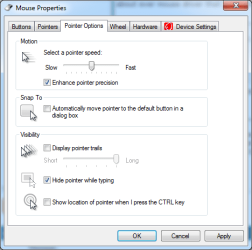
can you try going to start, search "mouse" and open up the pointer options, should look like this:
Capture.PNG
Make sure the speed is around the center of the scale and enhance pointer precision is selected.

Other things to note, which has been brought up already is the HDD possibly failing.

Also how much free ram is available when you look in the Task Manager? Is there any application using high cpu % over a long period of time?
 

My Computer My Computer

At a glance

Windows 7 Ultimate SP1 x64AMD A6-3420M APU4.0 Gb DDR3 838 MHzAMD Radeon HD 6520G
Computer type
PC/Desktop
Computer Manufacturer/Model Number
HP Pavilion g7-1350dx
OS
Windows 7 Ultimate SP1 x64
CPU
AMD A6-3420M APU
Memory
4.0 Gb DDR3 838 MHz
Graphics Card(s)
AMD Radeon HD 6520G
Sound Card
IDT HD Audio
Screen Resolution
1600x 900
Hard Drives
500GB Hitachi HTS547550A9E384
- Mouse panel :-)))))) I know it , no hope from this side... forget :-)
- HDD possibly failing : i should see something into windows logs : nohing, no HDD timeout

- This is a 2Gb ram system -no so much- but I do not see any relationship, except page pooling and HDD failure ?

- CPU% is low, but I need to check when this is happenning (this is a 2 core CPU system), may be too high kernel times ? but it also happenned once into a i7 and 8Go ram 8 core system, but it dissapeared (not THIS pc I'm talking about)
 

My Computer My Computer

At a glance

Windows 7 Ultimate
OS
Windows 7 Ultimate
- HDD possibly failing : i should see something into windows logs : nohing, no HDD timeout

The windows log may not show it actually! I was hoping if you could look at the S.M.A.R.T. Data, or test the hdd with a utility such as PartedMagic.
If you are interested in using Parted Magic to check the HDD health, just let me know and I will guide you through it.

- This is a 2Gb ram system -no so much- but I do not see any relationship, except page pooling and HDD failure ?
Well, the reason I ask is because of Paging File, where if the computer is running low on RAM, it will swap some memory contents to the hard drive. So if the Hard drive is dying, this would also make the system slow and unresponsive.

- CPU% is low, but I need to check when this is happenning (this is a 2 core CPU system), may be too high kernel times ? but it also happenned once into a i7 and 8Go ram 8 core system, but it dissapeared (not THIS pc I'm talking about)
Hmm, usually if there is no resource intensive application running, this shouldn't happen.


First can you start by posting the system specifications as instructed by Layback Bear.
Then we will be able to know what type of HDD it is.
 

My Computer My Computer

At a glance

Windows 7 Ultimate SP1 x64AMD A6-3420M APU4.0 Gb DDR3 838 MHzAMD Radeon HD 6520G
Computer type
PC/Desktop
Computer Manufacturer/Model Number
HP Pavilion g7-1350dx
OS
Windows 7 Ultimate SP1 x64
CPU
AMD A6-3420M APU
Memory
4.0 Gb DDR3 838 MHz
Graphics Card(s)
AMD Radeon HD 6520G
Sound Card
IDT HD Audio
Screen Resolution
1600x 900
Hard Drives
500GB Hitachi HTS547550A9E384
The motherboard is ASUS P5V-X SE
CPU is E4500

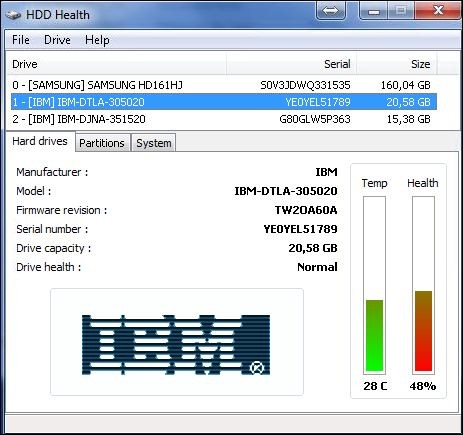
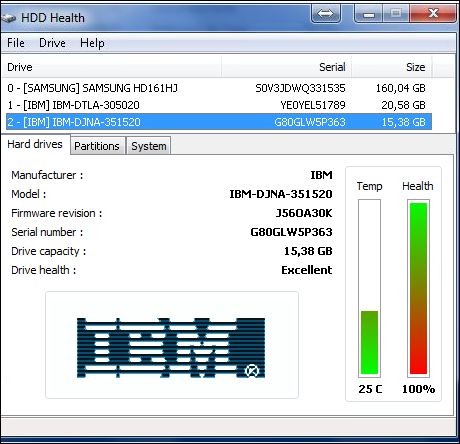
Disk #1

hd1.JPG


Disk #2

hd2.JPG


Disk #3

hd3.JPG


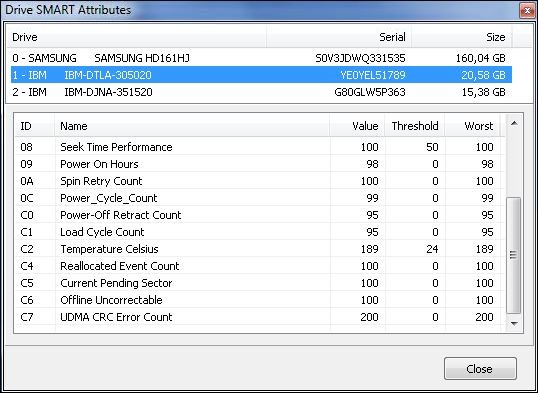
When looking closer to the disk #2 that is the weakest of all ->

hd4.JPG


hd5.JPG
 

My Computer My Computer

At a glance

Windows 7 Ultimate
OS
Windows 7 Ultimate
Do you know which drive you have the OS installed on?
 

My Computer My Computer

At a glance

Windows 7 Ultimate SP1 x64AMD A6-3420M APU4.0 Gb DDR3 838 MHzAMD Radeon HD 6520G
Computer type
PC/Desktop
Computer Manufacturer/Model Number
HP Pavilion g7-1350dx
OS
Windows 7 Ultimate SP1 x64
CPU
AMD A6-3420M APU
Memory
4.0 Gb DDR3 838 MHz
Graphics Card(s)
AMD Radeon HD 6520G
Sound Card
IDT HD Audio
Screen Resolution
1600x 900
Hard Drives
500GB Hitachi HTS547550A9E384
yes the Samsung 160Gb
Thanks
 

My Computer My Computer

At a glance

Windows 7 Ultimate
OS
Windows 7 Ultimate
Ok, first this is a Samsung ssd?
Do you have AHCI enabled in the bios?

Also go to Control Panel>System>Advanced System Settings>Performance Settings>Advanced tab>Virtual Memory. Click Change:

2838d1203358079-virtual-memory-paging-file-change-automatic_yes_no.jpg


Then uncheck whatever setting is chosen for paging file,
check No Paging File on 2 IBM drive, then Set, OK and reboot.


After reboot return to the same place to highlight the Samsung drive (only) and select System Managed Size, click Set, then OK.
 

My Computer My Computer

At a glance

Windows 7 Ultimate SP1 x64AMD A6-3420M APU4.0 Gb DDR3 838 MHzAMD Radeon HD 6520G
Computer type
PC/Desktop
Computer Manufacturer/Model Number
HP Pavilion g7-1350dx
OS
Windows 7 Ultimate SP1 x64
CPU
AMD A6-3420M APU
Memory
4.0 Gb DDR3 838 MHz
Graphics Card(s)
AMD Radeon HD 6520G
Sound Card
IDT HD Audio
Screen Resolution
1600x 900
Hard Drives
500GB Hitachi HTS547550A9E384
This was already done a while ago.
No paging files into the two old IBM disks.
I have also disabled power saving on USB ports

The issue remains, I have noticed that when this is happenning kernel time are 50% (red curve on task manager, but does not last, say 5 sec)
 

My Computer My Computer

At a glance

Windows 7 Ultimate
OS
Windows 7 Ultimate
This was already done a while ago.
No paging files into the two old IBM disks.
I have also disabled power saving on USB ports

The issue remains, I have noticed that when this is happenning kernel time are 50% (red curve on task manager, but does not last, say 5 sec)
Hmm, have you ran any virus or malware scan latley, can you check with MalwareBytes?
Try doing a full scan, and if anything shows up just post back.

Also have you tried running a sfc scannow?
 

My Computer My Computer

At a glance

Windows 7 Ultimate SP1 x64AMD A6-3420M APU4.0 Gb DDR3 838 MHzAMD Radeon HD 6520G
Computer type
PC/Desktop
Computer Manufacturer/Model Number
HP Pavilion g7-1350dx
OS
Windows 7 Ultimate SP1 x64
CPU
AMD A6-3420M APU
Memory
4.0 Gb DDR3 838 MHz
Graphics Card(s)
AMD Radeon HD 6520G
Sound Card
IDT HD Audio
Screen Resolution
1600x 900
Hard Drives
500GB Hitachi HTS547550A9E384
sfc scannow : no integrity issues
malware bytes : a riskware was found in the temporary folder... hum let's see

when I use teamviewer on this PC, no problem either with the mouse (this is indeed the remote mouse that is used)...
Very strange
 

My Computer My Computer

At a glance

Windows 7 Ultimate
OS
Windows 7 Ultimate
sfc scannow : no integrity issues
malware bytes : a riskware was found in the temporary folder... hum let's see

when I use teamviewer on this PC, no problem either with the mouse (this is indeed the remote mouse that is used)...
Very strange
Did the mouse always behave this way? Did it recently start?

Have you tried to restore to a previous backup?
 

My Computer My Computer

At a glance

Windows 7 Ultimate SP1 x64AMD A6-3420M APU4.0 Gb DDR3 838 MHzAMD Radeon HD 6520G
Computer type
PC/Desktop
Computer Manufacturer/Model Number
HP Pavilion g7-1350dx
OS
Windows 7 Ultimate SP1 x64
CPU
AMD A6-3420M APU
Memory
4.0 Gb DDR3 838 MHz
Graphics Card(s)
AMD Radeon HD 6520G
Sound Card
IDT HD Audio
Screen Resolution
1600x 900
Hard Drives
500GB Hitachi HTS547550A9E384
The issue was present under VISTA ... and then I decide to upgrade to Win 7 hopping it will dissapear ... and it did not.
This issue is more disturbing these last weeks.

1. may be I should install a logitech mouse and overide the window generic driver by the logitech one ?

2. I also have a dual boot to XP, I could check what is happening there ?
 

My Computer My Computer

At a glance

Windows 7 Ultimate
OS
Windows 7 Ultimate
The issue was present under VISTA ... and then I decide to upgrade to Win 7 hopping it will dissapear ... and it did not.
This issue is more disturbing these last weeks.

1. may be I should install a logitech mouse and overide the window generic driver by the logitech one ?

2. I also have a dual boot to XP, I could check what is happening there ?
Did you upgrade over Vista, or clean install. If it was an upgrade the problem may have carried its way through the upgrade.
Does it also occur under XP?

Go ahead and try the logitech drivers and see what happens.
 

My Computer My Computer

At a glance

Windows 7 Ultimate SP1 x64AMD A6-3420M APU4.0 Gb DDR3 838 MHzAMD Radeon HD 6520G
Computer type
PC/Desktop
Computer Manufacturer/Model Number
HP Pavilion g7-1350dx
OS
Windows 7 Ultimate SP1 x64
CPU
AMD A6-3420M APU
Memory
4.0 Gb DDR3 838 MHz
Graphics Card(s)
AMD Radeon HD 6520G
Sound Card
IDT HD Audio
Screen Resolution
1600x 900
Hard Drives
500GB Hitachi HTS547550A9E384
Ok, thanks guys, but none of you has any idea of what happenning there...
I'm sorry but I'm NOT going to try what I have already tried several time. Do you know where I can find an answer ?
I'm not a newbie.... 20 year of PC usage.
On stackoverflow may be ?
Thanks
 

My Computer My Computer

At a glance

Windows 7 Ultimate
OS
Windows 7 Ultimate
I had a similar problem, as a further pain the mouse would occasionally completely freeze and then require a PC reboot. I later found my mouse was an HID compliant device and needed the human interface device service to be started. The default state in windows7 is 'manual' so start the service and switch it to automatic.
 

My Computer My Computer

At a glance

Windows7 32bit
OS
Windows7 32bit
Back
Top