Sleep Mode Still Freeze up, Win 7 RTM

LarryLaser

New member
Member
Local time
8:59 AM
Messages
69
Location
USA
I have posted on "Anyone else kind of disappointed?" about this problem, and was suggested to start a Thread on this topic.

Here are the posts.

I am still having bug and freeze problems on all of the computers that I have been testing on since the first release in November.

I am currently testing both x64 and x86 versions on 4 of my PC's and still having minor bug issues, and the major freeze problem.

I do not Just use my PC's for e-mails, browsing the web and gaming. I primarily use them for Engineering Design Work and they need lots of resources to operate efficiently. My primary Base unit is the one I do most of my work on and the Most efficient Operating system on it is Windows XP x64 (sp2) and customized. (Not the Basic install of services and registry sets).

The freeze issue is random and it happens when my PC's go into sleep mode. Some times the will wake up normally, but way to often they will not wake at all, I have to force re-boot. And no error logs related to sleep mode issues, only the E-ID 41 (forced re-boot). This has happened on all the releases from 7000 to 7127, and now 7600, the releases from 7137 to 7229 never had this problem. And this has happened on all my test PC's including Laptops and Desktops.

I have tried many changes in settings for Power Settings (Advanced), Network Adapter Settings, Monitor settings.

Ideally I want my Network Adapter to stay Active on my main box so I can access files from my other computers any time I need them, I want my HDD's to go to sleep when not in use so they will live for a while. and My Monitors to shut down when not in use.
All computers are Multi-Boot

Any one have any Ideas??

Here are some Hardware details.
Main System
Windows 7 7600 RTM x64 Ultimate
Gigabyte GA-965P-DS3, Intel C2Q 6600 64Bit
Marvell Yukon 88E8053 PCI Gigabit
8 Gig Ram
Dual nVidia 9400 GT (PCI-e and PCI)
7 HDD's @ 5.5 TByts (SATA II and IDE)
4 Monitors 3-LCD Hanns G, 1-AOC

2nd Test System
Windows 7 7600 RTM x64 Pro
Gigabyte GA-G31M-ES2L, Intel C2D E6450 64Bit
Realtek RTL8111C (PCI) Gigabit
4 Gig, nVidia 7200 GS (PCI-e)
5 HDD's @ 1.75 TByts (SATA II and IDE)
2 Monitors, 1 LCD-Hanns-G, 1 CRT-Samtron

3rd Test Laptop
Windows 7 7600 RTM x86 Home Premium
Lenovo 3000 N100, Intel C2D T2060 32Bit
Intel Pro Wireless3945ABG
2 Gig, Mobile Intel 945 Graphics Chip Set
1 HDD - (SATA II)

4th Test Netbook
Windows 7 7600 RTM x86 Home Basic
Acer AspireONE, Intel C2-ATOM N270
Atheros AR5007EG Wireless, Realtek RTL8102E PCI - NIC
1.5 Gig RAM, Mobile Intel 945 Graphics Chip Set
1 HDD, WD 120 SATA II


Because the issue propogates across platforms and OS builds, it is reasonable to conclude that the cause is not in the hardware or the OS build.

Are you applying a setting at any level that is drawn from your legacy bag of tricks?

For more than a year, I dealt with XP booting to svchost running at 50%/100% due to a customized network setting on my slipstream CDs. I knew it was somewhere in those settings because I finally solved the problem by installing from a slipstream that used default network settings. I burned an entire pack of CDs testing different slipstream configs. I still do not know what the actual setting was that caused the problem.

Something I "learned" and applied caused a major XP "bug". It spanned XP, XP SP1 and XP SP2 on every machine I ever installed it on.

Yes Antman, I have dealt with that issue in Win XP as well, and found the solution to the problems in the settings for network controls and services related to them.
That is what I am trying to solve in Win7. Not massive resource demands, just the freeze problem.

I do a lot of experimenting in my design work on my laptop (the Lenovo, the Acer is my Wife's toy) and them Sync the files to my main box, then intigrate the design work and run simulation testing on my main box (cause It has the needed resources).

The only Network services that I have not used yet is the HomeGroup, I did test it in the beginning, but It will not communicate with any other OS but Win 7 and Server 2008. But I don't think that it would be related to the Freeze problem.

One point that I can not figure out, When my System (my main box) goes to sleep and then freezes, it turns off the Network Adapter and USB ports.
I have gone through the Advanced settings and disabled the shut-down options on them, but they still shut down on the 7600 version, that one didn't happen on the earlier versions, (that I recall).
If you have any of this problem or solution to it, please post.
Thanks
LarryLaser
 

My Computer My Computer

At a glance

Windows 7 7600 x86 &x64, Windows XPP sp3 (x86...C2Q 6600, C2D 6420, C2D T2060, C2-ATOM N2708 Gig, 4 Gig, 2 Gig, 1.5 GignVidia 9400 GS, 7200GT, FX 5200
OS
Windows 7 7600 x86 &x64, Windows XPP sp3 (x86) & sp2 x64
CPU
C2Q 6600, C2D 6420, C2D T2060, C2-ATOM N270
Motherboard
Gigabyte GA-965P-DS3, GA-G31M-ES2L, Lenovo 3000 N100, Acer A
Memory
8 Gig, 4 Gig, 2 Gig, 1.5 Gig
Graphics Card(s)
nVidia 9400 GS, 7200GT, FX 5200
Monitor(s) Displays
2-Hanns-G HW191D, 1-Hanns-G JC199D, 1-AOC 720LM, 2-Samtron
Screen Resolution
1440x900, 1280x1024
Hard Drives
Seagate Barracuda 11 & 12 series
2-500G, 2-1Tb
WD My Book 1Tb
Samsung 3-500G
Maxtor Diamond 9 - 11 80G to 300G about 8 diff.
PSU
many from 1000w to 250w
Case
many
Cooling
Massive fans on all, and my home build AC unit
Keyboard
MS Natural Multimedia
Mouse
MS IntelliMouse 3.0
Internet Speed
10Mbs d/l 768Kbs u/l
actually yes i have had this problem and for some reason it has become less and less apparent on other test builds...
i have also have had a problem with the USB that at any moment it may freeze on me (it felt like playing russian roulette where i would lose my work if it froze..:()

i have not tweaked in the sense that you have and you can say i have a default installation of Win7....
hearing such a report makes me think it might still be hardware related (the only builds that i did not have this happen was on the pre 7000 builds....(6801 was jthe only build where i did not have this problem....;))

i also have no solution for this and have done everything that i could think of, the only culprit i can think of would be hardware the hardware drivers (it seems interesting that you say USB and the Network (this is laptop and i use a wireless card) have had issues ...:) i began to hypothesize that it may be the usb causing the freezing, because in certain builds i was able to get access to computer without it freezing but had hard CPU usage by the System , DPC's and Interrupts (bordering on 100%, with USB device attached, and with devices unattached during sleep)...

since i found out my PC's HDD became corrupted (have had way to many corrupt sectors) and been brought a spare HDD, i will experiment on disabling driver and other miscellaneous software and see if i can come it make a sense of this weird bug...:)
 
Last edited:

My Computer My Computer

At a glance

Windows 7 Ult x64(x2), HomePrem x32(x4), Serv...Turion X2 ultra (oh well came with laptop)/P4...OCZ Dual Channel 4GB kit/ 1gb Dual ChannelHD 3200 graphics /GMA x3100 (yay for intergra...
Computer Manufacturer/Model Number
Tx2500z Tablet Pc/Homemade Server
OS
Windows 7 Ult x64(x2), HomePrem x32(x4), Server 08 (+VM), 08 R2 (VM) , SuSe 11.2 (VM), XP 32 (VM)
CPU
Turion X2 ultra (oh well came with laptop)/P4 @3.2 (yes P4)
Motherboard
IDK HP Motherboard / Intel DG965SS
Memory
OCZ Dual Channel 4GB kit/ 1gb Dual Channel
Graphics Card(s)
HD 3200 graphics /GMA x3100 (yay for intergrated!!)
Sound Card
Realtek HD Audio(mic working, well sort of)/Siig IC-70012
Monitor(s) Displays
built-in Hp 12" laptop screen/ Acer 19"
Screen Resolution
1280x800 /1440x900
Cooling
All Air Cooled
Mouse
Logi MX Rev. /MS Wheel Optical 1.1A /Logitech Optical Mouse
Internet Speed
College baby but its still routed through vpn to 1536k...
Other Info
love my wacom pen and pressure sensitivity...
wished it worked in 7, SUSE for that matter though
me too had this problem, it was my usb keyboard. If detached it and put a standard ps2 there were no problems. I solved it by putting a microswitch which cut the keyboard +5v. After a while i forgot the switch and it came up normally and haven't had the problem since.

The miracles of modern science
 

My Computer My Computer

At a glance

vista x64/ win 7 x64phenom 9950 BE8 gbnvidia gts 250
Computer Manufacturer/Model Number
me and myself
OS
vista x64/ win 7 x64
CPU
phenom 9950 BE
Motherboard
ASUS M2A-VM HDMI
Memory
8 gb
Graphics Card(s)
nvidia gts 250
Sound Card
realtek HD onboard
Monitor(s) Displays
dual hd 19" tft
Screen Resolution
1440x900
Hard Drives
2 x 500 gb WDC
1 x 500 gb Seagate
1 x 1000 gb Seagate
1 80 gb raptor
1 usb 160 gb
Cooling
standard issue
Keyboard
logitech g11
Mouse
usb wireless MS laser 6000
Internet Speed
18 mb (according to my provider :)
I solved it by putting a microswitch which cut the keyboard +5v.

The miracles of modern science

i would want one of those...;)
 

My Computer My Computer

At a glance

Windows 7 Ult x64(x2), HomePrem x32(x4), Serv...Turion X2 ultra (oh well came with laptop)/P4...OCZ Dual Channel 4GB kit/ 1gb Dual ChannelHD 3200 graphics /GMA x3100 (yay for intergra...
Computer Manufacturer/Model Number
Tx2500z Tablet Pc/Homemade Server
OS
Windows 7 Ult x64(x2), HomePrem x32(x4), Server 08 (+VM), 08 R2 (VM) , SuSe 11.2 (VM), XP 32 (VM)
CPU
Turion X2 ultra (oh well came with laptop)/P4 @3.2 (yes P4)
Motherboard
IDK HP Motherboard / Intel DG965SS
Memory
OCZ Dual Channel 4GB kit/ 1gb Dual Channel
Graphics Card(s)
HD 3200 graphics /GMA x3100 (yay for intergrated!!)
Sound Card
Realtek HD Audio(mic working, well sort of)/Siig IC-70012
Monitor(s) Displays
built-in Hp 12" laptop screen/ Acer 19"
Screen Resolution
1280x800 /1440x900
Cooling
All Air Cooled
Mouse
Logi MX Rev. /MS Wheel Optical 1.1A /Logitech Optical Mouse
Internet Speed
College baby but its still routed through vpn to 1536k...
Other Info
love my wacom pen and pressure sensitivity...
wished it worked in 7, SUSE for that matter though
i would want one of those...;)

A miracle? :D If not, i just cut the 5v+ USB wire on the mb, rewired it to a standard micro cantilever switch, added a green led which fed off the 5v line and away you go.
 

My Computer My Computer

At a glance

vista x64/ win 7 x64phenom 9950 BE8 gbnvidia gts 250
Computer Manufacturer/Model Number
me and myself
OS
vista x64/ win 7 x64
CPU
phenom 9950 BE
Motherboard
ASUS M2A-VM HDMI
Memory
8 gb
Graphics Card(s)
nvidia gts 250
Sound Card
realtek HD onboard
Monitor(s) Displays
dual hd 19" tft
Screen Resolution
1440x900
Hard Drives
2 x 500 gb WDC
1 x 500 gb Seagate
1 x 1000 gb Seagate
1 80 gb raptor
1 usb 160 gb
Cooling
standard issue
Keyboard
logitech g11
Mouse
usb wireless MS laser 6000
Internet Speed
18 mb (according to my provider :)
A miracle? :D If not, i just cut the 5v+ USB wire on the mb, rewired it to a standard micro cantilever switch, added a green led which fed off the 5v line and away you go.

ooh and that would work if it was my desktop (since i build that myself), but alas its my laptop (which i say is under warranty)if i tried that not only would i have unsolder and resolder the metal strips, but i have a big chance of messing up my lappy's mb, not to mention void the warranty...:cry:
 

My Computer My Computer

At a glance

Windows 7 Ult x64(x2), HomePrem x32(x4), Serv...Turion X2 ultra (oh well came with laptop)/P4...OCZ Dual Channel 4GB kit/ 1gb Dual ChannelHD 3200 graphics /GMA x3100 (yay for intergra...
Computer Manufacturer/Model Number
Tx2500z Tablet Pc/Homemade Server
OS
Windows 7 Ult x64(x2), HomePrem x32(x4), Server 08 (+VM), 08 R2 (VM) , SuSe 11.2 (VM), XP 32 (VM)
CPU
Turion X2 ultra (oh well came with laptop)/P4 @3.2 (yes P4)
Motherboard
IDK HP Motherboard / Intel DG965SS
Memory
OCZ Dual Channel 4GB kit/ 1gb Dual Channel
Graphics Card(s)
HD 3200 graphics /GMA x3100 (yay for intergrated!!)
Sound Card
Realtek HD Audio(mic working, well sort of)/Siig IC-70012
Monitor(s) Displays
built-in Hp 12" laptop screen/ Acer 19"
Screen Resolution
1280x800 /1440x900
Cooling
All Air Cooled
Mouse
Logi MX Rev. /MS Wheel Optical 1.1A /Logitech Optical Mouse
Internet Speed
College baby but its still routed through vpn to 1536k...
Other Info
love my wacom pen and pressure sensitivity...
wished it worked in 7, SUSE for that matter though
ooh and that would work if it was my desktop (since i build that myself), but alas its my laptop (which i say is under warranty)if i tried that not only would i have unsolder and resolder the metal strips, but i have a big chance of messing up my lappy's mb, not to mention void the warranty...:cry:

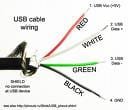
just cut the cable then. The wires are colour coded. Put the led over the 5v feed so it lights up when you're active
 

Attachments

  • usb.jpeg
    usb.jpeg
    3.2 KB · Views: 3,881

My Computer My Computer

At a glance

vista x64/ win 7 x64phenom 9950 BE8 gbnvidia gts 250
Computer Manufacturer/Model Number
me and myself
OS
vista x64/ win 7 x64
CPU
phenom 9950 BE
Motherboard
ASUS M2A-VM HDMI
Memory
8 gb
Graphics Card(s)
nvidia gts 250
Sound Card
realtek HD onboard
Monitor(s) Displays
dual hd 19" tft
Screen Resolution
1440x900
Hard Drives
2 x 500 gb WDC
1 x 500 gb Seagate
1 x 1000 gb Seagate
1 80 gb raptor
1 usb 160 gb
Cooling
standard issue
Keyboard
logitech g11
Mouse
usb wireless MS laser 6000
Internet Speed
18 mb (according to my provider :)
I also have a sleep issue with vista x64 and 7 x64, i believe part of fault is the hardware and drivers used on the system. I wish i could get it to work though coz every BSOD i get in sleep mode returns different errors from USB sys to nvidia drivers to %h whatever that syntax means.
 

My Computer My Computer

At a glance

Windows 7 Ultimate X64 RTMQ6600 @ 3.4Ghz8GB DDR2-800GTX285 1GB
OS
Windows 7 Ultimate X64 RTM
CPU
Q6600 @ 3.4Ghz
Motherboard
Abit IP35-E
Memory
8GB DDR2-800
Graphics Card(s)
GTX285 1GB
Sound Card
Creative X-Fi Extreme Music
Monitor(s) Displays
Samsung T220
Hard Drives
Samsung F1 Spinpoint 1TB
PSU
Silverstone Zues 750ZF
Case
Lian Li PC-P80
Cooling
Thermalright Ultra 120-Extreme
Does Nobody have a frigging clue on how to find the bug that is causing this freeze and sleep issue??
 

My Computer My Computer

At a glance

Windows 7 7600 x86 &x64, Windows XPP sp3 (x86...C2Q 6600, C2D 6420, C2D T2060, C2-ATOM N2708 Gig, 4 Gig, 2 Gig, 1.5 GignVidia 9400 GS, 7200GT, FX 5200
OS
Windows 7 7600 x86 &x64, Windows XPP sp3 (x86) & sp2 x64
CPU
C2Q 6600, C2D 6420, C2D T2060, C2-ATOM N270
Motherboard
Gigabyte GA-965P-DS3, GA-G31M-ES2L, Lenovo 3000 N100, Acer A
Memory
8 Gig, 4 Gig, 2 Gig, 1.5 Gig
Graphics Card(s)
nVidia 9400 GS, 7200GT, FX 5200
Monitor(s) Displays
2-Hanns-G HW191D, 1-Hanns-G JC199D, 1-AOC 720LM, 2-Samtron
Screen Resolution
1440x900, 1280x1024
Hard Drives
Seagate Barracuda 11 & 12 series
2-500G, 2-1Tb
WD My Book 1Tb
Samsung 3-500G
Maxtor Diamond 9 - 11 80G to 300G about 8 diff.
PSU
many from 1000w to 250w
Case
many
Cooling
Massive fans on all, and my home build AC unit
Keyboard
MS Natural Multimedia
Mouse
MS IntelliMouse 3.0
Internet Speed
10Mbs d/l 768Kbs u/l
Does Nobody have a frigging clue on how to find the bug that is causing this freeze and sleep issue??

hey larry it seems that disabling some USB Root HUB devices (at least for me...;)) so far has worked for me....
i disabled some that seem to not be used even though i have every usb slot filled...:sarc:

and my guess was correct that my problem was usb based (i found out that there 7 root hubs and i only have 3 usb slots +2 for blue-tooth and Fingerprint) i disabled two and so far so good...

uptime has been for 3 hours (pluging devices and unplugging every 5-10 minutes [before such heavy unplugging would the render the system unoperable in a few minutes]...;))

it seems my sleep issue has vanished too although i need to do more testing...:)
 

My Computer My Computer

At a glance

Windows 7 Ult x64(x2), HomePrem x32(x4), Serv...Turion X2 ultra (oh well came with laptop)/P4...OCZ Dual Channel 4GB kit/ 1gb Dual ChannelHD 3200 graphics /GMA x3100 (yay for intergra...
Computer Manufacturer/Model Number
Tx2500z Tablet Pc/Homemade Server
OS
Windows 7 Ult x64(x2), HomePrem x32(x4), Server 08 (+VM), 08 R2 (VM) , SuSe 11.2 (VM), XP 32 (VM)
CPU
Turion X2 ultra (oh well came with laptop)/P4 @3.2 (yes P4)
Motherboard
IDK HP Motherboard / Intel DG965SS
Memory
OCZ Dual Channel 4GB kit/ 1gb Dual Channel
Graphics Card(s)
HD 3200 graphics /GMA x3100 (yay for intergrated!!)
Sound Card
Realtek HD Audio(mic working, well sort of)/Siig IC-70012
Monitor(s) Displays
built-in Hp 12" laptop screen/ Acer 19"
Screen Resolution
1280x800 /1440x900
Cooling
All Air Cooled
Mouse
Logi MX Rev. /MS Wheel Optical 1.1A /Logitech Optical Mouse
Internet Speed
College baby but its still routed through vpn to 1536k...
Other Info
love my wacom pen and pressure sensitivity...
wished it worked in 7, SUSE for that matter though
My laptop (using Pro and Ultimate RTM) has no issue with sleep or hibernate at all. Works great.

My desktop though, causes lots of grief. I can put it to sleep just fine.
When I try to wake it, it doesn't. The HDDs come back on (as do all the lights), but the screen stays dark. Sometimes my KB and Mouse will light up, but nothing else. Now, I can restart it, or reset it. Then when it boots, it messes up, and either locks up, or won't let me log in (or into a temporary instead). Then I have to hard shut it down, unplug it, drain it, and start over. This is ANNOYING.

~Lordbob
 

My Computer My Computer

At a glance

Windows 7 Ultimate x64, Mint 9Intel i5-2500k2x 4Gb Corsair VENGEANCE DDR3-1600NVidia GeForce N260GTX Twin Frozr
Computer Manufacturer/Model Number
Hera
OS
Windows 7 Ultimate x64, Mint 9
CPU
Intel i5-2500k
Motherboard
ASUS P8P67 Pro
Memory
2x 4Gb Corsair VENGEANCE DDR3-1600
Graphics Card(s)
NVidia GeForce N260GTX Twin Frozr
Sound Card
Realtek HD OnBoard Audio
Monitor(s) Displays
ASUS 24" Monitor
Screen Resolution
1920x1080
Hard Drives
G.SKILL Phoenix Series 60GB SATA II MLC Internal Solid State Drive (SSD)
SAMSUNG Spinpoint F3R 1TB 7200 RPM 32MB Cache SATA II
PSU
Cooler Master Real Power Pro 750W
Case
Cooler Master Haf 932
Cooling
Fans
Keyboard
Razer Tarantula
Mouse
Razer Lachesis
Internet Speed
not fast enough
Sleep Mode sucks

I have been testing settings for just about everything.
The only thing that has helped the system is to disable the sleep mode in the Power Settings (Advanced), and keep the monitor settings enabled and the HDD's settings enabled.

I have tried many USB disable and change settings and none of them help.
Sleep Mode just sucks, every time I select Sleep in the Shut Down menu (in the start menu), the system freezes in sleep mode and will not wake up at all.
 

My Computer My Computer

At a glance

Windows 7 7600 x86 &x64, Windows XPP sp3 (x86...C2Q 6600, C2D 6420, C2D T2060, C2-ATOM N2708 Gig, 4 Gig, 2 Gig, 1.5 GignVidia 9400 GS, 7200GT, FX 5200
OS
Windows 7 7600 x86 &x64, Windows XPP sp3 (x86) & sp2 x64
CPU
C2Q 6600, C2D 6420, C2D T2060, C2-ATOM N270
Motherboard
Gigabyte GA-965P-DS3, GA-G31M-ES2L, Lenovo 3000 N100, Acer A
Memory
8 Gig, 4 Gig, 2 Gig, 1.5 Gig
Graphics Card(s)
nVidia 9400 GS, 7200GT, FX 5200
Monitor(s) Displays
2-Hanns-G HW191D, 1-Hanns-G JC199D, 1-AOC 720LM, 2-Samtron
Screen Resolution
1440x900, 1280x1024
Hard Drives
Seagate Barracuda 11 & 12 series
2-500G, 2-1Tb
WD My Book 1Tb
Samsung 3-500G
Maxtor Diamond 9 - 11 80G to 300G about 8 diff.
PSU
many from 1000w to 250w
Case
many
Cooling
Massive fans on all, and my home build AC unit
Keyboard
MS Natural Multimedia
Mouse
MS IntelliMouse 3.0
Internet Speed
10Mbs d/l 768Kbs u/l
I have been testing settings for just about everything.
The only thing that has helped the system is to disable the sleep mode in the Power Settings (Advanced), and keep the monitor settings enabled and the HDD's settings enabled.

I have tried many USB disable and change settings and none of them help.
Sleep Mode just sucks, every time I select Sleep in the Shut Down menu (in the start menu), the system freezes in sleep mode and will not wake up at all.

another thing i did (although this was just a test was to see if you could overwrite some of the driver files in 7 with preferably vista sp2 ones [i only tried sp2 since i download that one from technet])
what i have done (since i downlaoded the waik recently)
was to mounnt the vista sp2 install.wim and use the drivers from there
make a backup of both your %windir%\system32\driver and %windir%\system32\driverstore\filerepository and then painfully find the driver files used, copy, restart (you will have to disable driver signing if you are x64 though) sleep and see if changes anything
(both also have to be either x86 or x64...)
from what i have seen (if you already tried disabling drivers (and as such hardware)) then it is likely these windows 7 microsoft drivers might be the cause (even more so if it works in xp or vista..)

this very tricky and so what i have done beforehand was to make a system restore image and then do the changes there...:)
(even if you are just changing usb drivers...;))
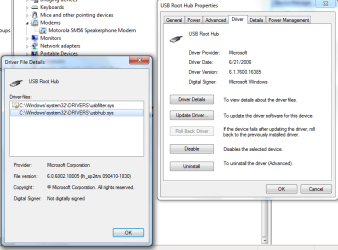
just to show the end result using a USB driver from vista sp2 in a Win7 RTM install
vista sp2.PNG

as you can see these are not signed because you still need the .cat or you need the certificate to be stored already in the Win7 rtm image....:)
like i said good luck...;)
 

My Computer My Computer

At a glance

Windows 7 Ult x64(x2), HomePrem x32(x4), Serv...Turion X2 ultra (oh well came with laptop)/P4...OCZ Dual Channel 4GB kit/ 1gb Dual ChannelHD 3200 graphics /GMA x3100 (yay for intergra...
Computer Manufacturer/Model Number
Tx2500z Tablet Pc/Homemade Server
OS
Windows 7 Ult x64(x2), HomePrem x32(x4), Server 08 (+VM), 08 R2 (VM) , SuSe 11.2 (VM), XP 32 (VM)
CPU
Turion X2 ultra (oh well came with laptop)/P4 @3.2 (yes P4)
Motherboard
IDK HP Motherboard / Intel DG965SS
Memory
OCZ Dual Channel 4GB kit/ 1gb Dual Channel
Graphics Card(s)
HD 3200 graphics /GMA x3100 (yay for intergrated!!)
Sound Card
Realtek HD Audio(mic working, well sort of)/Siig IC-70012
Monitor(s) Displays
built-in Hp 12" laptop screen/ Acer 19"
Screen Resolution
1280x800 /1440x900
Cooling
All Air Cooled
Mouse
Logi MX Rev. /MS Wheel Optical 1.1A /Logitech Optical Mouse
Internet Speed
College baby but its still routed through vpn to 1536k...
Other Info
love my wacom pen and pressure sensitivity...
wished it worked in 7, SUSE for that matter though
When I wake up from hibernation or sleep mode I get a blank black screen. Anyone have any idea what's causing it? I have to reboot the pc to get it to work again. Really sucks as I would love to use these features.
 

My Computer My Computer

At a glance

Windows 7 Ultimate 7600 RTM x64
OS
Windows 7 Ultimate 7600 RTM x64
Hey Vann,

Hello Vann,
Yea I have had the same type of issues in many of the version releases, mainly the from the 7000 version to the 7127 version, I did not have the problems in the 7137 and 7229 version, but the biggest problem is happening in the 7600 RTM version. Mine is from MS, I am a TechNet Subscriber. I have been reporting to MS since the beginning of this and many other bugs, and I am surprised that they have not fixed it yet.

This is what is happening on my main system layout,
When the system goes in to sleep mode some times (mostly) it will not wake up, but when it does the windows of apps running loses there proper position and most of the time the system loses one of the vid cards, and some times the monitors stay blanked (blacked out like yours).
My main system

  • Windows 7 7600 RTM x64 Ultimate
  • Gigabyte GA-965P-DS3, Intel C2Q 6600 64Bit
  • Marvell Yukon 88E8053 PCI Gigabit
  • 8 Gig Ram
  • Dual nVidia 9400 GT (PCI-e and PCI)
  • 7 HDD's @ 5.5 Terabyte (SATA II and IDE)
  • 4 Monitors 3-LCD Hanns G 19", 1-AOC 17"
These monitor issues and Network issues happen to be related to the Sleep Mode program, what I have found out is that the "Sleep Mode" is a Hybrid version of the Hibernate operation.

I have attempted setting changes in Power Settings and Network Adapter dealing with power switching for system timing and shutting them down, and to no avail. It still happens.

I have gone through Updates in the Drivers for the Graphics (nVidia 190.38 x64) and the Network driver (Marvell Yukon v11.10.7.3 for Win 7 x64). and still have the same issues.

I have run many Debugging tests and found that the issues are not problems from the hardware drivers.
What I have found so far is that when the system does go into sleep mode, and does wake up, most of the times the System (MS Operating System) does not re-activate the drivers properly, I have found that some of the internal dll's of the hardware files are not loaded and the ".sys" files are some times not loaded. The main Debugging has always returned "Vista_Driver_ID_#'s".
This is what I have constantly reported to MS and some of the Dev team members on the TechNet Forum. But have not got a response from them about a solution yet.

The only workaround I have found is to disable the Sleep and the Hibernate modes on my system. This issue has happened on many of my systems, not only one brand, I run 3 desktops and 3 laptops. I am currently building another one to run as a Server, and I will be testing it as well.

Ideally I want my Network Adapter to stay Active on my main box so I can access files from my other computers any time I need them, I want my HDD's to go to sleep when not in use so they will live for a while. And My Monitors to shut down when not in use.
All computers are Multi-Boot
 

My Computer My Computer

At a glance

Windows 7 7600 x86 &x64, Windows XPP sp3 (x86...C2Q 6600, C2D 6420, C2D T2060, C2-ATOM N2708 Gig, 4 Gig, 2 Gig, 1.5 GignVidia 9400 GS, 7200GT, FX 5200
OS
Windows 7 7600 x86 &x64, Windows XPP sp3 (x86) & sp2 x64
CPU
C2Q 6600, C2D 6420, C2D T2060, C2-ATOM N270
Motherboard
Gigabyte GA-965P-DS3, GA-G31M-ES2L, Lenovo 3000 N100, Acer A
Memory
8 Gig, 4 Gig, 2 Gig, 1.5 Gig
Graphics Card(s)
nVidia 9400 GS, 7200GT, FX 5200
Monitor(s) Displays
2-Hanns-G HW191D, 1-Hanns-G JC199D, 1-AOC 720LM, 2-Samtron
Screen Resolution
1440x900, 1280x1024
Hard Drives
Seagate Barracuda 11 & 12 series
2-500G, 2-1Tb
WD My Book 1Tb
Samsung 3-500G
Maxtor Diamond 9 - 11 80G to 300G about 8 diff.
PSU
many from 1000w to 250w
Case
many
Cooling
Massive fans on all, and my home build AC unit
Keyboard
MS Natural Multimedia
Mouse
MS IntelliMouse 3.0
Internet Speed
10Mbs d/l 768Kbs u/l
Antism #1

Patient: Doc it hurts when I do this..
Doctor: Dont do it..

I think the solution is obvious...
 

My Computer My Computer

At a glance

64-bit Windows 8.1 ProCore(TM) i5 CPU 4330 Haswell @ 3.20GHz12.00 GBIntel(R) HD Graphics
Computer type
PC/Desktop
Computer Manufacturer/Model Number
LENOVO K450 @3.0GHZ
OS
64-bit Windows 8.1 Pro
CPU
Core(TM) i5 CPU 4330 Haswell @ 3.20GHz
Motherboard
LENOVO
Memory
12.00 GB
Graphics Card(s)
Intel(R) HD Graphics
Sound Card
Intel HD integtrated
Monitor(s) Displays
HP 25' ISP Monitor
Screen Resolution
1900/1020
Hard Drives
(1) ST1000DM003-1CH162 (2) Generic STORAGE DEVICE USB Device (3) Generic STORAGE DEVICE USB Device
Internet Speed
100mb down/10mb up
My resolution - Stop putting your PC to sleep. PC's don't require sleep. Humans do. Nor are they bears, so they need not hibernate either.

Keep your PC entertained when your not fondling it by having it fold proteins for cancer research or have it try to brute force crack encryption...Or search for alien life
 

My Computer My Computer

At a glance

Windows 7 Ultimate x64Intel Core i7-260016Gb DDR3-1600ATI Radeon 7950
OS
Windows 7 Ultimate x64
CPU
Intel Core i7-2600
Memory
16Gb DDR3-1600
Graphics Card(s)
ATI Radeon 7950
Sound Card
Creative X-Fi Extreme Gamer
Monitor(s) Displays
(2) 22" LG WideScreens
Screen Resolution
1920 x 1080
Hard Drives
(1) Samsung 840 Pro 256GB
(1) WD RE4 1Tb SATA3 Drive
PSU
Antec TruPower 750W
Internet Speed
50Mbps
My resolution - Stop putting your PC to sleep. PC's don't require sleep. Humans do. Nor are they bears, so they need not hibernate either.

Keep your PC entertained when your not fondling it by having it fold proteins for cancer research or have it try to brute force crack encryption...Or search for alien life
I like using sleep because it reduces the heat my computer puts out while I am gone, and starts it up faster.... So I would like to use it.

~Lordbob
 

My Computer My Computer

At a glance

Windows 7 Ultimate x64, Mint 9Intel i5-2500k2x 4Gb Corsair VENGEANCE DDR3-1600NVidia GeForce N260GTX Twin Frozr
Computer Manufacturer/Model Number
Hera
OS
Windows 7 Ultimate x64, Mint 9
CPU
Intel i5-2500k
Motherboard
ASUS P8P67 Pro
Memory
2x 4Gb Corsair VENGEANCE DDR3-1600
Graphics Card(s)
NVidia GeForce N260GTX Twin Frozr
Sound Card
Realtek HD OnBoard Audio
Monitor(s) Displays
ASUS 24" Monitor
Screen Resolution
1920x1080
Hard Drives
G.SKILL Phoenix Series 60GB SATA II MLC Internal Solid State Drive (SSD)
SAMSUNG Spinpoint F3R 1TB 7200 RPM 32MB Cache SATA II
PSU
Cooler Master Real Power Pro 750W
Case
Cooler Master Haf 932
Cooling
Fans
Keyboard
Razer Tarantula
Mouse
Razer Lachesis
Internet Speed
not fast enough
I like using sleep because it reduces the heat my computer puts out while I am gone, and starts it up faster.... So I would like to use it.

~Lordbob

and i certainly agree...
when you have a AMD turion X2 processor that burns up if its used too much (im usually scared of gaming with it, usually hits 90C easily.....:shock: and that is at 50 percent usage (when it turns up to the highest stepping) although 105C is when i technically i should be worrying....:rolleyes:

one thing that ws interesting in that i found out checking the differences between vista and 7 on usb is that vista does not enable power management on usb while 7 does....
turned it off on all usb and when i had the laptop (i had to have it repaired) there were no freezes of any sort....
on the device manager most of the devices that was said to prolong bootup were all usb connected and so i guess i killed two birds with one stone...:p

like i said before my best build that i had no problems with (apart from wacom thing but that is a driver thing...:))and this includes the sleep problem was 6801, and that was a beautiful with almost instant standby and startup (the startup was in 1 second or less, by the time i open the lid it was already ready for input...;))
 

My Computer My Computer

At a glance

Windows 7 Ult x64(x2), HomePrem x32(x4), Serv...Turion X2 ultra (oh well came with laptop)/P4...OCZ Dual Channel 4GB kit/ 1gb Dual ChannelHD 3200 graphics /GMA x3100 (yay for intergra...
Computer Manufacturer/Model Number
Tx2500z Tablet Pc/Homemade Server
OS
Windows 7 Ult x64(x2), HomePrem x32(x4), Server 08 (+VM), 08 R2 (VM) , SuSe 11.2 (VM), XP 32 (VM)
CPU
Turion X2 ultra (oh well came with laptop)/P4 @3.2 (yes P4)
Motherboard
IDK HP Motherboard / Intel DG965SS
Memory
OCZ Dual Channel 4GB kit/ 1gb Dual Channel
Graphics Card(s)
HD 3200 graphics /GMA x3100 (yay for intergrated!!)
Sound Card
Realtek HD Audio(mic working, well sort of)/Siig IC-70012
Monitor(s) Displays
built-in Hp 12" laptop screen/ Acer 19"
Screen Resolution
1280x800 /1440x900
Cooling
All Air Cooled
Mouse
Logi MX Rev. /MS Wheel Optical 1.1A /Logitech Optical Mouse
Internet Speed
College baby but its still routed through vpn to 1536k...
Other Info
love my wacom pen and pressure sensitivity...
wished it worked in 7, SUSE for that matter though
What is interesting is that sleep and hibernate work perfectly on my laptop, but it just breaks down my desktop.

~Lordbob
 

My Computer My Computer

At a glance

Windows 7 Ultimate x64, Mint 9Intel i5-2500k2x 4Gb Corsair VENGEANCE DDR3-1600NVidia GeForce N260GTX Twin Frozr
Computer Manufacturer/Model Number
Hera
OS
Windows 7 Ultimate x64, Mint 9
CPU
Intel i5-2500k
Motherboard
ASUS P8P67 Pro
Memory
2x 4Gb Corsair VENGEANCE DDR3-1600
Graphics Card(s)
NVidia GeForce N260GTX Twin Frozr
Sound Card
Realtek HD OnBoard Audio
Monitor(s) Displays
ASUS 24" Monitor
Screen Resolution
1920x1080
Hard Drives
G.SKILL Phoenix Series 60GB SATA II MLC Internal Solid State Drive (SSD)
SAMSUNG Spinpoint F3R 1TB 7200 RPM 32MB Cache SATA II
PSU
Cooler Master Real Power Pro 750W
Case
Cooler Master Haf 932
Cooling
Fans
Keyboard
Razer Tarantula
Mouse
Razer Lachesis
Internet Speed
not fast enough
Back
Top