Solved Cannot dual boot xp and Windows 7 with W7 installed first.

gazza1988

New member
Local time
8:08 AM
Messages
20
I have a Sony Vaio VPCEB1C5E Sony : VPCEB1C5E updates | Download updates for VPCEB1C5E. It had Windows 7 home premium x64 on it but the hard drive went bust and I lost everything. I own a Windows 7 professional x64 cd and license which I used as my laptop did not come with cds. I would like to play some old games which do not run correctly in "xp mode"

Anyway back on track, a week ago I attempted to dual boot it using the excellent tutorial on this forum. everything went fine it rebooted and booted into xp x32 (I have slipstreamed my SATA driver and .net framework x32) everything was looking up. I tried to install easybcd but it needed .net framework. (my VAIO is capable of running xp because at the above link it gives me the correct SATA driver and a utility to create a cd with the correct drivers for my software) at this point I had no internet so I shut down the laptop and ran easybcd from windows 7.

I ran easybcd (v2.2) and foolowed the guide. once done I moved a few files across to the windows xp partition (drivers mainly, I had not spare cds so I used total mounter to mount a virtual RW cd drive) I then rebooted the computer and selected Windows XP from the boot menu and it complained about ntoskrnl.exe being invalid. I sorted this out and since then it has suffered from a BSOD (7B)

I have wiped the data on it and installed xp, but it would move the files onto the disk and and reboot into the BSOD. To get rid of this I had to change the boot drive in W7 from the system reserved partition to my main C: drive. i then deleted the system reserved partition and now it will boot into win7 and complete the installation of xp but once the laptop reboots after installation to boot xp for the first time I am met with a BSOD again (7B)

I am literally stuck. I have searched and searched for answers to this problem. I have tried many things but they all end in that BSOD after installation. I know I have the correct driver because it worked the very first time. I have tried burning a second copy of the xp installation but there is no difference.

If I select safe mode is BSOD's at acpitabl.dat. my research has told me that it is due to an incorrect driver which cannot be the case because it has worked before. I have a feeling it is something to do with easybcd. Is there an easy way to undo what it has done? Since I ran easybcd xp BSOD's

I have read about putting sata into IDE/compatibility mode in the bios. I cannot do that. my current bios (R0300Y8) does on give my the option to.

As I say this has been happening for a week, i have searched using google and read many pages but not found a solution.

It would be great if someone could say "run cmd and type 'boot xp damn you!"" but that said it wasn't a recognised command (how apt :))
 

My Computer My Computer

Computer Manufacturer/Model Number
Sony Vaio vpceb1c5e
OS
Windows 7 Professional x64

My Computer My Computer

Computer Manufacturer/Model Number
HP, Dell, Gateway, Toshiba - 4 laptops and 2 desktops
OS
Vista, Windows7, Mint Mate, Zorin, Windows 8
CPU
from 1.6GHz Duo to i7
Monitor(s) Displays
2x HP w2207
Hard Drives
5x HDD, 7x SSD, 12x Externals
Keyboard
with trackball - no mices
Mouse
Trackball mice
Internet Speed
DSL 6000

My Computer My Computer

Computer Manufacturer/Model Number
Sony Vaio vpceb1c5e
OS
Windows 7 Professional x64
So you made some mistake with EasyBCD. What exactly did you do ??
 

My Computer My Computer

Computer Manufacturer/Model Number
HP, Dell, Gateway, Toshiba - 4 laptops and 2 desktops
OS
Vista, Windows7, Mint Mate, Zorin, Windows 8
CPU
from 1.6GHz Duo to i7
Monitor(s) Displays
2x HP w2207
Hard Drives
5x HDD, 7x SSD, 12x Externals
Keyboard
with trackball - no mices
Mouse
Trackball mice
Internet Speed
DSL 6000
So you made some mistake with EasyBCD. What exactly did you do ??

I followed the tutorial. I added a entry for xp and rebooted. complained about ntldr being missing.

Booted into windows 7 and put the xp disc in and tried to run the install while in w7 but found that I couldn't. I deleted the partition for XP and reformatted the space (unticking quick format) and went for a second go. Since I did that I have had nothing but BSOD's or boot.ini invalid or ntldr missing. after reading so much about these issues and trying fixes etc my head is literally messed up with what I have done and what I haven't done.

To top it all off I looked under "perform additional tasks" on the XP SP3 cd and found the "install .net framework" option. I could have avoided all this if I had seen that option the first time (well maybe, seeing as I only every saw the xp desktop the one time)

It is getting late for me and I have work tomorrow (it's 10:45pm in England) so I may not be able to reply to any responses until I next manage to log on tomorrow evening.
 

My Computer My Computer

Computer Manufacturer/Model Number
Sony Vaio vpceb1c5e
OS
Windows 7 Professional x64
I wish you had asked in the Dual Boot comments as what's worked best now at the very end of XP's shelf life is to restart Win7 and then add XP using EasyBCD.

However you can never run the XP installer to install from Win7 as it's not compatible. So try booting it to again to install XP to its partition, deleting and full formatting it from the XP CD only.

Once XP is installed and starts, in Disk Mgmt mark WIn7 partition Active, reboot to see if Win7 will start on its own. If not boot into Win7 DVD or System Repair CD to run Startup Repair - Run up to 3 Separate Times until 7 starts, install EasyBCD to add XP on Add OS entry tab, accept XP boot files, Save and reboot.
 
Last edited:
Apologies for the late reply.

I did as said above.

Same thing occurs.

It loads the files from cd to partition and reboots.

It then tries to boot into xp but fails due to an invalid boot.ini which then moves on to complain about ntoskrnl.exe being missing or invalid.

I then load my Windows 7 recovery disk and run startup repair 3 times (although it does nothing after first run) and then I reboot.

I am then met by the os selection menu offering me windows 7 and xp.

Selecting xp it boots into the installation and successfully installs and reboots.

If I select xp the xp splash screen comes up for about 2 seconds then bsod with 7b error.

I can boot into windows 7 fine.

I have run the bootrec /fixmbr, /fixboot and /rebuildbcd commands from the recovery cd.

This all points to something in the boot sector on my windows 7 installation because it worked the very first time I did this.

If I leave it as it is now and do a repair install of windows 7 would it pick up on xp being installed and sort it out for me?

I would like to avoid having to install windows updates again as I do not have unlimitediInternet.

I also have no backup solution (i know it is naughty) but im on a tight budget.
 

My Computer My Computer

Computer Manufacturer/Model Number
Sony Vaio vpceb1c5e
OS
Windows 7 Professional x64
Make sure WIn7 is marked Active before running Startup Repair x3 or it might not always work, since XP tends to steal the Active flag. Partition - Mark as Active (Method Two)

Install EasyBCD (click Download - no Name or Email required), on Edit OS Menu tab highlight XP entry to Delete it, then on Add OS Entry tab add back XP, accept boot files, Save and reboot.

A 7 Repair Install might indeed work since it reinstalls Win7 last as needed to config the Boot Menu.

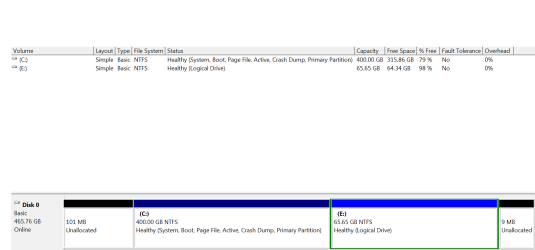
Please post back a screenshot of your maximized Disk Mgmt drive map and listings, using Snipping Tool in Start Menu.
 
Last edited:
Okay I shall try that using the disk part command recovery disk. I think I have already tried that though but once more can't hurt.


I have had a thought.

I am only using 80gb out of 400gb for my windows 7. I am using approximately 65gb for my xp partition. If I was to create a 100gb partition by shrinking windows 7 partition could I use that as a backup solution and doing a fresh install of windows 7. Copy my backups back over and deleting that partition and extending my windows 7?

I will have the disk management screen shot later on as I am currently on my mobile phone.
 

My Computer My Computer

Computer Manufacturer/Model Number
Sony Vaio vpceb1c5e
OS
Windows 7 Professional x64
If you're going to reinstall Win7 then I'd wipe the HD with Diskpart Clean Command since problems are often caused by corrupt boot code interfering which is solved by that command.

If you're trying to avoid reinstalling XP too then you can try that, however it's questionable XP has it's boot files correctly in place to be configured for a Dual Boot during Win7 install. That might be easier attempted using your Repair Install idea.

We might be able to say with more certainty after seeing the Disk Mgmt screenshot.
 
What is situation now? Win7 boots without problems?
winxp seemed to install succesfully but boot ended in bsod stop 7B?
 

My Computer My Computer

Computer type
Laptop
Computer Manufacturer/Model Number
ACER ASPIRE 5742G
OS
Microsoft Windows 7 Home Premium 64-bits 7601 Multiprocessor Free Service Pack 1
CPU
Intel(R) Core(TM) i3 CPU M 370 @ 2.40GHz
Motherboard
Acer Aspire 5742G
Memory
4,00 GB
Graphics Card(s)
ATI Mobility Radeon HD 5400 Series
Sound Card
(1) AMD High Definition Audio Device (2) Realtek High Defi
Screen Resolution
1366 x 768 x 32 bits (4294967296 colors) @ 60 Hz
Hard Drives
WDC WD5000BEVT-22ZAT0
ultimate Boot CD can fix it UBCD for Windows

UBCD for Windows

use Fix HDC
Registry Tools Fix HDC n/aFix the Hard Drive Controller when replacing your motherboard on an XP system,
 

My Computer My Computer

Computer type
Laptop
Computer Manufacturer/Model Number
ACER ASPIRE 5742G
OS
Microsoft Windows 7 Home Premium 64-bits 7601 Multiprocessor Free Service Pack 1
CPU
Intel(R) Core(TM) i3 CPU M 370 @ 2.40GHz
Motherboard
Acer Aspire 5742G
Memory
4,00 GB
Graphics Card(s)
ATI Mobility Radeon HD 5400 Series
Sound Card
(1) AMD High Definition Audio Device (2) Realtek High Defi
Screen Resolution
1366 x 768 x 32 bits (4294967296 colors) @ 60 Hz
Hard Drives
WDC WD5000BEVT-22ZAT0
Hello,

As requested I have attached a snip of disk management.
 

Attachments

  • Capture.PNG
    Capture.PNG
    14.2 KB · Views: 9

My Computer My Computer

Computer Manufacturer/Model Number
Sony Vaio vpceb1c5e
OS
Windows 7 Professional x64
What is situation now? Win7 boots without problems?
winxp seemed to install succesfully but boot ended in bsod stop 7B?

Yes that is correct.

I will try the boot cd the next time I connect to a broadband connection (currently using my ohones data connection and the charge will be astronomical if if try and download that.
 

My Computer My Computer

Computer Manufacturer/Model Number
Sony Vaio vpceb1c5e
OS
Windows 7 Professional x64
You said that during a booted XP installation you deleted the XP partition, created and full formatted a new one, correct? If so I wonder why it's made a Logical partition. It should be Primary. Try it again.

While XP will install on a Primary partition, Win7 cannot place its boot files there to configure the Dual Boot. So try XP install to a Primary partition which is what should be created if in fact you delete the partition during install, create and full format another.
 
Yeah, I booted the xp disk and when it loaded i highlighted the xp partition and pressed "d" to delete, then "L" to confirm deletion of the partition. I then formatted the unpartitioned space fully (ie not quickly)

The above snip is the result of doing that.
 

My Computer My Computer

Computer Manufacturer/Model Number
Sony Vaio vpceb1c5e
OS
Windows 7 Professional x64
Well in that case delete the partition in Disk Mgmt, then delete the resulting Free Space using Delete Volume, which should allow you to create a new Primary partition there.

If you need to force it then install free Partition Wizard bootable CD to specify creating a New Primary partition.

Are you even aware that when you reinstalled Win7 to C you abandoned it's 100mb System Reserved boot partition? One thing that could be tried is recreating and reactivating that boot partition which sometimes works with these types of anomalies.
 
Hmmm. Did that after as a trial. Now it hangs at 84%. Was stuck on 84% for an hour and 30 minutes. I turned the laptop off and run chkdsk again.

I ran chkdsk /f and /r neither came up with any errors.

I deleted the raw partition and quick formatted in the xp disc and it created the above logical partition with the same errors.

I tried creating a primary partition using easeus partition manager. But that kicked out cheaper same error..

I'm stumped
 

My Computer My Computer

Computer Manufacturer/Model Number
Sony Vaio vpceb1c5e
OS
Windows 7 Professional x64
Is it stuck at 84% on copying files (first step)
 

My Computer My Computer

Computer type
Laptop
Computer Manufacturer/Model Number
ACER ASPIRE 5742G
OS
Microsoft Windows 7 Home Premium 64-bits 7601 Multiprocessor Free Service Pack 1
CPU
Intel(R) Core(TM) i3 CPU M 370 @ 2.40GHz
Motherboard
Acer Aspire 5742G
Memory
4,00 GB
Graphics Card(s)
ATI Mobility Radeon HD 5400 Series
Sound Card
(1) AMD High Definition Audio Device (2) Realtek High Defi
Screen Resolution
1366 x 768 x 32 bits (4294967296 colors) @ 60 Hz
Hard Drives
WDC WD5000BEVT-22ZAT0
No, it hangs at 84% when fully formatting (not quick format) if I quick format it completes fully.
 

My Computer My Computer

Computer Manufacturer/Model Number
Sony Vaio vpceb1c5e
OS
Windows 7 Professional x64
Back
Top