How to properly dual boot 7 with Win10 (when 10 is installed first...)

energydream2007

New member
Local time
7:37 AM
Messages
38
Hey all, i know the recommended way is to install first the the previous versions of of the os then the newest, but what if 10 is installed first? how do i go doing that? please share you ways
 

My Computer My Computer

At a glance

Microsoft Windows 7 Ultimate 64-bit 7601 Mult...Intel(R) Core(TM) i7-2600K CPU @ 3.40GHz8.00 GBNVIDIA GeForce GTX 460
Computer type
PC/Desktop
OS
Microsoft Windows 7 Ultimate 64-bit 7601 Multiprocessor Free Service Pack 1
CPU
Intel(R) Core(TM) i7-2600K CPU @ 3.40GHz
Motherboard
ASUSTeK Computer INC. P8Z68 DELUXE/GEN3
Memory
8.00 GB
Graphics Card(s)
NVIDIA GeForce GTX 460
Sound Card
(1) Realtek High Definition Audio (2) ManyCam Virtual Micr
Monitor(s) Displays
Dell U2311H
Screen Resolution
1920 x 1080 x 32 bits (4294967296 colors) @ 60 Hz
Hard Drives
(1) ATA OCZ-VERTEX2 SCSI Disk Device (2) ATA WDC WD20EARS-00M SCSI Disk Device (3) ATA WDC WD20EARS-00M SCSI Disk Device (4) WD Ext HDD 1021 USB Device
PSU
1000W
Cooling
Noctua
Internet Speed
100Mbit
Antivirus
ESET 6
How is 10 installed uefi, secure boot, gpt,mbr disk as that makes a difference
 

My Computer My Computer

At a glance

win 8 32 bit
Computer type
PC/Desktop
OS
win 8 32 bit
How is 10 installed uefi, secure boot, gpt,mbr disk as that makes a difference
10 is installed in mbr, no uefi/gpt or secure boot - really classic (its P55 board by gigabyte)

il rather install 7 on the same drive (256gb ssd), although i can also assign a new drive for it there is a need..
 

My Computer My Computer

At a glance

Microsoft Windows 7 Ultimate 64-bit 7601 Mult...Intel(R) Core(TM) i7-2600K CPU @ 3.40GHz8.00 GBNVIDIA GeForce GTX 460
Computer type
PC/Desktop
OS
Microsoft Windows 7 Ultimate 64-bit 7601 Multiprocessor Free Service Pack 1
CPU
Intel(R) Core(TM) i7-2600K CPU @ 3.40GHz
Motherboard
ASUSTeK Computer INC. P8Z68 DELUXE/GEN3
Memory
8.00 GB
Graphics Card(s)
NVIDIA GeForce GTX 460
Sound Card
(1) Realtek High Definition Audio (2) ManyCam Virtual Micr
Monitor(s) Displays
Dell U2311H
Screen Resolution
1920 x 1080 x 32 bits (4294967296 colors) @ 60 Hz
Hard Drives
(1) ATA OCZ-VERTEX2 SCSI Disk Device (2) ATA WDC WD20EARS-00M SCSI Disk Device (3) ATA WDC WD20EARS-00M SCSI Disk Device (4) WD Ext HDD 1021 USB Device
PSU
1000W
Cooling
Noctua
Internet Speed
100Mbit
Antivirus
ESET 6
what if 10 is installed first?

il rather install 7 on the same drive (256gb ssd)


From within the win10 installation:

1. Create a partition for win7.
2. Apply the image.
3. Add a bootmenu entry.

Could also be done from winpe, but as there is already a win10 installed, might as well do it from there.

I do it often, If you haven't done it before, it is quite simple.

The appropriate image from win7 install.wim can be applied using dism commands or something with a gui, like gimagex or dism++ for example

After applying the image add the boot menu entry:

at administrator cmd prompt type

bcdboot win7drivetter:\windows

For example if the win7 image has been applied to partition E

bcdboot E:\windows
(then press enter)
 

My Computers My Computers

  • At a glance

    7 X64i5 84002x8gb 3200mhz
    Computer type
    PC/Desktop
    OS
    7 X64
    CPU
    i5 8400
    Motherboard
    gigabyte b365m ds3h
    Memory
    2x8gb 3200mhz
    Hard Drives
    various
    PSU
    pure power 11 400w cm
    Case
    Coolermaster
    Cooling
    cryorig m9i
  • At a glance

    7x64g54008gb ddr4 2400
    Computer type
    PC/Desktop
    OS
    7x64
    CPU
    g5400
    Motherboard
    ga b365m ds3h
    Memory
    8gb ddr4 2400
    PSU
    xfx pro 450w
hey siw2 iv tried before your route quiet a few times of applying the wim then adding the boot entry - all is going fine until i trying to boot it (from boot menu selecting win7) then im getting 0xc errors

maybe its because i tried to do it on vhd boot style?? created vhd partition - applying to it , adding to boot menu with easybcd - then restart to try booting to win7
 

My Computer My Computer

At a glance

Microsoft Windows 7 Ultimate 64-bit 7601 Mult...Intel(R) Core(TM) i7-2600K CPU @ 3.40GHz8.00 GBNVIDIA GeForce GTX 460
Computer type
PC/Desktop
OS
Microsoft Windows 7 Ultimate 64-bit 7601 Multiprocessor Free Service Pack 1
CPU
Intel(R) Core(TM) i7-2600K CPU @ 3.40GHz
Motherboard
ASUSTeK Computer INC. P8Z68 DELUXE/GEN3
Memory
8.00 GB
Graphics Card(s)
NVIDIA GeForce GTX 460
Sound Card
(1) Realtek High Definition Audio (2) ManyCam Virtual Micr
Monitor(s) Displays
Dell U2311H
Screen Resolution
1920 x 1080 x 32 bits (4294967296 colors) @ 60 Hz
Hard Drives
(1) ATA OCZ-VERTEX2 SCSI Disk Device (2) ATA WDC WD20EARS-00M SCSI Disk Device (3) ATA WDC WD20EARS-00M SCSI Disk Device (4) WD Ext HDD 1021 USB Device
PSU
1000W
Cooling
Noctua
Internet Speed
100Mbit
Antivirus
ESET 6
dont need to use vhd. apply image to normal ntfs partition.

Then use bcdboot command from within win10. It will automatically default to the current mode and the current bcd store, so no switches needed.

just
bcdboot e:\windows
obviously replace e with whatever the win7 partition letter is in your case
 

My Computers My Computers

  • At a glance

    7 X64i5 84002x8gb 3200mhz
    Computer type
    PC/Desktop
    OS
    7 X64
    CPU
    i5 8400
    Motherboard
    gigabyte b365m ds3h
    Memory
    2x8gb 3200mhz
    Hard Drives
    various
    PSU
    pure power 11 400w cm
    Case
    Coolermaster
    Cooling
    cryorig m9i
  • At a glance

    7x64g54008gb ddr4 2400
    Computer type
    PC/Desktop
    OS
    7x64
    CPU
    g5400
    Motherboard
    ga b365m ds3h
    Memory
    8gb ddr4 2400
    PSU
    xfx pro 450w
ok cool il try it. just for info - if i want it to be vhd its not possible?
 

My Computer My Computer

At a glance

Microsoft Windows 7 Ultimate 64-bit 7601 Mult...Intel(R) Core(TM) i7-2600K CPU @ 3.40GHz8.00 GBNVIDIA GeForce GTX 460
Computer type
PC/Desktop
OS
Microsoft Windows 7 Ultimate 64-bit 7601 Multiprocessor Free Service Pack 1
CPU
Intel(R) Core(TM) i7-2600K CPU @ 3.40GHz
Motherboard
ASUSTeK Computer INC. P8Z68 DELUXE/GEN3
Memory
8.00 GB
Graphics Card(s)
NVIDIA GeForce GTX 460
Sound Card
(1) Realtek High Definition Audio (2) ManyCam Virtual Micr
Monitor(s) Displays
Dell U2311H
Screen Resolution
1920 x 1080 x 32 bits (4294967296 colors) @ 60 Hz
Hard Drives
(1) ATA OCZ-VERTEX2 SCSI Disk Device (2) ATA WDC WD20EARS-00M SCSI Disk Device (3) ATA WDC WD20EARS-00M SCSI Disk Device (4) WD Ext HDD 1021 USB Device
PSU
1000W
Cooling
Noctua
Internet Speed
100Mbit
Antivirus
ESET 6
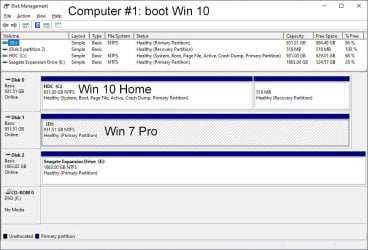
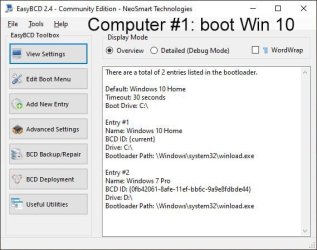
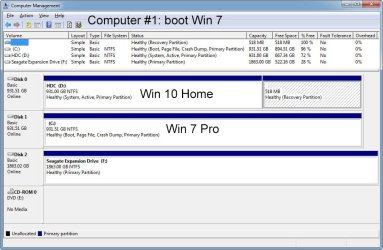
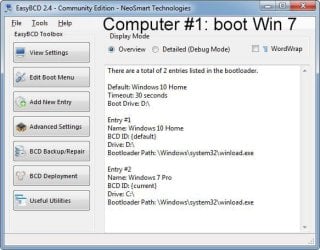
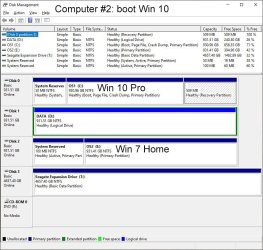
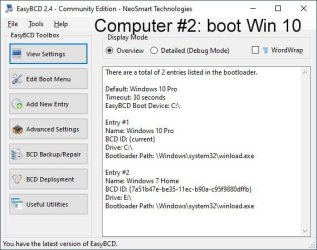
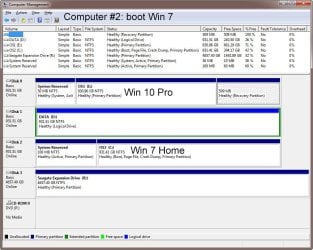
I have two older computers from 2009 and 2013 that don't support UEFI. I have dual-boot of Windows 7 and 10 on both of them. I installed Windows 10 first and installed Windows 7 later on a separate drive. I used the EasyBCD app to configure the dual-boot.

Computer #1 is dual-boot of Windows 10 Home and Windows 7 Pro

After booting Windows 10 Home:

1a1 Disk Management.jpg
1a2 EasyBCD.jpg

After booting Windows 7 Pro:

1b1 Computer Management.jpg
1b2 EasyBCD.jpg

Computer #2 is dual-boot of Windows 10 Pro and Windows 7 Home

After booting Windows 10 Pro

2a1 Disk Management.jpg
2a2 EasyBCD.jpg

After booting Windows 7 Home

2b1 Disk Management.jpg
2b2 EasyBCD.jpg
 

My Computers My Computers

  • At a glance

    Windows 7 Professional 64bit / Windows 10 Hom...AMD FX-8350GSKILL Ripjaw-X PC3 12800 12GB (2x4GB, 2x2GB)ASUS ENGTX560 DCII OC/2DI/1GD5 1GB
    Computer type
    PC/Desktop
    Computer Manufacturer/Model Number
    Custom build
    OS
    Windows 7 Professional 64bit / Windows 10 Home 64bit
    CPU
    AMD FX-8350
    Motherboard
    Gigabyte GA-990FXA-UD3 (AM3+) Rev. 4.0
    Memory
    GSKILL Ripjaw-X PC3 12800 12GB (2x4GB, 2x2GB)
    Graphics Card(s)
    ASUS ENGTX560 DCII OC/2DI/1GD5 1GB
    Sound Card
    Integrated
    Monitor(s) Displays
    Asus VE228H (21.5-in)
    Screen Resolution
    1920x1080 60Hz
    Hard Drives
    SAMSUNG 870 EVO 1TB (2.5" SATA SSD)
    SAMSUNG 870 EVO 500GB (2.5" SATA SSD)
    PSU
    Antec TruePower (new) TP-650 (650 watts)
    Case
    Antec Three Hundred
    Cooling
    AMD stock (plan to upgrade to Cooler Master Hyper 212 EVO)
    Keyboard
    Logitech K540 (wireless)
    Mouse
    Logitech M310 (wireless)
    Internet Speed
    Comcast Gigabit X2 Internet (2100Mbps down / 300Mbps up)
    Browser
    Firefox, Edge, Chrome
    Other Info
    Optical drive: ASUS DRW-24B3ST/BLK/G (Black) (24X)
    External hard drives: 2TB & 6TB
    Internet Gateway: Comcast XB8
  • Computer type
    PC/Desktop
If each on a separate drive, that would be much easier. IMO.
(OP said on the same drive. SIW2's method is right. but I often failed. a headache for me)


I have two older computers from 2009 and 2013 that don't support UEFI. I have dual-boot of Windows 7 and 10 on both of them. I installed Windows 10 first and installed Windows 7 later on a separate drive. I used the EasyBCD app to configure the dual-boot.
 

My Computers My Computers

  • At a glance

    Windows 7 Pro 64-bitI7-970032 GB
    Computer type
    PC/Desktop
    Computer Manufacturer/Model Number
    HP Elite 800 G5
    OS
    Windows 7 Pro 64-bit
    CPU
    I7-9700
    Memory
    32 GB
  • At a glance

    Windows 7 Pro 64-bit
    Computer type
    Laptop
    System Manufacturer/Model Number
    ASUS UX305C
    OS
    Windows 7 Pro 64-bit
If each on a separate drive, that would be much easier. IMO.
(OP said on the same drive. SIW2's method is right. but I often failed. a headache for me)
I put them on separate drives because it makes it easier to deal with if I have to reinstall either Windows 7 or 10.

Last week I realized that Computer #1 was not configured properly. In the BIOS SATA Mode was set to IDE instead of AHCI. When I changed SATA Mode to AHCI the computer would no longer boot to either Windows 7 or 10. I did manage to get Windows 10 to boot again but not Windows 7. I ended up reinstalling Windows 7. Having Windows 7 and 10 on different drives made this straight forward to do.
 

My Computers My Computers

  • At a glance

    Windows 7 Professional 64bit / Windows 10 Hom...AMD FX-8350GSKILL Ripjaw-X PC3 12800 12GB (2x4GB, 2x2GB)ASUS ENGTX560 DCII OC/2DI/1GD5 1GB
    Computer type
    PC/Desktop
    Computer Manufacturer/Model Number
    Custom build
    OS
    Windows 7 Professional 64bit / Windows 10 Home 64bit
    CPU
    AMD FX-8350
    Motherboard
    Gigabyte GA-990FXA-UD3 (AM3+) Rev. 4.0
    Memory
    GSKILL Ripjaw-X PC3 12800 12GB (2x4GB, 2x2GB)
    Graphics Card(s)
    ASUS ENGTX560 DCII OC/2DI/1GD5 1GB
    Sound Card
    Integrated
    Monitor(s) Displays
    Asus VE228H (21.5-in)
    Screen Resolution
    1920x1080 60Hz
    Hard Drives
    SAMSUNG 870 EVO 1TB (2.5" SATA SSD)
    SAMSUNG 870 EVO 500GB (2.5" SATA SSD)
    PSU
    Antec TruePower (new) TP-650 (650 watts)
    Case
    Antec Three Hundred
    Cooling
    AMD stock (plan to upgrade to Cooler Master Hyper 212 EVO)
    Keyboard
    Logitech K540 (wireless)
    Mouse
    Logitech M310 (wireless)
    Internet Speed
    Comcast Gigabit X2 Internet (2100Mbps down / 300Mbps up)
    Browser
    Firefox, Edge, Chrome
    Other Info
    Optical drive: ASUS DRW-24B3ST/BLK/G (Black) (24X)
    External hard drives: 2TB & 6TB
    Internet Gateway: Comcast XB8
  • Computer type
    PC/Desktop
Agree,
It's easier, each on its disk.

In my dual boot, a reason is to re-use apps under early Windows. a concern is too old, broken any time.
It indeed is Windows XP/10 dual-boot. If XP/10 are on same disk, some day the disk broken. then the PC is inaccessible.
hence, I prefer Windows 10 on another disk. a backup for early Windows.
 

My Computers My Computers

  • At a glance

    Windows 7 Pro 64-bitI7-970032 GB
    Computer type
    PC/Desktop
    Computer Manufacturer/Model Number
    HP Elite 800 G5
    OS
    Windows 7 Pro 64-bit
    CPU
    I7-9700
    Memory
    32 GB
  • At a glance

    Windows 7 Pro 64-bit
    Computer type
    Laptop
    System Manufacturer/Model Number
    ASUS UX305C
    OS
    Windows 7 Pro 64-bit
I put them on separate drives because it makes it easier to deal with if I have to reinstall either Windows 7 or 10.

Last week I realized that Computer #1 was not configured properly. In the BIOS SATA Mode was set to IDE instead of AHCI. When I changed SATA Mode to AHCI the computer would no longer boot to either Windows 7 or 10. I did manage to get Windows 10 to boot again but not Windows 7. I ended up reinstalling Windows 7. Having Windows 7 and 10 on different drives made this straight forward to do.

also a good idea, tnx for the detailed examples

- - - Updated - - -

dont need to use vhd. apply image to normal ntfs partition.

Then use bcdboot command from within win10. It will automatically default to the current mode and the current bcd store, so no switches needed.

just
bcdboot e:\windows
obviously replace e with whatever the win7 partition letter is in your case
man tnx for this i was able to do it, it works
 

My Computer My Computer

At a glance

Microsoft Windows 7 Ultimate 64-bit 7601 Mult...Intel(R) Core(TM) i7-2600K CPU @ 3.40GHz8.00 GBNVIDIA GeForce GTX 460
Computer type
PC/Desktop
OS
Microsoft Windows 7 Ultimate 64-bit 7601 Multiprocessor Free Service Pack 1
CPU
Intel(R) Core(TM) i7-2600K CPU @ 3.40GHz
Motherboard
ASUSTeK Computer INC. P8Z68 DELUXE/GEN3
Memory
8.00 GB
Graphics Card(s)
NVIDIA GeForce GTX 460
Sound Card
(1) Realtek High Definition Audio (2) ManyCam Virtual Micr
Monitor(s) Displays
Dell U2311H
Screen Resolution
1920 x 1080 x 32 bits (4294967296 colors) @ 60 Hz
Hard Drives
(1) ATA OCZ-VERTEX2 SCSI Disk Device (2) ATA WDC WD20EARS-00M SCSI Disk Device (3) ATA WDC WD20EARS-00M SCSI Disk Device (4) WD Ext HDD 1021 USB Device
PSU
1000W
Cooling
Noctua
Internet Speed
100Mbit
Antivirus
ESET 6
From within the win10 installation:1. Create a partition for win7.2. Apply the image.3. Add a bootmenu entry.
Could also be done from winpe, but as there is already a win10 installed, might as well do it from there.
I do it often, If you haven't done it before, it is quite simple.
The appropriate image from win7 install.wim can be applied using dism commands or something with a gui, like gimagex or dism++ for example
After applying the image add the boot menu entry:
at administrator cmd prompt typebcdboot win7drivetter:\windows
For example if the win7 image has been applied to partition Ebcdboot E:\windows(then press enter)

Sorry about a newbie question, the "image" is the ISO?

It sounds like this is what I should be doing, instead of trying to install 7 b4 10.
 

My Computers My Computers

  • At a glance

    10 trying for 7x64i7 6th gen32G
    Computer type
    PC/Desktop
    Computer Manufacturer/Model Number
    Dell Opti 7050
    OS
    10 trying for 7x64
    CPU
    i7 6th gen
    Memory
    32G
    Hard Drives
    1T SSD; 2T HDD
  • Computer type
    PC/Desktop
It would be much easier to install it on its own drive. No conflicts. Just disconnect the first drive, then install normally. When done, connect first drive.

Either select the OS at boot, or install Easy BCD for a boot menu. Foolproof (which is why I like it - no chance of screwing up).

With the cost of SSD so low, why make it difficult?
 

My Computer My Computer

At a glance

Windows 7 x64 SP1AMD Athlon 64 X2 6000+ / 3.0 GHz6 GB
Computer type
PC/Desktop
Computer Manufacturer/Model Number
Gateway GT5656
OS
Windows 7 x64 SP1
CPU
AMD Athlon 64 X2 6000+ / 3.0 GHz
Motherboard
NVIDIA GeForce 6150 SE
Memory
6 GB
Monitor(s) Displays
Lenovo LED
Screen Resolution
1920 X 1080
Hard Drives
Windows on 500 GB spinner; Ubuntu 16 on Sandisk 250GB SSD; Bodhi5 on Samsung 250GB SSD; another old spinner for fooling around.
PSU
Original that came with computer
Keyboard
Logitech wireless
Mouse
Logitech wireless
Antivirus
Microsoft Sec Essentials
Browser
Vivaldi
Makes sense. I was wondering if a separate drive is safer in the event of doing a factory reset on the Win 10 system? Maybe keeping them separate would make the 10 reset less likely to mess up the 7 system on the other disk?


So I unplug the first disk, which already has 10, and try to install 7 on the 2d disk?


If it works, then I might want to get another SSD, and then re-install 7 on that (currently the 2d is HDD - I won't mind having 3 if the hardware provides enough room for all of them - I'm about to open it up for the 1st time).
 

My Computers My Computers

  • At a glance

    10 trying for 7x64i7 6th gen32G
    Computer type
    PC/Desktop
    Computer Manufacturer/Model Number
    Dell Opti 7050
    OS
    10 trying for 7x64
    CPU
    i7 6th gen
    Memory
    32G
    Hard Drives
    1T SSD; 2T HDD
  • Computer type
    PC/Desktop
Sorry about a newbie question, the "image" is the ISO?

It sounds like this is what I should be doing, instead of trying to install 7 b4 10.

The image is one of the editions from install.wim

there are usually 4 images in win7 x64 install.wim

win7-imqges-apply.jpg
 

My Computers My Computers

  • At a glance

    7 X64i5 84002x8gb 3200mhz
    Computer type
    PC/Desktop
    OS
    7 X64
    CPU
    i5 8400
    Motherboard
    gigabyte b365m ds3h
    Memory
    2x8gb 3200mhz
    Hard Drives
    various
    PSU
    pure power 11 400w cm
    Case
    Coolermaster
    Cooling
    cryorig m9i
  • At a glance

    7x64g54008gb ddr4 2400
    Computer type
    PC/Desktop
    OS
    7x64
    CPU
    g5400
    Motherboard
    ga b365m ds3h
    Memory
    8gb ddr4 2400
    PSU
    xfx pro 450w
Thanks so much, I didn't get into it in that level of detail.

The GitHub guy who wrote a Dell install guide seems to think the Dell ISO's he's linked should work for any 7 license key.
 

My Computers My Computers

  • At a glance

    10 trying for 7x64i7 6th gen32G
    Computer type
    PC/Desktop
    Computer Manufacturer/Model Number
    Dell Opti 7050
    OS
    10 trying for 7x64
    CPU
    i7 6th gen
    Memory
    32G
    Hard Drives
    1T SSD; 2T HDD
  • Computer type
    PC/Desktop
Dell installation media activates automatically on a dell machine with slic table. Follow the usual prompts and it will install win7 pro which will activate automatically
 

My Computers My Computers

  • At a glance

    7 X64i5 84002x8gb 3200mhz
    Computer type
    PC/Desktop
    OS
    7 X64
    CPU
    i5 8400
    Motherboard
    gigabyte b365m ds3h
    Memory
    2x8gb 3200mhz
    Hard Drives
    various
    PSU
    pure power 11 400w cm
    Case
    Coolermaster
    Cooling
    cryorig m9i
  • At a glance

    7x64g54008gb ddr4 2400
    Computer type
    PC/Desktop
    OS
    7x64
    CPU
    g5400
    Motherboard
    ga b365m ds3h
    Memory
    8gb ddr4 2400
    PSU
    xfx pro 450w
Thanks, it's been an education !


When you browse for downloads on Dell's website, they direct you to an update download page that doesn't seem to help me prior to completing windows installation.


After trying a few different duck searches I finally found where they've hidden their motherboard drivers. It's a massive package, so I pulled out a better thumb drive. Hopefully the Win 7 installer will be able to identify SATA driver within this mass.


I was really surprised to see their original (non-update) driver was excluded from the regular driver/download page.


They call it Dell Command Deploy Optiplex 7050 Windows 7 Driver Pack
 

My Computers My Computers

  • At a glance

    10 trying for 7x64i7 6th gen32G
    Computer type
    PC/Desktop
    Computer Manufacturer/Model Number
    Dell Opti 7050
    OS
    10 trying for 7x64
    CPU
    i7 6th gen
    Memory
    32G
    Hard Drives
    1T SSD; 2T HDD
  • Computer type
    PC/Desktop
Back
Top