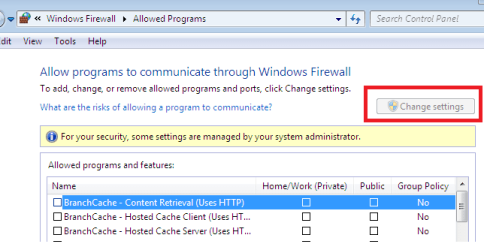
change settings in windows firewall is grayed out

ep1980

New member
Local time
2:03 PM
Messages
5
hi, i want to add port using "Exceptions" tab in "change settings" of windows firewall. but "change settings" button is grayed out.( i log in as admin and my windows is 7)

i read all the answered about this topic that mentioned already in this forum but i could not find my answer.

thanks, please help me
 

My Computer My Computer

OS
Windows 7 Ultimate x32
hi, i want to add port using "Exceptions" tab in "change settings" of windows firewall. but "change settings" button is grayed out.( i log in as admin and my windows is 7)

i read all the answered about this topic that mentioned already in this forum but i could not find my answer.

thanks, please help me
post a screenshot please so I can see which window your talking about
 

My Computer My Computer

Computer type
Laptop
Computer Manufacturer/Model Number
ACER ASPIRE 5742G
OS
Microsoft Windows 7 Home Premium 64-bits 7601 Multiprocessor Free Service Pack 1
CPU
Intel(R) Core(TM) i3 CPU M 370 @ 2.40GHz
Motherboard
Acer Aspire 5742G
Memory
4,00 GB
Graphics Card(s)
ATI Mobility Radeon HD 5400 Series
Sound Card
(1) AMD High Definition Audio Device (2) Realtek High Defi
Screen Resolution
1366 x 768 x 32 bits (4294967296 colors) @ 60 Hz
Hard Drives
WDC WD5000BEVT-22ZAT0
Control Panel\All Control Panel Items\Windows Firewall\allow a program or feature through windows firewall\change settings button
 

Attachments

  • er.png
    er.png
    11 KB · Views: 75

My Computer My Computer

OS
Windows 7 Ultimate x32
start REGEDIT and browse to HKEY_Local_Machine\SOFTWARE\Policies\Microsoft
any keys related to firewall there? Most likely HKEY_Local_Machine\SOFTWARE\Policies\Microsoft\WindowsFirewall
 

My Computer My Computer

Computer type
Laptop
Computer Manufacturer/Model Number
ACER ASPIRE 5742G
OS
Microsoft Windows 7 Home Premium 64-bits 7601 Multiprocessor Free Service Pack 1
CPU
Intel(R) Core(TM) i3 CPU M 370 @ 2.40GHz
Motherboard
Acer Aspire 5742G
Memory
4,00 GB
Graphics Card(s)
ATI Mobility Radeon HD 5400 Series
Sound Card
(1) AMD High Definition Audio Device (2) Realtek High Defi
Screen Resolution
1366 x 768 x 32 bits (4294967296 colors) @ 60 Hz
Hard Drives
WDC WD5000BEVT-22ZAT0
Control Panel\All Control Panel Items\Windows Firewall\allow a program or feature through windows firewall\change settings button
I can't see it clear on the screenshot, but it looks like the list of "allowed programs" is not grey!! So you can edit it
 

My Computer My Computer

Computer type
Laptop
Computer Manufacturer/Model Number
ACER ASPIRE 5742G
OS
Microsoft Windows 7 Home Premium 64-bits 7601 Multiprocessor Free Service Pack 1
CPU
Intel(R) Core(TM) i3 CPU M 370 @ 2.40GHz
Motherboard
Acer Aspire 5742G
Memory
4,00 GB
Graphics Card(s)
ATI Mobility Radeon HD 5400 Series
Sound Card
(1) AMD High Definition Audio Device (2) Realtek High Defi
Screen Resolution
1366 x 768 x 32 bits (4294967296 colors) @ 60 Hz
Hard Drives
WDC WD5000BEVT-22ZAT0
Control Panel\All Control Panel Items\Windows Firewall\allow a program or feature through windows firewall\change settings button
I can't see it clear on the screenshot, but it looks like the list of "allowed programs" is not grey!! So you can edit it


a red rectangle around "change settings" button. i do not want to edit anything. i want to click on "change settings" buttons and add a port, but it is disable. who can i make it enable?
 

My Computer My Computer

OS
Windows 7 Ultimate x32
Control Panel\All Control Panel Items\Windows Firewall\allow a program or feature through windows firewall\change settings button
Make that windows full screen. Add the bottom you see "add another program".
Do you want to add a program?.... don't think so... you want to add a port. You are in the wrong screen!
 

My Computer My Computer

Computer type
Laptop
Computer Manufacturer/Model Number
ACER ASPIRE 5742G
OS
Microsoft Windows 7 Home Premium 64-bits 7601 Multiprocessor Free Service Pack 1
CPU
Intel(R) Core(TM) i3 CPU M 370 @ 2.40GHz
Motherboard
Acer Aspire 5742G
Memory
4,00 GB
Graphics Card(s)
ATI Mobility Radeon HD 5400 Series
Sound Card
(1) AMD High Definition Audio Device (2) Realtek High Defi
Screen Resolution
1366 x 768 x 32 bits (4294967296 colors) @ 60 Hz
Hard Drives
WDC WD5000BEVT-22ZAT0
Control Panel\All Control Panel Items\Windows Firewall\allow a program or feature through windows firewall\change settings button
Make that windows full screen. Add the bottom you see "add another program".
Do you want to add a program?.... don't think so... you want to add a port. You are in the wrong screen!

Kaktussoft, i think you can just play game with computer. please let others answer a question if you do not know anything about it.

is there anybody in this forum who can help me?
 

My Computer My Computer

OS
Windows 7 Ultimate x32
Picture finally came through. You're in windows firewall you need to be in windows firewall with advanced features. Should be a link in the left side when you open windows firewall.

Kaktussoft is correct that you're in the wrong screen.

Only windows firewall with advanced features will allow you to add a port.

Once in windows firewall with advanced features create a new rule follow the wizard and specify which ports you want open.
 
Last edited:

My Computer My Computer

OS
Windows 7 Ultimate x64
Picture finally came through. You're in windows firewall you need to be in windows firewall with advanced features. Should be a link in the left side when you open windows firewall.

Kaktussoft is correct that you're in the wrong screen.

Only windows firewall with advanced features will allow you to add a port.

Once in windows firewall with advanced features create a new rule follow the wizard and specify which ports you want open.

parman thanks so much, because of your answer. i got it.
 

My Computer My Computer

OS
Windows 7 Ultimate x32
I would really appreciate it if someone could address the actual question. I don't want an alternate way of allowing someting, I want to know how to fix the fact that the "Change Settings" button is greyed out. In other words the answer to this question should tell one how to make that button active again. Not greyed out.
 

My Computer My Computer

OS
Home Premium 64bit
Back
Top