Speed up fan

dannyp32

New member
Is there a way to make the fan go faster
its a stock heatsink from an amd athlon 64 x2 5200
it looks like its spinning kind of slow

what is the best way to check the temp and at around what temp is a good temp to keep it?
 

My Computer

Computer Manufacturer/Model Number
I am the manufacturer
OS
Windows 7
CPU
athlon 64 x2 5200
Motherboard
gigabyte
Memory
4 gb
Hard Drives
160 gb
PSU
350
Cooling
my air conditioner

My Computer

Computer type
PC/Desktop
Computer Manufacturer/Model Number
DELL VOSTRO 3650
OS
Windows 8.1 PRO
CPU
3rd Generation Intel Core i7‐3612QM CPU @ 2.10GHZ
Memory
8GB DDR3
Graphics Card(s)
NVIDIA GeForce GT 525M (128 bit), 1GB Grpahics
Screen Resolution
1920X1080
Hard Drives
750GB 5400RPM
here is what speedfan says
fan1: 1722 rpm
fan2: 788 rpm
temp1:37c
temp2:28c
temp3:72c----this one has a picture of fire next to it..i think thats bad
core:11c
 

My Computer

Computer Manufacturer/Model Number
I am the manufacturer
OS
Windows 7
CPU
athlon 64 x2 5200
Motherboard
gigabyte
Memory
4 gb
Hard Drives
160 gb
PSU
350
Cooling
my air conditioner
Try finding a config for your mobo at SpeedFan's site. The path to get there begins in SpeedFan's settings - get a ticket and submit it. I don't have SpeedFan fired up so I can't get specific.

The configs will give a definition for what component each temp/speed is referring to. They are unique to each mobo model. You are at the mercy of the person who uploaded the config, however. There are some which are, maybe not stupid, just not, well there are some stupid ones. I had to test a number of them out before I found a valid one.

The 72 is warm, but not out of range - for the Northbridge. I am assuming it is the NB temp.

Unless the fans are fairly large, those speeds are not moving much air.
 
Cool'n'Quiet, enabled or disabled? Check in the bios and if enabled, disable it.

Also while there have a look under Power Management and see if "Smart Fan Control" is enabled, and if it is disable it.

temp3:72c----this one has a picture of fire next to it..i think thats bad

In all likelihood that is a phantom reading, meaning the monitoring chip is capable of supporting/reporting that reading but there is no sensor attached on the motherboard for that reading.

Try finding a config for your mobo at SpeedFan's site.

That would here,


SpeedFan Configuration Manager

you need to register first, and then just follow along till you find your motherboard (if it is there. You can also look here,

SpeedFan's listing of motherboards that are known to change fan speeds

and see if it has been reported to work, but will still need to go through the first link to get the config.
 

My Computer

Computer type
PC/Desktop
Computer Manufacturer/Model Number
Me
OS
Win 7 Ultimate x64
CPU
FX-8350 @ 4.6 GHz so far
Motherboard
Asus M5A97 EVO
Memory
ADATA XPG V1 Series Black 8GB DDR3 1600
Graphics Card(s)
Sapphire R9 270x Dual-X
Sound Card
Xonar DGX w/ Corsair Vengence 1300
Monitor(s) Displays
Acer S232HL Abid
Screen Resolution
1920x1080
Hard Drives
120 GB OCZ Vertex 3
500 GB Seagate 7200.12
PSU
Antec Earthwatts 650W Green
Case
Antec Three Hundred
Cooling
Cooler Master 212 EVO
Keyboard
Logitech G510
Mouse
Logitech G500s
Internet Speed
35000/3000
Cool'n'Quiet, enabled or disabled? Check in the bios and if enabled, disable it.

Also while there have a look under Power Management and see if "Smart Fan Control" is enabled, and if it is disable it.

i looked in the bios and i didnt see coolnquiet but i did see smart fan control
there is system smart fan control and cpu smart fan control
do i disable both of them?

i dont think they have my motherboard
its this one
Newegg.com - GIGABYTE GA-MA74GM-S2 AM3/AM2+/AM2 AMD 740G Micro ATX AMD Motherboard - AMD Motherboards

but i checked and its not there
 

My Computer

Computer Manufacturer/Model Number
I am the manufacturer
OS
Windows 7
CPU
athlon 64 x2 5200
Motherboard
gigabyte
Memory
4 gb
Hard Drives
160 gb
PSU
350
Cooling
my air conditioner
That helps, just checked the manual for your board. You will find the setting for C'n'Q under "Advanced BIOS Features", and it is set to Auto by default which will cause the fan to run a a slower (and quieter) speed when there is no load on the CPU.

The "Smart Fan Control" sort of does the same thing, only it runs the fan at a speed based on the temperature of the CPU. It too is set to Auto by default, and if disabled the fan will run at full speed. BTW disabling the "Control" will also disable the "Mode" options.
 

My Computer

Computer type
PC/Desktop
Computer Manufacturer/Model Number
Me
OS
Win 7 Ultimate x64
CPU
FX-8350 @ 4.6 GHz so far
Motherboard
Asus M5A97 EVO
Memory
ADATA XPG V1 Series Black 8GB DDR3 1600
Graphics Card(s)
Sapphire R9 270x Dual-X
Sound Card
Xonar DGX w/ Corsair Vengence 1300
Monitor(s) Displays
Acer S232HL Abid
Screen Resolution
1920x1080
Hard Drives
120 GB OCZ Vertex 3
500 GB Seagate 7200.12
PSU
Antec Earthwatts 650W Green
Case
Antec Three Hundred
Cooling
Cooler Master 212 EVO
Keyboard
Logitech G510
Mouse
Logitech G500s
Internet Speed
35000/3000
Even so, though, that is abnormally hot - I'd say you need to check to make sure the heatsink is making proper contact with the CPU and that you applied enough (meaning not too much and not too little) thermal compound in the process.
 

My Computers

System One System Two

  • Computer type
    PC/Desktop
    Computer Manufacturer/Model Number
    The Beast Model A (homebrew)
    OS
    Windows 11 21H2 Current build
    CPU
    AMD Ryzen 9 3950X
    Motherboard
    MSI MEG X570 GODLIKE
    Memory
    4 * 32 GB - Corsair Vengeance 3600 MHz
    Graphics Card(s)
    EVGA GeForce RTX 3080 Ti XC3 ULTRA GAMING (12G-P5-3955-KR)
    Sound Card
    Realtek® ALC1220 Codec
    Monitor(s) Displays
    2x Eve Spectrum ES07D03 4K Gaming Monitor (Matte) | Eve Spec
    Screen Resolution
    3x 3840 x 2160
    Hard Drives
    3x Samsung 980 Pro NVMe PCIe 4 M.2 2 TB SSD (MZ-V8P2T0B/AM) } 3x Sabrent Rocket NVMe 4.0 1 TB SSD
    PSU
    PC Power & Cooling’s Silencer Series 1050 Watt, 80 Plus Plat
    Case
    Fractal Design Define 7 XL Dark ATX Full Tower Case
    Cooling
    SteelSeries Apex Pro Wired Gaming Keyboard
    Keyboard
    SteelSeries Apex Pro
    Mouse
    Logitech MX Master 3S | MX Master 3 for business
    Internet Speed
    AT&T LightSpeed Gigabit Duplex Ftth
    Antivirus
    Windows Defender + MB 3
    Browser
    Nightly (default) + Firefox (stable),Chrome, Edge
  • Computer type
    PC/Desktop
    System Manufacturer/Model Number
    Dell Latitude E5470
    OS
    ChromeOS Flex Dev Channel (current)
    CPU
    Intel(R) Core(TM) i5-6300U CPU @ 2.40GHz, 2501 Mhz, 2 Core(s), 4 Logical Processor(s)
    Motherboard
    Dell
    Memory
    16 GB
    Graphics Card(s)
    Intel(R) HD Graphics 520
    Sound Card
    Intel(R) HD Graphics 520 + RealTek Audio
    Monitor(s) Displays
    Dell laptop display 15"
    Screen Resolution
    1920 * 1080
    Hard Drives
    Toshiba 128GB M.2 22300 drive
    INTEL Cherryville 520 Series SSDSC2CW180A 180 GB SATA III SSD
    PSU
    Dell
    Case
    Dell
    Cooling
    Dell
    Keyboard
    Dell
    Mouse
    Logitech MX Master 3S (shared w. Sys 1) | Dell TouchPad
    Internet Speed
    AT&T LightSpeed Gigabit Duplex Ftth
Even so, though, that is abnormally hot - I'd say you need to check to make sure the heatsink is making proper contact with the CPU and that you applied enough (meaning not too much and not too little) thermal compound in the process.

this was my first build ever so i am not sure if i did something wrong
the cpu (amd athlon 64 x2 5200) already had thermal compound so i did not apply any more
was i supposed to put some more?

ok so i disabled cool n quiet, cpu smart fan control, and system smart fan control
is that correct?
 

My Computer

Computer Manufacturer/Model Number
I am the manufacturer
OS
Windows 7
CPU
athlon 64 x2 5200
Motherboard
gigabyte
Memory
4 gb
Hard Drives
160 gb
PSU
350
Cooling
my air conditioner
Double check with real temp or your mobo bios, but I am highly confident that the 72c is your northbridge - accurate reading or not.
 
i checked on speed fan and now it says
fan 1: 3140 rpm
fan 2: 1281 rpm
temp 1: 37c
temp 2: 38c
temp 3: 81c
core: 18c
everything is a little bit hotter!!??

edit: now i checked in the bios and this is what pc health section says
reset case open status______disabled
case opened_______________yes
V core ___________________1.296V
DDR 1.8V_________________1.936V
+3.3V____________________3.376V
+12V____________________11.921V
current system temp _______37c
current cpu temp __________39c
current system fan speed___ 1285
current cpu fan speed_______3139


2ND EDIT
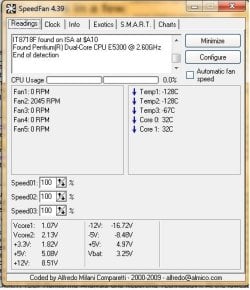
i have another computer and i checked with speed fan and these were the results
could you tell me if these are good or bad
 

Attachments

  • Untitled.jpg
    Untitled.jpg
    74.1 KB · Views: 31
Last edited:

My Computer

Computer Manufacturer/Model Number
I am the manufacturer
OS
Windows 7
CPU
athlon 64 x2 5200
Motherboard
gigabyte
Memory
4 gb
Hard Drives
160 gb
PSU
350
Cooling
my air conditioner
Your temps are fine anyway. I keep mine cooler, but I have a $200+ cooler. For $30 or less, you can get a low-end cooler assembly with more efficiency than the stock one. For $10-12, you can get a new stock cooler if you think your fan is bad. You can actually just get a new fan. But your temps are well within range.
 
I just read your sys specs. R U serious? If yes, point a fan at your "assembly".
yes i am serious...what do you mean like point a normal house fan at the computer???
could you check my second computer (i edited the above post) i am getting a little worried now

Your temps are fine anyway.
im confused now are they good or bad


will this thermal grease do the job or will i need a new fan???
Newegg.com - Arctic Silver 5 Thermal Compound - Thermal Compound / Grease
 

My Computer

Computer Manufacturer/Model Number
I am the manufacturer
OS
Windows 7
CPU
athlon 64 x2 5200
Motherboard
gigabyte
Memory
4 gb
Hard Drives
160 gb
PSU
350
Cooling
my air conditioner
You do not have a problem with your cardboard computer temps. You have an airflow pattern that does not match design specifications. That is all. Yes, I mean point a house fan at your "assembly".

Your northbridge chip is the one that needs the airflow in your current "build".
 
I just read your sys specs. R U serious? If yes, point a fan at your "assembly".

Your temps are fine anyway. I keep mine cooler, but I have a $200+ cooler. For $30 or less, you can get a low-end cooler assembly with more efficiency than the stock one. For $10-12, you can get a new stock cooler if you think your fan is bad. You can actually just get a new fan. But your temps are well within range.

You do not have a problem with your cardboard computer temps. You have an airflow pattern that does not match design specifications. That is all. Yes, I mean point a house fan at your "assembly".

Your northbridge chip is the one that needs the airflow in your current "build".

so the cpu temps are ok?
and the only one that is too hot is the northbridge

ok i will get my fan

and what about my other computer (speen fan results in the picture on top)
 

My Computer

Computer Manufacturer/Model Number
I am the manufacturer
OS
Windows 7
CPU
athlon 64 x2 5200
Motherboard
gigabyte
Memory
4 gb
Hard Drives
160 gb
PSU
350
Cooling
my air conditioner
Your temps are FINE all things considered. You risk damaging components every time you disassemble - I do not recommend applying any more thermal grease.

You might consider losing the cardboard box and just run open air. WITH a big fan pointing at the assembly.
 
Your other computer is another box of worms altogether. Please create another thread to eliminate any confusion between the two platforms.

The Speedfan data provided for the second PC is... odd.
 
Ok thanks
and it has an actual case
the cardboard box in my system specs is not real
thanks
 

My Computer

Computer Manufacturer/Model Number
I am the manufacturer
OS
Windows 7
CPU
athlon 64 x2 5200
Motherboard
gigabyte
Memory
4 gb
Hard Drives
160 gb
PSU
350
Cooling
my air conditioner
Back
Top