Solved Realtek High Definition Audio, No Sound

Shreddie

New member
Local time
7:26 AM
Messages
14
Location
Fremont
This is the second time this has happened.

My audio is not working. No output at all. My audio card is motherboard integrated. As said in the title, it is Realtek High Definition Audio (Speakers). Like I also said, this is the second time this has happened. Last time, I reinstalled my drivers and I was good to go. This time, however, I have reinstalled the drivers 3 times to no avail. When I plug in headphones and externals speakers, though, the audio works. Anyone got any suggestions?

Thanks,
Lucas
 

My Computer My Computer

At a glance

Windows 7 Home Premium 32bitAMD Athlon 64 X2 Dual Core ~2.9GHz2048MB RAMNVIDIA GeForce 9500 GT
OS
Windows 7 Home Premium 32bit
CPU
AMD Athlon 64 X2 Dual Core ~2.9GHz
Memory
2048MB RAM
Graphics Card(s)
NVIDIA GeForce 9500 GT
Sound Card
Speakers (Realtek High Definition Audio)
Monitor(s) Displays
Viewsonic VX1962WM
Screen Resolution
1680x1050 59Hz
Hard Drives
500MB HDD
Keyboard
WinTek English/Chinese Keyboard
Mouse
Logitech M305
Hello an welcome Shreddie So if they were working what have you done since then? that is different, and where did you download the driver form?

The motherboard too my friend what is that?
 

My Computer My Computer

At a glance

Desk1 7 Home Prem / Desk2 10 Pro / Main lap A...Desk1 i5 3750K / Laptop i7 GTX 860M / Desk2 i...Desk1 8GB (1866) / Desk2 16GB (1333) / Laptop...Desk 1& 2NVidia GTX 650 & Laptops on board Intel
Computer type
PC/Desktop
Computer Manufacturer/Model Number
Own build (new) Desk1 / Asus ROG Win 7 / Desk2 1st build
OS
Desk1 7 Home Prem / Desk2 10 Pro / Main lap Asus ROG 10 Pro 2 laptop Toshiba 7 Pro Asus P2520 7 & 10
CPU
Desk1 i5 3750K / Laptop i7 GTX 860M / Desk2 i5 2500
Motherboard
Desk1 Asus P877-V / Desk2 Gigabyte H67 UD3H / Laptop ?
Memory
Desk1 8GB (1866) / Desk2 16GB (1333) / Laptop 8Gb DDR3
Graphics Card(s)
Desk 1& 2NVidia GTX 650 & Laptops on board Intel
Sound Card
Desk 1 & 2 -XONAR DG Realtek High Def audio Laptop
Monitor(s) Displays
Desk 1 Benq HD 2450 / Desk2 Philips 24" / Laptop 17.5"
Screen Resolution
1920x1080 D1 & D2 & Laptop 1
Hard Drives
Desk1 Samsung 120GB 830 SSD
Asus ROG 256GB 850 Pro SSD
Desk2 Samsung 840 256 SSD
Toshiba 120GB EVO
PSU
Desk 1 Corsair HX 1050/ Laptop ? / Desk 2 Corsair HX 650
Case
Desk 1 Cooler HAF XM ? Toshiba laptop / Desk2 Coolermaster
Cooling
Fans on all Desk1 -2 Desk2 - all Coolermasters 5 Laptop ?
Keyboard
Desk 1 MS Sidewinder X6 Desk 2 MS Sidewinder X 4
Mouse
Desk 1&2 - Gigabyte MS 900 gamer - laptop - Logitec wireless
Internet Speed
ADSL2+
Other Info
One other Desktop (tester) and spare Toshba laptop both with SSD's
Running Kaspersky 2016 ISS on all machines config'd identically
Logitec audio stereo systems on each machine (x3)
Canon MG5250MFC
Router/modem TP-Link running WPA2SK
Hello an welcome Shreddie So if they were working what have you done since then? that is different, and where did you download the driver form?

The motherboard too my friend what is that?

The driver is the 6.0.1.6368 driver. I did nothing, I even watched some Youtube videos about an hour before I noticed something was wrong. I got the drivers from Windows driver downloading/grabbing. My motherboard is a Gigabyte GA-MA78GM-S2HP. I also may think that it may have something to do with my monitor's sound system, because if I plug in external speakers to the same plug where I plug in the moniter sound, it still plays.
 

My Computer My Computer

At a glance

Windows 7 Home Premium 32bitAMD Athlon 64 X2 Dual Core ~2.9GHz2048MB RAMNVIDIA GeForce 9500 GT
OS
Windows 7 Home Premium 32bit
CPU
AMD Athlon 64 X2 Dual Core ~2.9GHz
Memory
2048MB RAM
Graphics Card(s)
NVIDIA GeForce 9500 GT
Sound Card
Speakers (Realtek High Definition Audio)
Monitor(s) Displays
Viewsonic VX1962WM
Screen Resolution
1680x1050 59Hz
Hard Drives
500MB HDD
Keyboard
WinTek English/Chinese Keyboard
Mouse
Logitech M305
Hello an welcome Shreddie So if they were working what have you done since then? that is different, and where did you download the driver form?

The motherboard too my friend what is that?

The driver is the 6.0.1.6368 driver. I did nothing, I even watched some Youtube videos about an hour before I noticed something was wrong. I got the drivers from Windows driver downloading/grabbing. My motherboard is a Gigabyte GA-MA78GM-S2HP. I also may think that it may have something to do with my monitor's sound system, because if I plug in external speakers to the same plug where I plug in the moniter sound, it still plays.

You say that headphones and external speakers work OK. What is not working?
 

My Computer My Computer

At a glance

Windows 7 Home Premium 32-Bit - Build 7600 SP1Intel Core i3-2120 3.30GhzKingston 4 GB DDR3 1333 mhzAMD Radeon HD6670
Computer type
PC/Desktop
Computer Manufacturer/Model Number
Custom Build
OS
Windows 7 Home Premium 32-Bit - Build 7600 SP1
CPU
Intel Core i3-2120 3.30Ghz
Motherboard
Asus P8Z68-V LX Intel Z68 Socket H2 ATX
Memory
Kingston 4 GB DDR3 1333 mhz
Graphics Card(s)
AMD Radeon HD6670
Sound Card
Sound Blaster Audigy SE 24-Bit
Monitor(s) Displays
Asus VE228
Screen Resolution
1440 X 900
Hard Drives
OCZ Vertex 3 120 GB Sata 3 SSD ==
Kingston SH103/S3 120 G Hyper X 120 GB SSD ==
Western Digital 500 GB Caviar Green 7200 RPM ==
PSU
Corsair CX600M == 600 Watt
Case
NZXT Apollo - Silver with Clear Side Panel
Cooling
Three 120 mm Fans
Keyboard
Microsoft Natural 4000
Mouse
Microsoft Custom Optical 3000
Internet Speed
AT&T Fiber Optic Wireless Network
Antivirus
Microsoft Security Essentials
Browser
Chrome
Other Info
120 mm Blue LED Fan -- Three Blue LED Lazer Light Sticks
Yep Shreddie like Bigmack I a getting a tad confused here as to what is not working.

I think you mean if you plug in your speaker system to the board audio socket (green) the audio doesn't play and yet it will if you plug it into where the monitor plugs in it does . What I can't quite work out is what sort of cabling are you using for the monitor?

If you have DVI then you would need separate audio cable / link if you are using HDMI then you don't need that audio link for the monitor.

So can you clarify what is plugged into where and with what please.
 

My Computer My Computer

At a glance

Desk1 7 Home Prem / Desk2 10 Pro / Main lap A...Desk1 i5 3750K / Laptop i7 GTX 860M / Desk2 i...Desk1 8GB (1866) / Desk2 16GB (1333) / Laptop...Desk 1& 2NVidia GTX 650 & Laptops on board Intel
Computer type
PC/Desktop
Computer Manufacturer/Model Number
Own build (new) Desk1 / Asus ROG Win 7 / Desk2 1st build
OS
Desk1 7 Home Prem / Desk2 10 Pro / Main lap Asus ROG 10 Pro 2 laptop Toshiba 7 Pro Asus P2520 7 & 10
CPU
Desk1 i5 3750K / Laptop i7 GTX 860M / Desk2 i5 2500
Motherboard
Desk1 Asus P877-V / Desk2 Gigabyte H67 UD3H / Laptop ?
Memory
Desk1 8GB (1866) / Desk2 16GB (1333) / Laptop 8Gb DDR3
Graphics Card(s)
Desk 1& 2NVidia GTX 650 & Laptops on board Intel
Sound Card
Desk 1 & 2 -XONAR DG Realtek High Def audio Laptop
Monitor(s) Displays
Desk 1 Benq HD 2450 / Desk2 Philips 24" / Laptop 17.5"
Screen Resolution
1920x1080 D1 & D2 & Laptop 1
Hard Drives
Desk1 Samsung 120GB 830 SSD
Asus ROG 256GB 850 Pro SSD
Desk2 Samsung 840 256 SSD
Toshiba 120GB EVO
PSU
Desk 1 Corsair HX 1050/ Laptop ? / Desk 2 Corsair HX 650
Case
Desk 1 Cooler HAF XM ? Toshiba laptop / Desk2 Coolermaster
Cooling
Fans on all Desk1 -2 Desk2 - all Coolermasters 5 Laptop ?
Keyboard
Desk 1 MS Sidewinder X6 Desk 2 MS Sidewinder X 4
Mouse
Desk 1&2 - Gigabyte MS 900 gamer - laptop - Logitec wireless
Internet Speed
ADSL2+
Other Info
One other Desktop (tester) and spare Toshba laptop both with SSD's
Running Kaspersky 2016 ISS on all machines config'd identically
Logitec audio stereo systems on each machine (x3)
Canon MG5250MFC
Router/modem TP-Link running WPA2SK
Hello an welcome Shreddie So if they were working what have you done since then? that is different, and where did you download the driver form?

The motherboard too my friend what is that?

The driver is the 6.0.1.6368 driver. I did nothing, I even watched some Youtube videos about an hour before I noticed something was wrong. I got the drivers from Windows driver downloading/grabbing. My motherboard is a Gigabyte GA-MA78GM-S2HP. I also may think that it may have something to do with my monitor's sound system, because if I plug in external speakers to the same plug where I plug in the moniter sound, it still plays.

You say that headphones and external speakers work OK. What is not working?

Yep Shreddie like Bigmack I a getting a tad confused here as to what is not working.

I think you mean if you plug in your speaker system to the board audio socket (green) the audio doesn't play and yet it will if you plug it into where the monitor plugs in it does . What I can't quite work out is what sort of cabling are you using for the monitor?

If you have DVI then you would need separate audio cable / link if you are using HDMI then you don't need that audio link for the monitor.

So can you clarify what is plugged into where and with what please.

the internal speakers; any other speakers or headphones I remotely plug in from the outside work. the audio that is integrated in my monitor/computer doesn't work
 

My Computer My Computer

At a glance

Windows 7 Home Premium 32bitAMD Athlon 64 X2 Dual Core ~2.9GHz2048MB RAMNVIDIA GeForce 9500 GT
OS
Windows 7 Home Premium 32bit
CPU
AMD Athlon 64 X2 Dual Core ~2.9GHz
Memory
2048MB RAM
Graphics Card(s)
NVIDIA GeForce 9500 GT
Sound Card
Speakers (Realtek High Definition Audio)
Monitor(s) Displays
Viewsonic VX1962WM
Screen Resolution
1680x1050 59Hz
Hard Drives
500MB HDD
Keyboard
WinTek English/Chinese Keyboard
Mouse
Logitech M305
Hey Shreddie I am sorry mate and I am not trying to be obstructive but I am still not sure what you are plugging into what.

I see in your specs you have a ? dedicated in a PCI slot sound card? if so like my Asus Xonar cards it will shut off the motherboard's audio so that you could not use it's green (audio) socket.

If you are using some sort of software that gives you the ability to change and / or mix frequencies then you would still be using the motherboard audio socket.

Now where the monitor audio is coming from I can only guess that you are using an HDMI cable.

So we need to know a) is there a drop in ( motherboard slot) audio card b) where and how is the monitor plugged into the computer.
 

My Computer My Computer

At a glance

Desk1 7 Home Prem / Desk2 10 Pro / Main lap A...Desk1 i5 3750K / Laptop i7 GTX 860M / Desk2 i...Desk1 8GB (1866) / Desk2 16GB (1333) / Laptop...Desk 1& 2NVidia GTX 650 & Laptops on board Intel
Computer type
PC/Desktop
Computer Manufacturer/Model Number
Own build (new) Desk1 / Asus ROG Win 7 / Desk2 1st build
OS
Desk1 7 Home Prem / Desk2 10 Pro / Main lap Asus ROG 10 Pro 2 laptop Toshiba 7 Pro Asus P2520 7 & 10
CPU
Desk1 i5 3750K / Laptop i7 GTX 860M / Desk2 i5 2500
Motherboard
Desk1 Asus P877-V / Desk2 Gigabyte H67 UD3H / Laptop ?
Memory
Desk1 8GB (1866) / Desk2 16GB (1333) / Laptop 8Gb DDR3
Graphics Card(s)
Desk 1& 2NVidia GTX 650 & Laptops on board Intel
Sound Card
Desk 1 & 2 -XONAR DG Realtek High Def audio Laptop
Monitor(s) Displays
Desk 1 Benq HD 2450 / Desk2 Philips 24" / Laptop 17.5"
Screen Resolution
1920x1080 D1 & D2 & Laptop 1
Hard Drives
Desk1 Samsung 120GB 830 SSD
Asus ROG 256GB 850 Pro SSD
Desk2 Samsung 840 256 SSD
Toshiba 120GB EVO
PSU
Desk 1 Corsair HX 1050/ Laptop ? / Desk 2 Corsair HX 650
Case
Desk 1 Cooler HAF XM ? Toshiba laptop / Desk2 Coolermaster
Cooling
Fans on all Desk1 -2 Desk2 - all Coolermasters 5 Laptop ?
Keyboard
Desk 1 MS Sidewinder X6 Desk 2 MS Sidewinder X 4
Mouse
Desk 1&2 - Gigabyte MS 900 gamer - laptop - Logitec wireless
Internet Speed
ADSL2+
Other Info
One other Desktop (tester) and spare Toshba laptop both with SSD's
Running Kaspersky 2016 ISS on all machines config'd identically
Logitec audio stereo systems on each machine (x3)
Canon MG5250MFC
Router/modem TP-Link running WPA2SK
Hey Shreddie I am sorry mate and I am not trying to be obstructive but I am still not sure what you are plugging into what.

I see in your specs you have a ? dedicated in a PCI slot sound card? if so like my Asus Xonar cards it will shut off the motherboard's audio so that you could not use it's green (audio) socket.

If you are using some sort of software that gives you the ability to change and / or mix frequencies then you would still be using the motherboard audio socket.

Now where the monitor audio is coming from I can only guess that you are using an HDMI cable.

So we need to know a) is there a drop in ( motherboard slot) audio card b) where and how is the monitor plugged into the computer.
not exactly sure how to find the answer to either of those questions (my dad built me this computer some 7 years ago), but I do have a Realtek HD Audio Manager. I think the audio wire from my monitor is in the back analog panel (here's a picture)
http://gyazo.com/a245623b2a5a77d9f30a93522d918d34
 

My Computer My Computer

At a glance

Windows 7 Home Premium 32bitAMD Athlon 64 X2 Dual Core ~2.9GHz2048MB RAMNVIDIA GeForce 9500 GT
OS
Windows 7 Home Premium 32bit
CPU
AMD Athlon 64 X2 Dual Core ~2.9GHz
Memory
2048MB RAM
Graphics Card(s)
NVIDIA GeForce 9500 GT
Sound Card
Speakers (Realtek High Definition Audio)
Monitor(s) Displays
Viewsonic VX1962WM
Screen Resolution
1680x1050 59Hz
Hard Drives
500MB HDD
Keyboard
WinTek English/Chinese Keyboard
Mouse
Logitech M305
Right Lucas sorry bout that missed seeing your name - mate then you have the software and not a sound card.

So I guess you are using the blue VGA plug for the monitor - see pic sorry about the spelling.

Do you know how to use the Device Manager?

Plus just as matter of pure coincidence I downloaded the RealTek HD centre last night and I had a torrent of malware along with it.

So it begs the question have you scanned recently for malware if not try these
Malwarebytes < free version

and

SUPERAntiSpyware | Remove Malware | Remove Spyware - AntiMalware, AntiSpyware, AntiAdware! < free again

Plus what security do you have on the machine mate and how long is it since you last cleaned the machine up? :)

Try the scans first then it will be a look in the Device Manager - let us know if you are confident with that one - not being funny but you would e surprised how many people are not fully aware of it.
 

My Computer My Computer

At a glance

Desk1 7 Home Prem / Desk2 10 Pro / Main lap A...Desk1 i5 3750K / Laptop i7 GTX 860M / Desk2 i...Desk1 8GB (1866) / Desk2 16GB (1333) / Laptop...Desk 1& 2NVidia GTX 650 & Laptops on board Intel
Computer type
PC/Desktop
Computer Manufacturer/Model Number
Own build (new) Desk1 / Asus ROG Win 7 / Desk2 1st build
OS
Desk1 7 Home Prem / Desk2 10 Pro / Main lap Asus ROG 10 Pro 2 laptop Toshiba 7 Pro Asus P2520 7 & 10
CPU
Desk1 i5 3750K / Laptop i7 GTX 860M / Desk2 i5 2500
Motherboard
Desk1 Asus P877-V / Desk2 Gigabyte H67 UD3H / Laptop ?
Memory
Desk1 8GB (1866) / Desk2 16GB (1333) / Laptop 8Gb DDR3
Graphics Card(s)
Desk 1& 2NVidia GTX 650 & Laptops on board Intel
Sound Card
Desk 1 & 2 -XONAR DG Realtek High Def audio Laptop
Monitor(s) Displays
Desk 1 Benq HD 2450 / Desk2 Philips 24" / Laptop 17.5"
Screen Resolution
1920x1080 D1 & D2 & Laptop 1
Hard Drives
Desk1 Samsung 120GB 830 SSD
Asus ROG 256GB 850 Pro SSD
Desk2 Samsung 840 256 SSD
Toshiba 120GB EVO
PSU
Desk 1 Corsair HX 1050/ Laptop ? / Desk 2 Corsair HX 650
Case
Desk 1 Cooler HAF XM ? Toshiba laptop / Desk2 Coolermaster
Cooling
Fans on all Desk1 -2 Desk2 - all Coolermasters 5 Laptop ?
Keyboard
Desk 1 MS Sidewinder X6 Desk 2 MS Sidewinder X 4
Mouse
Desk 1&2 - Gigabyte MS 900 gamer - laptop - Logitec wireless
Internet Speed
ADSL2+
Other Info
One other Desktop (tester) and spare Toshba laptop both with SSD's
Running Kaspersky 2016 ISS on all machines config'd identically
Logitec audio stereo systems on each machine (x3)
Canon MG5250MFC
Router/modem TP-Link running WPA2SK
On my PC, I have speakers plugged into the PC in the green slot in the back. If I did not have those plugged in, I would get no sound. I am not sure where your sound is coming from. A simple solution would be get a pair of speakers and plug them in. You said that would work.
 

My Computer My Computer

At a glance

Windows 7 Home Premium 32-Bit - Build 7600 SP1Intel Core i3-2120 3.30GhzKingston 4 GB DDR3 1333 mhzAMD Radeon HD6670
Computer type
PC/Desktop
Computer Manufacturer/Model Number
Custom Build
OS
Windows 7 Home Premium 32-Bit - Build 7600 SP1
CPU
Intel Core i3-2120 3.30Ghz
Motherboard
Asus P8Z68-V LX Intel Z68 Socket H2 ATX
Memory
Kingston 4 GB DDR3 1333 mhz
Graphics Card(s)
AMD Radeon HD6670
Sound Card
Sound Blaster Audigy SE 24-Bit
Monitor(s) Displays
Asus VE228
Screen Resolution
1440 X 900
Hard Drives
OCZ Vertex 3 120 GB Sata 3 SSD ==
Kingston SH103/S3 120 G Hyper X 120 GB SSD ==
Western Digital 500 GB Caviar Green 7200 RPM ==
PSU
Corsair CX600M == 600 Watt
Case
NZXT Apollo - Silver with Clear Side Panel
Cooling
Three 120 mm Fans
Keyboard
Microsoft Natural 4000
Mouse
Microsoft Custom Optical 3000
Internet Speed
AT&T Fiber Optic Wireless Network
Antivirus
Microsoft Security Essentials
Browser
Chrome
Other Info
120 mm Blue LED Fan -- Three Blue LED Lazer Light Sticks
Right Lucas sorry bout that missed seeing your name - mate then you have the software and not a sound card.

So I guess you are using the blue VGA plug for the monitor - see pic sorry about the spelling.

Do you know how to use the Device Manager?

Plus just as matter of pure coincidence I downloaded the RealTek HD centre last night and I had a torrent of malware along with it.

So it begs the question have you scanned recently for malware if not try these
Malwarebytes < free version

and

SUPERAntiSpyware | Remove Malware | Remove Spyware - AntiMalware, AntiSpyware, AntiAdware! < free again

Plus what security do you have on the machine mate and how long is it since you last cleaned the machine up? :)

Try the scans first then it will be a look in the Device Manager - let us know if you are confident with that one - not being funny but you would e surprised how many people are not fully aware of it.

I have Norton Security Suite, I scan at least once a week. The manager came with the drivers, and I'm pretty sure the drivers are official drivers.

also, the wires at the back of my monitor are green (I think that one's the audio cord), white, (I think that is what connects the monitor to the computer to display the pictures) and a black one (for the power). and yes, I am fairly sure that I know how to use the device manager
 

My Computer My Computer

At a glance

Windows 7 Home Premium 32bitAMD Athlon 64 X2 Dual Core ~2.9GHz2048MB RAMNVIDIA GeForce 9500 GT
OS
Windows 7 Home Premium 32bit
CPU
AMD Athlon 64 X2 Dual Core ~2.9GHz
Memory
2048MB RAM
Graphics Card(s)
NVIDIA GeForce 9500 GT
Sound Card
Speakers (Realtek High Definition Audio)
Monitor(s) Displays
Viewsonic VX1962WM
Screen Resolution
1680x1050 59Hz
Hard Drives
500MB HDD
Keyboard
WinTek English/Chinese Keyboard
Mouse
Logitech M305

My Computer My Computer

At a glance

Windows 7 Home Premium 32bitAMD Athlon 64 X2 Dual Core ~2.9GHz2048MB RAMNVIDIA GeForce 9500 GT
OS
Windows 7 Home Premium 32bit
CPU
AMD Athlon 64 X2 Dual Core ~2.9GHz
Memory
2048MB RAM
Graphics Card(s)
NVIDIA GeForce 9500 GT
Sound Card
Speakers (Realtek High Definition Audio)
Monitor(s) Displays
Viewsonic VX1962WM
Screen Resolution
1680x1050 59Hz
Hard Drives
500MB HDD
Keyboard
WinTek English/Chinese Keyboard
Mouse
Logitech M305
I would suggest going to the Gigabyte site and use the driver they have posted.
 

My Computer My Computer

At a glance

Windows 7 Home Premium 64 bitIntel Core i7-4790G.SKILL 8GB (2 x 4GB) DDR3 F3-10666CL9D-8GBNTAMD Radeon R7 250
Computer type
PC/Desktop
Computer Manufacturer/Model Number
Custom Build
OS
Windows 7 Home Premium 64 bit
CPU
Intel Core i7-4790
Motherboard
GA-Z87X-D3H
Memory
G.SKILL 8GB (2 x 4GB) DDR3 F3-10666CL9D-8GBNT
Graphics Card(s)
AMD Radeon R7 250
Sound Card
Realtek ALC892
Monitor(s) Displays
Samsung UN32EH5000, Dell 1703FPT
Screen Resolution
1920 x 1080, 1280 x 1024
Hard Drives
WD5003AZEX
WD10EZEX
Samsung HD103SJ
Samsung 128 GB 840 PRO
PSU
SeaSonic M12II SS-500GM
Case
Fractal Design Define R4
Cooling
Zalman CNPS9900ALED
Keyboard
Logitech K800
Mouse
Logitech M705
Internet Speed
16 Mbps
Antivirus
Avast
Browser
Firefox
Other Info
Bose Companion 2 Multimedia Speakers
Hum Mack I saw that Lucas had the speakers in the first post what is throwing me is what is failing.

Ok Lucas that was shot of your monitor right? What we need is a pic of the rear of your computer to see what is hooked up there as you say you have a green cable hooked up there but as stated mate the pic is the monitor, I can see no green connection.

Now as I said if you use DVI to the monitor like I said you will not get sound from the monitor speakers the DVI is purely graphical data.

Have a look at the pic I sent it is that panel we need to see with hwatever you have connected.

Let get that sorted first.
 

My Computer My Computer

At a glance

Desk1 7 Home Prem / Desk2 10 Pro / Main lap A...Desk1 i5 3750K / Laptop i7 GTX 860M / Desk2 i...Desk1 8GB (1866) / Desk2 16GB (1333) / Laptop...Desk 1& 2NVidia GTX 650 & Laptops on board Intel
Computer type
PC/Desktop
Computer Manufacturer/Model Number
Own build (new) Desk1 / Asus ROG Win 7 / Desk2 1st build
OS
Desk1 7 Home Prem / Desk2 10 Pro / Main lap Asus ROG 10 Pro 2 laptop Toshiba 7 Pro Asus P2520 7 & 10
CPU
Desk1 i5 3750K / Laptop i7 GTX 860M / Desk2 i5 2500
Motherboard
Desk1 Asus P877-V / Desk2 Gigabyte H67 UD3H / Laptop ?
Memory
Desk1 8GB (1866) / Desk2 16GB (1333) / Laptop 8Gb DDR3
Graphics Card(s)
Desk 1& 2NVidia GTX 650 & Laptops on board Intel
Sound Card
Desk 1 & 2 -XONAR DG Realtek High Def audio Laptop
Monitor(s) Displays
Desk 1 Benq HD 2450 / Desk2 Philips 24" / Laptop 17.5"
Screen Resolution
1920x1080 D1 & D2 & Laptop 1
Hard Drives
Desk1 Samsung 120GB 830 SSD
Asus ROG 256GB 850 Pro SSD
Desk2 Samsung 840 256 SSD
Toshiba 120GB EVO
PSU
Desk 1 Corsair HX 1050/ Laptop ? / Desk 2 Corsair HX 650
Case
Desk 1 Cooler HAF XM ? Toshiba laptop / Desk2 Coolermaster
Cooling
Fans on all Desk1 -2 Desk2 - all Coolermasters 5 Laptop ?
Keyboard
Desk 1 MS Sidewinder X6 Desk 2 MS Sidewinder X 4
Mouse
Desk 1&2 - Gigabyte MS 900 gamer - laptop - Logitec wireless
Internet Speed
ADSL2+
Other Info
One other Desktop (tester) and spare Toshba laptop both with SSD's
Running Kaspersky 2016 ISS on all machines config'd identically
Logitec audio stereo systems on each machine (x3)
Canon MG5250MFC
Router/modem TP-Link running WPA2SK
Hum Mack I saw that Lucas had the speakers in the first post what is throwing me is what is failing.

Ok Lucas that was shot of your monitor right? What we need is a pic of the rear of your computer to see what is hooked up there as you say you have a green cable hooked up there but as stated mate the pic is the monitor, I can see no green connection.

Now as I said if you use DVI to the monitor like I said you will not get sound from the monitor speakers the DVI is purely graphical data.

Have a look at the pic I sent it is that panel we need to see with hwatever you have connected.

Let get that sorted first.
currently dling newest drivers; here is the back of my comp
imgur: the simple image sharer
 

My Computer My Computer

At a glance

Windows 7 Home Premium 32bitAMD Athlon 64 X2 Dual Core ~2.9GHz2048MB RAMNVIDIA GeForce 9500 GT
OS
Windows 7 Home Premium 32bit
CPU
AMD Athlon 64 X2 Dual Core ~2.9GHz
Memory
2048MB RAM
Graphics Card(s)
NVIDIA GeForce 9500 GT
Sound Card
Speakers (Realtek High Definition Audio)
Monitor(s) Displays
Viewsonic VX1962WM
Screen Resolution
1680x1050 59Hz
Hard Drives
500MB HDD
Keyboard
WinTek English/Chinese Keyboard
Mouse
Logitech M305
Ok now we might be getting somewhere that is the speaker socket you are plugged into there my friend.
Yes you have the onboard audio and yes it is software driven.

So there is no sound from your speaker set up hooked up like that?

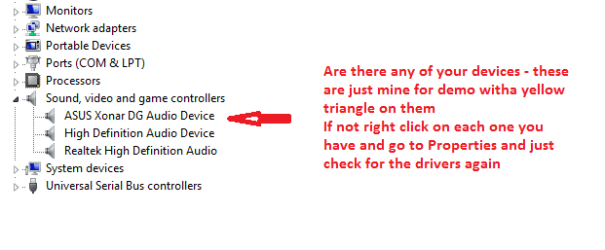
If not can you go to and just check in Device manager the Sound - see my pic.

Just try what I have put in the pic if everything is ok then I know this sounds (no pun) stupid but can you check to see if the speakers or system works on something else it could be something as simple as that.

I am not being funny but are they just speakers and not some powered system?
 

Attachments

  • SHRED2.PNG
    SHRED2.PNG
    7.6 KB · Views: 15

My Computer My Computer

At a glance

Desk1 7 Home Prem / Desk2 10 Pro / Main lap A...Desk1 i5 3750K / Laptop i7 GTX 860M / Desk2 i...Desk1 8GB (1866) / Desk2 16GB (1333) / Laptop...Desk 1& 2NVidia GTX 650 & Laptops on board Intel
Computer type
PC/Desktop
Computer Manufacturer/Model Number
Own build (new) Desk1 / Asus ROG Win 7 / Desk2 1st build
OS
Desk1 7 Home Prem / Desk2 10 Pro / Main lap Asus ROG 10 Pro 2 laptop Toshiba 7 Pro Asus P2520 7 & 10
CPU
Desk1 i5 3750K / Laptop i7 GTX 860M / Desk2 i5 2500
Motherboard
Desk1 Asus P877-V / Desk2 Gigabyte H67 UD3H / Laptop ?
Memory
Desk1 8GB (1866) / Desk2 16GB (1333) / Laptop 8Gb DDR3
Graphics Card(s)
Desk 1& 2NVidia GTX 650 & Laptops on board Intel
Sound Card
Desk 1 & 2 -XONAR DG Realtek High Def audio Laptop
Monitor(s) Displays
Desk 1 Benq HD 2450 / Desk2 Philips 24" / Laptop 17.5"
Screen Resolution
1920x1080 D1 & D2 & Laptop 1
Hard Drives
Desk1 Samsung 120GB 830 SSD
Asus ROG 256GB 850 Pro SSD
Desk2 Samsung 840 256 SSD
Toshiba 120GB EVO
PSU
Desk 1 Corsair HX 1050/ Laptop ? / Desk 2 Corsair HX 650
Case
Desk 1 Cooler HAF XM ? Toshiba laptop / Desk2 Coolermaster
Cooling
Fans on all Desk1 -2 Desk2 - all Coolermasters 5 Laptop ?
Keyboard
Desk 1 MS Sidewinder X6 Desk 2 MS Sidewinder X 4
Mouse
Desk 1&2 - Gigabyte MS 900 gamer - laptop - Logitec wireless
Internet Speed
ADSL2+
Other Info
One other Desktop (tester) and spare Toshba laptop both with SSD's
Running Kaspersky 2016 ISS on all machines config'd identically
Logitec audio stereo systems on each machine (x3)
Canon MG5250MFC
Router/modem TP-Link running WPA2SK
Ok now we might be getting somewhere that is the speaker socket you are plugged into there my friend.
Yes you have the onboard audio and yes it is software driven.

So there is no sound from your speaker set up hooked up like that?

If not can you go to and just check in Device manager the Sound - see my pic.

Just try what I have put in the pic if everything is ok then I know this sounds (no pun) stupid but can you check to see if the speakers or system works on something else it could be something as simple as that.

I am not being funny but are they just speakers and not some powered system?

yes, here is a pic, but it is there, and windows says it is working correctly. when I finish installing the drivers from the official gigabyte site I will update you c:

cb17ec6ddbed42e02aa5cbab2a0bdb93.png
 

My Computer My Computer

At a glance

Windows 7 Home Premium 32bitAMD Athlon 64 X2 Dual Core ~2.9GHz2048MB RAMNVIDIA GeForce 9500 GT
OS
Windows 7 Home Premium 32bit
CPU
AMD Athlon 64 X2 Dual Core ~2.9GHz
Memory
2048MB RAM
Graphics Card(s)
NVIDIA GeForce 9500 GT
Sound Card
Speakers (Realtek High Definition Audio)
Monitor(s) Displays
Viewsonic VX1962WM
Screen Resolution
1680x1050 59Hz
Hard Drives
500MB HDD
Keyboard
WinTek English/Chinese Keyboard
Mouse
Logitech M305
Ok Lucas now if the Gigabyte drivers don't solve it then this is where you will find the Realtek stuff Realtek

Just one word of caution here - this is what I downloaded last night and it might have been coincidental but I did get a lot of malware afterwards.

So just as a precaution my friend I would strongly recommend you download and install those two anti malware apps I mentioned.

They are always good for everything and just about everyone I know on this site uses and swears by them. Plus they will pick up quite a bit at first of stuff that your Norton may have missed.

Let us know how you go:)

John
 

My Computer My Computer

At a glance

Desk1 7 Home Prem / Desk2 10 Pro / Main lap A...Desk1 i5 3750K / Laptop i7 GTX 860M / Desk2 i...Desk1 8GB (1866) / Desk2 16GB (1333) / Laptop...Desk 1& 2NVidia GTX 650 & Laptops on board Intel
Computer type
PC/Desktop
Computer Manufacturer/Model Number
Own build (new) Desk1 / Asus ROG Win 7 / Desk2 1st build
OS
Desk1 7 Home Prem / Desk2 10 Pro / Main lap Asus ROG 10 Pro 2 laptop Toshiba 7 Pro Asus P2520 7 & 10
CPU
Desk1 i5 3750K / Laptop i7 GTX 860M / Desk2 i5 2500
Motherboard
Desk1 Asus P877-V / Desk2 Gigabyte H67 UD3H / Laptop ?
Memory
Desk1 8GB (1866) / Desk2 16GB (1333) / Laptop 8Gb DDR3
Graphics Card(s)
Desk 1& 2NVidia GTX 650 & Laptops on board Intel
Sound Card
Desk 1 & 2 -XONAR DG Realtek High Def audio Laptop
Monitor(s) Displays
Desk 1 Benq HD 2450 / Desk2 Philips 24" / Laptop 17.5"
Screen Resolution
1920x1080 D1 & D2 & Laptop 1
Hard Drives
Desk1 Samsung 120GB 830 SSD
Asus ROG 256GB 850 Pro SSD
Desk2 Samsung 840 256 SSD
Toshiba 120GB EVO
PSU
Desk 1 Corsair HX 1050/ Laptop ? / Desk 2 Corsair HX 650
Case
Desk 1 Cooler HAF XM ? Toshiba laptop / Desk2 Coolermaster
Cooling
Fans on all Desk1 -2 Desk2 - all Coolermasters 5 Laptop ?
Keyboard
Desk 1 MS Sidewinder X6 Desk 2 MS Sidewinder X 4
Mouse
Desk 1&2 - Gigabyte MS 900 gamer - laptop - Logitec wireless
Internet Speed
ADSL2+
Other Info
One other Desktop (tester) and spare Toshba laptop both with SSD's
Running Kaspersky 2016 ISS on all machines config'd identically
Logitec audio stereo systems on each machine (x3)
Canon MG5250MFC
Router/modem TP-Link running WPA2SK
Ok Lucas now if the Gigabyte drivers don't solve it then this is where you will find the Realtek stuff Realtek

Just one word of caution here - this is what I downloaded last night and it might have been coincidental but I did get a lot of malware afterwards.

So just as a precaution my friend I would strongly recommend you download and install those two anti malware apps I mentioned.

They are always good for everything and just about everyone I know on this site uses and swears by them. Plus they will pick up quite a bit at first of stuff that your Norton may have missed.

Let us know how you go:)

John

drivers didn't work, but I'm gonna install my actual monitor drivers now. I'll update you after
 

My Computer My Computer

At a glance

Windows 7 Home Premium 32bitAMD Athlon 64 X2 Dual Core ~2.9GHz2048MB RAMNVIDIA GeForce 9500 GT
OS
Windows 7 Home Premium 32bit
CPU
AMD Athlon 64 X2 Dual Core ~2.9GHz
Memory
2048MB RAM
Graphics Card(s)
NVIDIA GeForce 9500 GT
Sound Card
Speakers (Realtek High Definition Audio)
Monitor(s) Displays
Viewsonic VX1962WM
Screen Resolution
1680x1050 59Hz
Hard Drives
500MB HDD
Keyboard
WinTek English/Chinese Keyboard
Mouse
Logitech M305
No probs Lucas I wasn't holding my breath on the Giga site ones anyway. I have a Giga in this machine and I know the support is pretty ordinary.

Oh by the way don't forget those malware apps my friend even if it comes up nothing you have lost nothing and there again there may be something - sounds a bit gobbledegook but.....
 

My Computer My Computer

At a glance

Desk1 7 Home Prem / Desk2 10 Pro / Main lap A...Desk1 i5 3750K / Laptop i7 GTX 860M / Desk2 i...Desk1 8GB (1866) / Desk2 16GB (1333) / Laptop...Desk 1& 2NVidia GTX 650 & Laptops on board Intel
Computer type
PC/Desktop
Computer Manufacturer/Model Number
Own build (new) Desk1 / Asus ROG Win 7 / Desk2 1st build
OS
Desk1 7 Home Prem / Desk2 10 Pro / Main lap Asus ROG 10 Pro 2 laptop Toshiba 7 Pro Asus P2520 7 & 10
CPU
Desk1 i5 3750K / Laptop i7 GTX 860M / Desk2 i5 2500
Motherboard
Desk1 Asus P877-V / Desk2 Gigabyte H67 UD3H / Laptop ?
Memory
Desk1 8GB (1866) / Desk2 16GB (1333) / Laptop 8Gb DDR3
Graphics Card(s)
Desk 1& 2NVidia GTX 650 & Laptops on board Intel
Sound Card
Desk 1 & 2 -XONAR DG Realtek High Def audio Laptop
Monitor(s) Displays
Desk 1 Benq HD 2450 / Desk2 Philips 24" / Laptop 17.5"
Screen Resolution
1920x1080 D1 & D2 & Laptop 1
Hard Drives
Desk1 Samsung 120GB 830 SSD
Asus ROG 256GB 850 Pro SSD
Desk2 Samsung 840 256 SSD
Toshiba 120GB EVO
PSU
Desk 1 Corsair HX 1050/ Laptop ? / Desk 2 Corsair HX 650
Case
Desk 1 Cooler HAF XM ? Toshiba laptop / Desk2 Coolermaster
Cooling
Fans on all Desk1 -2 Desk2 - all Coolermasters 5 Laptop ?
Keyboard
Desk 1 MS Sidewinder X6 Desk 2 MS Sidewinder X 4
Mouse
Desk 1&2 - Gigabyte MS 900 gamer - laptop - Logitec wireless
Internet Speed
ADSL2+
Other Info
One other Desktop (tester) and spare Toshba laptop both with SSD's
Running Kaspersky 2016 ISS on all machines config'd identically
Logitec audio stereo systems on each machine (x3)
Canon MG5250MFC
Router/modem TP-Link running WPA2SK
Back
Top