
I performed a fresh install of windows 7 and updated all drivers/chipsets.
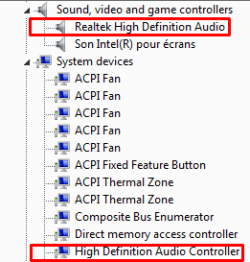
Somehow I feel like my audio is using two kinds of drivers/controllers. See the pictures below.
In the first picture, I suppose that's completely normal, because If i disable one of them, I don't get any audio installed anymore.
In the second picture, If I lower one of them, the main volume gets reduced. I suppose that's also normal, but the thing is when "Realtek HD Audio" is at 100, the sound is completely weird. It sounds like it's playing louder than it should or can. I don't know how I can show you how it sounds, but it's not normal.
tl;dr I can't put volume to maximum because the audio quality gets wrecked and sounds completely not normal. Both of those drivers/devices telling me that they're up to date, so I don't know how to fix it. Edit: for the volume to sound normal, realtek level has to be at 79.
Somehow I feel like my audio is using two kinds of drivers/controllers. See the pictures below.
In the first picture, I suppose that's completely normal, because If i disable one of them, I don't get any audio installed anymore.
In the second picture, If I lower one of them, the main volume gets reduced. I suppose that's also normal, but the thing is when "Realtek HD Audio" is at 100, the sound is completely weird. It sounds like it's playing louder than it should or can. I don't know how I can show you how it sounds, but it's not normal.
tl;dr I can't put volume to maximum because the audio quality gets wrecked and sounds completely not normal. Both of those drivers/devices telling me that they're up to date, so I don't know how to fix it. Edit: for the volume to sound normal, realtek level has to be at 79.
Attachments

My Computer
- OS
- w7 64b

