
Why Is My Wifi So Slow? Please Read

Pedroc1999

Banned
Local time
4:54 PM
Messages
1,155
Location
Merthyr Tydfil, Wales
So just over 2 years ago, me and my family decided to go from mobile broadband to homephone and a router. All is well and i havnt really been bothered to make it faster, so today i set off and do a speedtest at speedtest.net, it comes out with..

ping - 49ms
download - 6.67mbps
upload - 0.38mbps

I find this quite good, specialy the download speed.thing is when i go to download something from lets say mediafire, i am lucky to get 800kbps,and the same when i download stuff with utorrent - i am lucky to get over 800kbps, it normaly hovers around 670kbps

I dont want to break records i just want my internet speeds to increase a bit, in the real world, not on a speed test.

btw i am using a static ip with a wifi network if that helps
 

My Computer My Computer

At a glance

Windows 7 Ultimate x86Intel Pentium D 925 @ 3.00GHz1GB DDR2 667MHzOverclocked Asus ATI Radeon X1600 Pro 512MB
Computer Manufacturer/Model Number
Packard Bell iMedia 2218 -- Has Been Running For Almost 7 Years!
OS
Windows 7 Ultimate x86
CPU
Intel Pentium D 925 @ 3.00GHz
Motherboard
Socket 775 MCP73VT-PM
Memory
1GB DDR2 667MHz
Graphics Card(s)
Overclocked Asus ATI Radeon X1600 Pro 512MB
Sound Card
Sound Blaster Audigy 570
Monitor(s) Displays
19" LCD Monitor; MW19E-AAA
Screen Resolution
1440 x 900
Hard Drives
500gb 7200rpm (Windows 7) ---
160gb 7200rpm (Backup) ---
1TB Iomega External Drive (7200rpm)
PSU
250w Packard Bell Standard
Case
Packard Bell standard
Cooling
Intel Socket 775 Air Cooler
Keyboard
Wired PS/2 Keyboard
Mouse
Dell Wireless USB Mouse
Internet Speed
Wireles --- Download - 6.63 Mbps Upload - 0.38 Mbps
Other Info
Currently Planning To Build New Computer --- Also Got A Samsung Galaxy Ace II (Plays All Games You Throw At It)
Mediafire and other download sites suffer of user saturation issues, and torrents suffer of leechers who limit their upload bandwidth to minimum, try a public torrent like Ubuntu or OpenOffice and see if you get the same speeds, also, read the utorrent configuration guide carefully, see if your upload speed is set correctly.
 

My Computer My Computer

At a glance

Microsoft Windows 10 Professional / Windows 7...Intel i5-357016GB DDR3AMD Radeon HD 7850 2GB
Computer type
PC/Desktop
OS
Microsoft Windows 10 Professional / Windows 7 Professional
CPU
Intel i5-3570
Motherboard
Lenovo Mahobay
Memory
16GB DDR3
Graphics Card(s)
AMD Radeon HD 7850 2GB
Sound Card
(1) Realtek HD Audio (2) AMD HD Audio
Monitor(s) Displays
LG LS192WS
Screen Resolution
1440 x 900 @ 32bit color
Hard Drives
(1) SUV300S37A/120G (2) ST3500413AS SATA Disk Device AHCI mode enabled.
PSU
Corsair HX620
Case
Thermaltake V4 Black Edition
Cooling
Cooler Master Hyper 212 + Artic Silver 5 on CPU/GPU
Keyboard
Dell SK-8115
Mouse
Razer Copperhead with MAPED mat (awesome!)
Internet Speed
100 Mbps up/down
Browser
Chrome
Some of it is due to the servers you're downloading from, from what I understand. Heavy usage or overworked server = slower speeds.

My download speed according to speedtest is 10.02 mbps and I have NEVER came even close to that. On a good download I get a little better than 1.
 

My Computer My Computer

At a glance

Windows 10x64 Build 1709Intel i7 7700HQ Kaby Lake16 GB DDR4 @2400Nvidia Geforce GTX 1060
Computer type
Laptop
Computer Manufacturer/Model Number
MSI GE72VR Apache Pro-416
OS
Windows 10x64 Build 1709
CPU
Intel i7 7700HQ Kaby Lake
Motherboard
Micro-Star Intl. MS-179B (U3C1)
Memory
16 GB DDR4 @2400
Graphics Card(s)
Nvidia Geforce GTX 1060
Screen Resolution
1920x1080 120Hz
Hard Drives
256 GB Nvme M.2 SSD

1TB HDD@7200
Cooling
Cooler Blast 4
Keyboard
Steel Series
Antivirus
Bit Defender Free
Browser
Edge
Guys you are both getting the correct download speeds, the speeds are measured differently. Do a search for a bandwidth convertor and type in your speed test speeds and see how they convert to kbps.

Paul
 

My Computer My Computer

At a glance

Windows 7 Professional 64 bit
OS
Windows 7 Professional 64 bit
Thank you paul and they indeed line up.ok so how would i go about increasing that speed.my router is just 1 room away. about 10meters. Getting ethernet will be an option but that is for the future.
 

My Computer My Computer

At a glance

Windows 7 Ultimate x86Intel Pentium D 925 @ 3.00GHz1GB DDR2 667MHzOverclocked Asus ATI Radeon X1600 Pro 512MB
Computer Manufacturer/Model Number
Packard Bell iMedia 2218 -- Has Been Running For Almost 7 Years!
OS
Windows 7 Ultimate x86
CPU
Intel Pentium D 925 @ 3.00GHz
Motherboard
Socket 775 MCP73VT-PM
Memory
1GB DDR2 667MHz
Graphics Card(s)
Overclocked Asus ATI Radeon X1600 Pro 512MB
Sound Card
Sound Blaster Audigy 570
Monitor(s) Displays
19" LCD Monitor; MW19E-AAA
Screen Resolution
1440 x 900
Hard Drives
500gb 7200rpm (Windows 7) ---
160gb 7200rpm (Backup) ---
1TB Iomega External Drive (7200rpm)
PSU
250w Packard Bell Standard
Case
Packard Bell standard
Cooling
Intel Socket 775 Air Cooler
Keyboard
Wired PS/2 Keyboard
Mouse
Dell Wireless USB Mouse
Internet Speed
Wireles --- Download - 6.63 Mbps Upload - 0.38 Mbps
Other Info
Currently Planning To Build New Computer --- Also Got A Samsung Galaxy Ace II (Plays All Games You Throw At It)
Well first of all you want to check your speeds wired to see the max you can actually get. Then you will know how much you are losing wirelessly and if it's worth the effort.
 

My Computer My Computer

At a glance

Windows 7 Professional 64 bit
OS
Windows 7 Professional 64 bit
ping - 49ms
download - 6.67mbps
upload - 0.38mbps

... i am lucky to get 800kbps,and the same when i download stuff with utorrent - i am lucky to get over 800kbps, it normaly hovers around 670kbps

...
You are now confusing two different things, line speed and download speed because of the different measurement units used in those. If your line speed is about 6.5 Mbps, then your download speed would be exactly what you get, a bit more than 800 KBps.

This is because the two things are told using different units, megabits per second (Mbps) and kilobytes per second (KBps). Your download speed 6.67 Mbps = 6830.08 kbps or 6.67 * 1024 = 853.76 KBps or 6830.08/8.

Conclusion: If your line speed you are paying for would be that 6.67 Mbps you told you get, then your theoretical maximum download speed would be 6.67 * 1024 = 6830.08 kilobits per second (kbps). One byte = 8 bits, so to get download speed in kilobytes we need to divide kilobits with 8:
6830.08 / 8 = 853.76 kilobytes per second (KBps).

In other words, your download speed is as fast as you line speed indicates. No issues there.

Formula: Multiply line speed in Mbps with 1024, divide this with 8, or Mbps * 1024 / 8 = KBps.

Some examples: a 10/1 Mbps broadband connection (dl/ul) gives maximal 1,280 KBps (=1.25 MBps) download and 128 KBps upload speeds, a 100/20 Mbps line (as I have) maximal 12,800 KBps (12.5 MBps) download and 2,560 KBps (2.5 MBps) upload speeds.

Kari
 
Last edited:

My Computer My Computer

At a glance

Windows 10 Pro x64 EN-GB1.6 GHz Intel Core i7-720QM Processor6 GBATI Mobility Radeon HD 5850 Graphics
Computer type
Laptop
Computer Manufacturer/Model Number
HP ENVY 17-1150eg
OS
Windows 10 Pro x64 EN-GB
CPU
1.6 GHz Intel Core i7-720QM Processor
Memory
6 GB
Graphics Card(s)
ATI Mobility Radeon HD 5850 Graphics
Sound Card
Beats sound system with integrated subwoofer
Monitor(s) Displays
17" laptop display, 22" LED and 32" Full HD TV through HDMI
Screen Resolution
1600*900 (1), 1920*1080 (2&3)
Hard Drives
Internal: 2 x 500 GB SATA Hard Disk Drive 7200 rpm
External: 2TB for backups, 3TB USB3 network drive for media
Cooling
As Envy runs a bit warm, I have it on a Cooler Master pad
Keyboard
Logitech diNovo Media Desktop Laser (bluetooth)
Mouse
Logitech Performance Mouse MX
Internet Speed
50/10 Mbps VDSL
Antivirus
Windows Defender 4.3.9431.0
Browser
Maxthon 3.5.2., IE11
Sorry if you got confused.the scores on my top post are the scores i am getting on my pc with wifi.i have never been wired and i have no easy way of checking the speed fro a wired connection
 

My Computer My Computer

At a glance

Windows 7 Ultimate x86Intel Pentium D 925 @ 3.00GHz1GB DDR2 667MHzOverclocked Asus ATI Radeon X1600 Pro 512MB
Computer Manufacturer/Model Number
Packard Bell iMedia 2218 -- Has Been Running For Almost 7 Years!
OS
Windows 7 Ultimate x86
CPU
Intel Pentium D 925 @ 3.00GHz
Motherboard
Socket 775 MCP73VT-PM
Memory
1GB DDR2 667MHz
Graphics Card(s)
Overclocked Asus ATI Radeon X1600 Pro 512MB
Sound Card
Sound Blaster Audigy 570
Monitor(s) Displays
19" LCD Monitor; MW19E-AAA
Screen Resolution
1440 x 900
Hard Drives
500gb 7200rpm (Windows 7) ---
160gb 7200rpm (Backup) ---
1TB Iomega External Drive (7200rpm)
PSU
250w Packard Bell Standard
Case
Packard Bell standard
Cooling
Intel Socket 775 Air Cooler
Keyboard
Wired PS/2 Keyboard
Mouse
Dell Wireless USB Mouse
Internet Speed
Wireles --- Download - 6.63 Mbps Upload - 0.38 Mbps
Other Info
Currently Planning To Build New Computer --- Also Got A Samsung Galaxy Ace II (Plays All Games You Throw At It)
Sorry if you got confused.the scores on my top post are the scores i am getting on my pc with wifi.i have never been wired and i have no easy way of checking the speed fro a wired connection

No confusion here.

What I am saying is, without knowing the actual top speed your connection is capable of then there is no point trying to increase your wireless speed.

To find out the speed your connection is capable of then you will need to run a Wired speed test.


Paul.
 

My Computer My Computer

At a glance

Windows 7 Professional 64 bit
OS
Windows 7 Professional 64 bit
Well im going to have to leave it on hold for now then.
 

My Computer My Computer

At a glance

Windows 7 Ultimate x86Intel Pentium D 925 @ 3.00GHz1GB DDR2 667MHzOverclocked Asus ATI Radeon X1600 Pro 512MB
Computer Manufacturer/Model Number
Packard Bell iMedia 2218 -- Has Been Running For Almost 7 Years!
OS
Windows 7 Ultimate x86
CPU
Intel Pentium D 925 @ 3.00GHz
Motherboard
Socket 775 MCP73VT-PM
Memory
1GB DDR2 667MHz
Graphics Card(s)
Overclocked Asus ATI Radeon X1600 Pro 512MB
Sound Card
Sound Blaster Audigy 570
Monitor(s) Displays
19" LCD Monitor; MW19E-AAA
Screen Resolution
1440 x 900
Hard Drives
500gb 7200rpm (Windows 7) ---
160gb 7200rpm (Backup) ---
1TB Iomega External Drive (7200rpm)
PSU
250w Packard Bell Standard
Case
Packard Bell standard
Cooling
Intel Socket 775 Air Cooler
Keyboard
Wired PS/2 Keyboard
Mouse
Dell Wireless USB Mouse
Internet Speed
Wireles --- Download - 6.63 Mbps Upload - 0.38 Mbps
Other Info
Currently Planning To Build New Computer --- Also Got A Samsung Galaxy Ace II (Plays All Games You Throw At It)
Sorry if you got confused.the scores on my top post are the scores i am getting on my pc with wifi.i have never been wired and i have no easy way of checking the speed fro a wired connection
I understood that's WiFi. But if your WiFi gives you line speed 6.67 Mbps then your theoretical maximum download speed is 853.76 kilobytes per second (KBps).

In other words your download speed is close to the maximum if you get about 800 KBps download speed. A completely other question is could you get higher line speed. Not knowing how fast your line is, for what UL/DL speed you are paying for, I would say the only thing you can do is to pay for a faster line. The speedtest.net results you posted seem to suggest you have maybe 8 of 10 Mbps bandwidth (line speed); if so, you are getting quite normal speed out of it for no line is always as fast as promised.

Let's try once again: if you pay for a 10 Mbps line, your theoretical maximum download speed is 1280 KBps. If you pay for 8 Mbps line, the theoretical maximum download speed is 1024 KBps.

You need to understand that your speedtest result, 6.67 Mbps equals 853.76 KBps ergo with 6.67 Mbps connection you can not download faster than that.

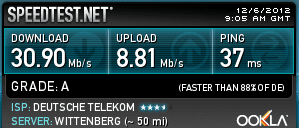
One more example. This is what Speedtest gives me at the moment her at the office:

Speedtest_2.PNG

Currently I have 30.9 Mbps. Notice that it is told in Megabits (Mb) per second, not Megabytes (MB); small b = bit and capital B = byte. That 30.9 Megabits per second = 3.86 Megabytes per second = 3955 Kilobytes per second (KBps).

The same with your speedtest results:
6.67 Megabits per second = 0.83 Megabytes per second = 853.76 Kilobytes per second. That's all your connection gives.

Kari
 

My Computer My Computer

At a glance

Windows 10 Pro x64 EN-GB1.6 GHz Intel Core i7-720QM Processor6 GBATI Mobility Radeon HD 5850 Graphics
Computer type
Laptop
Computer Manufacturer/Model Number
HP ENVY 17-1150eg
OS
Windows 10 Pro x64 EN-GB
CPU
1.6 GHz Intel Core i7-720QM Processor
Memory
6 GB
Graphics Card(s)
ATI Mobility Radeon HD 5850 Graphics
Sound Card
Beats sound system with integrated subwoofer
Monitor(s) Displays
17" laptop display, 22" LED and 32" Full HD TV through HDMI
Screen Resolution
1600*900 (1), 1920*1080 (2&3)
Hard Drives
Internal: 2 x 500 GB SATA Hard Disk Drive 7200 rpm
External: 2TB for backups, 3TB USB3 network drive for media
Cooling
As Envy runs a bit warm, I have it on a Cooler Master pad
Keyboard
Logitech diNovo Media Desktop Laser (bluetooth)
Mouse
Logitech Performance Mouse MX
Internet Speed
50/10 Mbps VDSL
Antivirus
Windows Defender 4.3.9431.0
Browser
Maxthon 3.5.2., IE11
Ok thank you for your answers
 

My Computer My Computer

At a glance

Windows 7 Ultimate x86Intel Pentium D 925 @ 3.00GHz1GB DDR2 667MHzOverclocked Asus ATI Radeon X1600 Pro 512MB
Computer Manufacturer/Model Number
Packard Bell iMedia 2218 -- Has Been Running For Almost 7 Years!
OS
Windows 7 Ultimate x86
CPU
Intel Pentium D 925 @ 3.00GHz
Motherboard
Socket 775 MCP73VT-PM
Memory
1GB DDR2 667MHz
Graphics Card(s)
Overclocked Asus ATI Radeon X1600 Pro 512MB
Sound Card
Sound Blaster Audigy 570
Monitor(s) Displays
19" LCD Monitor; MW19E-AAA
Screen Resolution
1440 x 900
Hard Drives
500gb 7200rpm (Windows 7) ---
160gb 7200rpm (Backup) ---
1TB Iomega External Drive (7200rpm)
PSU
250w Packard Bell Standard
Case
Packard Bell standard
Cooling
Intel Socket 775 Air Cooler
Keyboard
Wired PS/2 Keyboard
Mouse
Dell Wireless USB Mouse
Internet Speed
Wireles --- Download - 6.63 Mbps Upload - 0.38 Mbps
Other Info
Currently Planning To Build New Computer --- Also Got A Samsung Galaxy Ace II (Plays All Games You Throw At It)
There are quite a few things you do to speed up a wireless connection speeds. This doesn't mean it will make your ISP go faster. There are some adjustments you can make to obtain the maximum wireless speed possible for your particular hardware.

The speed for wireless is really determined by the available bandwidth and the bandwidth is determined by the available wireless channels in your area. Using channel bonding with the correct router settings can give you the best possible wireless speeds.

300Mbps is possible with most wireless N USB adaptors but only if you set the router up correctly and have 5 bars signal strength. The link below talks about how to obtain the best possible wireless speeds. :)

wifi status
 

My Computer My Computer

At a glance

Windows 7 Ult, Windows 8.1 Pro,Q9650-4.275GHz, E8600 4.5GHz, E6750-3.8GHzG.Skill PC2 9600 1200Mhz 5 5 5 15 2TGTX480
Computer type
PC/Desktop
Computer Manufacturer/Model Number
Home built
OS
Windows 7 Ult, Windows 8.1 Pro,
CPU
Q9650-4.275GHz, E8600 4.5GHz, E6750-3.8GHz
Motherboard
Evga 780i FTW
Memory
G.Skill PC2 9600 1200Mhz 5 5 5 15 2T
Graphics Card(s)
GTX480
Sound Card
Asus Xonar D2
Monitor(s) Displays
HannsG
Screen Resolution
1680X1050
Hard Drives
GSkill Phoenix Pro 120GB SSD
PSU
ThermalTake Toughpower 1000Watt modular
Case
ThermalTake XaserV
Cooling
Xigmatek S1283
Keyboard
Logitech G15
Mouse
Logitech G9
Internet Speed
T1
Back
Top