
Help, please! Why is my computer so slow?

juanantoniod

Antonio
Power User
Local time
2:55 PM
Messages
300
Location
Los Angeles, CA
Hello,

I have noticed that my computer operates a tad slower than usual. For example, as you can see from the attached screen captures, when I go into Windows Explorer, a green bar goes across the top of the screen while the drive information is populated (see second image). What is causing this lag in populating the drive info and why does the green bar take so long to cross? (This also happens when I go into add or remove programs and features.) Also, when I boot my computer, the icons on the desktop will show, then appear as placeholders, then appear again.

Would more memory help me? I have 2GB on board, but my system is capable of 4GB. I just need to know if that would definitely help this lag.

Thanks for any advice!
 

Attachments
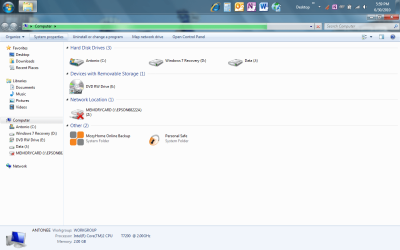
  • Screen Capture.png
    Screen Capture.png
    61.9 KB · Views: 48
  • Screen Capture 2.png
    Screen Capture 2.png
    65.3 KB · Views: 39

My Computer My Computer

Computer Manufacturer/Model Number
HP Pavilion Media Center PC m7350n
OS
Microsoft Windows 7 Home Premium 32-bit 7601 Multiprocessor Free Service Pack 1
CPU
Intel(R) Pentium(R) D CPU 2.80GHz
Motherboard
ASUSTek Computer INC. EMERY
Memory
2.00 GB
Graphics Card(s)
NVIDIA GeForce 6200SE TurboCache(TM)
Sound Card
Realtek High Definition Audio
Monitor(s) Displays
HP L1710 LCD Display
Screen Resolution
1280 x 1024 x 32 bits (4294967296 colors) @ 60 Hz
Hard Drives
(1) SAMSUNG SP2504C (2) EPSON Stylus Storage USB Device (3) Generic USB CF Reader USB Device (4) Generic USB MS Reader USB Device (5) Generic USB SD Reader USB Device (6) Generic USB SM Reader USB Device (7) Seagate FA GoFlex Desk USB Dev
Internet Speed
20+mbps

My Computer My Computer

Computer type
PC/Desktop
Computer Manufacturer/Model Number
Dell XPS 420
OS
Windows 10, Home Clean Install
CPU
Intel Core2 processsor Q8200(2.33Ghz 1333FSB) Quad Core Tech
Motherboard
Dell
Memory
6 gb
Graphics Card(s)
ATI Radeon 256MB HD3650
Sound Card
Intergrated 7.1 Channel Audio
Monitor(s) Displays
Dell SP2009W 20"
Hard Drives
640 GB Serial ATA Hard drive
Cooling
Fan
Keyboard
Dell USB Keyboard
Mouse
Dell Premium Optical USB
Internet Speed
DSL 2.85
Try the operation which runs slowly again, rightclick the Task Bar to Start Task Manager, click Processes tab and click CPU column heading to show what is eating processor in descending order. Post back results.

Type msconfig in Start box, rightclick Run as Admin, click startup tab and uncheck all but AV and gadgets, or anything else you absolutely have to have startup with computer (IM ok). All others are freeloading and can wait til you click on them. Restart computer.

Open Event Viewer>Admin view and Google repeat errors to resolve. Also look at Performance Log and Generate a Health Report at Control Panel\All Control Panel Items\Performance Information and Tools\Advanced Tools which might also have problems cued at top.

Type Problems in Start box to look for solutions possibly already cued.

Clean and order your HD perfectly using free state-of-the-art CCleaner "Run Cleaner" and REgistry tabs, then Auslogics Disk and Registry defraggers monthly.

In addition to Rich's wise suggestions to run Full AV test and memtest CD for 5-6 passes, test your HD using maker's full Diag/Repair CD scan to finish clearing your hardware: Hard Drive Diagnostics Tools and Utilities (Storage) - TACKtech Corp.
 
Maybe the drive has been shut down by the power management in the OS? Looks very similar to mine when windows shut it down after 20m. Of course this only applies if the drive is not the boot drive.
 

My Computer My Computer

Computer Manufacturer/Model Number
Home built
OS
windows 7 home 64bit
CPU
q6600
Motherboard
Gigabyte p35c-ds3r
Memory
8GiB ddr2 800mhz
Graphics Card(s)
Geforce GTS250
Sound Card
On board
Monitor(s) Displays
Benq FP241W
Screen Resolution
1920x1200
Hard Drives
Intel ssd x25-m 160GB OR 500GB Samsung (Ubuntu) in trays
Samsung 1TB f1 spinpoint
PSU
XFX 650Watt
Case
Unknown
Cooling
air
Keyboard
Logitech
Mouse
Wacom Bamboo
Internet Speed
13mb/S
Hello everyone! I appreciate all the input. I have run the MalwareBytes program, which found 7 infections, and I deleted them. This *may* have helped... We shall see. Nevertheless, I am going to proceed with the other recommendations, starting with Memtest. Also, in answer to the Processes question, the main process that keeps popping to the top of the list is iExplore.exe, and it shows 15-19 CPU. (I have no idea what that number means, but it is a lot more than other processes running, except a few which pop to the top of the list periodically, like the McAfee virus scanner or something else.
 

My Computer My Computer

Computer Manufacturer/Model Number
HP Pavilion Media Center PC m7350n
OS
Microsoft Windows 7 Home Premium 32-bit 7601 Multiprocessor Free Service Pack 1
CPU
Intel(R) Pentium(R) D CPU 2.80GHz
Motherboard
ASUSTek Computer INC. EMERY
Memory
2.00 GB
Graphics Card(s)
NVIDIA GeForce 6200SE TurboCache(TM)
Sound Card
Realtek High Definition Audio
Monitor(s) Displays
HP L1710 LCD Display
Screen Resolution
1280 x 1024 x 32 bits (4294967296 colors) @ 60 Hz
Hard Drives
(1) SAMSUNG SP2504C (2) EPSON Stylus Storage USB Device (3) Generic USB CF Reader USB Device (4) Generic USB MS Reader USB Device (5) Generic USB SD Reader USB Device (6) Generic USB SM Reader USB Device (7) Seagate FA GoFlex Desk USB Dev
Internet Speed
20+mbps
Okay, memcheck went fine. Thanks for the resourceful utility referral! Unchecked some startup items in MSCONFIG. Will see how it runs for a while and post back in a day or so. I'm also going to look into the event viewer as well. Thanks, guys!
 

My Computer My Computer

Computer Manufacturer/Model Number
HP Pavilion Media Center PC m7350n
OS
Microsoft Windows 7 Home Premium 32-bit 7601 Multiprocessor Free Service Pack 1
CPU
Intel(R) Pentium(R) D CPU 2.80GHz
Motherboard
ASUSTek Computer INC. EMERY
Memory
2.00 GB
Graphics Card(s)
NVIDIA GeForce 6200SE TurboCache(TM)
Sound Card
Realtek High Definition Audio
Monitor(s) Displays
HP L1710 LCD Display
Screen Resolution
1280 x 1024 x 32 bits (4294967296 colors) @ 60 Hz
Hard Drives
(1) SAMSUNG SP2504C (2) EPSON Stylus Storage USB Device (3) Generic USB CF Reader USB Device (4) Generic USB MS Reader USB Device (5) Generic USB SD Reader USB Device (6) Generic USB SM Reader USB Device (7) Seagate FA GoFlex Desk USB Dev
Internet Speed
20+mbps

My Computer My Computer

Computer type
PC/Desktop
Computer Manufacturer/Model Number
Dell XPS 420
OS
Windows 10, Home Clean Install
CPU
Intel Core2 processsor Q8200(2.33Ghz 1333FSB) Quad Core Tech
Motherboard
Dell
Memory
6 gb
Graphics Card(s)
ATI Radeon 256MB HD3650
Sound Card
Intergrated 7.1 Channel Audio
Monitor(s) Displays
Dell SP2009W 20"
Hard Drives
640 GB Serial ATA Hard drive
Cooling
Fan
Keyboard
Dell USB Keyboard
Mouse
Dell Premium Optical USB
Internet Speed
DSL 2.85
I've checked the event viewer and seen some sidebyside errors. I searched the Internet for these and did not find any definitive answer as to why they were occurring. Also, I did the Performance Report, and it said to, " configure Security Center to stop monitoring anti-virus status". However, I have searched high and low for how to do this, and cannot find it. Any guidance to this is appreciated! Thanks again!
 

My Computer My Computer

Computer Manufacturer/Model Number
HP Pavilion Media Center PC m7350n
OS
Microsoft Windows 7 Home Premium 32-bit 7601 Multiprocessor Free Service Pack 1
CPU
Intel(R) Pentium(R) D CPU 2.80GHz
Motherboard
ASUSTek Computer INC. EMERY
Memory
2.00 GB
Graphics Card(s)
NVIDIA GeForce 6200SE TurboCache(TM)
Sound Card
Realtek High Definition Audio
Monitor(s) Displays
HP L1710 LCD Display
Screen Resolution
1280 x 1024 x 32 bits (4294967296 colors) @ 60 Hz
Hard Drives
(1) SAMSUNG SP2504C (2) EPSON Stylus Storage USB Device (3) Generic USB CF Reader USB Device (4) Generic USB MS Reader USB Device (5) Generic USB SD Reader USB Device (6) Generic USB SM Reader USB Device (7) Seagate FA GoFlex Desk USB Dev
Internet Speed
20+mbps
I would install free Revo Uninstaller and use Advanced Mode to uninstall the McAfee bloatware, as it will bog down your system and let viruses in anyway. Revo will run the Windows uninstaller, but don't restart when prompted, instead click next and delete the bolded registry items and files it finds which McAfee leaves behind.

Replace it with the expert's new choice, free Microsoft Security Essentials which installs in 30 seconds, updates and runs a scan, then becomes nearly invisible unless there is a threat.

Run a full MSE scan in boot mode after it updates since you have infection and need to know i'ts out.
 
I will try these next...

Okay, memcheck went fine. Thanks for the resourceful utility referral! Unchecked some startup items in MSCONFIG. Will see how it runs for a while and post back in a day or so. I'm also going to look into the event viewer as well. Thanks, guys!


You may want to go with a clean boot
How to troubleshoot a problem by performing a clean boot in Windows Vista or in Windows 7

Also try in safe mode, is it faster?


RichC,

Thanks for the helpful input. I think that, just by turning off some of the automatically started processes, I am seeing better performance. At least, as I type this, my keyboard is keeping up, so that's a good sign. But this clean boot is a good option to try just to make sure. I will also try it in safe mode over the next few days and then report back.

Thank you very much! :)
 

My Computer My Computer

Computer Manufacturer/Model Number
HP Pavilion Media Center PC m7350n
OS
Microsoft Windows 7 Home Premium 32-bit 7601 Multiprocessor Free Service Pack 1
CPU
Intel(R) Pentium(R) D CPU 2.80GHz
Motherboard
ASUSTek Computer INC. EMERY
Memory
2.00 GB
Graphics Card(s)
NVIDIA GeForce 6200SE TurboCache(TM)
Sound Card
Realtek High Definition Audio
Monitor(s) Displays
HP L1710 LCD Display
Screen Resolution
1280 x 1024 x 32 bits (4294967296 colors) @ 60 Hz
Hard Drives
(1) SAMSUNG SP2504C (2) EPSON Stylus Storage USB Device (3) Generic USB CF Reader USB Device (4) Generic USB MS Reader USB Device (5) Generic USB SD Reader USB Device (6) Generic USB SM Reader USB Device (7) Seagate FA GoFlex Desk USB Dev
Internet Speed
20+mbps
If safe mode works, it will give us a handle on the cause. Good luck, till we meet, again.
 

My Computer My Computer

Computer type
PC/Desktop
Computer Manufacturer/Model Number
Dell XPS 420
OS
Windows 10, Home Clean Install
CPU
Intel Core2 processsor Q8200(2.33Ghz 1333FSB) Quad Core Tech
Motherboard
Dell
Memory
6 gb
Graphics Card(s)
ATI Radeon 256MB HD3650
Sound Card
Intergrated 7.1 Channel Audio
Monitor(s) Displays
Dell SP2009W 20"
Hard Drives
640 GB Serial ATA Hard drive
Cooling
Fan
Keyboard
Dell USB Keyboard
Mouse
Dell Premium Optical USB
Internet Speed
DSL 2.85
Thanks gregrocker!

I would install free Revo Uninstaller and use Advanced Mode to uninstall the McAfee bloatware, as it will bog down your system and let viruses in anyway. Revo will run the Windows uninstaller, but don't restart when prompted, instead click next and delete the bolded registry items and files it finds which McAfee leaves behind.

Replace it with the expert's new choice, free Microsoft Security Essentials which installs in 30 seconds, updates and runs a scan, then becomes nearly invisible unless there is a threat.

Run a full MSE scan in boot mode after it updates since you have infection and need to know i'ts out.


Gregrocker,

Is this true that McAfee is no good? I am happy to get rid of it, and I think that I have a 30 day guarantee since I just purchased it. Is MS Security Essentials really good?

Thanks again! :)
 

My Computer My Computer

Computer Manufacturer/Model Number
HP Pavilion Media Center PC m7350n
OS
Microsoft Windows 7 Home Premium 32-bit 7601 Multiprocessor Free Service Pack 1
CPU
Intel(R) Pentium(R) D CPU 2.80GHz
Motherboard
ASUSTek Computer INC. EMERY
Memory
2.00 GB
Graphics Card(s)
NVIDIA GeForce 6200SE TurboCache(TM)
Sound Card
Realtek High Definition Audio
Monitor(s) Displays
HP L1710 LCD Display
Screen Resolution
1280 x 1024 x 32 bits (4294967296 colors) @ 60 Hz
Hard Drives
(1) SAMSUNG SP2504C (2) EPSON Stylus Storage USB Device (3) Generic USB CF Reader USB Device (4) Generic USB MS Reader USB Device (5) Generic USB SD Reader USB Device (6) Generic USB SM Reader USB Device (7) Seagate FA GoFlex Desk USB Dev
Internet Speed
20+mbps

My Computer My Computer

Computer type
PC/Desktop
Computer Manufacturer/Model Number
Dell XPS 420
OS
Windows 10, Home Clean Install
CPU
Intel Core2 processsor Q8200(2.33Ghz 1333FSB) Quad Core Tech
Motherboard
Dell
Memory
6 gb
Graphics Card(s)
ATI Radeon 256MB HD3650
Sound Card
Intergrated 7.1 Channel Audio
Monitor(s) Displays
Dell SP2009W 20"
Hard Drives
640 GB Serial ATA Hard drive
Cooling
Fan
Keyboard
Dell USB Keyboard
Mouse
Dell Premium Optical USB
Internet Speed
DSL 2.85
Thanks Greg and Rich!!!

You saved me some money on this, since I just renewed my McAfee subscription, so it is still within the refund period. Thank you so very much!!! Just one question, in what order should I remove McAfee? I was thinking this would be the best:

1. Remove with Programs & Features > Uninstall
2. Run MCPRT (McAfee Product Removal Tool)
3. Run Revo Uninstaller

Or is there a better, more efficient way?
 

My Computer My Computer

Computer Manufacturer/Model Number
HP Pavilion Media Center PC m7350n
OS
Microsoft Windows 7 Home Premium 32-bit 7601 Multiprocessor Free Service Pack 1
CPU
Intel(R) Pentium(R) D CPU 2.80GHz
Motherboard
ASUSTek Computer INC. EMERY
Memory
2.00 GB
Graphics Card(s)
NVIDIA GeForce 6200SE TurboCache(TM)
Sound Card
Realtek High Definition Audio
Monitor(s) Displays
HP L1710 LCD Display
Screen Resolution
1280 x 1024 x 32 bits (4294967296 colors) @ 60 Hz
Hard Drives
(1) SAMSUNG SP2504C (2) EPSON Stylus Storage USB Device (3) Generic USB CF Reader USB Device (4) Generic USB MS Reader USB Device (5) Generic USB SD Reader USB Device (6) Generic USB SM Reader USB Device (7) Seagate FA GoFlex Desk USB Dev
Internet Speed
20+mbps

My Computer My Computer

Computer type
PC/Desktop
Computer Manufacturer/Model Number
Dell XPS 420
OS
Windows 10, Home Clean Install
CPU
Intel Core2 processsor Q8200(2.33Ghz 1333FSB) Quad Core Tech
Motherboard
Dell
Memory
6 gb
Graphics Card(s)
ATI Radeon 256MB HD3650
Sound Card
Intergrated 7.1 Channel Audio
Monitor(s) Displays
Dell SP2009W 20"
Hard Drives
640 GB Serial ATA Hard drive
Cooling
Fan
Keyboard
Dell USB Keyboard
Mouse
Dell Premium Optical USB
Internet Speed
DSL 2.85

My Computer My Computer

Computer Manufacturer/Model Number
HP Pavilion Media Center PC m7350n
OS
Microsoft Windows 7 Home Premium 32-bit 7601 Multiprocessor Free Service Pack 1
CPU
Intel(R) Pentium(R) D CPU 2.80GHz
Motherboard
ASUSTek Computer INC. EMERY
Memory
2.00 GB
Graphics Card(s)
NVIDIA GeForce 6200SE TurboCache(TM)
Sound Card
Realtek High Definition Audio
Monitor(s) Displays
HP L1710 LCD Display
Screen Resolution
1280 x 1024 x 32 bits (4294967296 colors) @ 60 Hz
Hard Drives
(1) SAMSUNG SP2504C (2) EPSON Stylus Storage USB Device (3) Generic USB CF Reader USB Device (4) Generic USB MS Reader USB Device (5) Generic USB SD Reader USB Device (6) Generic USB SM Reader USB Device (7) Seagate FA GoFlex Desk USB Dev
Internet Speed
20+mbps
! Just one question, in what order should I remove McAfee? I was thinking this would be the best:

1. Remove with Programs & Features > Uninstall
2. Run MCPRT (McAfee Product Removal Tool)
3. Run Revo Uninstaller

Or is there a better, more efficient way?

If you run Uninstall first, Revo will not work. You have to run Revo and it will run the Windows Uninstaller. Then ignore the prompt for Restart, click Next on Revo and it will cue up bolded Registry items and files for you to Delete. Make sure you click Delete after choosing only the bolded items.

You could then run the McAfee tool to clean up anything left.

Others may know the best way to remove McAfee as I have only used Revo, but it found a ton of Reg keys and Files left behind after Uninstall.
 
Last edited:
Rich, do you trust the McAfee removal tool to do as good of a job as Revo Uninstaller.

The reason I ask is because I Revo'd McAfee for a couple of guys in Florida and I remember it having hundreds of leftover files and reg keys.

Maybe he should run the tool after Revo'ing it? What do you think?

I tell posters to use Revno, I think it is great. But when a company has a specific tool, I think that is the best way to go. I would try the uninstall tool to clean it up. Maybe ccleaner, also.

POSSIBLY in the case of this poster, since it was just installed an System Restore may be best.
 

My Computer My Computer

Computer type
PC/Desktop
Computer Manufacturer/Model Number
Dell XPS 420
OS
Windows 10, Home Clean Install
CPU
Intel Core2 processsor Q8200(2.33Ghz 1333FSB) Quad Core Tech
Motherboard
Dell
Memory
6 gb
Graphics Card(s)
ATI Radeon 256MB HD3650
Sound Card
Intergrated 7.1 Channel Audio
Monitor(s) Displays
Dell SP2009W 20"
Hard Drives
640 GB Serial ATA Hard drive
Cooling
Fan
Keyboard
Dell USB Keyboard
Mouse
Dell Premium Optical USB
Internet Speed
DSL 2.85
To the original poster, If just installed, uninstall with System Restore, I think that is the best, the cleanest and no leftover remnants.
 

My Computer My Computer

Computer type
PC/Desktop
Computer Manufacturer/Model Number
Dell XPS 420
OS
Windows 10, Home Clean Install
CPU
Intel Core2 processsor Q8200(2.33Ghz 1333FSB) Quad Core Tech
Motherboard
Dell
Memory
6 gb
Graphics Card(s)
ATI Radeon 256MB HD3650
Sound Card
Intergrated 7.1 Channel Audio
Monitor(s) Displays
Dell SP2009W 20"
Hard Drives
640 GB Serial ATA Hard drive
Cooling
Fan
Keyboard
Dell USB Keyboard
Mouse
Dell Premium Optical USB
Internet Speed
DSL 2.85
revo is a good bet especially with removing mcafee. it helped me remove a damaged mcafee installation.

my 2 cents: security essentials isnt all that its cracked out to be. i got a nasty google redirect virus under its watch. if i were you, i'd do some research on whats best out there.
 

My Computer My Computer

Computer Manufacturer/Model Number
ATX Custom Build 2012
OS
Windows 7 Enterprise x64 SP1
CPU
Intel Core i3-2100 @ 3.10GHz
Motherboard
Intel DH67CL desktop ATX
Memory
10 GB DDR3
Graphics Card(s)
Asus EAH5450 series (Radeon)
Monitor(s) Displays
Samsung SyncMaster 226BW, Samsung Syncmaster P2450H
Screen Resolution
226BW: 1680 x 1050 & P2450H: 1920 x 1080
Hard Drives
Western Digital 320 GB sata (boot), Samsung 640 GB sata, Seagate 2 TB sata (data)
PSU
Cooler Master Extreme Power Plus 500W
Case
Thermaltake V3 Black Edition
Cooling
stock cooling with added intake fan
Keyboard
HP Wireless Elite Keyboard Wireless Keyboard
Mouse
Microsoft Touch
Internet Speed
Comcast Cable business class <=18Mb {averages 12Mb}
Other Info
Optical drives: LG SuperMulti Blue, HP DVD 1260T
Other: Kensington Bluetooth Receiver
Network: Buffalo Wireless N USB, DLink N router/DLink Ethernet Switch/DLink Xtreme N wireless bridge
Printer: HP Photosmart Plus, HP Officejet Pro 8600 Plus
PCs: HP dv6-3040us (7 x64 SP1), HP DM4-2165dx (7 x64 SP1), HP Pavilion zv6130us (7 x86), Apple Macbook Air (Lion)
************
Back
Top