Startup Sound - Change in Windows 7

How to Change the Windows 7 Startup Sound

   Information
This will show you how to change the Windows 7 startup sound, not the "Windows Logon" sound, to any WAV file of your choice.

You must be logged in as an administrator to be able to do the steps in this tutorial.

   Note
If you run a sfc /scannow command, then you will lose all changes made to the system file in the tutorial below since it and all other system files will be restored back to default by the command.
   Warning
Making a mistake while modifying system files can render your Windows 7 installation unusable. To be safe, you should create a restore point before doing this tutorial in case you need to do a system restore at boot using the restore point to undo any mistakes that may be made.
   Tip
If you like, here are the Startup Sounds from previous Windows releases.

Windows History: logos, bootscreens, startup sounds etc | Redmond Pie


OPTION ONE

To Change Startup Sound in Windows 7 using "Startup Sound Changer"

1. If you have not already, download the StartupSoundChanger.zip file for the free Startup Sound Changer program at the link below, and save it to your desktop.
NOTE: You will need to click on the grey download button at the program's site below. WinAero: Downloads / Software / Startup Sound Changer - change your Windows startup

download.png
2. Open the ZIP file, and extract (drag and drop) the StartupSoundChanger.exe to your desktop.

3. Run the StartupSoundChanger.exe file, and click on Yes when prompted by UAC.
NOTE: This is a standalone .exe file that does not install anything on your computer.

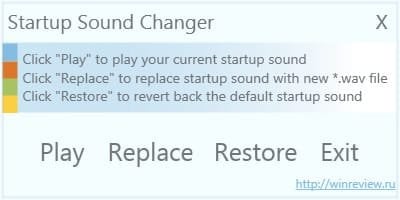
4. With "Startup Sound Changer" you can set a .wav file to replace the startup sound, play current startup sound, and restore the default startup sound. (see screenshot below) ssc.jpg


OPTION TWO

To Manually Change Startup Sound in Windows 7

1. Do step 2 or 3 below for what you would like to do.

2. To Restore Default Startup Sound in Windows 7

   Note
If you lost your backup or didn't create one, then here's a copy of the default startup sound .wav file that you could use to restore it with using step 3 below.


Download


A) Copy the default backup imageres_original.dll file (step 3O below) to your desktop.

B) Right click on the imageres_original.dll file and click on Rename.

C) Rename it to imageres.dll and press enter.

D) Repeat steps 3Q to 3X below to restore this file.
3. To Change Startup Sound in Windows 7 A) In Windows Explorer, navigate to C:\Windows\System32\imageres.dll. (see screenshot below) Step1.jpg
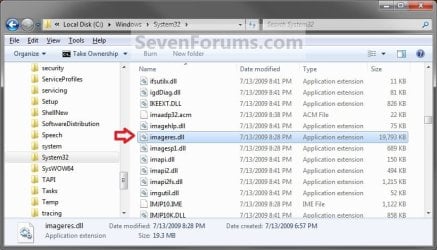
B) Right click on the imageres.dll file, and click on Copy. (see screenshot above)

C) Right click on your desktop, and click on Paste.

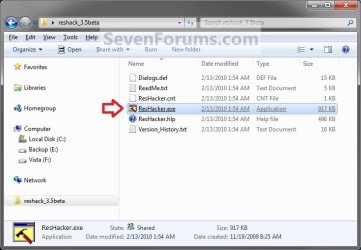
D) If you have not already, then download and install Resource Hacker.

E) Right click on the Resource Hacker shortcut in Start Menu - All Programs, then click on Run as administrator. (see screenshot below) Start_Menu.jpg
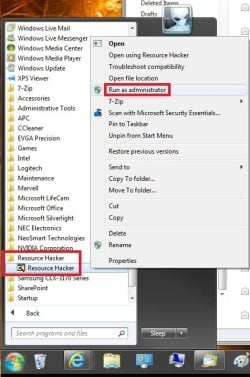
F) If prompted by UAC, then click on Yes.

G) In Resource Hacker, click on File and Open. (see screenshot below) Step4.jpg
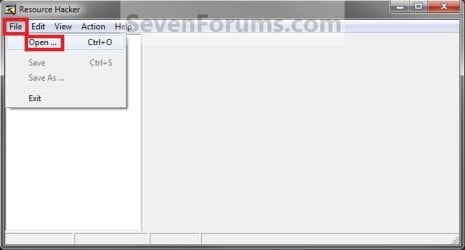
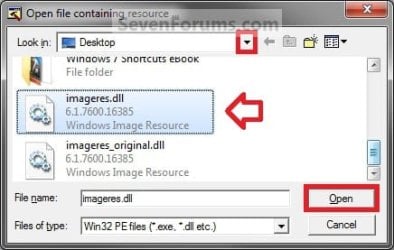
H) Navigate to and select the imageres.dll file copy on your desktop, and click on Open. (see screenshot below) Step5.jpg
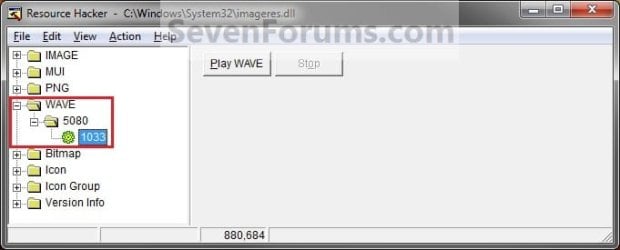
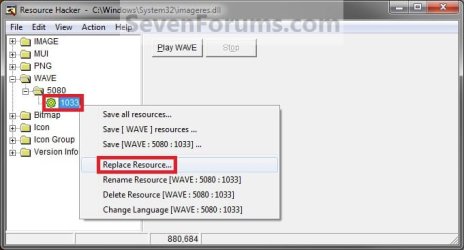
I) In the left pane of Resource Hacker, expand WAVE, and 5080, to 1033. (see screenshot below)
NOTE: If 5080 and 1033 is named something else, then that is fine as long as they are still under WAVE. Just substitute what you have instead in the steps below. You can click on the Play WAVE button to hear what the current startup sound is. Step6.jpg
J) Right click on 1033 and click on Replace Resource. (see screenshot below) Step7.jpg
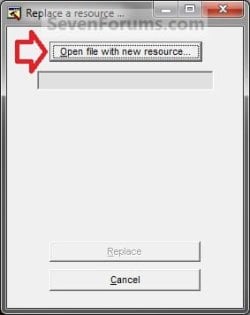
K) Click on Open file with new resource. (see screenshot below) Step8.jpg
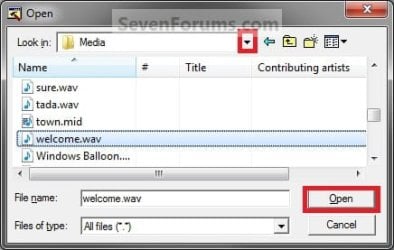
L) Navigate to and select the .wav file that you want for the startup sound, and click on Open. (see screenshot below)
NOTE: This .wav file must be unblocked and remain at this same location. For example, move or copy the .wav into the C:\Windows\Media. If you move or delete this .wav file, the startup sound will no longer play it. Step9.jpg
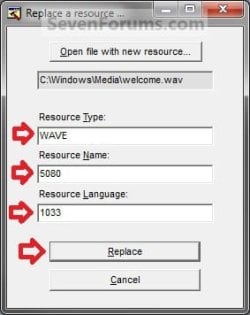
M) Under Resource Type, type WAVE. Under Resource Name, type 5080. Under Resource Language, type 1033. Click on the Replace button. (see screenshots below) Step10A.jpg
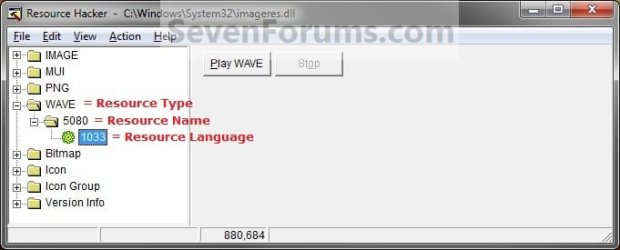
Step10B.jpg

N) Click on File and Save, then close Resource Hacker. (see screenshot below)
NOTE: You can click on the Play WAVE button first to hear and verify what the current startup sound is set as in this file. Step11.jpg
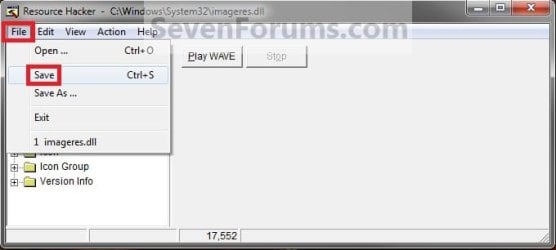
O) On your desktop, Move and Save the imageres_original.dll file to another safe location of your choice as a backup.

   Warning
THIS IS YOUR ONLY BACKUP OF THE ORIGINAL IMAGERES.DLL FILE WITH THE DEFAULT STARTUP SOUND.


P) Check to make sure that the Play Windows Startup sound is checked in Sound so that it is turned on. (see screenshot below) Sounds.jpg
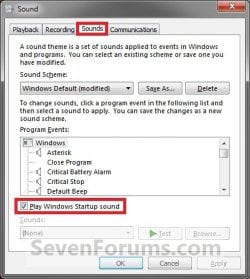
Q) Restart the computer and boot into the System Recovery Options (WinRE) screen, then select the Command Prompt option and press enter.
NOTE: If you do not have a retail Windows 7 installation disc, then you can create a System Repair Disc to use to boot to the System Recovery Screen instead. System_Recovery_Options.jpg
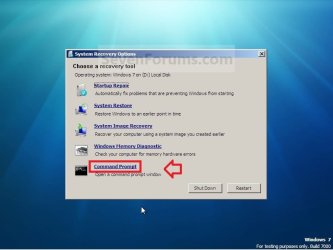
R) In the command prompt, type diskpart and press enter. (see screenshot below step 3V)

S) In the command prompt, type list volume and press enter. (see screenshot below step 3V)

T) Make note of what the drive letter is for your Windows 7 partition or drive. (see screenshot below step 3V)
NOTE: The Windows drive is not always C at boot. For example, mine is listed as D here. Look at the volume name and size to help you determine which letter is the one that you have Windows 7 installed on.

U) In the command prompt, type exit and press enter. (see screenshot below step 3V)

V) In the command prompt, type the command below and press enter. (see screenshot below)
NOTE: Substitute D in the command below with the drive letter you have listed in step 3T for your Windows 7, and substitute username in the command below with your user account name.

Code:
COPY /V /Y "[B][COLOR=red]D[/COLOR][/B]:\Users\[B][COLOR=red]username[/COLOR][/B]\Desktop\imageres.dll" "[B][COLOR=red]D[/COLOR][/B]:\Windows\System32"
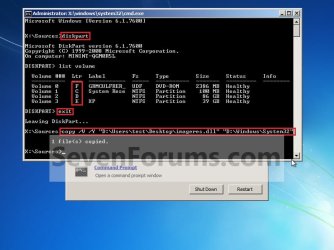
Command.jpg
W) Close the command prompt, and click on the Restart button. (see screenshot above)

X) As Windows 7 restarts, you will hear your new startup sound.

   Tip
If you ever wanted to change the startup sound again anytime after the first time you did this tutorial, you would only need to replace the .wav file at the exact same location in step 3L in Windows Explorer with a different .wav file that you want to use now instead, then rename the new .wav file with the exact same name as the old .wav file. No other steps would be required.

That's it,
Shawn


Attachments

Last edited:

The drive letter at boot is not always the same as in Windows. Be sure to do all of the steps at boot to help verify the drive letter is correct. Double check to make sure that the .wav file is unblocked, and that you have it's path correct in the modified .dll.
 

My Computer My Computer

At a glance

64-bit Windows 11 Pro for WorkstationsIntel i7-8700K OC'd to 5 GHz64 GB (4x16GB) G.SKILL TridentZ RGB DDR4 3600...ASUS ROG-STRIX-GTX1080TI-O11G-GAMING
Computer type
PC/Desktop
Computer Manufacturer/Model Number
Self built custom
OS
64-bit Windows 11 Pro for Workstations
CPU
Intel i7-8700K OC'd to 5 GHz
Motherboard
ASUS ROG Maximus XI Formula Z390
Memory
64 GB (4x16GB) G.SKILL TridentZ RGB DDR4 3600 MHz
Graphics Card(s)
ASUS ROG-STRIX-GTX1080TI-O11G-GAMING
Sound Card
Integrated
Monitor(s) Displays
2 x Samsung Odyssey G7 27"
Screen Resolution
2560x1440
Hard Drives
1TB Samsung 990 PRO M.2,
4TB Samsung 990 PRO PRO M.2,
TerraMaster F8 SSD Plus NAS
PSU
Seasonic Prime Titanium 850W
Case
Thermaltake Core P3
Cooling
Corsair Hydro H115i
Keyboard
Logitech wireless K800
Mouse
Logitech MX Master 4
Internet Speed
2 Gb/s Download and 100 Mb/s Upload
Antivirus
Malwarebyte Anti-Malware Premium
Browser
Google Chrome
Other Info
Logitech Z625 speaker system,
Logitech BRIO 4K Pro webcam,
HP Color LaserJet Pro MFP M477fdn,
APC SMART-UPS RT 1000 XL - SURT1000XLI,
Galaxy S23 Plus phone
Yes I listed the volumes and C: is my main partition with windows on it.

The .wav was unblocked but it was set to read only and its 514kb where the majority of them are under 200. Now that its set off read only Ill try it again. Ill update you on what happens
 
Last edited by a moderator:

My Computer My Computer

At a glance

Windows 7 Home x64
OS
Windows 7 Home x64
Ok, so I did a system restore to kind of wipe all that stuff I did. After the system restore, instead of playing nothing it would play my normal windows startup sound.

After that I re-did the instructions step by step to the letter. I unblocked my .wav I did the CMD copy via DVD. I moved the .wav to media. And the .wav isn't read only. I took ownership, I opened RH as admin and changed the file properly. The CMD said the file was copied and I restarted.

But now its going back to not playing any sound at all. It wont play my .wav for some reason.

Is there a file size limit? Its like 514 KB. I don't know what if anything Im doing wrong. I have been able to edit all sounds, startup messages, orb, boot screen, logoff messages ect. But this wont work.
 

My Computer My Computer

At a glance

Windows 7 Home x64
OS
Windows 7 Home x64
If .wav file had been converted from another audio format, then that could be the issue. If you like, try another smaller .wav file as a test to see if it may just be the one that you are using.
 

My Computer My Computer

At a glance

64-bit Windows 11 Pro for WorkstationsIntel i7-8700K OC'd to 5 GHz64 GB (4x16GB) G.SKILL TridentZ RGB DDR4 3600...ASUS ROG-STRIX-GTX1080TI-O11G-GAMING
Computer type
PC/Desktop
Computer Manufacturer/Model Number
Self built custom
OS
64-bit Windows 11 Pro for Workstations
CPU
Intel i7-8700K OC'd to 5 GHz
Motherboard
ASUS ROG Maximus XI Formula Z390
Memory
64 GB (4x16GB) G.SKILL TridentZ RGB DDR4 3600 MHz
Graphics Card(s)
ASUS ROG-STRIX-GTX1080TI-O11G-GAMING
Sound Card
Integrated
Monitor(s) Displays
2 x Samsung Odyssey G7 27"
Screen Resolution
2560x1440
Hard Drives
1TB Samsung 990 PRO M.2,
4TB Samsung 990 PRO PRO M.2,
TerraMaster F8 SSD Plus NAS
PSU
Seasonic Prime Titanium 850W
Case
Thermaltake Core P3
Cooling
Corsair Hydro H115i
Keyboard
Logitech wireless K800
Mouse
Logitech MX Master 4
Internet Speed
2 Gb/s Download and 100 Mb/s Upload
Antivirus
Malwarebyte Anti-Malware Premium
Browser
Google Chrome
Other Info
Logitech Z625 speaker system,
Logitech BRIO 4K Pro webcam,
HP Color LaserJet Pro MFP M477fdn,
APC SMART-UPS RT 1000 XL - SURT1000XLI,
Galaxy S23 Plus phone
Ok the two files I am using.

File name: WTU.wav
Location: C:\Users\<username>\Desktop\Station 13-S806 Data\Background stuff
Size: 349 KB
Works fine.
Was a .mp3 converted to .wav in audacity.

File name: WTUR.wav
Location #1: C:\Users\<username>\Desktop\Station 13-S806 Data\Background stuff
Location #2: C:\Windows\Media
Size: 572 KB
Doesn't work.
Was originally a .wav
In media it isn't a shortcut. I copy/pasted it into that folder.

Both files are unblocked, not set as read only.
They both say the same thing, but WTUR is cleaner.
 
Last edited:

My Computer My Computer

At a glance

Windows 7 Home x64
OS
Windows 7 Home x64
I used resourcehacker only, to change my startup sound on my laptop and desktop.

I recently reinstalled the OS on the desktop and I obviously would like to change the startup sound again.
I didn't save my custom startup sound anywhere, it's only located in imageres.dll

So, I open imageres.dll on my laptop and find that the sound located there is the original sound. Well, I then open imageres.dll in the sysWOW64 folder instead but the result is the same.

I'm confused....

If the startup sound isn't located in either imageres.dll files but it plays fine on startup, then where can I find it?
 

My Computer My Computer

At a glance

Windows 7 Ultimate x64Intel Core i7 3820 5200 MHzCorsair LP Vengeance 4x4 1600 MHz3x EVGA GTX 670 FTW
Computer Manufacturer/Model Number
Homemade
OS
Windows 7 Ultimate x64
CPU
Intel Core i7 3820 5200 MHz
Motherboard
ASUS Rampage IV Formula
Memory
Corsair LP Vengeance 4x4 1600 MHz
Graphics Card(s)
3x EVGA GTX 670 FTW
Sound Card
Build-in
Monitor(s) Displays
3x 22" Samsung Syncmaster 2233RZ
Screen Resolution
5040*1050
Hard Drives
1 240 GB SSD
1TB HDD Green-something - 32MB cache
1TB HDD Green-something - 64MB cache
PSU
Silverstone Strider 1500W
Case
NZXT Phantom
Cooling
Water
Keyboard
Microsoft Digital Media Keyboard 3000
Mouse
Razer Naga, blue
Internet Speed
10/1
Hello Flagstang,

The startup sound is only referenced in the imageres.dll file. That's why we must use the steps exactly as in the tutorial to change this reference to the wav file saved on the computer we want played instead. :)
 

My Computer My Computer

At a glance

64-bit Windows 11 Pro for WorkstationsIntel i7-8700K OC'd to 5 GHz64 GB (4x16GB) G.SKILL TridentZ RGB DDR4 3600...ASUS ROG-STRIX-GTX1080TI-O11G-GAMING
Computer type
PC/Desktop
Computer Manufacturer/Model Number
Self built custom
OS
64-bit Windows 11 Pro for Workstations
CPU
Intel i7-8700K OC'd to 5 GHz
Motherboard
ASUS ROG Maximus XI Formula Z390
Memory
64 GB (4x16GB) G.SKILL TridentZ RGB DDR4 3600 MHz
Graphics Card(s)
ASUS ROG-STRIX-GTX1080TI-O11G-GAMING
Sound Card
Integrated
Monitor(s) Displays
2 x Samsung Odyssey G7 27"
Screen Resolution
2560x1440
Hard Drives
1TB Samsung 990 PRO M.2,
4TB Samsung 990 PRO PRO M.2,
TerraMaster F8 SSD Plus NAS
PSU
Seasonic Prime Titanium 850W
Case
Thermaltake Core P3
Cooling
Corsair Hydro H115i
Keyboard
Logitech wireless K800
Mouse
Logitech MX Master 4
Internet Speed
2 Gb/s Download and 100 Mb/s Upload
Antivirus
Malwarebyte Anti-Malware Premium
Browser
Google Chrome
Other Info
Logitech Z625 speaker system,
Logitech BRIO 4K Pro webcam,
HP Color LaserJet Pro MFP M477fdn,
APC SMART-UPS RT 1000 XL - SURT1000XLI,
Galaxy S23 Plus phone
I understand that I have not went into CMD mode like in the tutorial, but copied the .dll file directly from the desktop to system32 without any problems. A restart and the new sound was played just fine back then.

I just want to know where the file is located now. It's not in any of the imageres.dll files but plays fine on startup.
If the sound file has been reduced to #%"#5&%"42"¤3%€& or something, then it doesn't matter. I just can't remember where I found that sound in the first place. It must be on the computer somewhere in order to be played, right?
 

My Computer My Computer

At a glance

Windows 7 Ultimate x64Intel Core i7 3820 5200 MHzCorsair LP Vengeance 4x4 1600 MHz3x EVGA GTX 670 FTW
Computer Manufacturer/Model Number
Homemade
OS
Windows 7 Ultimate x64
CPU
Intel Core i7 3820 5200 MHz
Motherboard
ASUS Rampage IV Formula
Memory
Corsair LP Vengeance 4x4 1600 MHz
Graphics Card(s)
3x EVGA GTX 670 FTW
Sound Card
Build-in
Monitor(s) Displays
3x 22" Samsung Syncmaster 2233RZ
Screen Resolution
5040*1050
Hard Drives
1 240 GB SSD
1TB HDD Green-something - 32MB cache
1TB HDD Green-something - 64MB cache
PSU
Silverstone Strider 1500W
Case
NZXT Phantom
Cooling
Water
Keyboard
Microsoft Digital Media Keyboard 3000
Mouse
Razer Naga, blue
Internet Speed
10/1
It's going to be wherever you saved the .wav file at to use instead of the default startup sound. Do you know the name of the .wav file you used?

If not, then I suppose you could search the Computer window with *.wav in the search box into see if it you may spot it in the search results.
 

My Computer My Computer

At a glance

64-bit Windows 11 Pro for WorkstationsIntel i7-8700K OC'd to 5 GHz64 GB (4x16GB) G.SKILL TridentZ RGB DDR4 3600...ASUS ROG-STRIX-GTX1080TI-O11G-GAMING
Computer type
PC/Desktop
Computer Manufacturer/Model Number
Self built custom
OS
64-bit Windows 11 Pro for Workstations
CPU
Intel i7-8700K OC'd to 5 GHz
Motherboard
ASUS ROG Maximus XI Formula Z390
Memory
64 GB (4x16GB) G.SKILL TridentZ RGB DDR4 3600 MHz
Graphics Card(s)
ASUS ROG-STRIX-GTX1080TI-O11G-GAMING
Sound Card
Integrated
Monitor(s) Displays
2 x Samsung Odyssey G7 27"
Screen Resolution
2560x1440
Hard Drives
1TB Samsung 990 PRO M.2,
4TB Samsung 990 PRO PRO M.2,
TerraMaster F8 SSD Plus NAS
PSU
Seasonic Prime Titanium 850W
Case
Thermaltake Core P3
Cooling
Corsair Hydro H115i
Keyboard
Logitech wireless K800
Mouse
Logitech MX Master 4
Internet Speed
2 Gb/s Download and 100 Mb/s Upload
Antivirus
Malwarebyte Anti-Malware Premium
Browser
Google Chrome
Other Info
Logitech Z625 speaker system,
Logitech BRIO 4K Pro webcam,
HP Color LaserJet Pro MFP M477fdn,
APC SMART-UPS RT 1000 XL - SURT1000XLI,
Galaxy S23 Plus phone
In my first post I said: "I didn't save my custom startup sound anywhere, it's only located in imageres.dll" which means that after I had loaded the sound into imageres.dll I deleted the sound file from the computer.

However I tried to do a 1033, 5080 and a .wav search from within "computer" and no usable results came up.

Basing on what you say to my responses, I'd assume you don't have a clue of where the sound file could be located at since it's not in imageres.dll.

I guess I'll just have to go through hours of searching the BBC's documentaries again :(
 

My Computer My Computer

At a glance

Windows 7 Ultimate x64Intel Core i7 3820 5200 MHzCorsair LP Vengeance 4x4 1600 MHz3x EVGA GTX 670 FTW
Computer Manufacturer/Model Number
Homemade
OS
Windows 7 Ultimate x64
CPU
Intel Core i7 3820 5200 MHz
Motherboard
ASUS Rampage IV Formula
Memory
Corsair LP Vengeance 4x4 1600 MHz
Graphics Card(s)
3x EVGA GTX 670 FTW
Sound Card
Build-in
Monitor(s) Displays
3x 22" Samsung Syncmaster 2233RZ
Screen Resolution
5040*1050
Hard Drives
1 240 GB SSD
1TB HDD Green-something - 32MB cache
1TB HDD Green-something - 64MB cache
PSU
Silverstone Strider 1500W
Case
NZXT Phantom
Cooling
Water
Keyboard
Microsoft Digital Media Keyboard 3000
Mouse
Razer Naga, blue
Internet Speed
10/1
If you ever find your custom .wav file you originally used, be sure to keep a backup of it so not to have to go through all this again. :(
 

My Computer My Computer

At a glance

64-bit Windows 11 Pro for WorkstationsIntel i7-8700K OC'd to 5 GHz64 GB (4x16GB) G.SKILL TridentZ RGB DDR4 3600...ASUS ROG-STRIX-GTX1080TI-O11G-GAMING
Computer type
PC/Desktop
Computer Manufacturer/Model Number
Self built custom
OS
64-bit Windows 11 Pro for Workstations
CPU
Intel i7-8700K OC'd to 5 GHz
Motherboard
ASUS ROG Maximus XI Formula Z390
Memory
64 GB (4x16GB) G.SKILL TridentZ RGB DDR4 3600 MHz
Graphics Card(s)
ASUS ROG-STRIX-GTX1080TI-O11G-GAMING
Sound Card
Integrated
Monitor(s) Displays
2 x Samsung Odyssey G7 27"
Screen Resolution
2560x1440
Hard Drives
1TB Samsung 990 PRO M.2,
4TB Samsung 990 PRO PRO M.2,
TerraMaster F8 SSD Plus NAS
PSU
Seasonic Prime Titanium 850W
Case
Thermaltake Core P3
Cooling
Corsair Hydro H115i
Keyboard
Logitech wireless K800
Mouse
Logitech MX Master 4
Internet Speed
2 Gb/s Download and 100 Mb/s Upload
Antivirus
Malwarebyte Anti-Malware Premium
Browser
Google Chrome
Other Info
Logitech Z625 speaker system,
Logitech BRIO 4K Pro webcam,
HP Color LaserJet Pro MFP M477fdn,
APC SMART-UPS RT 1000 XL - SURT1000XLI,
Galaxy S23 Plus phone
Flagstang, there is another copy of the original imageres.dll file. It's located in the Winsxs sub folders. The folder with "amd64" prefix is the one you want for a 64 bit installation, and "x86" prefix for a 32 bit installation. This is of course assuming you didn't replace those.
 

My Computer My Computer

At a glance

Windows 7 Home Premium x64AMD Vision A8-3500M 4 Core8GbAMD Radeon HD 6620G
Computer type
Laptop
Computer Manufacturer/Model Number
HP Pavillion dv6 (dv6-6165dx)
OS
Windows 7 Home Premium x64
CPU
AMD Vision A8-3500M 4 Core
Motherboard
AMD
Memory
8Gb
Graphics Card(s)
AMD Radeon HD 6620G
Screen Resolution
1366x768
Hard Drives
Hitachi Travelstar 500Gb
Internet Speed
Realtek RTL8188CE 802.11b/g/n
Will be trying this very soon, thank you brink
 

My Computer My Computer

At a glance

windows 7 64 bit
OS
windows 7 64 bit
Why does everybody want to hack their dll...use software instead.

Well, I don't know about you guys, but I hate those silly hacks to pieces.....

Murphy's Law says "if something can go wrong, it probably will."

So, I prefer the easy way to do things.

That's why I downloaded & use this freebee software


'Startup Sound Changer'


So, don't waste your time with those silly grief infested hacks that usually don't work or reset to default. :)
 

My Computer My Computer

At a glance

WINDOWS 7 HOME PREMIUMIntel Celeron Dual Core8gbNVIDA GFORCE 9500 GT
Computer Manufacturer/Model Number
COMPAQ PRESARIO CQ57-105TU
OS
WINDOWS 7 HOME PREMIUM
CPU
Intel Celeron Dual Core
Memory
8gb
Graphics Card(s)
NVIDA GFORCE 9500 GT
Sound Card
ON BOARD
Monitor(s) Displays
LAPTOP
Hard Drives
500 GB INTERNAL, 1TB EXTERNAL
Case
LAPTOP
Cooling
N/A
^ Yes Bobby, that one works. It replaces only the single imageres.dll file in use. Anytime Windows detects that it is changed (like with an SFC scan), the system copy will overwrite it.
 

My Computer My Computer

At a glance

Windows 7 Home Premium x64AMD Vision A8-3500M 4 Core8GbAMD Radeon HD 6620G
Computer type
Laptop
Computer Manufacturer/Model Number
HP Pavillion dv6 (dv6-6165dx)
OS
Windows 7 Home Premium x64
CPU
AMD Vision A8-3500M 4 Core
Motherboard
AMD
Memory
8Gb
Graphics Card(s)
AMD Radeon HD 6620G
Screen Resolution
1366x768
Hard Drives
Hitachi Travelstar 500Gb
Internet Speed
Realtek RTL8188CE 802.11b/g/n
Correct you are. Thank goodness it takes only 10 seconds to correct again using the program.

How often does the average user (non-power user/technician) use the SFC Scan?

I've used it only once in the last 3 years. Actually I forgot what it was, so I had to google it to refresh my memory.
BigGrin02.gif


Nobody else in my group even knew what a SFC scan was, much less how to use it.

Thanks for the heads up.
awright005.gif


If I ever do another SFC Scan I hope I can remember this!
big%20laugh%20007.gif
 
Last edited:

My Computer My Computer

At a glance

WINDOWS 7 HOME PREMIUMIntel Celeron Dual Core8gbNVIDA GFORCE 9500 GT
Computer Manufacturer/Model Number
COMPAQ PRESARIO CQ57-105TU
OS
WINDOWS 7 HOME PREMIUM
CPU
Intel Celeron Dual Core
Memory
8gb
Graphics Card(s)
NVIDA GFORCE 9500 GT
Sound Card
ON BOARD
Monitor(s) Displays
LAPTOP
Hard Drives
500 GB INTERNAL, 1TB EXTERNAL
Case
LAPTOP
Cooling
N/A
All that BS to just change my startup sound, when it just took click-click in XP?!
Gee, I never had any malware problem with that OS!
Every day is something new to hate about 7 taking control out of the hands of users. Jeez Louise.
:mad:
 

My Computer My Computer

At a glance

Win10 Pro 64-bitAMD Ryzen 7 3800X32 GB Kingston DDR4-2666MSI nVidia GT 710 (2GB)
Computer type
PC/Desktop
Computer Manufacturer/Model Number
Self-Built
OS
Win10 Pro 64-bit
CPU
AMD Ryzen 7 3800X
Motherboard
Gigabyte X570 UD
Memory
32 GB Kingston DDR4-2666
Graphics Card(s)
MSI nVidia GT 710 (2GB)
Sound Card
Creative Audigy FX 5.1
Monitor(s) Displays
ViewSonic VG2439Smh 24"
Screen Resolution
1920x1080
Hard Drives
3xWD1TB; 1xSeagate 1TB... all spinning rust
PSU
EVGA 100-W1-0500-KR (500w)
Case
SilverStone PS10 (modified)
Cooling
CPU:AMD Wraith Prism. Case:3x Noctua 120mm
Keyboard
Compaq Professional PS/2
Mouse
Microsoft Basic Optical Mouse 2.0
Internet Speed
Fiber 1Gbit/sec down/up
Antivirus
Avast Free
Browser
FF, Chrome
Other Info
2x LG GH24NSC0 DVD burners, Mackie CR3 monitor speakers
Thanks for the heads up.
awright005.gif
You're welcome. And thanks for the rep! :geek:
How often does the average user (non-power user/technician) use the SFC Scan?
Probably like never... but aside from SFC scan, there could be other Windows updates that might detect the imageres.dll out of sync and replace it. It's just good to be aware of this. In any case, like you said it's very easy to apply the change again. ;)


Yeah, you're right OM... it's a pain that Microsoft singled out the start-up sound from being accessible in the sound control panel. They should have provided an alternate means of changing it, if they wanted the average person to leave it alone. I'm curious what the deal is with Windows 8...
 

My Computer My Computer

At a glance

Windows 7 Home Premium x64AMD Vision A8-3500M 4 Core8GbAMD Radeon HD 6620G
Computer type
Laptop
Computer Manufacturer/Model Number
HP Pavillion dv6 (dv6-6165dx)
OS
Windows 7 Home Premium x64
CPU
AMD Vision A8-3500M 4 Core
Motherboard
AMD
Memory
8Gb
Graphics Card(s)
AMD Radeon HD 6620G
Screen Resolution
1366x768
Hard Drives
Hitachi Travelstar 500Gb
Internet Speed
Realtek RTL8188CE 802.11b/g/n
Incidentally Bobby, your avatar made me laugh... I remember that "paper men" animated GIF from a few years back. I once made a variation of it:

Paper-Men_ST.gif


:D
 

My Computer My Computer

At a glance

Windows 7 Home Premium x64AMD Vision A8-3500M 4 Core8GbAMD Radeon HD 6620G
Computer type
Laptop
Computer Manufacturer/Model Number
HP Pavillion dv6 (dv6-6165dx)
OS
Windows 7 Home Premium x64
CPU
AMD Vision A8-3500M 4 Core
Motherboard
AMD
Memory
8Gb
Graphics Card(s)
AMD Radeon HD 6620G
Screen Resolution
1366x768
Hard Drives
Hitachi Travelstar 500Gb
Internet Speed
Realtek RTL8188CE 802.11b/g/n
Im having some super problems with this. Im using Windows 7 Ultimate x64. So when i move the imageres to my desktop and change the sound, it works! it plays my sound. But when i move it back into system32, and i open it with res hack, its the default sound. Why is it doing this?
 

My Computer My Computer

At a glance

Windows 7 Ultimate x64
Computer type
PC/Desktop
OS
Windows 7 Ultimate x64
Back
Top