Solved Windows 7 installation hangs at "Completing Installation” - I’m at my

Slackjaw190

New member
Local time
1:26 AM
Messages
9
Windows 7 installation hangs at "Completing Installation” - I’m at my

Comp Spec

CPU – E6600
GPU-ATI 4780
MB - Gigabyte 965P-DS3P (rev 3.3 I think although manual says 2.0)
Ram - GeIL 2GB (2x1GB) DDR2 PC2-6400C4 800MHz

What should have been a straight forward installation of a new SSD (that I have done before) has turned into a nightmare.

First of all I attached the hardrive and installed windows 7 without a hitch. Then for some reason the installation got corrupted (I think in my haste I restarted the comp while it was installing a million updates). No problem I thought, I’ll format the hdd and install it again. This is where things started to go wrong.


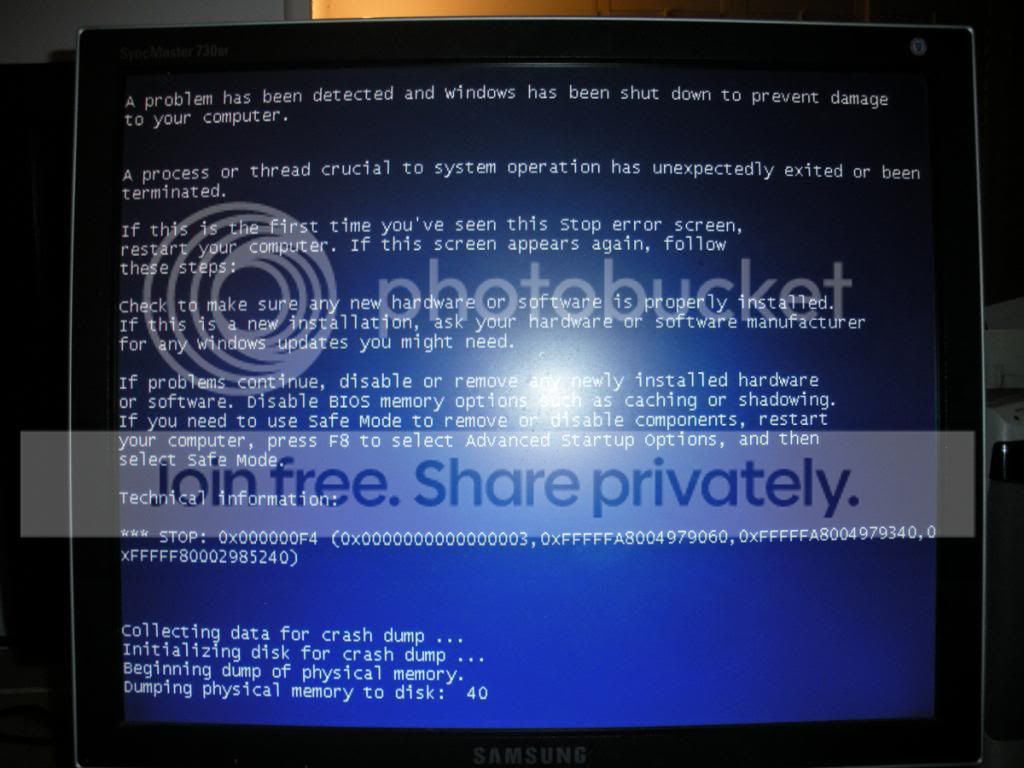
First of all I got the bootmgr missing error when trying to install from the disk so I created a bootable usb pen and everything seemed to be going fine, however when the system reboots it hangs on completing Installation and after 5 mins or so I get the BSoD (restarts too quick of me to read) and the comp restarts. I’ve spent hours/days trawling the forums and trying various fixes but none seem to work for me


:cry:

What I’ve tried

- AHCI is enabled
- Swapped an usb keyboard for an old one (whatever they’re called)
- Disconnected everything when window reinstall during installation that I can (keyboard, mouse
- Disconected everything I Can from the MB – wireless adapter, 3 sticks of ram (Left with 1 stick of 1GB), optical drive
- Swapped gfx cards
- Booted in safe mode as far as I could and tried to disable the VGA display adapters.
- Run RAM tests – passed also running at the recommended voltage of 2.1
- Used Intels toolbox to run a drive diagnostic scan – all fine.
- Run dban to fully clear the hdd
- Tried installing drivers during W7 installation
- Typing start explorer.exe in the cmd box
- Every SATA port

I really don’t know what else to try. An hour before Windows installed flawlessly on the same drive. Also if I reset bios defaults and plug the old hdd back in the computer boots and runs fine.

Any suggestions?
 

My Computer My Computer

At a glance

Windows 7 Pro x64Intel E6600GeIL 4GB (4x1GB) DDR2 PC2-6400C4 800MHzATI 4870
OS
Windows 7 Pro x64
CPU
Intel E6600
Motherboard
MB - Gigabyte 965P-DS3P (rev 3.3)
Memory
GeIL 4GB (4x1GB) DDR2 PC2-6400C4 800MHz
Graphics Card(s)
ATI 4870
Sound Card
N/A
Hard Drives
Intel 520 120GB
Unplug all other HD's and peripherals,

Boot into BIOS setup, reset to defaults, save changes. Next if an EFI BIOS, enable Legacy BIOS, set DVD drive first to boot, HD second. Then set SATA controller to AHCI. Save changes and Exit.

Then boot into installer DVD or flash stick burned or written using tool and latest ISO for your licensed OS version here.

At first installer screen Press Shift + F10 to open a Command Box, type:

DISKPART
LIST DISK
SELECT DISK 0 (after confirming Windows 7 target HD #)
CLEAN
CREATE PARTITION PRIMARY SIZE=102400 (for 100gb partition, adjust as desired)
FORMAT FS=NTFS LABEL="WINDOWS 7"
ACTIVE
EXIT
EXIT

Next click Install Now, then Custom install to Clean Install Windows 7 to the partition you created. If it fails then report back at which step and the verbatim error message.

In addition read over these steps to understand the tools and methods which work best to get and maintain a perfect Clean Reinstall - Factory OEM Windows 7. The steps are the same for retail.

After install you can adjust partition size or Create new partitions for data, etc. in Disk Mgmt. We are creating the partition here to mark it Active which overcomes certain install failures.
 
Hi,
Thanks for the reply.
Still doesn’t seem to work. I followed your instructions and I still get exactly the same problem. The only bit I couldn't do was put the "" bits in "WINDOWS 7" as the default keyboard layout seems to be US and I couldn't find them.
 

My Computer My Computer

At a glance

Windows 7 Pro x64Intel E6600GeIL 4GB (4x1GB) DDR2 PC2-6400C4 800MHzATI 4870
OS
Windows 7 Pro x64
CPU
Intel E6600
Motherboard
MB - Gigabyte 965P-DS3P (rev 3.3)
Memory
GeIL 4GB (4x1GB) DDR2 PC2-6400C4 800MHz
Graphics Card(s)
ATI 4870
Sound Card
N/A
Hard Drives
Intel 520 120GB
Hi Slackjaw190, Try shift +@ that should give you the quotation marks ,once you are up and running you can set your keyboard to English UK :)
 

My Computer My Computer

At a glance

win 7 ultimate32bit, Win8.1pro wmc 32bitamd phenom x4 9600corsair twinxs 2x2gb2x nvidia 1gb 8500gt
Computer type
PC/Desktop
Computer Manufacturer/Model Number
self build
OS
win 7 ultimate32bit, Win8.1pro wmc 32bit
CPU
amd phenom x4 9600
Motherboard
asus m2n32-sli deluxe
Memory
corsair twinxs 2x2gb
Graphics Card(s)
2x nvidia 1gb 8500gt
Sound Card
onboard
Monitor(s) Displays
23" PB Viseo 233d
Screen Resolution
1920x1080
Hard Drives
maxtor sata 500gb
maxtor sata 320gb
fujitsu sata200gb
PSU
oryxx tornado 750w
Case
thermaltake xaser lll
Cooling
artic freezer64 pro + 7 case fans
Thanks,

Still didn't make any difference though
 

My Computer My Computer

At a glance

Windows 7 Pro x64Intel E6600GeIL 4GB (4x1GB) DDR2 PC2-6400C4 800MHzATI 4870
OS
Windows 7 Pro x64
CPU
Intel E6600
Motherboard
MB - Gigabyte 965P-DS3P (rev 3.3)
Memory
GeIL 4GB (4x1GB) DDR2 PC2-6400C4 800MHz
Graphics Card(s)
ATI 4870
Sound Card
N/A
Hard Drives
Intel 520 120GB

My Computer My Computer

At a glance

win 7 ultimate32bit, Win8.1pro wmc 32bitamd phenom x4 9600corsair twinxs 2x2gb2x nvidia 1gb 8500gt
Computer type
PC/Desktop
Computer Manufacturer/Model Number
self build
OS
win 7 ultimate32bit, Win8.1pro wmc 32bit
CPU
amd phenom x4 9600
Motherboard
asus m2n32-sli deluxe
Memory
corsair twinxs 2x2gb
Graphics Card(s)
2x nvidia 1gb 8500gt
Sound Card
onboard
Monitor(s) Displays
23" PB Viseo 233d
Screen Resolution
1920x1080
Hard Drives
maxtor sata 500gb
maxtor sata 320gb
fujitsu sata200gb
PSU
oryxx tornado 750w
Case
thermaltake xaser lll
Cooling
artic freezer64 pro + 7 case fans
Thanks for the suggestions guys.

I'll give the SysPrep method ago before transferring it.

I need more time then I got atm as it looks quite complicated. Is it method 2 I need?

ty

Slack
 

My Computer My Computer

At a glance

Windows 7 Pro x64Intel E6600GeIL 4GB (4x1GB) DDR2 PC2-6400C4 800MHzATI 4870
OS
Windows 7 Pro x64
CPU
Intel E6600
Motherboard
MB - Gigabyte 965P-DS3P (rev 3.3)
Memory
GeIL 4GB (4x1GB) DDR2 PC2-6400C4 800MHz
Graphics Card(s)
ATI 4870
Sound Card
N/A
Hard Drives
Intel 520 120GB
An easier method is using Paragon Virtualization Manager.

SIW2 knows a way to write it to bootable CD so it performs like Paragon Adaptive Restore CD which is no longer available except for those of us who have a copy.
 
Before I start, as I can't seem to find a dummies guide to Paragon

I put the SDD into my other comp and disconnect all of its current hdds

Install Windows 7

Install Paragon and run the ‘Adjust to different hardware’ option

Pick Windows 7 Pro

Switch off comp and reinsert hdd to other com that Windows wouldn’t install on and it will work?
 

My Computer My Computer

At a glance

Windows 7 Pro x64Intel E6600GeIL 4GB (4x1GB) DDR2 PC2-6400C4 800MHzATI 4870
OS
Windows 7 Pro x64
CPU
Intel E6600
Motherboard
MB - Gigabyte 965P-DS3P (rev 3.3)
Memory
GeIL 4GB (4x1GB) DDR2 PC2-6400C4 800MHz
Graphics Card(s)
ATI 4870
Sound Card
N/A
Hard Drives
Intel 520 120GB
As far as I know the Paragon Virtualization PNP Adjust operation to adjust Win7 to boot on different hardware needs to be done on new hardware. This is why I said you may need to find a way to put the app on a CD as it was in it's earlier Paragon Adaptive Restore form.

But since we are allowed to link to Partition Wizard's older freeware version 4.2 CD to non-destructively convert Dynamic disks back to basic, here is a download link to the older freeware Paragon Adaptive Restore CD ISO to have it in bootable CD form. Boot on target hardware to run PNP Adapt, providing drivers if prompted.
 
Last edited:
I'll have a go tomoz, looks rather confusing to me atm.

I managed to get a screen shot/photo of the BSOD message if it helps.

DSCN1020_zpscacd60bf.jpg
 

My Computer My Computer

At a glance

Windows 7 Pro x64Intel E6600GeIL 4GB (4x1GB) DDR2 PC2-6400C4 800MHzATI 4870
OS
Windows 7 Pro x64
CPU
Intel E6600
Motherboard
MB - Gigabyte 965P-DS3P (rev 3.3)
Memory
GeIL 4GB (4x1GB) DDR2 PC2-6400C4 800MHz
Graphics Card(s)
ATI 4870
Sound Card
N/A
Hard Drives
Intel 520 120GB
Hi,

I have seen an instance where the 0x00F4 stop code was fixed by updating the firmware of the SSD (in this case it was a Crucial). I recommend checking to see if a firmware is available for your SSD....what type is it?).

http://forums.majorgeeks.com/showthread.php?t=271137

Regards,
Golden
 

My Computer My Computer

At a glance

Windows 10 Pro x64 ; Xubuntu x64Intel i7 860 @ 2.80 GHz O/C'ed to 4.0GHz16GB Corsair Vengance DDR3 @ 661 MHz Dual Cha...EVGA NVidia GTX 560 1024MB
Computer type
PC/Desktop
Computer Manufacturer/Model Number
Golden Mk. I.4
OS
Windows 10 Pro x64 ; Xubuntu x64
CPU
Intel i7 860 @ 2.80 GHz O/C'ed to 4.0GHz
Motherboard
Gigabyte P55A-UD3R Rev.1. Award BIOS F13
Memory
16GB Corsair Vengance DDR3 @ 661 MHz Dual Channel (9-9-9-24)
Graphics Card(s)
EVGA NVidia GTX 560 1024MB
Sound Card
Realtek Integrated
Monitor(s) Displays
Dual Samsung SyncMaster 2494HS
Screen Resolution
1920*1080 and 1920*1080
Hard Drives
1*Samsung 840 EVO 120GB SSD;
1*OCZ Vertex 2 60GB SSD;
2*Samsung F3 SpinPoint 1TB in RAID0;
1*Samsung F1 SpinPoint 1TB;
2*Western Digital 1TB External USB 3.0
1*Western Digital 500GB External USB 3.0
1*Seagate 500GB External USB 2.0
PSU
Thermaltake ToughPower QFan 750W
Case
Thermaltake Element S VK60001W2Z
Cooling
Corsair H60 Water Cooling, 2*230mm and 2*80mm case fans
Keyboard
Logitech G110
Mouse
Logitech MX518
It's an Intel 520 120GB.

According to Intel Toolbox the Firmware is up to date
 

My Computer My Computer

At a glance

Windows 7 Pro x64Intel E6600GeIL 4GB (4x1GB) DDR2 PC2-6400C4 800MHzATI 4870
OS
Windows 7 Pro x64
CPU
Intel E6600
Motherboard
MB - Gigabyte 965P-DS3P (rev 3.3)
Memory
GeIL 4GB (4x1GB) DDR2 PC2-6400C4 800MHz
Graphics Card(s)
ATI 4870
Sound Card
N/A
Hard Drives
Intel 520 120GB
It works:D.

After hours/day of frustration I’m in
I don’t really know how but I just thought I could try a few basic things. I used a different cable and inserted it in the pink (Intel?) SATA port (think I’ve tried this before however)
Guess what it installsJ
Thanks for all your help and suggestions guys.
 

My Computer My Computer

At a glance

Windows 7 Pro x64Intel E6600GeIL 4GB (4x1GB) DDR2 PC2-6400C4 800MHzATI 4870
OS
Windows 7 Pro x64
CPU
Intel E6600
Motherboard
MB - Gigabyte 965P-DS3P (rev 3.3)
Memory
GeIL 4GB (4x1GB) DDR2 PC2-6400C4 800MHz
Graphics Card(s)
ATI 4870
Sound Card
N/A
Hard Drives
Intel 520 120GB
:thumbsup:
 

My Computer My Computer

At a glance

Windows 10 Pro x64 ; Xubuntu x64Intel i7 860 @ 2.80 GHz O/C'ed to 4.0GHz16GB Corsair Vengance DDR3 @ 661 MHz Dual Cha...EVGA NVidia GTX 560 1024MB
Computer type
PC/Desktop
Computer Manufacturer/Model Number
Golden Mk. I.4
OS
Windows 10 Pro x64 ; Xubuntu x64
CPU
Intel i7 860 @ 2.80 GHz O/C'ed to 4.0GHz
Motherboard
Gigabyte P55A-UD3R Rev.1. Award BIOS F13
Memory
16GB Corsair Vengance DDR3 @ 661 MHz Dual Channel (9-9-9-24)
Graphics Card(s)
EVGA NVidia GTX 560 1024MB
Sound Card
Realtek Integrated
Monitor(s) Displays
Dual Samsung SyncMaster 2494HS
Screen Resolution
1920*1080 and 1920*1080
Hard Drives
1*Samsung 840 EVO 120GB SSD;
1*OCZ Vertex 2 60GB SSD;
2*Samsung F3 SpinPoint 1TB in RAID0;
1*Samsung F1 SpinPoint 1TB;
2*Western Digital 1TB External USB 3.0
1*Western Digital 500GB External USB 3.0
1*Seagate 500GB External USB 2.0
PSU
Thermaltake ToughPower QFan 750W
Case
Thermaltake Element S VK60001W2Z
Cooling
Corsair H60 Water Cooling, 2*230mm and 2*80mm case fans
Keyboard
Logitech G110
Mouse
Logitech MX518
Very true gregrocker.

I had reinserted the cable many times, but never tried a different cable(don't forget I did have a sucessful installation) and I had never tried the Intel SATA port as the yellow ones are recommended.
 

My Computer My Computer

At a glance

Windows 7 Pro x64Intel E6600GeIL 4GB (4x1GB) DDR2 PC2-6400C4 800MHzATI 4870
OS
Windows 7 Pro x64
CPU
Intel E6600
Motherboard
MB - Gigabyte 965P-DS3P (rev 3.3)
Memory
GeIL 4GB (4x1GB) DDR2 PC2-6400C4 800MHz
Graphics Card(s)
ATI 4870
Sound Card
N/A
Hard Drives
Intel 520 120GB
Back
Top