Solved Migrating Windows 7 installation from Sata SSD (MBR) to NVME. How to?

View attachment 420242

The answer is in post #10

To fix that you need to point nt6repair at the sick windows partition and click FIX.

You had better borrow this boot media so you can boot it from usb and point nt6repair at your sick windows partition.

17514x64v30.iso

nt6repair is on the desktop of the booted media.

If I may butt in here SIW2, will your "nt6repair" also fix a boot problem on Windows 7 Ultimate?
 

My Computer My Computer

At a glance

Windows 7 Ultimate 64 bit SP1DualCore Intel Pentium D 820, 2800 MHz (14 x ...Kingston DDR3 (PC3-10700H) 6.0GBAMD Radeon HD 6450
Computer type
PC/Desktop
Computer Manufacturer/Model Number
Homebuild
OS
Windows 7 Ultimate 64 bit SP1
CPU
DualCore Intel Pentium D 820, 2800 MHz (14 x 200)
Motherboard
Gigabyte EX58-UD3R
Memory
Kingston DDR3 (PC3-10700H) 6.0GB
Graphics Card(s)
AMD Radeon HD 6450
Sound Card
Realtek ALC882/D/M
Monitor(s) Displays
Samsung SyncMaster 2233SW
Screen Resolution
1920 x 1080
Hard Drives
Drive #1 - WDC WD2500JB-22REA0 (232 GB)
Drive #2 - WDC WD6400AAKS-65A7B0 (596 GB)
PSU
EVGA Supernova 750w G2 Gold
Cooling
5 x 80mm Generic Fans
Keyboard
Microsoft Comfort Curve 2000
Mouse
SteelSeries IKARI 62001-1 Laser or Microsoft Laser 6000
Internet Speed
1500/256
Antivirus
NOD32 v10.1.235.0
Browser
FireFox 59.0.2 X64bit
Other Info
Telstra Technicolor TG799vac Modem
LG HL-DT-ST DVDRAM GH20NS15 ATA Device
16X52X32X52 COMBO SCSI CDRom Device
Logitech Wave Keyboard
Microsoft 6000 Laser Mouse
Now that you can boot the spare drive as MBR with the two partitions (system and Windows) you can try to convert it using MBRtoGPT.exe from a Win 10 installation drive.
- Create a Win 10 installation drive using MCT
- Boot from the Win 10 installation drive and launch a CMD window (Shift+F10)
- type the command
MBR2GPT /validate

If validate is OK, type:
MBR2GPT /convert

If successful, reboot, enter BIOS and set it to work as UEFI (see SIW2 instructions)
Boot the spare drive as UEFI
 

My Computers My Computers

  • At a glance

    Windows 7 HP 64i5 6600K - 800MHz to 4200MHz4+4G GSkill DDR4 3000IG - Intel 530
    Computer type
    PC/Desktop
    Computer Manufacturer/Model Number
    custom build
    OS
    Windows 7 HP 64
    CPU
    i5 6600K - 800MHz to 4200MHz
    Motherboard
    GA-Z170-HD3P
    Memory
    4+4G GSkill DDR4 3000
    Graphics Card(s)
    IG - Intel 530
    Monitor(s) Displays
    Samsung 226BW
    Screen Resolution
    1680x1050
    Hard Drives
    (1) -1 SM951 – 128GB M.2 AHCI PCIe SSD drive for Windows 7 and Lubuntu
    (2) -1 WD SATA 3 - 1T for Data
    (3) -1 WD SATA 3 - 1T for backup
    PSU
    Thermaltake 450W TR2 gold
    Keyboard
    Old and good Chicony mechanical keyboard
    Mouse
    Logitech mX performance - 9 buttons (had to disable some)
    Internet Speed
    500Mb/s
    Browser
    Firefox 64
    Other Info
    TinyWall firewall
  • At a glance

    Windows 7 Proi7-4500U 800MHz to 3.0GHz(4+4)G DDR3 1600IG intel 4400 + NVIDIA GeForce GT 745M
    Computer type
    Laptop
    System Manufacturer/Model Number
    Asus Q550LF
    OS
    Windows 7 Pro
    CPU
    i7-4500U 800MHz to 3.0GHz
    Motherboard
    Asus Q550LF
    Memory
    (4+4)G DDR3 1600
    Graphics Card(s)
    IG intel 4400 + NVIDIA GeForce GT 745M
    Sound Card
    Realtek
    Monitor(s) Displays
    LG Display LP156WF4-SPH1
    Screen Resolution
    1920 x 1080
    Hard Drives
    BX500 120G SSD for Windows and programs +
    1T HDD for data
    Internet Speed
    500 Mb/s
    Browser
    Firefox
    Other Info
    TinyWall firewall
Now that you can boot the spare drive as MBR with the two partitions (system and Windows) you can try to convert it using MBRtoGPT.exe from a Win 10 installation drive.
- Create a Win 10 installation drive using MCT
- Boot from the Win 10 installation drive and launch a CMD window (Shift+F10)
- type the command
MBR2GPT /validate

If validate is OK, type:
MBR2GPT /convert

If successful, reboot, enter BIOS and set it to work as UEFI (see SIW2 instructions)
Boot the spare drive as UEFI

I tried to use SIW2's software on the NVME disk too (doing the same operation I did on the spare disk), and also the NVME disk can boot now, even as MBR, without converting it to GPT.
But there are 2 differences compared to the original SSD Sata:

(1) Windows 7 is no longer authentic. (It's authentic in the original SSD, with regular serial key)
(2) desktop access is veeery slow (you have to wait more than two minutes before the icons appear), instead of 2 or 3 seconds (in the original SSD).

Point (1) can be fixed, but it's still slow as mentioned in point (2).

These issues concern both of cloned disks (the spare disk and the NVME one).
 

My Computers My Computers

  • At a glance

    Windows 7 Ultimate x64Intel I7 5820k32 GB DDR4
    Computer type
    PC/Desktop
    Computer Manufacturer/Model Number
    custom build
    OS
    Windows 7 Ultimate x64
    CPU
    Intel I7 5820k
    Motherboard
    Asus X99-A/USB 3.1
    Memory
    32 GB DDR4
    Hard Drives
    SSD Samsung 850 EVO Sata 256GB
    HDD Western Digital Sata 2TB

    SSD WD SN550 NVME 500GB
  • Computer type
    PC/Desktop
You can try this way.
- Detach the HDD, SSD and the NVMe
- Boot from a Win 7 installation drive as legacy and do a clean install on the spare drive (delete all partitions on the spare drive).
- After the first phase (copy files) it will shutdown to reboot. Shut it down, don't let it reboot.
- Attach the HDD and the SSD. Boot from the (HDD + SSD)
- With Macrium Reflect, delete the Windows partition on the spare drive and then clone the Windows partition from the SSD into the spare drive.
The Spare drive must now have a System, a MS Reserved, and a Windows partition.
Detach the HDD, SSD and try to boot from the spare drive.
 

My Computers My Computers

  • At a glance

    Windows 7 HP 64i5 6600K - 800MHz to 4200MHz4+4G GSkill DDR4 3000IG - Intel 530
    Computer type
    PC/Desktop
    Computer Manufacturer/Model Number
    custom build
    OS
    Windows 7 HP 64
    CPU
    i5 6600K - 800MHz to 4200MHz
    Motherboard
    GA-Z170-HD3P
    Memory
    4+4G GSkill DDR4 3000
    Graphics Card(s)
    IG - Intel 530
    Monitor(s) Displays
    Samsung 226BW
    Screen Resolution
    1680x1050
    Hard Drives
    (1) -1 SM951 – 128GB M.2 AHCI PCIe SSD drive for Windows 7 and Lubuntu
    (2) -1 WD SATA 3 - 1T for Data
    (3) -1 WD SATA 3 - 1T for backup
    PSU
    Thermaltake 450W TR2 gold
    Keyboard
    Old and good Chicony mechanical keyboard
    Mouse
    Logitech mX performance - 9 buttons (had to disable some)
    Internet Speed
    500Mb/s
    Browser
    Firefox 64
    Other Info
    TinyWall firewall
  • At a glance

    Windows 7 Proi7-4500U 800MHz to 3.0GHz(4+4)G DDR3 1600IG intel 4400 + NVIDIA GeForce GT 745M
    Computer type
    Laptop
    System Manufacturer/Model Number
    Asus Q550LF
    OS
    Windows 7 Pro
    CPU
    i7-4500U 800MHz to 3.0GHz
    Motherboard
    Asus Q550LF
    Memory
    (4+4)G DDR3 1600
    Graphics Card(s)
    IG intel 4400 + NVIDIA GeForce GT 745M
    Sound Card
    Realtek
    Monitor(s) Displays
    LG Display LP156WF4-SPH1
    Screen Resolution
    1920 x 1080
    Hard Drives
    BX500 120G SSD for Windows and programs +
    1T HDD for data
    Internet Speed
    500 Mb/s
    Browser
    Firefox
    Other Info
    TinyWall firewall
The problem seems to be the tool he is cloning with.
 

My Computers My Computers

  • At a glance

    7 X64i5 84002x8gb 3200mhz
    Computer type
    PC/Desktop
    OS
    7 X64
    CPU
    i5 8400
    Motherboard
    gigabyte b365m ds3h
    Memory
    2x8gb 3200mhz
    Hard Drives
    various
    PSU
    pure power 11 400w cm
    Case
    Coolermaster
    Cooling
    cryorig m9i
  • At a glance

    7x64g54008gb ddr4 2400
    Computer type
    PC/Desktop
    OS
    7x64
    CPU
    g5400
    Motherboard
    ga b365m ds3h
    Memory
    8gb ddr4 2400
    PSU
    xfx pro 450w
I tried again; it didn't boot at first try, but nt6repair can fix it and it's as fast as the original ssd now (or faster, maybe).
So... I let it go the system partition, I only cloned the windows partition and then fixed the boot with nt6repair.
This way it works.
It doesn't matter if it's in english at the beginning (in the loading phase, "starting windows"), it's not a problem, since when I access the desktop everything is OK and identical to the original.
NVME boots even in MBR... so I can mark the issue as solved!
(Thank you SIW2 and Megahertz07)
 

My Computers My Computers

  • At a glance

    Windows 7 Ultimate x64Intel I7 5820k32 GB DDR4
    Computer type
    PC/Desktop
    Computer Manufacturer/Model Number
    custom build
    OS
    Windows 7 Ultimate x64
    CPU
    Intel I7 5820k
    Motherboard
    Asus X99-A/USB 3.1
    Memory
    32 GB DDR4
    Hard Drives
    SSD Samsung 850 EVO Sata 256GB
    HDD Western Digital Sata 2TB

    SSD WD SN550 NVME 500GB
  • Computer type
    PC/Desktop
it didn't boot at first try, but nt6repair can fix it and it's as fast as the original ssd now (or faster, maybe).
:-)


What is the exact make and model and of nvme disk?

wd-sn550-revisions.jpg
 
Last edited:

My Computers My Computers

  • At a glance

    7 X64i5 84002x8gb 3200mhz
    Computer type
    PC/Desktop
    OS
    7 X64
    CPU
    i5 8400
    Motherboard
    gigabyte b365m ds3h
    Memory
    2x8gb 3200mhz
    Hard Drives
    various
    PSU
    pure power 11 400w cm
    Case
    Coolermaster
    Cooling
    cryorig m9i
  • At a glance

    7x64g54008gb ddr4 2400
    Computer type
    PC/Desktop
    OS
    7x64
    CPU
    g5400
    Motherboard
    ga b365m ds3h
    Memory
    8gb ddr4 2400
    PSU
    xfx pro 450w
:-)


What is the exact make and model of nvme disk?
It's a Western Digital Blue SN550 (Windows defines it "WDC WDS500G2B0C").
It's considered a "SCSI Device" (I couldn't find any info about it in my MB's BIOS: Ahci vs. Raid selection is for SATA devices only, non NVME).

But it works. It uses "stornvme.sys" driver by Microsoft.
Western Digital's Dashboard software says it's not the "best" driver to use, so the temperature and other infos are not available (but neither the Dashboard software itself nor WD provide a "better" driver).
 

My Computers My Computers

  • At a glance

    Windows 7 Ultimate x64Intel I7 5820k32 GB DDR4
    Computer type
    PC/Desktop
    Computer Manufacturer/Model Number
    custom build
    OS
    Windows 7 Ultimate x64
    CPU
    Intel I7 5820k
    Motherboard
    Asus X99-A/USB 3.1
    Memory
    32 GB DDR4
    Hard Drives
    SSD Samsung 850 EVO Sata 256GB
    HDD Western Digital Sata 2TB

    SSD WD SN550 NVME 500GB
  • Computer type
    PC/Desktop

My Computers My Computers

  • At a glance

    7 X64i5 84002x8gb 3200mhz
    Computer type
    PC/Desktop
    OS
    7 X64
    CPU
    i5 8400
    Motherboard
    gigabyte b365m ds3h
    Memory
    2x8gb 3200mhz
    Hard Drives
    various
    PSU
    pure power 11 400w cm
    Case
    Coolermaster
    Cooling
    cryorig m9i
  • At a glance

    7x64g54008gb ddr4 2400
    Computer type
    PC/Desktop
    OS
    7x64
    CPU
    g5400
    Motherboard
    ga b365m ds3h
    Memory
    8gb ddr4 2400
    PSU
    xfx pro 450w
Senza nome.png
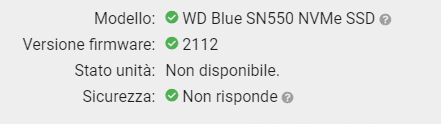
The only info I can see in WD's Dashboard...

- - - Updated - - -

You can try the msvme driver in this zip View attachment 420263

Windows loves its stornvme driver. Trying to install any other driver: "The proper driver is already installed".

Curiously, Samsung Magician shows the WD Nvme temperature, but WD Dashboard software does not!
(Neither program shows the status of the drive).
 

My Computers My Computers

  • At a glance

    Windows 7 Ultimate x64Intel I7 5820k32 GB DDR4
    Computer type
    PC/Desktop
    Computer Manufacturer/Model Number
    custom build
    OS
    Windows 7 Ultimate x64
    CPU
    Intel I7 5820k
    Motherboard
    Asus X99-A/USB 3.1
    Memory
    32 GB DDR4
    Hard Drives
    SSD Samsung 850 EVO Sata 256GB
    HDD Western Digital Sata 2TB

    SSD WD SN550 NVME 500GB
  • Computer type
    PC/Desktop
Back
Top