
Solved View and Connect to Available Wireless Networks

Rand Marks

Banned
Local time
8:58 AM
Messages
96
Hi,

I strongly prefer to have the network system icon disabled at all times. However, the disadvantage to that is that I can’t view and connect to networks in range. Is there a way to open this window without having to click the system tray icon?
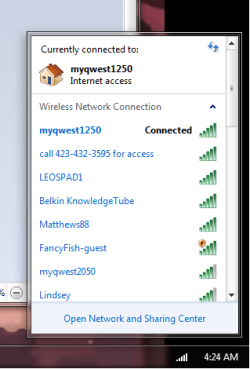
sss.png

If not, is there a good network program out there?

Rand Marks
 

My Computer My Computer

OS
Windows 7 Ultimate SP1 64-bit
Hi,

I strongly prefer to have the network system icon disabled at all times. However, the disadvantage to that is that I can’t view and connect to networks in range. Is there a way to open this window without having to click the system tray icon?

View attachment 248936

If not, is there a good network program out there?

Rand Marks

Yes you can go: start/Control panel/Network and internet/Network and sharing center and i believe that the window, you wanted, will open up but in different format/view :)
You could also make a shortcut to you task bar/desktop
 

Attachments

  • Network for user.PNG
    Network for user.PNG
    150.5 KB · Views: 10

My Computer My Computer

Computer Manufacturer/Model Number
Me, Myself and I (:
OS
Windows 7 x86 Ultimate
CPU
Intel Pentium 4 (3.2GHz) @3.6GHz
Motherboard
Asus P5N-D SLI
Memory
3 GB DDR2 (2GB @800MHz + 1GB @533MHz)-3 inuvidual sticks
Graphics Card(s)
ATI Radeon HD 5450 1GB DDR3
Sound Card
Realtek HD Audio
Monitor(s) Displays
Philips Brilliance 170p 17" DVI/VGA
Screen Resolution
1280x1024 @60 Hz
Hard Drives
WDC WD400BD-08LRAO 40 GB Blue Caviar-Sata II
PSU
LC-Power LC6480S Scorpio-480W 18A@ +12V
Cooling
CPU~Arctic Freezer 7 Pro; 2 92mm case fans; HDD fan;
Keyboard
Logitec Usb
Mouse
Dell optical mouse Usb
Internet Speed
2 Mb/s
Other Info
SOLD MY PC 6 MONTHS AGO IN ORDER TO BUY A MOTORCYCLE :D I don't need a PC :D
Hi, petko131,

Thank you for that, but I have found a way to open the window directly. Here it is.
rundll32.exe van.dll,RunVAN
 

My Computer My Computer

OS
Windows 7 Ultimate SP1 64-bit
Back
Top