
Solved Please help identify this Windows 7 login security

JimmyVu

New member
Local time
5:54 AM
Messages
5
Hi everyone! My first post here.

Like the title said, I'm trying to identify what type of Windows 7 security login was involuntarily placed on a family's PC. I've posted this question on another forum, but they all refused to help because they think I was trying to hack into someone's PC.

Here's the long story...

My uncle got a call from some guy with India accent claiming to work for Microsoft. He said that my uncle's PC has viruses and registry errors. He said he needed to scan my uncles PC to see the extent of the problem, so emailed a link and instructed my uncle to download program from that website. After downloading this system scanner software, he basically took over my uncles PC (like Win remote assistance) and started scanning the PC. According to my uncle, after downloading this program, he saw his mouse cursor moved around the screen, opened the Control Panel and adjusted some settings. What settings it was, he doesn't recall. Again, this sure sounded like Windows Remote Assistance. Now all of this is happening while my uncle was on the phone with this guy. fter he was done scanning, he inform my uncle that the PC has so and so amount of virus and errors. He wanted $200 to remove the virus and fix the registry. My uncle refused, so the guy told him that the PC will be locked with a password until he is willing to pay. My uncle refused because he thought the price is outrageous and he didn't feel comfortable giving someone his CC over the phone. So this guy told my uncle that the PC will be locked with a password and he will only get the password if he pays. He even gave a toll free(800) for my uncle to call back if he changes his mind.

When you boot up the PC, you will get a message "This computer is configured to required a password in order to start up. Please enter the startup password below". As you can see, this isn't the usual Windows login screen.

This is what the login message looks like:
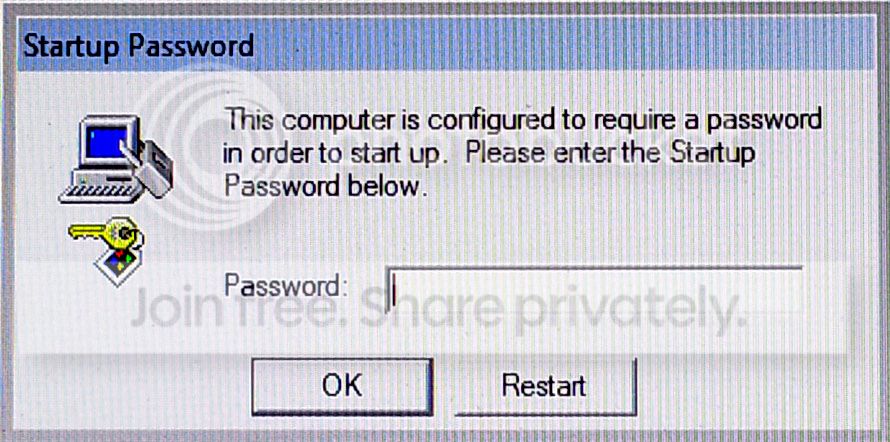
Login_zps634dbf7b.jpg


Since we do not have the password, we click on "Restart". After the PC restarts, we get an Window Error Recovery" message
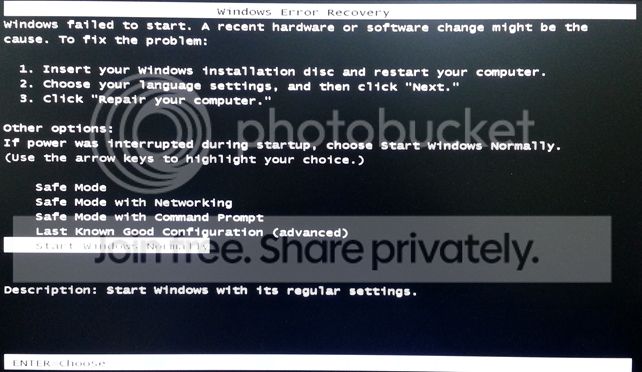
Error_zps3a4f8ae2.jpg


What I've done so far:
I tried running Windows Repair with the recovery disc, but it found nothing wrong. I tried do a system restore to an earlier date, but the message still pops up asking for a password. I've googled this problem and I got "It's a bios password issue", I reset the password in the bios and nothing. Someone mentioned it's a "lsass.exe issue", try running the recovery disc, which I did but it didn't work.

After fiddling with this for nearly 3 days, I decided to reformat and do a clean installation. I pull the hard drive from the PC and placed it in a external hd docking station. I was able to access this hard drive and see all the folders and files. I was surprised that it didn't ask for a password. I decide to run Malwarebytes and scan this hd, but it found nothing. Now I'm backing up all of my uncles files and will proceed to reformat.

This is the contents of the Windows folder on my uncle's hd:
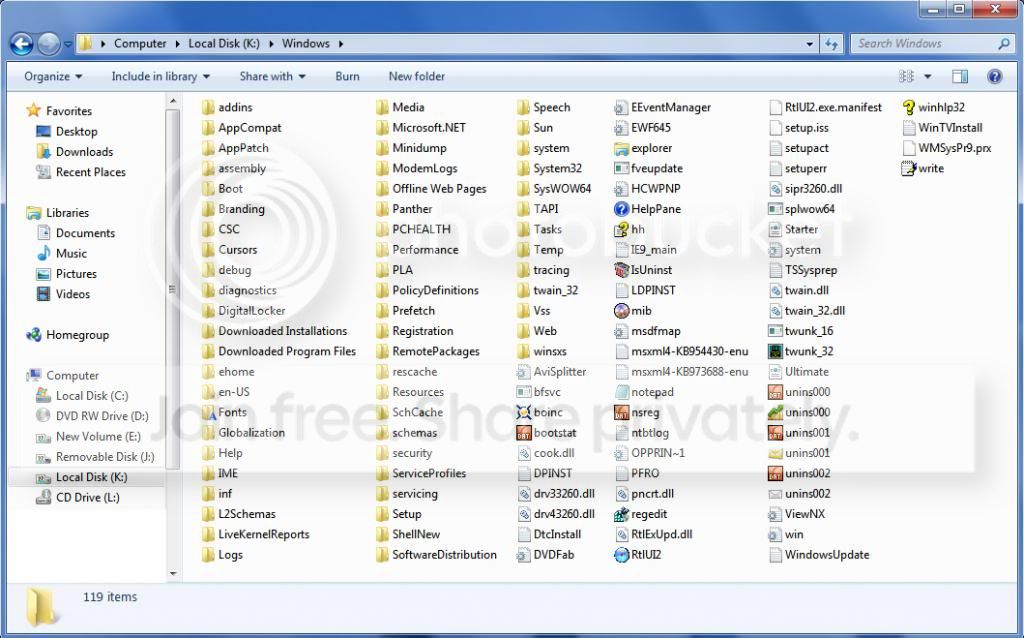
HyHD2_zpsc5e6b5d3.jpg


I would rate my PC skills a 4 out of 5. I probably do 10 viruses, malware, etc removal from people's PC every month. I've also done Windows password recovery several times, but I have never encounter something like this before.

QUESTIONS:
What type of Windows security is this?
Where in Windows would you go to implement/manage this type of security?
Is it a third party program?

Thanks in advance!
 

My Computer My Computer

OS
Windows 7 Ultimate x64
It sounds like some type of ransom-ware was installed to the system - since you are going to format and re install Windows, this will remove the ransom-ware so you wont have further problems.

Regards,
Golden
 

My Computer My Computer

Computer type
PC/Desktop
Computer Manufacturer/Model Number
Golden Mk. I.4
OS
Windows 10 Pro x64 ; Xubuntu x64
CPU
Intel i7 860 @ 2.80 GHz O/C'ed to 4.0GHz
Motherboard
Gigabyte P55A-UD3R Rev.1. Award BIOS F13
Memory
16GB Corsair Vengance DDR3 @ 661 MHz Dual Channel (9-9-9-24)
Graphics Card(s)
EVGA NVidia GTX 560 1024MB
Sound Card
Realtek Integrated
Monitor(s) Displays
Dual Samsung SyncMaster 2494HS
Screen Resolution
1920*1080 and 1920*1080
Hard Drives
1*Samsung 840 EVO 120GB SSD;
1*OCZ Vertex 2 60GB SSD;
2*Samsung F3 SpinPoint 1TB in RAID0;
1*Samsung F1 SpinPoint 1TB;
2*Western Digital 1TB External USB 3.0
1*Western Digital 500GB External USB 3.0
1*Seagate 500GB External USB 2.0
PSU
Thermaltake ToughPower QFan 750W
Case
Thermaltake Element S VK60001W2Z
Cooling
Corsair H60 Water Cooling, 2*230mm and 2*80mm case fans
Keyboard
Logitech G110
Mouse
Logitech MX518
Hi Jimmy,

I'm sorry, but your uncle has been scammed. There is no way on this Earth that anyone can ring someone up and claim that they have PC virus/registry problems. How did they get your uncle's phone number in the first place? I would consider having it changed because once one scammer has got hold of it and it has been verified as an active line (by your uncle answering it in the first place), the chances are this won't be the last call of this type that your uncle receives.

I'm pleased that your uncle had the sense not to pay up, and a full reformat is probably the easiest remedy for this.
 

My Computer My Computer

Computer type
PC/Desktop
Computer Manufacturer/Model Number
Dwarf Dwf/11/2012 r09/2013
OS
Windows 8.1 Pro RTM x64
CPU
Intel Core-i5-3570K 4-core @ 3.4GHz (Ivy Bridge) (OC 4.4GHz)
Motherboard
ASRock Z77 Extreme4-M
Memory
4 x 4GB DDR3-1600 Corsair Vengeance CMZ8GX3M2A1600C9B (16GB)
Graphics Card(s)
MSI GeForce GTX770 Gaming OC 2GB
Sound Card
Realtek High Definition on board solution (ALC 898)
Monitor(s) Displays
ViewSonic VA1912w Widescreen (VGA)
Screen Resolution
1440x900
Hard Drives
OCZ Agility 3 SSD 120GB SATA III x2 (RAID 0)
Samsung HD501LJ 500GB SATA II x2
Hitachi HDS721010CLA332 1TB SATA II
Iomega 1.5TB Ext USB 2.0
WD 2.0TB Ext USB 3.0
PSU
XFX Pro Series 850W Semi-Modular
Case
Gigabyte IF233
Cooling
1 x 120mm Front Inlet 1 x 120mm Rear Exhaust
Keyboard
Microsoft Comfort Curve Keyboard 3000 (USB)
Mouse
Microsoft Comfort Mouse 3000 for Business (USB)
Internet Speed
NetGear DG834Gv3 ADSL Modem/Router (Ethernet) ~4.0 Mb/s (O2)
Antivirus
Avast! 8.0.1497
Browser
IE 11
Other Info
Optical Drive: HL-DT-ST BD-RE BH10LS30 SATA Bluray
Lexmark S305 Printer/Scanner/Copier (USB)
WEI Score: 8.1/8.1/8.5/8.5/8.25
Asus Eee PC 1011PX Netbook (Windows 7 x86 Starter)
It sounds like some type of ransom-ware was installed to the system - since you are going to format and re install Windows, this will remove the ransom-ware so you wont have further problems.

Regards,
Golden

So this isn't something that was built-in to Windows, but a third party software?

Can you remove this "ransom-ware" without reformat?

I just noticed something on this hard drive Program Files folder called Uniblue...It seems suspicious. I'm going to look into it.
 

My Computer My Computer

OS
Windows 7 Ultimate x64
It is possible, but will probably require specialist advice and will depend on the type and variant of ransom-ware that has been installed. In addition, there is no telling what other damage has been done. If you wish, I can ask one of our malware specialists to take a look. Please carry out her instructions and report back with any information that she asks for.
 

My Computer My Computer

Computer type
PC/Desktop
Computer Manufacturer/Model Number
Dwarf Dwf/11/2012 r09/2013
OS
Windows 8.1 Pro RTM x64
CPU
Intel Core-i5-3570K 4-core @ 3.4GHz (Ivy Bridge) (OC 4.4GHz)
Motherboard
ASRock Z77 Extreme4-M
Memory
4 x 4GB DDR3-1600 Corsair Vengeance CMZ8GX3M2A1600C9B (16GB)
Graphics Card(s)
MSI GeForce GTX770 Gaming OC 2GB
Sound Card
Realtek High Definition on board solution (ALC 898)
Monitor(s) Displays
ViewSonic VA1912w Widescreen (VGA)
Screen Resolution
1440x900
Hard Drives
OCZ Agility 3 SSD 120GB SATA III x2 (RAID 0)
Samsung HD501LJ 500GB SATA II x2
Hitachi HDS721010CLA332 1TB SATA II
Iomega 1.5TB Ext USB 2.0
WD 2.0TB Ext USB 3.0
PSU
XFX Pro Series 850W Semi-Modular
Case
Gigabyte IF233
Cooling
1 x 120mm Front Inlet 1 x 120mm Rear Exhaust
Keyboard
Microsoft Comfort Curve Keyboard 3000 (USB)
Mouse
Microsoft Comfort Mouse 3000 for Business (USB)
Internet Speed
NetGear DG834Gv3 ADSL Modem/Router (Ethernet) ~4.0 Mb/s (O2)
Antivirus
Avast! 8.0.1497
Browser
IE 11
Other Info
Optical Drive: HL-DT-ST BD-RE BH10LS30 SATA Bluray
Lexmark S305 Printer/Scanner/Copier (USB)
WEI Score: 8.1/8.1/8.5/8.5/8.25
Asus Eee PC 1011PX Netbook (Windows 7 x86 Starter)
Uniblue is one of those 3rd party registry cleaners.....I don't think that's the source of the problem.

Follow Jacee's advice (the malware expert Dwarf referred to) when she replies if you want to try and clean it up. Alternatively, if you still plan to format and re-install Windows, that will certainly clean it up.
 

My Computer My Computer

Computer type
PC/Desktop
Computer Manufacturer/Model Number
Golden Mk. I.4
OS
Windows 10 Pro x64 ; Xubuntu x64
CPU
Intel i7 860 @ 2.80 GHz O/C'ed to 4.0GHz
Motherboard
Gigabyte P55A-UD3R Rev.1. Award BIOS F13
Memory
16GB Corsair Vengance DDR3 @ 661 MHz Dual Channel (9-9-9-24)
Graphics Card(s)
EVGA NVidia GTX 560 1024MB
Sound Card
Realtek Integrated
Monitor(s) Displays
Dual Samsung SyncMaster 2494HS
Screen Resolution
1920*1080 and 1920*1080
Hard Drives
1*Samsung 840 EVO 120GB SSD;
1*OCZ Vertex 2 60GB SSD;
2*Samsung F3 SpinPoint 1TB in RAID0;
1*Samsung F1 SpinPoint 1TB;
2*Western Digital 1TB External USB 3.0
1*Western Digital 500GB External USB 3.0
1*Seagate 500GB External USB 2.0
PSU
Thermaltake ToughPower QFan 750W
Case
Thermaltake Element S VK60001W2Z
Cooling
Corsair H60 Water Cooling, 2*230mm and 2*80mm case fans
Keyboard
Logitech G110
Mouse
Logitech MX518
Hi Jimmy,

I'm sorry, but your uncle has been scammed. There is no way on this Earth that anyone can ring someone up and claim that they have PC virus/registry problems. How did they get your uncle's phone number in the first place? I would consider having it changed because once one scammer has got hold of it and it has been verified as an active line (by your uncle answering it in the first place), the chances are this won't be the last call of this type that your uncle receives.

I'm pleased that your uncle had the sense not to pay up, and a full reformat is probably the easiest remedy for this.

I totally agree with you. When I was called over to his house to check on this PC, I was just dumbfoundead the entire way over there as to how they know his phone numbers. I interrogated him like the FBI. Did he get any weird emails? Filled out any online questionnaires? Visit any weird website? See any strange pop-ups? He answered NO to everything. I told him to keep an eye out for his identity with the credit bureau from now on.

As for him not paying, he told me he might of paid if it were $20:rolleyes:. He's a 67 yrs old who calls me everyday when he needs to print something. So when a guy from Microsoft calls and tells him that his Windows has been sending error messages to Microsoft headquarters, he believed him. How many seniors could fall or have fallen for this? Unbelievable!
 

My Computer My Computer

OS
Windows 7 Ultimate x64
It is possible, but will probably require specialist advice and will depend on the type and variant of ransom-ware that has been installed. In addition, there is no telling what other damage has been done. If you wish, I can ask one of our malware specialists to take a look. Please carry out her instructions and report back with any information that she asks for.

Yes, please have Jaycee contact me. I have not formatted the drive yet, as I now have access to it by way of the external docking station. I'm interested to know how to resolve this if I ever encounter it again.

Thanks
 

My Computer My Computer

OS
Windows 7 Ultimate x64
They carefully choose the amount that they demand from you in order to provide you with the key to unlock your PC. This amount is designed to make you think that you are paying for a worthwhile service whereas nothing could be further from the truth. If they charge too much, people won't fall for them. Likewise, charging too little will have the same effect.

This key that they provide on receipt of their demands actually serves 2 functions. One, it removes the prompt and allows you to use the PC as normal. However, its other more sinister function is to actually activate whatever Trojan/malware that they have placed on your system.

Unfortunately, there are plenty of gullible people out there to give these crooks a decent living. I'm sorry that your uncle fell for this scam, but at least he had the sense not to cave in to their demands for money.
 

My Computer My Computer

Computer type
PC/Desktop
Computer Manufacturer/Model Number
Dwarf Dwf/11/2012 r09/2013
OS
Windows 8.1 Pro RTM x64
CPU
Intel Core-i5-3570K 4-core @ 3.4GHz (Ivy Bridge) (OC 4.4GHz)
Motherboard
ASRock Z77 Extreme4-M
Memory
4 x 4GB DDR3-1600 Corsair Vengeance CMZ8GX3M2A1600C9B (16GB)
Graphics Card(s)
MSI GeForce GTX770 Gaming OC 2GB
Sound Card
Realtek High Definition on board solution (ALC 898)
Monitor(s) Displays
ViewSonic VA1912w Widescreen (VGA)
Screen Resolution
1440x900
Hard Drives
OCZ Agility 3 SSD 120GB SATA III x2 (RAID 0)
Samsung HD501LJ 500GB SATA II x2
Hitachi HDS721010CLA332 1TB SATA II
Iomega 1.5TB Ext USB 2.0
WD 2.0TB Ext USB 3.0
PSU
XFX Pro Series 850W Semi-Modular
Case
Gigabyte IF233
Cooling
1 x 120mm Front Inlet 1 x 120mm Rear Exhaust
Keyboard
Microsoft Comfort Curve Keyboard 3000 (USB)
Mouse
Microsoft Comfort Mouse 3000 for Business (USB)
Internet Speed
NetGear DG834Gv3 ADSL Modem/Router (Ethernet) ~4.0 Mb/s (O2)
Antivirus
Avast! 8.0.1497
Browser
IE 11
Other Info
Optical Drive: HL-DT-ST BD-RE BH10LS30 SATA Bluray
Lexmark S305 Printer/Scanner/Copier (USB)
WEI Score: 8.1/8.1/8.5/8.5/8.25
Asus Eee PC 1011PX Netbook (Windows 7 x86 Starter)
It is possible, but will probably require specialist advice and will depend on the type and variant of ransom-ware that has been installed. In addition, there is no telling what other damage has been done. If you wish, I can ask one of our malware specialists to take a look. Please carry out her instructions and report back with any information that she asks for.

Yes, please have Jaycee contact me. I have not formatted the drive yet, as I now have access to it by way of the external docking station. I'm interested to know how to resolve this if I ever encounter it again.

Thanks
Done. Please await her reply.
 

My Computer My Computer

Computer type
PC/Desktop
Computer Manufacturer/Model Number
Dwarf Dwf/11/2012 r09/2013
OS
Windows 8.1 Pro RTM x64
CPU
Intel Core-i5-3570K 4-core @ 3.4GHz (Ivy Bridge) (OC 4.4GHz)
Motherboard
ASRock Z77 Extreme4-M
Memory
4 x 4GB DDR3-1600 Corsair Vengeance CMZ8GX3M2A1600C9B (16GB)
Graphics Card(s)
MSI GeForce GTX770 Gaming OC 2GB
Sound Card
Realtek High Definition on board solution (ALC 898)
Monitor(s) Displays
ViewSonic VA1912w Widescreen (VGA)
Screen Resolution
1440x900
Hard Drives
OCZ Agility 3 SSD 120GB SATA III x2 (RAID 0)
Samsung HD501LJ 500GB SATA II x2
Hitachi HDS721010CLA332 1TB SATA II
Iomega 1.5TB Ext USB 2.0
WD 2.0TB Ext USB 3.0
PSU
XFX Pro Series 850W Semi-Modular
Case
Gigabyte IF233
Cooling
1 x 120mm Front Inlet 1 x 120mm Rear Exhaust
Keyboard
Microsoft Comfort Curve Keyboard 3000 (USB)
Mouse
Microsoft Comfort Mouse 3000 for Business (USB)
Internet Speed
NetGear DG834Gv3 ADSL Modem/Router (Ethernet) ~4.0 Mb/s (O2)
Antivirus
Avast! 8.0.1497
Browser
IE 11
Other Info
Optical Drive: HL-DT-ST BD-RE BH10LS30 SATA Bluray
Lexmark S305 Printer/Scanner/Copier (USB)
WEI Score: 8.1/8.1/8.5/8.5/8.25
Asus Eee PC 1011PX Netbook (Windows 7 x86 Starter)
Ransomware! ...
Essentially online extortion, ransomware involves infecting a user’s computer with a virus that locks it. The attackers demand money before the computer will be unlocked, but once the money is paid, they rarely unlock it.

In the vast majority of cases, victims do not regain access to their computer unless they hire a computer technician to remove the virus manually. And even then, they risk losing all files and data because the best way to remove the virus is to wipe the computer clean.
Source: http://www.nytimes.com/2012/12/06/t...in-the-united-states.html?pagewanted=all&_r=0

Continue backing up all of your uncle's files and proceed to reformat!
 

My Computer My Computer

Computer type
PC/Desktop
Computer Manufacturer/Model Number
Bruce ... somewhere in his 40's
OS
Windows 7 Ultimate 32bit SP1
CPU
Intel(R) Core(TM)2 Quad CPU @ 2.40GHz, 2400 MHz
Motherboard
INTEL/D975XBX2
Memory
4 GB
Graphics Card(s)
ATI Radeon HD 2600 Pro
Monitor(s) Displays
Samsung SyncMaster 914v
Screen Resolution
1280 x 1024
Hard Drives
2/500GB each ... ST3500630AS ATA Device.
One is not connected
PSU
Rocketfish 700 W
Case
G.Skill Gigabyte Chassis
Keyboard
Standard PS/2 Keyboard
Mouse
Microsoft PS/2 Mouse
Internet Speed
DSL
Antivirus
Avira Internet Security
Browser
IE 11
Other Info
ATI HDMI Audio
My first encounter with a Ransomware!

I will reformat the drive.

Thanks Jacee!
 

My Computer My Computer

OS
Windows 7 Ultimate x64
Back
Top