Solved Frequent BSOD

Three crashes in 5 mins and I realise theres no BSOD - it goes fuzzy and reboots.


Did you restore your (hopefully) backed up drivers after re-install?.
FUZZY?!? Was there a slight distortion of the pixels?

cheers

dave
 

My Computer My Computer

Computer type
PC/Desktop
OS
Windows 7 Professional 64bit
CPU
AMD Athlon (tm) X2 5200+ Dual Core 2712 Mhz
Motherboard
Asus
Memory
4GB
Graphics Card(s)
Nividia GeForce 8600 GTS- DIED 25/7/2013 R.I.P
Sound Card
None
Monitor(s) Displays
22" Yuraku LCD (Dont ask)
Screen Resolution
1280x960
Hard Drives
2TB WD Caviar green
PSU
Windy up type
Case
Scout cm Storm
Cooling
Hair dryer on full cool power ;-)
Keyboard
QWERTY
Mouse
Microsoft Special
Internet Speed
BT Infinity 9.38Mb/s Wheeeeeeeeeeeeeeee!!
Antivirus
MSE
Browser
Internet Explore 10 and Chrome
Other Info
Don't shout...I've got a Hangover!
Fuzzy = pixelated screen for 1 or 2 secs. Drivers are all availabl;e on Dell website, certainly re did some that seemed to need it.
 

My Computer My Computer

Computer Manufacturer/Model Number
Dell Inspiron
OS
Windows 7 64bit
Memory
8 Gb
sfcscanow reports windows resource protection did not find any integrity violation problems.
 

My Computer My Computer

Computer Manufacturer/Model Number
Dell Inspiron
OS
Windows 7 64bit
Memory
8 Gb
Fuzzy = pixelated screen for 1 or 2 secs. Drivers are all availabl;e on Dell website, certainly re did some that seemed to need it.


Including Display driver?
 

My Computer My Computer

Computer type
PC/Desktop
OS
Windows 7 Professional 64bit
CPU
AMD Athlon (tm) X2 5200+ Dual Core 2712 Mhz
Motherboard
Asus
Memory
4GB
Graphics Card(s)
Nividia GeForce 8600 GTS- DIED 25/7/2013 R.I.P
Sound Card
None
Monitor(s) Displays
22" Yuraku LCD (Dont ask)
Screen Resolution
1280x960
Hard Drives
2TB WD Caviar green
PSU
Windy up type
Case
Scout cm Storm
Cooling
Hair dryer on full cool power ;-)
Keyboard
QWERTY
Mouse
Microsoft Special
Internet Speed
BT Infinity 9.38Mb/s Wheeeeeeeeeeeeeeee!!
Antivirus
MSE
Browser
Internet Explore 10 and Chrome
Other Info
Don't shout...I've got a Hangover!
Will do it again
 

My Computer My Computer

Computer Manufacturer/Model Number
Dell Inspiron
OS
Windows 7 64bit
Memory
8 Gb
Hey Maverick,

Before I ask for any help, can you try this (after re-installing your drivers):
Boot the computer into safe mode (rapid press of F8 key at splash screen on boot) and see if your BSOD stops:

If you still get BSOD in safe mode then it most probable its hardware related. (leave in safe mode till BSOD occurs)
If it stops its more likely software/driver issues.

Cheers

Dave
 

My Computer My Computer

Computer type
PC/Desktop
OS
Windows 7 Professional 64bit
CPU
AMD Athlon (tm) X2 5200+ Dual Core 2712 Mhz
Motherboard
Asus
Memory
4GB
Graphics Card(s)
Nividia GeForce 8600 GTS- DIED 25/7/2013 R.I.P
Sound Card
None
Monitor(s) Displays
22" Yuraku LCD (Dont ask)
Screen Resolution
1280x960
Hard Drives
2TB WD Caviar green
PSU
Windy up type
Case
Scout cm Storm
Cooling
Hair dryer on full cool power ;-)
Keyboard
QWERTY
Mouse
Microsoft Special
Internet Speed
BT Infinity 9.38Mb/s Wheeeeeeeeeeeeeeee!!
Antivirus
MSE
Browser
Internet Explore 10 and Chrome
Other Info
Don't shout...I've got a Hangover!
Not really an option as have gone 2 x 2 hr spells with no crash today
 

My Computer My Computer

Computer Manufacturer/Model Number
Dell Inspiron
OS
Windows 7 64bit
Memory
8 Gb
May have been the driver updates that have reduced the crashes. However now getting a message at boot about Catalyst Control Centre and drivers.
 

My Computer My Computer

Computer Manufacturer/Model Number
Dell Inspiron
OS
Windows 7 64bit
Memory
8 Gb

My Computer My Computer

Computer type
PC/Desktop
OS
Windows 7 Professional 64bit
CPU
AMD Athlon (tm) X2 5200+ Dual Core 2712 Mhz
Motherboard
Asus
Memory
4GB
Graphics Card(s)
Nividia GeForce 8600 GTS- DIED 25/7/2013 R.I.P
Sound Card
None
Monitor(s) Displays
22" Yuraku LCD (Dont ask)
Screen Resolution
1280x960
Hard Drives
2TB WD Caviar green
PSU
Windy up type
Case
Scout cm Storm
Cooling
Hair dryer on full cool power ;-)
Keyboard
QWERTY
Mouse
Microsoft Special
Internet Speed
BT Infinity 9.38Mb/s Wheeeeeeeeeeeeeeee!!
Antivirus
MSE
Browser
Internet Explore 10 and Chrome
Other Info
Don't shout...I've got a Hangover!
But how do I find what model I have?
 

My Computer My Computer

Computer Manufacturer/Model Number
Dell Inspiron
OS
Windows 7 64bit
Memory
8 Gb
Hey mavrick,

On a desktop computer, go into your Bios (should tell you what key to press on Dell splash screen, I think its F2)

then look for System Info and you should see your model number next to Dell:

Inspiron_530_BIOS_System_Model_Location.jpg


Hope this helps

Dave
 

My Computer My Computer

Computer type
PC/Desktop
OS
Windows 7 Professional 64bit
CPU
AMD Athlon (tm) X2 5200+ Dual Core 2712 Mhz
Motherboard
Asus
Memory
4GB
Graphics Card(s)
Nividia GeForce 8600 GTS- DIED 25/7/2013 R.I.P
Sound Card
None
Monitor(s) Displays
22" Yuraku LCD (Dont ask)
Screen Resolution
1280x960
Hard Drives
2TB WD Caviar green
PSU
Windy up type
Case
Scout cm Storm
Cooling
Hair dryer on full cool power ;-)
Keyboard
QWERTY
Mouse
Microsoft Special
Internet Speed
BT Infinity 9.38Mb/s Wheeeeeeeeeeeeeeee!!
Antivirus
MSE
Browser
Internet Explore 10 and Chrome
Other Info
Don't shout...I've got a Hangover!
The Bios system info just gives dell Inspiron 580 which I knew but not the graphics card type.
 

My Computer My Computer

Computer Manufacturer/Model Number
Dell Inspiron
OS
Windows 7 64bit
Memory
8 Gb
Hi Maverick,

We need to find out what graphics adapter/card you have installed:

Go to:

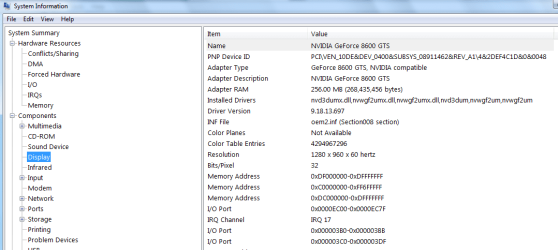
Start> type in search msinfo32.exe then click on components and expand and look for display.

See mines a Nividia GeForce 8600GTs
There you will see adapter description as in the pic.

post that info on here please and i will locate your driver


cheers

dave
 

Attachments

  • Untitled666666666666666666666.png
    Untitled666666666666666666666.png
    22.7 KB · Views: 2

My Computer My Computer

Computer type
PC/Desktop
OS
Windows 7 Professional 64bit
CPU
AMD Athlon (tm) X2 5200+ Dual Core 2712 Mhz
Motherboard
Asus
Memory
4GB
Graphics Card(s)
Nividia GeForce 8600 GTS- DIED 25/7/2013 R.I.P
Sound Card
None
Monitor(s) Displays
22" Yuraku LCD (Dont ask)
Screen Resolution
1280x960
Hard Drives
2TB WD Caviar green
PSU
Windy up type
Case
Scout cm Storm
Cooling
Hair dryer on full cool power ;-)
Keyboard
QWERTY
Mouse
Microsoft Special
Internet Speed
BT Infinity 9.38Mb/s Wheeeeeeeeeeeeeeee!!
Antivirus
MSE
Browser
Internet Explore 10 and Chrome
Other Info
Don't shout...I've got a Hangover!
ATI Radeon HD 5450
 

My Computer My Computer

Computer Manufacturer/Model Number
Dell Inspiron
OS
Windows 7 64bit
Memory
8 Gb
Found and downloading the drivers, but have to go out shortly so will post outcome tomorrow.
 

My Computer My Computer

Computer Manufacturer/Model Number
Dell Inspiron
OS
Windows 7 64bit
Memory
8 Gb
Hi Maverick,

This should be your driver you need:

AMD Catalyst 7 - 64-Bit Edition

Hope this helps

Cheers dave
 

My Computer My Computer

Computer type
PC/Desktop
OS
Windows 7 Professional 64bit
CPU
AMD Athlon (tm) X2 5200+ Dual Core 2712 Mhz
Motherboard
Asus
Memory
4GB
Graphics Card(s)
Nividia GeForce 8600 GTS- DIED 25/7/2013 R.I.P
Sound Card
None
Monitor(s) Displays
22" Yuraku LCD (Dont ask)
Screen Resolution
1280x960
Hard Drives
2TB WD Caviar green
PSU
Windy up type
Case
Scout cm Storm
Cooling
Hair dryer on full cool power ;-)
Keyboard
QWERTY
Mouse
Microsoft Special
Internet Speed
BT Infinity 9.38Mb/s Wheeeeeeeeeeeeeeee!!
Antivirus
MSE
Browser
Internet Explore 10 and Chrome
Other Info
Don't shout...I've got a Hangover!
Sorted with the driver - thanks - but still getting the non BSDOD crashes - screen goes fuzzy for 1/10 sec then reboots. Sometimes every few minutes, other times goes couple of hours OK. Haven't been able to try Safe Mode as cant connect to internet in safe mode.
 

My Computer My Computer

Computer Manufacturer/Model Number
Dell Inspiron
OS
Windows 7 64bit
Memory
8 Gb
Hi,

Can you look in the event viwer and check for errors.
Open Event Viewer by clicking the Start button
4f6cbd09-148c-4dd8-b1f2-48f232a2fd33_47.png
, clicking Control Panel, clicking System and Maintenance (security), clicking Administrative Tools, and then double-clicking Event Viewer. If you are prompted for an administrator password or confirmation, type the password or provide confirmation.
Expand custom view and click admin events and you should see latest errors, post any relating to Graphics/drivers etc.

Also please boot into safemode (F8), and see if your screen is still "fuzzy" and post back after you go back into normal mode and you have internet access.


Cheers

Dave
 

My Computer My Computer

Computer type
PC/Desktop
OS
Windows 7 Professional 64bit
CPU
AMD Athlon (tm) X2 5200+ Dual Core 2712 Mhz
Motherboard
Asus
Memory
4GB
Graphics Card(s)
Nividia GeForce 8600 GTS- DIED 25/7/2013 R.I.P
Sound Card
None
Monitor(s) Displays
22" Yuraku LCD (Dont ask)
Screen Resolution
1280x960
Hard Drives
2TB WD Caviar green
PSU
Windy up type
Case
Scout cm Storm
Cooling
Hair dryer on full cool power ;-)
Keyboard
QWERTY
Mouse
Microsoft Special
Internet Speed
BT Infinity 9.38Mb/s Wheeeeeeeeeeeeeeee!!
Antivirus
MSE
Browser
Internet Explore 10 and Chrome
Other Info
Don't shout...I've got a Hangover!
The trouble is with safe mode, theres nothing much you can do or see properly and it may take 2 hours of browsing to reproduce the problem even in normal mode. I'm working outside all day today so cant do much.
There are dozens odff errors in event viewer, Vss, Kermnel event tracing, service control manager, print service, .net runtimwe, wmi.
 

My Computer My Computer

Computer Manufacturer/Model Number
Dell Inspiron
OS
Windows 7 64bit
Memory
8 Gb
Back
Top