SATA HD To USB Cable (External HD To PC)

Robert11

New member
Power User
Local time
2:35 AM
Messages
542
Hi,

Have about given up with my Seagate external HD (FreeAgent), but saw a post where the poster
mentioned that the drive (his) was apparently mechanically fine and that it turned out to be the electronics inside the HD case.
(My Free Agent External HD has a separate power wart, and a dc power input, as well as the USB output)

He was able to recover his files by opening the case and using a SATA to USB to go directly from the Drive to his desktop PC, and bypassing the FreeAgents case electronics. The PC apparently recognized the HD without any problem.

Sure sound like it is worth a try.

Will have to purchase the appropriate cables.

Question: they seem to come in different "flavors". Some cables have just the SATA drive connector to USB, and have a statement that the drive would be powered by the power thru the USB.

Is this doable, and the right approach for me probably ?
How would the Drive "know" to use the single USB-Data cable for power, and not the normal dc power input ?
A jumper somewhere ?

Or, some others (on Overstock, e.g.) seem to come with a power supply and a cable for the output to go to the drive, as well as a data cable. Does this make more sense, particularly since my HD uses an external dc power supply ?

Or,...?

Thanks,
Bob
 

My Computer My Computer

At a glance

Windows 7 64bit
OS
Windows 7 64bit

My Computer My Computer

At a glance

Windows 8.1 Pro w/Media Center 64bit, Windows...Phenom II X6 1100TCrucial Balistic 8gb DDR3-1866 CL9MSI R6850 Cyclone IGD5 PE
Computer type
PC/Desktop
Computer Manufacturer/Model Number
Home Built
OS
Windows 8.1 Pro w/Media Center 64bit, Windows 7 HP 64bit
CPU
Phenom II X6 1100T
Motherboard
ASUS M5A99X EVO
Memory
Crucial Balistic 8gb DDR3-1866 CL9
Graphics Card(s)
MSI R6850 Cyclone IGD5 PE
Sound Card
On Board
Monitor(s) Displays
ASUS VE258Q 25" LED with DVI-HDMI-DisplayPort
Screen Resolution
1920 x 1080
Hard Drives
Two WD Cavier Black 2TB Sata III, WD My Book Essential 2TB USB 3.0
PSU
Seasonic X650 80 Plus GOLD Modular
Case
Corsair 400R
Cooling
Antec Kuhler H2O 620, Two 120mm and four 140mm
Keyboard
Logitech K120
Mouse
Logitech Marble Mouse USB, Logitech Precision Game Pad
Internet Speed
15MB
Antivirus
Norton IS 2013, Malwarebytes Pro Beta 2
Browser
IE-11, FF-27
Other Info
APC UPS ES 750, Netgear WNR3500L Gigabit & Wireless N Router with SamKnows Test Program, Motorola SB6120 Gigabit Cable Modem. Brother HL-2170W Laser Printer, Epson V300 Scanner
For PhoneMan et al From OP: How Might This Work ?

Hi,

Much thanks for suggestion; appreciate it.

Got to thinking about this a bit more, and realize I'm confused (as usual) over some aspects.

A typical HD in a desktop PC enclosure uses, I guess, the electronics on the PC Motherboard to do whatever is required to read and write the data on the HD. Connected directly to the Motherboard, of course with a SATA-to-Motherboard cable, without any USB. No problem here.

a. But, an External HD, if I understand it correctly, has its "own" electronics in the case to do this.
Am I right about this ?
Why not save some $, and just connect the bare HD to the PC with a SATA-USB cable, and let the Motherboard again do the processing ?

b. If I go this route in trying to read my External HD, which hopefully is still working well (assumption being that its electronics, only, are bad) by using a SATA to USB to bypass its electronics, how do I tell the PC to read it ?

Will it do it "automatically" ? Or,...?
Any caveats; think it will/might work ?

Think it's worth a try ?

If you, or anyone, could clarify any of this for me, would be most appreciative.

Thanks,
Bob
 

My Computer My Computer

At a glance

Windows 7 64bit
OS
Windows 7 64bit

My Computer My Computer

At a glance

Windows `10 Professional 64bitIntel i5 [email protected]Corsair Vengeance DDR3 1600 16GNVIDIA GeForce GT520 1GHz
Computer type
PC/Desktop
Computer Manufacturer/Model Number
Home Built
OS
Windows `10 Professional 64bit
CPU
Intel i5 [email protected]
Motherboard
MSI P67A-GD55 (MS7681)
Memory
Corsair Vengeance DDR3 1600 16G
Graphics Card(s)
NVIDIA GeForce GT520 1GHz
Sound Card
Realtek High Definition Audio
Monitor(s) Displays
Haans G 241
Screen Resolution
1600X1024
Hard Drives
Crucial MX100 256GB SSD
PSU
OCZ ModXStream Modular High Performance 500 Watt
Case
Rosewill Challenger-U3
Cooling
Just Fans
Keyboard
Kensington K64338B
Mouse
Microsoft wheel mouse 1.1A
Internet Speed
240.0 Mbps
Antivirus
ESET Internet Security
Browser
Firefox
Other Info
SuperAntiSpyware-Pro
Malwarebytes (Premium)
Kerish Doctor
The HDD has an electronic controller that talks to the MB using SATA protocol over a SATA cable (normal internal hookup) In the external box it takes the SATA protocol and converts it to USB to talk to the MB on its USB port. If the box goes bad (USB to SATA converter) then the HDD can be connected with a SATA cable to the MB's SATA port. The converter you asked about is to replace the bad converter built into the box so you don't have to install the drive inside the PC. This is assuming the SATA to USB converter in the external box is the problem. The controller on the HDD could also be bad.

Jim :cool:
 

My Computer My Computer

At a glance

Windows 8.1 Pro w/Media Center 64bit, Windows...Phenom II X6 1100TCrucial Balistic 8gb DDR3-1866 CL9MSI R6850 Cyclone IGD5 PE
Computer type
PC/Desktop
Computer Manufacturer/Model Number
Home Built
OS
Windows 8.1 Pro w/Media Center 64bit, Windows 7 HP 64bit
CPU
Phenom II X6 1100T
Motherboard
ASUS M5A99X EVO
Memory
Crucial Balistic 8gb DDR3-1866 CL9
Graphics Card(s)
MSI R6850 Cyclone IGD5 PE
Sound Card
On Board
Monitor(s) Displays
ASUS VE258Q 25" LED with DVI-HDMI-DisplayPort
Screen Resolution
1920 x 1080
Hard Drives
Two WD Cavier Black 2TB Sata III, WD My Book Essential 2TB USB 3.0
PSU
Seasonic X650 80 Plus GOLD Modular
Case
Corsair 400R
Cooling
Antec Kuhler H2O 620, Two 120mm and four 140mm
Keyboard
Logitech K120
Mouse
Logitech Marble Mouse USB, Logitech Precision Game Pad
Internet Speed
15MB
Antivirus
Norton IS 2013, Malwarebytes Pro Beta 2
Browser
IE-11, FF-27
Other Info
APC UPS ES 750, Netgear WNR3500L Gigabit & Wireless N Router with SamKnows Test Program, Motorola SB6120 Gigabit Cable Modem. Brother HL-2170W Laser Printer, Epson V300 Scanner
External HD's are just a standard HD in an enclosure with the electronics that Phone Man explained above so I would connect the drive directly to the Motherboard with a standard SATA cable to make sure the drive works ok provided you have a spare SATA connector and cable before spending any money. You will also need a spare SATA power connector on your Power Supply or a Molex to SATA adaptor to power the drive.

Do this then check that the drive is recognized in the BIOS and if it is Windows should be able to detect and read the drive but you may have to assign it a drive letter if for some reason it does not receive one.

If the drive is ok then consider buying a 3rd party external enclosure or a SATA to USB cable/adaptor. One problem with a adaptor is you will no longer be able to use the existing enclosure unless it was smaller enough to fit inside after removing the original electronics or if your adventurous you could cut out the back, rip out the electronics and find someway of fixing the adaptor to the enclosure but thats if the connectors would reach the drive (or cut it back till they did). There's also the option of leaving it in the PC as a internal drive.
 

My Computer My Computer

At a glance

Windows 7 Ultimate x64Intel Pentium Dual Core E5200 2.5GHz (3.77GHz...Corsair 4GB DDR2 (4x1GB CM2X1024-6400C4)Palit GeForce GTS 250 (1024MB)
Computer Manufacturer/Model Number
Self built
OS
Windows 7 Ultimate x64
CPU
Intel Pentium Dual Core E5200 2.5GHz (3.77GHz OC)
Motherboard
Asus P5Q-E
Memory
Corsair 4GB DDR2 (4x1GB CM2X1024-6400C4)
Graphics Card(s)
Palit GeForce GTS 250 (1024MB)
Sound Card
On Board (ADI AD2000B 8ch HD)
Monitor(s) Displays
Samsung 32in LCD TV
Screen Resolution
1360x768
Hard Drives
2 x 1TB Samsung 103SJ (Raid0)
2 x External 500GB Samsung 502IJ (NexStar 3 HD Enclosures)
PSU
550W Antec Neo HE 550
Case
Antec P180
Cooling
Xigmatex Red Scorpion CPU Cooler. 3x120mm Fans
Keyboard
Logitech MX5000 Laser (Combo)
Mouse
Logitech MX5000 Laser (Combo)
Internet Speed
ADSL2+ (avg 10 Mbps Down, 0.80 Mbps up)
Other Info
Gigabyte GN-WP01GS 54g Wireless Lan Card
Hi there

I'm sure I was the guy who mentioned this -- when I had a 3TB Intenso external

USB3 drive "Die on me" -- Disk was fine but power connector failed. On opening the drive it was simply a 100% "Bog standard" WD Barricuda 7200 RPM SATA 3TB drive. !!

Here's my original post

http://www.sevenforums.com/hardware...xt-drive-when-power-usb-connector-breaks.html

The easiest way to use these is to convert them to Powered External drives via a SATA==>USB2 or better if you have it on your computer SATA==>USB3 port but you can use them as Internal HDD's too by doing what I did in that post.

If the drive is a decent 7200 RPM one the access time will be fine -- even for a USB2 connection.

( For laptop drives you can get SATA==>USB enclosures or even just a cable --these drives don't need external power supplies as the USB is sufficient to drive these small 2.5 inch drives).

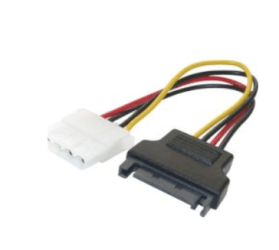
Note you can also buy an old 4 pin IDE power connector===> SATA power connector for a few cents if you really want to use the disks connected to the MOBO and you don't have enough SATA power connectors from the computers power supply. Screenshot enc and they work 100% OK --I've used 3 of these as I didn't have enough SATA connectors in the PSU. !!! (MOBO has 7 SATA connectors, Power unit - 4 SATA / 4 IDE so I needed a bit of "cabling adapter magic here").

most computer Power supplies still provide a number of IDE 4 pin power connectors which you can use when you've used up all the SATA ones so just plug your SATA adapter cable into a spare one of these and the other end into the HDD.

some SATA drives also have the standard 4 Pin (old IDE type disks) slot on them in addition to the conventional SATA set.

You can also get enclosure cases so you can connect either this set or the standard SATA power connector on the disk to the power input on the case. Plug the data connectors into the sata data connector.

Either way it's simple to use "retired disks" from old machines without throwing them away -- even an old slow IDE one used as an external HDD can be very useful for storing backup images, archives of music, films, photos etc. This type of disk - especially if you don't use it very often is very handy and speed isn't really important here --I store backup copies of Virtual machines on two 500 GB old IDE drives I've converted to external -- and just use these once a week or so when I'm backing up the Virtual machines.

So it's easy to use either as Internal or External -- your choice. The enclosures and cables are cheap -- my gut feel is for flexibility use as external drives especially if you have USB3 on your computer. (A USB3 drive can be plugged into a USB2 port as well so you aren't restricted to using the disk on USB3 ports only if you go down that route.

While the enclosures etc might be common knowledge not so many people know about the IDE==>SATA power connector adapter which are very useful especially if you have an older computer PSU that you don't want to get rid of.

Screen shot enc -- cost about 2 EUR so if it keeps your PSU in business -- worth it.


Cheers
jimbo
 

Attachments

  • power.png
    power.png
    19.3 KB · Views: 1

My Computer My Computer

At a glance

Linux CENTOS 7 / various Windows OS'es and se...Intel i7 Intel i58GB, 16GBOn Motherboard
Computer type
PC/Desktop
Computer Manufacturer/Model Number
Custom built, several laptops HP/ASUS
OS
Linux CENTOS 7 / various Windows OS'es and servers
CPU
Intel i7 Intel i5
Memory
8GB, 16GB
Graphics Card(s)
On Motherboard
Sound Card
Realtek HD audio
Monitor(s) Displays
Apple Cinema display, Samsung LCD
Screen Resolution
1920 X 1080
Hard Drives
4 X 1TB SATA
Mouse
Toshiba wireless laser
Internet Speed
> 20MB up
From OP: A Bit More Help Requested, Please (where is the Connector ?)

Hi Guys,

First, thanks for All the help and suggestions.
Much appreciated.

Thought I'd open up the case first to see what the insides look like before ordering any SATA cables.

The appears to be no SATA connector; just the power and USB connectors from a PC board that is part of the drive itself, underneath a perforsted metal shield (which I did not remove).
Should I remove this metal shield ?

There is also a flat metal (no perforations) "plate" on the other side screwed into the HD.
This one has the Seagate label glued to it.

Hate to appear dumber than I am, will blame it on old age now, but where is the SATA connector ?
Is there one for this particular class of drive ?

And, there is a thin metallic silvery strip running along one of the edges inside of the case. 6" long.
Has a black and red wire going from it into the drive PC board.
And a yellow and black wire connecting both ends of this strip.
Any idea what this is ?

The label on the HD says: Seagate Barracuda 7200.11 750 GB
P/N 9BX156-568

Thanks again.
Would sure like to get the data off of it. Turning into an interesting project.

Regards,
Bob
 

My Computer My Computer

At a glance

Windows 7 64bit
OS
Windows 7 64bit
This one includes the power pack and every possible cable combination - good to have on hand: Amazon.com: SATA/PATA/IDE Drive to USB 2.0 Adapter Converter Cable for 2.5 / 3.5 Inch Hard Drive / Optical Drive with External AC Power Adapter: Computers & Accessories

One thing I always do with externals is wipe the HD using Diskpart Clean Command to remove the software. This will in most cases stop any backup or syncing software from interfering tho some extra device functions remaining as added hardware also might need disabling in Device Manager.

But it's best to first google the model to see how others have resolved the problems. There's one model which can't be wiped so the advice given in every search is to return it - an idiotic marketing disaster you wonder if they're even aware of. Your drive also has tech support included for a year so I'd query them for what's needed to disconnect it.

If it causes you much grief post a lot about it by name in every search you find so others are warned via google.
 
Last edited:
From A Very Embarrassed OP

Hello again,

Please see previous Post.

Very, very embarrassed.

I popped off the metal perforated plate, and found the SATA connectors.

A long one, and next to it a shorter one with about 8 slots. I assume that this is for the power.
True ?

BTW: In Device Manager, it shows this external drive as Not being enabled.
When I try to Enable it, it says that Windows cannot enable it.
Also, a Code 22 error. What does this mean, please ?

Would this preclude any chance of success if I try the SATA cable to USB port on the PC, as has been suggested ? Still worth a try ?
 

My Computer My Computer

At a glance

Windows 7 64bit
OS
Windows 7 64bit
Hi Guys,

First, thanks for All the help and suggestions.
Much appreciated.

Thought I'd open up the case first to see what the insides look like before ordering any SATA cables.

The appears to be no SATA connector; just the power and USB connectors from a PC board that is part of the drive itself, underneath a perforsted metal shield (which I did not remove).
Should I remove this metal shield ?

There is also a flat metal (no perforations) "plate" on the other side screwed into the HD.
This one has the Seagate label glued to it.

Hate to appear dumber than I am, will blame it on old age now, but where is the SATA connector ?
Is there one for this particular class of drive ?

And, there is a thin metallic silvery strip running along one of the edges inside of the case. 6" long.
Has a black and red wire going from it into the drive PC board.
And a yellow and black wire connecting both ends of this strip.
Any idea what this is ?

The label on the HD says: Seagate Barracuda 7200.11 750 GB
P/N 9BX156-568

Thanks again.
Would sure like to get the data off of it. Turning into an interesting project.

Regards,
Bob

Hi there
sounds like you have a similar disk that I had and am using now as an internal HDD.
Get the base disk off the container -- just pull off any attached connectors --get the barebones disk drive out of the enclosure

Those Barracudas are 7200 RPM drives and are decent performers so it's worth saving however you look at it. 750 GB is a decent size too.

The metal plate probably just holds the DISK into the container -- don't pull off the metal disk CASE however.

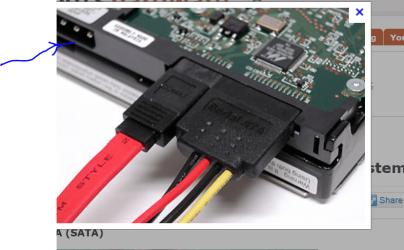
it should look something like this - screenshot enc.

It's possible also on the older types power is supplied (for an external drive) by the 4 pin connector where I've marked it in blue as these were done so older Power units could be used with modern mobos to supply power for SATA drives using the older 4 pin IDE power cables.

You don't need to use that any more as the two sata connectors or on the right (DATA and power) will supply the power and correctly connect the drive to the MOBO.

If you don't have enough SATA power connectors from your power unit just plug the SATA data connector to the MOBO and use one of the 4 pin IDE power connectors where I've got the blue arrow --or use an IDE to SATA IDE power cable adapter like I've shown in a previous post in the thread.

Don't throw the HDD away - it's definitely useful and useable.

(With the money you save by not buying another disk to replace this one you could even get an SSD !!!).

Cheers
jimbo
 

Attachments

  • sata.png
    sata.png
    146.6 KB · Views: 0

My Computer My Computer

At a glance

Linux CENTOS 7 / various Windows OS'es and se...Intel i7 Intel i58GB, 16GBOn Motherboard
Computer type
PC/Desktop
Computer Manufacturer/Model Number
Custom built, several laptops HP/ASUS
OS
Linux CENTOS 7 / various Windows OS'es and servers
CPU
Intel i7 Intel i5
Memory
8GB, 16GB
Graphics Card(s)
On Motherboard
Sound Card
Realtek HD audio
Monitor(s) Displays
Apple Cinema display, Samsung LCD
Screen Resolution
1920 X 1080
Hard Drives
4 X 1TB SATA
Mouse
Toshiba wireless laser
Internet Speed
> 20MB up
Back
Top