Solved Text wrapping in Word 2010

Mitch656

New member
Power User
VIP
Local time
11:06 PM
Messages
722
Location
Australia
Hi,
When i insert/paste images into a word 2010 document it also seems to be pasted with the "In Line with text" wrapping. However i dont want that. I want my images to pasted in "Tight"

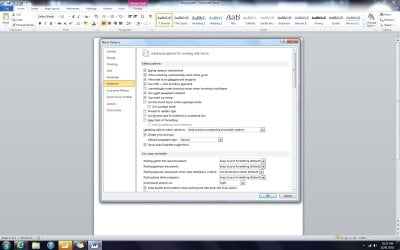
I have gone into Option > Advance, and changed my paste setting and saved it, however when ever i start a new document it still apears as "In line with text" but when i go into option it says default is "Tight" but the document doesnt seem to do it.

How can i fix this?? :)
 

My Computer My Computer

At a glance

Windows 7 Professional 64bitIntel Core i5 - 2500K @ 3.30GHz4GB DDR3EVGA Nvidia GeForce GT 740 2GB DDR3
Computer type
PC/Desktop
Computer Manufacturer/Model Number
Custom Build
OS
Windows 7 Professional 64bit
CPU
Intel Core i5 - 2500K @ 3.30GHz
Motherboard
Gigabyte Z77-HD3
Memory
4GB DDR3
Graphics Card(s)
EVGA Nvidia GeForce GT 740 2GB DDR3
Screen Resolution
1680 x 1050
Hard Drives
1T Samaung HD/ 1T toshiba external drive/ 1T western digital external drive/ 2T seagate external drive/ 250gb samaung SSD
PSU
Antec 430W
Keyboard
Microsoft Wireless Keyboard 800
Mouse
Microsoft Wireless Mouse 1000
Antivirus
AVG
Browser
Internet Explorer
Here is a reg file to force those settings.

Save
the .reg file to your desktop.
Double click/tap on the downloaded .reg file to merge it.
When prompted, click/tap on Run, Yes (UAC-Windows 7/8), Yes, and OK to approve merging the .reg file.
You can now delete the downloaded .reg file if you like.
 

Attachments

My Computer My Computer

At a glance

Windows 8.1 ; Windows 7 x86 (Dec2008-Jan2013)
Computer type
PC/Desktop
OS
Windows 8.1 ; Windows 7 x86 (Dec2008-Jan2013)
Other Info
"The scale icon at the top right of a post or tutorial is how you can give rep to the member."
Here is a reg file to force those settings.

Save the .reg file to your desktop.
Double click/tap on the downloaded .reg file to merge it.
When prompted, click/tap on Run, Yes (UAC-Windows 7/8), Yes, and OK to approve merging the .reg file.
You can now delete the downloaded .reg file if you like.

So i did a repair instaill of Office, that didn't work.
I applyed your registery edit, but that didn't work :\

What is wrong with office??
Are my settings right?
 

Attachments

  • Untitled.jpg
    Untitled.jpg
    129.8 KB · Views: 12

My Computer My Computer

At a glance

Windows 7 Professional 64bitIntel Core i5 - 2500K @ 3.30GHz4GB DDR3EVGA Nvidia GeForce GT 740 2GB DDR3
Computer type
PC/Desktop
Computer Manufacturer/Model Number
Custom Build
OS
Windows 7 Professional 64bit
CPU
Intel Core i5 - 2500K @ 3.30GHz
Motherboard
Gigabyte Z77-HD3
Memory
4GB DDR3
Graphics Card(s)
EVGA Nvidia GeForce GT 740 2GB DDR3
Screen Resolution
1680 x 1050
Hard Drives
1T Samaung HD/ 1T toshiba external drive/ 1T western digital external drive/ 2T seagate external drive/ 250gb samaung SSD
PSU
Antec 430W
Keyboard
Microsoft Wireless Keyboard 800
Mouse
Microsoft Wireless Mouse 1000
Antivirus
AVG
Browser
Internet Explorer
Please post a screenshot of a document, where you believe office is not doing "tight" paste setting.
 

My Computer My Computer

At a glance

Windows 8.1 ; Windows 7 x86 (Dec2008-Jan2013)
Computer type
PC/Desktop
OS
Windows 8.1 ; Windows 7 x86 (Dec2008-Jan2013)
Other Info
"The scale icon at the top right of a post or tutorial is how you can give rep to the member."
Please post a screenshot of a document, where you believe office is not doing "tight" paste setting.
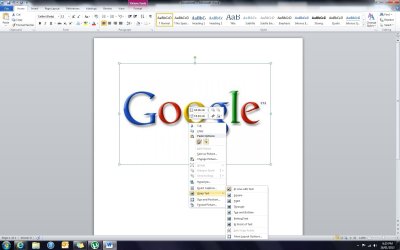
I went to show you an example, and it seemed to work, i was going to reply saying it fixed, but i throught i better try one more time to make sure. And it doesnt work again... :S
So strange..

Edit: It seems if i do a screen shot and paste it into the word doucment it does "tight" wrapping, but if i copy an image from google or my pc and paste, or ever drag it, and become "In line with text"
 

Attachments

  • Untitled.jpg
    Untitled.jpg
    98.1 KB · Views: 5

My Computer My Computer

At a glance

Windows 7 Professional 64bitIntel Core i5 - 2500K @ 3.30GHz4GB DDR3EVGA Nvidia GeForce GT 740 2GB DDR3
Computer type
PC/Desktop
Computer Manufacturer/Model Number
Custom Build
OS
Windows 7 Professional 64bit
CPU
Intel Core i5 - 2500K @ 3.30GHz
Motherboard
Gigabyte Z77-HD3
Memory
4GB DDR3
Graphics Card(s)
EVGA Nvidia GeForce GT 740 2GB DDR3
Screen Resolution
1680 x 1050
Hard Drives
1T Samaung HD/ 1T toshiba external drive/ 1T western digital external drive/ 2T seagate external drive/ 250gb samaung SSD
PSU
Antec 430W
Keyboard
Microsoft Wireless Keyboard 800
Mouse
Microsoft Wireless Mouse 1000
Antivirus
AVG
Browser
Internet Explorer
I was able to recreate this behaviour in Office 2013.
Yes, indeed, when you Right click an image in a browser and select copy, and then paste it in Word it will have "In line" layout position even if "Tight" position is set. I think this is feature not a bug, because it is pasting it in HTML format.
The only solution I was able to come up with is Special paste.

On the Office Ribbon below Paste button there is a little triangle. Click on it for more options -> Paste Special -> Device Independent Bitmap or File. Now this image will be pasted in Tight wrapping. At the point of time, I am not sure how to solve this in way that is more efficient (if there is a solution).

But my money is on the fact that likely there is no solution, because there is no such option as "Tight" in HTML format.
.
 
Last edited:

My Computer My Computer

At a glance

Windows 8.1 ; Windows 7 x86 (Dec2008-Jan2013)
Computer type
PC/Desktop
OS
Windows 8.1 ; Windows 7 x86 (Dec2008-Jan2013)
Other Info
"The scale icon at the top right of a post or tutorial is how you can give rep to the member."
I was able to recreate this behaviour in Office 2013.
Yes, indeed, when you Right click an image in a browser and select copy, and then paste it in Word it will have "In line" layout position even if "Tight" position is set. I think this is feature not a bug, because it is pasting it in HTML format.
The only solution I was able to come up with is Special paste.

On the Office Ribbon below Paste button there is a little triangle. Click on it for more options -> Paste Special -> Device Independent Bitmap or File. Now this image will be pasted in Tight wrapping. At the point of time, I am not sure how to solve this in way that is more efficient (if there is a solution).

But my money is on the fact that likely there is no solution, because there is no such option as "Tight" in HTML format.
.

Huh... I never used to have this problem... (at least i dont think)
but thanks for your help anyway :)
 

My Computer My Computer

At a glance

Windows 7 Professional 64bitIntel Core i5 - 2500K @ 3.30GHz4GB DDR3EVGA Nvidia GeForce GT 740 2GB DDR3
Computer type
PC/Desktop
Computer Manufacturer/Model Number
Custom Build
OS
Windows 7 Professional 64bit
CPU
Intel Core i5 - 2500K @ 3.30GHz
Motherboard
Gigabyte Z77-HD3
Memory
4GB DDR3
Graphics Card(s)
EVGA Nvidia GeForce GT 740 2GB DDR3
Screen Resolution
1680 x 1050
Hard Drives
1T Samaung HD/ 1T toshiba external drive/ 1T western digital external drive/ 2T seagate external drive/ 250gb samaung SSD
PSU
Antec 430W
Keyboard
Microsoft Wireless Keyboard 800
Mouse
Microsoft Wireless Mouse 1000
Antivirus
AVG
Browser
Internet Explorer
Back
Top