Solved How to remove a System Reserved partition on a data drive?

rnb250

New member
Local time
6:07 AM
Messages
9
Location
Auckland
Hi Everyone
I recently added another Hard Drive that had a partially installed version of W7 on it (long story!)
When it booted up, Windows said it was installing software on it, I am thinking maybe because of the Windows files on there it was thinking I wanted a dual boot setup?
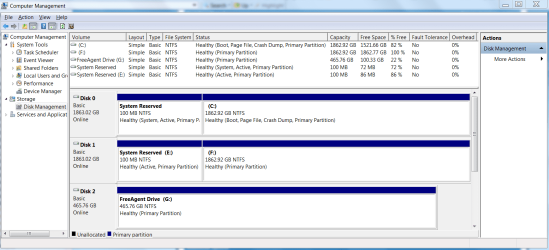
When I looked under My Computer (my-computer.png) it had changed the letter of my removable USB drive and added the new drive (F) along with a System Reserved Drive (E).
I assume E is a partition on the same drive as F as it shows up under Computer Management as belonging to Disk 1 (hard-drives.png).
I quick formatted F and rebooted and then tried disconnecting, reconnecting and rebooting but it remains there.
What I would like to know is:
1. Is it definitely on the new drive F?
2. How I can remove it / re-format and just use F solely as a data drive?
Any help or advice would be much appreciated.
With thanks and regards
Harley M Storey
 

Attachments

  • my-computer.PNG
    my-computer.PNG
    52.2 KB · Views: 22
  • hard-drives.PNG
    hard-drives.PNG
    50.1 KB · Views: 35

My Computer My Computer

At a glance

Microsoft Windows 7 Ultimate 64-bit 7601 Mult...Intel(R) Core(TM) i7 CPU 860 @ 2.80GHz16.00 GBATI Radeon HD 4600 Series
Computer type
PC/Desktop
Computer Manufacturer/Model Number
Ascent Custom Build
OS
Microsoft Windows 7 Ultimate 64-bit 7601 Multiprocessor Free Service Pack 1
CPU
Intel(R) Core(TM) i7 CPU 860 @ 2.80GHz
Motherboard
Intel Corporation DQ57TM
Memory
16.00 GB
Graphics Card(s)
ATI Radeon HD 4600 Series
Sound Card
(1) AMD High Definition Audio Device (2) Realtek High Defi
Monitor(s) Displays
LG 27EB22 Monitor
Screen Resolution
1920 x 1080 x 32 bits (4294967296 colors) @ 60 Hz
Hard Drives
(1) WDC WD2001FASS-00W2B0 ATA Device (2) WDC WD2002FAEX-007BA0 ATA Device (3) Seagate FreeAgentDesktop USB Device
PSU
Antec EarthWatts EA650
Keyboard
Microsoft Wreless Comfort 4000
Mouse
Logitech G700
Antivirus
MSE
The drive is not bootable on its own (System) so you can delete both E and F once the data is moved off, then repartition the drive as you wish.

If the drive interferes at all I'd wipe it with Diskpart Clean Command to clear the old code from the boot sector, then repartition.
 
Comment withdrawn to avoid confusion.
 
Last edited:

My Computer My Computer

At a glance

Vista, Windows7, Mint Mate, Zorin, Windows 8from 1.6GHz Duo to i7
Computer Manufacturer/Model Number
HP, Dell, Gateway, Toshiba - 4 laptops and 2 desktops
OS
Vista, Windows7, Mint Mate, Zorin, Windows 8
CPU
from 1.6GHz Duo to i7
Monitor(s) Displays
2x HP w2207
Hard Drives
5x HDD, 7x SSD, 12x Externals
Keyboard
with trackball - no mices
Mouse
Trackball mice
Internet Speed
DSL 6000
The System Reserved is marked System & Active, therefore the boot partition.
 

My Computer My Computer

At a glance

ME/XP/Vista/Win7
OS
ME/XP/Vista/Win7
The System Reserved is marked System & Active, therefore the boot partition.
You are right. I missed that little detail. Will withdraw my comment.
 

My Computer My Computer

At a glance

Vista, Windows7, Mint Mate, Zorin, Windows 8from 1.6GHz Duo to i7
Computer Manufacturer/Model Number
HP, Dell, Gateway, Toshiba - 4 laptops and 2 desktops
OS
Vista, Windows7, Mint Mate, Zorin, Windows 8
CPU
from 1.6GHz Duo to i7
Monitor(s) Displays
2x HP w2207
Hard Drives
5x HDD, 7x SSD, 12x Externals
Keyboard
with trackball - no mices
Mouse
Trackball mice
Internet Speed
DSL 6000
Thanks for your help everyone.
I have deleted the partitions and reformatted the drive, however when doing so Windows told me that other processes were accessing the partitions and forcing partition delete may cause the system to become unstable.
Anyone have any ideas what those processes might be in case I run into any future issues?
Is this what gregrocker meant when he said "If the drive interferes..."?
thanks and regards
Harley
 

My Computer My Computer

At a glance

Microsoft Windows 7 Ultimate 64-bit 7601 Mult...Intel(R) Core(TM) i7 CPU 860 @ 2.80GHz16.00 GBATI Radeon HD 4600 Series
Computer type
PC/Desktop
Computer Manufacturer/Model Number
Ascent Custom Build
OS
Microsoft Windows 7 Ultimate 64-bit 7601 Multiprocessor Free Service Pack 1
CPU
Intel(R) Core(TM) i7 CPU 860 @ 2.80GHz
Motherboard
Intel Corporation DQ57TM
Memory
16.00 GB
Graphics Card(s)
ATI Radeon HD 4600 Series
Sound Card
(1) AMD High Definition Audio Device (2) Realtek High Defi
Monitor(s) Displays
LG 27EB22 Monitor
Screen Resolution
1920 x 1080 x 32 bits (4294967296 colors) @ 60 Hz
Hard Drives
(1) WDC WD2001FASS-00W2B0 ATA Device (2) WDC WD2002FAEX-007BA0 ATA Device (3) Seagate FreeAgentDesktop USB Device
PSU
Antec EarthWatts EA650
Keyboard
Microsoft Wreless Comfort 4000
Mouse
Logitech G700
Antivirus
MSE
The warning might have been generated by the presence of the Active flag which signals which partition is to be bootable, but it wasn't independently bootable or there would be a System flag as well.

The interference I was referring to is if having the drive connected slows boot of C. This might mean that boot code which remains on the HD is interfering and wiping the HD of all boot code (which deleting and formatting doesn't do) may resolve it.
 
Hi Greg,
Thanks for the help.
I checked under Folder Options / View / and selected "Show Hidden files" and unchecked "Hide protected operating system files."
I couldnt see any files on the disc, does this mean that a clean is uneccessary? - with a 2TB drive it would take a while.
best
Harley
 

My Computer My Computer

At a glance

Microsoft Windows 7 Ultimate 64-bit 7601 Mult...Intel(R) Core(TM) i7 CPU 860 @ 2.80GHz16.00 GBATI Radeon HD 4600 Series
Computer type
PC/Desktop
Computer Manufacturer/Model Number
Ascent Custom Build
OS
Microsoft Windows 7 Ultimate 64-bit 7601 Multiprocessor Free Service Pack 1
CPU
Intel(R) Core(TM) i7 CPU 860 @ 2.80GHz
Motherboard
Intel Corporation DQ57TM
Memory
16.00 GB
Graphics Card(s)
ATI Radeon HD 4600 Series
Sound Card
(1) AMD High Definition Audio Device (2) Realtek High Defi
Monitor(s) Displays
LG 27EB22 Monitor
Screen Resolution
1920 x 1080 x 32 bits (4294967296 colors) @ 60 Hz
Hard Drives
(1) WDC WD2001FASS-00W2B0 ATA Device (2) WDC WD2002FAEX-007BA0 ATA Device (3) Seagate FreeAgentDesktop USB Device
PSU
Antec EarthWatts EA650
Keyboard
Microsoft Wreless Comfort 4000
Mouse
Logitech G700
Antivirus
MSE
Well you've already formatted the HD, correct? So it wouldn't show any boot files anyway. What's important that gets cleaned is code in the boot sector which might be interfering, such as the nt60 bootsect code which makes a Win7 drive bootable at one time but remains if the OS is deleted or formatted over.

Clean
just take seconds to wipe the boot sector and partition table. It's Clean All that takes a long time and is overkilll for these purposes, only needed to make data unrecoverable.
 
Last edited:
The warning might have been generated by the presence of the Active flag which signals which partition is to be bootable, but it wasn't independently bootable or there would be a System flag as well.

About the system flag... "System" just indicates that this is the partition from which you started. If you change the boot order in bios then another active partition (with boot files) will become the system partition.
 

My Computer My Computer

At a glance

Windows
OS
Windows
Just for anyone else who may find this thread useful, this is what I did:

Opened command prompt
http://www.sevenforums.com/tutorials/783-elevated-command-prompt.html

Cleaned disk
http://www.sevenforums.com/tutorials/52129-disk-clean-clean-all-diskpart-command.html

Initialized as MBR Partition Style (as it is a Western Digital Disk and this is what they recommended)
How to initialize or write a signature to a secondary hard drive or Solid State drive in Windows (8, 7, Vista, XP)

Created and formatted the volume
http://www.sevenforums.com/tutorials/2674-partition-volume-create-new.html

Hope this is useful for others and thanks to everyone for their kind advice.
Cheers
Harley
 

My Computer My Computer

At a glance

Microsoft Windows 7 Ultimate 64-bit 7601 Mult...Intel(R) Core(TM) i7 CPU 860 @ 2.80GHz16.00 GBATI Radeon HD 4600 Series
Computer type
PC/Desktop
Computer Manufacturer/Model Number
Ascent Custom Build
OS
Microsoft Windows 7 Ultimate 64-bit 7601 Multiprocessor Free Service Pack 1
CPU
Intel(R) Core(TM) i7 CPU 860 @ 2.80GHz
Motherboard
Intel Corporation DQ57TM
Memory
16.00 GB
Graphics Card(s)
ATI Radeon HD 4600 Series
Sound Card
(1) AMD High Definition Audio Device (2) Realtek High Defi
Monitor(s) Displays
LG 27EB22 Monitor
Screen Resolution
1920 x 1080 x 32 bits (4294967296 colors) @ 60 Hz
Hard Drives
(1) WDC WD2001FASS-00W2B0 ATA Device (2) WDC WD2002FAEX-007BA0 ATA Device (3) Seagate FreeAgentDesktop USB Device
PSU
Antec EarthWatts EA650
Keyboard
Microsoft Wreless Comfort 4000
Mouse
Logitech G700
Antivirus
MSE
Thanks for reporting back, Harley. If there's nothing else then you can mark thread Solved at top.
 
Back
Top