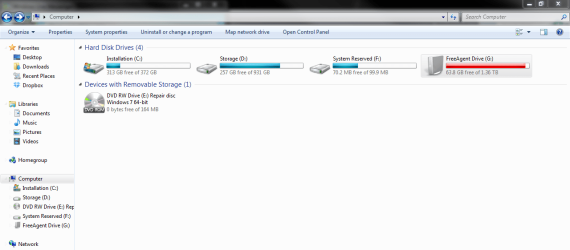
Recently after flashing a new BIOS I had to do a StartUp Repair (got the "BOOTMGR is missing" message) which did its job and all is working fine, but now I have the "System Reserved" partition showing up when I open Windows Explorer. It's also taking up the F: drive letter, which used to belong to my external HDD. I don't really care about either of that, but for aesthetic purposes if anything, is there a way to make it go away?
My Computer
- Computer type
- PC/Desktop
- Computer Manufacturer/Model Number
- Custom Build
- OS
- Windows 7 Ultimate x64
- CPU
- AMD Phenom II X6 1055T
- Motherboard
- ASRock 890GX Extreme3
- Memory
- Corsair CMX4GX3M2A1333C8 2GB DIMM DDR (x4)
- Graphics Card(s)
- NVIDIA GeForce GTX 460
- Sound Card
- ASRock IXP SB600 High Definition (on board)
- Monitor(s) Displays
- LG 32LH3000 LCD TV 32'' / Samsung SyncMaster 24B300 24"
- Screen Resolution
- 3840x1080
- Hard Drives
- Crucial MX100 256GB SSD / WD Caviar 1TB SATA III / Maxtor 6H400F0 400GB / Seagate FreeAgent 1.5TB (external USB drive)
- PSU
- Corsair TX650 V2
- Case
- Thermaltake Shark Black ATX Full Tower
- Cooling
- 2x12cm Intake / 14cm Exhaust / Thermalright HR-02 Macho
- Keyboard
- Logitech K200
- Mouse
- Razer Lachesis 5600
- Internet Speed
- 50/5 mbps VDSL
- Antivirus
- ESET NOD32
- Browser
- Mozilla Firefox