I need some help on searching for a specific .avi file

shi0n

New member
Local time
4:07 PM
Messages
8
Ok, just this morning I tried doing some stuffs on my computer. My sister wants me to convert the Project Diva Extend Opening video to the computer, so tried ripping the .pmf from my UMD and found out that there were no audio for it. So I searched and searched until I found this [HTML=http://www.pspmod.com/forums/off-topic-discussion/25338-convert-pmf-avi.html#post670789]thread[/HTML]. As you can see, I already posted here that the .avi files are missing. I need to delete them or locate them somehow, it's not on my c: or anything. But it is accessible via mplayer.exe

I need help ASAP >.< thanks as well on the advance~
 

My Computer My Computer

At a glance

Windows 7 Home Premium 32bit
OS
Windows 7 Home Premium 32bit
Hello shi0n and welcoem to Seven Forums.

Just for my own clarification, when you say the .avi files are missing but "...accessible via mplayer.exe", is mplayer.exe accessing the .avi files from your hard drive or someplace else? If from the hard drive, have you tried doing a wildcard search? In the Start Menu search box try searching for *.avi and every .avi file on the hard drive should be located along with its file path (if you right-click and select properties.) Other search techniques are explained here:

http://www.sevenforums.com/tutorials/36599-search-windows-7-a.html

Windows 7 Search - wildcards and search codes

If I misunderstood your question I sincerely apologize.
 

My Computer My Computer

At a glance

Win 7 Pro 64-bitIntel i5 2.4 Ghz8GB DDR3Intel HD 3000
Computer type
Laptop
Computer Manufacturer/Model Number
Sony Vaio VPCEB47GM Laptop
OS
Win 7 Pro 64-bit
CPU
Intel i5 2.4 Ghz
Memory
8GB DDR3
Graphics Card(s)
Intel HD 3000
Sound Card
IDT High Definition
Monitor(s) Displays
15.6 WGXA Anti-Glare LED
Screen Resolution
1280x800
Hard Drives
640Gb 7200rpm
Antivirus
MSE
Browser
Opera (primary) with IE9 backup
Hello shi0n and welcoem to Seven Forums.

Just for my own clarification, when you say the .avi files are missing but "...accessible via mplayer.exe", is mplayer.exe accessing the .avi files from your hard drive or someplace else? If from the hard drive, have you tried doing a wildcard search? In the Start Menu search box try searching for *.avi and every .avi file on the hard drive should be located along with its file path (if you right-click and select properties.) Other search techniques are explained here:

http://www.sevenforums.com/tutorials/36599-search-windows-7-a.html

Windows 7 Search - wildcards and search codes

If I misunderstood your question I sincerely apologize.

I already tried this, since I've been searching here and there for some answers. What I recently did was to put some files in my external harddrive so I wouldn't need to worry about the memory thing. But it would really be great if someone knows this kind of problem. I already tried searching using the Date, ext., filename, only .avis, still, those two files are nowhere to be found but they're playable by mplayer.exe using this command on cmd.
First open cmd, then type cd c:\ then enter
next type mplayer convert.avi
it would play the convert.avi which is found in C:\ right? I tried showing every hidden folders and files, it's still missing.
 

My Computer My Computer

At a glance

Windows 7 Home Premium 32bit
OS
Windows 7 Home Premium 32bit
And you are sure you have searched for avi extension on whole computer, Explorer window on Computer view?

Kari

search_extension.png
 

My Computer My Computer

At a glance

Windows 10 Pro x64 EN-GB1.6 GHz Intel Core i7-720QM Processor6 GBATI Mobility Radeon HD 5850 Graphics
Computer type
Laptop
Computer Manufacturer/Model Number
HP ENVY 17-1150eg
OS
Windows 10 Pro x64 EN-GB
CPU
1.6 GHz Intel Core i7-720QM Processor
Memory
6 GB
Graphics Card(s)
ATI Mobility Radeon HD 5850 Graphics
Sound Card
Beats sound system with integrated subwoofer
Monitor(s) Displays
17" laptop display, 22" LED and 32" Full HD TV through HDMI
Screen Resolution
1600*900 (1), 1920*1080 (2&3)
Hard Drives
Internal: 2 x 500 GB SATA Hard Disk Drive 7200 rpm
External: 2TB for backups, 3TB USB3 network drive for media
Cooling
As Envy runs a bit warm, I have it on a Cooler Master pad
Keyboard
Logitech diNovo Media Desktop Laser (bluetooth)
Mouse
Logitech Performance Mouse MX
Internet Speed
50/10 Mbps VDSL
Antivirus
Windows Defender 4.3.9431.0
Browser
Maxthon 3.5.2., IE11
here are some screenshots
64240_404276826322384_1239546018_n.jpg

166529_404276832989050_1229068967_n.jpg

74095_404276819655718_897154791_n.jpg

75272_404276979655702_104006842_n.jpg

543864_404277089655691_2065288870_n.jpg

notice that I typed mplayer convert.avi
72557_404277056322361_783095358_n.jpg

notice that I also typed next was done.avi
72961_404277082989025_1927615236_n.jpg

here I tried renaming media player classic shortcut link to mpc, so I typed mpc convert.avi next picture mpc done.avi
317985_404277189655681_1963957400_n.jpg

296812_404277139655686_196143453_n.jpg


there you guys have it. I hope you guys can figure this out, I really need to know how to delete these files or might as well locate them at the same time, I tried using del done.avi, but file is not found :(
 

My Computer My Computer

At a glance

Windows 7 Home Premium 32bit
OS
Windows 7 Home Premium 32bit
And you are sure you have searched for avi extension on whole computer, Explorer window on Computer view?

Kari

View attachment 251049

Finished doing that, I posted some screenshots so it would be more accurate for the problem >.< :(
 

My Computer My Computer

At a glance

Windows 7 Home Premium 32bit
OS
Windows 7 Home Premium 32bit
I posted some screenshots so it would be more accurate for the problem >.< :(

More accurate? Your post was most confusing I have seen, with screenshots of no value showing absolutely nothing worth to know, except the fact that you do not really know what and how you should search.

To start, a short command line tip about FIND command which you seem to have tried: it is not used to search files, it is used to search a (text)string IN files. Following example for instance searches string Some text in all .txt files in target folder:
Code:
find "Some text" *.txt
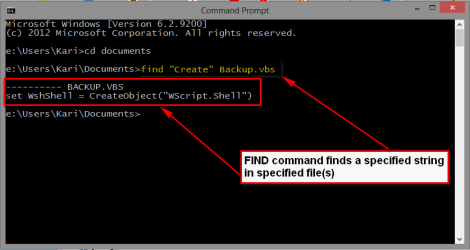
This one searches string Create in file Backup.vbs (a Visual Basic Script):
Code:
find "Create" Backup.vbs
If found, the full text row containing the searched string will be shown:

2013-01-20_005312.png

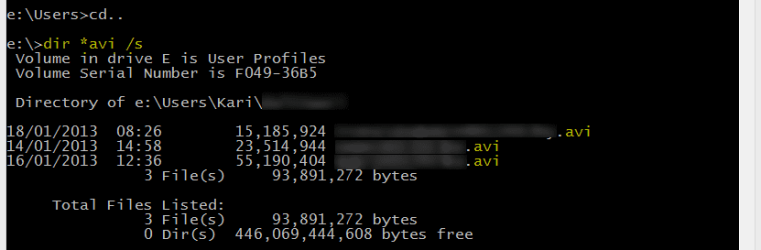
Using Command Prompt, the search is done with DIR command. It only searches the current folder, with switch /s current folder and all its subfolders.

An example:
Search all AVI files in current folder and its all subfolders:
Code:
dir *.avi /s
When you remember that cd\ command always takes you to the root of the current drive, you can search your whole computer with a few commands. Following command sequence (commands in that order you would give them on Command Prompt) would first search .avi files on C:, then on D: and finally on E:, always starting from the drive root:
Code:
[LIST]
[*]C:
[*]cd\
[*]dir *.avi /s
[LIST]
[*]Here would appear a list of found *.avi files on C:
[/LIST]
[*]D:
[*]cd\
[*]dir *.avi /s
[LIST]
[*]Here would appear a list of found *.avi files on D:
[/LIST] 
[*]E:
[*]cd\
[*]dir *.avi /s
[LIST]
[*]Here would appear a list of found *.avi files on E:
[/LIST]
[/LIST]
The screenshot below shows search of .avi files on my User Profile drive E: and its subfolders, and then shows all folders (in this example just one) containing .avi files listing the found files:

search_extension_2.png

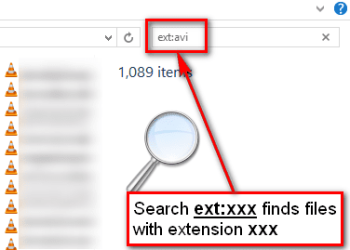
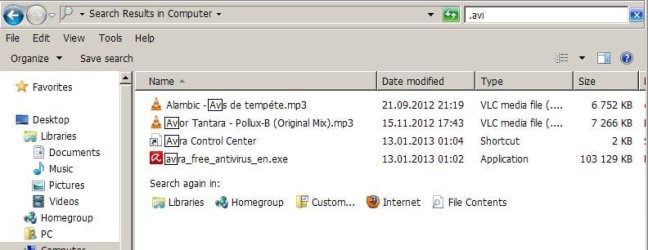
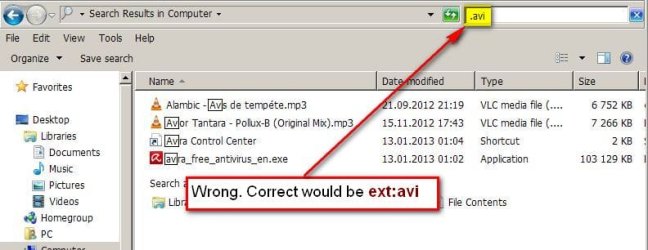
You screenshots show no searching and explain absolutely nothing. Did you do what I asked you to do in my previous post, search .avi files on Windows Explorer opened to Computer view. See the screenshot below, it's from Windows 8 but search is exactly the same in Windows 7:

search_extension_1.png

Kari
 

My Computer My Computer

At a glance

Windows 10 Pro x64 EN-GB1.6 GHz Intel Core i7-720QM Processor6 GBATI Mobility Radeon HD 5850 Graphics
Computer type
Laptop
Computer Manufacturer/Model Number
HP ENVY 17-1150eg
OS
Windows 10 Pro x64 EN-GB
CPU
1.6 GHz Intel Core i7-720QM Processor
Memory
6 GB
Graphics Card(s)
ATI Mobility Radeon HD 5850 Graphics
Sound Card
Beats sound system with integrated subwoofer
Monitor(s) Displays
17" laptop display, 22" LED and 32" Full HD TV through HDMI
Screen Resolution
1600*900 (1), 1920*1080 (2&3)
Hard Drives
Internal: 2 x 500 GB SATA Hard Disk Drive 7200 rpm
External: 2TB for backups, 3TB USB3 network drive for media
Cooling
As Envy runs a bit warm, I have it on a Cooler Master pad
Keyboard
Logitech diNovo Media Desktop Laser (bluetooth)
Mouse
Logitech Performance Mouse MX
Internet Speed
50/10 Mbps VDSL
Antivirus
Windows Defender 4.3.9431.0
Browser
Maxthon 3.5.2., IE11
:shock: jeez, once upon a time searching for lost files was a simple, easy and failsafe task i windows.

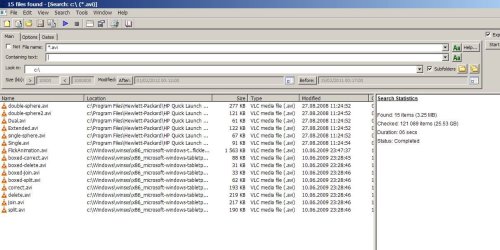
Try Agent Ransack - Free File Searching Utility

Easy job: enter *.avi + the drive (letter) you want to search (alt. use the dropdown menu to choose the whole pc). If the file exists, it will be found.

Optional, enter some dates and\or size to narrow down the search.
 

Attachments

  • Capture.JPG
    Capture.JPG
    121 KB · Views: 8

My Computer My Computer

At a glance

W7, W8.1
Computer type
Laptop
Computer Manufacturer/Model Number
Dell \ Lenovo\ HP \ Toshiba
OS
W7, W8.1
Antivirus
MSE, Malwarebytes
Browser
FF
I posted some screenshots so it would be more accurate for the problem >.< :(

More accurate? Your post was most confusing I have seen, with screenshots of no value showing absolutely nothing worth to know, except the fact that you do not really know what and how you should search.

To start, a short command line tip about FIND command which you seem to have tried: it is not used to search files, it is used to search a (text)string IN files. Following example for instance searches string Some text in all .txt files in target folder:
Code:
find "Some text" *.txt
This one searches string Create in file Backup.vbs (a Visual Basic Script):
Code:
find "Create" Backup.vbs
If found, the full text row containing the searched string will be shown:

View attachment 251062

Using Command Prompt, the search is done with DIR command. It only searches the current folder, with switch /s current folder and all its subfolders.

An example:
Search all AVI files in current folder and its all subfolders:
Code:
dir *.avi /s
When you remember that cd\ command always takes you to the root of the current drive, you can search your whole computer with a few commands. Following command sequence (commands in that order you would give them on Command Prompt) would first search .avi files on C:, then on D: and finally on E:, always starting from the drive root:
Code:
[LIST]
[*]C:
[*]cd\
[*]dir *.avi /s
[LIST]
[*]Here would appear a list of found *.avi files on C:
[/LIST]
[*]D:
[*]cd\
[*]dir *.avi /s
[LIST]
[*]Here would appear a list of found *.avi files on D:
[/LIST] 
[*]E:
[*]cd\
[*]dir *.avi /s
[LIST]
[*]Here would appear a list of found *.avi files on E:
[/LIST]
[/LIST]
The screenshot below shows search of .avi files on my User Profile drive E: and its subfolders, and then shows all folders (in this example just one) containing .avi files listing the found files:

View attachment 251064

You screenshots show no searching and explain absolutely nothing. Did you do what I asked you to do in my previous post, search .avi files on Windows Explorer opened to Computer view. See the screenshot below, it's from Windows 8 but search is exactly the same in Windows 7:

View attachment 251063

Kari

well what I showed you guys there that the .avi was accessible via mplayer.exe on my c:\
And also I have done what you have said already on your previous post. Now let me do what you have just said, it might just work :)
 

My Computer My Computer

At a glance

Windows 7 Home Premium 32bit
OS
Windows 7 Home Premium 32bit
I have no idea what post #5 is all about. I just type in avi in the search libraries of expolrer and tick on computer and get this.


search avi.PNG

I'm I misunderstanding something?
Make sure indexing is active.
 

My Computer My Computer

At a glance

Windows 10 Pro. 64/ version 1709 Windows 7 Pr...Intel i7-6800K @ 4.3Corsair Platinum 16 gig @2400EVGA GTX 1070 OC
Computer type
PC/Desktop
Computer Manufacturer/Model Number
Home made Desktop
OS
Windows 10 Pro. 64/ version 1709 Windows 7 Pro/64
CPU
Intel i7-6800K @ 4.3
Motherboard
ASUS X-99 Deluxe II
Memory
Corsair Platinum 16 gig @2400
Graphics Card(s)
EVGA GTX 1070 OC
Monitor(s) Displays
Asus 27" LED LCD/VE278Q
Screen Resolution
1920-1080 or 1280-720 HDMI
Hard Drives
INTEL SSD 730-240 Gb Sata 3.0/
PSU
EVGA Platium 1200W
Case
Phanteks Luxe Tempered Glass 8 fans/ one radiator
Cooling
XSPC/ Water Cooled CPU
Keyboard
Das 4 Professional
Mouse
Logitech M705/MX Anywhere 2-S
Internet Speed
100 mbits
Antivirus
Microsoft Security Essentials/ Malwarebytes Premium 3.0/ SAS
Browser
I.E. 11 default/Firefox/ ISP Time Warner Cable/Spectrum
Other Info
LG BluRay Burner/
Sound system-KLipsch-THX/
Icy Dock ssd Hot Swap bays.
:shock: jeez, once upon a time searching for lost files was a simple, easy and failsafe task i windows.
It still is. Extremely easy, fast and reliable. You just need to know how to use Windows Search.

You of course know that Agent Ransack is a light version of File Locator. Here some tests I have made between File Locator and Windows Search: http://www.sevenforums.com/general-discussion/126321-more-search-hell-6.html#post1098141

Kari
 

My Computer My Computer

At a glance

Windows 10 Pro x64 EN-GB1.6 GHz Intel Core i7-720QM Processor6 GBATI Mobility Radeon HD 5850 Graphics
Computer type
Laptop
Computer Manufacturer/Model Number
HP ENVY 17-1150eg
OS
Windows 10 Pro x64 EN-GB
CPU
1.6 GHz Intel Core i7-720QM Processor
Memory
6 GB
Graphics Card(s)
ATI Mobility Radeon HD 5850 Graphics
Sound Card
Beats sound system with integrated subwoofer
Monitor(s) Displays
17" laptop display, 22" LED and 32" Full HD TV through HDMI
Screen Resolution
1600*900 (1), 1920*1080 (2&3)
Hard Drives
Internal: 2 x 500 GB SATA Hard Disk Drive 7200 rpm
External: 2TB for backups, 3TB USB3 network drive for media
Cooling
As Envy runs a bit warm, I have it on a Cooler Master pad
Keyboard
Logitech diNovo Media Desktop Laser (bluetooth)
Mouse
Logitech Performance Mouse MX
Internet Speed
50/10 Mbps VDSL
Antivirus
Windows Defender 4.3.9431.0
Browser
Maxthon 3.5.2., IE11
You of course know that Agent Ransack is a light version of File Locator. Here some tests I have made between File Locator and Windows Search: http://www.sevenforums.com/general-d...ml#post1098141

Can only quote mjf in #53

Here are the results of my tests which still convince me Agent Ransack / FileLocator Lite(FLL) is here to stay for me. Windows for me at least (and others I'm sure) is an untrusty/flaky piece of software.

Some are happy with w7 search (IMO a bizarre and clumsy interface (when it comes to setting criterias) + a tendency to return no or random results), but many are dissatisfied, and do experience problems performing even the simplest searches.

Whatever the situation, Agent Ransack (one among many dedicated search programs) is an alternative, free to try out then simply see from practical use if one likes it over w7 search, or (as I do) use w7 search for some tasks, and Agent for others (as when there is reason to believe w7 did not return correct or complete results).
http://www.sevenforums.com/general-discussion/126321-more-search-hell-6.html#post1098638
 

My Computer My Computer

At a glance

W7, W8.1
Computer type
Laptop
Computer Manufacturer/Model Number
Dell \ Lenovo\ HP \ Toshiba
OS
W7, W8.1
Antivirus
MSE, Malwarebytes
Browser
FF
Of course I understand not everyone is capable to learn and understand the simple instructions and usage of Windows Search, and might therefore not find what he / she is looking for, thus needing some third party help in this extremely simple task. Luckily my very limited capacity has been enough to learn Windows Search, and it has never failed me. I have always found what I have been looking for, and I'll bet if we could organize a search competition with identical machines I could search and find anything on Windows using its own search faster than another user with any of these third party tools.

Some are happy with w7 search (IMO a bizarre and clumsy interface (when it comes to setting criterias) + a tendency to return no or random results)
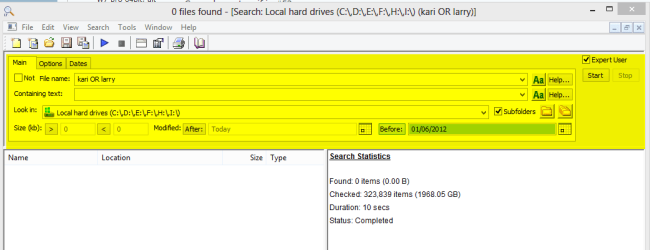
We obviously have a different opinion about clumsy interface. A few minutes ago I had to search one Windows computer for all images that have my name Kari or the name Larry included in filename, and which are created before June 2012.

Windows Search simple search string kind:image name:kari OR name:larry before:June 2012 and results (the "clumsy" search interface as you called it highlighted):

Search_1.png

And then File Locator (Agent Ransack). Alone setting the before date took longer than typing the whole search string in Windows search. And, of course, search found nothing for you can't just set two partial filenames as search criteria so easily:

Search_2.png

(To help comparing I highlighted the part you call clumsy in Windows Search.)

Kari
 
Last edited:

My Computer My Computer

At a glance

Windows 10 Pro x64 EN-GB1.6 GHz Intel Core i7-720QM Processor6 GBATI Mobility Radeon HD 5850 Graphics
Computer type
Laptop
Computer Manufacturer/Model Number
HP ENVY 17-1150eg
OS
Windows 10 Pro x64 EN-GB
CPU
1.6 GHz Intel Core i7-720QM Processor
Memory
6 GB
Graphics Card(s)
ATI Mobility Radeon HD 5850 Graphics
Sound Card
Beats sound system with integrated subwoofer
Monitor(s) Displays
17" laptop display, 22" LED and 32" Full HD TV through HDMI
Screen Resolution
1600*900 (1), 1920*1080 (2&3)
Hard Drives
Internal: 2 x 500 GB SATA Hard Disk Drive 7200 rpm
External: 2TB for backups, 3TB USB3 network drive for media
Cooling
As Envy runs a bit warm, I have it on a Cooler Master pad
Keyboard
Logitech diNovo Media Desktop Laser (bluetooth)
Mouse
Logitech Performance Mouse MX
Internet Speed
50/10 Mbps VDSL
Antivirus
Windows Defender 4.3.9431.0
Browser
Maxthon 3.5.2., IE11
I think if one spends more time learning how to use Windows Explorier Search and less time condemning it they will become a happier computer person.
 

My Computer My Computer

At a glance

Windows 10 Pro. 64/ version 1709 Windows 7 Pr...Intel i7-6800K @ 4.3Corsair Platinum 16 gig @2400EVGA GTX 1070 OC
Computer type
PC/Desktop
Computer Manufacturer/Model Number
Home made Desktop
OS
Windows 10 Pro. 64/ version 1709 Windows 7 Pro/64
CPU
Intel i7-6800K @ 4.3
Motherboard
ASUS X-99 Deluxe II
Memory
Corsair Platinum 16 gig @2400
Graphics Card(s)
EVGA GTX 1070 OC
Monitor(s) Displays
Asus 27" LED LCD/VE278Q
Screen Resolution
1920-1080 or 1280-720 HDMI
Hard Drives
INTEL SSD 730-240 Gb Sata 3.0/
PSU
EVGA Platium 1200W
Case
Phanteks Luxe Tempered Glass 8 fans/ one radiator
Cooling
XSPC/ Water Cooled CPU
Keyboard
Das 4 Professional
Mouse
Logitech M705/MX Anywhere 2-S
Internet Speed
100 mbits
Antivirus
Microsoft Security Essentials/ Malwarebytes Premium 3.0/ SAS
Browser
I.E. 11 default/Firefox/ ISP Time Warner Cable/Spectrum
Other Info
LG BluRay Burner/
Sound system-KLipsch-THX/
Icy Dock ssd Hot Swap bays.
Am happy for you, being satisfied is the whole point, as I am using both Agent Ransack and W7 search, each as needed and for their own and different purpose. As some of my work and income depends on a reliable search, am using the tools that fits best.

Of course I understand not everyone is capable to learn and understand the simple instructions and usage of Windows Search, and might therefore not find what he / she is looking for, thus needing some third party help in this extremely simple task
:confused:

Regarding the OP's avi problem, a practical test:
 

Attachments

  • s4.JPG
    s4.JPG
    118.8 KB · Views: 7
  • s2.JPG
    s2.JPG
    28.5 KB · Views: 7
  • s1.JPG
    s1.JPG
    40.8 KB · Views: 8
  • s3.JPG
    s3.JPG
    28.8 KB · Views: 5

My Computer My Computer

At a glance

W7, W8.1
Computer type
Laptop
Computer Manufacturer/Model Number
Dell \ Lenovo\ HP \ Toshiba
OS
W7, W8.1
Antivirus
MSE, Malwarebytes
Browser
FF
Regarding the OP's avi problem, a practical test:

Referring to the first sentence in my previous post, please see your edited screenshots below to learn correct usage of Windows Search:

251259d1358771168-i-need-some-help-searching-specific-avi-file-s3.jpg

251257d1358771168-i-need-some-help-searching-specific-avi-file-s1.jpg

Kari
 

My Computer My Computer

At a glance

Windows 10 Pro x64 EN-GB1.6 GHz Intel Core i7-720QM Processor6 GBATI Mobility Radeon HD 5850 Graphics
Computer type
Laptop
Computer Manufacturer/Model Number
HP ENVY 17-1150eg
OS
Windows 10 Pro x64 EN-GB
CPU
1.6 GHz Intel Core i7-720QM Processor
Memory
6 GB
Graphics Card(s)
ATI Mobility Radeon HD 5850 Graphics
Sound Card
Beats sound system with integrated subwoofer
Monitor(s) Displays
17" laptop display, 22" LED and 32" Full HD TV through HDMI
Screen Resolution
1600*900 (1), 1920*1080 (2&3)
Hard Drives
Internal: 2 x 500 GB SATA Hard Disk Drive 7200 rpm
External: 2TB for backups, 3TB USB3 network drive for media
Cooling
As Envy runs a bit warm, I have it on a Cooler Master pad
Keyboard
Logitech diNovo Media Desktop Laser (bluetooth)
Mouse
Logitech Performance Mouse MX
Internet Speed
50/10 Mbps VDSL
Antivirus
Windows Defender 4.3.9431.0
Browser
Maxthon 3.5.2., IE11
Am trying to help the OP by replicating some of the problems he\she may have been facing, and providing a solution, in this specific case Agent Ransack always finds the actual file type, w7 search never.

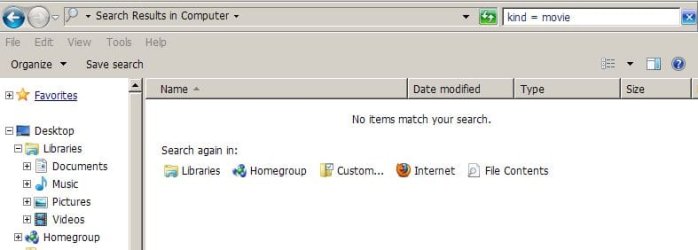
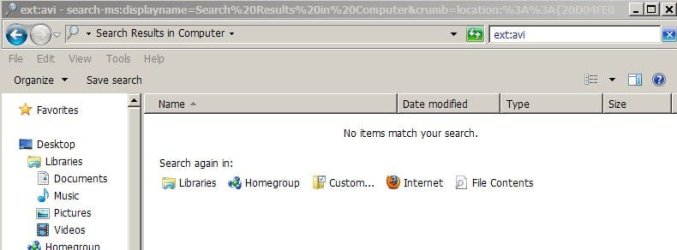
FYI, the 'kind = movie' was automatically inserted by windows when choosing 'movie' from the drop down list of available file types. Is windows search doing something wrong ?? impossible, of course lol. But you may not know about those drop down lists.

And btw, ext:avi tried as well, no match.
 

Attachments

  • s.JPG
    s.JPG
    32.2 KB · Views: 7

My Computer My Computer

At a glance

W7, W8.1
Computer type
Laptop
Computer Manufacturer/Model Number
Dell \ Lenovo\ HP \ Toshiba
OS
W7, W8.1
Antivirus
MSE, Malwarebytes
Browser
FF
Thanks Kari! I never understood Windows search until I read your hand full of posts here. Now I have mastered it - its far easier than I realised :)
 

My Computer My Computer

At a glance

Windows 10 Pro x64 ; Xubuntu x64Intel i7 860 @ 2.80 GHz O/C'ed to 4.0GHz16GB Corsair Vengance DDR3 @ 661 MHz Dual Cha...EVGA NVidia GTX 560 1024MB
Computer type
PC/Desktop
Computer Manufacturer/Model Number
Golden Mk. I.4
OS
Windows 10 Pro x64 ; Xubuntu x64
CPU
Intel i7 860 @ 2.80 GHz O/C'ed to 4.0GHz
Motherboard
Gigabyte P55A-UD3R Rev.1. Award BIOS F13
Memory
16GB Corsair Vengance DDR3 @ 661 MHz Dual Channel (9-9-9-24)
Graphics Card(s)
EVGA NVidia GTX 560 1024MB
Sound Card
Realtek Integrated
Monitor(s) Displays
Dual Samsung SyncMaster 2494HS
Screen Resolution
1920*1080 and 1920*1080
Hard Drives
1*Samsung 840 EVO 120GB SSD;
1*OCZ Vertex 2 60GB SSD;
2*Samsung F3 SpinPoint 1TB in RAID0;
1*Samsung F1 SpinPoint 1TB;
2*Western Digital 1TB External USB 3.0
1*Western Digital 500GB External USB 3.0
1*Seagate 500GB External USB 2.0
PSU
Thermaltake ToughPower QFan 750W
Case
Thermaltake Element S VK60001W2Z
Cooling
Corsair H60 Water Cooling, 2*230mm and 2*80mm case fans
Keyboard
Logitech G110
Mouse
Logitech MX518
Am trying to help the OP by replicating some of the problems he\she may have been facing, and providing a solution, in this specific case Agent Ransack always finds the actual file type, w7 search never.

FYI, the 'kind = movie' was automatically inserted by windows when choosing 'movie' from the drop down list of available file types. Is windows search doing something wrong ?? impossible, of course lol. But you may not know about those drop down lists.

And btw, ext:avi tried as well, no match.
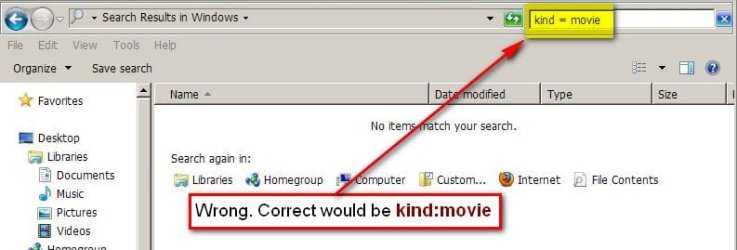
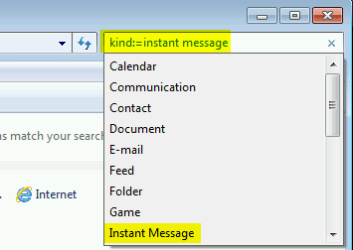
Wrong. Windows does not automatically put that kind of string on search field. Correct usage is either kind:movie or kind:=movie (also kind := movie works, important character is the colon :). If you select a search criteria from drop down menu, it automatically adds both colon and equal characters:

Search_5.png

I am also only trying to show OP a simple solution to his issue. An added point in my posts, a point very important for me, is that as so often you do not really need third party solutions to solve simple issues like this.

There's a simple trick to check if your search criteria syntax is correct. It turns blue if correct, stays black if not.

Correct, criteria written in blue:

Search_6.png

Wrong, criteria written in black:

Search_7.png

Kari


EDIT:

Important notice, search filter kind:movie only finds "real" movie formats like ripped DVDs and so on. To search video files like AVI, WMV, MP4 and so on use filter kind:video
 

My Computer My Computer

At a glance

Windows 10 Pro x64 EN-GB1.6 GHz Intel Core i7-720QM Processor6 GBATI Mobility Radeon HD 5850 Graphics
Computer type
Laptop
Computer Manufacturer/Model Number
HP ENVY 17-1150eg
OS
Windows 10 Pro x64 EN-GB
CPU
1.6 GHz Intel Core i7-720QM Processor
Memory
6 GB
Graphics Card(s)
ATI Mobility Radeon HD 5850 Graphics
Sound Card
Beats sound system with integrated subwoofer
Monitor(s) Displays
17" laptop display, 22" LED and 32" Full HD TV through HDMI
Screen Resolution
1600*900 (1), 1920*1080 (2&3)
Hard Drives
Internal: 2 x 500 GB SATA Hard Disk Drive 7200 rpm
External: 2TB for backups, 3TB USB3 network drive for media
Cooling
As Envy runs a bit warm, I have it on a Cooler Master pad
Keyboard
Logitech diNovo Media Desktop Laser (bluetooth)
Mouse
Logitech Performance Mouse MX
Internet Speed
50/10 Mbps VDSL
Antivirus
Windows Defender 4.3.9431.0
Browser
Maxthon 3.5.2., IE11
Important notice, search filter kind:movie only finds "real" movie formats like ripped DVDs and so on. To search video files like AVI, WMV, MP4 and so on use filter kind:video
Good point. Tried kind:video, it found 14 of the 15 avi's on this pc. Not bad lol.

Whatever, an interesting discussion, and learned a few things both in Agent Ransack and W search. As for the original topic, let's hope the OP has succeeded (if the files are there) by either 1. Somehow mastered W search (and made it work properly for his purpose), 2. Giving Agent R. a try (and quite immediately finding the files).

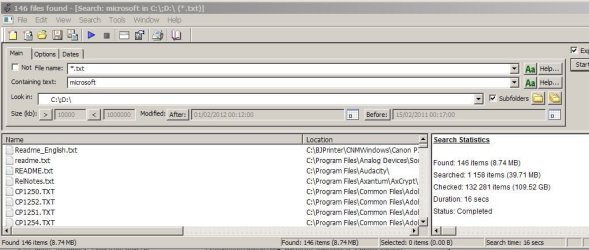
Here's another example of why I treat W search with a dose of skepticism, the missing results (131 vs 146) may have some explanation, but good thing about Agent R it never needs any special explanation, setting or doubts, just digs up what's there.
 

Attachments

  • s7.JPG
    s7.JPG
    51.8 KB · Views: 5
  • s8.JPG
    s8.JPG
    73.4 KB · Views: 5

My Computer My Computer

At a glance

W7, W8.1
Computer type
Laptop
Computer Manufacturer/Model Number
Dell \ Lenovo\ HP \ Toshiba
OS
W7, W8.1
Antivirus
MSE, Malwarebytes
Browser
FF
Back
Top