How do I create partition in windows 7home premium without formatting?

mmnouman

New member
Member
Local time
10:24 PM
Messages
60
I have laptop with with following specs;

Dell N5110
core i7
4 Gb DDR3 ram
500GB Hard Disk
2769mb Graphics


When I bought, it has only single disk drive "C" with registered Window 7 Home Premium, now I want to make partitions without formatting this window. I don’t want to lose this registered window and my data as well.

Is there any method for it ??
Kindly help out.
 

My Computer My Computer

At a glance

Windows 7 x64DELL80GBNvidia GT525m
Computer Manufacturer/Model Number
DELL Inspiron N5110
OS
Windows 7 x64
CPU
DELL
Memory
80GB
Graphics Card(s)
Nvidia GT525m
Hard Drives
500GB
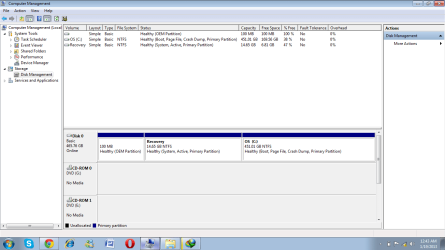
Please post back a screenshot of your maximized Disk Management drive map and listings:

1. Type Disk Management in Start :orb: Search box.
2. Open Disk Mgmt. window and maximize it.
3. Type Snipping Tool in Start Search box.
4. Open Snipping Tool, choose Rectangular Snip, click New, draw a box around full drive map and all listings.
5, Save Snip, attach using paper clip in Reply Box.

Tell us what is on each partition. We'll give you the steps to create new partition(s) while keeping Dell Recovery and Diagnostics tools bootable.

In addition take a a look at Clean Reinstall - Factory OEM Windows 7
and Clean Up Factory Bloatware
 
You have definitely more than 1 partition. And if you have 4 primary partitions (which is possible), then we'll have to take extra measures before you embark into partition creation. That's why it is so important we have a look at your disk management.
 

My Computer My Computer

At a glance

Vista, Windows7, Mint Mate, Zorin, Windows 8from 1.6GHz Duo to i7
Computer Manufacturer/Model Number
HP, Dell, Gateway, Toshiba - 4 laptops and 2 desktops
OS
Vista, Windows7, Mint Mate, Zorin, Windows 8
CPU
from 1.6GHz Duo to i7
Monitor(s) Displays
2x HP w2207
Hard Drives
5x HDD, 7x SSD, 12x Externals
Keyboard
with trackball - no mices
Mouse
Trackball mice
Internet Speed
DSL 6000
122.png
 

My Computer My Computer

At a glance

Windows 7 x64DELL80GBNvidia GT525m
Computer Manufacturer/Model Number
DELL Inspiron N5110
OS
Windows 7 x64
CPU
DELL
Memory
80GB
Graphics Card(s)
Nvidia GT525m
Hard Drives
500GB
will it effect on my data saved in "C" Drive..... ? As I don't want to lose my data........
or any disadvantage of this method ?
 

My Computer My Computer

At a glance

Windows 7 x64DELL80GBNvidia GT525m
Computer Manufacturer/Model Number
DELL Inspiron N5110
OS
Windows 7 x64
CPU
DELL
Memory
80GB
Graphics Card(s)
Nvidia GT525m
Hard Drives
500GB
Is recovery being active correct?
 

My Computer My Computer

At a glance

Windows 10 Pro. 64/ version 1709 Windows 7 Pr...Intel i7-6800K @ 4.3Corsair Platinum 16 gig @2400EVGA GTX 1070 OC
Computer type
PC/Desktop
Computer Manufacturer/Model Number
Home made Desktop
OS
Windows 10 Pro. 64/ version 1709 Windows 7 Pro/64
CPU
Intel i7-6800K @ 4.3
Motherboard
ASUS X-99 Deluxe II
Memory
Corsair Platinum 16 gig @2400
Graphics Card(s)
EVGA GTX 1070 OC
Monitor(s) Displays
Asus 27" LED LCD/VE278Q
Screen Resolution
1920-1080 or 1280-720 HDMI
Hard Drives
INTEL SSD 730-240 Gb Sata 3.0/
PSU
EVGA Platium 1200W
Case
Phanteks Luxe Tempered Glass 8 fans/ one radiator
Cooling
XSPC/ Water Cooled CPU
Keyboard
Das 4 Professional
Mouse
Logitech M705/MX Anywhere 2-S
Internet Speed
100 mbits
Antivirus
Microsoft Security Essentials/ Malwarebytes Premium 3.0/ SAS
Browser
I.E. 11 default/Firefox/ ISP Time Warner Cable/Spectrum
Other Info
LG BluRay Burner/
Sound system-KLipsch-THX/
Icy Dock ssd Hot Swap bays.
will it effect on my data saved in "C" Drive..... ? As I don't want to lose my data........
or any disadvantage of this method ?
No, there will ne no effect on the content od C - if you use Disk Management.
 

My Computer My Computer

At a glance

Vista, Windows7, Mint Mate, Zorin, Windows 8from 1.6GHz Duo to i7
Computer Manufacturer/Model Number
HP, Dell, Gateway, Toshiba - 4 laptops and 2 desktops
OS
Vista, Windows7, Mint Mate, Zorin, Windows 8
CPU
from 1.6GHz Duo to i7
Monitor(s) Displays
2x HP w2207
Hard Drives
5x HDD, 7x SSD, 12x Externals
Keyboard
with trackball - no mices
Mouse
Trackball mice
Internet Speed
DSL 6000

My Computer My Computer

At a glance

Vista, Windows7, Mint Mate, Zorin, Windows 8from 1.6GHz Duo to i7
Computer Manufacturer/Model Number
HP, Dell, Gateway, Toshiba - 4 laptops and 2 desktops
OS
Vista, Windows7, Mint Mate, Zorin, Windows 8
CPU
from 1.6GHz Duo to i7
Monitor(s) Displays
2x HP w2207
Hard Drives
5x HDD, 7x SSD, 12x Externals
Keyboard
with trackball - no mices
Mouse
Trackball mice
Internet Speed
DSL 6000
Thank you whs.
 

My Computer My Computer

At a glance

Windows 10 Pro. 64/ version 1709 Windows 7 Pr...Intel i7-6800K @ 4.3Corsair Platinum 16 gig @2400EVGA GTX 1070 OC
Computer type
PC/Desktop
Computer Manufacturer/Model Number
Home made Desktop
OS
Windows 10 Pro. 64/ version 1709 Windows 7 Pro/64
CPU
Intel i7-6800K @ 4.3
Motherboard
ASUS X-99 Deluxe II
Memory
Corsair Platinum 16 gig @2400
Graphics Card(s)
EVGA GTX 1070 OC
Monitor(s) Displays
Asus 27" LED LCD/VE278Q
Screen Resolution
1920-1080 or 1280-720 HDMI
Hard Drives
INTEL SSD 730-240 Gb Sata 3.0/
PSU
EVGA Platium 1200W
Case
Phanteks Luxe Tempered Glass 8 fans/ one radiator
Cooling
XSPC/ Water Cooled CPU
Keyboard
Das 4 Professional
Mouse
Logitech M705/MX Anywhere 2-S
Internet Speed
100 mbits
Antivirus
Microsoft Security Essentials/ Malwarebytes Premium 3.0/ SAS
Browser
I.E. 11 default/Firefox/ ISP Time Warner Cable/Spectrum
Other Info
LG BluRay Burner/
Sound system-KLipsch-THX/
Icy Dock ssd Hot Swap bays.
You are welcome.
 

My Computer My Computer

At a glance

Vista, Windows7, Mint Mate, Zorin, Windows 8from 1.6GHz Duo to i7
Computer Manufacturer/Model Number
HP, Dell, Gateway, Toshiba - 4 laptops and 2 desktops
OS
Vista, Windows7, Mint Mate, Zorin, Windows 8
CPU
from 1.6GHz Duo to i7
Monitor(s) Displays
2x HP w2207
Hard Drives
5x HDD, 7x SSD, 12x Externals
Keyboard
with trackball - no mices
Mouse
Trackball mice
Internet Speed
DSL 6000
Is recovery being active correct?

How can I know that ? pls guide......
 

My Computer My Computer

At a glance

Windows 7 x64DELL80GBNvidia GT525m
Computer Manufacturer/Model Number
DELL Inspiron N5110
OS
Windows 7 x64
CPU
DELL
Memory
80GB
Graphics Card(s)
Nvidia GT525m
Hard Drives
500GB
so what you suggest....... I do this or not...because I felt that my PC is slow as compared to other PC's having same specs and same manufacturer but good in performance than mine due to several partitions......

Another thing I have recovery drive of 14.65GB.......does it contain Window recovery or any other thing ?
 

My Computer My Computer

At a glance

Windows 7 x64DELL80GBNvidia GT525m
Computer Manufacturer/Model Number
DELL Inspiron N5110
OS
Windows 7 x64
CPU
DELL
Memory
80GB
Graphics Card(s)
Nvidia GT525m
Hard Drives
500GB
The recovery partition is there in case you want to reinstall the system. I suggest not to touch it.
 

My Computer My Computer

At a glance

Vista, Windows7, Mint Mate, Zorin, Windows 8from 1.6GHz Duo to i7
Computer Manufacturer/Model Number
HP, Dell, Gateway, Toshiba - 4 laptops and 2 desktops
OS
Vista, Windows7, Mint Mate, Zorin, Windows 8
CPU
from 1.6GHz Duo to i7
Monitor(s) Displays
2x HP w2207
Hard Drives
5x HDD, 7x SSD, 12x Externals
Keyboard
with trackball - no mices
Mouse
Trackball mice
Internet Speed
DSL 6000
will my recovery drive bring back registered window with all its features, when in case I want to reinstall it or any problem occurs in my window ??

If so what is the method ??
 

My Computer My Computer

At a glance

Windows 7 x64DELL80GBNvidia GT525m
Computer Manufacturer/Model Number
DELL Inspiron N5110
OS
Windows 7 x64
CPU
DELL
Memory
80GB
Graphics Card(s)
Nvidia GT525m
Hard Drives
500GB
Follow these steps if you ever need to run Dell Windows 7 PC Restore.

But be aware that the factory pre-install is not the best way to run Win7 since it is loaded with bloatware and duplicate utilities that have better versions built into Win7. For this reason to get best performance many tech enthusiasts choose to Clean Reinstall - Factory OEM Windows 7.

Until then I would at least Clean Up Factory Bloatware to improve performance. In addition you can Optimize Windows 7 especially editing visual effects of animation, fading, sliding, dragging intact and selection rectangle.

If performance issues still exist work through these Troubleshooting Steps for Windows 7 to assure a Clean Boot, check the logs for repeat errors to resolve, utilize System Resources to find solutions to problem, Generate a System Health Report.

Test your hardware using Dell Diagnostics: Dell Diagnostics Utility - How to Run the
 
will my recovery drive bring back registered window with all its features, when in case I want to reinstall it or any problem occurs in my window ??

If so what is the method ??
Your best bet is to make frequent images and restore a recent image once your system goes on the blink. That is a 20 to 30 minute affair versus a hard day's of work for a reinstall. Here is how.
 

My Computer My Computer

At a glance

Vista, Windows7, Mint Mate, Zorin, Windows 8from 1.6GHz Duo to i7
Computer Manufacturer/Model Number
HP, Dell, Gateway, Toshiba - 4 laptops and 2 desktops
OS
Vista, Windows7, Mint Mate, Zorin, Windows 8
CPU
from 1.6GHz Duo to i7
Monitor(s) Displays
2x HP w2207
Hard Drives
5x HDD, 7x SSD, 12x Externals
Keyboard
with trackball - no mices
Mouse
Trackball mice
Internet Speed
DSL 6000
Thanks for your support.

I want to confirm again; that if I shrink my partition C to make 2 new partitions, will it effect on;
1. files(corrupt problem)
2. performance will improve ?
3. data on C drive will be safe ?
 

My Computer My Computer

At a glance

Windows 7 x64DELL80GBNvidia GT525m
Computer Manufacturer/Model Number
DELL Inspiron N5110
OS
Windows 7 x64
CPU
DELL
Memory
80GB
Graphics Card(s)
Nvidia GT525m
Hard Drives
500GB
Before you shrink your C partition, make a backup image of it - especially if you use Partition Wizard (I once lost a whole drive full of partitions because of a little mistake I made). Disk Management is safer but may not shrink as much as you need.
 

My Computer My Computer

At a glance

Vista, Windows7, Mint Mate, Zorin, Windows 8from 1.6GHz Duo to i7
Computer Manufacturer/Model Number
HP, Dell, Gateway, Toshiba - 4 laptops and 2 desktops
OS
Vista, Windows7, Mint Mate, Zorin, Windows 8
CPU
from 1.6GHz Duo to i7
Monitor(s) Displays
2x HP w2207
Hard Drives
5x HDD, 7x SSD, 12x Externals
Keyboard
with trackball - no mices
Mouse
Trackball mice
Internet Speed
DSL 6000
Back
Top