
No bass at all. New laptop

Hoggorm

New member
Member
Local time
5:30 AM
Messages
64
Hi,


I have a new laptop with Intel HM77 Express chipset, build in speakers and something called THX TruStudio Pro Settings.


Now I've had a few laptops and what I immediately noticed with this new one is the completely bass less sound. Listening to music, although never optimal on a laptop, is almost impossible. The sound is just too flat and "sharp".


Any ideas if it is possible to add some bass in Windows 7?


As mentioned the computer also comes with a software called THX TruStudio Pro Settings. I do not know yet what this software does (still reading about it) but I find it strange that a quality mark as THX should be associated with such a low quality sound (or speaker system if the problem lies there).


If I connect a headset to the laptop, the sound sounds fine enough.

In the Device Manager - sound section - I have two items:

Intel(R) Monitor sound (translated from Norwegian: Intel(R) Skjermlyd)
Realtek High Definition Audio

Opening the volume control I have two sound sources:
Speakers - giving the low quality sound
Realtek Digital Output - No sound at all although I can see the bar on the right going up and down indicating sound is being played there.
 
Last edited:

My Computer My Computer

At a glance

Windows 7 Home premium, 64 bitIntel Core i7-3820 ProcessorCorsair Vengeance DDR3 1600MHz 16GB CL9HIS Radeon HD 7950 3GB
OS
Windows 7 Home premium, 64 bit
CPU
Intel Core i7-3820 Processor
Motherboard
ASUS P9X79
Memory
Corsair Vengeance DDR3 1600MHz 16GB CL9
Graphics Card(s)
HIS Radeon HD 7950 3GB
Monitor(s) Displays
Samsung S24B300H Monitor
Screen Resolution
1920 x 1080
Hard Drives
Samsung SSD 830 Series 128GB 2.5"
Western Digital Caviar® Green 2TB
this problem doesn't have any relation with your driver, its the speaker used in your laptop, what is your laptop brand and model?
also use jetaudio media player, it has some other setting to reveal that problem
See this: JetAudio
 

My Computer My Computer

At a glance

Windows 7 Ultimate x64core i7.
OS
Windows 7 Ultimate x64
CPU
core i7.
this problem doesn't have any relation with your driver, its the speaker used in your laptop, what is your laptop brand and model?
also use jetaudio media player, it has some other setting to reveal that problem
See this: JetAudio

The computer is a Multicom Xishan W350E laptop. Multicom is a local Norwegian store. I assume they maybe adjust the Xishan W350E computer slightly before shipping it out to me. Although I do not know what that might be.

As long as it's just the speakers that's fine. I've never heard this poor audio in a laptop before though. The computer is supposed to be a gaming computer so I'd expect a bit higher quality on the audio...


How should I use JetAudio to reveal the problem?
 

My Computer My Computer

At a glance

Windows 7 Home premium, 64 bitIntel Core i7-3820 ProcessorCorsair Vengeance DDR3 1600MHz 16GB CL9HIS Radeon HD 7950 3GB
OS
Windows 7 Home premium, 64 bit
CPU
Intel Core i7-3820 Processor
Motherboard
ASUS P9X79
Memory
Corsair Vengeance DDR3 1600MHz 16GB CL9
Graphics Card(s)
HIS Radeon HD 7950 3GB
Monitor(s) Displays
Samsung S24B300H Monitor
Screen Resolution
1920 x 1080
Hard Drives
Samsung SSD 830 Series 128GB 2.5"
Western Digital Caviar® Green 2TB
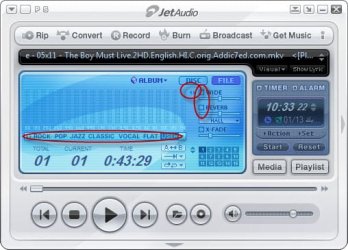
change these setting see the attachment,
aslo you can use an external speaker or a good head phone, if you want the best one, try "Beats"
 

Attachments

  • 1-13-2013 10-33-25 PM.jpg
    1-13-2013 10-33-25 PM.jpg
    37.3 KB · Views: 12

My Computer My Computer

At a glance

Windows 7 Ultimate x64core i7.
OS
Windows 7 Ultimate x64
CPU
core i7.
change these setting see the attachment,

Ok, thank you. I assume however, that this only will change sound when playing music from that specific player?

When I watch a movie with Windows media player, get a Skype call, etc., etc., those will still sound the same as before?


My Computer My Computer

At a glance

Windows 7 Home premium, 64 bitIntel Core i7-3820 ProcessorCorsair Vengeance DDR3 1600MHz 16GB CL9HIS Radeon HD 7950 3GB
OS
Windows 7 Home premium, 64 bit
CPU
Intel Core i7-3820 Processor
Motherboard
ASUS P9X79
Memory
Corsair Vengeance DDR3 1600MHz 16GB CL9
Graphics Card(s)
HIS Radeon HD 7950 3GB
Monitor(s) Displays
Samsung S24B300H Monitor
Screen Resolution
1920 x 1080
Hard Drives
Samsung SSD 830 Series 128GB 2.5"
Western Digital Caviar® Green 2TB
All three of my netbooks and my current notebook have lousy sounding speakers. Putting on a small external speaker improved the sound significantly. Tweaking the onboard equalizer helped even more. But even tiny el cheapo earphones i had knocking about gave the best sound of all; odd that.
 

My Computer My Computer

At a glance

Win 7 Ultimate 64 bitIntel i7-3930KKingston HyperX Genesis 32GB Kit (8x4GB Modul...MSI R7850 Twin Frozr 2GD5/OC Radeon HD 7850 2...
Computer type
PC/Desktop
Computer Manufacturer/Model Number
Custom Build
OS
Win 7 Ultimate 64 bit
CPU
Intel i7-3930K
Motherboard
ASUS P9X79 WS
Memory
Kingston HyperX Genesis 32GB Kit (8x4GB Modules) 1600MHz DDR
Graphics Card(s)
MSI R7850 Twin Frozr 2GD5/OC Radeon HD 7850 2GB 256-bit GDDR
Sound Card
Asus Xonar Essence STX
Monitor(s) Displays
3x Asus VG248QE 24", Vizio 32" TV
Screen Resolution
1920 x 1080, ?
Hard Drives
Samsung 128GB 840 Pro SSD (1),
Samsung 4TB 850 EVO SSDs (4)
Samsung 4TB 850 EVO SSDs (16) external backup drives used in 2.5" hot swap bays in the computer.
PSU
Corsair HX750w
Case
Antec Two Hundred v2 (modified)
Cooling
Cooler Master GeminII S524 120mm (fan replaced with a 140mm)
Keyboard
Logitech G510s
Mouse
Logitech M525 (two in use)
Internet Speed
=< 32Mbps down, 8Mbps up
Antivirus
AVAST!, MBAM, SAS, Spybot S&D (all but MBAM free) Glary Util
Browser
IE11
Other Info
LSI 9211-8i HBA card (8 SATA III ports), 2.5" & 3.5" Hot Swap Bays, HooToo HT-CR001 PCI-E to USB 3.0 Internal Hub + 6 Slot Card Reader, and LG Model CH12LS28 BD-ROM Optical Drive. Also, ScanSnap S1500 ADF duplexing scanner, Canon 9000F flat bed scanner, Corsair SP2500 2.1 speakers, Samsung CLP 415nw laser color printer, Cyberpower PP2200SW UPS
is it posssible for you to hear the sound on an identical display model in the store, that way you can be sure its the same crap quality sound and not an issue with the onboard speaker on your laptop
 

My Computer My Computer

At a glance

Microsoft Windows 7 Home Premium 64-bit 7600IIx4 amd athelon 635 processor2x2gbati radeon HD 5450
Computer Manufacturer/Model Number
Hewlett packard/p6512uk
OS
Microsoft Windows 7 Home Premium 64-bit 7600
CPU
IIx4 amd athelon 635 processor
Motherboard
FOXCONN 2AA9
Memory
2x2gb
Graphics Card(s)
ati radeon HD 5450
Sound Card
(1) Realtek High Definition Audio (2) AMD High Definition
Monitor(s) Displays
samsung lcd tv 32"
Screen Resolution
1360x 768
Hard Drives
(1) WDC WD10 01FAES-60Z2A0 SATA Disk Device (2) Maxtor OneTouch USB Device (3) ST310003 33AS USB Device (4) WD My Book 1111 USB Device
PSU
?
Cooling
air!
Keyboard
wireless hp
Mouse
wireless Hp,optical
Internet Speed
1.10mb/s
Antivirus
MSE
Browser
Firefox
As mentioned the computer also comes with a software called THX TruStudio Pro Settings. I do not know yet what this software does (still reading about it) but I find it strange that a quality mark as THX should be associated with such a low quality sound (or speaker system if the problem lies there).

Though not it's only purpose, THX TruStudio Pro Settings is probably causing the low quality sound.

I encountered a similar issue on my MSI GT780DXR...

The software is optimizing the audio output for your laptop speakers. Too much bass on laptop speakers sounds pretty bad and probably isn't too good for them.

I created a how-to describing how to configure TruStudio for use with external speakers with pictures here.

Let me know if that helps.
 

My Computer My Computer

At a glance

Windows 7 Ultimate x64i7-2670QM16gbNVidia GTX570m
Computer Manufacturer/Model Number
MSI GT780DXR
OS
Windows 7 Ultimate x64
CPU
i7-2670QM
Motherboard
MSI notebook
Memory
16gb
Graphics Card(s)
NVidia GTX570m
Sound Card
Generic Realtek, Numark NS7FX
Monitor(s) Displays
1920x1080 notebook display + 1920x1080 Westinghouse 42" TV
Screen Resolution
1920x1080
Hard Drives
500gb Segate Momentus XT HybridDrive
750gb Western Digital Scorpio Black
PSU
MSI notebook
Case
MSI notebook
Cooling
MSI notebook
Keyboard
Razer Nostromo
Mouse
Razer Mamba
Internet Speed
30MB down/5MB up
is it posssible for you to hear the sound on an identical display model in the store, that way you can be sure its the same crap quality sound and not an issue with the onboard speaker on your laptop
Unfortunately the store is too far away for me to visit it...

I created a how-to describing how to configure TruStudio for use with external speakers with pictures here.

Let me know if that helps.

Thank you! I followed your instructions but did not notice any difference at all when changing the Hz slider... While playing a song in iTunes I tried both max and minimum Hz without any difference. It appears as if the THX TruStudio is not working as it should..?
 

My Computer My Computer

At a glance

Windows 7 Home premium, 64 bitIntel Core i7-3820 ProcessorCorsair Vengeance DDR3 1600MHz 16GB CL9HIS Radeon HD 7950 3GB
OS
Windows 7 Home premium, 64 bit
CPU
Intel Core i7-3820 Processor
Motherboard
ASUS P9X79
Memory
Corsair Vengeance DDR3 1600MHz 16GB CL9
Graphics Card(s)
HIS Radeon HD 7950 3GB
Monitor(s) Displays
Samsung S24B300H Monitor
Screen Resolution
1920 x 1080
Hard Drives
Samsung SSD 830 Series 128GB 2.5"
Western Digital Caviar® Green 2TB
Back
Top