
All USB ports don't recognized usb drives but do see other devices

mlg3000

New member
Member
Local time
11:59 AM
Messages
46
I can't remember exactly how this happened because it's been a cascading disaster. It started with my efforts to uninstall Crashplan. In the course of this I unplugged one usb drive (I have 6) from a hub while it was on. At the time everything seemed ok, but it was not the case once I shut down and rebooted.

I have usb 2 ports and usb 3 ports along with an old usb card which works fine for a laser printer, scanner etc.

Now in a situation where not a single usb drive is recognized except for the yellow exclamation in device manager. Drive properties all say "A driver (service) for this device has been disabled. An alternate driver may be providing this functionality. (Code 32)". After researching this and talking with Asus, I was told to reinstall the NEC USB drivers,and to reinstall the Intel Chip software. When this didn't work I followed instructions on the net and first uninstalled the devices, shut down, and rebooted letting Windows find the "right" drivers. Windows appeared to replace the same drivers in device manager and continues to be unable to recognize a single USB 2 or 3 drive whether it is plugged directly into the machine or into the internal card or either external hub. At the same time, all these usb ports recognize my mouse, my keyboard, my laser printer, battery backup and more.

I've tried the uninstall, shut down and let windows install several times and Asus quickly lost interest and offered to RMA the board which is not worth the trouble to me given that it is already about 3 yrs old.
I can't even use a backup because no external drives can be read.

Not sure where to begin but I really need HELP! I've no way to backup, store photos, use the computer with safety. I'm quite sure this is not a function of a virus or malware as I'd just run Eset and MBAM the night before. And the things that work, work perfectly.

I have a strange error in the event log (several times) - don't know if it's related to the "service" that was stopped and therefore the drives don't function, or not. It says: "Event filter with query "SELECT * FROM __InstanceModificationEvent WITHIN 60 WHERE TargetInstance ISA "Win32_Processor" AND TargetInstance.LoadPercentage > 99" could not be reactivated in namespace "//./root/CIMV2" because of error 0x80041003. Events cannot be delivered through this filter until the problem is corrected."

Can someone suggest where I might begin. I have a restore disk from 2 1/2 years ago when I bought the computer but that seems rather drastic since I've added 4 drives, 16 gig of ram, an SSD and on and on.

Asus P6x58D Premium, Win 7 Prof SP1 64 bit installed a few months ago on the new SSD. 24 gig of Ram and lots of hard drive space. C is a Plextor 5P 256.

Thanks for reading this long saga of woe.

Madeline
 

My Computer My Computer

At a glance

Win 7 64 Profi7 93024 gig 1333HIS ATI Radeon HD 6850
Computer Manufacturer/Model Number
Desktop made to order - Asus P6x58D Premium
OS
Win 7 64 Prof
CPU
i7 930
Motherboard
Asus P6x58D Premium
Memory
24 gig 1333
Graphics Card(s)
HIS ATI Radeon HD 6850
Sound Card
Creative
Monitor(s) Displays
NEC Multisync P241W
Screen Resolution
1920 x 1200
Hard Drives
2 WD 1tb each black caviar
1 WD black caviar 2tb
1 Plextor SSD SATA 6 256 gig
1 Intel generation 2 SSD 160 gig
PSU
i7 930
Case
Antec 183 (?)
Cooling
Zalman fan and heat pipe
Keyboard
Goldtouch
Mouse
Logitech G 700 used wirelessly
Internet Speed
19.6 Mbps up and 2.00 Mbps down
Other Info
5 usb 3 hard drives used for backup. Until recently also backed up with Crashplan but discovered it was the cause of endless VSS errors and open programs stopping responding. HP Laserjet and large Epson inkjet for photography. Very old Epson Scanner. Cyberpower UPS.
Hello Madeline mate you look like it is in a real mess and I cannot quite work out what you are asking.

If I have it right (looking at the Asus site specs) you have 8 ports at the back panel and 4 x mid board points to connect to now that adds up to 12 ports and my query is which ports are working any of the back ones at all?
 

My Computer My Computer

At a glance

Desk1 7 Home Prem / Desk2 10 Pro / Main lap A...Desk1 i5 3750K / Laptop i7 GTX 860M / Desk2 i...Desk1 8GB (1866) / Desk2 16GB (1333) / Laptop...Desk 1& 2NVidia GTX 650 & Laptops on board Intel
Computer type
PC/Desktop
Computer Manufacturer/Model Number
Own build (new) Desk1 / Asus ROG Win 7 / Desk2 1st build
OS
Desk1 7 Home Prem / Desk2 10 Pro / Main lap Asus ROG 10 Pro 2 laptop Toshiba 7 Pro Asus P2520 7 & 10
CPU
Desk1 i5 3750K / Laptop i7 GTX 860M / Desk2 i5 2500
Motherboard
Desk1 Asus P877-V / Desk2 Gigabyte H67 UD3H / Laptop ?
Memory
Desk1 8GB (1866) / Desk2 16GB (1333) / Laptop 8Gb DDR3
Graphics Card(s)
Desk 1& 2NVidia GTX 650 & Laptops on board Intel
Sound Card
Desk 1 & 2 -XONAR DG Realtek High Def audio Laptop
Monitor(s) Displays
Desk 1 Benq HD 2450 / Desk2 Philips 24" / Laptop 17.5"
Screen Resolution
1920x1080 D1 & D2 & Laptop 1
Hard Drives
Desk1 Samsung 120GB 830 SSD
Asus ROG 256GB 850 Pro SSD
Desk2 Samsung 840 256 SSD
Toshiba 120GB EVO
PSU
Desk 1 Corsair HX 1050/ Laptop ? / Desk 2 Corsair HX 650
Case
Desk 1 Cooler HAF XM ? Toshiba laptop / Desk2 Coolermaster
Cooling
Fans on all Desk1 -2 Desk2 - all Coolermasters 5 Laptop ?
Keyboard
Desk 1 MS Sidewinder X6 Desk 2 MS Sidewinder X 4
Mouse
Desk 1&2 - Gigabyte MS 900 gamer - laptop - Logitec wireless
Internet Speed
ADSL2+
Other Info
One other Desktop (tester) and spare Toshba laptop both with SSD's
Running Kaspersky 2016 ISS on all machines config'd identically
Logitec audio stereo systems on each machine (x3)
Canon MG5250MFC
Router/modem TP-Link running WPA2SK
laptop or desktop? specs? it is important because early desktop/laptop usb 3.0 adopters have a ton of issues. My g74sx went through hell before I get usb 3 to work on me, and that laptop isnt one of early adopter. there are also issues with power not going to USB, or usb/mobo itself is damaged, or maybe that particular device just not work.

does it not detect at all? what about try shutting down computer and reboot to see if gets picked up?

take a picture of your device manager under last drop down tree thing "universal serial bus controllers" does it have NEC controller in it? or does it have USB 3.0 in it at all?


I have had a cooler master notebook cooler also act as a USB 3.0 hub with 4 usb 3.0 ports, I used it with my g74sx awhile back and it was fine until 1 day nothing gets picked up anymore. could be a hub problem too.. ? or usb wire itself going faulty but the chance of that is low.
 

My Computer My Computer

At a glance

window 7 64 bit
OS
window 7 64 bit
Ok M18 you take point mate.
 

My Computer My Computer

At a glance

Desk1 7 Home Prem / Desk2 10 Pro / Main lap A...Desk1 i5 3750K / Laptop i7 GTX 860M / Desk2 i...Desk1 8GB (1866) / Desk2 16GB (1333) / Laptop...Desk 1& 2NVidia GTX 650 & Laptops on board Intel
Computer type
PC/Desktop
Computer Manufacturer/Model Number
Own build (new) Desk1 / Asus ROG Win 7 / Desk2 1st build
OS
Desk1 7 Home Prem / Desk2 10 Pro / Main lap Asus ROG 10 Pro 2 laptop Toshiba 7 Pro Asus P2520 7 & 10
CPU
Desk1 i5 3750K / Laptop i7 GTX 860M / Desk2 i5 2500
Motherboard
Desk1 Asus P877-V / Desk2 Gigabyte H67 UD3H / Laptop ?
Memory
Desk1 8GB (1866) / Desk2 16GB (1333) / Laptop 8Gb DDR3
Graphics Card(s)
Desk 1& 2NVidia GTX 650 & Laptops on board Intel
Sound Card
Desk 1 & 2 -XONAR DG Realtek High Def audio Laptop
Monitor(s) Displays
Desk 1 Benq HD 2450 / Desk2 Philips 24" / Laptop 17.5"
Screen Resolution
1920x1080 D1 & D2 & Laptop 1
Hard Drives
Desk1 Samsung 120GB 830 SSD
Asus ROG 256GB 850 Pro SSD
Desk2 Samsung 840 256 SSD
Toshiba 120GB EVO
PSU
Desk 1 Corsair HX 1050/ Laptop ? / Desk 2 Corsair HX 650
Case
Desk 1 Cooler HAF XM ? Toshiba laptop / Desk2 Coolermaster
Cooling
Fans on all Desk1 -2 Desk2 - all Coolermasters 5 Laptop ?
Keyboard
Desk 1 MS Sidewinder X6 Desk 2 MS Sidewinder X 4
Mouse
Desk 1&2 - Gigabyte MS 900 gamer - laptop - Logitec wireless
Internet Speed
ADSL2+
Other Info
One other Desktop (tester) and spare Toshba laptop both with SSD's
Running Kaspersky 2016 ISS on all machines config'd identically
Logitec audio stereo systems on each machine (x3)
Canon MG5250MFC
Router/modem TP-Link running WPA2SK
clarification - all usb ports don't recognize usb drives

Hello Madeline mate you look like it is in a real mess and I cannot quite work out what you are asking.

If I have it right (looking at the Asus site specs) you have 8 ports at the back panel and 4 x mid board points to connect to now that adds up to 12 ports and my query is which ports are working any of the back ones at all?

I have two usb 3 at the back, 4 or 5 usb 2 at the back and an old usb 2 card with another 4 ports at the back. Front ports are not connected. I also have a 7 port usb 3 hub which was working beautifully.

ALL the ports work for every kind of usb device you can think of, except any usb hard drive (2 or 3). In other words, every port will support mouse, scanner, laser printer, keyboard etc - while NONE will recognize any usb hard drive.

I tried a few of the drives and the 7 port hub on my portable on usb 3 and usb 2 ports, and they all are recognized and work fine on the portable.

This is a large desktop made to order a few years ago and upgraded by me since then with more memory, another black caviar and another SSD etc.

picture of device manager attached

Thank you for researching and helping. I hope the above clears up the confusion.

Madeline
 

Attachments

Last edited:

My Computer My Computer

At a glance

Win 7 64 Profi7 93024 gig 1333HIS ATI Radeon HD 6850
Computer Manufacturer/Model Number
Desktop made to order - Asus P6x58D Premium
OS
Win 7 64 Prof
CPU
i7 930
Motherboard
Asus P6x58D Premium
Memory
24 gig 1333
Graphics Card(s)
HIS ATI Radeon HD 6850
Sound Card
Creative
Monitor(s) Displays
NEC Multisync P241W
Screen Resolution
1920 x 1200
Hard Drives
2 WD 1tb each black caviar
1 WD black caviar 2tb
1 Plextor SSD SATA 6 256 gig
1 Intel generation 2 SSD 160 gig
PSU
i7 930
Case
Antec 183 (?)
Cooling
Zalman fan and heat pipe
Keyboard
Goldtouch
Mouse
Logitech G 700 used wirelessly
Internet Speed
19.6 Mbps up and 2.00 Mbps down
Other Info
5 usb 3 hard drives used for backup. Until recently also backed up with Crashplan but discovered it was the cause of endless VSS errors and open programs stopping responding. HP Laserjet and large Epson inkjet for photography. Very old Epson Scanner. Cyberpower UPS.
Ok Madeline the device manager is not showing any problems as you can see so it might be a daft question but have you tried a brand new stick in any of the ports if not try one.

My theory may be because you removed one stick illegally it could have possibly and I say possibly corrupted the other drives.

Now I appreciate the confusion in your original post my friend but hey we all get a bit uptight about stuff like this at times so just take it step by step and eliminate stuff as we go:)

Let us know re the new stick - oh and try each port and I am thinking down the track that old adaptor card might have to come out too.

Just out of curiosity how come you need so many ports? - a powered hub would get you out of trouble with half this hassle.
 

My Computer My Computer

At a glance

Desk1 7 Home Prem / Desk2 10 Pro / Main lap A...Desk1 i5 3750K / Laptop i7 GTX 860M / Desk2 i...Desk1 8GB (1866) / Desk2 16GB (1333) / Laptop...Desk 1& 2NVidia GTX 650 & Laptops on board Intel
Computer type
PC/Desktop
Computer Manufacturer/Model Number
Own build (new) Desk1 / Asus ROG Win 7 / Desk2 1st build
OS
Desk1 7 Home Prem / Desk2 10 Pro / Main lap Asus ROG 10 Pro 2 laptop Toshiba 7 Pro Asus P2520 7 & 10
CPU
Desk1 i5 3750K / Laptop i7 GTX 860M / Desk2 i5 2500
Motherboard
Desk1 Asus P877-V / Desk2 Gigabyte H67 UD3H / Laptop ?
Memory
Desk1 8GB (1866) / Desk2 16GB (1333) / Laptop 8Gb DDR3
Graphics Card(s)
Desk 1& 2NVidia GTX 650 & Laptops on board Intel
Sound Card
Desk 1 & 2 -XONAR DG Realtek High Def audio Laptop
Monitor(s) Displays
Desk 1 Benq HD 2450 / Desk2 Philips 24" / Laptop 17.5"
Screen Resolution
1920x1080 D1 & D2 & Laptop 1
Hard Drives
Desk1 Samsung 120GB 830 SSD
Asus ROG 256GB 850 Pro SSD
Desk2 Samsung 840 256 SSD
Toshiba 120GB EVO
PSU
Desk 1 Corsair HX 1050/ Laptop ? / Desk 2 Corsair HX 650
Case
Desk 1 Cooler HAF XM ? Toshiba laptop / Desk2 Coolermaster
Cooling
Fans on all Desk1 -2 Desk2 - all Coolermasters 5 Laptop ?
Keyboard
Desk 1 MS Sidewinder X6 Desk 2 MS Sidewinder X 4
Mouse
Desk 1&2 - Gigabyte MS 900 gamer - laptop - Logitec wireless
Internet Speed
ADSL2+
Other Info
One other Desktop (tester) and spare Toshba laptop both with SSD's
Running Kaspersky 2016 ISS on all machines config'd identically
Logitec audio stereo systems on each machine (x3)
Canon MG5250MFC
Router/modem TP-Link running WPA2SK
Win won't run any usb hard drive but ok with other usb

Ok Madeline the device manager is not showing any problems as you can see so it might be a daft question but have you tried a brand new stick in any of the ports if not try one.

My theory may be because you removed one stick illegally it could have possibly and I say possibly corrupted the other drives.

Now I appreciate the confusion in your original post my friend but hey we all get a bit uptight about stuff like this at times so just take it step by step and eliminate stuff as we go:)

Let us know re the new stick - oh and try each port and I am thinking down the track that old adaptor card might have to come out too.

Just out of curiosity how come you need so many ports? - a powered hub would get you out of trouble with half this hassle.


I had a usb hard drive sitting on a shelf, unplugged for a month or more. First I tried that in about 5 ports and each time got the device couldn't be installed and the event log reads "Failed extract of third-party root list from auto update cab at: <http://www.download.windowsupdate.com/msdownload/update/v3/static/trustedr/en/authrootstl.cab> with error: A required certificate is not within its validity period when verifying against the current system clock or the timestamp in the signed file."

I then tried two different usb carriers for small camera SD cards and they weren't recognized either - being tried in several ports.

I'm not sure what the error means but I do know that I used the Windows SP1 disk on at least 2 occasions during the last few months to repair something. The date and time on the taskbar agree with my cellphone and the time zone is correct. I have Windows Update set to tell me when there are updates but NOT to download them, nor install them. I'm sure it's not happy with that - but it is an option.

I have a powered 7 port USB 3 hub so that I can run my various backup drives (5 altogether) without having to plug and unplug etc. I never actually run more than two at once and I still have two open ports. When I unplugged the live drive it was actually from this hub. The hub still works for mouse etc., just not for any drives - but then, nothing else does either.

Why do I need so many ports? Well, the 5 usb 3 backup drives: (I'm a photographer part time and store raw images, Lightroom catalog etc.), as well as usually using two different backup programs. A wireless mouse, an Intuos tablet, a calibrator for my monitor for photo work, a laser printer, an inkjet printer for photos, a scanner, a cable to Cyberpower UPS unit that logs events, webcam for skype. I'm not sure this is a complete list but it gives you an idea of how I use so many usb ports.

I actually feel unsure as to whether this is a hardware or software (Windows related) issue. As far as hardware is concerned, all the drives work on my portable and all my other (non-storage) usb devices work on all the usb ports, including the hub. The error message I receive when I try to plug any drive in says "A driver (service) for this device has been disabled. It happened at the same time I was trying to uninstall CrashPlan and also turning off a few startup services for programs that were no longer installed etc. I use Autoruns to do this.

I'm tempted to go into Services and turn everything on and see if it makes any difference - but I feel the need to act with more forethought than that :)

I also have a full partition backup done with Macrium Pro the day before this happened. I'm wondering about just restoring drive C or maybe just the Windows and the WOW directories. But - I can't figure out how to run the drive on this computer to do so. And, do you think it would help?

Would greatly appreciate your thoughts on how I might proceed from here.

Thanks again.

Madeline
 

My Computer My Computer

At a glance

Win 7 64 Profi7 93024 gig 1333HIS ATI Radeon HD 6850
Computer Manufacturer/Model Number
Desktop made to order - Asus P6x58D Premium
OS
Win 7 64 Prof
CPU
i7 930
Motherboard
Asus P6x58D Premium
Memory
24 gig 1333
Graphics Card(s)
HIS ATI Radeon HD 6850
Sound Card
Creative
Monitor(s) Displays
NEC Multisync P241W
Screen Resolution
1920 x 1200
Hard Drives
2 WD 1tb each black caviar
1 WD black caviar 2tb
1 Plextor SSD SATA 6 256 gig
1 Intel generation 2 SSD 160 gig
PSU
i7 930
Case
Antec 183 (?)
Cooling
Zalman fan and heat pipe
Keyboard
Goldtouch
Mouse
Logitech G 700 used wirelessly
Internet Speed
19.6 Mbps up and 2.00 Mbps down
Other Info
5 usb 3 hard drives used for backup. Until recently also backed up with Crashplan but discovered it was the cause of endless VSS errors and open programs stopping responding. HP Laserjet and large Epson inkjet for photography. Very old Epson Scanner. Cyberpower UPS.
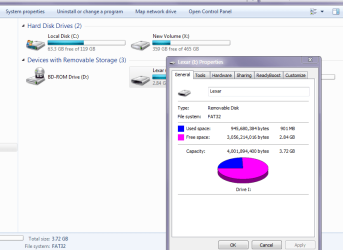
Ok Madeline I understand why you nee so many now - sorry I wasn't being nosey just it seemed a lot of ports to be used.

NOw before you do that if you can getthese devices hooked up to another machine can you check the files system they are using.

To do that > Start > Computer > right click on a drive > click on properties it should say whether it is a FAT32 or NTFS see my pics the FAT32 is one stick I have in and the other is my C: SSD drive - NTFS filing
 

Attachments

  • MADE.PNG
    MADE.PNG
    21.9 KB · Views: 6
  • MADE2.PNG
    MADE2.PNG
    23.8 KB · Views: 6

My Computer My Computer

At a glance

Desk1 7 Home Prem / Desk2 10 Pro / Main lap A...Desk1 i5 3750K / Laptop i7 GTX 860M / Desk2 i...Desk1 8GB (1866) / Desk2 16GB (1333) / Laptop...Desk 1& 2NVidia GTX 650 & Laptops on board Intel
Computer type
PC/Desktop
Computer Manufacturer/Model Number
Own build (new) Desk1 / Asus ROG Win 7 / Desk2 1st build
OS
Desk1 7 Home Prem / Desk2 10 Pro / Main lap Asus ROG 10 Pro 2 laptop Toshiba 7 Pro Asus P2520 7 & 10
CPU
Desk1 i5 3750K / Laptop i7 GTX 860M / Desk2 i5 2500
Motherboard
Desk1 Asus P877-V / Desk2 Gigabyte H67 UD3H / Laptop ?
Memory
Desk1 8GB (1866) / Desk2 16GB (1333) / Laptop 8Gb DDR3
Graphics Card(s)
Desk 1& 2NVidia GTX 650 & Laptops on board Intel
Sound Card
Desk 1 & 2 -XONAR DG Realtek High Def audio Laptop
Monitor(s) Displays
Desk 1 Benq HD 2450 / Desk2 Philips 24" / Laptop 17.5"
Screen Resolution
1920x1080 D1 & D2 & Laptop 1
Hard Drives
Desk1 Samsung 120GB 830 SSD
Asus ROG 256GB 850 Pro SSD
Desk2 Samsung 840 256 SSD
Toshiba 120GB EVO
PSU
Desk 1 Corsair HX 1050/ Laptop ? / Desk 2 Corsair HX 650
Case
Desk 1 Cooler HAF XM ? Toshiba laptop / Desk2 Coolermaster
Cooling
Fans on all Desk1 -2 Desk2 - all Coolermasters 5 Laptop ?
Keyboard
Desk 1 MS Sidewinder X6 Desk 2 MS Sidewinder X 4
Mouse
Desk 1&2 - Gigabyte MS 900 gamer - laptop - Logitec wireless
Internet Speed
ADSL2+
Other Info
One other Desktop (tester) and spare Toshba laptop both with SSD's
Running Kaspersky 2016 ISS on all machines config'd identically
Logitec audio stereo systems on each machine (x3)
Canon MG5250MFC
Router/modem TP-Link running WPA2SK
Please excuse me jumping in, but I've cured some USB woes with the following tactics. Nothing to lose and you won't "break" anything. Unplug all USB stuff except keyboard and mouse.

In C:\Windows\System32\Driverstore:
Do not touch the folders (en-US; File Repository; Temp).
Right-click each file, (one at a time), go to Properties - Security - Edit. Select your User account - check off Full Control - OK. When done, select all the files and delete them.

In C:\Windows\System32\Driverstore\File Repository:
Scroll down to folder usbstor.inf(........) If there are two, work on the first one. Go into this folder and copy & paste usbstor.inf and usbstor.pnf to C:\Windows\inf. Agree to overwrite.

Reboot. When back to your desktop, find the command prompt - right-click & run as administrator and type the following: mountvol.exe /N
Then type: mountvol.exe /e
This will disable then re-enable auto mounting.

Start plugging in your stuff one at a time and see if they're recognized.
 

My Computer My Computer

At a glance

W7 Home Premium 32bit
Computer Manufacturer/Model Number
8 home-builds from the 80's into 2004
OS
W7 Home Premium 32bit
Ok Madeline I understand why you nee so many now - sorry I wasn't being nosey just it seemed a lot of ports to be used.

NOw before you do that if you can getthese devices hooked up to another machine can you check the files system they are using.

To do that > Start > Computer > right click on a drive > click on properties it should say whether it is a FAT32 or NTFS see my pics the FAT32 is one stick I have in and the other is my C: SSD drive - NTFS filing

Hi
Thanks for staying with this.
I made some progress last night - found that left over files from Acronis, which I removed a while ago, can cause havoc, particularly fltsrv. I used my tried and true registry editor (JV 16) and found at least twenty entries. I was able to delete most of them but some said I couldn't. JV 16 always makes restorable backups so I felt a little braver.
I then did a plain search for fltsrv and found the driver as part of an entry in the registry along with par??, which allows for parallel ports. I deleted fltsrv and left parxxx.
I found renesas usb 3 hub driver for my motherboard and installed it - in addition to the NEC.
Two improvements occurred:
1. When I booted, I did no longer got the message that my usb 3 hub is not working at
the speed it could be. It was being recognized as usb 3 finally.
2. When plugging in a USB hard drive the light flickered the way it always has when
it's being recognized by the system. But I couldn't read or write to it.
3. The usb drive showed up in disk management with a different letter. However, it
will not respond to active use.
4. The usb drive shows up in device manager but no longer has the yellow triangle - appears to be "normal". Microsoft has assigned driver 6.1.7600.16385 and looking for other drivers produced nothing. No errors in device manager.

When I try to change the drive letter, or get properties, I get:
"the operation failed to complete because the Disk Management Console View is not up to date. Refresh the view (no luck) and if that doesn't work, restart the system." I've done this several times with no luck. I also tried making everyone the owner with full privileges but that didn't work either.

It seems to be looking more like a software/windows issue. Any more thoughts as to how to proceed? How I might be able to get the Disk Management Console to respond to the usb drives that it is now seeing?

I'm now going back to registry to try to get the rest of fltsrv out and am hoping you have an idea from the semi-progress I've achieved so far.

Thanks again.

Madeline
 
Last edited:

My Computer My Computer

At a glance

Win 7 64 Profi7 93024 gig 1333HIS ATI Radeon HD 6850
Computer Manufacturer/Model Number
Desktop made to order - Asus P6x58D Premium
OS
Win 7 64 Prof
CPU
i7 930
Motherboard
Asus P6x58D Premium
Memory
24 gig 1333
Graphics Card(s)
HIS ATI Radeon HD 6850
Sound Card
Creative
Monitor(s) Displays
NEC Multisync P241W
Screen Resolution
1920 x 1200
Hard Drives
2 WD 1tb each black caviar
1 WD black caviar 2tb
1 Plextor SSD SATA 6 256 gig
1 Intel generation 2 SSD 160 gig
PSU
i7 930
Case
Antec 183 (?)
Cooling
Zalman fan and heat pipe
Keyboard
Goldtouch
Mouse
Logitech G 700 used wirelessly
Internet Speed
19.6 Mbps up and 2.00 Mbps down
Other Info
5 usb 3 hard drives used for backup. Until recently also backed up with Crashplan but discovered it was the cause of endless VSS errors and open programs stopping responding. HP Laserjet and large Epson inkjet for photography. Very old Epson Scanner. Cyberpower UPS.
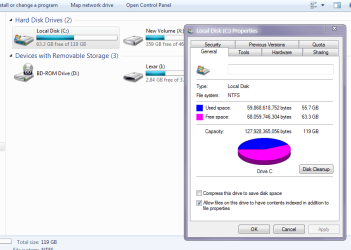
Please excuse me jumping in, but I've cured some USB woes with the following tactics. Nothing to lose and you won't "break" anything. Unplug all USB stuff except keyboard and mouse.

In C:\Windows\System32\Driverstore:
Do not touch the folders (en-US; File Repository; Temp).
Right-click each file, (one at a time), go to Properties - Security - Edit. Select your User account - check off Full Control - OK. When done, select all the files and delete them.

In C:\Windows\System32\Driverstore\File Repository:
Scroll down to folder usbstor.inf(........) If there are two, work on the first one. Go into this folder and copy & paste usbstor.inf and usbstor.pnf to C:\Windows\inf. Agree to overwrite.

Reboot. When back to your desktop, find the command prompt - right-click & run as administrator and type the following: mountvol.exe /N

Then type: mountvol.exe /e
This will disable then re-enable auto mounting.

Start plugging in your stuff one at a time and see if they're recognized.


Thanks for the suggestion and I will keep it in case I have more trouble. But doing all that I did in the last post, plus getting snapman.sys and fltsrv (old Acronis file) out of every corner of the registry, as well as finding updated Renesas usb 3 drivers, seems to have worked. What a relief!

I am, however. left with one chronic error and one chronic warning. Do you think your suggestion(s) might address either of these - or - do you have another suggestion:

Session "Homegroup Log" failed to start with the following error: 0xC0000035 - error

Log Name: Application
Source: Microsoft-Windows-User Profiles Service
Date: 1/26/2013 4:17:39 PM
Event ID: 1530
Task Category: None
Level: Warning
Keywords:
User: SYSTEM
Computer: mg-PC
Description:
Windows detected your registry file is still in use by other applications or services. The file will be unloaded now. The applications or services that hold your registry file may not function properly afterwards.

DETAIL -
1 user registry handles leaked from \Registry\User\S-1-5-21-3328621373-938311138-4019764245-1001:
Process 912 (\Device\HarddiskVolume1\Windows\System32\winlogon.exe) has opened key \REGISTRY\USER\S-1-5-21-3328621373-938311138-4019764245-1001

Event Xml:
<Event xmlns="http://schemas.microsoft.com/win/2004/08/events/event">
<System>
<Provider Name="Microsoft-Windows-User Profiles Service" Guid="{89B1E9F0-5AFF-44A6-9B44-0A07A7CE5845}" />
<EventID>1530</EventID>
<Version>0</Version>
<Level>3</Level>
<Task>0</Task>
<Opcode>0</Opcode>
<Keywords>0x8000000000000000</Keywords>
<TimeCreated SystemTime="2013-01-26T21:17:39.449287200Z" />
<EventRecordID>134371</EventRecordID>
<Correlation />
This is the warning

Thanks again for your help
<Execution ProcessID="144" ThreadID="284" />
<Channel>Application</Channel>
<Computer>mg-PC</Computer>
<Security UserID="S-1-5-18" />
</System>
<EventData Name="EVENT_HIVE_LEAK">
<Data Name="Detail">1 user registry handles leaked from \Registry\User\S-1-5-21-3328621373-938311138-4019764245-1001:
Process 912 (\Device\HarddiskVolume1\Windows\System32\winlogon.exe) has opened key \REGISTRY\USER\S-1-5-21-3328621373-938311138-4019764245-1001
</Data>
</EventData>
</Event>
 

My Computer My Computer

At a glance

Win 7 64 Profi7 93024 gig 1333HIS ATI Radeon HD 6850
Computer Manufacturer/Model Number
Desktop made to order - Asus P6x58D Premium
OS
Win 7 64 Prof
CPU
i7 930
Motherboard
Asus P6x58D Premium
Memory
24 gig 1333
Graphics Card(s)
HIS ATI Radeon HD 6850
Sound Card
Creative
Monitor(s) Displays
NEC Multisync P241W
Screen Resolution
1920 x 1200
Hard Drives
2 WD 1tb each black caviar
1 WD black caviar 2tb
1 Plextor SSD SATA 6 256 gig
1 Intel generation 2 SSD 160 gig
PSU
i7 930
Case
Antec 183 (?)
Cooling
Zalman fan and heat pipe
Keyboard
Goldtouch
Mouse
Logitech G 700 used wirelessly
Internet Speed
19.6 Mbps up and 2.00 Mbps down
Other Info
5 usb 3 hard drives used for backup. Until recently also backed up with Crashplan but discovered it was the cause of endless VSS errors and open programs stopping responding. HP Laserjet and large Epson inkjet for photography. Very old Epson Scanner. Cyberpower UPS.
usb drive recognition really almost there

Ok Madeline I understand why you nee so many now - sorry I wasn't being nosey just it seemed a lot of ports to be used.

NOw before you do that if you can getthese devices hooked up to another machine can you check the files system they are using.

To do that > Start > Computer > right click on a drive > click on properties it should say whether it is a FAT32 or NTFS see my pics the FAT32 is one stick I have in and the other is my C: SSD drive - NTFS filing

Hi,

I didn't think you were being nosey - I am aware of how many devices I'm using and everytime I look at all the wires I ask myself the same question. I read your question as wanting to understand more, perhaps find a clue, as to what was going on, and for that, I thank you.

As you will note from my previous post, I made progress last night. and this morning, after more hours, I think it is fixed except for two repeated errors.

This AM I researched files left by Acronis and used the aggressive setting on my registry cleaner. I removed fltsrv and snapman (one word). On the aggressive setting I was allowed to move all of them.

I checked and changed some permissions on the disk management console so that I clearly have full permission and so does Everyone.

At this moment all my usb drives that are plugged into the usb 3 powered hub are working and I was even able to do an incremental backup with Macrium Pro so I have a before and after - or some semblence of it. With CrashPlan completely disabled and not blocking VSS every few minutes, and no files that can't be found, my machine is snappy again. I almost can't believe it will last.

However, I am receiving one repeated error and one repeated warning and I'd like to resolve them to be sure they wont cause problems when I have time to reinstall all my usb equipment and make sure it works, which will be later tonight or tomorrow. The error and the warning are:

Session "Homegroup Log" failed to start with the following error: 0xC0000035 this is the error

Log Name: Application
Source: Microsoft-Windows-User Profiles Service
Date: 1/26/2013 4:17:39 PM
Event ID: 1530
Task Category: None
Level: Warning
Keywords:
User: SYSTEM
Computer: mg-PC
Description:
Windows detected your registry file is still in use by other applications or services. The file will be unloaded now. The applications or services that hold your registry file may not function properly afterwards.

DETAIL -
1 user registry handles leaked from \Registry\User\S-1-5-21-3328621373-938311138-4019764245-1001:
Process 912 (\Device\HarddiskVolume1\Windows\System32\winlogon.exe) has opened key \REGISTRY\USER\S-1-5-21-3328621373-938311138-4019764245-1001

Event Xml:
<Event xmlns="http://schemas.microsoft.com/win/2004/08/events/event">
<System>
<Provider Name="Microsoft-Windows-User Profiles Service" Guid="{89B1E9F0-5AFF-44A6-9B44-0A07A7CE5845}" />
<EventID>1530</EventID>
<Version>0</Version>
<Level>3</Level>
<Task>0</Task>
<Opcode>0</Opcode>
<Keywords>0x8000000000000000</Keywords>
<TimeCreated SystemTime="2013-01-26T21:17:39.449287200Z" />
<EventRecordID>134371</EventRecordID>
<Correlation />
<Execution ProcessID="144" ThreadID="284" />
<Channel>Application</Channel>
<Computer>mg-PC</Computer>
<Security UserID="S-1-5-18" />
</System>
<EventData Name="EVENT_HIVE_LEAK">
<Data Name="Detail">1 user registry handles leaked from \Registry\User\S-1-5-21-3328621373-938311138-4019764245-1001:
Process 912 (\Device\HarddiskVolume1\Windows\System32\winlogon.exe) has opened key \REGISTRY\USER\S-1-5-21-3328621373-938311138-4019764245-1001
</Data>
</EventData>
</Event>
this is the warning which I don't fully understand but have a feeling it may be important?

Thank you so much for your help and I'm so grateful to have a working system again.

BTW, do you know of a cloud backup service that might be more sophisticated in its design than CrashPlan?

Madeline
 

My Computer My Computer

At a glance

Win 7 64 Profi7 93024 gig 1333HIS ATI Radeon HD 6850
Computer Manufacturer/Model Number
Desktop made to order - Asus P6x58D Premium
OS
Win 7 64 Prof
CPU
i7 930
Motherboard
Asus P6x58D Premium
Memory
24 gig 1333
Graphics Card(s)
HIS ATI Radeon HD 6850
Sound Card
Creative
Monitor(s) Displays
NEC Multisync P241W
Screen Resolution
1920 x 1200
Hard Drives
2 WD 1tb each black caviar
1 WD black caviar 2tb
1 Plextor SSD SATA 6 256 gig
1 Intel generation 2 SSD 160 gig
PSU
i7 930
Case
Antec 183 (?)
Cooling
Zalman fan and heat pipe
Keyboard
Goldtouch
Mouse
Logitech G 700 used wirelessly
Internet Speed
19.6 Mbps up and 2.00 Mbps down
Other Info
5 usb 3 hard drives used for backup. Until recently also backed up with Crashplan but discovered it was the cause of endless VSS errors and open programs stopping responding. HP Laserjet and large Epson inkjet for photography. Very old Epson Scanner. Cyberpower UPS.
Ok Madeline looks some progress now before you go delving into the registry can you tell me when you last scanned for malware and what with?

If you haven't got it get Malwarebytes and SuperAntiSpyware plus ADWcleaner downloaded and run them.

I noticed a recent USB fix that turned out to be malware related so-

http://www.superantispyware.com/

http://www.malwarebytes.org/products/malwarebytes_free/


http://www.bleepingcomputer.com/download/adwcleaner/

all are free they may take a little while to run if you haven't run these before - this is again a process of elimination and just delete any rubbish that comes up.:)
 

My Computer My Computer

At a glance

Desk1 7 Home Prem / Desk2 10 Pro / Main lap A...Desk1 i5 3750K / Laptop i7 GTX 860M / Desk2 i...Desk1 8GB (1866) / Desk2 16GB (1333) / Laptop...Desk 1& 2NVidia GTX 650 & Laptops on board Intel
Computer type
PC/Desktop
Computer Manufacturer/Model Number
Own build (new) Desk1 / Asus ROG Win 7 / Desk2 1st build
OS
Desk1 7 Home Prem / Desk2 10 Pro / Main lap Asus ROG 10 Pro 2 laptop Toshiba 7 Pro Asus P2520 7 & 10
CPU
Desk1 i5 3750K / Laptop i7 GTX 860M / Desk2 i5 2500
Motherboard
Desk1 Asus P877-V / Desk2 Gigabyte H67 UD3H / Laptop ?
Memory
Desk1 8GB (1866) / Desk2 16GB (1333) / Laptop 8Gb DDR3
Graphics Card(s)
Desk 1& 2NVidia GTX 650 & Laptops on board Intel
Sound Card
Desk 1 & 2 -XONAR DG Realtek High Def audio Laptop
Monitor(s) Displays
Desk 1 Benq HD 2450 / Desk2 Philips 24" / Laptop 17.5"
Screen Resolution
1920x1080 D1 & D2 & Laptop 1
Hard Drives
Desk1 Samsung 120GB 830 SSD
Asus ROG 256GB 850 Pro SSD
Desk2 Samsung 840 256 SSD
Toshiba 120GB EVO
PSU
Desk 1 Corsair HX 1050/ Laptop ? / Desk 2 Corsair HX 650
Case
Desk 1 Cooler HAF XM ? Toshiba laptop / Desk2 Coolermaster
Cooling
Fans on all Desk1 -2 Desk2 - all Coolermasters 5 Laptop ?
Keyboard
Desk 1 MS Sidewinder X6 Desk 2 MS Sidewinder X 4
Mouse
Desk 1&2 - Gigabyte MS 900 gamer - laptop - Logitec wireless
Internet Speed
ADSL2+
Other Info
One other Desktop (tester) and spare Toshba laptop both with SSD's
Running Kaspersky 2016 ISS on all machines config'd identically
Logitec audio stereo systems on each machine (x3)
Canon MG5250MFC
Router/modem TP-Link running WPA2SK
I would not be concerned with one leaked handle and one (what I consider it to be) minor warning.

Don't be too caught up with Event Viewer errors. Windows almost always comes up with something its not happy with. I see EV errors on brand new clean installs.

So happy to see the great progress you made after a lot of work on your part. Follow our down under mates advice, and perform those three scans in full. Start one each night before you go to bed; probably will be 1 1/2 to 2 hours each.
 

My Computer My Computer

At a glance

W7 Home Premium 32bit
Computer Manufacturer/Model Number
8 home-builds from the 80's into 2004
OS
W7 Home Premium 32bit
Ok Madeline looks some progress now before you go delving into the registry can you tell me when you last scanned for malware and what with?

If you haven't got it get Malwarebytes and SuperAntiSpyware plus ADWcleaner downloaded and run them.

I noticed a recent USB fix that turned out to be malware related so-

http://www.superantispyware.com/

http://www.malwarebytes.org/products/malwarebytes_free/


http://www.bleepingcomputer.com/download/adwcleaner/

all are free they may take a little while to run if you haven't run these before - this is again a process of elimination and just delete any rubbish that comes up.:)


I run Mbam ongoingly along with my Eset AV. The day before this happened I'd run Mbam and SAS along with doing a complete virus scan. I wasn't aware of ADWCleaner, but I've just downloaded it and will run it.

Madeline
 

My Computer My Computer

At a glance

Win 7 64 Profi7 93024 gig 1333HIS ATI Radeon HD 6850
Computer Manufacturer/Model Number
Desktop made to order - Asus P6x58D Premium
OS
Win 7 64 Prof
CPU
i7 930
Motherboard
Asus P6x58D Premium
Memory
24 gig 1333
Graphics Card(s)
HIS ATI Radeon HD 6850
Sound Card
Creative
Monitor(s) Displays
NEC Multisync P241W
Screen Resolution
1920 x 1200
Hard Drives
2 WD 1tb each black caviar
1 WD black caviar 2tb
1 Plextor SSD SATA 6 256 gig
1 Intel generation 2 SSD 160 gig
PSU
i7 930
Case
Antec 183 (?)
Cooling
Zalman fan and heat pipe
Keyboard
Goldtouch
Mouse
Logitech G 700 used wirelessly
Internet Speed
19.6 Mbps up and 2.00 Mbps down
Other Info
5 usb 3 hard drives used for backup. Until recently also backed up with Crashplan but discovered it was the cause of endless VSS errors and open programs stopping responding. HP Laserjet and large Epson inkjet for photography. Very old Epson Scanner. Cyberpower UPS.
I would not be concerned with one leaked handle and one (what I consider it to be) minor warning.

Don't be too caught up with Event Viewer errors. Windows almost always comes up with something its not happy with. I see EV errors on brand new clean installs.

So happy to see the great progress you made after a lot of work on your part. Follow our down under mates advice, and perform those three scans in full. Start one each night before you go to bed; probably will be 1 1/2 to 2 hours each.
+1 and Madeline if you haven't got CCleaner it might be a good tool to use to clear some of the crud out of the system. Be careful when deleting cookies if they are linked to sites where you need a password like here for example .

To do that run the CCleaner when analysed click on Options then cookies and highlight the ones to keep that is done by sending the to the right hand list with the little > (centre column). Go back to the Analyse page (C and the brush) and run cleaner.
The first time you run it it might take a while but then run it everyday or when you like - to keep the machine clutter free.
CCleaner - Download < from the piriform site - a lot of us use this app:)
 

My Computer My Computer

At a glance

Desk1 7 Home Prem / Desk2 10 Pro / Main lap A...Desk1 i5 3750K / Laptop i7 GTX 860M / Desk2 i...Desk1 8GB (1866) / Desk2 16GB (1333) / Laptop...Desk 1& 2NVidia GTX 650 & Laptops on board Intel
Computer type
PC/Desktop
Computer Manufacturer/Model Number
Own build (new) Desk1 / Asus ROG Win 7 / Desk2 1st build
OS
Desk1 7 Home Prem / Desk2 10 Pro / Main lap Asus ROG 10 Pro 2 laptop Toshiba 7 Pro Asus P2520 7 & 10
CPU
Desk1 i5 3750K / Laptop i7 GTX 860M / Desk2 i5 2500
Motherboard
Desk1 Asus P877-V / Desk2 Gigabyte H67 UD3H / Laptop ?
Memory
Desk1 8GB (1866) / Desk2 16GB (1333) / Laptop 8Gb DDR3
Graphics Card(s)
Desk 1& 2NVidia GTX 650 & Laptops on board Intel
Sound Card
Desk 1 & 2 -XONAR DG Realtek High Def audio Laptop
Monitor(s) Displays
Desk 1 Benq HD 2450 / Desk2 Philips 24" / Laptop 17.5"
Screen Resolution
1920x1080 D1 & D2 & Laptop 1
Hard Drives
Desk1 Samsung 120GB 830 SSD
Asus ROG 256GB 850 Pro SSD
Desk2 Samsung 840 256 SSD
Toshiba 120GB EVO
PSU
Desk 1 Corsair HX 1050/ Laptop ? / Desk 2 Corsair HX 650
Case
Desk 1 Cooler HAF XM ? Toshiba laptop / Desk2 Coolermaster
Cooling
Fans on all Desk1 -2 Desk2 - all Coolermasters 5 Laptop ?
Keyboard
Desk 1 MS Sidewinder X6 Desk 2 MS Sidewinder X 4
Mouse
Desk 1&2 - Gigabyte MS 900 gamer - laptop - Logitec wireless
Internet Speed
ADSL2+
Other Info
One other Desktop (tester) and spare Toshba laptop both with SSD's
Running Kaspersky 2016 ISS on all machines config'd identically
Logitec audio stereo systems on each machine (x3)
Canon MG5250MFC
Router/modem TP-Link running WPA2SK
I would not be concerned with one leaked handle and one (what I consider it to be) minor warning.

Don't be too caught up with Event Viewer errors. Windows almost always comes up with something its not happy with. I see EV errors on brand new clean installs.

So happy to see the great progress you made after a lot of work on your part. Follow our down under mates advice, and perform those three scans in full. Start one each night before you go to bed; probably will be 1 1/2 to 2 hours each.
+1 and Madeline if you haven't got CCleaner it might be a good tool to use to clear some of the crud out of the system. Be careful when deleting cookies if they are linked to sites where you need a password like here for example .

To do that run the CCleaner when analysed click on Options then cookies and highlight the ones to keep that is done by sending the to the right hand list with the little > (centre column). Go back to the Analyse page (C and the brush) and run cleaner.
The first time you run it it might take a while but then run it everyday or when you like - to keep the machine clutter free.
CCleaner - Download < from the piriform site - a lot of us use this app:)

I've used CCleaner to clean temp files and such but I've always shied away from the registry section because I don't really know how to use it properly. I presently use JV16 (have for many years) and clean the registry when there have been a lot of changes, or use it to search such as I just did with Acronis.

But I've read a lot about people using CClearner. I never knew you could choose cookies and I will do so immediately - that's really great! Do you use it as your registry cleaner as well?

Thanks

Madeline
 

My Computer My Computer

At a glance

Win 7 64 Profi7 93024 gig 1333HIS ATI Radeon HD 6850
Computer Manufacturer/Model Number
Desktop made to order - Asus P6x58D Premium
OS
Win 7 64 Prof
CPU
i7 930
Motherboard
Asus P6x58D Premium
Memory
24 gig 1333
Graphics Card(s)
HIS ATI Radeon HD 6850
Sound Card
Creative
Monitor(s) Displays
NEC Multisync P241W
Screen Resolution
1920 x 1200
Hard Drives
2 WD 1tb each black caviar
1 WD black caviar 2tb
1 Plextor SSD SATA 6 256 gig
1 Intel generation 2 SSD 160 gig
PSU
i7 930
Case
Antec 183 (?)
Cooling
Zalman fan and heat pipe
Keyboard
Goldtouch
Mouse
Logitech G 700 used wirelessly
Internet Speed
19.6 Mbps up and 2.00 Mbps down
Other Info
5 usb 3 hard drives used for backup. Until recently also backed up with Crashplan but discovered it was the cause of endless VSS errors and open programs stopping responding. HP Laserjet and large Epson inkjet for photography. Very old Epson Scanner. Cyberpower UPS.
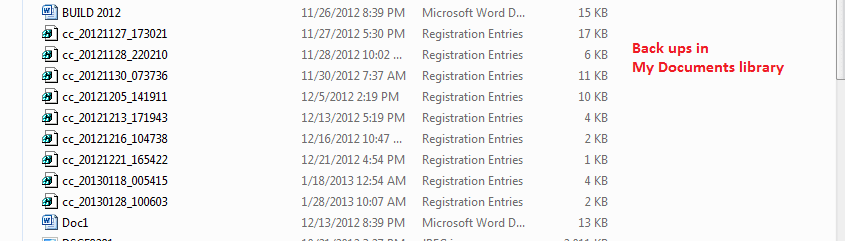
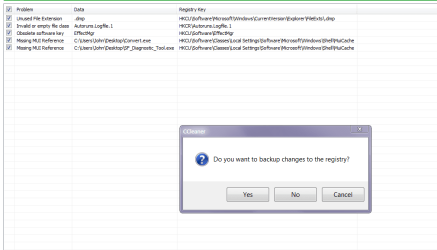
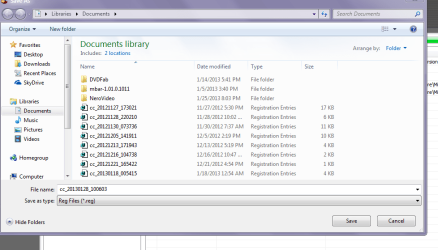
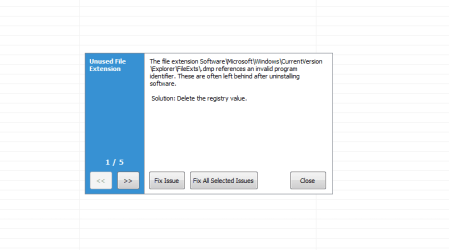
Yes Madeline I do but I always back up the reg before I apply any changes - it gives you that option before you do that and the back up is stored in My Documents usually - if you need to reverse the changes you click on the Documents entry and it will reapply the changes but I have never had to do that. Piriform - Registry cleaning is some info on the feature as well as other stuff

This is is the only reg cleaner that I will ever use but it is always down to ones own preferences. In any case using a reg cleaner of any sort needs caution at all times as you will see in my pics I did just a while ago the entries are files that are obsolete / invalid / or missing files that I just ran the cleaner for as they were of little consequence but I still backed up first.

The CCleaner I use far more frequently than the reg feature.

Just as a by the by piriform do an app called Recuva - retrieves deleted stuff and Speccy which will show you a lot of details about your machine and system - very handy to have for when you have problems and folks want to know details.:)
Recuva - Undelete, Unerase, File and Disk Recovery - Free Download

Speccy - System Information - Free Download

Defraggler - File and Disk Defragmentation - Free Download < some use this too (bit slow for me and as I have an SSD do not use a defrag anyway)
 

Attachments

  • REG1.PNG
    REG1.PNG
    14.3 KB · Views: 1
  • REG2.PNG
    REG2.PNG
    35.8 KB · Views: 1
  • REG3.PNG
    REG3.PNG
    6.2 KB · Views: 1
  • REG4.PNG
    REG4.PNG
    9 KB · Views: 1

My Computer My Computer

At a glance

Desk1 7 Home Prem / Desk2 10 Pro / Main lap A...Desk1 i5 3750K / Laptop i7 GTX 860M / Desk2 i...Desk1 8GB (1866) / Desk2 16GB (1333) / Laptop...Desk 1& 2NVidia GTX 650 & Laptops on board Intel
Computer type
PC/Desktop
Computer Manufacturer/Model Number
Own build (new) Desk1 / Asus ROG Win 7 / Desk2 1st build
OS
Desk1 7 Home Prem / Desk2 10 Pro / Main lap Asus ROG 10 Pro 2 laptop Toshiba 7 Pro Asus P2520 7 & 10
CPU
Desk1 i5 3750K / Laptop i7 GTX 860M / Desk2 i5 2500
Motherboard
Desk1 Asus P877-V / Desk2 Gigabyte H67 UD3H / Laptop ?
Memory
Desk1 8GB (1866) / Desk2 16GB (1333) / Laptop 8Gb DDR3
Graphics Card(s)
Desk 1& 2NVidia GTX 650 & Laptops on board Intel
Sound Card
Desk 1 & 2 -XONAR DG Realtek High Def audio Laptop
Monitor(s) Displays
Desk 1 Benq HD 2450 / Desk2 Philips 24" / Laptop 17.5"
Screen Resolution
1920x1080 D1 & D2 & Laptop 1
Hard Drives
Desk1 Samsung 120GB 830 SSD
Asus ROG 256GB 850 Pro SSD
Desk2 Samsung 840 256 SSD
Toshiba 120GB EVO
PSU
Desk 1 Corsair HX 1050/ Laptop ? / Desk 2 Corsair HX 650
Case
Desk 1 Cooler HAF XM ? Toshiba laptop / Desk2 Coolermaster
Cooling
Fans on all Desk1 -2 Desk2 - all Coolermasters 5 Laptop ?
Keyboard
Desk 1 MS Sidewinder X6 Desk 2 MS Sidewinder X 4
Mouse
Desk 1&2 - Gigabyte MS 900 gamer - laptop - Logitec wireless
Internet Speed
ADSL2+
Other Info
One other Desktop (tester) and spare Toshba laptop both with SSD's
Running Kaspersky 2016 ISS on all machines config'd identically
Logitec audio stereo systems on each machine (x3)
Canon MG5250MFC
Router/modem TP-Link running WPA2SK
Madeline - forgot this is very handy for their stuff too just dig down into each app it details everything out and gives examples.

Piriform - Docs
 

My Computer My Computer

At a glance

Desk1 7 Home Prem / Desk2 10 Pro / Main lap A...Desk1 i5 3750K / Laptop i7 GTX 860M / Desk2 i...Desk1 8GB (1866) / Desk2 16GB (1333) / Laptop...Desk 1& 2NVidia GTX 650 & Laptops on board Intel
Computer type
PC/Desktop
Computer Manufacturer/Model Number
Own build (new) Desk1 / Asus ROG Win 7 / Desk2 1st build
OS
Desk1 7 Home Prem / Desk2 10 Pro / Main lap Asus ROG 10 Pro 2 laptop Toshiba 7 Pro Asus P2520 7 & 10
CPU
Desk1 i5 3750K / Laptop i7 GTX 860M / Desk2 i5 2500
Motherboard
Desk1 Asus P877-V / Desk2 Gigabyte H67 UD3H / Laptop ?
Memory
Desk1 8GB (1866) / Desk2 16GB (1333) / Laptop 8Gb DDR3
Graphics Card(s)
Desk 1& 2NVidia GTX 650 & Laptops on board Intel
Sound Card
Desk 1 & 2 -XONAR DG Realtek High Def audio Laptop
Monitor(s) Displays
Desk 1 Benq HD 2450 / Desk2 Philips 24" / Laptop 17.5"
Screen Resolution
1920x1080 D1 & D2 & Laptop 1
Hard Drives
Desk1 Samsung 120GB 830 SSD
Asus ROG 256GB 850 Pro SSD
Desk2 Samsung 840 256 SSD
Toshiba 120GB EVO
PSU
Desk 1 Corsair HX 1050/ Laptop ? / Desk 2 Corsair HX 650
Case
Desk 1 Cooler HAF XM ? Toshiba laptop / Desk2 Coolermaster
Cooling
Fans on all Desk1 -2 Desk2 - all Coolermasters 5 Laptop ?
Keyboard
Desk 1 MS Sidewinder X6 Desk 2 MS Sidewinder X 4
Mouse
Desk 1&2 - Gigabyte MS 900 gamer - laptop - Logitec wireless
Internet Speed
ADSL2+
Other Info
One other Desktop (tester) and spare Toshba laptop both with SSD's
Running Kaspersky 2016 ISS on all machines config'd identically
Logitec audio stereo systems on each machine (x3)
Canon MG5250MFC
Router/modem TP-Link running WPA2SK
all usb ports don't recognize usb drives

Yes Madeline I do but I always back up the reg before I apply any changes - it gives you that option before you do that and the back up is stored in My Documents usually - if you need to reverse the changes you click on the Documents entry and it will reapply the changes but I have never had to do that. Piriform - Registry cleaning is some info on the feature as well as other stuff

This is is the only reg cleaner that I will ever use but it is always down to ones own preferences. In any case using a reg cleaner of any sort needs caution at all times as you will see in my pics I did just a while ago the entries are files that are obsolete / invalid / or missing files that I just ran the cleaner for as they were of little consequence but I still backed up first.

The CCleaner I use far more frequently than the reg feature.

Just as a by the by piriform do an app called Recuva - retrieves deleted stuff and Speccy which will show you a lot of details about your machine and system - very handy to have for when you have problems and folks want to know details.:)
Recuva - Undelete, Unerase, File and Disk Recovery - Free Download

Speccy - System Information - Free Download

Defraggler - File and Disk Defragmentation - Free Download < some use this too (bit slow for me and as I have an SSD do not use a defrag anyway)


Thanks for the above information and the link to Piriform - it is perfectly clear and would be well worth trying. Yes - I will definitely back up the registry.

I've tried defraggler and I do find it quite slow. I have two SSDs on which I don't use it, but I also have three WD black caviars which do need some defragmenting from time to time. The last time I used it, it took forever. I remember liking Auslogics a while ago and perhaps I'll try that again.

I'll also download recuva - it could come in very handy. I've used Speccy for quite some time since I have so much in my case I use it to check temperatures in hot weather.

Thanks for all the tips.l

Madeline
 

My Computer My Computer

At a glance

Win 7 64 Profi7 93024 gig 1333HIS ATI Radeon HD 6850
Computer Manufacturer/Model Number
Desktop made to order - Asus P6x58D Premium
OS
Win 7 64 Prof
CPU
i7 930
Motherboard
Asus P6x58D Premium
Memory
24 gig 1333
Graphics Card(s)
HIS ATI Radeon HD 6850
Sound Card
Creative
Monitor(s) Displays
NEC Multisync P241W
Screen Resolution
1920 x 1200
Hard Drives
2 WD 1tb each black caviar
1 WD black caviar 2tb
1 Plextor SSD SATA 6 256 gig
1 Intel generation 2 SSD 160 gig
PSU
i7 930
Case
Antec 183 (?)
Cooling
Zalman fan and heat pipe
Keyboard
Goldtouch
Mouse
Logitech G 700 used wirelessly
Internet Speed
19.6 Mbps up and 2.00 Mbps down
Other Info
5 usb 3 hard drives used for backup. Until recently also backed up with Crashplan but discovered it was the cause of endless VSS errors and open programs stopping responding. HP Laserjet and large Epson inkjet for photography. Very old Epson Scanner. Cyberpower UPS.
Back
Top