

- Local time
- 5:19 AM
- Messages
- 124
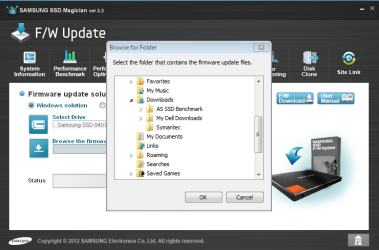
How do I install the latest Samsung SSD firmware update (DXM04B0Q)? The Magician software is supposed to do it, but when I open up the download folder where the firmware update download is located, the Magician software doesn't see it. I've downloaded the firmware in many different locations, but still, the Magician software doesn't see it. Any Ideas? See snips to see firmare update download location and what Magician software sees. The firmware update (DXM04B0Q) is right below the Symantic folder.
Magician download and firmware update download: Support - Solid State Drives MZ-7PD512 | Samsung Memory & Storage
Magician download and firmware update download: Support - Solid State Drives MZ-7PD512 | Samsung Memory & Storage
Attachments

My Computer
- Computer Manufacturer/Model Number
- Dell 17R N7110 Inspiron laptop
- OS
- Windows 7 Ultimate (x64) Service Pack 1 (build 7601)
- CPU
- Intel(R) Core(TM) i5-2450M CPU @ 2.50GHz
- Motherboard
- Dell Inc. 0YH79Y A00
- Memory
- 8 GB
- Graphics Card(s)
- Intel HD Graphics 3000 with up to 1.6GB dynamic video memory
- Sound Card
- SRS Premium Sound - (1) Realtek High Definition Audio
- Monitor(s) Displays
- 17.3" diagonal HD+ TrueLife LED display
- Screen Resolution
- 1600x900 resolution
- Hard Drives
- 1 TB HD #ST1000LM024 HN-M101MBB,
512 GB Samsung 840 Pro SSD
- PSU
- stock
- Case
- stock
- Cooling
- stock
- Keyboard
- stock
- Mouse
- stock
- Internet Speed
- WiFi
- Other Info
- Printer: HP Photosmart C3180


