Formatting of HDD

JackWH

New member
Local time
5:11 PM
Messages
9
Hi guys,

I haven an 80GB HDD running Windows XP at the moment.

Tomorrow I intend to upgrade to Windows 7 64-bit.

I have an external HD for all my data, so the 80GB isn't really a matter to me at the moment.

What I am wondering is about formatting the drive, since I am going from Windows XP 32-bit to Windows 7 64-bit.

Will I have to format the Hard Drive BEFORE I insert the installation DVD, or does the Windows 7 Installer AUTOMATICALLY format my HDD before copying the Win7 files?


Sorry if this has been posted before, I did do a search.

Thank you very much!

~ Jack :)
 

My Computer My Computer

At a glance

Windows 7 x64 Build 7100 RCIntel Pentium E2180 Dual-Core, 2.2GHz4GB DDR2Nvidia GeForce 7900 GT 256MB
Computer Manufacturer/Model Number
Custom build
OS
Windows 7 x64 Build 7100 RC
CPU
Intel Pentium E2180 Dual-Core, 2.2GHz
Motherboard
Gigabyte G31M
Memory
4GB DDR2
Graphics Card(s)
Nvidia GeForce 7900 GT 256MB
Sound Card
Realtek Onboard
Monitor(s) Displays
18" Generic
Screen Resolution
1280x1024
Hard Drives
80GB Western Digital IDE
PSU
ISO (?)
Case
Ei Systems 314
Cooling
Foxconn CPU Fan, 3000RPM; Case Fan
Keyboard
Microsoft Wireless MultiMedia Keyboard 1.1
Mouse
Microsoft Wireless Optical Mouse 2000
Internet Speed
Crappy Belkin wireless dongle.
Other Info
Bought an Ei Systems 314 PC from PC World about 3 years ago. Have upgraded it considerably - new processor, new graphics, new OS, new RAM, and soon a new HDD.
When you first start the setup it will ask you if you want to do an upgrade or a custom install... choose custom install and follow the prompts...
 

My Computer My Computer

At a glance

64-bit Windows 8.1 ProCore(TM) i5 CPU 4330 Haswell @ 3.20GHz12.00 GBIntel(R) HD Graphics
Computer type
PC/Desktop
Computer Manufacturer/Model Number
LENOVO K450 @3.0GHZ
OS
64-bit Windows 8.1 Pro
CPU
Core(TM) i5 CPU 4330 Haswell @ 3.20GHz
Motherboard
LENOVO
Memory
12.00 GB
Graphics Card(s)
Intel(R) HD Graphics
Sound Card
Intel HD integtrated
Monitor(s) Displays
HP 25' ISP Monitor
Screen Resolution
1900/1020
Hard Drives
(1) ST1000DM003-1CH162 (2) Generic STORAGE DEVICE USB Device (3) Generic STORAGE DEVICE USB Device
Internet Speed
100mb down/10mb up
Hi guys,

I haven an 80GB HDD running Windows XP at the moment.

Tomorrow I intend to upgrade to Windows 7 64-bit.

I have an external HD for all my data, so the 80GB isn't really a matter to me at the moment.

What I am wondering is about formatting the drive, since I am going from Windows XP 32-bit to Windows 7 64-bit.

Will I have to format the Hard Drive BEFORE I insert the installation DVD, or does the Windows 7 Installer AUTOMATICALLY format my HDD before copying the Win7 files?


Sorry if this has been posted before, I did do a search.

Thank you very much!

~ Jack :)

Jack

Win 7 will take care of it. One word of adice get your 64bit drivers before you do the install just in case. Might save you some time

Ken
 

My Computer My Computer

At a glance

Win 8 Release candidate 8400[email protected]4 gigsNvidia 9600M
Computer Manufacturer/Model Number
HP Pavillion dv-7 1005 Tx
OS
Win 8 Release candidate 8400
CPU
[email protected]
Memory
4 gigs
Graphics Card(s)
Nvidia 9600M
Sound Card
HD built-in
Monitor(s) Displays
17" Wxga
Screen Resolution
1440x900
Cooling
none
Internet Speed
45Mb down 5Mb up
You can format it before as well, but the setup will also have a format option. Either way, you're safe.
 

My Computer My Computer

At a glance

Windows 8.1 PRO3rd Generation Intel Core i7‐3612QM CPU @ 2.1...8GB DDR3NVIDIA GeForce GT 525M (128 bit), 1GB Grpahics
Computer type
PC/Desktop
Computer Manufacturer/Model Number
DELL VOSTRO 3650
OS
Windows 8.1 PRO
CPU
3rd Generation Intel Core i7‐3612QM CPU @ 2.10GHZ
Memory
8GB DDR3
Graphics Card(s)
NVIDIA GeForce GT 525M (128 bit), 1GB Grpahics
Screen Resolution
1920X1080
Hard Drives
750GB 5400RPM
There is a consideration.

Windows 7 would like to create a 100MB recovery partition - allowing for recovery operations wthout inserting the DVD.

If you delete the existing partition(s), rather than formatting existing one(s), Win 7 will reserve the 100MB partition. Opinion varies if this is a good thing - I say it is. You can create a RAMdisk Options selection on the OS boot menu - like XP's Recovery Console.
 
Hey guys, thank you so much for the prompt reply and helpful help! I have given you all good rep :)

One word of adice get your 64bit drivers before you do the install just in case

I have downloaded all my necessary 64-bit drivers and put them on my USB stick ready for installation once Win7 is up and running. I'm trusting Win7 will recognise my memory stick without any extra drivers? Ta!
 

My Computer My Computer

At a glance

Windows 7 x64 Build 7100 RCIntel Pentium E2180 Dual-Core, 2.2GHz4GB DDR2Nvidia GeForce 7900 GT 256MB
Computer Manufacturer/Model Number
Custom build
OS
Windows 7 x64 Build 7100 RC
CPU
Intel Pentium E2180 Dual-Core, 2.2GHz
Motherboard
Gigabyte G31M
Memory
4GB DDR2
Graphics Card(s)
Nvidia GeForce 7900 GT 256MB
Sound Card
Realtek Onboard
Monitor(s) Displays
18" Generic
Screen Resolution
1280x1024
Hard Drives
80GB Western Digital IDE
PSU
ISO (?)
Case
Ei Systems 314
Cooling
Foxconn CPU Fan, 3000RPM; Case Fan
Keyboard
Microsoft Wireless MultiMedia Keyboard 1.1
Mouse
Microsoft Wireless Optical Mouse 2000
Internet Speed
Crappy Belkin wireless dongle.
Other Info
Bought an Ei Systems 314 PC from PC World about 3 years ago. Have upgraded it considerably - new processor, new graphics, new OS, new RAM, and soon a new HDD.
There is a consideration.

Windows 7 would like to create a 100MB recovery partition - allowing for recovery operations wthout inserting the DVD.

If you delete the existing partition(s), rather than formatting existing one(s), Win 7 will reserve the 100MB partition. Opinion varies if this is a good thing - I say it is. You can create a RAMdisk Options selection on the OS boot menu - like XP's Recovery Console.
Antman,
Any chance of posting exactly which files and folders (w/contents) are on that 100MB partition? (I ain't got one)
With visible 'hidden/system' files, etc...
Sounds like \boot\* from DVD.

Create a RAMdisk ? XP Recovery ?
Am I missing something from W7 and XP?

Thanks!
 

My Computer My Computer

At a glance

XP_Pro, W7_7201, W7RC.vhd, SciLinux5.3, Fedor...AMD 64x21 gigDunno
Computer Manufacturer/Model Number
Gateway GT5056
OS
XP_Pro, W7_7201, W7RC.vhd, SciLinux5.3, Fedora12, Fedora9_2x, OpenSolaris_09-06
CPU
AMD 64x2
Motherboard
Yes
Memory
1 gig
Graphics Card(s)
Dunno
Sound Card
Realtek something
Monitor(s) Displays
Samsung SyncMaster 940MW w/TV
Screen Resolution
1280x1024
Hard Drives
250 GB WD, USB Seagate Freedesk 1.5 T
Internet Speed
Cable modem
Other Info
1 + 1 = 10b,
7 + 7 = 16o,
a + b = 15h.
Antman,
Any chance of posting exactly which files and folders (w/contents) are on that 100MB partition? (I ain't got one)
With visible 'hidden/system' files, etc...
Sounds like \boot\* from DVD.

Create a RAMdisk ? XP Recovery ?
Am I missing something from W7 and XP?

Thanks!
I don't have the recovery partition on this (current) install, so I cannot list the contents, but they are available via Google.

My PC is dual boot. The XP install has the Recovery Console installed. By playing with BCedit, EasyBCD et al, you can get the Win7 equivelant of Recovery Console to appear in the Boot Menu. Win7 calls it RAMdisk Options (or something very close to that). It is my belief that the recovery process will create an X drive, just like the install process does. I am aiting patiently for a generic or MS release of a Win7 compatible ramdisk.sys-type app. RAMdisk Options is not visible to me within VistaBoot Pro - my current BCDeditor. EasyBCD zapped my XP install once - but I got it back.

Oddly, I have the RAMdisk O0tion on my boot menu with the recovery partition installed. Therefore, Win7 must still be able to create a RAM drive from either C:\Windows or the DVD.

It seems to me.
 
I don't have the 100mb partition , and don't get an option in the visible boot menu for Ramdisk.

He's there allright - just hiding.

If you check out bcdedit - you can find him - there is an entry that should trigger the recovery options by autofailover.

D:\Windows\system32>bcdedit /enum all /v


<SNIP>

Windows Boot Loader
-------------------
identifier {587e9dad-8402-11de-b60c-9ed3ec668626}
device ramdisk=[D:]\Recovery\9bd6ff3c-4cfe-11de-aa8d-ab30a7c73d
2e\Winre.wim,{587e9dae-8402-11de-b60c-9ed3ec668626}
path \windows\system32\winload.exe
description Windows Recovery Environment (recovered)
locale
osdevice ramdisk=[D:]\Recovery\9bd6ff3c-4cfe-11de-aa8d-ab30a7c73d
2e\Winre.wim,{587e9dae-8402-11de-b60c-9ed3ec668626}
systemroot \windows
winpe Yes
custom:46000010 Yes


<SNIP>


Device options
--------------
identifier {587e9dae-8402-11de-b60c-9ed3ec668626}
ramdisksdidevice partition=D:
ramdisksdipath \Recovery\9bd6ff3c-4cfe-11de-aa8d-ab30a7c73d2e\boot.sdi

D:\Windows\system32>


The difficulty with that is it will only work if bootmgr is working - any problems earlier in the chain and WinRe won't start up.

That's why there is also an option to run off a recovery cd.

The recovery cd is created from the Recovery folder referred to above.

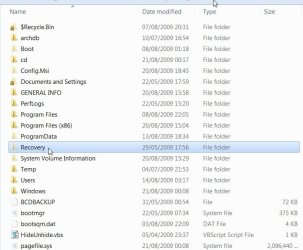
It is a hidden folder on the root of the drive pretending to be empty.

RECOVERY-1A-2009-08-21_015342.jpg

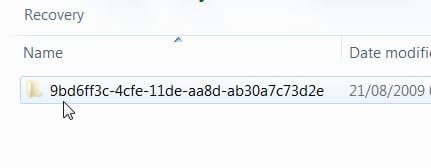
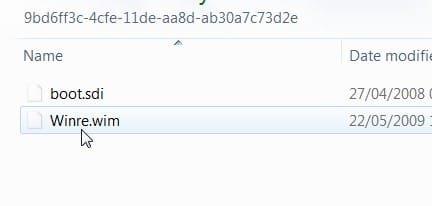
If you copy and paste it somewhere else - you will be able to access the copy ( easier if you remove the H and S attributes from the copy)

RECOVERY-2-2009-08-21_011209.jpg

RECOVERY-3-2009-08-21_011258.jpg

If you like, you can copy that e.g. to the root of the drive of another machine running Vista ( 7 WinRe works perfectly on Vista - needs to be the same bit version of course).

Then create a boot menu entry for it on your Vista machine.

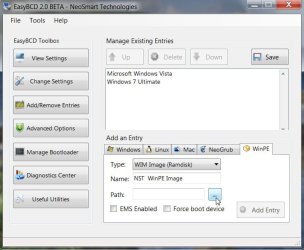
You could do it manually, or use Easybcd ( It will ask for an install dvd as it thinks you only have WinRe and wants to copy boot.sdi off the dvd).

RECOVERY - EASYBCD-2009-08-21_014017.jpg

Browse to WinRe.wim that you copied onto the drive ( I copied the Recovery folder with WinRe inside) - put the dvd in when it asks and add the entry.
 
Last edited:

My Computers My Computers

  • At a glance

    7 X64i5 84002x8gb 3200mhz
    Computer type
    PC/Desktop
    OS
    7 X64
    CPU
    i5 8400
    Motherboard
    gigabyte b365m ds3h
    Memory
    2x8gb 3200mhz
    Hard Drives
    various
    PSU
    pure power 11 400w cm
    Case
    Coolermaster
    Cooling
    cryorig m9i
  • At a glance

    7x64g54008gb ddr4 2400
    Computer type
    PC/Desktop
    OS
    7x64
    CPU
    g5400
    Motherboard
    ga b365m ds3h
    Memory
    8gb ddr4 2400
    PSU
    xfx pro 450w
For a "clean install" make sure you select the Drive Options link first to format the HDD. I missed this the first time around and ended up getting a Windows.old folder added to my system because of a previous install. Last night when I installed x64, I noticed the link and selected it and seen I could format the HDD.

6142d1237475886-win-7-will-not-install-partition-0-drive-options-advanced-2009-03-19_151649.jpg
 

My Computer My Computer

At a glance

Windows 7 RTM x64Q9300 - overclocked to 3.10ghzPNY 8GB DDR2 800Palit Sonic GTX 460 x2 SLI
OS
Windows 7 RTM x64
CPU
Q9300 - overclocked to 3.10ghz
Motherboard
XFX 750i SLI
Memory
PNY 8GB DDR2 800
Graphics Card(s)
Palit Sonic GTX 460 x2 SLI
Sound Card
mainboard
Monitor(s) Displays
Optoma GT720 projector
Screen Resolution
1280 x 720 (for 3D)
Hard Drives
WD Caviar Green 640 GB, 16 MB Cache, SATA 3 Gb/s
PSU
XFX Black Edition 750w
Case
NMedia 2000B
Cooling
EVERCOOL HPH-9525CU 95mm Ever Lubricate CPU Cooler
Keyboard
Microsoft wireless
Mouse
Microsoft wireless
Internet Speed
Comcast hi-speed
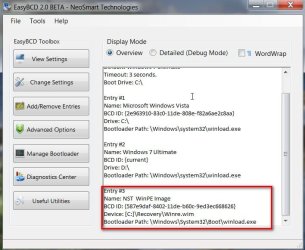
Here is the boot menu option for Ramdisk that was added by Easybcd:

EASYBCD WINRE ADDED2009-08-22_074759.jpg

Boots up perfectly.
 
Last edited:

My Computers My Computers

  • At a glance

    7 X64i5 84002x8gb 3200mhz
    Computer type
    PC/Desktop
    OS
    7 X64
    CPU
    i5 8400
    Motherboard
    gigabyte b365m ds3h
    Memory
    2x8gb 3200mhz
    Hard Drives
    various
    PSU
    pure power 11 400w cm
    Case
    Coolermaster
    Cooling
    cryorig m9i
  • At a glance

    7x64g54008gb ddr4 2400
    Computer type
    PC/Desktop
    OS
    7x64
    CPU
    g5400
    Motherboard
    ga b365m ds3h
    Memory
    8gb ddr4 2400
    PSU
    xfx pro 450w
Here is the boot menu option for Ramdisk that was added by Easybcd:

View attachment 24678

Boots up perfectly.
If Easybcd put it there, then BCDEdit should also...

What do you 'see' when you boot this option ?

A W7 window with selectable Recovery options? <-- AutoExpansion: I typed 'w.7 window', no dot
An Admin command prompt with 'Help' ?

I had seen the word 'ramdisk' using the 'all/verbose' options, but the word was also strewn
amongst the multiple .vhd entries I have in there.
So I just ignored it, since all the .vhds worked OK from BootMgr menu.

This seems like pretty useful stuff if we're eliminating the DVD boot.
What does the 'NST' mean? (NST WinPE)
 

My Computer My Computer

At a glance

XP_Pro, W7_7201, W7RC.vhd, SciLinux5.3, Fedor...AMD 64x21 gigDunno
Computer Manufacturer/Model Number
Gateway GT5056
OS
XP_Pro, W7_7201, W7RC.vhd, SciLinux5.3, Fedora12, Fedora9_2x, OpenSolaris_09-06
CPU
AMD 64x2
Motherboard
Yes
Memory
1 gig
Graphics Card(s)
Dunno
Sound Card
Realtek something
Monitor(s) Displays
Samsung SyncMaster 940MW w/TV
Screen Resolution
1280x1024
Hard Drives
250 GB WD, USB Seagate Freedesk 1.5 T
Internet Speed
Cable modem
Other Info
1 + 1 = 10b,
7 + 7 = 16o,
a + b = 15h.
Antman,
Any chance of posting exactly which files and folders (w/contents) are on that 100MB partition? (I ain't got one)
With visible 'hidden/system' files, etc...
Sounds like \boot\* from DVD.

Create a RAMdisk ? XP Recovery ?
Am I missing something from W7 and XP?

Thanks!

I posted screenshots of what is in the 100 MB partition here:
http://www.sevenforums.com/226923-post14.html
 

My Computer My Computer

At a glance

Windows 10 Pro (x64)Intel Core i7-3930K (3.2GHz - 4.5GHz)4x Samsung 4GB PC3-12800 DDR3 (16GB 1600MHz)Nvidia Geforce GTX 690
Computer type
PC/Desktop
Computer Manufacturer/Model Number
Alienware Aurora ALX R4
OS
Windows 10 Pro (x64)
CPU
Intel Core i7-3930K (3.2GHz - 4.5GHz)
Motherboard
Alienware Aurora-R4 x79
Memory
4x Samsung 4GB PC3-12800 DDR3 (16GB 1600MHz)
Graphics Card(s)
Nvidia Geforce GTX 690
Sound Card
SteelSeries Siberia Elite
Monitor(s) Displays
Dell UltraSharp U3011
Screen Resolution
2560x1600
Hard Drives
Samsung 850 Pro 256 GB, Seagate 1TB Desktop Hybrid HDD, 2x Western Digital 4TB Green HDD
PSU
875W Some Dell PSU <.<
Case
Alienware Aurora ALX
Cooling
Custom Liquid Cooling (EK CPU & GPU blocks) dual EK 480RAD
Keyboard
Logitech G710+ Mechanical
Mouse
Logitech G700s
Internet Speed
Verizon Fios (50 mbps average)
Other Info
Server: Intel NUC D54250WYK: i5-4250U, 16GB, 256 GB mSATA, Windows Server 2012 R2
Hi Chuckr,

I used Easybcd to add all the entries for WinRe to bcd, because I copied it to a different partition (and as a reminder of how Easybcd does it)

NST is for NeoSmartTechnologies - the makers of Easybcd.

When you boot WinRe from the HD, you see the same as when you boot System recovery options on the dvd.

As you already have the entries for WinRe on your 7 installation - you do not need to do that.

If you simply want to add the option to boot WinRe directly from the boot menu - use /displayorder command to add it to the boot menu , like this:

bcdedit /displayorder id{...} [ /addfirst | /addlast].

To find the {identifier}:

D:\Windows\system32>bcdedit /enum all /v


<SNIP>

Windows Boot Loader
-------------------
identifier {587e9dad-8402-11de-b60c-9ed3ec668626}
device ramdisk=[D:]\Recovery\9bd6ff3c-4cfe-11de-aa8d-ab30a7c73d
2e\Winre.wim,{587e9dae-8402-11de-b60c-9ed3ec668626}


To add it to boot menu:


D:\Windows\system32>bcdedit /displayorder {587e9dad-8402-11de-b60c-9ed3ec668626} /addfirst

The operation completed successfully.


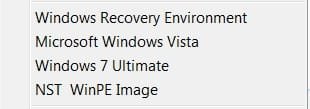
The Boot Menu selection now looks like this:

bootmenu-ramdisks2009-08-23_225251.jpg
 
Last edited:

My Computers My Computers

  • At a glance

    7 X64i5 84002x8gb 3200mhz
    Computer type
    PC/Desktop
    OS
    7 X64
    CPU
    i5 8400
    Motherboard
    gigabyte b365m ds3h
    Memory
    2x8gb 3200mhz
    Hard Drives
    various
    PSU
    pure power 11 400w cm
    Case
    Coolermaster
    Cooling
    cryorig m9i
  • At a glance

    7x64g54008gb ddr4 2400
    Computer type
    PC/Desktop
    OS
    7x64
    CPU
    g5400
    Motherboard
    ga b365m ds3h
    Memory
    8gb ddr4 2400
    PSU
    xfx pro 450w
I posted screenshots of what is in the 100 MB partition here:
http://www.sevenforums.com/226923-post14.html
Thanks, logicearth, but I think you're missing one more 'important' picture:

That one being: System Reserved (B:), contents of folder \boot\

This seems to be the 'meat' of that 100 MB special.
I still feel its the same as DVD:\boot\, where all the 'good stuff' is...

Thanks,
Chuck
 

My Computer My Computer

At a glance

XP_Pro, W7_7201, W7RC.vhd, SciLinux5.3, Fedor...AMD 64x21 gigDunno
Computer Manufacturer/Model Number
Gateway GT5056
OS
XP_Pro, W7_7201, W7RC.vhd, SciLinux5.3, Fedora12, Fedora9_2x, OpenSolaris_09-06
CPU
AMD 64x2
Motherboard
Yes
Memory
1 gig
Graphics Card(s)
Dunno
Sound Card
Realtek something
Monitor(s) Displays
Samsung SyncMaster 940MW w/TV
Screen Resolution
1280x1024
Hard Drives
250 GB WD, USB Seagate Freedesk 1.5 T
Internet Speed
Cable modem
Other Info
1 + 1 = 10b,
7 + 7 = 16o,
a + b = 15h.
...That one being: System Reserved (B:), contents of folder \boot\

This seems to be the 'meat' of that 100 MB special.
I still feel its the same as DVD:\boot\, where all the 'good stuff' is...
+1.
 
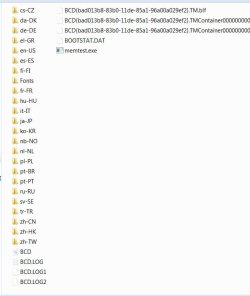
I suspect it is the more like the one on the root of the drive (if you don't have 100mb system partition):

BOOTFOLDERONROOT2009-08-24_022843.jpg

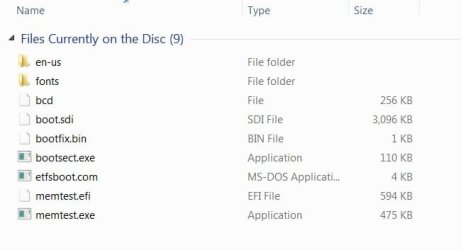
Boot folder on dvd :

BOOTFOLDERON 7DVD2009-08-24_022626.jpg
 

My Computers My Computers

  • At a glance

    7 X64i5 84002x8gb 3200mhz
    Computer type
    PC/Desktop
    OS
    7 X64
    CPU
    i5 8400
    Motherboard
    gigabyte b365m ds3h
    Memory
    2x8gb 3200mhz
    Hard Drives
    various
    PSU
    pure power 11 400w cm
    Case
    Coolermaster
    Cooling
    cryorig m9i
  • At a glance

    7x64g54008gb ddr4 2400
    Computer type
    PC/Desktop
    OS
    7x64
    CPU
    g5400
    Motherboard
    ga b365m ds3h
    Memory
    8gb ddr4 2400
    PSU
    xfx pro 450w
I suspect it is the more like the one on the root of the drive (if you don't have 100mb system partition):

View attachment 25129

Boot folder on dvd :

View attachment 25130
Wow,

The more information I get, the more confusered i yam...

Now that I'm booted with w7, I was going to go thru it all tonight and set up the HDD_boot Recovery w/ menu select. (may still do that after sorting things out).

Firstly, siw2, I want to say "Thank you" for your clear and excellent technical posts!

Next, the discrepancies I see (and have to sort out) are probably attributed to two factors:
1. I have 32-bit. I believe yours is 64.
2. I run 'build 7201' and can check 7100RC in .vhd if nec. I'm sure yours is 7600 RTM.

For example, my DVD:\boot has 8 files, memtest.efi missing (64?)

Ahh, found it: its my "SystemDriveC:"\boot that has those language stuff folders.

Guess we'll have to wait for someone to post the System Reserved (B:), contents of folder \boot\ to actually see the 100 MB version...
Googled words are: 'backup', 'bitlocker', etc. With hacks to delete it... :)

PS:
Is the 'label' of "NST WinPE Image" correct?
Seems "NST WinRE Image" should be there IMHO. (This ain't your father's Vista.)
 

My Computer My Computer

At a glance

XP_Pro, W7_7201, W7RC.vhd, SciLinux5.3, Fedor...AMD 64x21 gigDunno
Computer Manufacturer/Model Number
Gateway GT5056
OS
XP_Pro, W7_7201, W7RC.vhd, SciLinux5.3, Fedora12, Fedora9_2x, OpenSolaris_09-06
CPU
AMD 64x2
Motherboard
Yes
Memory
1 gig
Graphics Card(s)
Dunno
Sound Card
Realtek something
Monitor(s) Displays
Samsung SyncMaster 940MW w/TV
Screen Resolution
1280x1024
Hard Drives
250 GB WD, USB Seagate Freedesk 1.5 T
Internet Speed
Cable modem
Other Info
1 + 1 = 10b,
7 + 7 = 16o,
a + b = 15h.
As you already have the entries for WinRe on your 7 installation - you do not need to do that:

Windows Boot Loader
-------------------
identifier {587e9dad-8402-11de-b60c-9ed3ec668626}
device ramdisk=[D:]\Recovery\9bd6ff3c-4cfe-11de-aa8d-ab30a7c73d
2e\Winre.wim,{587e9dae-8402-11de-b60c-9ed3ec668626}


To add it to boot menu:

D:\Windows\system32> bcdedit /displayorder {587e9dad-8402-11de-b60c-9ed3ec668626} /addfirst
Yup,

A real "piece of pie"!! Sweet! Nice!

Got it now, 'RAMdisk options" on the BootMgr menu.
Goes to "Install USA K/B", mandatory Admin password (like XP),
and eventually to 'Recovery options', like the DVD turtle does:
1.) Fix boot problems, 2.) Recover Win7 image, ...., DOS-box, etc.

Seems like the only option that my install is missing, for real Recovery of everything, is the "MS DaRT" (Diagnostics and Recovery Toolset), also sometimes called "MS Winternals ERD-2007".
Must be on a .vhd somewhere...
Thanks again, siw2.

Now, to wait for the SystemReserved_B:\boot\ contents... :D
 
Last edited:

My Computer My Computer

At a glance

XP_Pro, W7_7201, W7RC.vhd, SciLinux5.3, Fedor...AMD 64x21 gigDunno
Computer Manufacturer/Model Number
Gateway GT5056
OS
XP_Pro, W7_7201, W7RC.vhd, SciLinux5.3, Fedora12, Fedora9_2x, OpenSolaris_09-06
CPU
AMD 64x2
Motherboard
Yes
Memory
1 gig
Graphics Card(s)
Dunno
Sound Card
Realtek something
Monitor(s) Displays
Samsung SyncMaster 940MW w/TV
Screen Resolution
1280x1024
Hard Drives
250 GB WD, USB Seagate Freedesk 1.5 T
Internet Speed
Cable modem
Other Info
1 + 1 = 10b,
7 + 7 = 16o,
a + b = 15h.
Now, to wait for the SystemReserved_B:\boot\ contents... :D
If you don't have the System Reserve drive, just look in C:\boot. Its exactly the same. Installations with the reserved partition do not have boot in the C: drive, because...you can figure that out. :P
 

My Computer My Computer

At a glance

Windows 10 Pro (x64)Intel Core i7-3930K (3.2GHz - 4.5GHz)4x Samsung 4GB PC3-12800 DDR3 (16GB 1600MHz)Nvidia Geforce GTX 690
Computer type
PC/Desktop
Computer Manufacturer/Model Number
Alienware Aurora ALX R4
OS
Windows 10 Pro (x64)
CPU
Intel Core i7-3930K (3.2GHz - 4.5GHz)
Motherboard
Alienware Aurora-R4 x79
Memory
4x Samsung 4GB PC3-12800 DDR3 (16GB 1600MHz)
Graphics Card(s)
Nvidia Geforce GTX 690
Sound Card
SteelSeries Siberia Elite
Monitor(s) Displays
Dell UltraSharp U3011
Screen Resolution
2560x1600
Hard Drives
Samsung 850 Pro 256 GB, Seagate 1TB Desktop Hybrid HDD, 2x Western Digital 4TB Green HDD
PSU
875W Some Dell PSU <.<
Case
Alienware Aurora ALX
Cooling
Custom Liquid Cooling (EK CPU & GPU blocks) dual EK 480RAD
Keyboard
Logitech G710+ Mechanical
Mouse
Logitech G700s
Internet Speed
Verizon Fios (50 mbps average)
Other Info
Server: Intel NUC D54250WYK: i5-4250U, 16GB, 256 GB mSATA, Windows Server 2012 R2
Back
Top