Solved Wired and Wireless Network Problems

princesslisa

New member
Local time
12:24 PM
Messages
8
Location
California
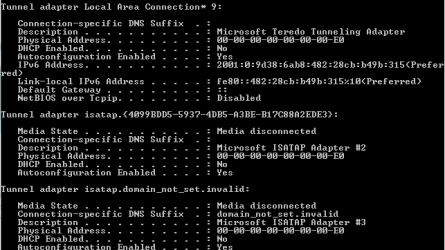
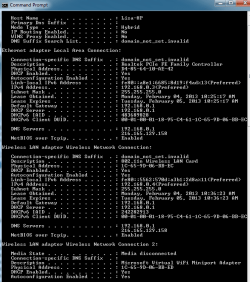
Windows 7 Home Premium 64 bit. Kaspersky Internet Security 2013. Actiontec GT742WG. I lost internet connection a couple of weeks ago so powercycled my modem. Since then I've had nothing but network problems. The above computer is ethernet wired to my modem and I have a wireless network for a couple of other computers and 2 Droid phones. I haven't been on the other 2 computers for some time and haven't changed any settings etc. They do have a wireless connection though that I recently checked. I keep getting an unidentified public network intermittently so I use the windows troubleshooter to check for problems and fix them. I have some screenshots attached. Can someone please help me. Thank you...
 

Attachments
  • CMD 1.png
    CMD 1.png
    18.3 KB · Views: 27
  • CMD 2.png
    CMD 2.png
    6.3 KB · Views: 24
  • Device Manager Shot.png
    Device Manager Shot.png
    4.2 KB · Views: 261

My Computer

Computer Manufacturer/Model Number
HP Pavilion Slimline s5660f
OS
Windows 7 Home Premium x 64
CPU
AMD Phenom(tm) IIx4
Motherboard
H-ALVORIX_HF-RS880-uATX by Foxconn
Memory
8GB
Graphics Card(s)
ATI Radeon HD 5450 •512 MB VDDR3 memory
Sound Card
High Definition 8-channel audio •ALC 888S-VD chipset
Monitor(s) Displays
LG M2762D-PM 27" monitor/tv
Hard Drives
•1 TB SATA 3G (3.0 Gb/sec) •7200 rpm
Ok, I've seen this before with the DNS showing a valid DNS IP but also a default gateway of 192.168.0.1 which usually indicates there is another router or a modem/router and then your access point.

Can you confirm if this is true or not?

If there is only one router then you need to define 2 DNS IP addresses in your routers set up page, as it appears now you seem to have one DNS server typed into your IPv4 properties?
 

My Computer

Computer type
PC/Desktop
Computer Manufacturer/Model Number
Home built
OS
Windows 7 Ult, Windows 8.1 Pro,
CPU
Q9650-4.275GHz, E8600 4.5GHz, E6750-3.8GHz
Motherboard
Evga 780i FTW
Memory
G.Skill PC2 9600 1200Mhz 5 5 5 15 2T
Graphics Card(s)
GTX480
Sound Card
Asus Xonar D2
Monitor(s) Displays
HannsG
Screen Resolution
1680X1050
Hard Drives
GSkill Phoenix Pro 120GB SSD
PSU
ThermalTake Toughpower 1000Watt modular
Case
ThermalTake XaserV
Cooling
Xigmatek S1283
Keyboard
Logitech G15
Mouse
Logitech G9
Internet Speed
T1
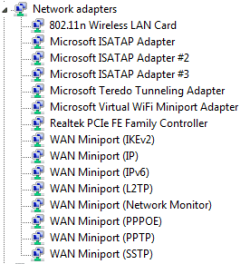
I have one modem, actiontek GT724WG which is hardwired to my HP computer. My HP computer has a wireless LAN card 802.11n which is shown in above device manager pic. I also have a wireless network which I connect another desktop, a laptop, my Dish DVR and 2 Droids connected to.

I'll attach network and sharing map that shows a switch which confuses me also. Do I enter the preferred and alternate DNS address in the LAN advanced porperties and/or the wireless connection advanced properties?

Sorry for the delay. I had a shocking medical appt and just now came back on to see if anyone answered me...Thank you...xx
 

Attachments

  • Network Map.png
    Network Map.png
    21.8 KB · Views: 14

My Computer

Computer Manufacturer/Model Number
HP Pavilion Slimline s5660f
OS
Windows 7 Home Premium x 64
CPU
AMD Phenom(tm) IIx4
Motherboard
H-ALVORIX_HF-RS880-uATX by Foxconn
Memory
8GB
Graphics Card(s)
ATI Radeon HD 5450 •512 MB VDDR3 memory
Sound Card
High Definition 8-channel audio •ALC 888S-VD chipset
Monitor(s) Displays
LG M2762D-PM 27" monitor/tv
Hard Drives
•1 TB SATA 3G (3.0 Gb/sec) •7200 rpm
Another thing that's odd in my modem page I see that one of our Droid phones is showing up as an ethernet connected device. Neither my husband or I have our phone setup for a mobile hotspot. I'm wondering if motocast hadn't created this mess but I no longer have it installed on my computer. I used Revo Uninstaller which also shows left behind folders etc. so I deleted all of the leftovers too.
 

My Computer

Computer Manufacturer/Model Number
HP Pavilion Slimline s5660f
OS
Windows 7 Home Premium x 64
CPU
AMD Phenom(tm) IIx4
Motherboard
H-ALVORIX_HF-RS880-uATX by Foxconn
Memory
8GB
Graphics Card(s)
ATI Radeon HD 5450 •512 MB VDDR3 memory
Sound Card
High Definition 8-channel audio •ALC 888S-VD chipset
Monitor(s) Displays
LG M2762D-PM 27" monitor/tv
Hard Drives
•1 TB SATA 3G (3.0 Gb/sec) •7200 rpm
I have one modem, actiontek GT724WG which is hardwired to my HP computer. My HP computer has a wireless LAN card 802.11n which is shown in above device manager pic. I also have a wireless network which I connect another desktop, a laptop, my Dish DVR and 2 Droids connected to.

I'll attach network and sharing map that shows a switch which confuses me also. Do I enter the preferred and alternate DNS address in the LAN advanced porperties and/or the wireless connection advanced properties?

Sorry for the delay. I had a shocking medical appt and just now came back on to see if anyone answered me...Thank you...xx

The only real problem I see here besides Kaspersky, is that you have a modem then a PC, then somewhere along the line there is a wireless A/P which isn't really conventional network. Or maybe I read that incorrectly?

It also appears that you have both wireless and wired connections working at the same time?

It may help if you only enable one connection at a time.

You would normally have the modem plugged into the internet or WAN port of the router then connect your machines to the router from there.
 

My Computer

Computer type
PC/Desktop
Computer Manufacturer/Model Number
Home built
OS
Windows 7 Ult, Windows 8.1 Pro,
CPU
Q9650-4.275GHz, E8600 4.5GHz, E6750-3.8GHz
Motherboard
Evga 780i FTW
Memory
G.Skill PC2 9600 1200Mhz 5 5 5 15 2T
Graphics Card(s)
GTX480
Sound Card
Asus Xonar D2
Monitor(s) Displays
HannsG
Screen Resolution
1680X1050
Hard Drives
GSkill Phoenix Pro 120GB SSD
PSU
ThermalTake Toughpower 1000Watt modular
Case
ThermalTake XaserV
Cooling
Xigmatek S1283
Keyboard
Logitech G15
Mouse
Logitech G9
Internet Speed
T1
I agree with you Chev. When I had powercycled the modem weeks back (in my 1st post) that's when the trouble started. I used to have the ethernet connection symbol in my taskbar which, changed to the wireless icon. That's when I discovered the above network.

I am a bit confused on the LAN and the wireless connection on the network both on my PC. I was told that I have to have the LAN connection for the PC that is plugged into the modem which is the Lisa-HP. I don't have a router connected to the modem.

I am trying to seek help on how to sort this all out. I don't even know how the AP was created and configured. Was hoping for steps to help me fix this mess...Thank you Chev. Hope that clears up any confusion that I may have created.
 

My Computer

Computer Manufacturer/Model Number
HP Pavilion Slimline s5660f
OS
Windows 7 Home Premium x 64
CPU
AMD Phenom(tm) IIx4
Motherboard
H-ALVORIX_HF-RS880-uATX by Foxconn
Memory
8GB
Graphics Card(s)
ATI Radeon HD 5450 •512 MB VDDR3 memory
Sound Card
High Definition 8-channel audio •ALC 888S-VD chipset
Monitor(s) Displays
LG M2762D-PM 27" monitor/tv
Hard Drives
•1 TB SATA 3G (3.0 Gb/sec) •7200 rpm
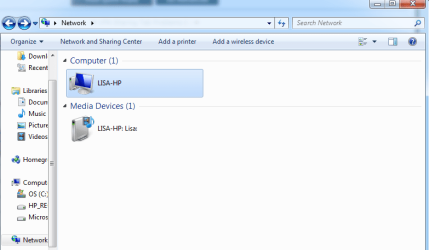
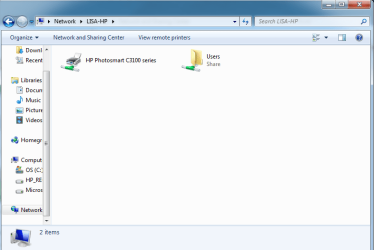
I believe the second Lisa-HP down in the network map is my HP printer...1st screenshot to illustrate where I opened up Network and sharing and double clicked on the house symbol TKHM9 in between the Lisa HP (This computer) and Internet (globe). 2nd screenshot is of network with 2 items. 3rd screenshot is result of double clicking Computer (1) LISA-HP is my HP printer and when I double click Media Devices (1) Lisa-HP: Lisa: it opens up Windows Media Player 4th.

I hope I haven't confused you even more...:/
 

Attachments

  • Network and Sharing to show house symbol.png
    Network and Sharing to show house symbol.png
    36.6 KB · Views: 7
  • House Icon in Network and Sharing.png
    House Icon in Network and Sharing.png
    21 KB · Views: 7
  • Printer.png
    Printer.png
    22.9 KB · Views: 6

My Computer

Computer Manufacturer/Model Number
HP Pavilion Slimline s5660f
OS
Windows 7 Home Premium x 64
CPU
AMD Phenom(tm) IIx4
Motherboard
H-ALVORIX_HF-RS880-uATX by Foxconn
Memory
8GB
Graphics Card(s)
ATI Radeon HD 5450 •512 MB VDDR3 memory
Sound Card
High Definition 8-channel audio •ALC 888S-VD chipset
Monitor(s) Displays
LG M2762D-PM 27" monitor/tv
Hard Drives
•1 TB SATA 3G (3.0 Gb/sec) •7200 rpm
Well the first thing is that your Actiontec GT724WG is not just a modem, it's a modem/router gateway combo unit. Routers can handle multiple connection where a modem can't.

You need to go into the set up page for this router and set up the wireless connection properties, the reset removed the settings so it has to be set up again. The Quick start guide in the link below shows you how to do this.

While you are there you will need to type in 2 valid DNS servers at the Ethernet connection set up page, Google's DNS is a good place to start 8.8.8.8 and 8.8.4.4

http://www.actiontec.com/products/product.php?pid=39#.URPYIffTnRY

You should be able to get there by typing 192.168.0.1 into the URL of your browser, this is standard procedure for setting up a wireless router.

I'm not sure why you are showing dual connections, but the Ethernet connection should override the wireless when they are both connected. Let me know how the set up goes and if it helps fix this problem. :)
 
Last edited:

My Computer

Computer type
PC/Desktop
Computer Manufacturer/Model Number
Home built
OS
Windows 7 Ult, Windows 8.1 Pro,
CPU
Q9650-4.275GHz, E8600 4.5GHz, E6750-3.8GHz
Motherboard
Evga 780i FTW
Memory
G.Skill PC2 9600 1200Mhz 5 5 5 15 2T
Graphics Card(s)
GTX480
Sound Card
Asus Xonar D2
Monitor(s) Displays
HannsG
Screen Resolution
1680X1050
Hard Drives
GSkill Phoenix Pro 120GB SSD
PSU
ThermalTake Toughpower 1000Watt modular
Case
ThermalTake XaserV
Cooling
Xigmatek S1283
Keyboard
Logitech G15
Mouse
Logitech G9
Internet Speed
T1
Thank you Chev...Yes, on the modem/router. Also I tried to use Googles DNS above and my ISP apparently won't allow it. TDS telecom. I read in another forum that another TDS customer was told after some prodding that TDS in fact pushes their DNS.

Kaspersy is a new Anti-Virus for me since it allows up to 8 devices for 1 license...I'd be interested to know your take....

I'll post the outcome later on this eveing but more than in the morning...Thanks again..xx
 

My Computer

Computer Manufacturer/Model Number
HP Pavilion Slimline s5660f
OS
Windows 7 Home Premium x 64
CPU
AMD Phenom(tm) IIx4
Motherboard
H-ALVORIX_HF-RS880-uATX by Foxconn
Memory
8GB
Graphics Card(s)
ATI Radeon HD 5450 •512 MB VDDR3 memory
Sound Card
High Definition 8-channel audio •ALC 888S-VD chipset
Monitor(s) Displays
LG M2762D-PM 27" monitor/tv
Hard Drives
•1 TB SATA 3G (3.0 Gb/sec) •7200 rpm
Ok, so I went into the router itself and started looking around...I notice a very strange 3 digit number in the SNR margin which led me to call my ISP who provide their modem router. They are sending me a new one out since it's 4 years old.

That being said this could also be the OS Windows 7 problem. I see a lot of the same problems in various forums in regards to wireless networks. I'll be deleting all connections before I set up the new modem router.

I want to thank you Chev65 for your help. I was able to learn some things from your responses. :)
 

My Computer

Computer Manufacturer/Model Number
HP Pavilion Slimline s5660f
OS
Windows 7 Home Premium x 64
CPU
AMD Phenom(tm) IIx4
Motherboard
H-ALVORIX_HF-RS880-uATX by Foxconn
Memory
8GB
Graphics Card(s)
ATI Radeon HD 5450 •512 MB VDDR3 memory
Sound Card
High Definition 8-channel audio •ALC 888S-VD chipset
Monitor(s) Displays
LG M2762D-PM 27" monitor/tv
Hard Drives
•1 TB SATA 3G (3.0 Gb/sec) •7200 rpm
Back
Top